battery LEXUS RX450h 2021 Owner's Guide
[x] Cancel search | Manufacturer: LEXUS, Model Year: 2021, Model line: RX450h, Model: LEXUS RX450h 2021Pages: 528, PDF Size: 10.73 MB
Page 191 of 528
1914-2. Driving procedures
4
Driving
*1: To improve fuel efficiency and reduce noise, shift the shift lever to D for normal
driving.
*2: By selecting shift ra nges using S mode,
you can control accelerating force and
engine braking force.
■When driving with dynamic radar cruise
control with full-speed range activated
Even when performing the following
actions with the intent of enabling engine
braking, engine braking will not occur
because dynamic radar cruise control with
full-speed range will not be canceled.
●While driving in D or S mode, downshift-
ing to 5 or 4. ( P.238)
●When switching the driving mode to
sport mode while driving in the D position
( P.281)
■Restraining sudden start (Drive-Start
Control)
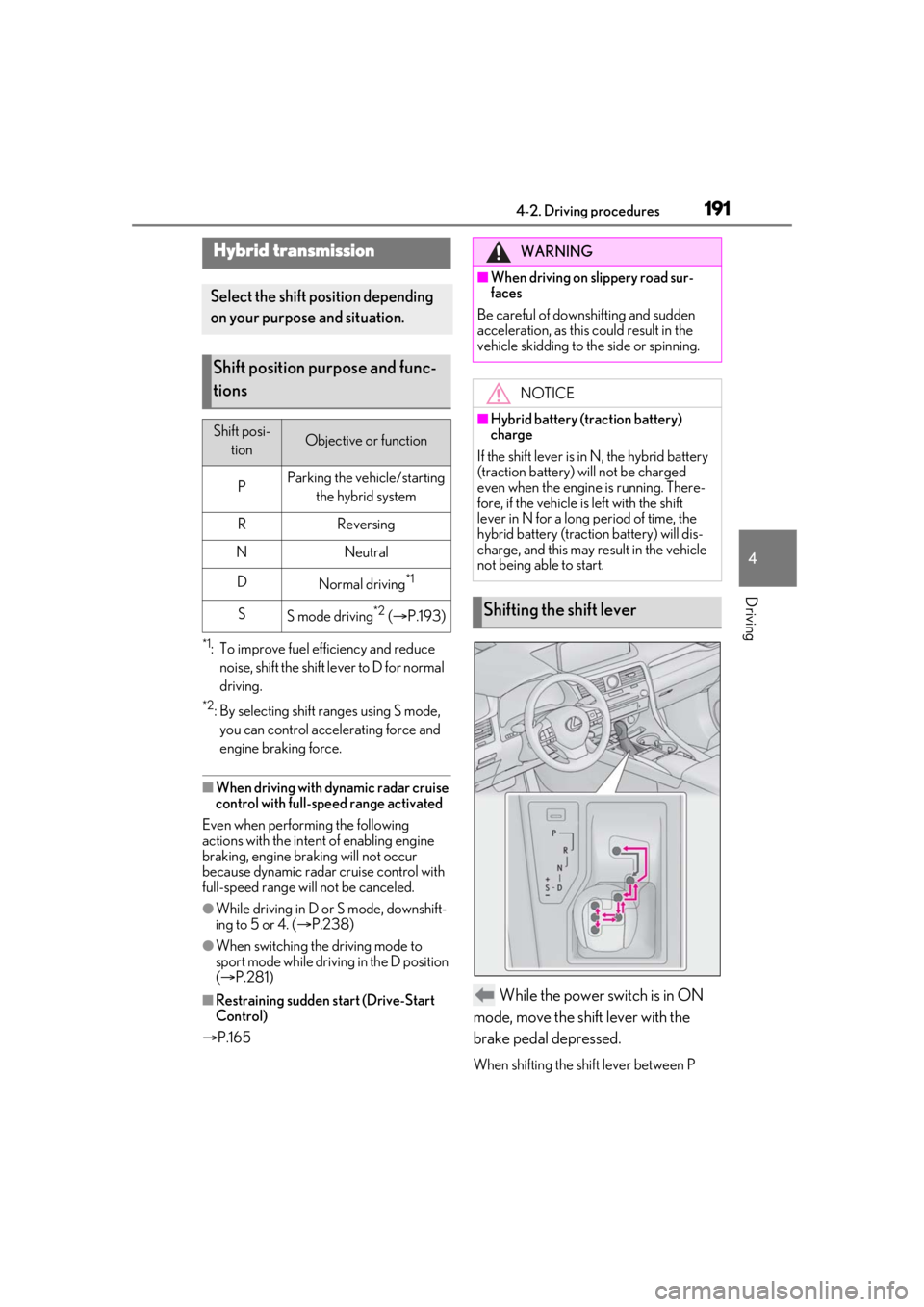
P.165 While the power switch is in ON
mode, move the shift lever with the
brake pedal depressed.
When shifting the shift lever between P
Hybrid transmission
Select the shift position depending
on your purpose and situation.
Shift position purpose and func-
tions
Shift posi- tionObjective or function
PParking the vehicle/starting the hybrid system
RReversing
NNeutral
DNormal driving*1
SS mode driving*2 ( P.193)
WARNING
■When driving on slippery road sur-
faces
Be careful of downsh ifting and sudden
acceleration, as this could result in the
vehicle skidding to the side or spinning.
NOTICE
■Hybrid battery (t raction battery)
charge
If the shift lever is in N, the hybrid battery
(traction battery) will not be charged
even when the engine is running. There-
fore, if the vehicle is left with the shift
lever in N for a long period of time, the
hybrid battery (traction battery) will dis-
charge, and this may re sult in the vehicle
not being able to start.
Shifting the shift lever
Page 201 of 528
2014-3. Operating the lights and wipers
4
Driving
Doing so interferes with the sensor detect-
ing the level of ambient light and may cause
the automatic headlight system to malfunc-
tion.
■Automatic light off system
●When the headlights are on: The head-
lights and tail lights turn off 30 seconds
after the driver’s door is opened and
closed if the power switch is turned to
ACCESSORY mode or turned off. (The
lights turn off immediately if on the
key is pressed after all the doors are
closed.)
●When only the tail lights are on: The tail
lights turn off automatically if the power
switch is turned to ACCESSORY mode
or turned off and the driver’s door is
opened.
■Automatic headlight leveling system (if
equipped)
The level of the headlights is automatically
adjusted according to the number of pas-
sengers and the loading condition of the
vehicle to ensure that the headlights do not
interfere with other road users.
■Light reminder buzzer
A buzzer sounds when the power switch is
turned off or turned to ACCESSORY
mode and the driver’s door is opened while
the lights are turned on.
■Welcome lighting
If the headlight switch is turned to and
the surrounding area is dark, unlocking the
doors using the smart access system with
push-button start or wireless remote con-
trol will turn the parking lights and tail lights
on automatically.
■Windshield wiper linked headlight illu-
mination
When driving during daytime with the
headlight switch turned to , if the wind-
shield wipers are used, the headlights will
turn on automatically after several seconds
to help enhance the visibility of your vehicle.
■12-volt battery-saving function
In order to prevent the 12-volt battery of the vehicle from discharging, if the headlights
and/or tail lights are on when the power
switch is turned off the 12-volt battery sav-
ing function will operate and automatically
turn off all the lights
after approximately 20
minutes. When the power switch is turned
to ON mode, the 12-volt battery-saving
function will be disabled.
When any of the following are performed,
the 12-volt battery-saving function is can-
celed once and then reactivated. All the
lights will turn off automatically 20 minutes
after the 12-volt battery-saving function has
been reactivated:
●When the headlight switch is operated
●When a door is opened or closed
■Customization
Some functions can be customized.
( P.480)
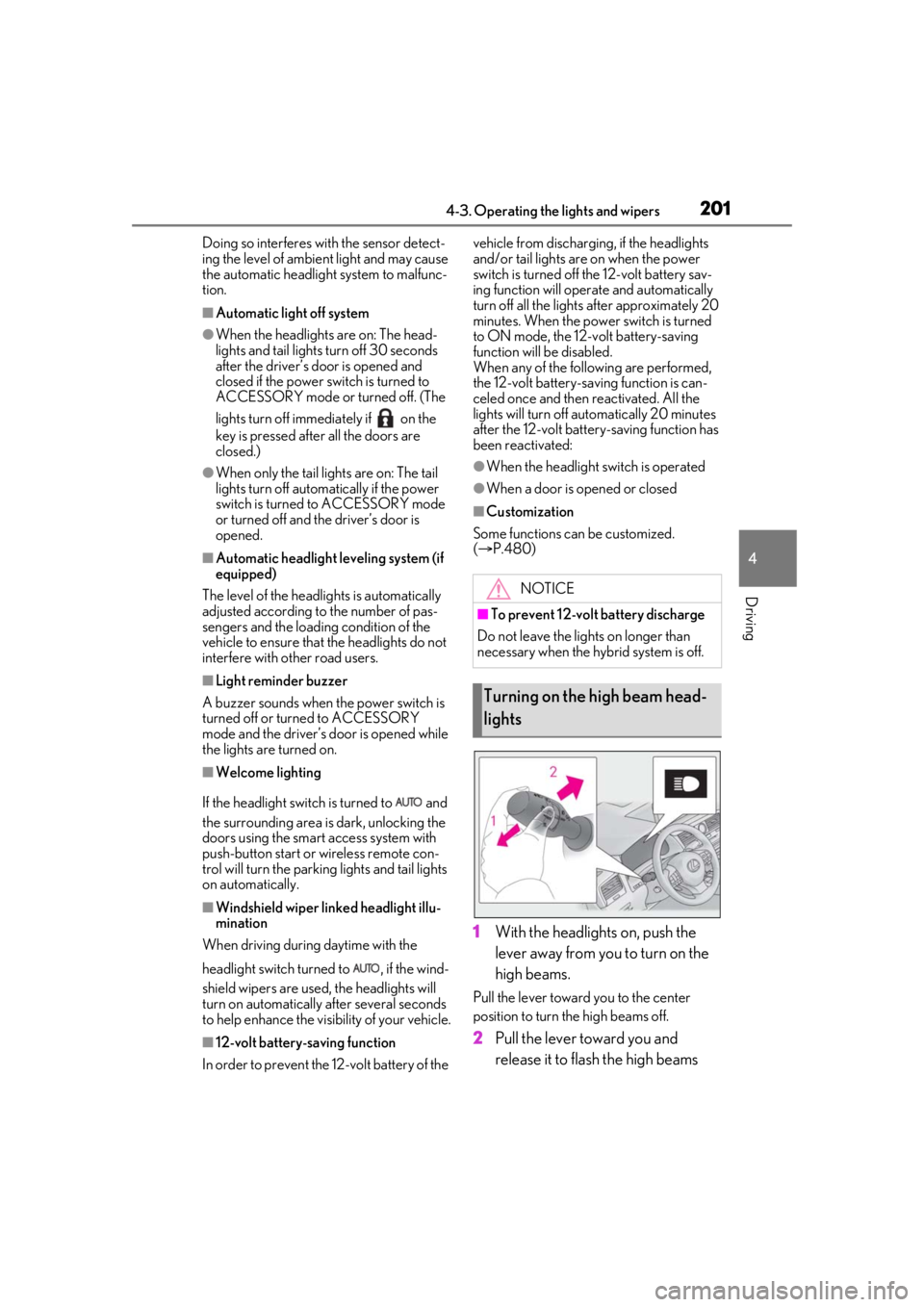
1 With the headlights on, push the
lever away from you to turn on the
high beams.
Pull the lever toward you to the center
position to turn the high beams off.
2Pull the lever toward you and
release it to flash the high beams
NOTICE
■To prevent 12-volt battery discharge
Do not leave the lights on longer than
necessary when the hy brid system is off.
Turning on the high beam head-
lights
Page 223 of 528
2234-5. Using the driving support systems
4
Driving
collision with a detected object is high.
Each function is operational at the following speed
●Pre-collision warning
●Pre-collision brake assist
●Pre-collision braking
The system may not operate in the following situations:
●If a 12-volt battery terminal has been disco nnected and reconnected and then the vehicle
has not been driven for a certain amount of time
●If the shift lever is in R
●When the VSC OFF indicator is illuminated (only the pre-collision warning function will
be operational)
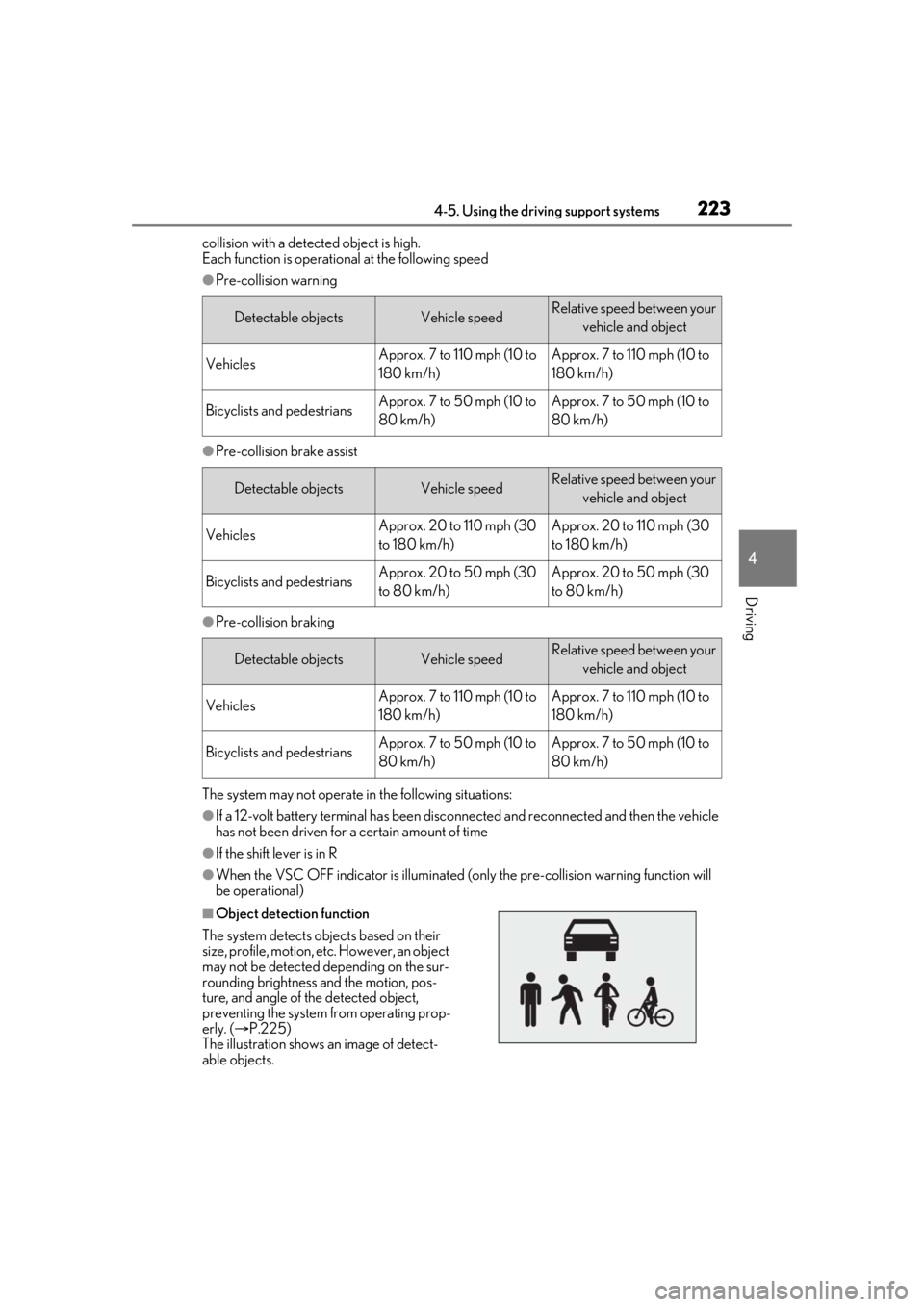
■Object detection function
The system detects ob jects based on their
size, profile, motion, etc. However, an object
may not be detected depending on the sur-
rounding brightness and the motion, pos-
ture, and angle of the detected object,
preventing the system from operating prop-
erly. ( P.225)
The illustration shows an image of detect-
able objects.
Detectable objectsVehicle speedRelative speed between your
vehicle and object
VehiclesApprox. 7 to 110 mph (10 to
180 km/h)Approx. 7 to 110 mph (10 to
180 km/h)
Bicyclists and pedestriansApprox. 7 to 50 mph (10 to
80 km/h)Approx. 7 to 50 mph (10 to
80 km/h)
Detectable objectsVehicle speedRelative speed between your vehicle and object
VehiclesApprox. 20 to 110 mph (30
to 180 km/h)Approx. 20 to 110 mph (30
to 180 km/h)
Bicyclists and pedestriansApprox. 20 to 50 mph (30
to 80 km/h)Approx. 20 to 50 mph (30
to 80 km/h)
Detectable objectsVehicle speedRelative speed between your vehicle and object
VehiclesApprox. 7 to 110 mph (10 to
180 km/h)Approx. 7 to 110 mph (10 to
180 km/h)
Bicyclists and pedestriansApprox. 7 to 50 mph (10 to
80 km/h)Approx. 7 to 50 mph (10 to
80 km/h)
Page 257 of 528
2574-5. Using the driving support systems
4
Driving
■The system can be operated when
●The power switch is in ON mode.
●Intuitive parking assist function is on.
●The vehicle speed is less than about 6
mph (10 km/h).
●A shift lever other than P.
■Setting the buzzer volume
The buzzer volume can be adjusted on the
multi-information display. ( P.253)
■If “Parking Assist Unavailable” is dis-
played on the multi-information display
●Water may be continuously flowing over
the sensor surface, such as in a heavy
rain. When the system determines that it
is normal, the system will return to nor-
mal.
●Initialization may not have been per-
formed after a battery terminal was dis-
connected and reconnected. Initialize the
system. ( P.257) If this message contin-
ues to be displayed even after initializa-
tion, have the vehicle inspected by your
Lexus dealer.
■If “Parking Assist Unavailable Clean
Parking Assist Sensor” is displayed on
the multi-information display
A sensor may be covered with ice, snow,
dirt, etc. Remove the ice, snow, dirt, etc.,
from the sensor to return the system to nor-
mal.
Also, due to ice forming on a sensor at low
temperatures, a warn ing message may be
displayed or the sensor may not be able to
detect an object. Once the ice melts, the
system will return to normal.
■If a 12-volt battery terminal has been
disconnected and reconnected
The system needs to be initialized. To initial-
ize the system, drive the vehicle straight
ahead for 5 seconds or more at a speed of
approximately 22 mph (35 km/h) or more.
■Sensor detection information
●The following situations may occur
during use.
• The sensor's detection areas are limited to the areas around the vehicle front and
rear bumpers.
• Depending on the shape of the object and other factors, the detection distance
may shorten, or detection may be impos-
WARNING
●Towing eyelets are installed.
●A backlit licence pl ate is installed.
■When using intuitive parking assist
In the following situations, the system
may not function correctly due to a sen-
sor malfunction, etc. Have the vehicle
checked by your Lexus dealer.
●The intuitive parking assist operation
display flashes or shows continuously,
and a buzzer sounds when no objects
are detected.
●If the area around a sensor collides
with something, or is subjected to
strong impact.
●If the bumper or grille collides with
something.
●If the display flashes or is displayed
continuously and a buzzer does not
sound, except when the mute function
has been turned on.
●If a display error occurs, first check the
sensor.
If the error occurs even when there is
no ice, snow or mud on the sensor, it is
likely that the sensor is malfunctioning.
■Notes when washing the vehicle
Do not apply intensive bursts of water or
steam to the sensor area.
Doing so may result in the sensor mal-
functioning.
●When using a high pressure washer to
wash the vehicle, do not spray the sen-
sors directly, as doing so may cause a
sensor to malfunction.
●When using steam to clean the vehicle,
do not direct steam too close to the
sensors as doing so may cause a sen-
sor to malfunction.
Page 270 of 528

2704-5. Using the driving support systems
●Change the traveling direction of the
vehicle
■If “Parking Support Brake Unavailable”
is displayed on the multi-information
display and the PKSB OFF indicator is
flashing
●If this message is displayed only when the
shift lever is in any position other than R, a
sensor on the front or rear bumper may
be dirty. Clean the sensors and their sur-
rounding area on the bumpers.
●Initialization may no t have been per-
formed after a 12-volt battery terminal
was disconnected and reconnected. Ini-
tialize the system. ( P.270)
If this message continues to be displayed
even after init ialization, have the vehicle
inspected by your Lexus dealer.
■If “Parking Assist Unavailable” and
“Parking Assist Unavailable Clean
Parking Assist Sensor” are displayed on
the multi-informatio n display and the
PKSB OFF indicator is flashing
●A sensor may be covered with ice, snow,
dirt, etc. Remove the ice, snow, dirt, etc.,
from the sensor to return the system to
normal.
If this message is shown even after
removing dirt from the sensor, or shown
when the sensor was not dirty to begin
with, have the vehicle inspected by your
Lexus dealer.
●A sensor may be frozen. Once the ice
melts, the system will return to normal.
●Water may be continuo usly flowing over
the sensor surface, such as in a heavy
rain. When the system determines that it
is normal, the system will return to nor-
mal.
■If a 12-volt battery terminal has been
disconnected and reconnected
The system needs to be initialized. To initial-
ize the system, drive the vehicle straight
ahead for 5 seconds or more at a speed of
approximately 22 mph (35 km/h) or more.
Additionally, for vehicles with the Parking
Support Brake function, turn the steering
wheel fully to the left and right with the vehi-
cle stopped.
Page 289 of 528
2894-6. Driving tips
4
Driving
4-6.Driving tips
When using Eco drive mode, the
torque corresponding to the accelera-
tor pedal depression amount can be
generated more smoothly than it is in
normal conditions. In addition, the
operation of the air conditioning sys-
tem (heating/cooling) will be mini-
mized, improving the fuel economy.
( P.281)
The Eco-friendly driving is possible by
keeping the indicator needle (except F
SPORT models) or bar display (F
SPORT models) of Hybrid System
Indicator within Eco area. ( P.85)
Shift the shift lever to D when stopped
at a traffic light, or driving in heavy traf-
fic, etc. Shift the shift lever to P when
parking. When using the N, there is no
positive effect on fuel consumption. In
the N, the gasoline engine operates
but electricity cannot be generated.
Also, when using the air conditioning
system, etc., the hybrid battery (trac-
tion battery) power is consumed.
Drive your vehicle smoothly. Avoid
abrupt acceleration and decelera-
tion. Gradual acceleration and
deceleration will make more effec-
tive use of the electric motor (trac-
tion motor) without having to use
gasoline engine power.
Avoid repeated acceleration.
Repeated acceleration consumes
hybrid battery (traction battery)
power, resulting in poor fuel con-
sumption. Battery power can be
restored by driving with the acceler-
ator pedal slightly released.
Make sure to operate the brakes gently
and in a timely manner. A greater
amount of electrical energy can be
regenerated when slowing down.
Repeated acceleration and decelera-
tion, as well as long waits at traffic
lights, will lead to bad fuel economy.
Check traffic reports before leaving
and avoid delays as much as possible.
When driving in a traffic jam, gently
release the brake pedal to allow the
vehicle to move forward slightly while
avoiding overuse of the accelerator
pedal. Doing so can help control
excessive gasoline consumption.
Hybrid vehicle driving tips
For economical and ecological
driving, pay attention to the follow-
ing points:
Using Eco drive mode
Use of Hybrid System Indicator
Shift lever operation
Accelerator pedal/brake pedal
operation
When braking
Delays
Page 291 of 528
2914-6. Driving tips
4
Driving
Use fluids that are appropriate to
the prevailing outside temperatures.
•Engine oil
• Engine/power control unit coolant
•Washer fluid
Have a service technician inspect
the condition of the 12-volt battery.
Have the vehicle fitted with four
snow tires or purchase a set of tire
chains for the front tires.
Ensure that all tires ar e of the specified size
and the same brand, and that chains match
the size of the tires.
Perform the following according to the
driving conditions:
Do not try to forcibly open a window
or move a wiper that is frozen. Pour
warm water over the frozen area to
melt the ice. Wipe away the water
Winter driving tips
Carry out the necessary prepara-
tions and inspections before driving
the vehicle in winter. Always drive
the vehicle in a manner appropriate
to the prevailing weather condi-
tions.
Pre-winter preparations
WARNING
■Driving with snow tires
Observe the following precautions to
reduce the risk of accidents.
Failure to do so may result in a loss of
vehicle control and cause death or seri-
ous injury.
●Use tires of the specified size.
●Maintain the recommended level of air
pressure.
●Do not drive in excess of 75 mph (120
km/h), regardless of the type of snow
tires being used.
●Use snow tires on all, not just some
wheels.
■Driving with tire chains
Observe the following precautions to
reduce the risk of accidents.
Failure to do so may result in the vehicle
being unable to be driven safely, and may
cause death or serious injury.
●Do not drive in excess of the speed
limit specified for the tire chains being
used, or 30 mph (50 km/h), which-
ever is lower.
●Avoid driving on bumpy road surfaces
or over potholes.
●Avoid sudden acceleration, abrupt
steering, sudden br aking and shifting
operations that cause sudden engine
braking.
●Slow down sufficiently before entering
a curve to ensure that vehicle control is
maintained.
●Do not use the LTA (Lane Tracing
Assist) system.
NOTICE
■Repairing or replacing snow tires
Request repairs or replacement of snow
tires from your Lexus dealer or legitimate
tire retailers.
This is because the removal and attach-
ment of snow tires affects the operation
of the tire pressure warning valves and
transmitters.
Before driving the vehicle
Page 295 of 528
2954-6. Driving tips
4
Driving
WARNING
●Do not grip the steering wheel spokes
when driving off-road. A bad bump
could jerk the wheel and injure your
hands. Keep both hands and especially
your thumbs on the outside of the rim.
●Always check your brakes for effec-
tiveness immediately after driving in
sand, mud, water or snow.
●After driving through tall grass, mud,
rock, sand, rivers, etc., check that there
is no grass, bush, paper, rags, stone,
sand, etc. adhering or trapped on the
underbody. Clear off any such matter
from the underbody. If the vehicle is
used with these materials trapped or
adhering to the underbody, a break-
down or fire could occur.
●When driving off-road or in rugged
terrain, do not drive at excessive
speeds, jump, make sharp turns, strike
objects, etc. This may cause loss of
control or vehicle rollover causing
death or serious injury. You are also
risking expensive damage to your
vehicle’s suspension and chassis.
NOTICE
■To prevent water damage
Take all necessary sa fety measures to
ensure that water da mage to the hybrid
battery (traction battery), hybrid system
or other components does not occur.
●Water entering the engine compart-
ment may cause severe damage to the
hybrid system. Water entering the inte-
rior may cause the hybrid battery
(traction battery) stowed under the
rear seats to short circuit.
●Water entering the hybrid transmis-
sion and rear electr ic motor (traction
motor) will cause deterioration in
transmission quality. The malfunction
indicator may come on, and the vehi-
cle may not be drivable.
●Water can wash the grease from wheel
bearings, causing rusting and prema-
ture failure, and may also enter the
hybrid transmission case, reducing the
gear oil’s lubricating qualities.
■When you drive through water
If driving through water, such as when
crossing shallow streams, first check the
depth of the water and the bottom of the
riverbed for firmness. Drive slowly and
avoid deep water.
■Inspection after off-road driving
●Sand and mud that has accumulated
around brake discs may affect braking
efficiency and may damage brake sys-
tem components.
●Always perform a maintenance
inspection after each day of off-road
driving that has taken you through
rough terrain, sand, mud, or water. For
scheduled maintena nce information,
refer to the “Warranty and Services
Guide/Owner’s Manual Supple-
ment/Scheduled Maintenance”.
Page 308 of 528
3085-3. Using the air conditioning system and defogger
■Main control screen
Using the touchpad of the Remote
Touch, select the button on the screen.
This system can also be operated by
the touch screen.
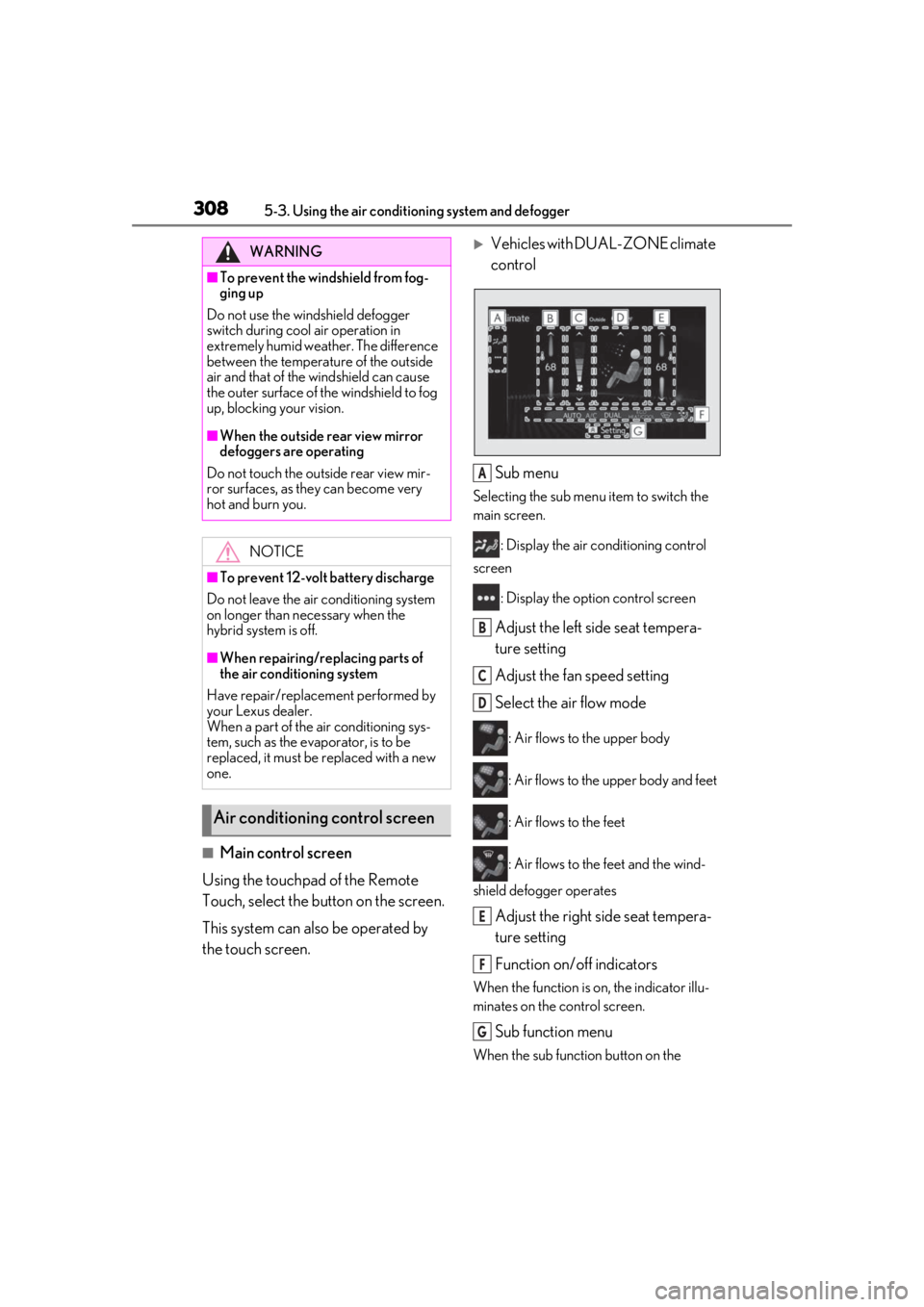
Vehicles with DUAL-ZONE climate
control
Sub menu
Selecting the sub menu item to switch the
main screen. : Display the air co nditioning control
screen
: Display the option control screen
Adjust the left side seat tempera-
ture setting
Adjust the fan speed setting
Select the air flow mode
: Air flows to the upper body
: Air flows to the upper body and feet
: Air flows to the feet
: Air flows to the feet and the wind-
shield defogger operates
Adjust the right side seat tempera-
ture setting
Function on/off indicators
When the function is on, the indicator illu-
minates on the control screen.
Sub function menu
When the sub function button on the
WARNING
■To prevent the windshield from fog-
ging up
Do not use the windshield defogger
switch during cool air operation in
extremely humid weather. The difference
between the temperature of the outside
air and that of the windshield can cause
the outer surface of the windshield to fog
up, blocking your vision.
■When the outside rear view mirror
defoggers are operating
Do not touch the outside rear view mir-
ror surfaces, as they can become very
hot and burn you.
NOTICE
■To prevent 12-volt battery discharge
Do not leave the air conditioning system
on longer than necessary when the
hybrid system is off.
■When repairing/replacing parts of
the air conditioning system
Have repair/replace ment performed by
your Lexus dealer.
When a part of the air conditioning sys-
tem, such as the evaporator, is to be
replaced, it must be replaced with a new
one.
Air conditioning control screen
A
B
C
D
E
F
G
Page 317 of 528
3175-3. Using the air conditioning system and defogger
5
Interior features
than that operated is maintained.
■Using automatic mode
Fan speed is adjusted automatically accord-
ing to the temperature setting and the
ambient conditions.
Therefore, the fan may stop for a while until
warm or cool air is ready to flow immedi-
ately after “Rear AUTO” is selected or
“AUTO” is touched.
Cool air may blow around the upper body
even when the heater is on due to sunlight.
The temperature setting of the rear
seats can be adjusted using the follow-
ing methods:
When the “3-ZONE” indicator is
off: Adjust the driv er’s seat tempera-
ture.
Adjust the temperature setting of each
rear seat using the Center Display or rear
air conditioning system control panel.
Adjust the temperature setting of
rear seats using the Center Display
(rear air conditioning control
screen) or rear air conditioning sys-
tem control panel.
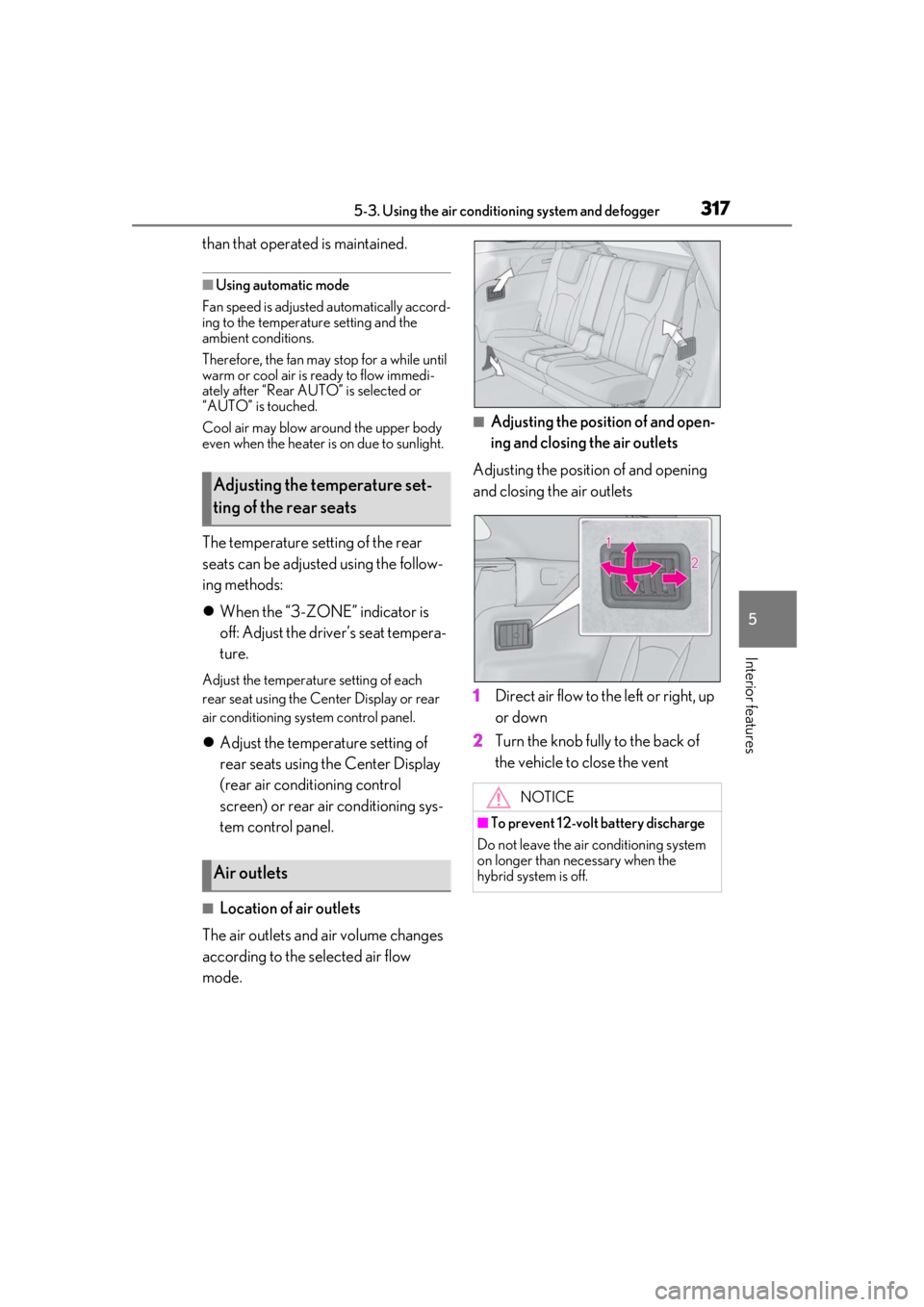
■Location of air outlets
The air outlets and air volume changes
according to the selected air flow
mode.
■Adjusting the position of and open-
ing and closing the air outlets
Adjusting the position of and opening
and closing the air outlets
1 Direct air flow to the left or right, up
or down
2 Turn the knob fully to the back of
the vehicle to close the vent
Adjusting the temperature set-
ting of the rear seats
Air outlets
NOTICE
■To prevent 12-volt battery discharge
Do not leave the air conditioning system
on longer than necessary when the
hybrid system is off.