inflation pressure LEXUS RX450h 2021 Owners Manual
[x] Cancel search | Manufacturer: LEXUS, Model Year: 2021, Model line: RX450h, Model: LEXUS RX450h 2021Pages: 528, PDF Size: 10.73 MB
Page 1 of 528

RX450hL-RX450h_U
1
2
3
4
5
6
7
8
9
Pictorial indexSearch by illustration
For safety
and securityMake sure to read through them
(Main topics: Child seat, theft deterrent system)
Vehicle status
information and
indicatorsReading driving-related information
(Main topics: Meters, multi-information display)
Before drivingOpening and closing the doors and windows,
adjustment before driving
(Main topics: Keys, doors, seats)
DrivingOperations and advice which are necessary for driving
(Main topics: Starting hybrid system, refueling)
Interior featuresUsage of the interior features
(Main topics: Air conditioner, storage features)
Maintenance
and careCaring for your vehicle and maintenance procedures
(Main topics: Interior and exterior, light bulbs)
When trouble
arisesWhat to do in case of malfunction and emergency
(Main topics: Battery discharge, flat tire)
Vehicle
specificationsVehicle specifications, customizable features
(Main topics: Fuel, oil, tire inflation pressure)
For ownersReporting safety defects for U.S. owners, and seat belt,
SRS airbag and headlight aim instructions for Canadian
owners
IndexSearch by symptom
Search alphabetically
Page 4 of 528

4TABLE OF CONTENTS
6-1. Maintenance and careCleaning and protecting the vehi-cle exterior ................................... 356
Cleaning and protecting the vehi- cle interior .................................... 359
6-2. Maintenance Maintenance requirements ..... 362
General maintenance ................ 363
Emission inspection and mainte- nance (I/M) programs ............ 366
6-3. Do-it-yourself maintenance Do-it-yourself service precautions........................................................... 367
Hood.................................................. 369
Positioning a floor jack............... 369
Engine compartment................... 371
12-volt battery................................ 376
Tires ................................................... 380
Tire inflation pressure ................. 387
Wheels.............................................. 389
Air conditioning filter..................390
Windshield wiper inserts........... 392
Electronic key battery ................ 393
Checking and replacing fuses ........................................................... 395
Headlight aim................................. 397
Light bulbs ....................................... 399
7-1. Essential information Emergency flashers...................... 410
If your vehicle has to be stopped in an emergency .............................. 410If the vehicle is trapped in rising
water ................................................. 411
7-2. Steps to take in an emergency If your vehicle needs to be towed............................................................ 413
If you think something is wrong ............................................................ 417
If a warning light turns on or a warn- ing buzzer sounds...................... 418
If a warning messa ge is displayed
.......................................................... 428
If you have a flat tire .................... 432
If the hybrid syst em will not start
.......................................................... 444
If you lose your keys.................... 446
If the fuel filler door cannot be opened .......................................... 446
If the electronic key does not oper- ate properly ................................. 447
If the 12-volt battery is discharged .......................................................... 449
If your vehicle overheats ........... 454
If the vehicle becomes stuck ... 457
8-1. Specifications Maintenance data (fuel, oil level, etc.) ................................................. 460
Fuel information............................ 469
Tire information .............................. 471
8-2. Customization Customizable features .............. 480
8-3. Init
ialization
Items to initialize ........................... 493
6Maintenance and care
7When trouble arises
8Vehicle specifications
Page 13 of 528
13Pictorial index
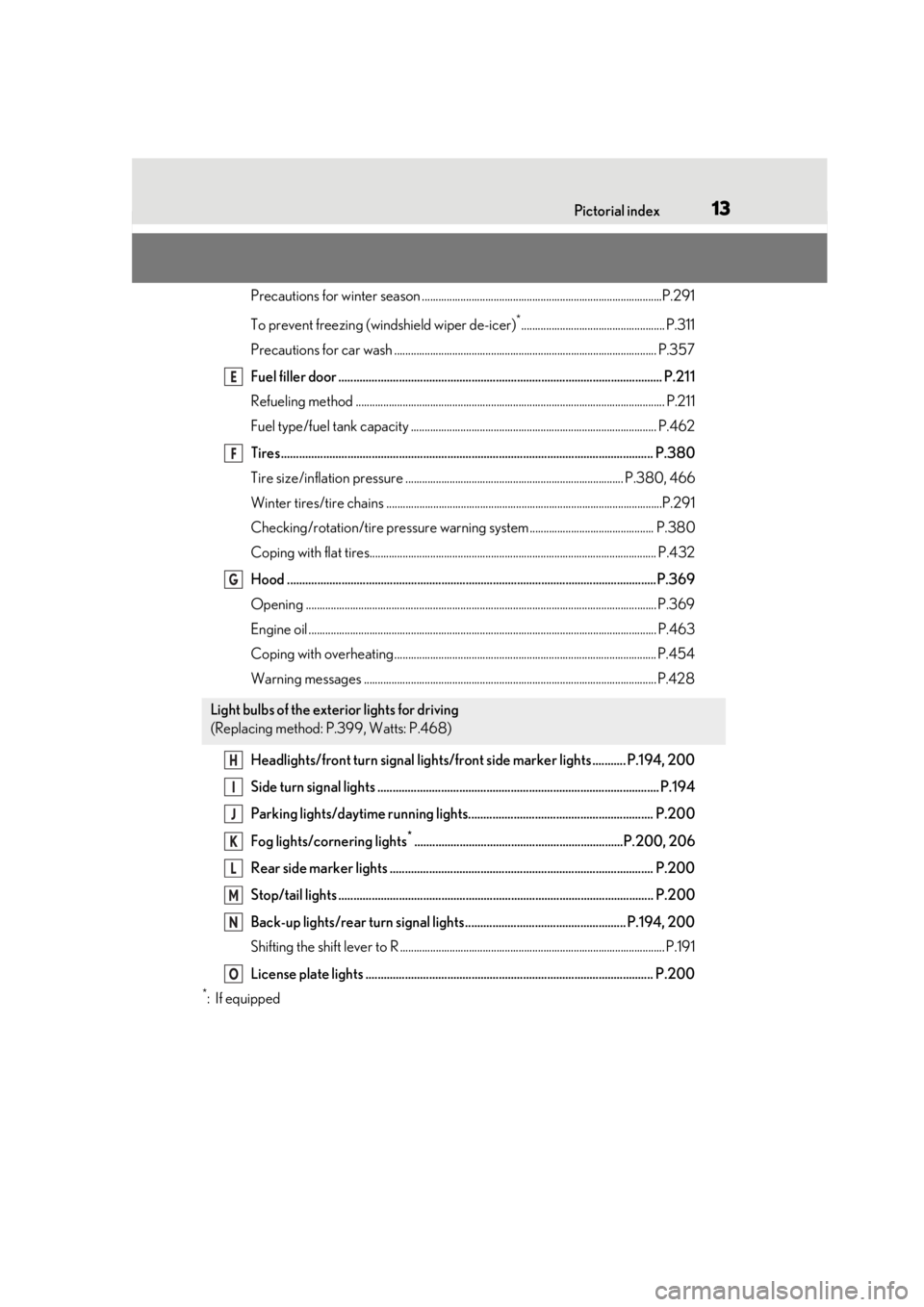
Precautions for winter season .......................................................................................P.291
To prevent freezing (windshield wiper de-icer)
*.................................................... P.311
Precautions for car wash ............................................................................................... P.357
Fuel filler door ........................................................................................................... P.211
Refueling method ............................................................................................................... .P.211
Fuel type/fuel tank capacity ...... ................................................................................... P.462
Tires.......................................................................................................................... .P.380
Tire size/inflation pressure ............................ ................................................... P.380, 466
Winter tires/tire chains ....................................................................................................P.2 91
Checking/rotation/tire pressure warning system............................................. P.380
Coping with flat tires........................................................................................................ P .432
Hood ..........................................................................................................................P.369
Opening ........................................................................................................................ ....... P.369
Engine oil ..................................................................................................................... ......... P.463
Coping with overheating ............................................................................................... P.454
Warning messages .......................................................................................................... P.428
Headlights/front turn signal lights/front side marker lights ........... P.194, 200
Side turn signal lights ............................................................................................. P.194
Parking lights/daytime running lights............................................................. P.200
Fog lights/cornering lights
*.....................................................................P.200, 206
Rear side marker lights ....................................................................................... P.200
Stop/tail lights ........................................................................................................ P.200
Back-up lights/rear turn signal lights ..................................................... P.194, 200
Shifting the shift lever to R ................................................................................................ P. 191
License plate lights ............................................................................................... P.200
*:If equipped
Light bulbs of the exterior lights for driving
(Replacing method: P.399, Watts: P.468)
E
F
G
H
I
J
K
L
M
N
O
Page 91 of 528
912-1. Instrument cluster
2
Vehicle status information and indicators
*4: This distance is computed based on your average fuel consumption. As a
result, the actual distance that can be
driven may differ from that displayed.
■Energy monitor
P.99
■AWD Control
Displays the driving force applied to
each wheel using segments.
The greater the number of segments
displayed, the greater the driving force
applied.
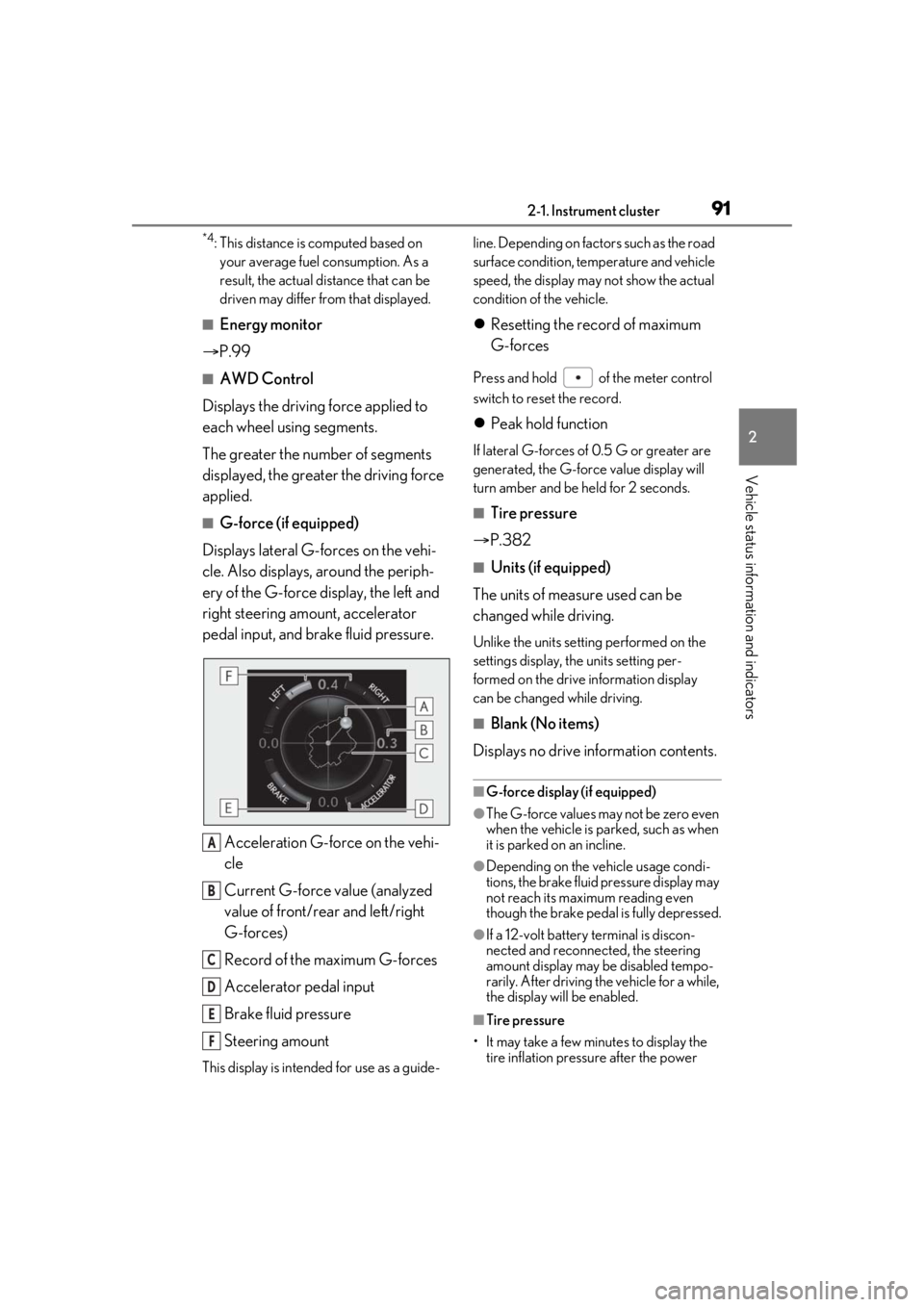
■G-force (if equipped)
Displays lateral G-forces on the vehi-
cle. Also displays, around the periph-
ery of the G-force display, the left and
right steering amount, accelerator
pedal input, and brake fluid pressure.
Acceleration G-force on the vehi-
cle
Current G-force value (analyzed
value of front/rear and left/right
G-forces)
Record of the maximum G-forces
Accelerator pedal input
Brake fluid pressure
Steering amount
This display is intended for use as a guide- line. Depending on fact
ors such as the road
surface condition, temperature and vehicle
speed, the display may not show the actual
condition of the vehicle.
Resetting the record of maximum
G-forces
Press and hold of the meter control
switch to reset the record.
Peak hold function
If lateral G-forces of 0.5 G or greater are
generated, the G-forc e value display will
turn amber and be held for 2 seconds.
■Tire pressure
P.382
■Units (if equipped)
The units of measure used can be
changed while driving.
Unlike the units sett ing performed on the
settings display, th e units setting per-
formed on the drive information display
can be changed while driving.
■Blank (No items)
Displays no drive information contents.
■G-force display (if equipped)
●The G-force values may not be zero even
when the vehicle is parked, such as when
it is parked on an incline.
●Depending on the vehicle usage condi-
tions, the brake fluid pressure display may
not reach its maximum reading even
though the brake pedal is fully depressed.
●If a 12-volt battery terminal is discon-
nected and reconnect ed, the steering
amount display may be disabled tempo-
rarily. After driving th e vehicle for a while,
the display will be enabled.
■Tire pressure
• It may take a few minutes to display the tire inflation pressu re after the power
A
B
C
D
E
F
Page 92 of 528
922-1. Instrument cluster
switch is turned to ON mode. It may also
take a few minutes to display the tire infla-
tion pressure after inflation pressure has
been adjusted.
• “---” may be displayed if the tire position information cannot be determined due to
unfavorable radio wave conditions.
• Tire inflation pressure changes with tem- perature. The displayed values may also
be different from the values measured
using a tire pressure gauge.
Select to display the following naviga-
tion system-linked information.
Route guidance
Compass display (heading-up dis-
play)
Select to enable selection of an audio
source or track on the meter using the
meter control switches.
Select to display the operational status
of the following systems:
LTA (Lane Tracing Assist) ( P.227)
RSA (Road Sign Assist) (if
equipped) ( P.236)
Dynamic radar cruise control with
full-speed range ( P.238)
■Meter display settings that can be
changed
Clock
Select to switch between 12-hour display
and 24-hour display.
Language
Select to change the language displayed.
Units
Select to change the units of measure dis-
played.
EV indicator ( P.189)
Select to enable/disable the EV indicator.
Switch settings
Select to display how to change the top
screen.
Drive information 1/Drive informa-
tion 2/Drive information 3
Select to select up to 2 items ( P.90) that
will be displayed on each Drive information
screen (Drive information 1 screen, Drive
information 2 screen, and Drive informa-
tion 3 screen) respectively.
Pop-up display
Select to enable/disable the pop-up dis-
play.
• Intersection guidance
• Incoming calls
• Brightness adjustment
Color (except F SPORT models)
Select to set the color of the cursor on the
multi-information display.
Tachometer setting
Select to set the tachometer or Hybrid
System Indicator to always be displayed or
Navigation system-linked dis-
play (if equipped)
Audio system-linked display
Driving assist system information
Settings display
Page 226 of 528

2264-5. Using the driving support systems
• If a vehicle ahead is a child sized bicycle, a bicycle that is carrying a large load, a
bicycle ridden by more than one person,
or a uniquely shaped bicycle (bicycle with
a child seat, tandem bicycle, etc.)
• If a pedestrian/or the riding height of a
bicyclist ahead is shorter than approxi-
mately 3.2 ft. (1 m) or taller than approxi-
mately 6.5 ft. (2 m)
• If a pedestrian/bicyclist is wearing over- sized clothing (a rain coat, long skirt,
etc.), making their silhouette obscure
• If a pedestrian is bending forward or squatting or bicyclist is bending forward
• If a pedestrian/bicyclist is moving fast
• If a pedestrian is pushing a stroller, wheel-
chair, bicycle or other vehicle
• When driving in incl ement weather such
as heavy rain, fog, snow or a sandstorm
• When driving through steam or smoke
• When the surrounding area is dim, such as at dawn or dusk, or while at night or in
a tunnel, making a detectable object
appear to be nearly the same color as its
surroundings
• When driving in a place where the sur- rounding brightness changes suddenly,
such as at the entrance or exit of a tunnel
• After the hybrid system has started the vehicle has not been driven for a certain
amount of time
• While making a left/right turn and for a few seconds after makin g a left/right turn
• While driving on a curve and for a few seconds after driving on a curve
• If your vehicle is skidding
• If the front of the vehicle is raised or low-
ered
• If the wheels are misaligned
• If a wiper blade is blocking the front cam- era
• The vehicle is being driven at extremely
high speeds
• When driving on a hill • If the radar sensor or front camera is mis-
aligned
●In some situations su ch as the following,
sufficient braking force may not be
obtained, preventing the system from
performing properly:
• If the braking functions cannot operate to their full extent, such as when the brake
parts are extremely cold, extremely hot,
or wet
• If the vehicle is not properly maintained
(brakes or tires are excessively worn,
improper tire inflation pressure, etc.)
• When the vehicle is being driven on a
gravel road or other slippery surface
■If VSC is disabled
●If VSC is disabled ( P.285), the
pre-collision brake assist and pre-colli-
sion braking functions are also disabled.
●The PCS warning light will turn on and
“VSC Turned Off Pre-Collision Brake
System Unavailable” will be displayed on
the multi-information display.
Page 287 of 528
2874-5. Using the driving support systems
4
Driving
WARNING
■Stopping distance when the ABS is
operating may exceed that of normal
conditions
The ABS is not designed to shorten the
vehicle’s stopping di stance. Always main-
tain a safe distance from the vehicle in
front of you, especially in the following
situations:
●When driving on dirt, gravel or
snow-covered roads
●When driving with tire chains
●When driving over bumps in the road
●When driving over roads with potholes
or uneven surfaces
■TRAC/VSC may not operate effec-
tively when
Directional control and power may not
be achievable while driving on slippery
road surfaces, even if the TRAC/VSC
system is operating. Drive the vehicle
carefully in conditions where stability and
power may be lost.
■Active Cornering Assist does not
operate effectively when
●Do not overly rely on Active Corner-
ing Assist. Active Cornering Assist
may not operate effectively when
accelerating down slopes or driving on
slippery road surfaces.
●When Active Cornering Assist fre-
quently operates, Active Cornering
Assist may temporarily stop operating
to ensure proper operation of the
brakes, TRAC and VSC.
■Hill-start assist control does not oper-
ate effectively when
●Do not overly rely on hill-start assist
control. Hill-start assist control may
not operate effectively on steep
inclines and roads covered with ice.
●Unlike the parking brake, hill-start
assist control is not intended to hold
the vehicle stationary for an extended
period of time. Do not attempt to use
hill-start assist control to hold the vehi-
cle on an incline, as doing so may lead
to an accident.
■When the TRAC/ABS/VSC/Trailer
Sway Control is activated
The slip indicator light flashes. Always
drive carefully. Reckless driving may
cause an accident. Exercise particular
care when the indicator light flashes.
■When the TRAC/VSC/Trailer Sway
Control systems are turned off
●Be especially careful and drive at a
speed appropriate to the road condi-
tions. As these are the systems to help
ensure vehicle stab ility and driving
force, do not turn the
TRAC/VSC/Trailer Sway Control sys-
tems off unless necessary.
●Trailer Sway Control is part of the VSC
system and will not operate if VSC is
turned off or experiences a malfunc-
tion.
■Replacing tires
Make sure that all ti res are of the speci-
fied size, brand, tread pattern and total
load capacity. In addition, make sure that
the tires are inflated to the recom-
mended tire inflation pressure level.
The ABS, TRAC, Trailer Sway Control
and VSC systems will not function cor-
rectly if different tire s are installed on the
vehicle.
Contact your Lexus dealer for further
information when replacing tires or
wheels.
■Handling of tires and the suspension
Using tires with any kind of problem or
modifying the suspensi on will affect the
driving assist systems, and may cause a
system to malfunction.
Page 290 of 528

2904-6. Driving tips
Control and maintain the vehicle at a
constant speed. Before stopping at a
toll booth or similar, allow plenty of
time to release the accelerator and
gently apply the brakes. A greater
amount of electrical energy can be
regenerated when slowing down.
Use the air conditioning only when
necessary. Doing so can help reduce
excessive gasoline consumption.
In summer: When the ambient tem-
perature is high, use the recirculated
air mode. Doing so will help to reduce
the burden on the air conditioning sys-
tem and reduce fuel consumption as
well.
In winter: Because the gasoline engine
will not automatically cut out until it and
the interior of the vehicle are warm, it
will consume fuel. Also, fuel consump-
tion can be improved by avoiding over-
use of the heater.
Make sure to check the tire inflation
pressure frequently. Improper tire infla-
tion pressure can cause poor fuel
economy.
Also, as snow tires can cause large
amounts of friction, their use on dry
roads can lead to poor fuel economy.
Use tires that are appropriate for the
season. Carrying heavy luggage will lead to
poor fuel economy. Avoid carrying
unnecessary luggage.
Installing a large
roof rack will also cause poor fuel
economy.
Since the gasoline engine starts up and
cuts out automatically when cold,
warming up the engine is unnecessary.
Moreover, frequently driving short dis-
tances will cause the engine to repeat-
edly warm up, which can lead to excess
fuel consumption.
Highway driving
Air conditioning
Checking tire inflation pressure
Luggage
Warming up before driving
Page 355 of 528

355
6
6
Maintenance and care
Maintenance and care
.6-1. Maintenance and careCleaning and protecting the vehi-cle exterior ................................ 356
Cleaning and protecting the vehi- cle interior ................................. 359
6-2. Maintenance Maintenance requirements........................................................ 362
General maintenance ............. 363
Emission inspection and mainte- nance (I/M) programs ......... 366
6-3. Do-it-yourself maintenance Do-it-yourself service precautions........................................................ 367
Hood............................................... 369
Positioning a floor jack............ 369
Engine compartment................ 371
12-volt battery............................. 376
Tires ................................................ 380
Tire inflation pressure .............. 387
Wheels........................................... 389
Air conditioning filter...............390
Windshield wiper inserts........ 392
Electronic key battery ............. 393
Checking and replacing fuses ........................................................ 395
Headlight aim.............................. 397
Light bulbs .................................... 399
Page 365 of 528
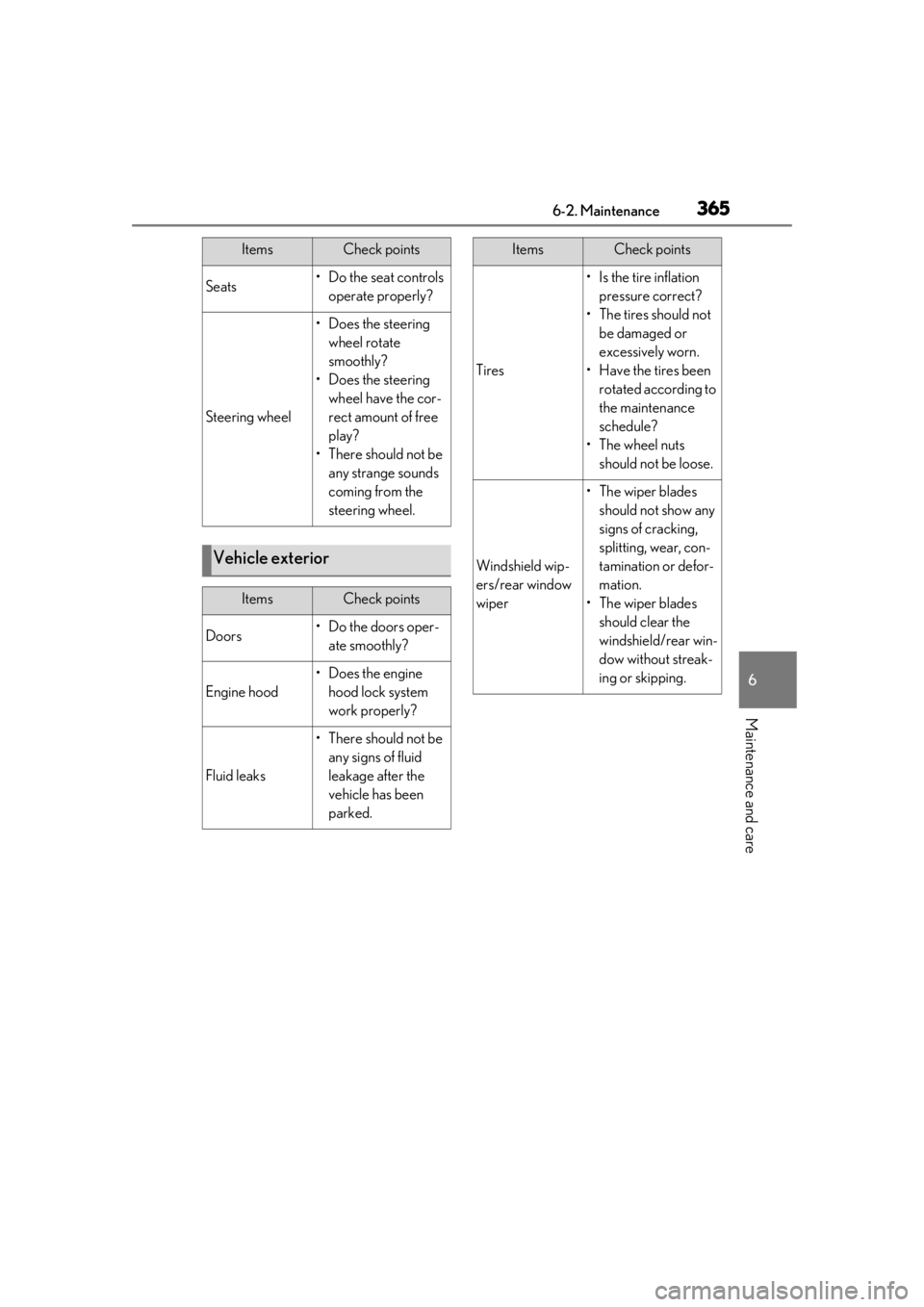
3656-2. Maintenance
6
Maintenance and care
Seats• Do the seat controls operate properly?
Steering wheel
• Does the steering wheel rotate
smoothly?
• Does the steering wheel have the cor-
rect amount of free
play?
•There should not be any strange sounds
coming from the
steering wheel.
Vehicle exterior
ItemsCheck points
Doors• Do the doors oper-ate smoothly?
Engine hood
•Does the engine hood lock system
work properly?
Fluid leaks
•There should not be any signs of fluid
leakage after the
vehicle has been
parked.
ItemsCheck points
Tires
• Is the tire inflation pressure correct?
• The tires should not be damaged or
excessively worn.
• Have the tires been rotated according to
the maintenance
schedule?
•The wheel nuts should not be loose.
Windshield wip-
ers/rear window
wiper
• The wiper blades should not show any
signs of cracking,
splitting, wear, con-
tamination or defor-
mation.
• The wiper blades should clear the
windshield/rear win-
dow without streak-
ing or skipping.
ItemsCheck points