interior lights LEXUS RX450h 2021 Owners Manual
[x] Cancel search | Manufacturer: LEXUS, Model Year: 2021, Model line: RX450h, Model: LEXUS RX450h 2021Pages: 528, PDF Size: 10.73 MB
Page 3 of 528
3TABLE OF CONTENTS
1
2
3
4
5
6
7
8
9
Trailer towing (vehicles with towing package) ........................................ 173
Dinghy towing ................................ 183
4-2. Driving procedures Power (ignition) switch ............... 184
EV drive mode ............................... 189
Hybrid transmission ...................... 191
Turn signal lever............................. 194
Parking brake ................................. 195
Brake Hold....................................... 198
4-3. Operating the lights and wipers Headlight switch ........................... 200
AHB (Automatic High Beam) ........................................................... 203
Fog light switch ............................. 206
Windshield wipers and washer ........................................................... 206
Rear window wiper and washer ............................................................ 210
4-4. Refueling Opening the fuel tank cap.......... 211
4-5. Using the driving support systems Lexus Safety System + 2.0 ........ 214
PCS (Pre-Collision System).... 220
LTA (Lane Tracing Assist)........ 227
RSA (Road Sign Assist) ............. 236
Dynamic radar crui se control with
full-speed range......................... 238
BSM (Blind Spot Monitor) ....... 247
PKSA (Parking Support Alert) ........................................................... 253
Intuitive parking assist ................ 255
RCTA (Rear cross traffic alert) function ........................................... 261
PKSB (Parking Support Brake) ........................................................... 266Parking Support Brake function
(static objects) .............................. 271
Parking Support Brake function (rear-crossing vehicles) .......... 277
Driving mode select switch ...... 281
Driving assist systems ................ 283
4-6. Driving tips Hybrid vehicle driving tips ....... 289
Winter driving tips ......................... 291
Utility vehicle precautions........ 293
5-1. Remote Touch/Display Remote Touch............................... 298
Center Display.............................. 300
5-2. Lexus Climate Concierge Lexus Climate Concierge........ 303
5-3. Using the air conditioning system and defogger
Front automatic air conditioning system ............................................ 304
Rear automatic air conditioning system ............................................. 315
Heated steering wheel/seat heat- ers/seat ventilators.................... 318
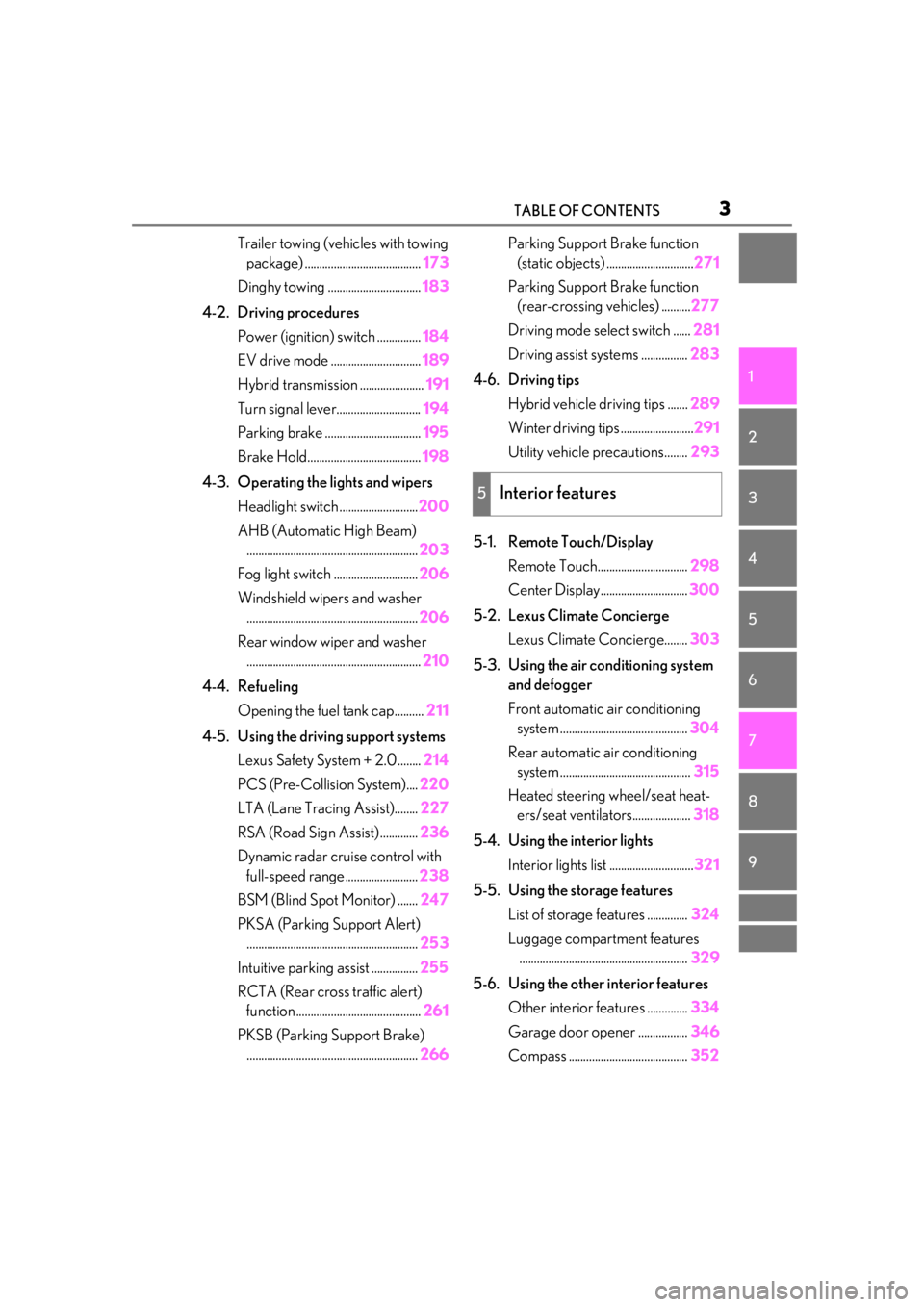
5-4. Using the interior lights Interior lights list ............................. 321
5-5. Using the storage features List of storage features .
.............324
Luggage compartment features .......................................................... 329
5-6. Using the other interior features Other interior features .............. 334
Garage door opener ................. 346
Compass ......................................... 352
5Interior features
Page 21 of 528
21Pictorial index
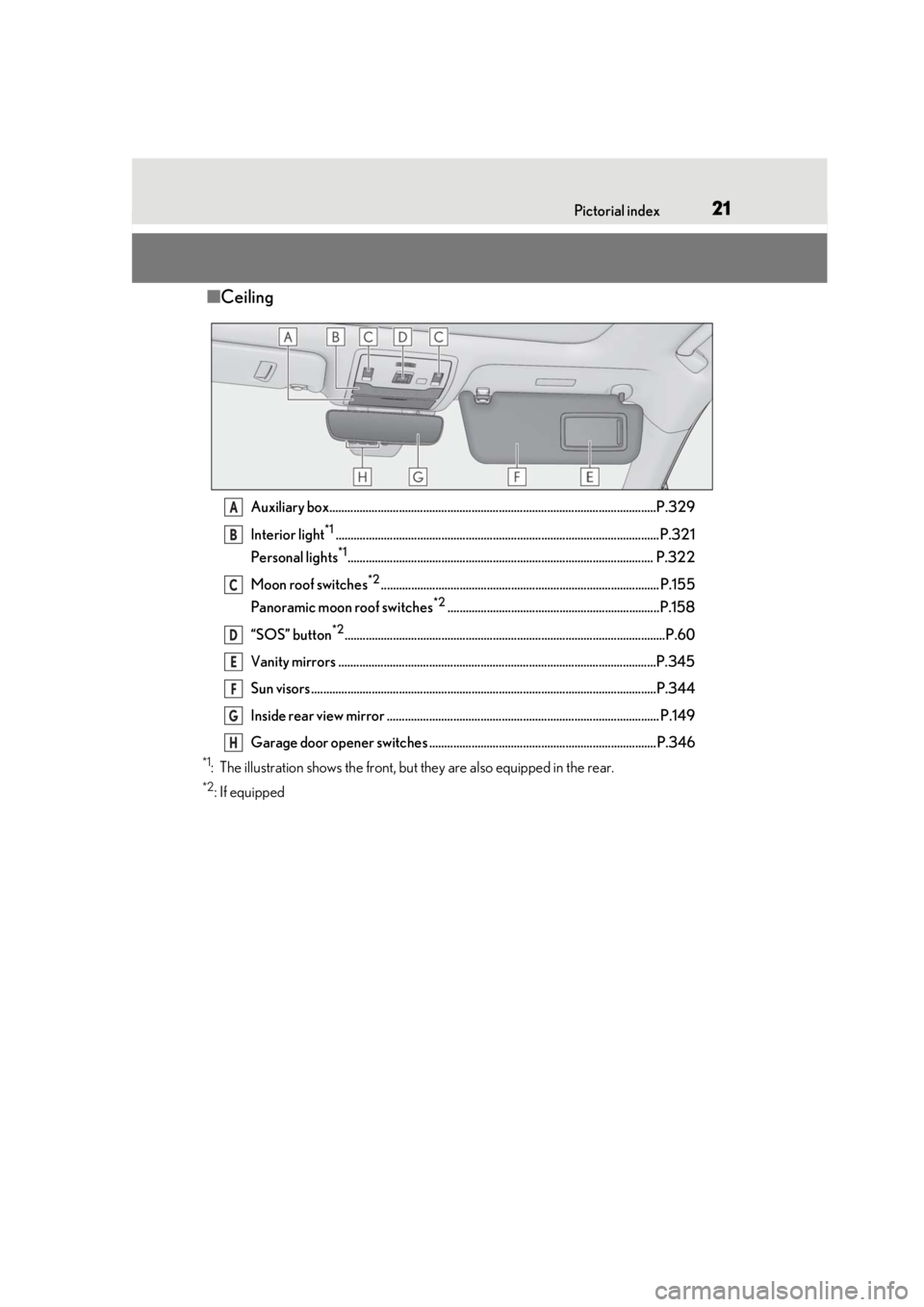
■Ceiling
Auxiliary box............................................................................................................P.329
Interior light
*1...........................................................................................................P.321
Personal lights
*1..................................................................................................... P.322
Moon roof switches
*2............................................................................................ P.155
Panoramic moon roof switches
*2......................................................................P.158
“SOS” button
*2..........................................................................................................P.60
Vanity mirrors .........................................................................................................P.345
Sun visors ..................................................................................................................P.344
Inside rear view mirror .......................................................................................... P.149
Garage door opener switches ...........................................................................P.346
*1: The illustration shows the front, but they are also equipped in the rear.
*2: If equipped
A
B
C
D
E
F
G
H
Page 33 of 528

331-1. For safe use
1
For safety and security
RX450hL: Rear side airbags (outboard second-row seats)
Your vehicle is equipped with ADVANCED AIRBAGS designed based on the US
motor vehicle safety standards (FMVSS208). The airbag sensor assembly (ECU)
controls airbag deployment based on information obtained from the sensors etc.
shown in the system components diagram above. This information includes crash
severity and occupant information. As the airbags deploy, a chemical reaction in
the inflators quickly fills the airbags with no n-toxic gas to help restrain the motion of
the occupants.
■If the SRS airbags deploy (inflate)
●Slight abrasions, burns, bruising etc., may
be sustained from SRS airbags, due to the
extremely high speed deployment (infla-
tion) by hot gases.
●A loud noise and white powder will be
emitted.
●Parts of the airbag module (steering
wheel hub, airbag cover and inflator) as
well as the front seat s, parts of the front
and rear pillars, and roof side rails, may
be hot for several minutes. The airbag
itself may also be hot.
●The windshield may crack.
●The hybrid system will be stopped and
fuel supply to the engine will be stopped.
( P.72)
●All of the doors will be unlocked.
( P.110)
●The brakes and stop lights will be con-
trolled automatically. ( P.284)
●The interior lights will turn on automati-
cally. ( P.322)
●The emergency flashers will turn on auto-
matically. ( P.410)
●For Lexus Enform Safety Connect sub-
scribers, if any of the following situations
occur, the system is designed to send an
emergency call to the response center,
notifying them of the vehicle’s location
(without needing to push the “SOS” but-
ton) and an agent will attempt to speak
with the occupants to ascertain the level
of emergency and assi stance required. If
the occupants are unable to communi-
cate, the agent automatically treats the
call as an emergency and helps to dis- patch the necessary emergency services.
(
P.60)
• An SRS airbag is deployed.
• A seat belt pretensioner is activated.
• The vehicle is involved in a severe rear-end collision.
■SRS airbag deployment conditions (SRS
front airbags)
●The SRS front airbags will deploy in the
event of an impact that exceeds the set
threshold level (the level of force corre-
sponding to an approximately 12 - 18
mph [20 - 30 km/h] frontal collision with
a fixed wall that does not move or
deform).
However, this threshol d velocity will be
considerably higher in the following situa-
tions:
• If the vehicle strikes an object, such as a parked vehicle or sign pole, which can
move or deform on impact
• If the vehicle is involved in an underride collision, such as a collision in which the
front of the vehicle “underrides”, or goes
under, the bed of a truck
●Depending on the type of collision, it is
possible that only the seat belt preten-
sioners will activate.
●The SRS seat cushion airbag on the front
passenger seat will not operate if the
occupant is not wearing a seat belt.
■SRS airbag deployment conditions (SRS
side and curtain shield airbags)
●The SRS side and curtain shield airbags
will deploy in the event of an impact that
exceeds the set threshold level (the level
of force corresponding to the impact
force produced by an approximately
3300 lb. [1500 kg] vehicle colliding with
Page 297 of 528

297
5
5
Interior features
Interior features
.5-1. Remote Touch/DisplayRemote Touch ............................ 298
Center Display ........................... 300
5-2. Lexus Climate Concierge Lexus Climate Concierge ..... 303
5-3. Using the air conditioning system and defogger
Front automatic air conditioning system ......................................... 304
Rear automatic air conditioning system .......................................... 315
Heated steering wheel/seat heat- ers/seat ventilators ................. 318
5-4. Using the interior lights Interior lights list.......................... 321
5-5. Using the storage features List of storage features............ 324
Luggage compartment features ........................................................ 329
5-6. Using the other interior features Other interior features ........... 334
Garage door opener............... 346
Compass....................................... 352
Page 319 of 528
3195-3. Using the air conditioning system and defogger
5
Interior features
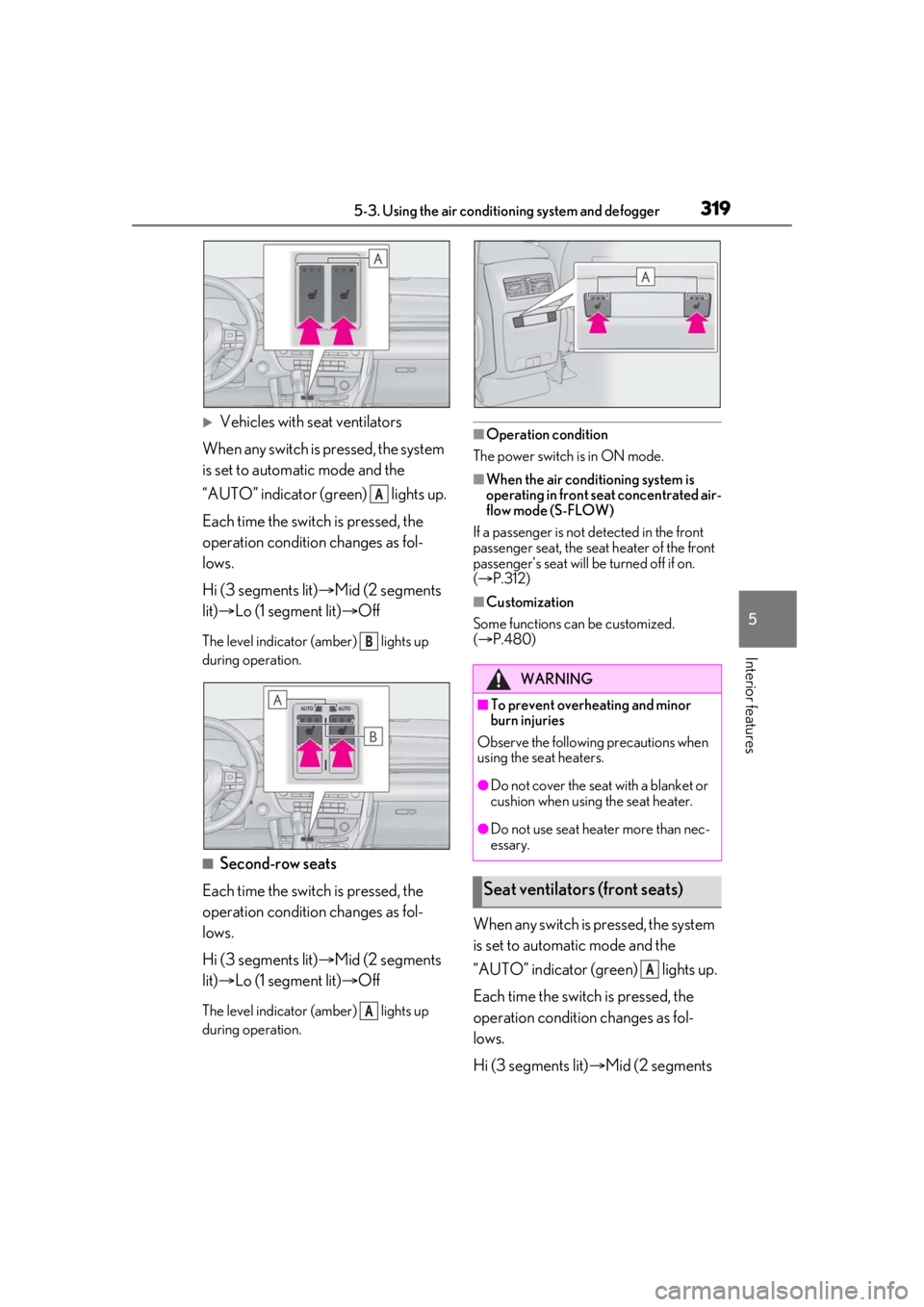
Vehicles with seat ventilators
When any switch is pressed, the system
is set to automatic mode and the
“AUTO” indicator (green) lights up.
Each time the switch is pressed, the
operation condition changes as fol-
lows.
Hi (3 segments lit) Mid (2 segments
lit) Lo (1 segment lit) Off
The level indicator (amber) lights up
during operation.
■Second-row seats
Each time the switch is pressed, the
operation condition changes as fol-
lows.
Hi (3 segments lit) Mid (2 segments
lit) Lo (1 segment lit) Off
The level indicator (amber) lights up
during operation.
■Operation condition
The power switch is in ON mode.
■When the air conditioning system is
operating in front seat concentrated air-
flow mode (S-FLOW)
If a passenger is not detected in the front
passenger seat, the seat heater of the front
passenger’s seat will be turned off if on.
( P.312)
■Customization
Some functions can be customized.
( P.480)
When any switch is pressed, the system
is set to automatic mode and the
“AUTO” indicator (green) lights up.
Each time the switch is pressed, the
operation condition changes as fol-
lows.
Hi (3 segments lit) Mid (2 segments
A
B
A
WARNING
■To prevent overheating and minor
burn injuries
Observe the following precautions when
using the seat heaters.
●Do not cover the seat with a blanket or
cushion when using the seat heater.
●Do not use seat heater more than nec-
essary.
Seat ventilators (front seats)
A
Page 321 of 528
3215-4. Using the interior lights
5
Interior features
5-4.Using the interior lights
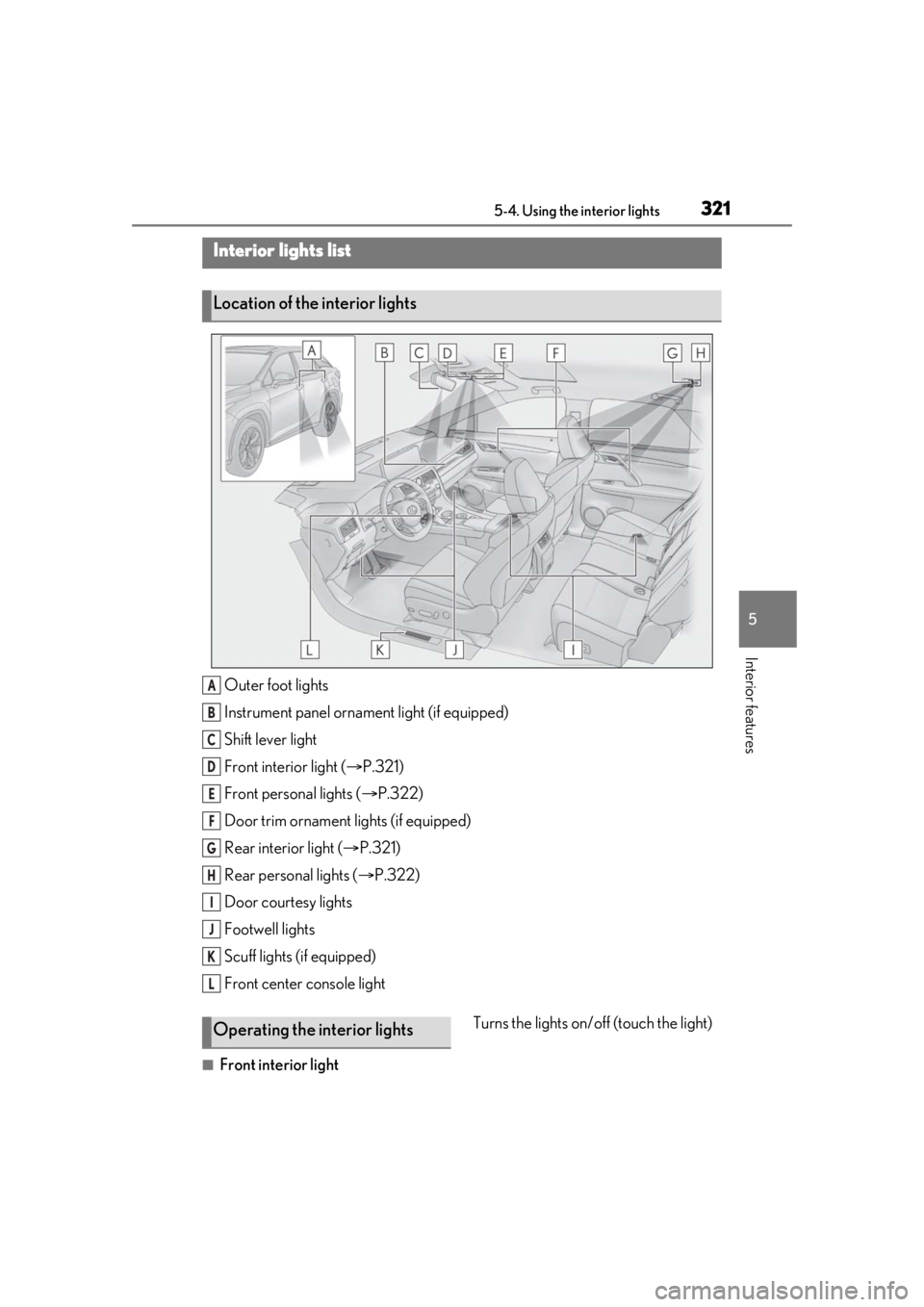
Outer foot lights
Instrument panel ornament light (if equipped)
Shift lever light
Front interior light (P.321)
Front personal lights ( P.322)
Door trim ornament lights (if equipped)
Rear interior light ( P.321)
Rear personal lights ( P.322)
Door courtesy lights
Footwell lights
Scuff lights (if equipped)
Front center console light
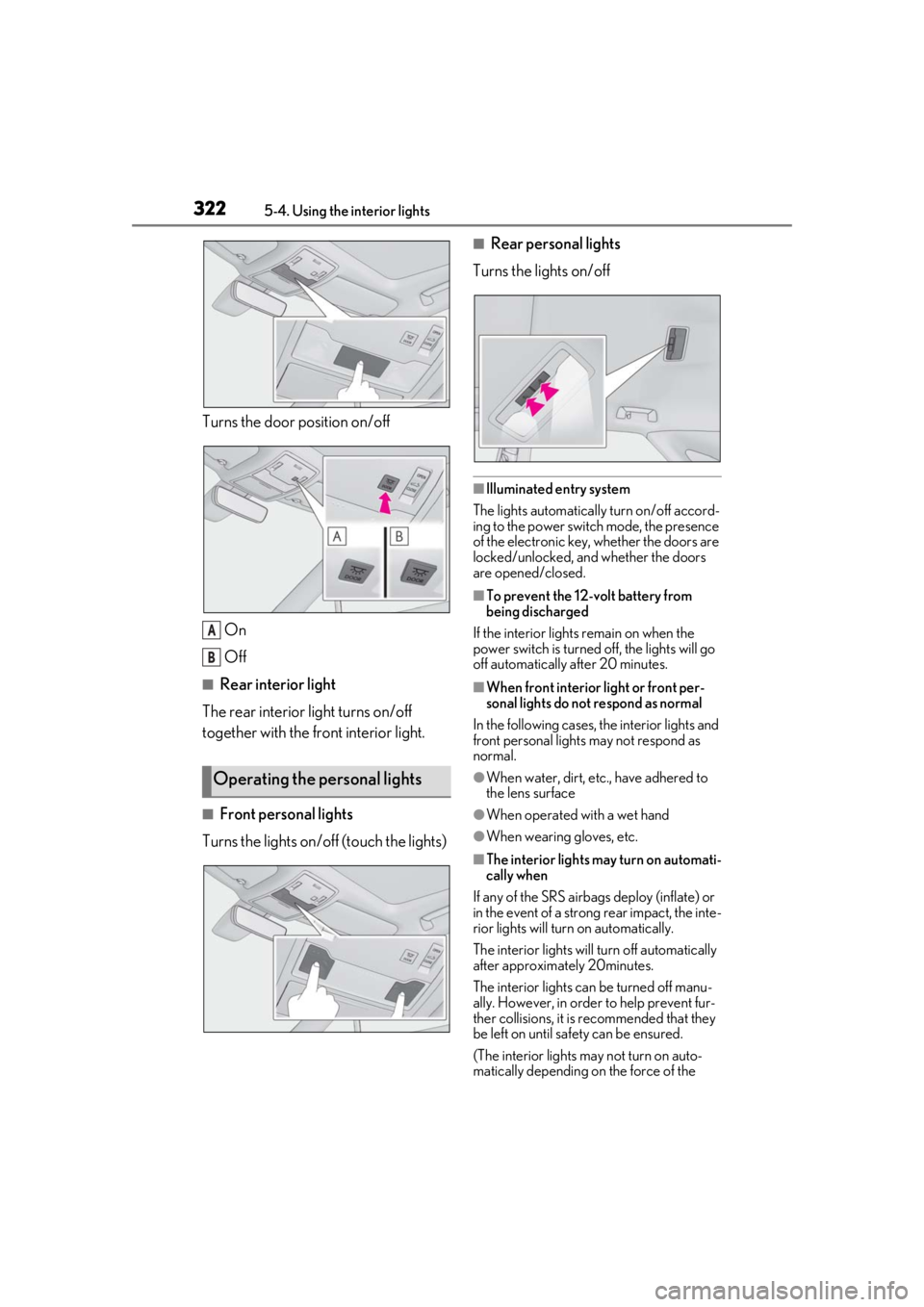
■Front interior light Turns the lights on/off (touch the light)
Interior lights list
Location of the interior lights
A
B
C
D
E
F
G
H
I
J
K
L
Operating the interior lights
Page 322 of 528
3225-4. Using the interior lights
Turns the door position on/off
On
Off
■Rear interior light
The rear interior light turns on/off
together with the front interior light.
■Front personal lights
Turns the lights on/off (touch the lights)
■Rear personal lights
Turns the lights on/off
■Illuminated entry system
The lights automatically turn on/off accord-
ing to the power switch mode, the presence
of the electronic key, whether the doors are
locked/unlocked, and whether the doors
are opened/closed.
■To prevent the 12-volt battery from
being discharged
If the interior lights remain on when the
power switch is turned off, the lights will go
off automatically after 20 minutes.
■When front interior light or front per-
sonal lights do not respond as normal
In the following cases, the interior lights and
front personal lights may not respond as
normal.
●When water, dirt, etc., have adhered to
the lens surface
●When operated with a wet hand
●When wearing gloves, etc.
■The interior lights may turn on automati-
cally when
If any of the SRS airbag s deploy (inflate) or
in the event of a strong rear impact, the inte-
rior lights will turn on automatically.
The interior lights will turn off automatically
after approximately 20minutes.
The interior lights can be turned off manu-
ally. However, in order to help prevent fur-
ther collisions, it is recommended that they
be left on until sa fety can be ensured.
(The interior lights may not turn on auto-
matically depending on the force of the
Operating the personal lights
A
B
Page 323 of 528
3235-4. Using the interior lights
5
Interior features
impact and conditions of the collision.)
■Customization
Some functions can be customized.
( P.480)
NOTICE
■Removing light lenses
Never remove the lens for the front inte-
rior light and front personal lights. Other-
wise, the lights will be damaged. If the
lens need to remove , contact your Lexus
dealer.
■To prevent 12-volt battery discharge
Do not leave the lights on longer than
necessary when the hy brid system is off.
Page 326 of 528
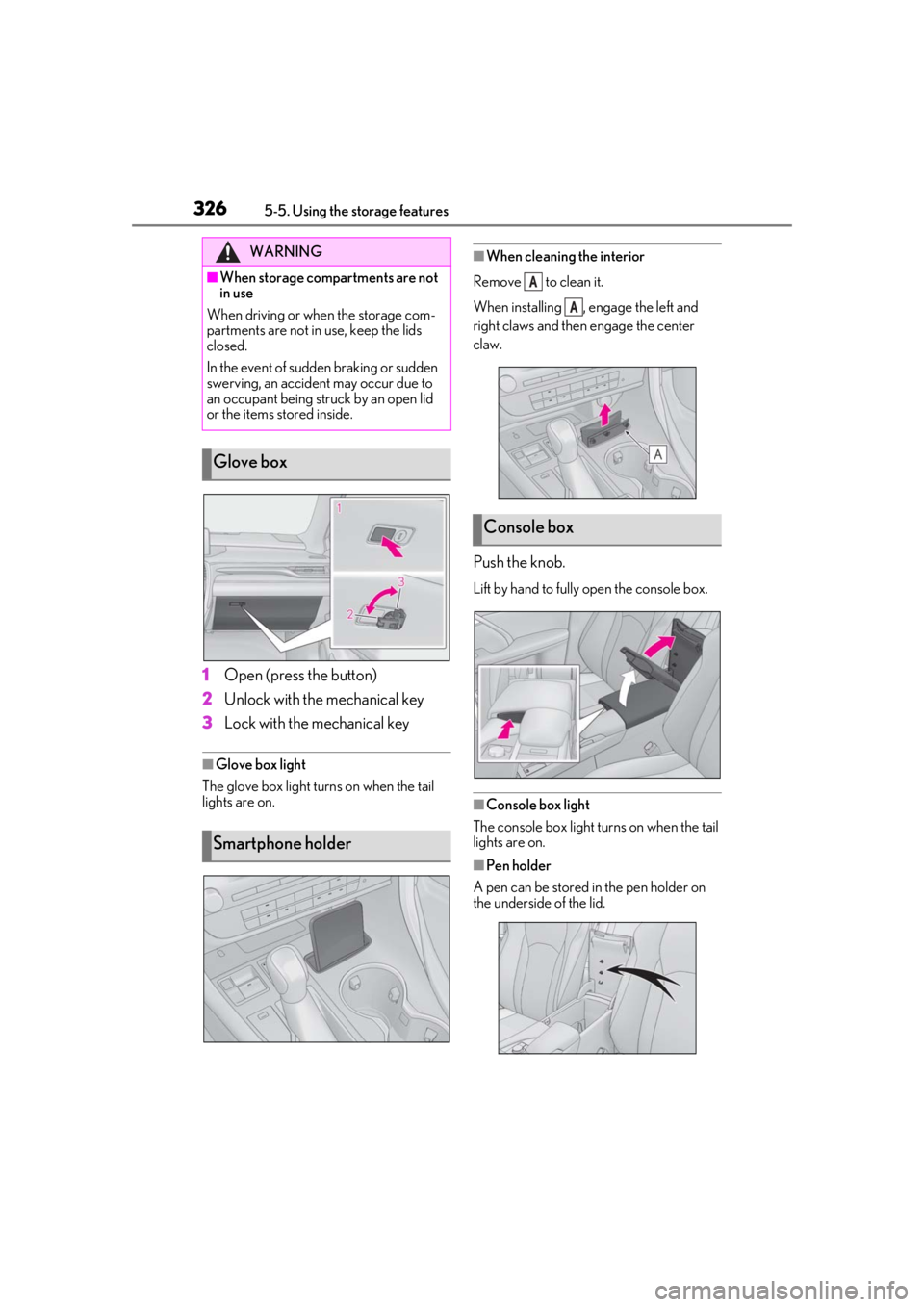
3265-5. Using the storage features
1Open (press the button)
2 Unlock with the mechanical key
3 Lock with the mechanical key
■Glove box light
The glove box light turns on when the tail
lights are on.
■When cleaning the interior
Remove to clean it.
When installing , engage the left and
right claws and then engage the center
claw.
Push the knob.
Lift by hand to fully open the console box.
■Console box light
The console box light turns on when the tail
lights are on.
■Pen holder
A pen can be stored in the pen holder on
the underside of the lid.
WARNING
■When storage compartments are not
in use
When driving or when the storage com-
partments are not in use, keep the lids
closed.
In the event of sudden braking or sudden
swerving, an accident may occur due to
an occupant being struck by an open lid
or the items stored inside.
Glove box
Smartphone holder
Console box
A
A
Page 336 of 528
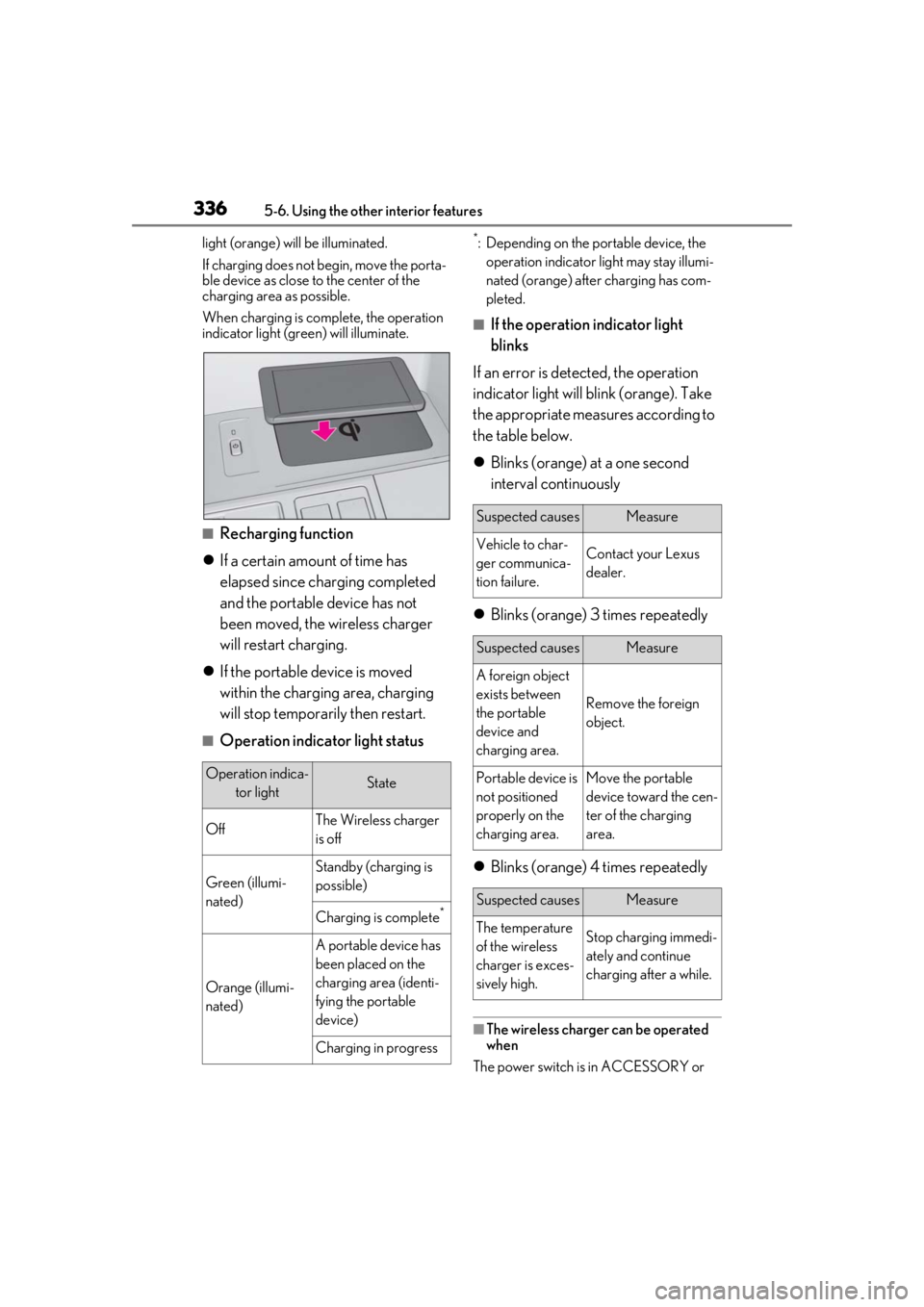
3365-6. Using the other interior features
light (orange) will be illuminated.
If charging does not begin, move the porta-
ble device as close to the center of the
charging area as possible.
When charging is complete, the operation
indicator light (green) will illuminate.
■Recharging function
If a certain amount of time has
elapsed since charging completed
and the portable device has not
been moved, the wireless charger
will restart charging.
If the portable device is moved
within the charging area, charging
will stop temporarily then restart.
■Operation indicator light status
*: Depending on the portable device, the
operation indicator light may stay illumi-
nated (orange) afte r charging has com-
pleted.
■If the operation indicator light
blinks
If an error is dete cted, the operation
indicator light will blink (orange). Take
the appropriate measures according to
the table below.
Blinks (orange) at a one second
interval continuously
Blinks (orange) 3 times repeatedly
Blinks (orange) 4 times repeatedly
■The wireless charger can be operated
when
The power switch is in ACCESSORY or
Operation indica- tor lightState
OffThe Wireless charger
is off
Green (illumi-
nated)
Standby (charging is
possible)
Charging is complete*
Orange (illumi-
nated)
A portable device has
been placed on the
charging area (identi-
fying the portable
device)
Charging in progress
Suspected causesMeasure
Vehicle to char-
ger communica-
tion failure.Contact your Lexus
dealer.
Suspected causesMeasure
A foreign object
exists between
the portable
device and
charging area.
Remove the foreign
object.
Portable device is
not positioned
properly on the
charging area.Move the portable
device toward the cen-
ter of the charging
area.
Suspected causesMeasure
The temperature
of the wireless
charger is exces-
sively high.Stop charging immedi-
ately and continue
charging after a while.