park assist LEXUS RX450h 2021 Owners Manual
[x] Cancel search | Manufacturer: LEXUS, Model Year: 2021, Model line: RX450h, Model: LEXUS RX450h 2021Pages: 528, PDF Size: 10.73 MB
Page 3 of 528
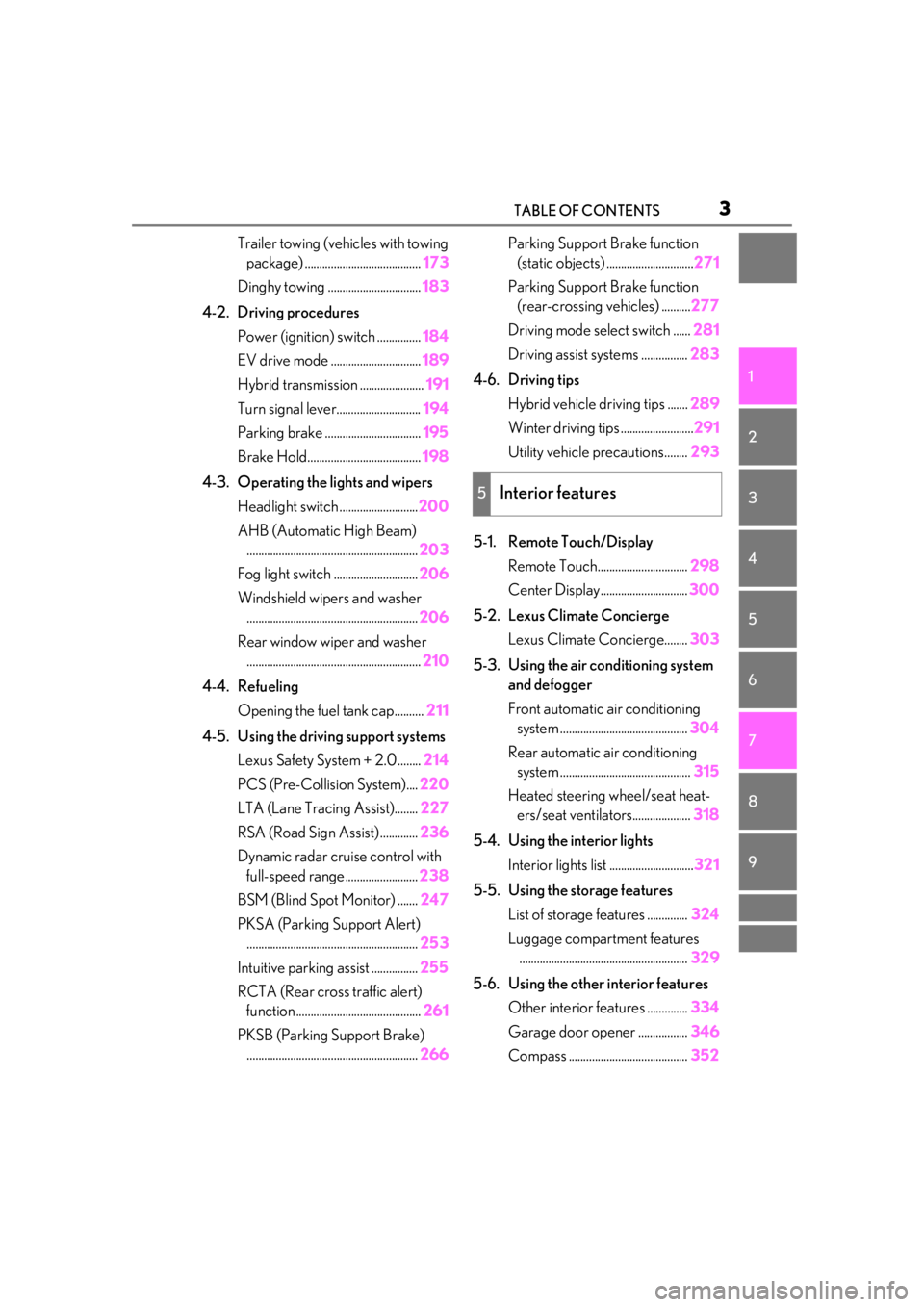
3TABLE OF CONTENTS
1
2
3
4
5
6
7
8
9
Trailer towing (vehicles with towing package) ........................................ 173
Dinghy towing ................................ 183
4-2. Driving procedures Power (ignition) switch ............... 184
EV drive mode ............................... 189
Hybrid transmission ...................... 191
Turn signal lever............................. 194
Parking brake ................................. 195
Brake Hold....................................... 198
4-3. Operating the lights and wipers Headlight switch ........................... 200
AHB (Automatic High Beam) ........................................................... 203
Fog light switch ............................. 206
Windshield wipers and washer ........................................................... 206
Rear window wiper and washer ............................................................ 210
4-4. Refueling Opening the fuel tank cap.......... 211
4-5. Using the driving support systems Lexus Safety System + 2.0 ........ 214
PCS (Pre-Collision System).... 220
LTA (Lane Tracing Assist)........ 227
RSA (Road Sign Assist) ............. 236
Dynamic radar crui se control with
full-speed range......................... 238
BSM (Blind Spot Monitor) ....... 247
PKSA (Parking Support Alert) ........................................................... 253
Intuitive parking assist ................ 255
RCTA (Rear cross traffic alert) function ........................................... 261
PKSB (Parking Support Brake) ........................................................... 266Parking Support Brake function
(static objects) .............................. 271
Parking Support Brake function (rear-crossing vehicles) .......... 277
Driving mode select switch ...... 281
Driving assist systems ................ 283
4-6. Driving tips Hybrid vehicle driving tips ....... 289
Winter driving tips ......................... 291
Utility vehicle precautions........ 293
5-1. Remote Touch/Display Remote Touch............................... 298
Center Display.............................. 300
5-2. Lexus Climate Concierge Lexus Climate Concierge........ 303
5-3. Using the air conditioning system and defogger
Front automatic air conditioning system ............................................ 304
Rear automatic air conditioning system ............................................. 315
Heated steering wheel/seat heat- ers/seat ventilators.................... 318
5-4. Using the interior lights Interior lights list ............................. 321
5-5. Using the storage features List of storage features .
.............324
Luggage compartment features .......................................................... 329
5-6. Using the other interior features Other interior features .............. 334
Garage door opener ................. 346
Compass ......................................... 352
5Interior features
Page 79 of 528
792-1. Instrument cluster
2
Vehicle status information and indicators
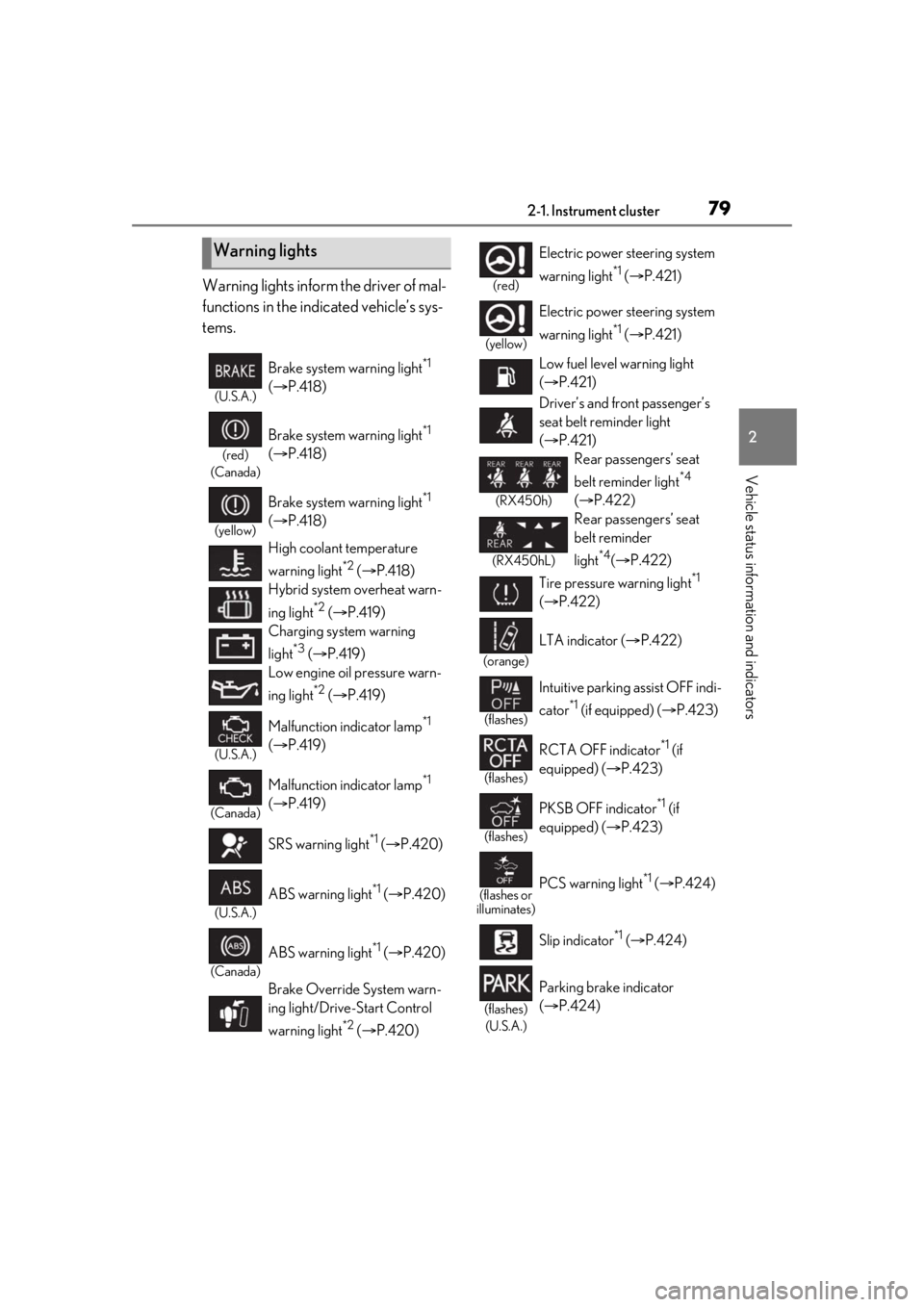
Warning lights inform the driver of mal-
functions in the indicated vehicle’s sys-
tems.
Warning lights
(U.S.A.)
Brake system warning light*1
( P.418)
(red)
(Canada)
Brake system warning light*1
( P.418)
(yellow)
Brake system warning light*1
( P.418)
High coolant temperature
warning light
*2 ( P.418)
Hybrid system overheat warn-
ing light
*2 ( P.419)
Charging system warning
light
*3 ( P.419)
Low engine oil pressure warn-
ing light
*2 ( P.419)
(U.S.A.)
Malfunction indicator lamp*1
( P.419)
(Canada)
Malfunction indicator lamp*1
( P.419)
SRS warning light
*1 ( P.420)
(U.S.A.)
ABS warning light*1 ( P.420)
(Canada)
ABS warning light*1 ( P.420)
Brake Override System warn-
ing light/Drive-Start Control
warning light
*2 ( P.420)
(red)
Electric power steering system
warning light
*1 ( P.421)
(yellow)
Electric power steering system
warning light
*1 ( P.421)
Low fuel level warning light
( P.421)
Driver’s and front passenger’s
seat belt reminder light
( P.421)
(RX450h)
Rear passengers’ seat
belt reminder light
*4
( P.422)
(RX450hL)
Rear passengers’ seat
belt reminder
light
*4( P.422)
Tire pressure warning light
*1
( P.422)
(orange)
LTA indicator ( P.422)
(flashes)
Intuitive parking assist OFF indi-
cator
*1 (if equipped) ( P.423)
(flashes)
RCTA OFF indicator*1 (if
equipped) ( P.423)
(flashes)
PKSB OFF indicator*1 (if
equipped) ( P.423)
(flashes or
illuminates)PCS warning light*1 ( P.424)
Slip indicator
*1 ( P.424)
(flashes)
(U.S.A.)
Parking brake indicator
( P.424)
Page 81 of 528
812-1. Instrument cluster
2
Vehicle status information and indicators
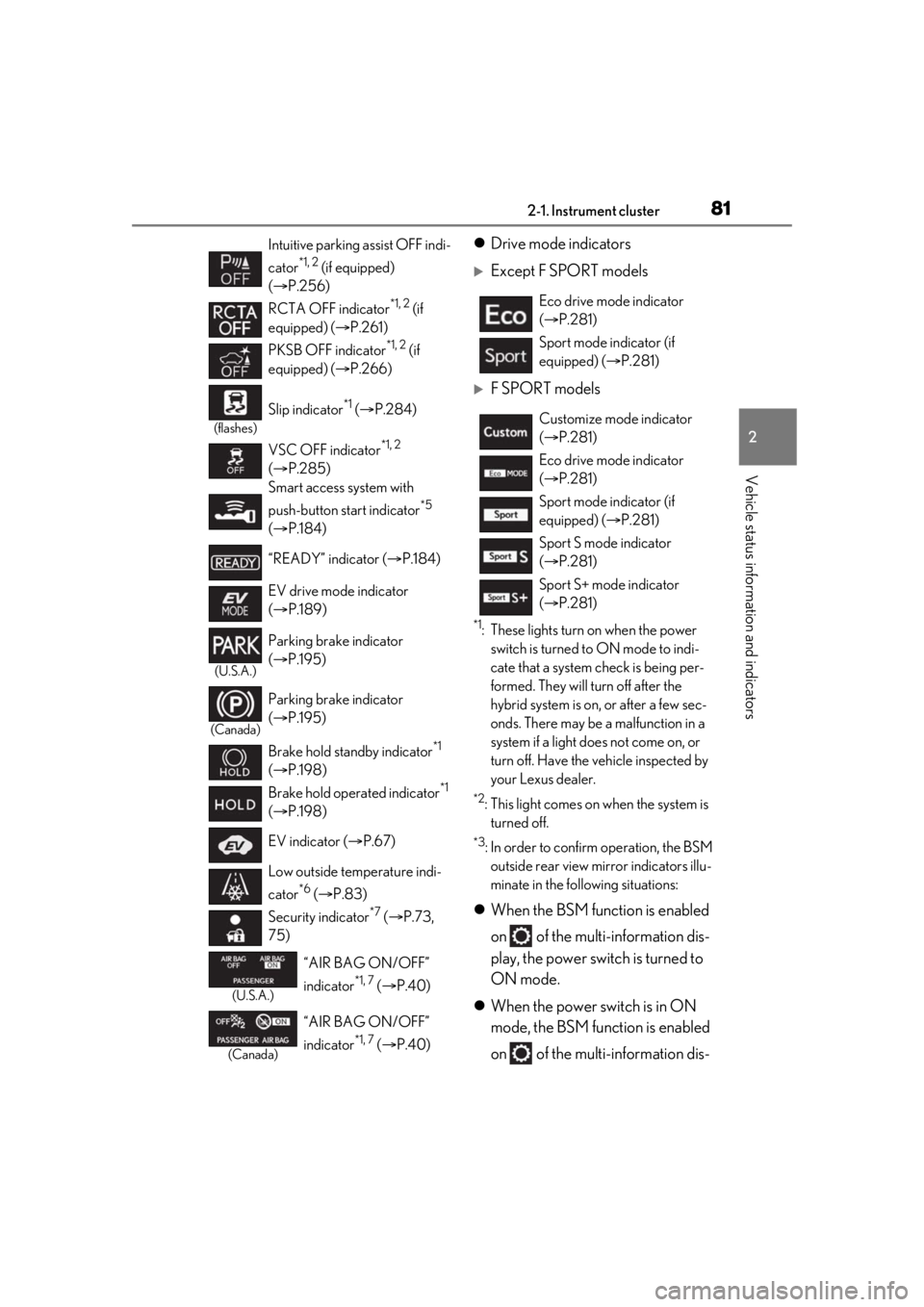
Drive mode indicators
Except F SPORT models
F SPORT models
*1: These lights turn on when the power
switch is turned to ON mode to indi-
cate that a system check is being per-
formed. They will turn off after the
hybrid system is on, or after a few sec-
onds. There may be a malfunction in a
system if a light does not come on, or
turn off. Have the vehicle inspected by
your Lexus dealer.
*2: This light comes on when the system is turned off.
*3: In order to confirm operation, the BSM outside rear view mirror indicators illu-
minate in the following situations:
When the BSM function is enabled
on of the multi-information dis-
play, the power switch is turned to
ON mode.
When the power switch is in ON
mode, the BSM function is enabled
on of the multi-information dis-
Intuitive parking assist OFF indi-
cator
*1, 2 (if equipped)
( P.256)
RCTA OFF indicator
*1, 2 (if
equipped) ( P.261)
PKSB OFF indicator
*1, 2 (if
equipped) ( P.266)
(flashes)
Slip indicator*1 ( P.284)
VSC OFF indicator
*1, 2
( P.285)
Smart access system with
push-button start indicator
*5
( P.184)
“READY” indicator ( P.184)
EV drive mode indicator
( P.189)
(U.S.A.)
Parking brake indicator
( P.195)
(Canada)
Parking brake indicator
( P.195)
Brake hold standby indicator
*1
( P.198)
Brake hold operated indicator
*1
( P.198)
EV indicator ( P.67)
Low outside temperature indi-
cator
*6 ( P.83)
Security indicator
*7 ( P.73,
75)
(U.S.A.)
“AIR BAG ON/OFF”
indicator
*1, 7 ( P.40)
(Canada)
“AIR BAG ON/OFF”
indicator
*1, 7 ( P.40)
Eco drive mode indicator
( P.281)
Sport mode indicator (if
equipped) ( P.281)
Customize mode indicator
( P.281)
Eco drive mode indicator
( P.281)
Sport mode indicator (if
equipped) ( P.281)
Sport S mode indicator
( P.281)
Sport S+ mode indicator
( P.281)
Page 95 of 528
952-1. Instrument cluster
2
Vehicle status information and indicators
*:If equipped
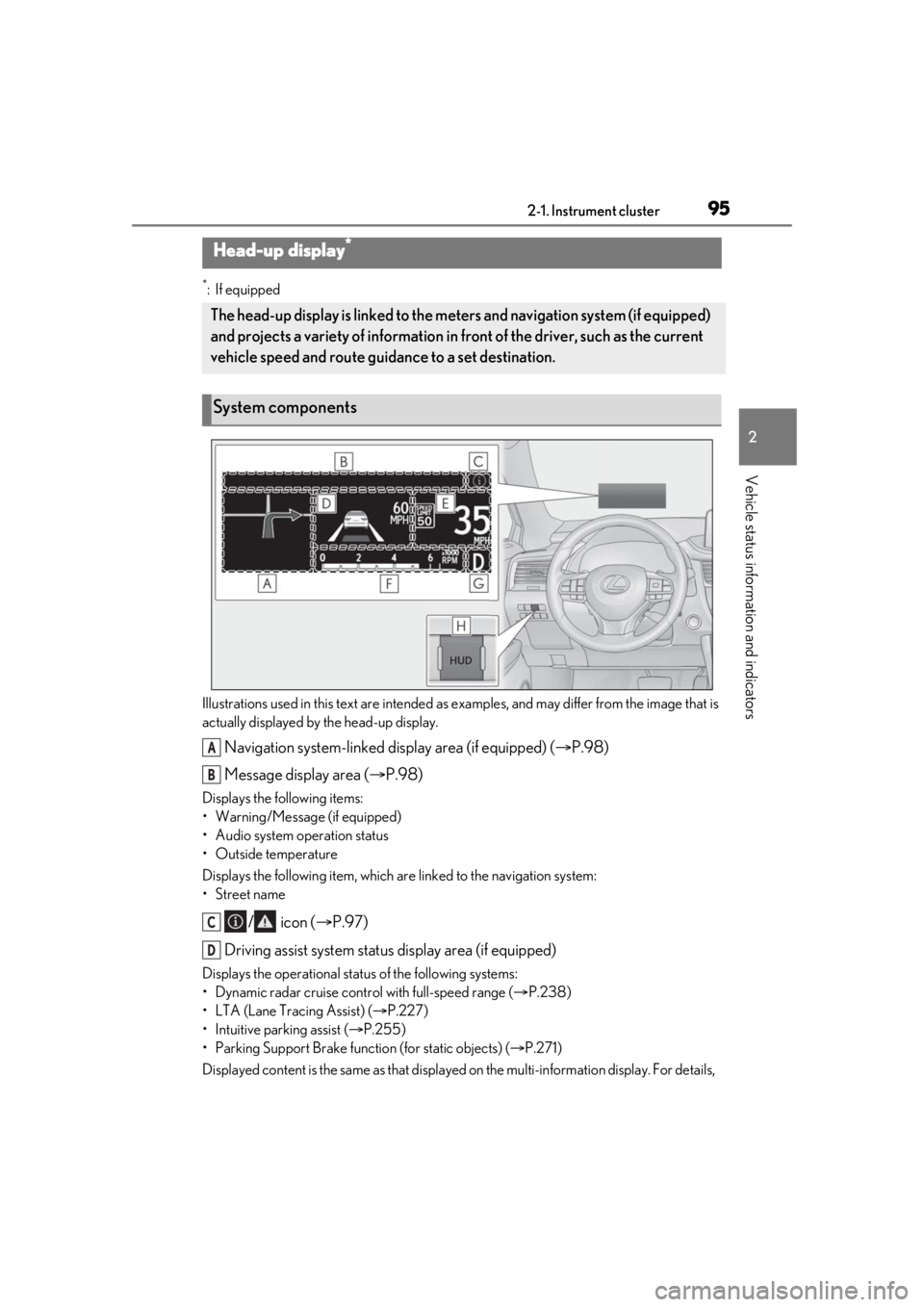
Illustrations used in this text are intended as examples, and may differ from the image that is
actually displayed by the head-up display.
Navigation system-linked display area (if equipped) ( P.98)
Message display area ( P.98)
Displays the following items:
• Warning/Message (if equipped)
• Audio system operation status
• Outside temperature
Displays the following item, which ar e linked to the navigation system:
•Street name
/ icon ( P.97)
Driving assist system status display area (if equipped)
Displays the operational stat us of the following systems:
• Dynamic radar cruise control with full-speed range ( P.238)
• LTA (Lane Tracing Assist) ( P.227)
• Intuitive parking assist ( P.255)
• Parking Support Brake function (for static objects) (P.271)
Displayed content is the same as that displaye d on the multi-information display. For details,
Head-up display*
The head-up display is linked to the meters and navigation system (if equipped)
and projects a variety of information in front of the driver, such as the current
vehicle speed and route guidance to a set destination.
System components
A
B
C
D
Page 97 of 528
972-1. Instrument cluster
2
Vehicle status information and indicators
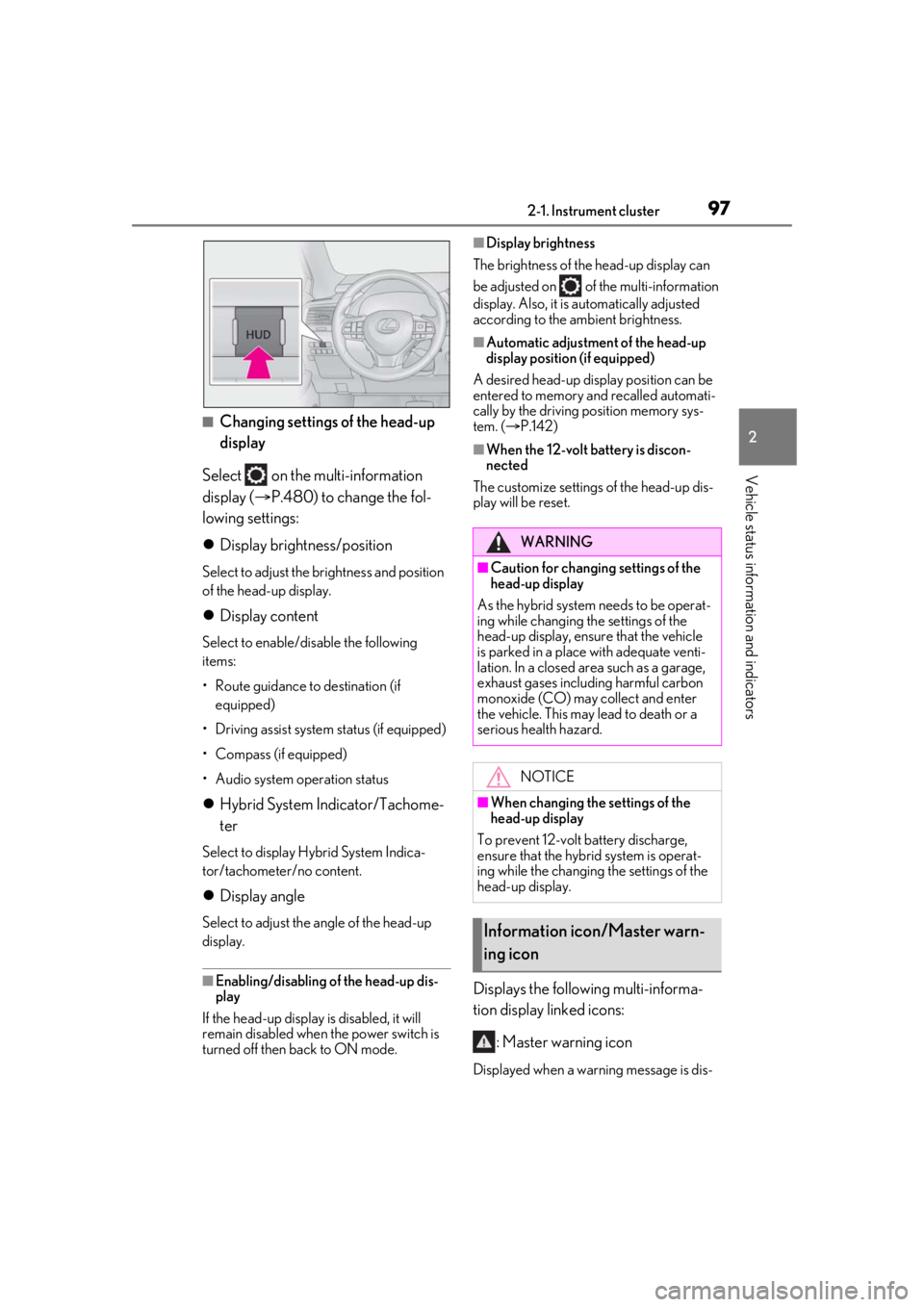
■Changing settings of the head-up
display
Select on the multi-information
display ( P.480) to change the fol-
lowing settings:
Display brightness/position
Select to adjust the brightness and position
of the head-up display.
Display content
Select to enable/dis able the following
items:
• Route guidance to destination (if equipped)
• Driving assist system status (if equipped)
• Compass (if equipped)
• Audio system operation status
Hybrid System Indicator/Tachome-
ter
Select to display Hybrid System Indica-
tor/tachometer/no content.
Display angle
Select to adjust the angle of the head-up
display.
■Enabling/disabling of the head-up dis-
play
If the head-up display is disabled, it will
remain disabled when the power switch is
turned off then back to ON mode.
■Display brightness
The brightness of the head-up display can
be adjusted on of the multi-information
display. Also, it is automatically adjusted
according to the ambient brightness.
■Automatic adjustment of the head-up
display position (if equipped)
A desired head-up display position can be
entered to memory and recalled automati-
cally by the driving position memory sys-
tem. ( P.142)
■When the 12-volt battery is discon-
nected
The customize settings of the head-up dis-
play will be reset.
Displays the following multi-informa-
tion display linked icons:
: Master warning icon
Displayed when a warn ing message is dis-
WARNING
■Caution for changing settings of the
head-up display
As the hybrid system needs to be operat-
ing while changing th e settings of the
head-up display, ensure that the vehicle
is parked in a place with adequate venti-
lation. In a closed area such as a garage,
exhaust gases including harmful carbon
monoxide (CO) may collect and enter
the vehicle. This may lead to death or a
serious health hazard.
NOTICE
■When changing the settings of the
head-up display
To prevent 12-volt battery discharge,
ensure that the hybrid system is operat-
ing while the changing the settings of the
head-up display.
Information icon/Master warn-
ing icon
Page 127 of 528

1273-2. Opening, closing and locking the doors
3
Before driving
devices
• Another vehicle’s electronic key, another electronic key of your vehicle, or a wire-
less key that emits radio waves
• Personal computers or personal digital assistants (PDAs)
• Digital audio players
• Portable game systems
●If window tint with a metallic content or
metallic objects are attached to the rear
window
●When the electronic key is placed near a
battery charger or electronic devices
●When the vehicle is parked in a pay park-
ing spot where radio waves are emitted
■Note for the entry function
●Even when the electronic key is within the
effective range (detection areas), the sys-
tem may not operate properly in the fol-
lowing cases:
• The electronic key is too close to the win-
dow or outside door handle, near the
ground, or in a high place when the doors
are locked or unlocked.
• The electronic key is near the ground or in a high place, or too close to the rear
bumper center when the back door is
opened.
• The electronic key is on the instrument panel, luggage compar tment, floor, or in
the door pockets or glove box when the
hybrid system is star ted or power switch
modes are changed.
●Do not leave the electronic key on top of
the instrument panel or near the door
pockets when exiting the vehicle.
Depending on the radio wave reception
conditions, it may be detected by the
antenna outside the cabin and the door
will become lockable from the outside,
possibly trapping the electronic key
inside the vehicle.
●As long as the electron ic key is within the
effective range, the doors may be locked
or unlocked by anyone.
●Even if the electronic key is not inside the
vehicle, it may be possible to start the
hybrid system if the electronic key is near
the window.
●The doors may unlock if a large amount of water splashes on the door handle,
such as in the rain or in a car wash when
the electronic key is
within the effective
range. (The door will automatically be
locked after approximately 60 seconds if
the doors are not opened and closed.)
●If the wireless remote control is used to
lock the doors when the electronic key is
near the vehicle, there is a possibility that
the door may not be unlocked by the
entry function. (Use the wireless remote
control to unlock the doors.)
●Touching the door lock sensor while
wearing gloves may delay or prevent lock
operation. Remove the gloves and touch
the lock sensor again.
●When the lock operation is performed
using the lock sensor, recognition signals
will be shown up to two consecutive
times. After this, no recognition signals
will be given.
●If the door handle becomes wet while the
electronic key is within the effective
range, the door may lock and unlock
repeatedly. In that case, follow the follow-
ing correction procedures to wash the
vehicle:
• Place the electronic key in a location 6 ft. (2 m) or more away from the vehicle.
(Take care to ensure that the key is not
stolen.)
• Set the electronic key to battery-saving
mode to disable the smart access system
with push-button start. ( P.126)
●If the electronic key is inside the vehicle
and a door handle becomes wet during a
car wash, a message may be shown on
the multi-information display and a
buzzer will sound outside the vehicle. To
turn off the alarm, lock all the doors.
●The lock sensor may not work properly if
it comes into contact with ice, snow, mud,
etc. Clean the lock sensor and attempt to
operate it again.
●A sudden approach to the effective
range or door handle may prevent the
doors from being unlocked. In this case,
return the door handle to the original
position and check that the doors unlock
before pulling the door handle again.
●If there is another electronic key in the
Page 163 of 528
163
4
4
Driving
Driving
.4-1. Before drivingDriving the vehicle ..................... 164
Cargo and luggage ................... 169
Vehicle load limits ...................... 172
Trailer towing (vehicles without towing package) ...................... 173
Trailer towing (vehicles with tow- ing package).............................. 173
Dinghy towing ............................. 183
4-2. Driving procedures Power (ignition) switch ............ 184
EV drive mode ............................ 189
Hybrid transmission ................... 191
Turn signal lever.......................... 194
Parking brake .............................. 195
Brake Hold.................................... 198
4-3. Operating the lights and wipers Headlight switch ........................ 200
AHB (Automatic High Beam) ........................................................ 203
Fog light switch .......................... 206
Windshield wipers and washer ........................................................ 206
Rear window wiper and washer ......................................................... 210
4-4. Refueling Opening the fuel tank cap....... 211
4-5. Using the driving support sys- tems
Lexus Safety System + 2.0 ..... 214PCS (Pre-Collision System)
....................................................... 220
LTA (Lane Tracing Assist) ..... 227
RSA (Road Sign Assist).......... 236
Dynamic radar cruise control with full-speed range...................... 238
BSM (Blind Spot Monitor) .... 247
PKSA (Parking Support Alert) ....................................................... 253
Intuitive parking assist ............. 255
RCTA (Rear cross traffic alert) function........................................ 261
PKSB (Parking Support Brake) ....................................................... 266
Parking Support Brake function (static objects) ........................... 271
Parking Support Brake function (rear-crossing vehicles) ...... 277
Driving mode select switch ... 281
Driving assist systems.............. 283
4-6. Driving tips Hybrid vehicle driving tips .... 289
Winter driving tips ..................... 291
Utility vehicle precautions..... 293
Page 164 of 528
1644-1. Before driving
4-1.Before driving
■Starting the hybrid system
P.184
■Driving
1 With the brake pedal depressed,
shift the shift lever to D. ( P.191)
2 Release the parking brake.
(P.195)
If the parking brake is in automatic mode,
the parking brake is released automatically
when shifting the shift lever to any position
other than P. ( P.196)
3 Gradually release the brake pedal
and gently depress the accelerator
pedal to accelerate the vehicle.
■Stopping
1 With the shift lever in D, depress the
brake pedal.
2 If necessary, set the parking brake.
(P.195)
If the vehicle is to be stopped for an
extended period of time, shift the shift lever
to P or N. ( P.191)
■Parking the vehicle
1 With the shift lever in D, depress the
brake pedal.
2 Set the parking brake ( P.195),
and shift the shift lever to P
( P.191).
3 Press the power switch to stop the
hybrid system. 4
Lock the door, making sure that you
have the electronic key on your
person.
If parking on a hill, block the wheels as
needed.
■Starting off on a steep uphill
1 With the brake pedal depressed,
shift the shift lever to D. ( P.191)
2 Pull the parking brake switch and
parking brake is set manually.
(P.195)
3 Release the brake pedal and gently
depress the accelerator pedal to
accelerate the vehicle.
4 Press the parking brake switch and
parking brake is released manually.
■When starting off on a uphill
The hill-start assist control will activate.
( P.284)
■For fuel-efficient driving
Keep in mind that hybr id vehicles are similar
to conventional vehicles, and it is necessary
to refrain from activi ties such as sudden
acceleration. ( P.289)
■Driving in the rain
●Drive carefully when it is raining, because
visibility will be reduced, the windows
may become fogged-up, and the road
will be slippery.
●Drive carefully when it starts to rain,
because the road surface will be espe-
cially slippery.
●Refrain from high speeds when driving on
an expressway in the rain, because there
may be a layer of wa ter between the tires
and the road surface, preventing the
steering and brakes from operating prop-
erly.
■Restraining the hybrid system output
(Brake Override System)
●When the accelerato r and brake pedals
are depressed at the same time, the
Driving the vehicle
The following procedures should be
observed to ensure safe driving:
Driving procedure
Page 186 of 528
1864-2. Driving procedures
1Stop the vehicle completely.
2 Set the parking brake ( P.195),
and shift the shift lever to P.
3 Press the power switch.
4 Release the brake pedal and check
that the display on the meters is off.
■Automatic hybrid system shut off fea-
ture
●The vehicle is equipped with a feature
that automatically shuts off the hybrid sys-
tem when the shift lever is in P with the
hybrid system operating for an extended
period.
●The hybrid system will automatically shut
off after approximately 1 hour if it has
been left running while the shift lever is in
P.
●The timer for the automatic hybrid system
shut off feature will reset if the brake
pedal is depressed or if the shift lever is in
a position other than P.
●After the vehicle is parked, if the door is
locked with the door lock switch ( P.111)
from the inside or the mechanical key
from the outside, the automatic hybrid
system shut off feature will be disabled.
The timer for the automatic hybrid system
shut off feature will be re-enabled if the
driver’s door is opened.
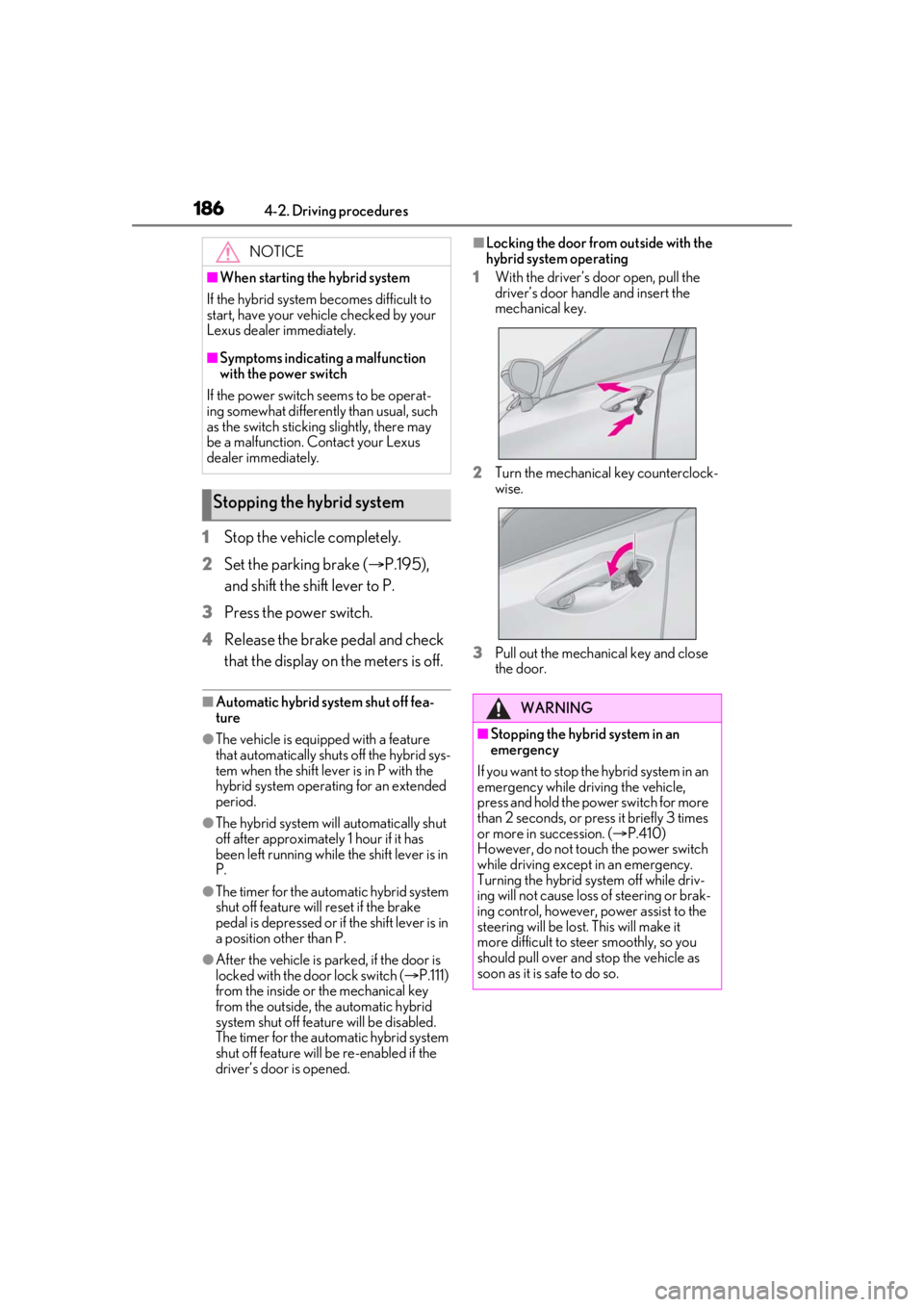
■Locking the door from outside with the
hybrid system operating
1 With the driver’s door open, pull the
driver’s door hand le and insert the
mechanical key.
2 Turn the mechanical key counterclock-
wise.
3 Pull out the mechanical key and close
the door.NOTICE
■When starting the hybrid system
If the hybrid system becomes difficult to
start, have your vehicle checked by your
Lexus dealer immediately.
■Symptoms indicating a malfunction
with the power switch
If the power switch seems to be operat-
ing somewhat differently than usual, such
as the switch sticking slightly, there may
be a malfunction. Contact your Lexus
dealer immediately.
Stopping the hybrid system
WARNING
■Stopping the hybrid system in an
emergency
If you want to stop the hybrid system in an
emergency while driving the vehicle,
press and hold the power switch for more
than 2 seconds, or pr ess it briefly 3 times
or more in succession. ( P.410)
However, do not touch the power switch
while driving except in an emergency.
Turning the hybrid system off while driv-
ing will not cause loss of steering or brak-
ing control, however, power assist to the
steering will be lost. This will make it
more difficult to steer smoothly, so you
should pull over and stop the vehicle as
soon as it is safe to do so.
Page 253 of 528
2534-5. Using the driving support systems
4
Driving
ations:
• When the sensor is misaligned due to a strong impact to the sensor or its sur-
rounding area
• When the distance between your vehicle and a guardrail, wall, etc. that enters the
detection area is short
• When driving up an d down consecutive
steep inclines, such as hills, dips in the
road, etc.
• When vehicle lanes are narrow, or when driving on the edge of a lane, and a vehi-
cle traveling in a lane other than the adja-
cent lanes enters the detection area
• When driving on roads with sharp bends,
consecutive curves, or uneven surfaces
• When the tires are slipping or spinning
• When the distance between your vehicle and a following vehicle is short
• When an accessory (such as a bicycle carrier) is installed to the rear of the vehi-
cle
*: If equipped
■Intuitive parking assist (if
equipped)
Ultrasonic sensors are used to detect
static objects in the detection area
when driving at a low speed or backing
up. ( P.255)
■RCTA (Rear Cross Traffic Alert)
function (if equipped)
Rear side radar sensors are used to
detect approaching vehicles in the
detection areas behind the vehicle
when backing up. ( P.261)
■Adjusting the buzzer volume
The buzzer volume can be adjusted on
the multi-information display. The vol-
ume of buzzers for the intuitive parking
assist and RCTA function will be
PKSA (Parking Support
Alert)*
The Parking Support Alert system
consists of the following functions
that operate when driving at a low
speed or backing up, such as when
parking. When the system deter-
mines that the possibility of a colli-
sion with a detected object or such
as a wall is high, a warning operates
to urge the driver to take evasive
action.
PKSA (Parking Support Alert)
system
Setting the buzzer volume