sport mode LEXUS RX450h 2021 Owners Manual
[x] Cancel search | Manufacturer: LEXUS, Model Year: 2021, Model line: RX450h, Model: LEXUS RX450h 2021Pages: 528, PDF Size: 10.73 MB
Page 78 of 528
782-1. Instrument cluster
2-1.Instrument cluster
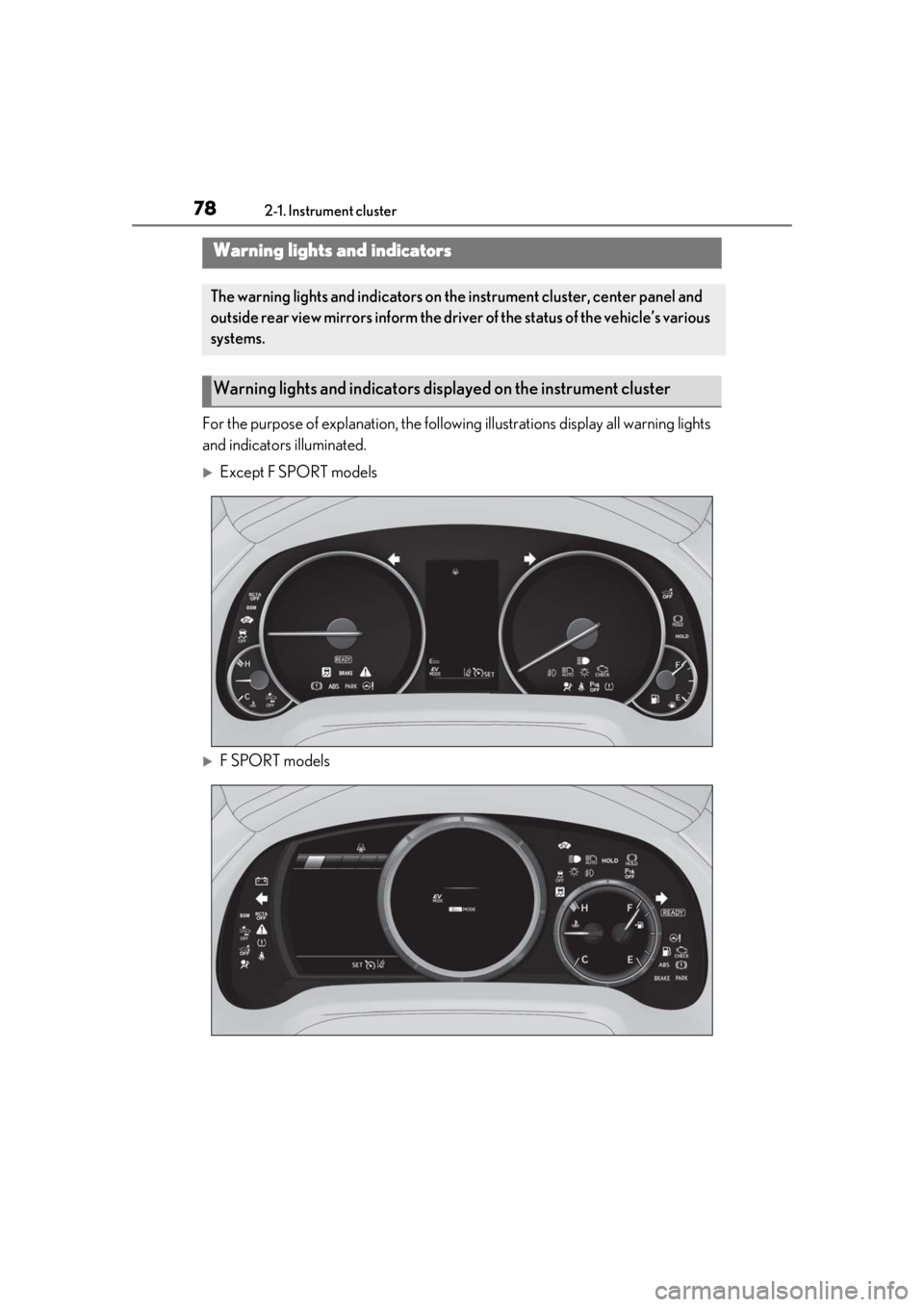
For the purpose of explanation, the following illustrations display all warning lights
and indicators illuminated.
Except F SPORT models
F SPORT models
Warning lights and indicators
The warning lights and indicators on th e instrument cluster, center panel and
outside rear view mirrors inform the driver of the status of the vehicle’s various
systems.
Warning lights and indicators displayed on the instrument cluster
Page 80 of 528
802-1. Instrument cluster
*1: These lights turn on when the power switch is turned to ON mode to indi-
cate that a system check is being per-
formed. They will turn off after the
hybrid system is on, or after a few sec-
onds. There may be a malfunction in a
system if a light does not come on, or
turn off. Have the vehicle inspected by
your Lexus dealer.
*2: This light illuminates on the multi-infor-mation display.
*3: Except F SPORT models: This light illu-minates on the multi-information dis-
play.
F SPORT models: This light illuminates
on the meter.
*4: This light illuminates on the center panel.
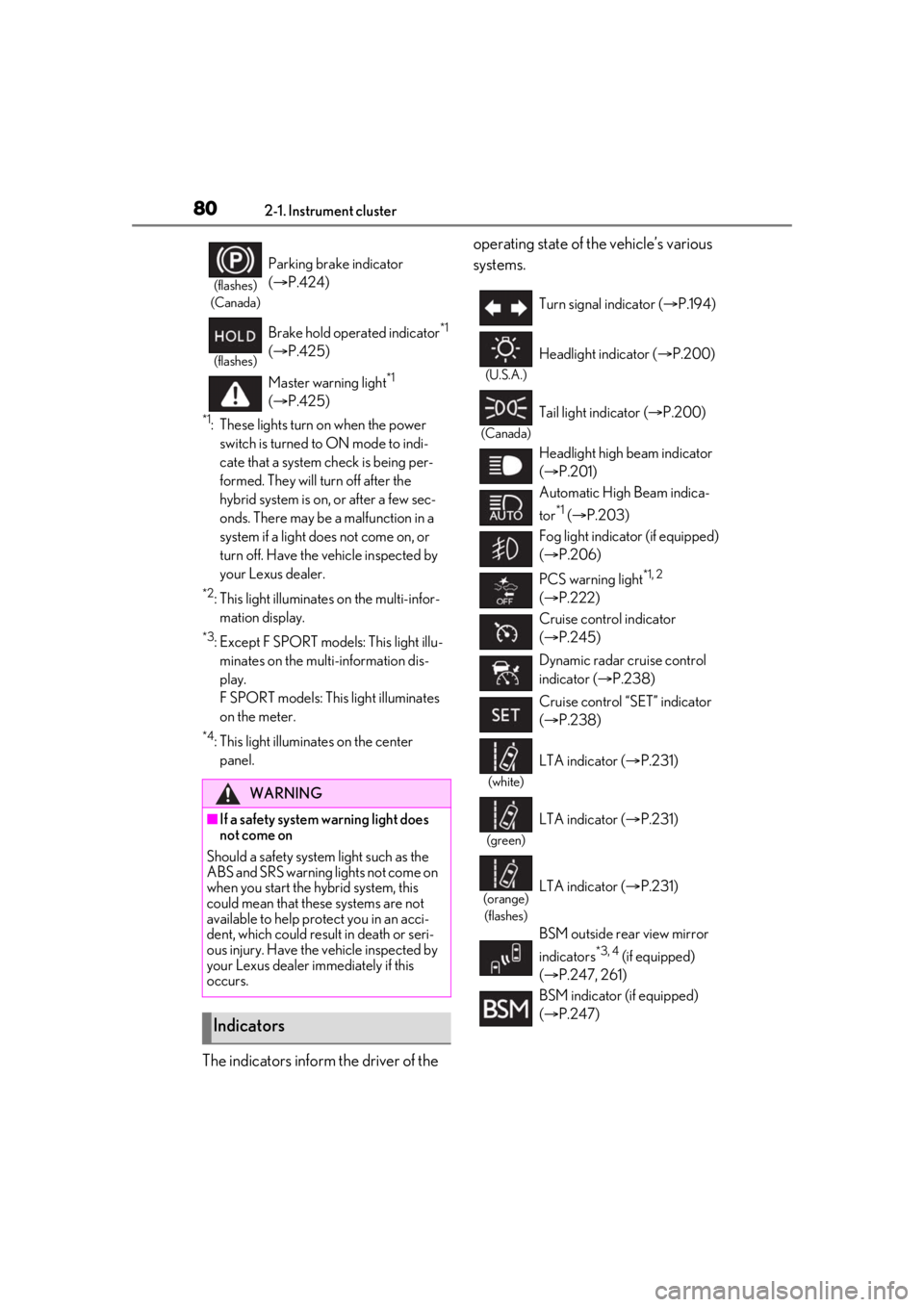
The indicators inform the driver of the operating state of the vehicle’s various
systems.
(flashes)
(Canada)
Parking brake indicator
( P.424)
(flashes)
Brake hold operated indicator*1
( P.425)
Master warning light
*1
( P.425)
WARNING
■If a safety system warning light does
not come on
Should a safety system light such as the
ABS and SRS warning lights not come on
when you start the hybrid system, this
could mean that these systems are not
available to help pr otect you in an acci-
dent, which could result in death or seri-
ous injury. Have the vehicle inspected by
your Lexus dealer immediately if this
occurs.
Indicators
Turn signal indicator ( P.194)
(U.S.A.)
Headlight indicator ( P.200)
(Canada)
Tail light indicator ( P.200)
Headlight high beam indicator
( P.201)
Automatic High Beam indica-
tor
*1 ( P.203)
Fog light indicator (if equipped)
( P.206)
PCS warning light
*1, 2
( P.222)
Cruise control indicator
( P.245)
Dynamic radar cruise control
indicator ( P.238)
Cruise control “SET” indicator
( P.238)
(white)
LTA indicator ( P.231)
(green)
LTA indicator ( P.231)
(orange)
(flashes)LTA indicator ( P.231)
BSM outside rear view mirror
indicators
*3, 4 (if equipped)
( P.247, 261)
BSM indicator (if equipped)
( P.247)
Page 81 of 528
812-1. Instrument cluster
2
Vehicle status information and indicators
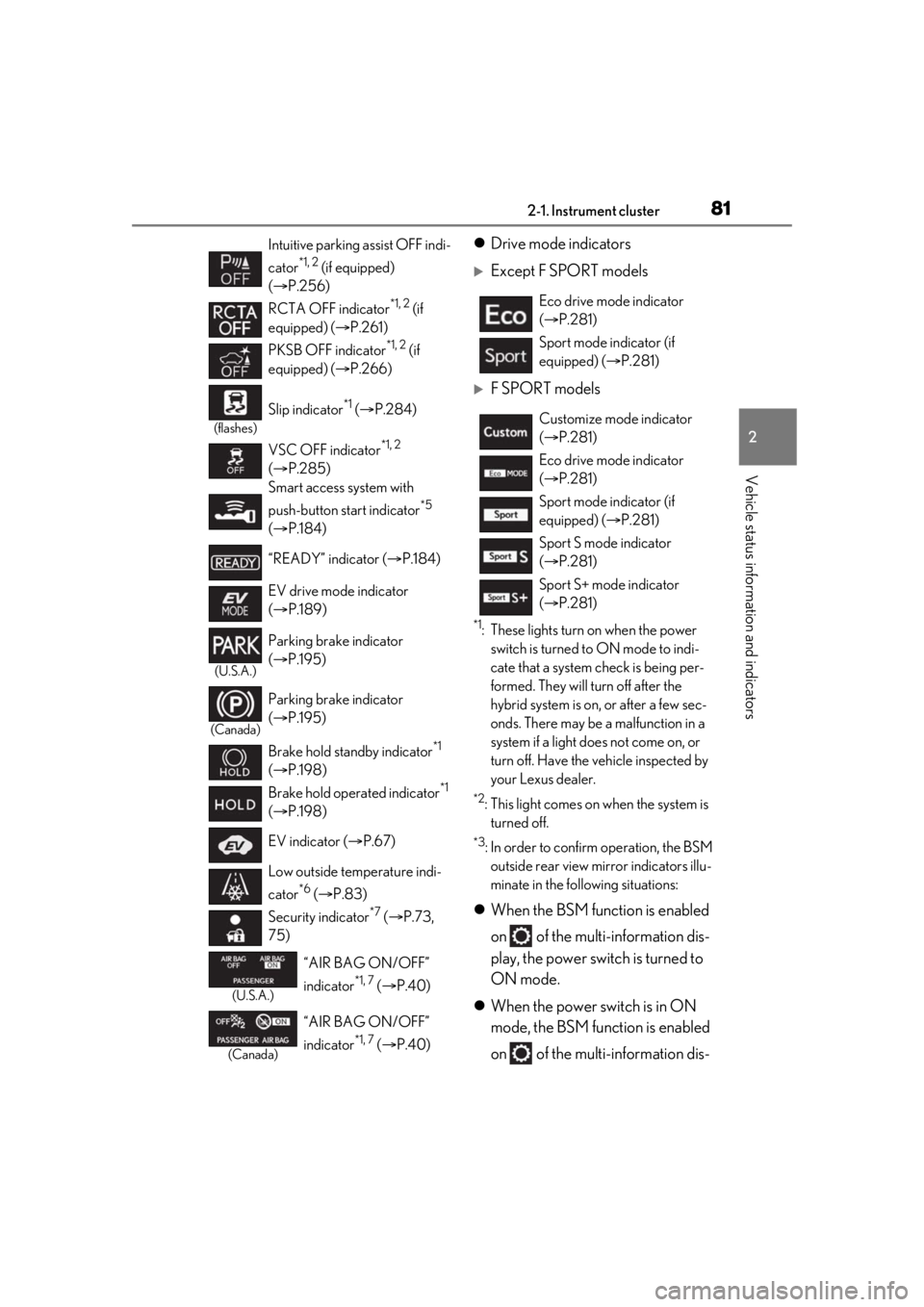
Drive mode indicators
Except F SPORT models
F SPORT models
*1: These lights turn on when the power
switch is turned to ON mode to indi-
cate that a system check is being per-
formed. They will turn off after the
hybrid system is on, or after a few sec-
onds. There may be a malfunction in a
system if a light does not come on, or
turn off. Have the vehicle inspected by
your Lexus dealer.
*2: This light comes on when the system is turned off.
*3: In order to confirm operation, the BSM outside rear view mirror indicators illu-
minate in the following situations:
When the BSM function is enabled
on of the multi-information dis-
play, the power switch is turned to
ON mode.
When the power switch is in ON
mode, the BSM function is enabled
on of the multi-information dis-
Intuitive parking assist OFF indi-
cator
*1, 2 (if equipped)
( P.256)
RCTA OFF indicator
*1, 2 (if
equipped) ( P.261)
PKSB OFF indicator
*1, 2 (if
equipped) ( P.266)
(flashes)
Slip indicator*1 ( P.284)
VSC OFF indicator
*1, 2
( P.285)
Smart access system with
push-button start indicator
*5
( P.184)
“READY” indicator ( P.184)
EV drive mode indicator
( P.189)
(U.S.A.)
Parking brake indicator
( P.195)
(Canada)
Parking brake indicator
( P.195)
Brake hold standby indicator
*1
( P.198)
Brake hold operated indicator
*1
( P.198)
EV indicator ( P.67)
Low outside temperature indi-
cator
*6 ( P.83)
Security indicator
*7 ( P.73,
75)
(U.S.A.)
“AIR BAG ON/OFF”
indicator
*1, 7 ( P.40)
(Canada)
“AIR BAG ON/OFF”
indicator
*1, 7 ( P.40)
Eco drive mode indicator
( P.281)
Sport mode indicator (if
equipped) ( P.281)
Customize mode indicator
( P.281)
Eco drive mode indicator
( P.281)
Sport mode indicator (if
equipped) ( P.281)
Sport S mode indicator
( P.281)
Sport S+ mode indicator
( P.281)
Page 83 of 528
832-1. Instrument cluster
2
Vehicle status information and indicators
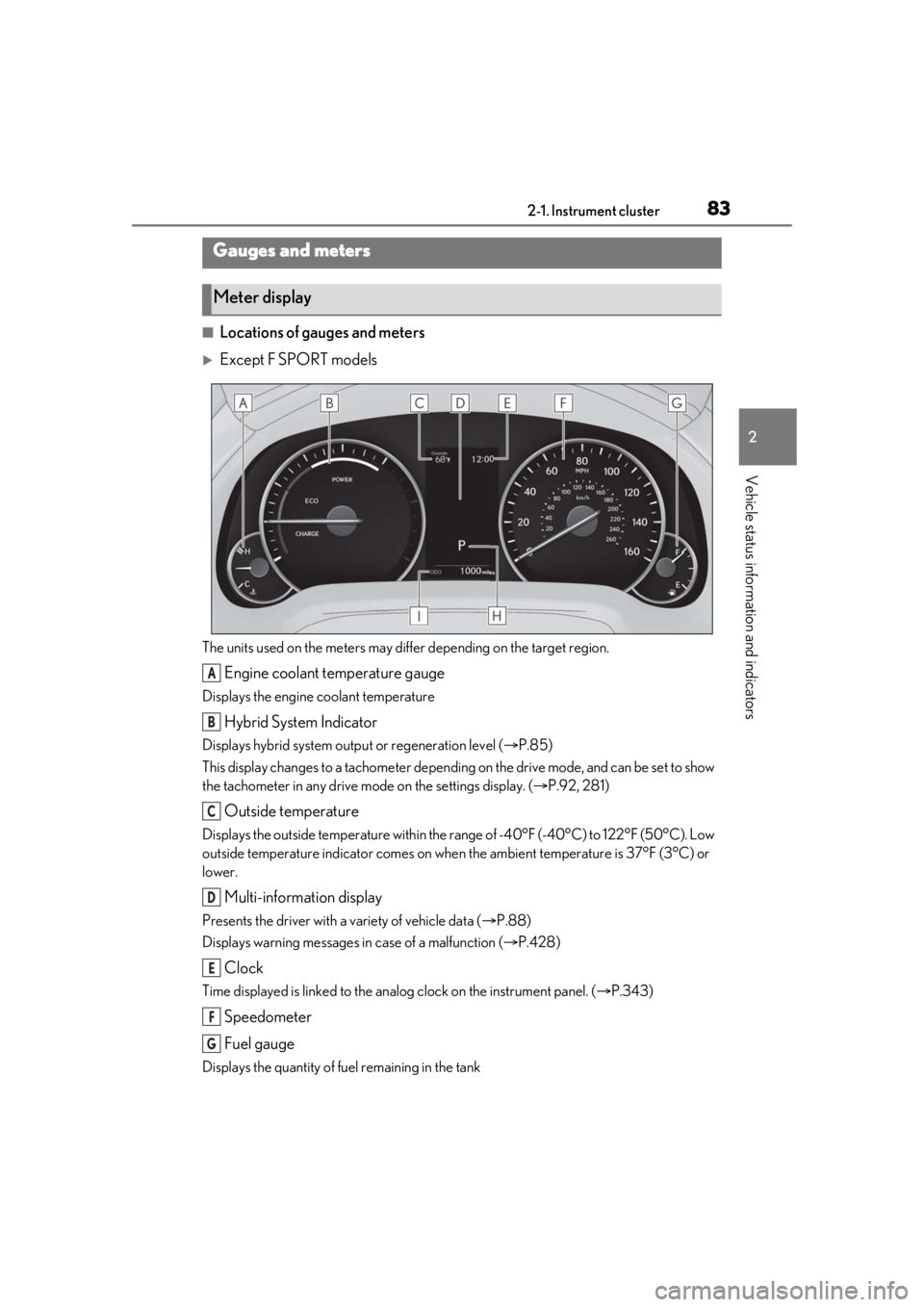
■Locations of gauges and meters
Except F SPORT models
The units used on the meters may differ depending on the target region.
Engine coolant temperature gauge
Displays the engine coolant temperature
Hybrid System Indicator
Displays hybrid system output or regeneration level (P.85)
This display changes to a tachometer depending on the drive mode, and can be set to show
the tachometer in any drive mode on the settings display. ( P.92, 281)
Outside temperature
Displays the outside temperature within the range of -40°F (-40°C) to 122°F (50°C). Low
outside temperature indicator comes on when the ambient temperature is 37°F (3°C) or
lower.
Multi-information display
Presents the driver with a variety of vehicle data ( P.88)
Displays warning messages in case of a malfunction (P.428)
Clock
Time displayed is linked to the analog clock on the instrument panel. (P.343)
Speedometer
Fuel gauge
Displays the quantity of fuel remaining in the tank
Gauges and meters
Meter display
A
B
C
D
E
F
G
Page 84 of 528
842-1. Instrument cluster
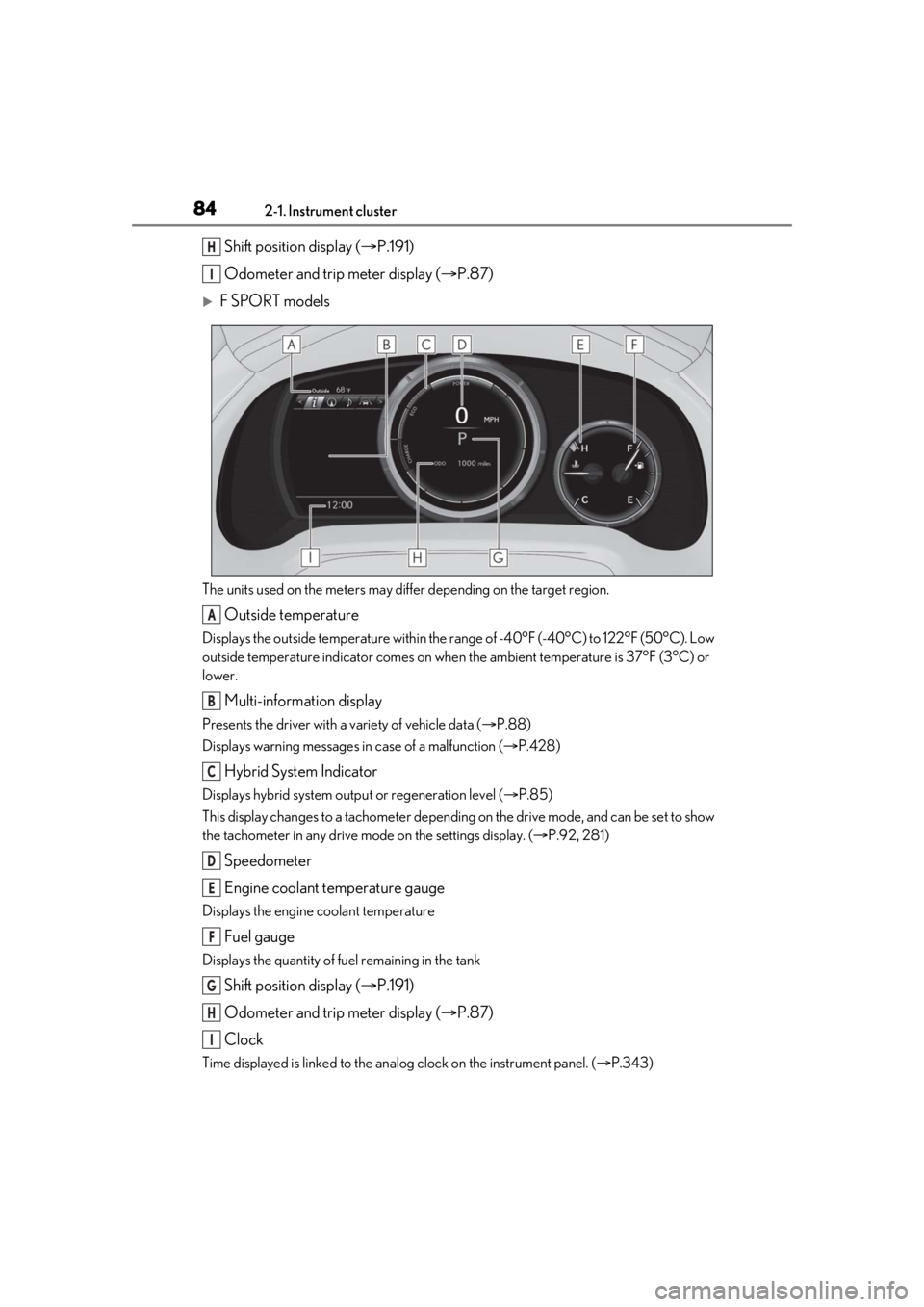
Shift position display (P.191)
Odometer and trip meter display ( P.87)
F SPORT models
The units used on the meters may differ depending on the target region.
Outside temperature
Displays the outside temperature within the range of -40°F (-40°C) to 122°F (50°C). Low
outside temperature indicator comes on when the ambient temperature is 37°F (3°C) or
lower.
Multi-information display
Presents the driver with a variety of vehicle data ( P.88)
Displays warning messages in case of a malfunction (P.428)
Hybrid System Indicator
Displays hybrid system outp ut or regeneration level (P.85)
This display changes to a tachometer depending on the drive mode, and can be set to show
the tachometer in any drive mode on the settings display. ( P.92, 281)
Speedometer
Engine coolant temperature gauge
Displays the engine coolant temperature
Fuel gauge
Displays the quantity of fuel remaining in the tank
Shift position display ( P.191)
Odometer and trip meter display ( P.87)
Clock
Time displayed is linked to the analog clock on the instrument panel. (P.343)
H
I
A
B
C
D
E
F
G
H
I
Page 85 of 528
852-1. Instrument cluster
2
Vehicle status information and indicators
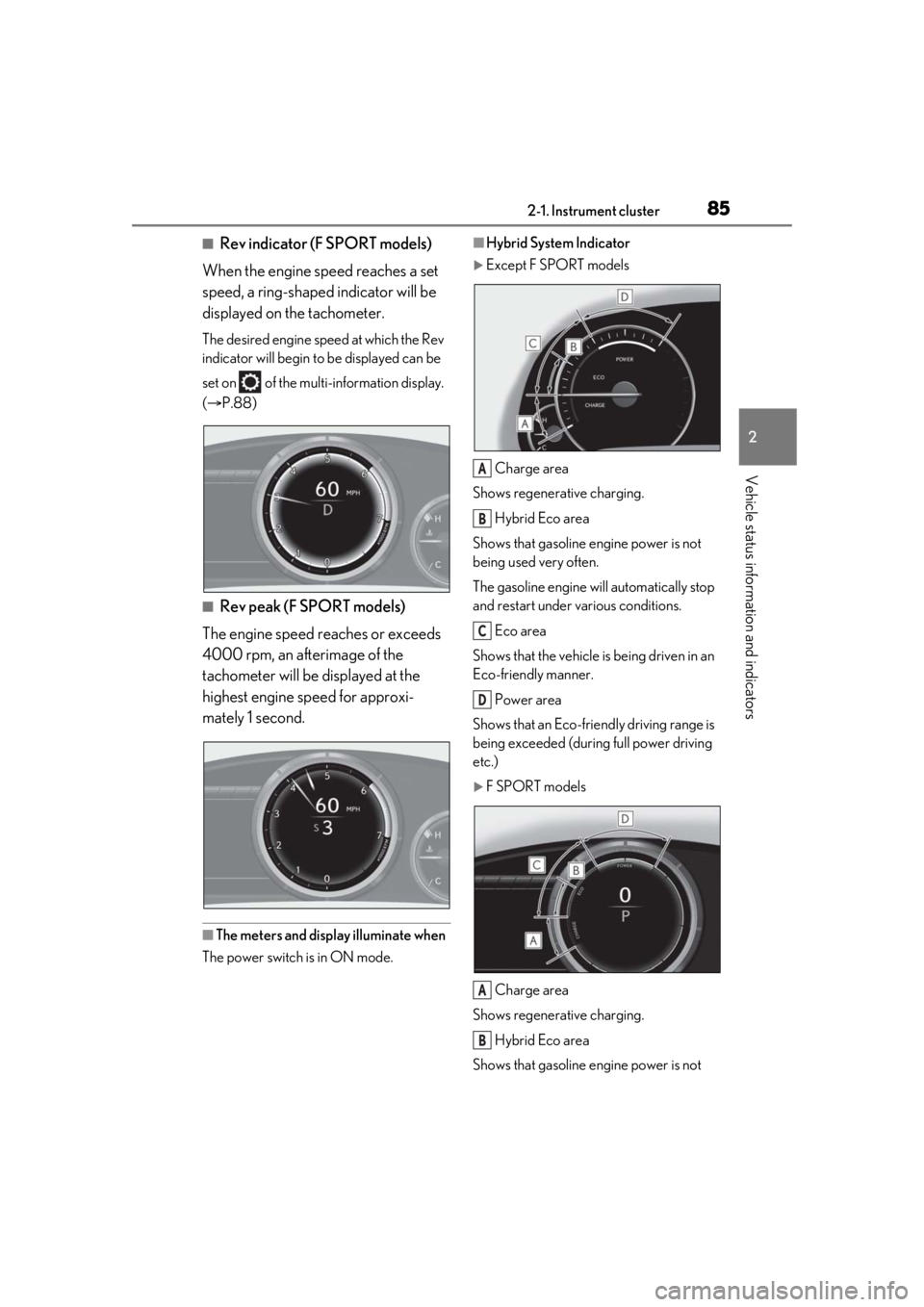
■Rev indicator (F SPORT models)
When the engine speed reaches a set
speed, a ring-shaped indicator will be
displayed on the tachometer.
The desired engine speed at which the Rev
indicator will begin to be displayed can be
set on of the multi-information display.
( P.88)
■Rev peak (F SPORT models)
The engine speed reaches or exceeds
4000 rpm, an afterimage of the
tachometer will be displayed at the
highest engine speed for approxi-
mately 1 second.
■The meters and display illuminate when
The power switch is in ON mode.
■Hybrid System Indicator
Except F SPORT models
Charge area
Shows regenerative charging.
Hybrid Eco area
Shows that gasoline en gine power is not
being used very often.
The gasoline engine will automatically stop
and restart under various conditions.
Eco area
Shows that the vehicle is being driven in an
Eco-friendly manner.
Power area
Shows that an Eco-frie ndly driving range is
being exceeded (during full power driving
etc.)
F SPORT models
Charge area
Shows regenerative charging.
Hybrid Eco area
Shows that gasoline en gine power is not
A
B
C
D
A
B
Page 86 of 528
862-1. Instrument cluster
being used very often.
The gasoline engine will automatically stop
and restart under various conditions.Eco area
Shows that the vehicle is being driven in an
Eco-friendly manner.
Power area
Shows that an Eco-friendly driving range is
being exceeded (durin g full power driving
etc.)
●Depending on the selected driving mode,
the Hybrid System Indicator or tachome-
ter will be displayed. The Hybrid System
Indicator or tachometer can be set to
always be displayed on of the
multi-information display. ( P.92)
●The Hybrid System Indicator is displayed
in the following situations:
• When the tachometer setting is set to
change according to the driving mode
and a driving mode other than sport
mode is selected
• When the tachometer setting is set to always display the Hybrid System Indica-
tor
●By keeping the indicator needle (except
F SPORT models) or bar display (F
SPORT models) within the Eco area,
more Eco-friendly driving can be
achieved.
●Charge area indicates regeneration* sta-
tus. Regenerated energy will be used to
charge the hybrid battery (traction bat-
tery).
*: When used in this manual, regeneration
refers to the conversion of energy cre-
ated by the movement of the vehicle into
electrical energy.
■Tachometer
Hybrid System Indicator switches to the
tachometer when driving mode is in sport
mode.
The settings of the tachometer display can
be changed on the multi-information dis-
play.
■Engine speed
On hybrid vehicles, engine speed is pre-
cisely controlled in order to help improve
fuel efficiency and reduce exhaust emis-
sions etc.
There are times when the engine speed that
is displayed may differ even when vehicle
operation and driving conditions are the
same.
■Outside temperature display
●In the following situations, the correct
outside temperature may not be dis-
played, or the display may take longer
than normal to change:
• When stopped, or driving at low speeds (less than 12 mph [20 km/h])
• When the outside temperature has
changed suddenly (at the entrance/exit of
a garage, tunnel, etc.)
●When “--” or “E” is displayed, the system
may be malfunctioning. Take your vehicle
to your Lexus dealer.
■Liquid crystal display
Small spots or light sp ots may appear on the
display. This phenomenon is characteristic
of liquid crystal disp lays, and there is no
problem continuing to use the display.
■Customization
The gauges and meters can be customized
on of the multi-information display.
( P.92)
C
D
WARNING
■The information display at low tem-
peratures
Allow the interior of the vehicle to warm
up before using the liquid crystal infor-
mation display. At extremely low tem-
peratures, the information display
monitor may respond slowly, and display
changes may be delayed.
Page 88 of 528
882-1. Instrument cluster
1Darker
2 Brighter
■Brightness of the meters (day mode and
night mode)
The brightness of the meters is changed
between day mode and night mode.
●Day mode: When the tail lights are off or
when the tail lights are on but the sur-
rounding area is bright
●Night mode: When the tail lights are on
and the surrounding area is dark
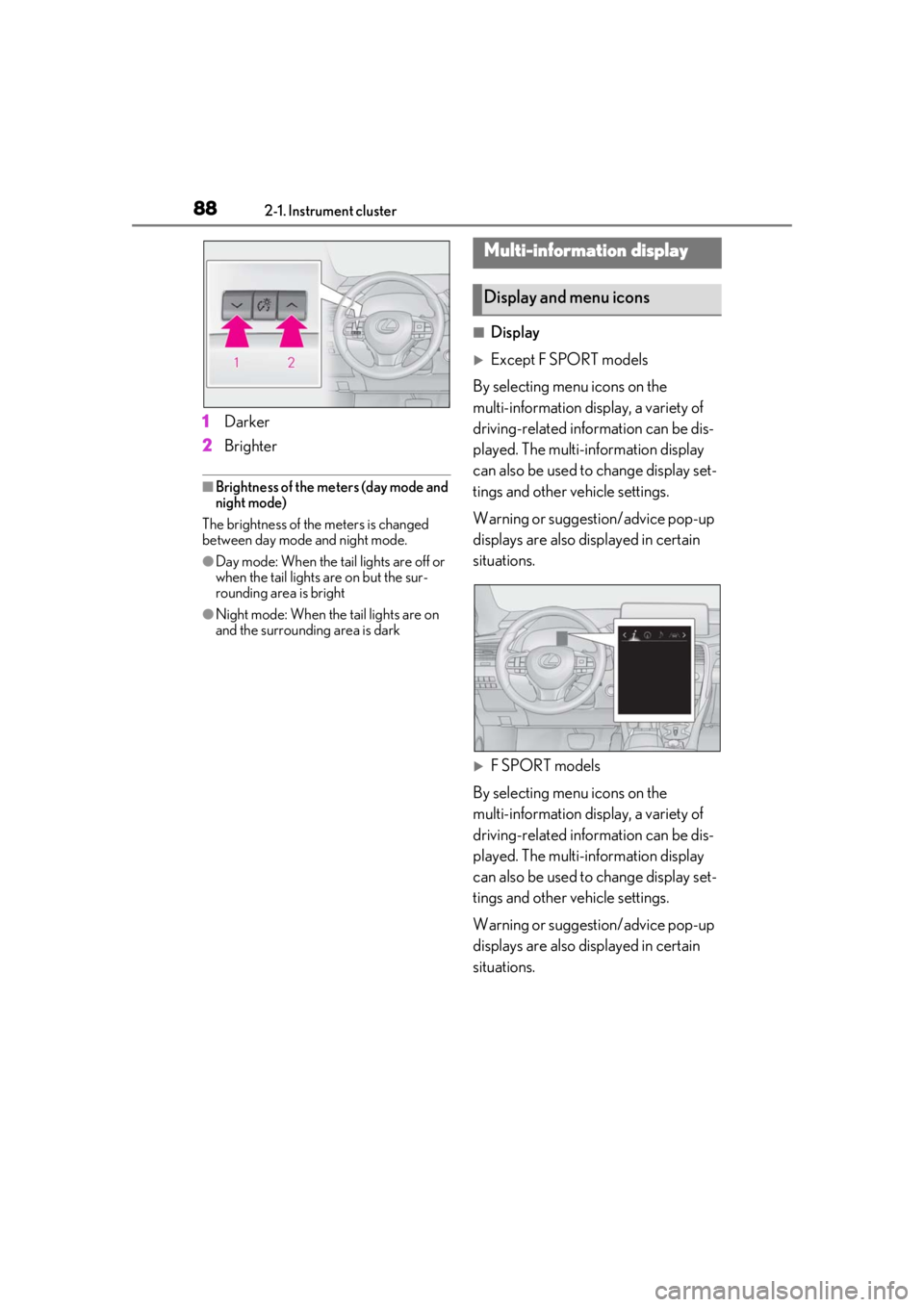
■Display
Except F SPORT models
By selecting menu icons on the
multi-information display, a variety of
driving-related information can be dis-
played. The multi-information display
can also be used to change display set-
tings and other vehicle settings.
Warning or suggestion/advice pop-up
displays are also displayed in certain
situations.
F SPORT models
By selecting menu icons on the
multi-information display, a variety of
driving-related information can be dis-
played. The multi-information display
can also be used to change display set-
tings and other vehicle settings.
Warning or suggestion/advice pop-up
displays are also displayed in certain
situations.
Multi-information display
Display and menu icons
Page 92 of 528
922-1. Instrument cluster
switch is turned to ON mode. It may also
take a few minutes to display the tire infla-
tion pressure after inflation pressure has
been adjusted.
• “---” may be displayed if the tire position information cannot be determined due to
unfavorable radio wave conditions.
• Tire inflation pressure changes with tem- perature. The displayed values may also
be different from the values measured
using a tire pressure gauge.
Select to display the following naviga-
tion system-linked information.
Route guidance
Compass display (heading-up dis-
play)
Select to enable selection of an audio
source or track on the meter using the
meter control switches.
Select to display the operational status
of the following systems:
LTA (Lane Tracing Assist) ( P.227)
RSA (Road Sign Assist) (if
equipped) ( P.236)
Dynamic radar cruise control with
full-speed range ( P.238)
■Meter display settings that can be
changed
Clock
Select to switch between 12-hour display
and 24-hour display.
Language
Select to change the language displayed.
Units
Select to change the units of measure dis-
played.
EV indicator ( P.189)
Select to enable/disable the EV indicator.
Switch settings
Select to display how to change the top
screen.
Drive information 1/Drive informa-
tion 2/Drive information 3
Select to select up to 2 items ( P.90) that
will be displayed on each Drive information
screen (Drive information 1 screen, Drive
information 2 screen, and Drive informa-
tion 3 screen) respectively.
Pop-up display
Select to enable/disable the pop-up dis-
play.
• Intersection guidance
• Incoming calls
• Brightness adjustment
Color (except F SPORT models)
Select to set the color of the cursor on the
multi-information display.
Tachometer setting
Select to set the tachometer or Hybrid
System Indicator to always be displayed or
Navigation system-linked dis-
play (if equipped)
Audio system-linked display
Driving assist system information
Settings display
Page 93 of 528
932-1. Instrument cluster
2
Vehicle status information and indicators
be changed to automatically according to
the driving mode.
Needle (F SPORT models)
Select to set the tachometer needle color.
Rev indicator (F SPORT models)
( P.85)
• Select to enable/disable the Rev indica-
tor.
• Select to set the desired engine speed at which the Rev indicator will begin to be
displayed.
Selectable engine speed range:
2000 rpm to 6000 rpm
Rev peak (F SPORT models)
( P.85)
Select to enable/dis able the Rev peak.
Default setting
Select to reset the meter display settings to
the default setting.
■Vehicle functions and settings that
can be changed
P.480
■Background color of the indicator/shift
position display area (except F SPORT
models)
The background color of the indicator/shift
position display area is changed according
to the driving mode as follows ( P.281):
●Eco drive mode: Blue
●Sport mode: Red
■Suspension of the settings display
●Some settings cannot be changed while
driving. When changi ng settings, park
the vehicle in a safe place.
●If a warning message is displayed, opera-
tion of the settings display will be sus-
pended.
Displays suggestions to the driver in
the following situations. To select a
response to a displayed suggestion,
use the meter control switches.
■Suggestion to enable the power
back door
If the power back door system is dis-
abled (setting on set to off) and the
power back door switch on the instru-
ment panel is operated, a suggestion
message will be displayed asking if you
wish to enable the power back door
system.
To enable the power back door system,
select “Yes”.
After enabling the power back door sys-
tem, press the power back door switch
again to open or close the power back
door.
WARNING
■Cautions during setting up the dis-
play
As the hybrid system needs to be operat-
ing during setting up the display, ensure
that the vehicle is parked in a place with
adequate ventilation. In a closed area
such as a garage, ex haust gases includ-
ing harmful carbon monoxide (CO) may
collect and enter the vehicle. This may
lead to death or a serious health hazard.
NOTICE
■While setting up the display
To prevent 12-volt battery discharge,
ensure that the hybrid system is operat-
ing while setting up the display features.
Suggestion function