lock LEXUS RX450h 2022 Owners Manual
[x] Cancel search | Manufacturer: LEXUS, Model Year: 2022, Model line: RX450h, Model: LEXUS RX450h 2022Pages: 532, PDF Size: 27.62 MB
Page 365 of 532
3636-3. Do-it-yourself maintenance
6
Maintenance and care
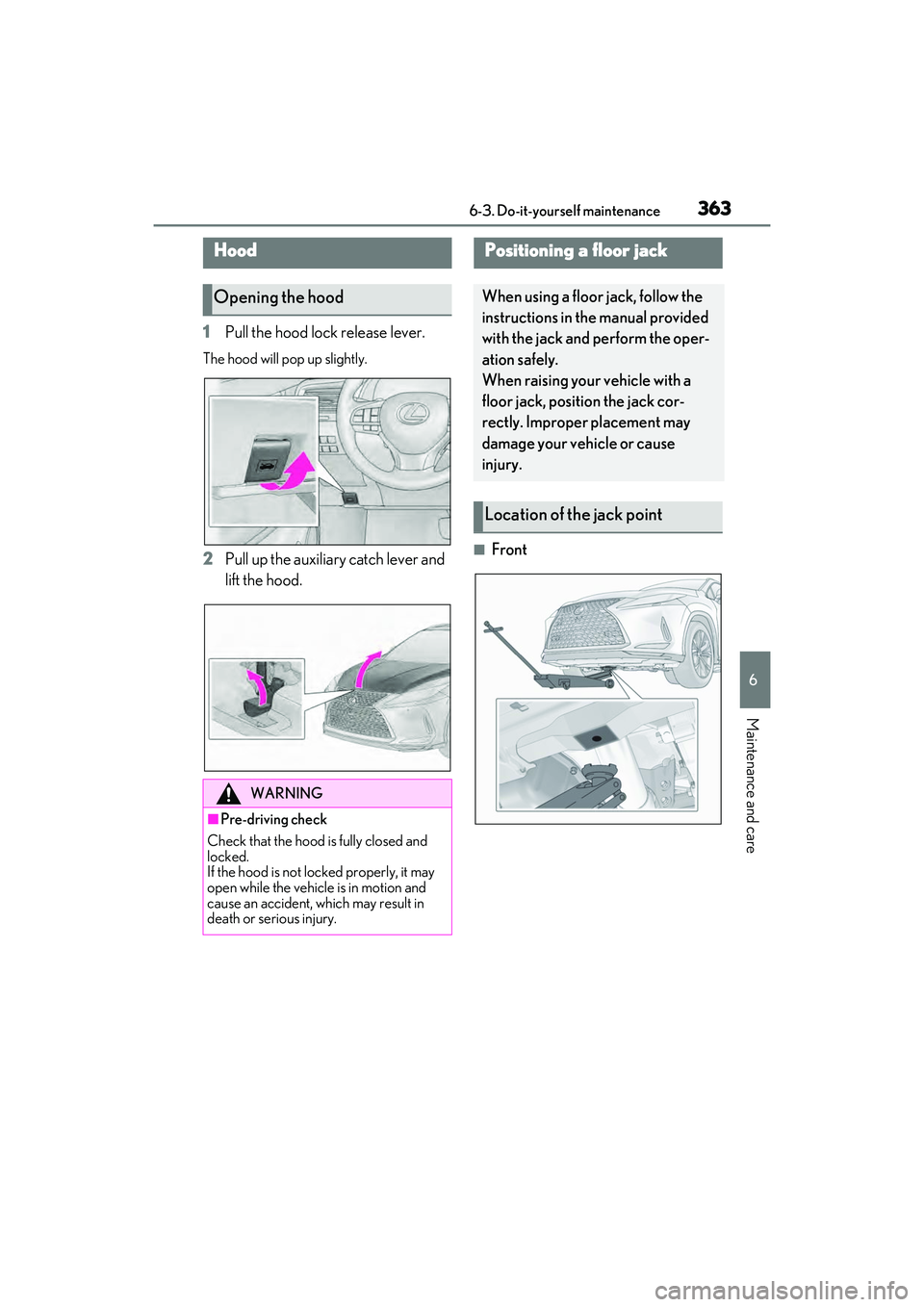
1Pull the hood lock release lever.
The hood will pop up slightly.
2Pull up the auxiliary catch lever and
lift the hood.■Front
Hood
Opening the hood
WARNING
■Pre-driving check
Check that the hood is fully closed and
locked.
If the hood is not locked properly, it may
open while the vehicle is in motion and
cause an accident, which may result in
death or serious injury.
Positioning a floor jack
When using a floor jack, follow the
instructions in the manual provided
with the jack and perform the oper-
ation safely.
When raising your vehicle with a
floor jack, position the jack cor-
rectly. Improper placement may
damage your vehicle or cause
injury.
Location of the jack point
Page 368 of 532
3666-3. Do-it-yourself maintenance
on the dipstick.
■Checking the engine oil
1 Park the vehicle on level ground.
After warming up the engine and
turning off the hybrid system, wait
more than 5 minutes for the oil to
drain back into the bottom of the
engine.
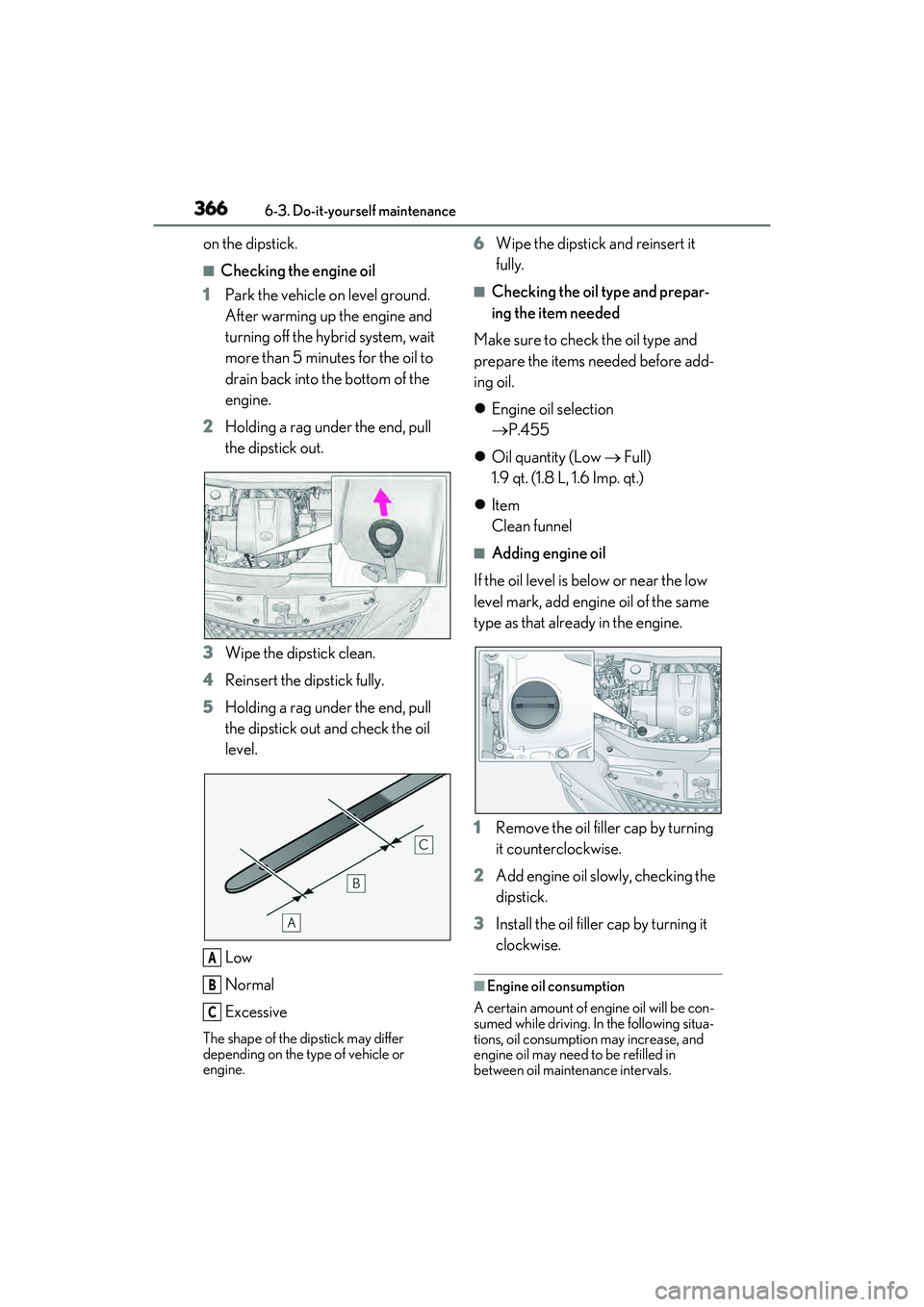
2 Holding a rag under the end, pull
the dipstick out.
3 Wipe the dipstick clean.
4 Reinsert the dipstick fully.
5 Holding a rag under the end, pull
the dipstick out and check the oil
level.
Low
Normal
Excessive
The shape of the dipstick may differ
depending on the type of vehicle or
engine.
6Wipe the dipstick and reinsert it
fully.
■Checking the oil type and prepar-
ing the item needed
Make sure to check the oil type and
prepare the items needed before add-
ing oil.
Engine oil selection
P.455
Oil quantity (Low Full)
1.9 qt. (1.8 L, 1.6 Imp. qt.)
Item
Clean funnel
■Adding engine oil
If the oil level is below or near the low
level mark, add engine oil of the same
type as that already in the engine.
1 Remove the oil filler cap by turning
it counterclockwise.
2 Add engine oil slowly, checking the
dipstick.
3 Install the oil filler cap by turning it
clockwise.
■Engine oil consumption
A certain amount of engine oil will be con-
sumed while driving. In the following situa-
tions, oil consumption may increase, and
engine oil may need to be refilled in
between oil maintenance intervals.
A
B
C
Page 373 of 532
3716-3. Do-it-yourself maintenance
6
Maintenance and care
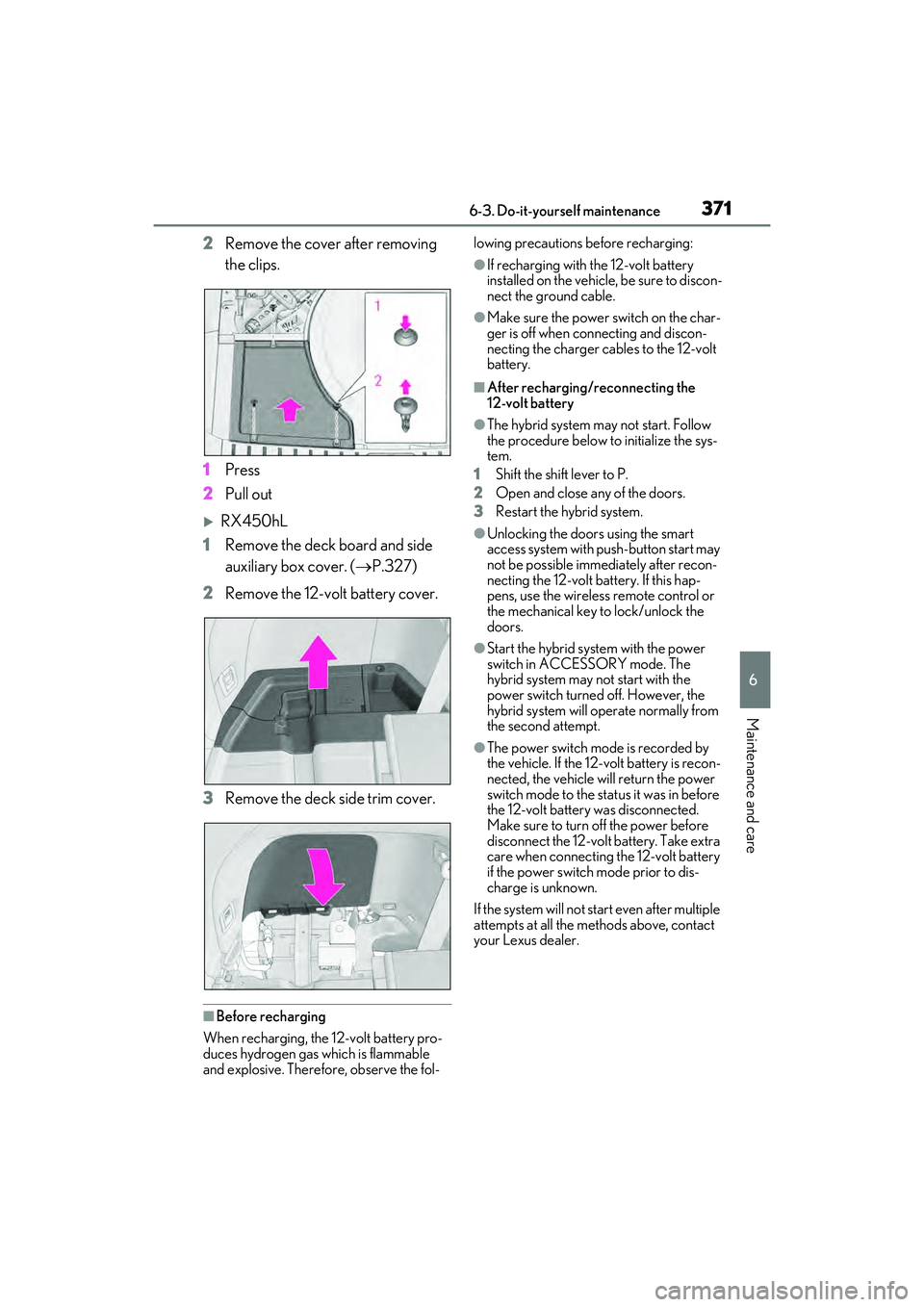
2Remove the cover after removing
the clips.
1 Press
2 Pull out
RX450hL
1 Remove the deck board and side
auxiliary box cover. ( P.327)
2 Remove the 12-volt battery cover.
3 Remove the deck side trim cover.
■Before recharging
When recharging, the 12-volt battery pro-
duces hydrogen gas which is flammable
and explosive. Therefore, observe the fol- lowing precautions before recharging:
●If recharging with the 12-volt battery
installed on the vehicle, be sure to discon-
nect the ground cable.
●Make sure the power switch on the char-
ger is off when connecting and discon-
necting the charger cables to the 12-volt
battery.
■After recharging/reconnecting the
12-volt battery
●The hybrid system may not start. Follow
the procedure below to initialize the sys-
tem.
1 Shift the shift lever to P.
2 Open and close any of the doors.
3 Restart the hybrid system.
●Unlocking the doors using the smart
access system with push-button start may
not be possible immediately after recon-
necting the 12-volt battery. If this hap-
pens, use the wireless remote control or
the mechanical key to lock/unlock the
doors.
●Start the hybrid system with the power
switch in ACCESSORY mode. The
hybrid system may not start with the
power switch turned off. However, the
hybrid system will operate normally from
the second attempt.
●The power switch mode is recorded by
the vehicle. If the 12-volt battery is recon-
nected, the vehicle will return the power
switch mode to the stat us it was in before
the 12-volt battery was disconnected.
Make sure to turn off the power before
disconnect the 12-volt battery. Take extra
care when connecting the 12-volt battery
if the power switch mode prior to dis-
charge is unknown.
If the system will not start even after multiple
attempts at all the methods above, contact
your Lexus dealer.
Page 385 of 532
3836-3. Do-it-yourself maintenance
6
Maintenance and care
1Turn the power switch off.
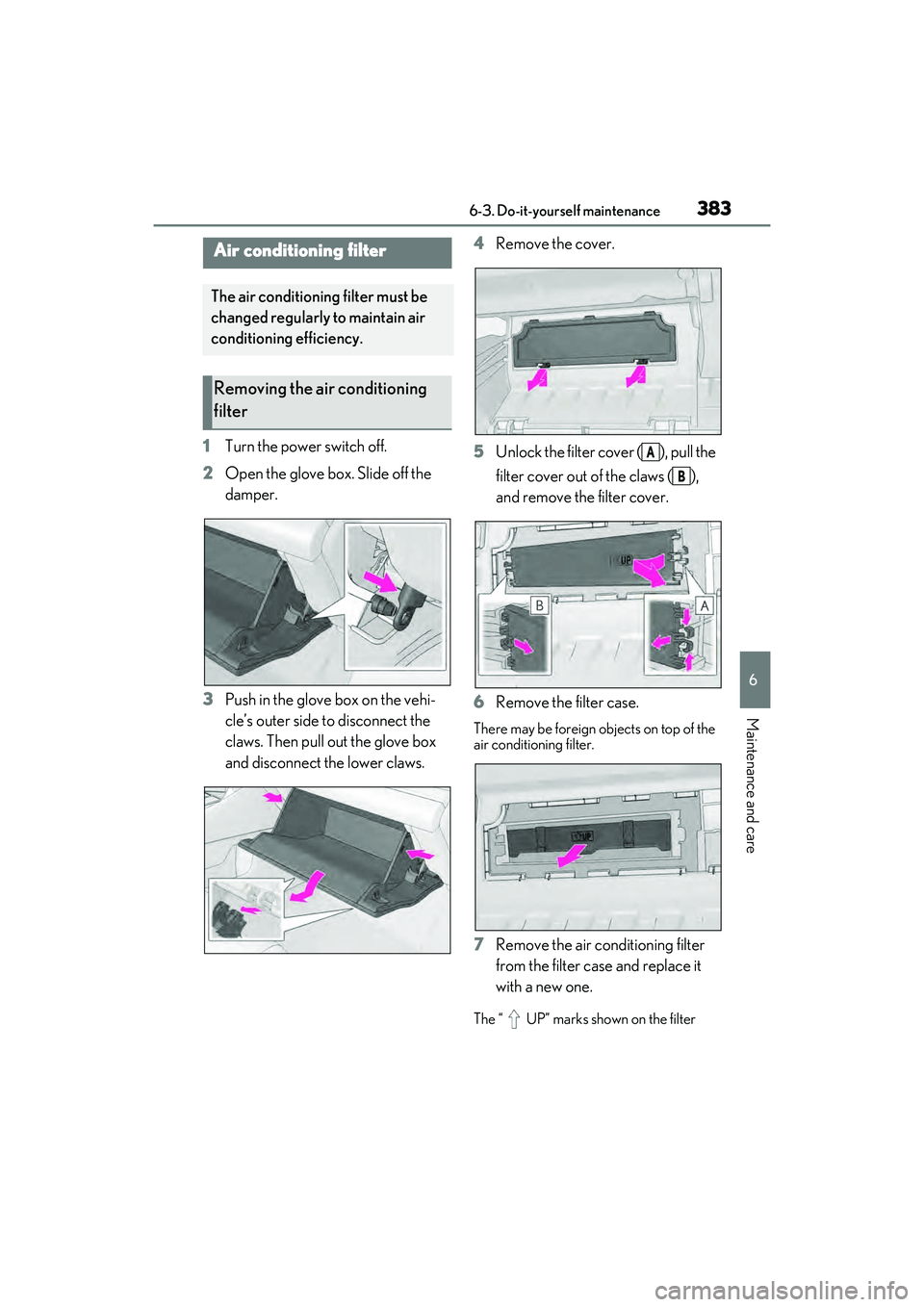
2 Open the glove box. Slide off the
damper.
3 Push in the glove box on the vehi-
cle’s outer side to disconnect the
claws. Then pull out the glove box
and disconnect the lower claws. 4
Remove the cover.
5 Unlock the filter cover ( ), pull the
filter cover out of the claws ( ),
and remove the filter cover.
6 Remove the filter case.
There may be foreign objects on top of the
air conditioning filter.
7Remove the air conditioning filter
from the filter case and replace it
with a new one.
The “ UP” marks shown on the filter
Air conditioning filter
The air conditioning filter must be
changed regularly to maintain air
conditioning efficiency.
Removing the air conditioning
filter
A
B
Page 387 of 532
3856-3. Do-it-yourself maintenance
6
Maintenance and care
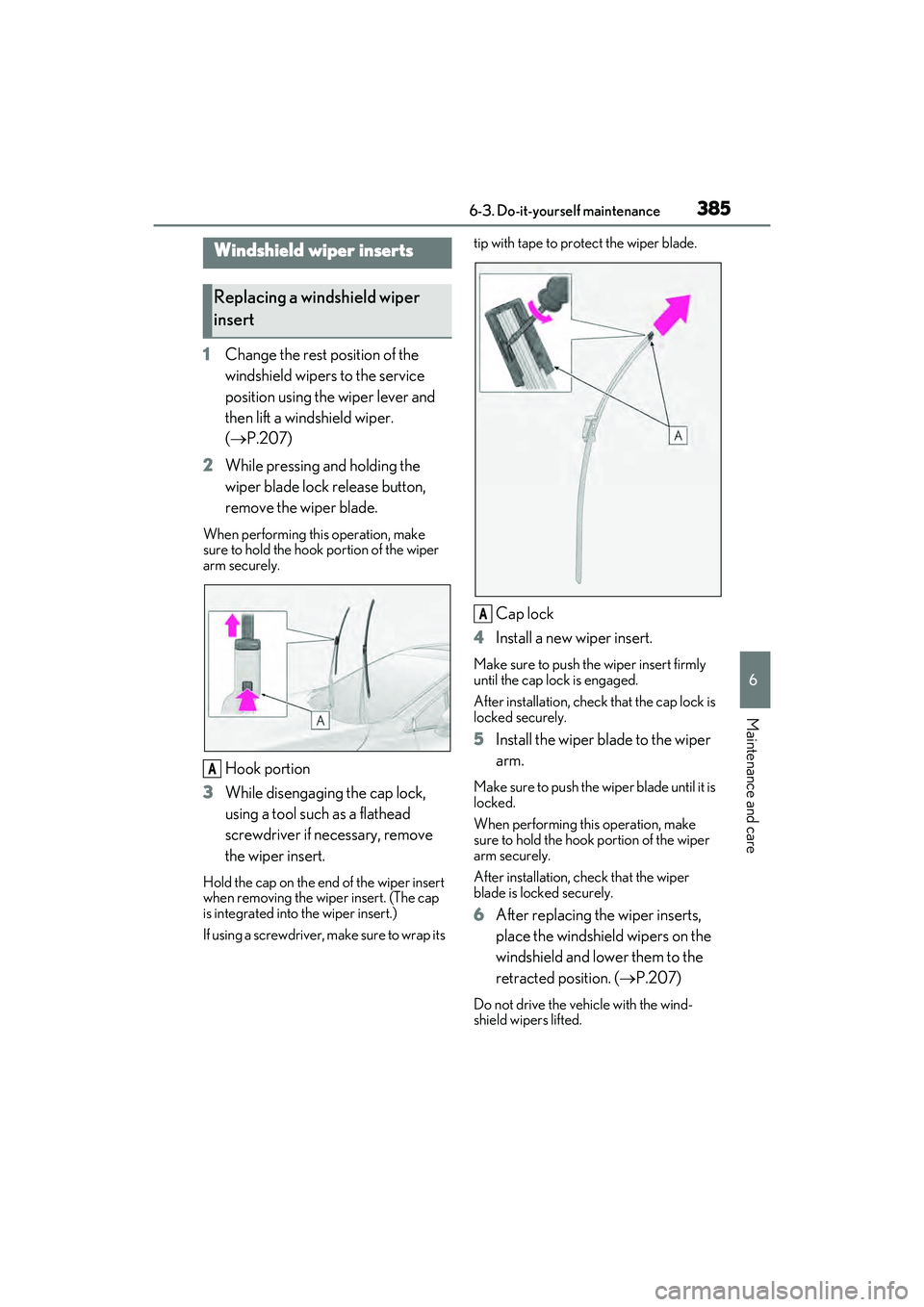
1Change the rest position of the
windshield wipers to the service
position using the wiper lever and
then lift a windshield wiper.
( P.207)
2 While pressing and holding the
wiper blade lock release button,
remove the wiper blade.
When performing this operation, make
sure to hold the hook portion of the wiper
arm securely.
Hook portion
3 While disengaging the cap lock,
using a tool such as a flathead
screwdriver if necessary, remove
the wiper insert.
Hold the cap on the end of the wiper insert
when removing the wiper insert. (The cap
is integrated into the wiper insert.)
If using a screwdriver, make sure to wrap its tip with tape to protect the wiper blade.
Cap lock
4 Install a new wiper insert.
Make sure to push the wiper insert firmly
until the cap lock is engaged.
After installation, check that the cap lock is
locked securely.
5 Install the wiper blade to the wiper
arm.
Make sure to push the wiper blade until it is
locked.
When performing this operation, make
sure to hold the hook portion of the wiper
arm securely.
After installation, check that the wiper
blade is locked securely.
6After replacing the wiper inserts,
place the windshield wipers on the
windshield and lower them to the
retracted position. ( P.207)
Do not drive the vehicle with the wind-
shield wipers lifted.
Windshield wiper inserts
Replacing a windshield wiper
insert
A
A
Page 396 of 532
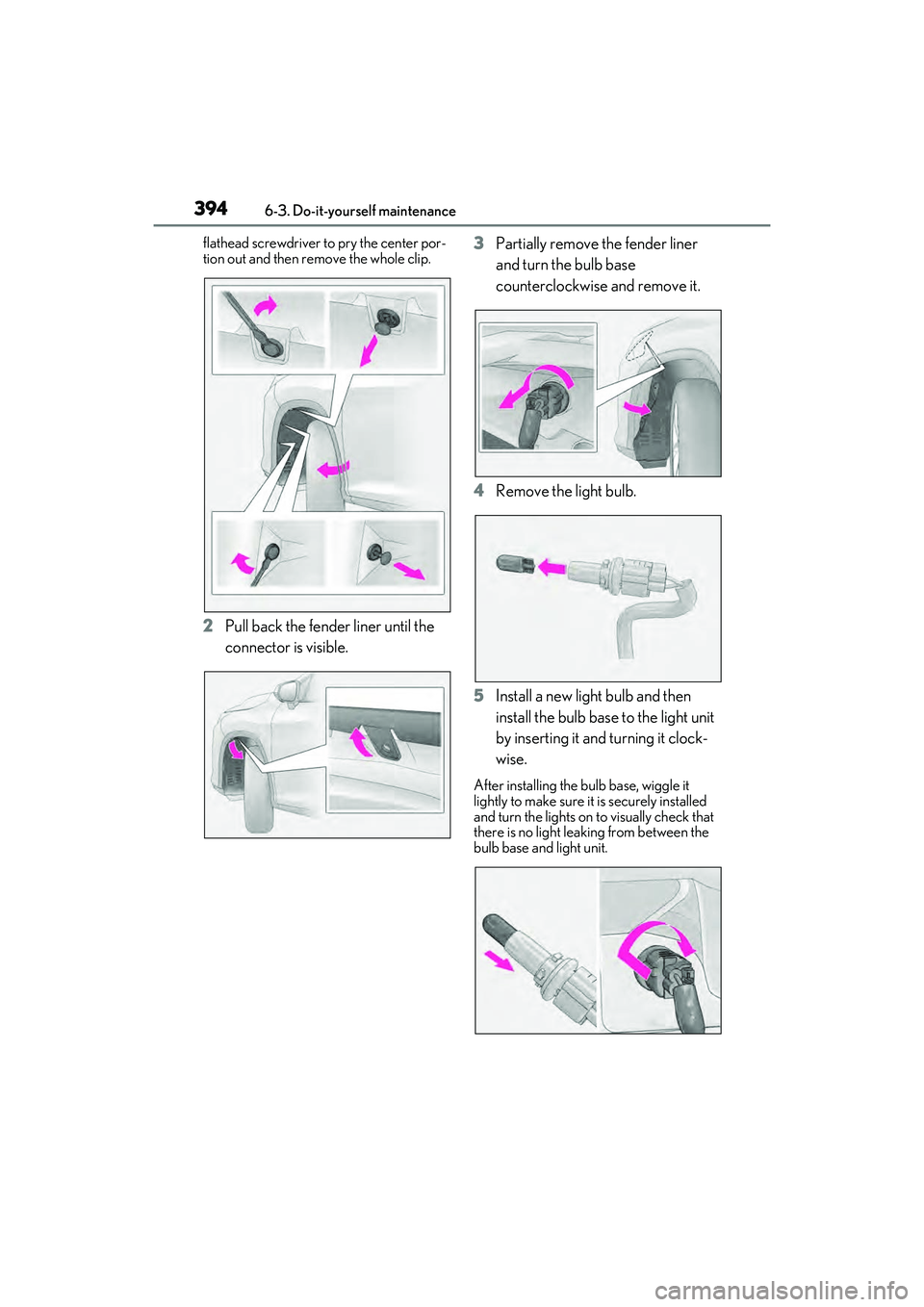
3946-3. Do-it-yourself maintenance
flathead screwdriver to pry the center por-
tion out and then re move the whole clip.
2Pull back the fender liner until the
connector is visible. 3
Partially remove the fender liner
and turn the bulb base
counterclockwise and remove it.
4 Remove the light bulb.
5 Install a new light bulb and then
install the bulb base to the light unit
by inserting it and turning it clock-
wise.
After installing the bulb base, wiggle it
lightly to make sure it is securely installed
and turn the lights on to visually check that
there is no light leaking from between the
bulb base and light unit.
Page 398 of 532
3966-3. Do-it-yourself maintenance
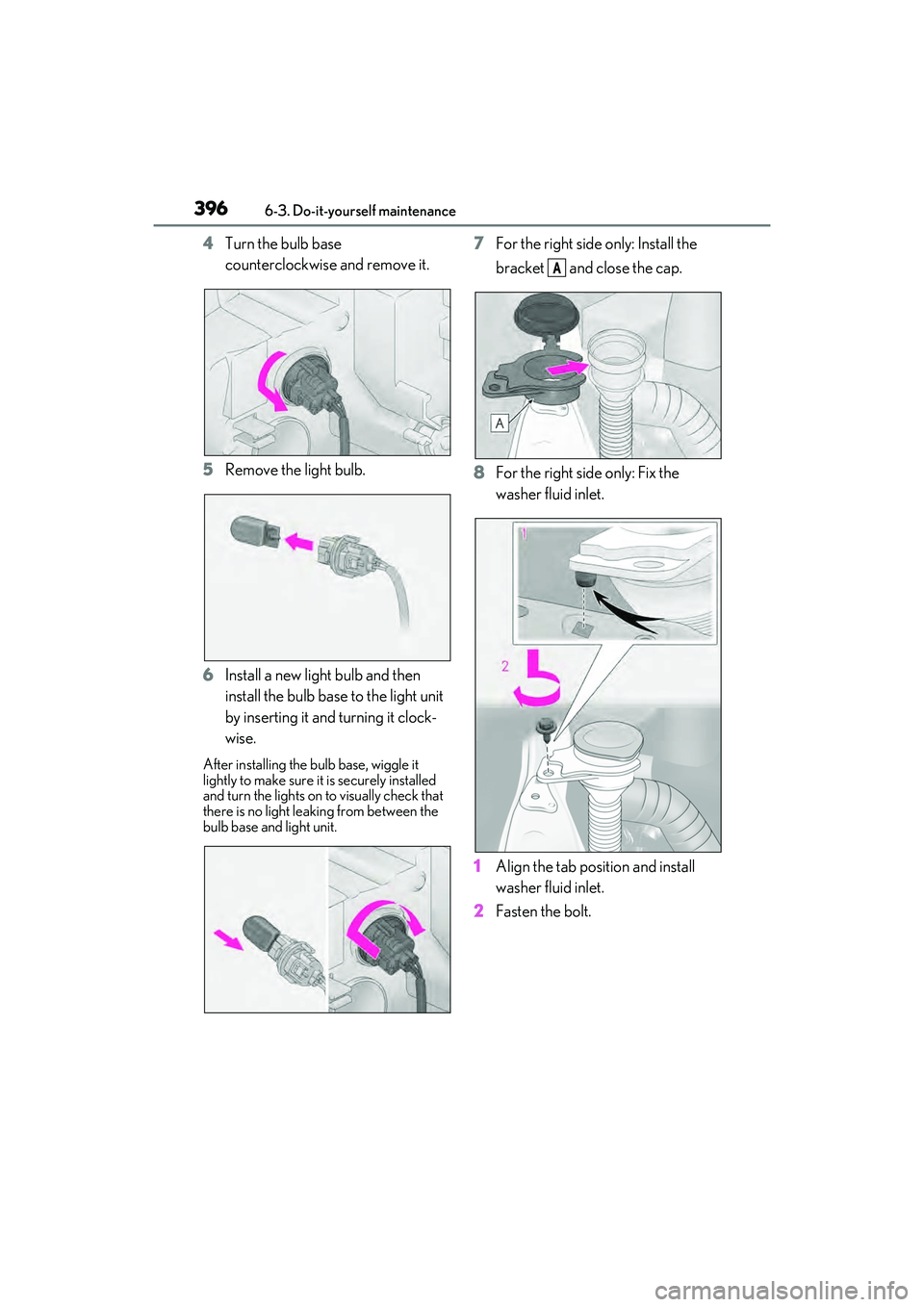
4Turn the bulb base
counterclockwise and remove it.
5 Remove the light bulb.
6 Install a new light bulb and then
install the bulb base to the light unit
by inserting it and turning it clock-
wise.
After installing the bu lb base, wiggle it
lightly to make sure it is securely installed
and turn the lights on to visually check that
there is no light leaking from between the
bulb base and light unit.
7 For the right side only: Install the
bracket and close the cap.
8 For the right side only: Fix the
washer fluid inlet.
1 Align the tab position and install
washer fluid inlet.
2 Fasten the bolt.
A
Page 400 of 532
3986-3. Do-it-yourself maintenance
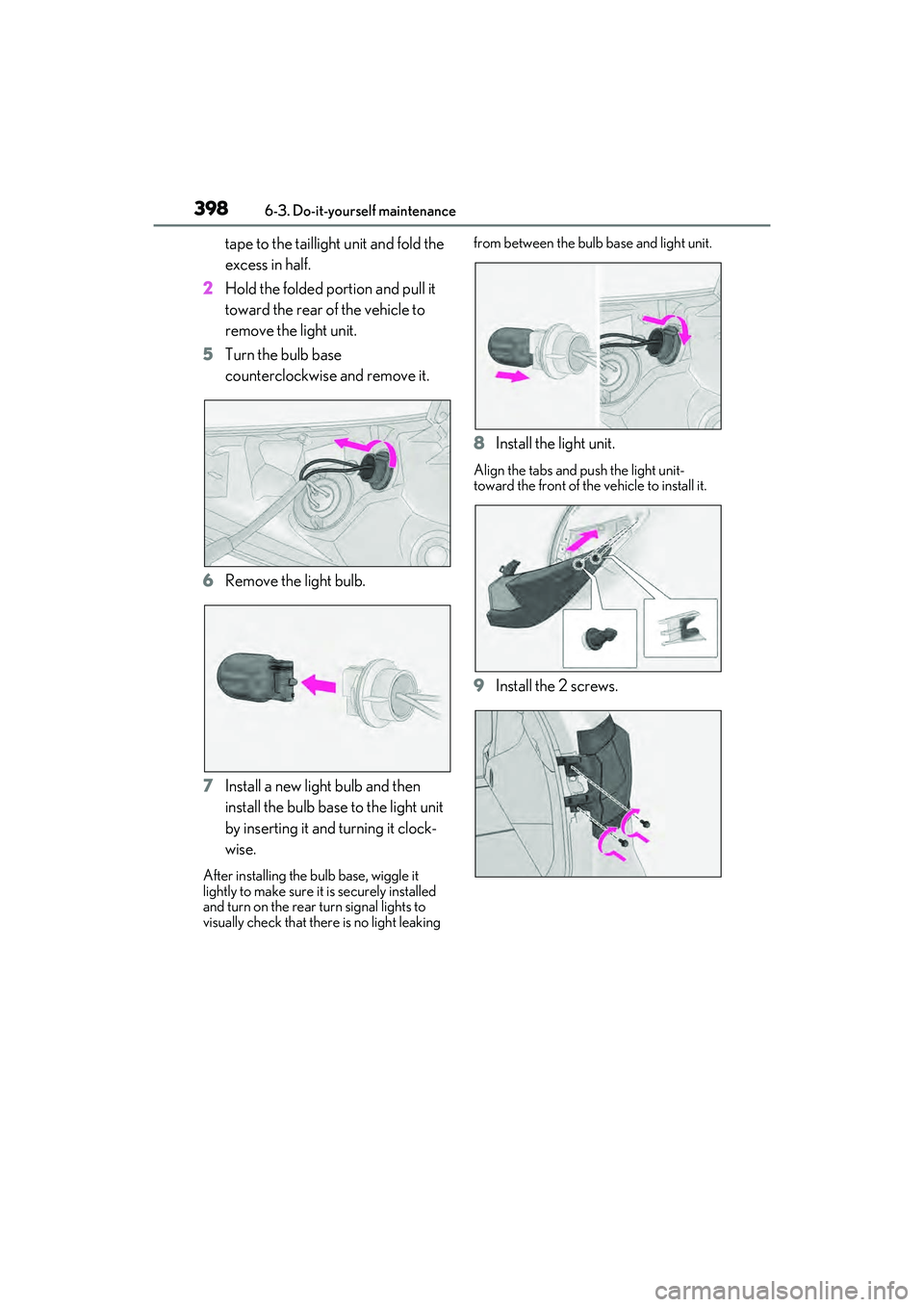
tape to the taillight unit and fold the
excess in half.
2 Hold the folded portion and pull it
toward the rear of the vehicle to
remove the light unit.
5 Turn the bulb base
counterclockwise and remove it.
6 Remove the light bulb.
7 Install a new light bulb and then
install the bulb base to the light unit
by inserting it and turning it clock-
wise.
After installing the bu lb base, wiggle it
lightly to make sure it is securely installed
and turn on the rear turn signal lights to
visually check that there is no light leaking from between the bulb
base and light unit.
8Install the light unit.
Align the tabs and push the light unit-
toward the front of the vehicle to install it.
9Install the 2 screws.
Page 401 of 532
3996-3. Do-it-yourself maintenance
6
Maintenance and care
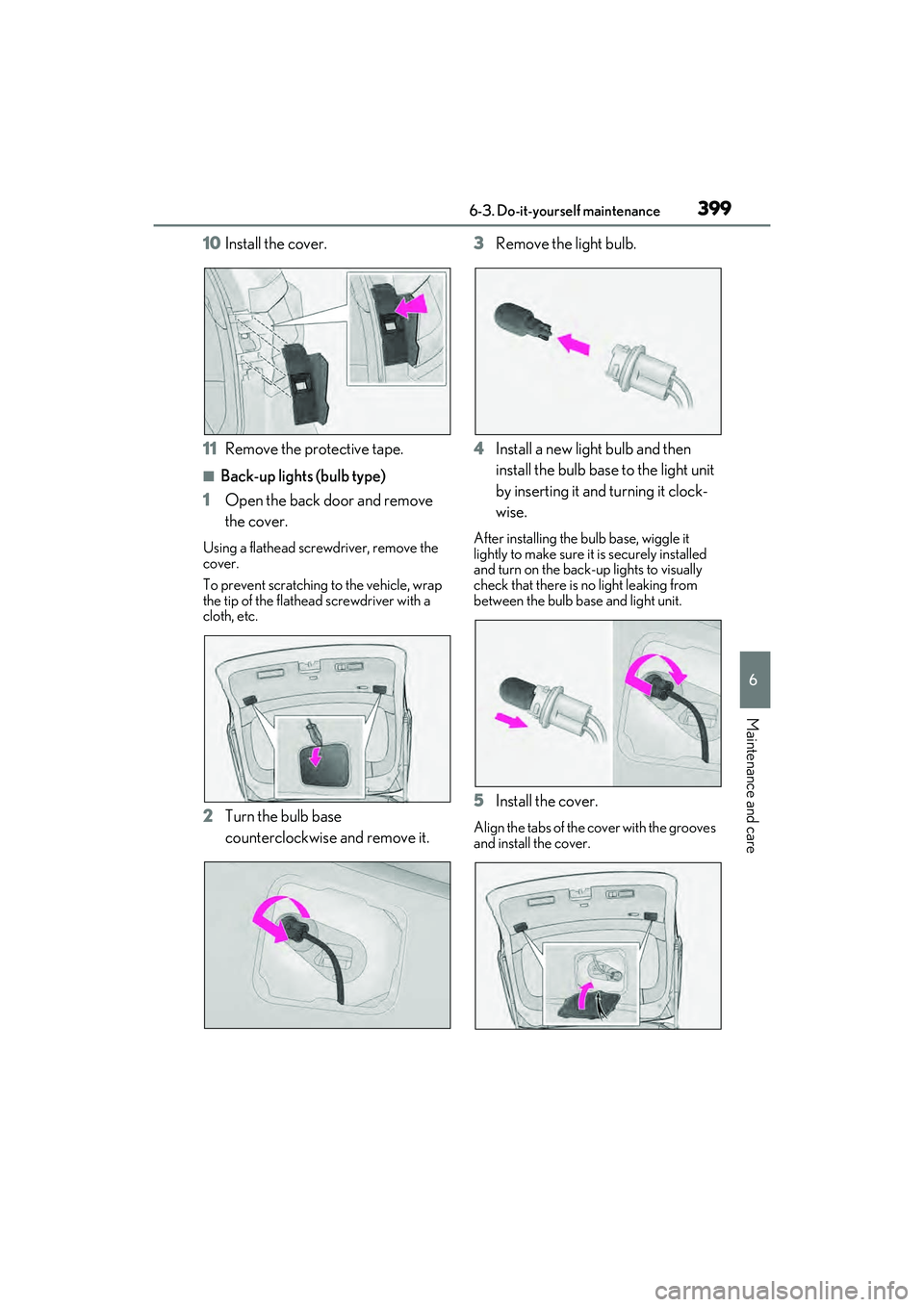
10Install the cover.
11 Remove the protective tape.
■Back-up lights (bulb type)
1 Open the back door and remove
the cover.
Using a flathead scre wdriver, remove the
cover.
To prevent scratching to the vehicle, wrap
the tip of the flathead screwdriver with a
cloth, etc.
2 Turn the bulb base
counterclockwise and remove it. 3
Remove the light bulb.
4 Install a new light bulb and then
install the bulb base to the light unit
by inserting it and turning it clock-
wise.
After installing the bulb base, wiggle it
lightly to make sure it is securely installed
and turn on the back-up lights to visually
check that there is no light leaking from
between the bulb ba se and light unit.
5Install the cover.
Align the tabs of the cover with the grooves
and install the cover.
Page 402 of 532
4006-3. Do-it-yourself maintenance
WARNING
■To prevent injury
Before performing any light bulb
replacement procedure, be sure to turn
the power switch off. Failure to do so may
result in burns from hot components or a
part of your body may get caught on an
operating component, possibly causing
serious injury.
■Replacing light bulbs
●Turn off the lights. Do not attempt to
replace the bulb immediately after
turning off the lights.
The bulbs become very hot and may
cause burns.
●Do not touch the glass portion of the
light bulb with bare hands. When it is
unavoidable to hold the glass portion,
use and hold with a clean dry cloth to
avoid getting moisture and oils on the
bulb.
Also, if the bulb is scratched or
dropped, it may blow out or crack.
●Fully install light bulbs and any parts
used to secure them. Failure to do so
may result in heat damage, fire, or
water entering the headlight unit. This
may damage the headlights or cause
condensation to buil d up on the lens.
●Do not attempt to repair or disassem-
ble the light bulbs, connectors, electric
circuits or component parts.
Doing so may result in death or serious
injury due to electric shock.
■To prevent damage or fire
●Make sure bulbs are fully seated and
locked.
●Check the wattage of the bulb before
installing to prevent heat damage.