light LEXUS RX450h 2022 Owners Manual
[x] Cancel search | Manufacturer: LEXUS, Model Year: 2022, Model line: RX450h, Model: LEXUS RX450h 2022Pages: 532, PDF Size: 27.62 MB
Page 318 of 532
3165-4. Using the interior lights
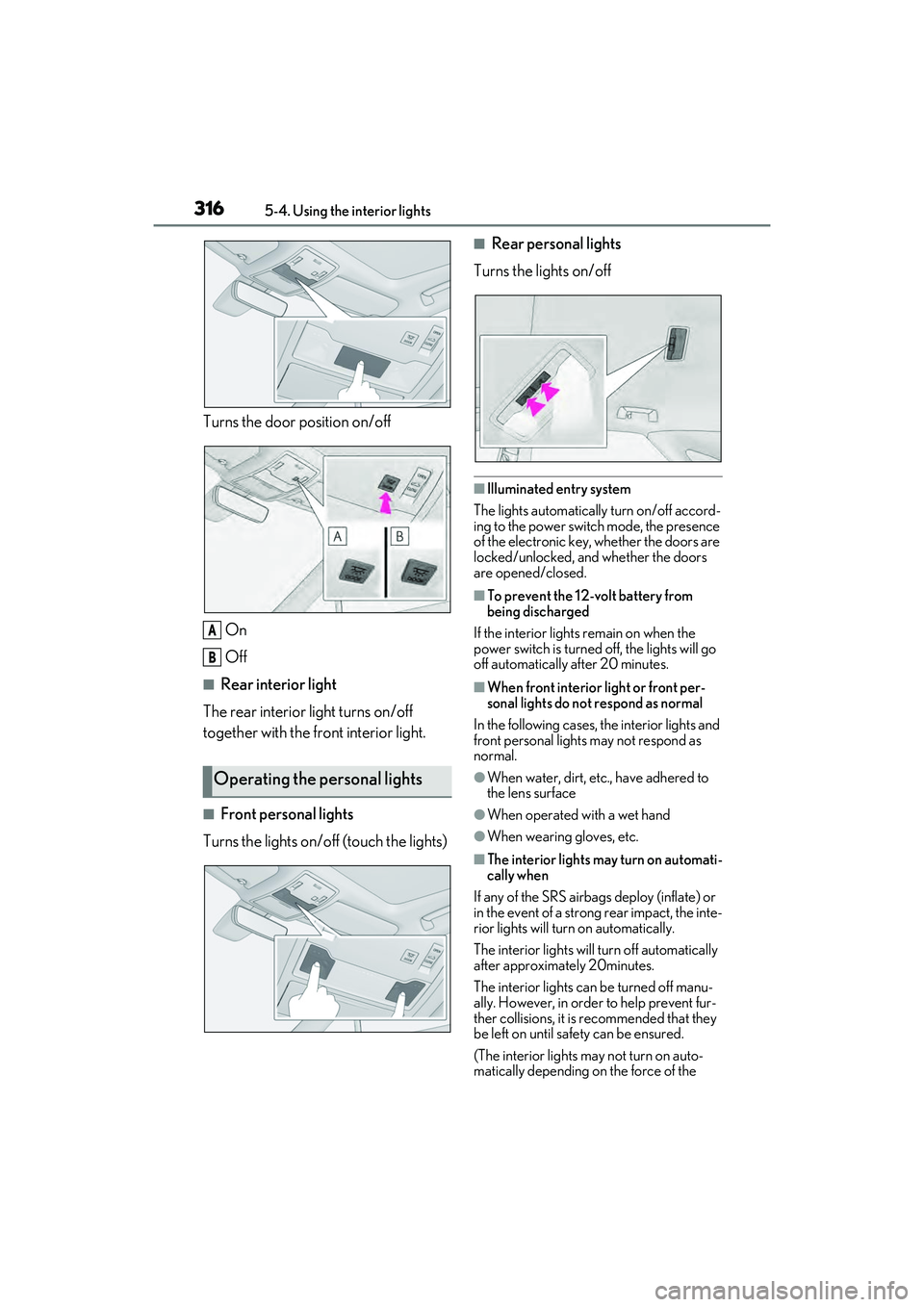
Turns the door position on/off
On
Off
■Rear interior light
The rear interior light turns on/off
together with the front interior light.
■Front personal lights
Turns the lights on/off (touch the lights)
■Rear personal lights
Turns the lights on/off
■Illuminated entry system
The lights automatically turn on/off accord-
ing to the power switch mode, the presence
of the electronic key, whether the doors are
locked/unlocked, and whether the doors
are opened/closed.
■To prevent the 12-volt battery from
being discharged
If the interior lights remain on when the
power switch is turned off, the lights will go
off automatically after 20 minutes.
■When front interior light or front per-
sonal lights do not respond as normal
In the following cases, the interior lights and
front personal lights may not respond as
normal.
●When water, dirt, etc., have adhered to
the lens surface
●When operated with a wet hand
●When wearing gloves, etc.
■The interior lights may turn on automati-
cally when
If any of the SRS airbag s deploy (inflate) or
in the event of a strong rear impact, the inte-
rior lights will turn on automatically.
The interior lights will turn off automatically
after approximately 20minutes.
The interior lights can be turned off manu-
ally. However, in order to help prevent fur-
ther collisions, it is recommended that they
be left on until sa fety can be ensured.
(The interior lights may not turn on auto-
matically depending on the force of the
Operating the personal lights
A
B
Page 319 of 532
3175-4. Using the interior lights
5
Interior features
impact and conditions of the collision.)
■Customization
Some functions can be customized.
( P.472)
NOTICE
■Removing light lenses
Never remove the lens for the front inte-
rior light and front personal lights. Other-
wise, the lights will be damaged. If the
lens need to remove , contact your Lexus
dealer.
■To prevent 12-vol t battery discharge
Do not leave the lights on longer than
necessary when the hy brid system is off.
Page 321 of 532
3195-5. Using the storage features
5
Interior features
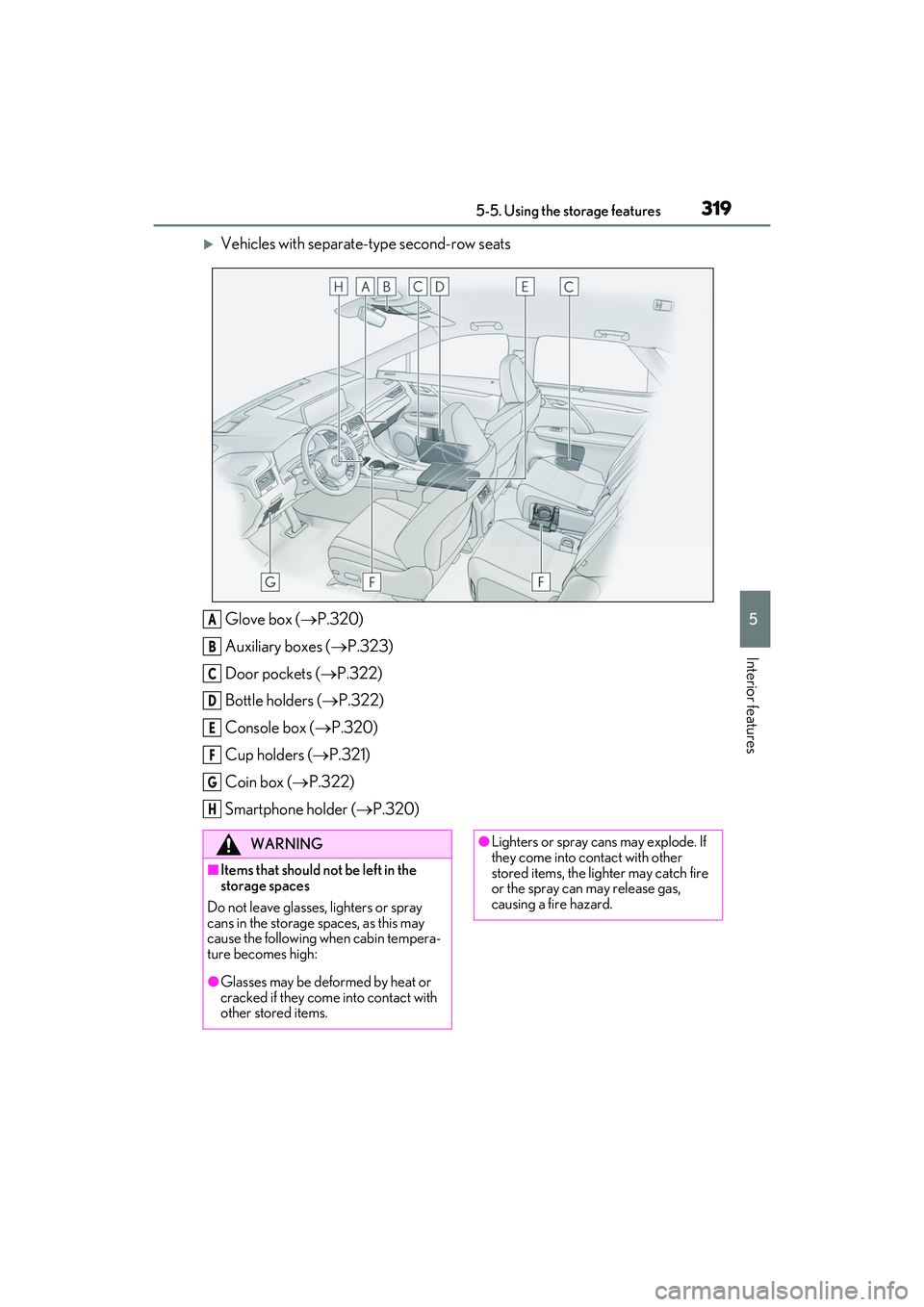
Vehicles with separate-type second-row seatsGlove box ( P.320)
Auxiliary boxes ( P.323)
Door pockets ( P.322)
Bottle holders ( P.322)
Console box ( P.320)
Cup holders ( P.321)
Coin box ( P.322)
Smartphone holder ( P.320)
A
B
C
D
E
F
G
H
WARNING
■Items that should not be left in the
storage spaces
Do not leave glasses, lighters or spray
cans in the storage spaces, as this may
cause the following when cabin tempera-
ture becomes high:
●Glasses may be deformed by heat or
cracked if they come into contact with
other stored items.
●Lighters or spray ca ns may explode. If
they come into contact with other
stored items, the lighter may catch fire
or the spray can may release gas,
causing a fire hazard.
Page 322 of 532
3205-5. Using the storage features
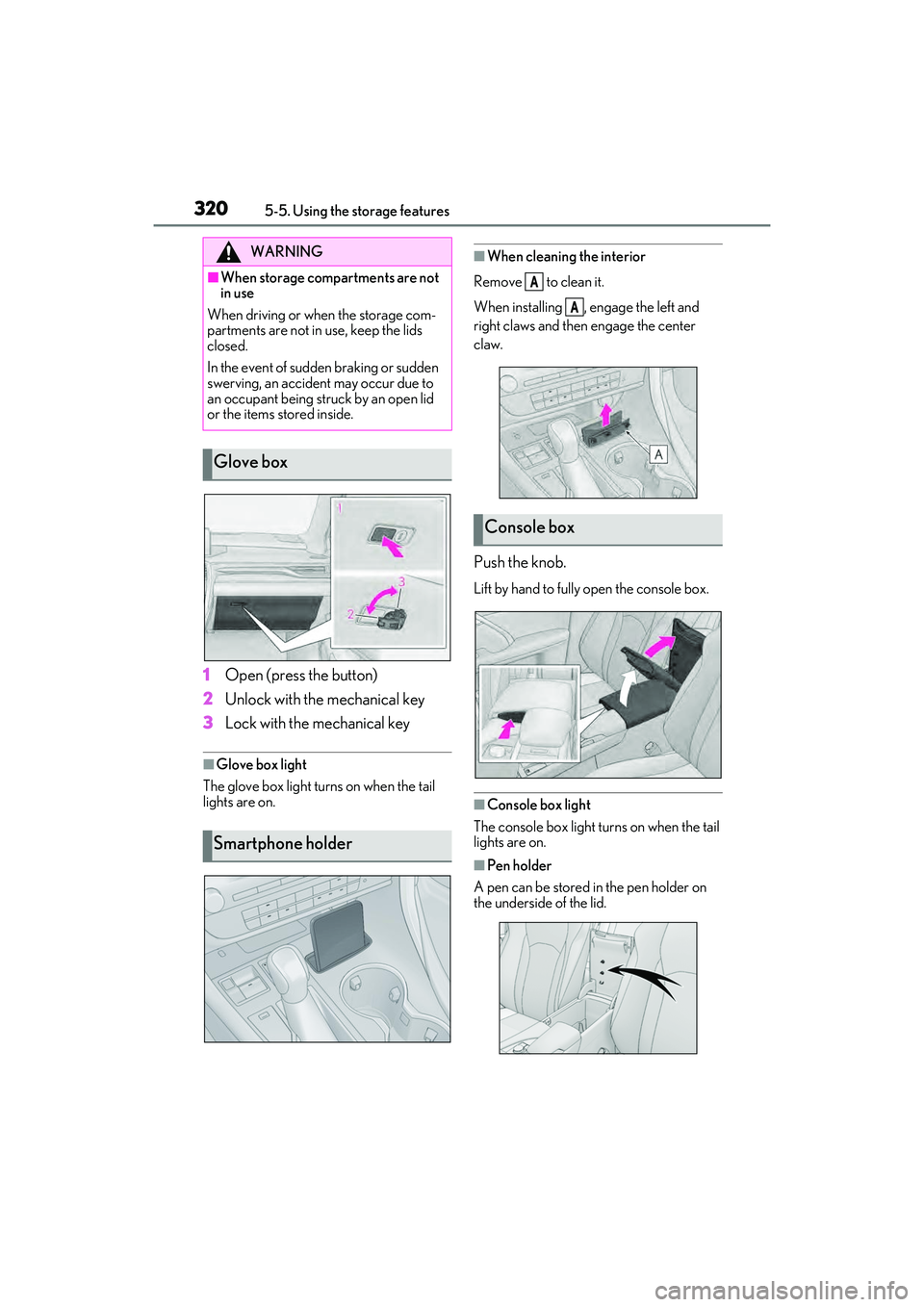
1Open (press the button)
2 Unlock with the mechanical key
3 Lock with the mechanical key
■Glove box light
The glove box light turns on when the tail
lights are on.
■When cleaning the interior
Remove to clean it.
When installing , engage the left and
right claws and then engage the center
claw.
Push the knob.
Lift by hand to fully open the console box.
■Console box light
The console box light turns on when the tail
lights are on.
■Pen holder
A pen can be stored in the pen holder on
the underside of the lid.
WARNING
■When storage compartments are not
in use
When driving or when the storage com-
partments are not in use, keep the lids
closed.
In the event of sudden braking or sudden
swerving, an accident may occur due to
an occupant being struck by an open lid
or the items stored inside.
Glove box
Smartphone holder
Console box
A
A
Page 332 of 532
3305-6. Using the other interior features
A portable device, such as a
smartphone or mobile battery, can be
charged by just placing it on the
charging area, provided the device is
compatible with the Qi wireless
charging standard created by the
Wireless Power Consortium.
The wireless charger cannot be used
with a portable device that is larger
than the charging area. Additionally,
depending on the portable device, the
wireless charger may not operate
properly. Refer to the operation man-
ual of the portable device.
■The “Qi” symbol
The “Qi” symbol is a trademark of the
Wireless Power Consortium.
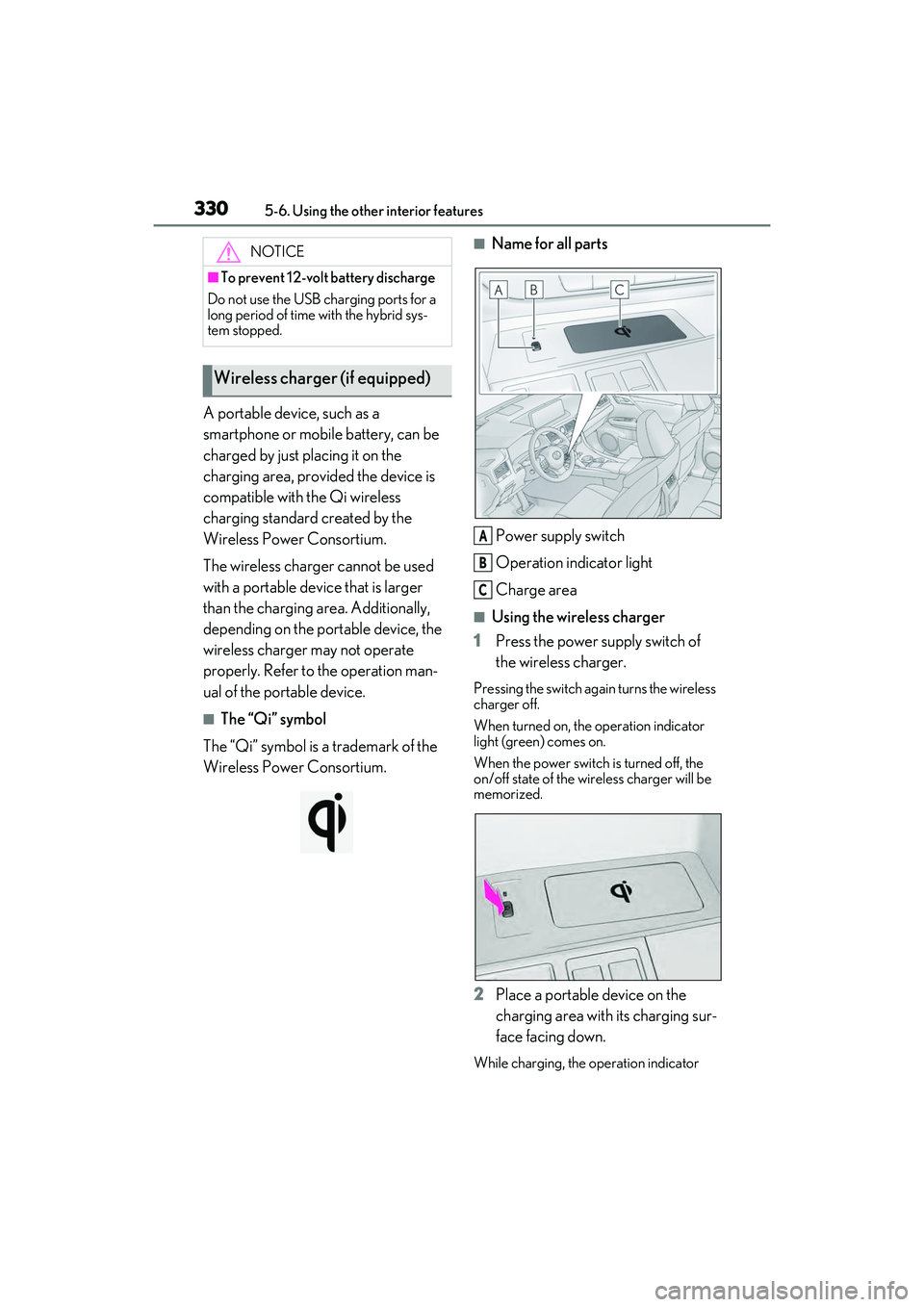
■Name for all parts
Power supply switch
Operation indicator light
Charge area
■Using the wireless charger
1 Press the power supply switch of
the wireless charger.
Pressing the switch again turns the wireless
charger off.
When turned on, the operation indicator
light (green) comes on.
When the power switch is turned off, the
on/off state of the wi reless charger will be
memorized.
2 Place a portable device on the
charging area with its charging sur-
face facing down.
While charging, the operation indicator
NOTICE
■To prevent 12-vol t battery discharge
Do not use the USB charging ports for a
long period of time with the hybrid sys-
tem stopped.
Wireless charger (if equipped)
A
B
C
Page 333 of 532

3315-6. Using the other interior features
5
Interior features
light (orange) will be illuminated.
If charging does not begin, move the porta-
ble device as close to the center of the
charging area as possible.
When charging is complete, the operation
indicator light (green) will illuminate.
■Recharging function
If a certain amount of time has
elapsed since charging completed
and the portable device has not
been moved, the wireless charger
will restart charging.
If the portable device is moved
within the charging area, charging
will stop temporarily then restart.
■Operation indicator light status
*: Depending on the portable device, the
operation indicator light may stay illumi-
nated (orange) afte r charging has com-
pleted.
■If the operation indicator light
blinks
If an error is dete cted, the operation
indicator light will blink (orange). Take
the appropriate measures according to
the table below.
Blinks (orange) at a one second
interval continuously
Blinks (orange) 3 times repeatedly
Blinks (orange) 4 times repeatedly
■The wireless charger can be operated
when
The power switch is in ACCESSORY or
Operation indica- tor lightState
OffThe Wireless charger
is off
Green (illumi-
nated)
Standby (charging is
possible)
Charging is complete*
Orange (illumi-
nated)
A portable device has
been placed on the
charging area (identi-
fying the portable
device)
Charging in progress
Suspected causesMeasure
Vehicle to char-
ger communica-
tion failure.Contact your Lexus
dealer.
Suspected causesMeasure
A foreign object
exists between
the portable
device and
charging area.
Remove the foreign
object.
Portable device is
not positioned
properly on the
charging area.Move the portable
device toward the cen-
ter of the charging
area.
Suspected causesMeasure
The temperature
of the wireless
charger is exces-
sively high.Stop charging immedi-
ately and continue
charging after a while.
Page 334 of 532
3325-6. Using the other interior features
ON mode.
■Portable devices that can be charged
●Portable devices compatible with the Qi
wireless charging standard can be
charged by the wireless charger. How-
ever, compatibility with all devices which
meet the Qi wireless charging standard is
not guaranteed.
●The wireless charger is designed to sup-
ply low power electricity (5 W or less) to
a cellular phone, smartphone, or other
portable device.
■If a cover or accessory is attached to the
portable device
Do not charge a portable device if a cover
or accessory which is not Qi compatible is
attached. Depending on the type of cover
and/or accessory attached, it may not be
possible to charge the portable device. If
the portable device is placed on the
charging area and does not charge, remove
the cover and/or accessories.
■If interference is heard in AM radio
broadcasts while charging
Turn off the wireless charger and check if
the noise is reduced. If noise is reduced,
press and hold the power supply switch of
the wireless charger fo r 2 seconds. The fre-
quency of the wireless charger is changed
and noise may be reduced. When the fre-
quency is changed, the operation indicator
light will blink (orange) 2 times.
■Charging precautions
●If the electronic key cannot be detected
in the cabin, charging cannot be per-
formed. When a door is opened and
closed, charging may be temporarily sus-
pended.
●While charging, the wireless charger and
the portable device will become warm.
This is not a malfunction. If a portable
device becomes warm while charging
and charging stops due to the protection
function of the portab le device, wait until
the portable device cools down and
charge it again.
■Sound generated during operation
When the power supply switch is turned on
or while a portable de vice is being identi- fied, operation sounds may be heard. This is
not a malfunction.
■Cleaning the wireless charger
P.354
Page 338 of 532
3365-6. Using the other interior features
WARNING
■Caution while driving
When charging a portable device while
driving, for safety reasons, the driver
should not operate th e portable device.
■Caution regarding interference with
electronic devices
People with implantable cardiac pace-
makers, cardiac resynchronization ther-
apy pacemakers or implantable
cardioverter defibrillators, as well as any
other electrical medical device, should
consult their physician about the usage of
the wireless charger.
Operations of the wireless charger may
have an affect on medical devices.
■To prevent damage or burns
Observe the following precautions.
Failure to do so may result in the possibil-
ity of fire, equipment failure or damage,
or burns due to heat.
●Do not put any metallic objects
between the charging area and the
portable device while charging.
●Do not attach metallic objects, such as
aluminum stickers, to the charging
area.
●Do not cover the wireless charger with
a cloth or other obje ct while charging.
●Do not attempt to charge portable
devices which are not compatible with
the Qi wireless charging standard.
●Do not disassemble, modify or remove
the wireless charger.
●Do not apply force or impact to the
wireless charger.
NOTICE
■Conditions in which the wireless
charger may not operate correctly
In the following situations, the wireless
charger may not operate correctly:
●When a portable device is fully
charged
●When there is a foreign object
between the charging area and porta-
ble device
●When a portable device becomes hot
while charging
●When a portable device is placed on
the wireless area with its charging sur-
face facing up
●When a portable device is not cen-
tered on the charging area
●When the vehicle is near a TV tower,
electric power plant, gas station, radio
station, large display, airport or other
facility that gene rates strong radio
waves or electrical noise
●When the portable device is in contact
with, or is covered by any of the follow-
ing metallic objects:
• Cards to which aluminum foil is attached
• Cigarette boxes that have aluminum foil inside
• Metallic wallets or bags
•Coins
• Metal hand warmers
• Media such as CDs and DVDs
●When wireless keys (that emit radio
waves) other than those of your vehicle
are being used nearby.
If in situations other than above the wire-
less charger does not operate properly
or the operation indicator light is blink-
ing, the wireless charger may be mal-
functioning. Contact your Lexus dealer.
Page 342 of 532
3405-6. Using the other interior features
it backward.
Slide the cover to open.
The light turns on when the cover is
opened.
■To prevent 12-volt battery discharge
If the vanity lights remain on when the
power switch is turned off, the lights will go
off automatically after 20 minutes.
Use the front passenger footwell hooks
to help support and prevent objects
placed on the floor, such as a grocery
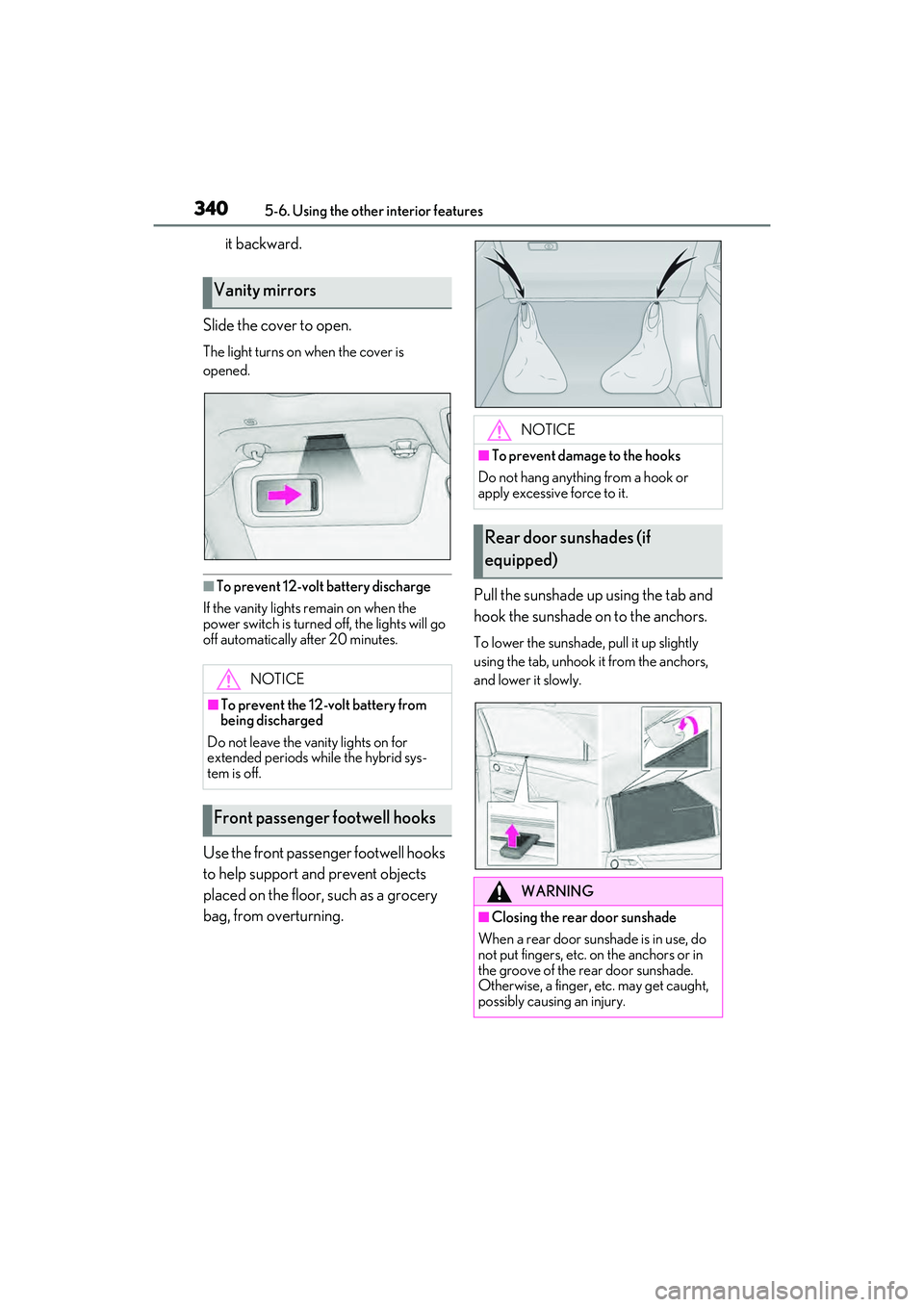
bag, from overturning. Pull the sunshade up using the tab and
hook the sunshade on to the anchors.
To lower the sunshade, pull it up slightly
using the tab, unhook it from the anchors,
and lower it slowly.
Vanity mirrors
NOTICE
■To prevent the 12-volt battery from
being discharged
Do not leave the vanity lights on for
extended periods while the hybrid sys-
tem is off.
Front passenger footwell hooks
NOTICE
■To prevent damage to the hooks
Do not hang anything from a hook or
apply excessive force to it.
Rear door sunshades (if
equipped)
WARNING
■Closing the rear door sunshade
When a rear door sunshade is in use, do
not put fingers, etc. on the anchors or in
the groove of the rear door sunshade.
Otherwise, a finger, etc. may get caught,
possibly causing an injury.
Page 343 of 532
3415-6. Using the other interior features
5
Interior features
■HomeLink® programming procedure
The programming procedures can also be
found at the following URL.
Website: www.homelink.com/lexus
For support, contact customer support at
the following.
Help Line: 1-800-355-3515
The HomeLink® wireless control sys-
tem in your vehicle has 3 buttons which
can be programmed to operate 3 dif-
ferent devices. Refer to the program-
ming methods on the following pages
to determine the method which is
appropriate for the device.
NOTICE
■To ensure normal operation of the
sunshade
●Do not put anything in an area where it
may interfere with the operation of a
rear door sunshade.
●To prevent damage to the rear door
sunshades, do no t apply excessive
load or attach items to the rear door
sunshades.
Garage door opener
The garage door opener can be
programmed using the
HomeLink
® to operate garage
doors, gates, entry doors, door
locks, home lighting systems, secu-
rity systems, and other devices.
System components