ESP LEXUS RX450h 2022 User Guide
[x] Cancel search | Manufacturer: LEXUS, Model Year: 2022, Model line: RX450h, Model: LEXUS RX450h 2022Pages: 532, PDF Size: 27.62 MB
Page 66 of 532
641-3. Lexus Enform
location.
■Stolen Vehicle Location
If your vehicle is stolen, Safety Connect
can work with local authorities to assist
them in locating and recovering the
vehicle. After filing a police report, call
the Safety Connect response center at
1-800-25-LEXUS
(1-800-255-3987) in the United
States, 1-877-539-8777 in Puerto
Rico or 1-800-265- 3987 in Canada,
and follow the prompts for Safety Con-
nect to initiate this service.
In addition to assisting law enforce-
ment with recovery of a stolen vehicle,
Safety-Connect-equipped vehicle
location data may, under certain cir-
cumstances, be shared with third par-
ties to locate your vehicle. Further
information is available at Lexus.com.
■Emergency Assistance Button
(“SOS”)
In the event of an emergency on the
road, push the “SOS” button to reach
the Safety Connect response center.
The answering agent will determine
your vehicle’s location, assess the
emergency, and dispatch the neces-
sary assistance required.
If you accidentally press the “SOS” button,
tell the response-center agent that you are
not experiencing an emergency.
■Enhanced Roadside Assistance
Enhanced Roadside Assistance adds
GPS data to the already included war-
ranty-based Lexus roadside service.
Subscribers can press the “SOS” but-
ton to reach a Safety Connect response-center agent, who can help
with a wide range of needs, such as:
towing, flat tire, fuel delivery, etc. For a
description of the Roadside Assistance
services and their limitations, please
see the Safety Connect Terms and
Conditions, which are available at
Lexus.com.
Important! Read this information about
exposure to radio frequency signals
before using Safety Connect;
The Safety Connect system installed in
your vehicle is a low-power radio trans-
mitter and receiver. It receives and also
sends out radio frequency (RF) signals.
In August 1996, the Federal Commu-
nications Commission (FCC) adopted
RF exposure guidelines with safety lev-
els for mobile wireless phones. Those
guidelines are consistent with the
safety standards previously set by the
following U.S. and international stan-
dards bodies.
ANSI (American National Stan-
dards Institute) C95.1 [1992]
NCRP (National Council on Radia-
tion Protection and Measurement)
Report 86 [1986]
ICNIRP (International Commission
on Non-Ionizing Radiation Protec-
tion) [1996]
Those standards were based on com-
prehensive and periodic evaluations of
the relevant scientific literature. Over
Safety information for Safety
Connect
Page 72 of 532
701-4. Hybrid system
■Electromagnetic waves
●High voltage parts and cables on hybrid
vehicles incorporate electromagnetic
shielding, and therefore emit approxi-
mately the same amount of electromag-
netic waves as conventional gasoline
powered vehicles or home electronic
appliances.
●Your vehicle may cause sound interfer-
ence in some third party-produced radio
parts.
■Hybrid battery (traction battery)
The hybrid battery (traction battery) has a
limited service life. The lifespan of the
hybrid battery (traction battery) can
change in accordance with driving style and
driving conditions.
WARNING
■High voltage precautions
This vehicle has high voltage DC and AC
systems as well as a 12-volt system. DC
and AC high voltage is very dangerous
and can cause severe burns and electric
shock that may result in death or serious
injury.
●Never touch, disassemble, remove or
replace the high voltage parts, cables
or their connectors.
●The hybrid system will become hot
after starting as the system uses high
voltage. Be careful of both the high
voltage and the high temperature, and
always obey the warning labels
attached to the vehicle.
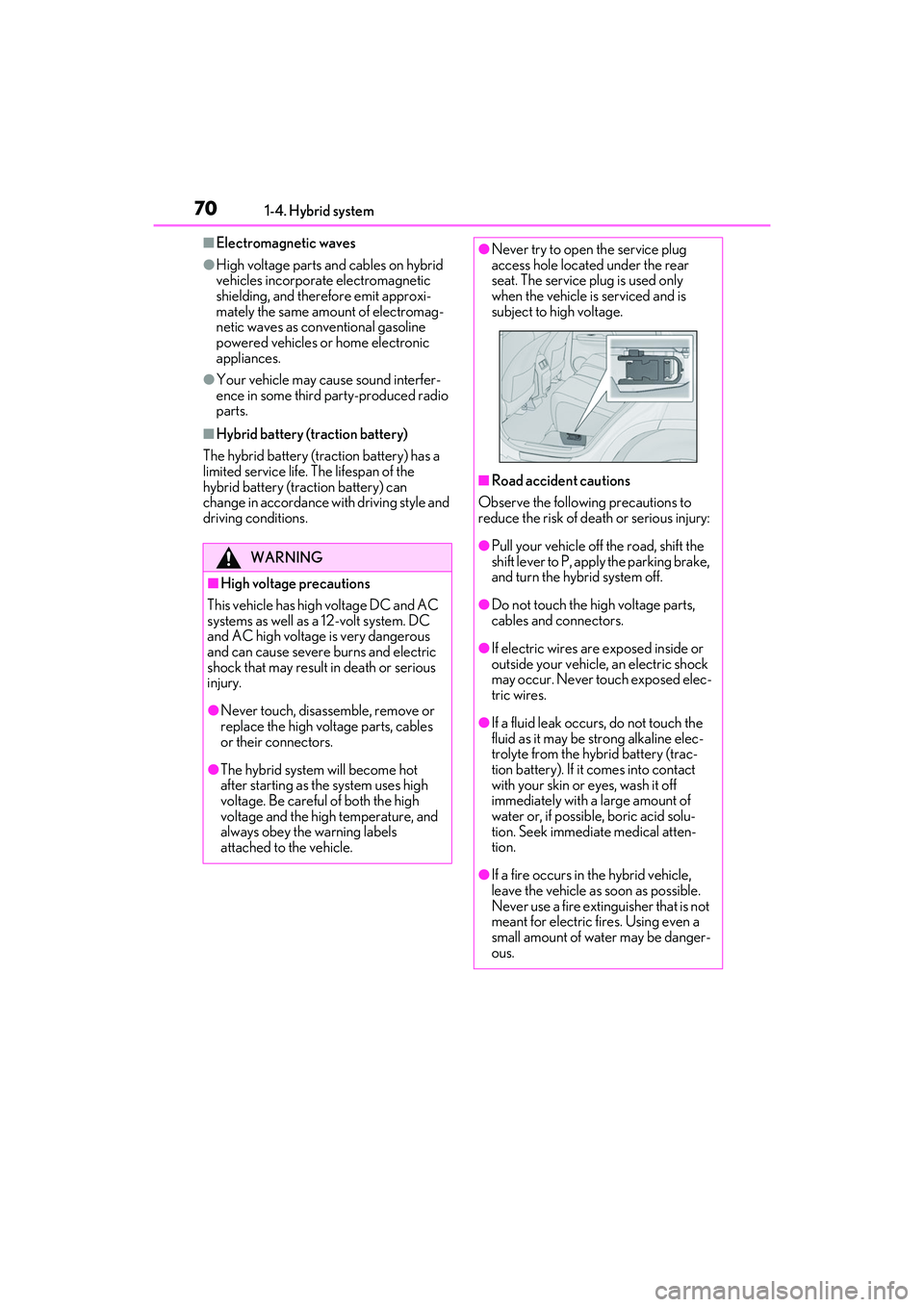
●Never try to open the service plug
access hole located under the rear
seat. The service plug is used only
when the vehicle is serviced and is
subject to high voltage.
■Road accide nt cautions
Observe the following precautions to
reduce the risk of de ath or serious injury:
●Pull your vehicle off the road, shift the
shift lever to P, apply the parking brake,
and turn the hybrid system off.
●Do not touch the high voltage parts,
cables and connectors.
●If electric wires ar e exposed inside or
outside your vehicle, an electric shock
may occur. Never touch exposed elec-
tric wires.
●If a fluid leak occurs, do not touch the
fluid as it may be st rong alkaline elec-
trolyte from the hybrid battery (trac-
tion battery). If it comes into contact
with your skin or eyes, wash it off
immediately with a large amount of
water or, if possible, boric acid solu-
tion. Seek immediate medical atten-
tion.
●If a fire occurs in the hybrid vehicle,
leave the vehicle as soon as possible.
Never use a fire extinguisher that is not
meant for electric fires. Using even a
small amount of water may be danger-
ous.
Page 73 of 532
711-4. Hybrid system
1
For safety and security
The air intake/discharge vents for the
hybrid battery (traction battery) are
located under the rear seats and in lug-
gage compartment respectively. If the
air intake vents are blocked, it could
lead to a reduction in hybrid battery
(traction battery) output.
WARNING
●If your vehicle needs to be towed, do
so with all four wheels raised. If the
wheels connected to the electric
motor (traction motor) are on the
ground when towing, the motor may
continue to generate electricity. This
may cause a fire. ( P.405)
●Carefully inspect the ground under the
vehicle. If you find that liquid has
leaked onto the ground, the fuel sys-
tem may have been damaged. Leave
the vehicle as soon as possible.
■Hybrid battery (traction battery)
●Never resell, hand over or modify the
hybrid battery. To prevent accidents,
hybrid batteries that have been
removed from a disposed vehicle are
collected through yo ur Lexus dealer.
Do not dispose of the battery yourself.
Unless the battery is properly col-
lected, the following may occur, result-
ing in death or serious injury:
• The hybrid battery may be illegally dis- posed of or dumped, and it is hazard-
ous to the environment or someone
may touch a high voltage part, result-
ing in an electric shock.
• The hybrid battery is intended to be used exclusively with your hybrid vehi-
cle. If the hybrid battery is used outside
of your vehicle or modified in any way,
accidents such as electric shock, heat
generation, smoke generation, an
explosion and electrolyte leakage may
occur.
When reselling or handing over your
vehicle, the possibility of an accident is
extremely high because the person
receiving the vehicle may not be aware
of these dangers.
●If your vehicle is disposed of without
the hybrid battery having been
removed, there is a danger of serious
electric shock if high voltage parts,
cables and their connectors are
touched. In the event that your vehicle
must be disposed of, the hybrid battery
must be disposed of by your Lexus
dealer or a qualified service shop. If
the hybrid battery is not disposed of
properly, it may cause electric shock
that can result in death or serious
injury.
NOTICE
■Hybrid battery (traction battery) air
intake/discharge vents
Do not carry large amounts of water
such as water cooler bottles in the vehi-
cle. If water spills onto the hybrid battery
(traction battery), the battery may be
damaged. Have the vehicle inspected by
your Lexus dealer.
Hybrid battery (traction bat-
tery) air intake/discharge vents
Page 75 of 532
731-5. Theft deterrent system
1
For safety and security
1-5.Theft deterrent system
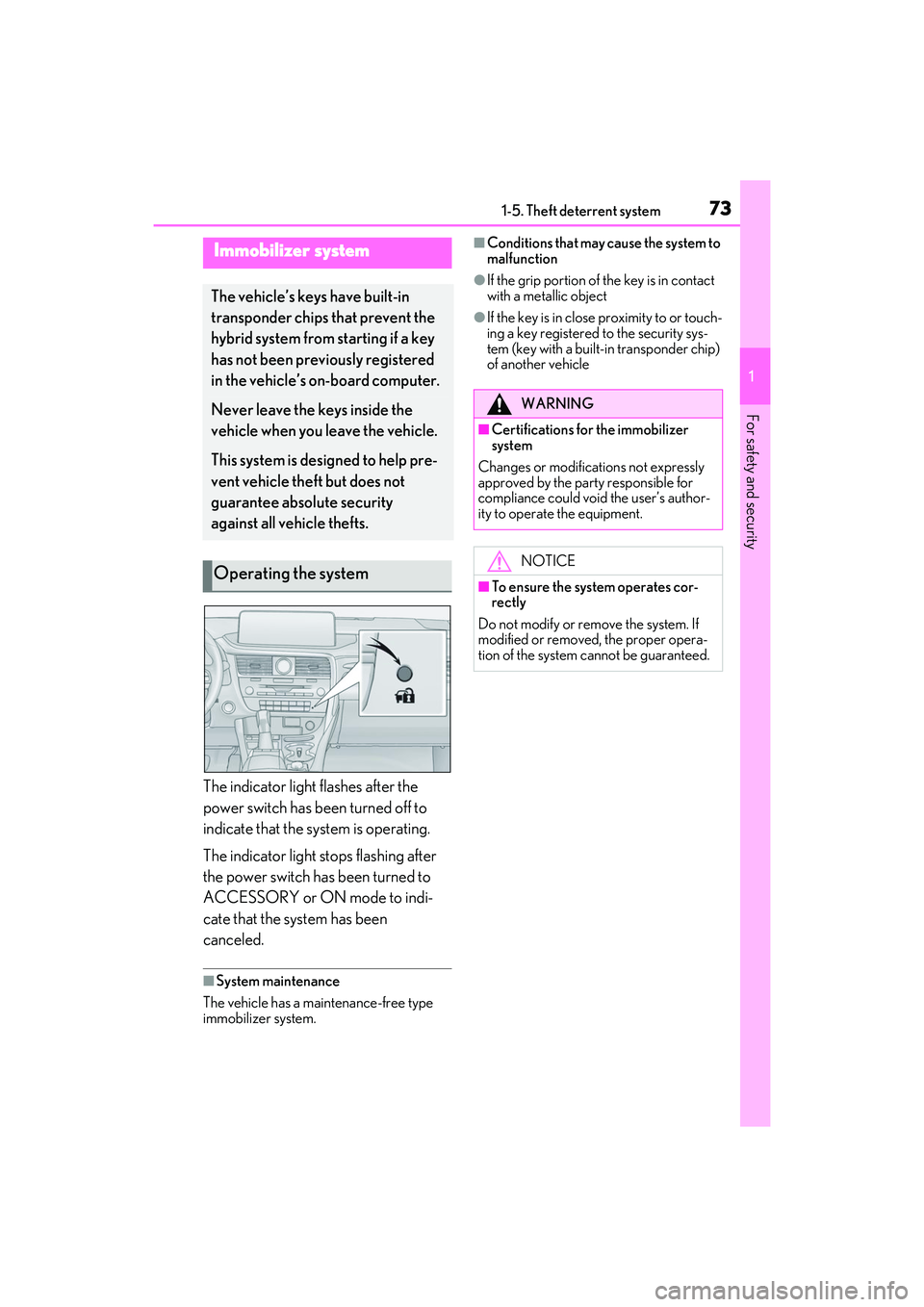
The indicator light flashes after the
power switch has been turned off to
indicate that the system is operating.
The indicator light stops flashing after
the power switch has been turned to
ACCESSORY or ON mode to indi-
cate that the system has been
canceled.
■System maintenance
The vehicle has a maintenance-free type
immobilizer system.
■Conditions that may cause the system to
malfunction
●If the grip portion of the key is in contact
with a metallic object
●If the key is in close proximity to or touch-
ing a key registered to the security sys-
tem (key with a built-in transponder chip)
of another vehicle
Immobilizer system
The vehicle’s keys have built-in
transponder chips that prevent the
hybrid system from starting if a key
has not been previously registered
in the vehicle’s on-board computer.
Never leave the keys inside the
vehicle when you leave the vehicle.
This system is designed to help pre-
vent vehicle theft but does not
guarantee absolute security
against all vehicle thefts.
Operating the system
WARNING
■Certifications for the immobilizer
system
Changes or modifications not expressly
approved by the party responsible for
compliance could void the user’s author-
ity to operate the equipment.
NOTICE
■To ensure the system operates cor-
rectly
Do not modify or remove the system. If
modified or removed, the proper opera-
tion of the system cannot be guaranteed.
Page 88 of 532

862-1. Instrument cluster
being used very often.
The gasoline engine will automatically stop
and restart under various conditions.Eco area
Shows that the vehicle is being driven in an
Eco-friendly manner.
Power area
Shows that an Eco-friendly driving range is
being exceeded (durin g full power driving
etc.)
●Depending on the selected driving mode,
the Hybrid System Indicator or tachome-
ter will be displayed. The Hybrid System
Indicator or tachometer can be set to
always be displa yed on of the
multi-information display. ( P.92)
●The Hybrid System Indicator is displayed
in the following situations:
• When the tachometer setting is set to
change according to the driving mode
and a driving mode other than sport
mode is selected
• When the tachometer setting is set to always display the Hybrid System Indica-
tor
●By keeping the indicat or needle (except
F SPORT models) or bar display (F
SPORT models) within the Eco area,
more Eco-friendly driving can be
achieved.
●Charge area indicates regeneration* sta-
tus. Regenerated energy will be used to
charge the hybrid battery (traction bat-
tery).
*: When used in this manual, regeneration
refers to the conversion of energy cre-
ated by the movement of the vehicle into
electrical energy.
■Tachometer
Hybrid System Indicator switches to the
tachometer when driving mode is in sport
mode.
The settings of the ta chometer display can
be changed on the multi-information dis-
play.
■Engine speed
On hybrid vehicles, engine speed is pre-
cisely controlled in order to help improve
fuel efficiency and reduce exhaust emis-
sions etc.
There are times when the engine speed that
is displayed may differ even when vehicle
operation and driving conditions are the
same.
■Outside temperature display
●In the following situations, the correct
outside temperature may not be dis-
played, or the display may take longer
than normal to change:
• When stopped, or driving at low speeds (less than 12 mph [20 km/h])
• When the outside temperature has
changed suddenly (at the entrance/exit of
a garage, tunnel, etc.)
●When “--” or “E” is displayed, the system
may be malfunctioning . Take your vehicle
to your Lexus dealer.
■Liquid crystal display
Small spots or light sp ots may appear on the
display. This phenomenon is characteristic
of liquid crystal disp lays, and there is no
problem continuing to use the display.
■Customization
The gauges and meters can be customized
on of the multi-in formation display.
( P.92)
C
D
WARNING
■The information display at low tem-
peratures
Allow the interior of the vehicle to warm
up before using the liquid crystal infor-
mation display. At extremely low tem-
peratures, the information display
monitor may respond slowly, and display
changes may be delayed.
Page 94 of 532
922-1. Instrument cluster
switch is turned to ON mode. It may also
take a few minutes to display the tire infla-
tion pressure after inflation pressure has
been adjusted.
• “---” may be displayed if the tire position information cannot be determined due to
unfavorable radio wave conditions.
• Tire inflation pressu re changes with tem-
perature. The displayed values may also
be different from the values measured
using a tire pressure gauge.
Select to display the following naviga-
tion system-linked information.
Route guidance
Compass display (heading-up dis-
play)
Select to enable selection of an audio
source or track on the meter using the
meter control switches.
Select to display the operational status
of the following systems:
LTA (Lane Tracing Assist) ( P.225)
RSA (Road Sign Assist) (if
equipped) ( P.234)
Dynamic radar cruise control with
full-speed range ( P.236)
■Meter display settings that can be
changed
Clock
Select to switch between 12-hour display
and 24-hour display.
Language
Select to change t he language displayed.
Units
Select to change the units of measure dis-
played.
EV indicator ( P.187)
Select to enable/disab le the EV indicator.
Switch settings
Select to display how to change the top
screen.
Drive information 1/Drive informa-
tion 2/Drive information 3
Select to select up to 2 items ( P.90) that
will be displayed on each Drive information
screen (Drive information 1 screen, Drive
information 2 screen, and Drive informa-
tion 3 screen) respectively.
Pop-up display
Select to enable/dis able the pop-up dis-
play.
• Intersection guidance
• Incoming calls
• Brightness adjustment
Color (except F SPORT models)
Select to set the color of the cursor on the
multi-information display.
Tachometer setting
Select to set the tachometer or Hybrid
System Indicator to always be displayed or
Navigation system-linked dis-
play (if equipped)
Audio system-linked display
Driving assist system information
Settings display
Page 95 of 532
932-1. Instrument cluster
2
Vehicle status information and indicators
be changed to automatically according to
the driving mode.
Needle (F SPORT models)
Select to set the tachometer needle color.
Rev indicator (F SPORT models)
( P.85)
• Select to enable/disable the Rev indica-
tor.
• Select to set the desired engine speed at which the Rev indicator will begin to be
displayed.
Selectable engine speed range:
2000 rpm to 6000 rpm
Rev peak (F SPORT models)
( P.85)
Select to enable/disable the Rev peak.
Default setting
Select to reset the meter display settings to
the default setting.
■Vehicle functions and settings that
can be changed
P.472
■Background color of the indicator/shift
position display area (except F SPORT
models)
The background color of the indicator/shift
position display area is changed according
to the driving mode as follows ( P.276):
●Eco drive mode: Blue
●Sport mode: Red
■Suspension of the settings display
●Some settings cannot be changed while
driving. When changing settings, park
the vehicle in a safe place.
●If a warning message is displayed, opera-
tion of the settings display will be sus-
pended.
Displays suggestions to the driver in
the following situations. To select a
response to a displayed suggestion,
use the meter control switches.
■Suggestion to enable the power
back door
If the power back door system is dis-
abled (setting on set to off) and the
power back door switch on the instru-
ment panel is operated, a suggestion
message will be displayed asking if you
wish to enable the power back door
system.
To enable the power back door system,
select “Yes”.
After enabling the power back door sys-
tem, press the power back door switch
again to open or close the power back
door.
WARNING
■Cautions during setting up the dis-
play
As the hybrid system needs to be operat-
ing during setting up the display, ensure
that the vehicle is parked in a place with
adequate ventilation. In a closed area
such as a garage, ex haust gases includ-
ing harmful carbon monoxide (CO) may
collect and enter the vehicle. This may
lead to death or a serious health hazard.
NOTICE
■While setting up the display
To prevent 12-volt battery discharge,
ensure that the hybrid system is operat-
ing while setting up the display features.
Suggestion function
Page 98 of 532
962-1. Instrument cluster
Displayed content is the same as that displayed on the multi-information display. For details,
refer to the explanations of each system.
Vehicle speed display area
Displays the following items:
• Vehicle speed
• Speed limit (vehicles with a na vigation system) (U.S.A. only)
• Road sign icons recognized by the RSA ( P.234)
Hybrid System Indicator/Tachometer ( P.99)
Shift position display ( P.189)
HUD (Head-up display) switch ( P.96)
■Head-up display
The head-up disp lay may seem dark or hard
to see when viewed through sunglasses,
especially polarized su nglasses. Adjust the
brightness of the he ad-up display or
remove your sunglasses.
■Enabling/Disabling the head-up
display
Press the HUD (Head-up display)
switch.
E
F
G
H
WARNING
■Before using the head-up display
●Check that the position and brightness
of the head-up display image does not
interfere with safe driving. Incorrect
adjustment of the image’s position or
brightness may obstru ct the driver’s
view and lead to an accident, resulting
in death or serious injury.
●Do not continuously look at the
head-up display while driving as you
may fail to see pedestrians, objects on
the road, etc. ahead of the vehicle.
NOTICE
■To prevent damage to components
●Do not place any drinks near the
head-up display projector. If the pro-
jector gets wet, electrical malfunctions
may result.
●Do not place anything on or put stick-
ers onto the head-up display projector.
Doing so could interrupt head-up dis-
play indications.
●Do not touch the inside of the head-up
display projector or thrust sharp edges
or the like into the projector. Doing so
could cause mechanical malfunctions.
Using the head-up display
Page 113 of 532
1113-2. Opening, closing and locking the doors
3
Before driving
mechanical key. (P.439)
■Customization
Some functions can be customized.
( P.472)
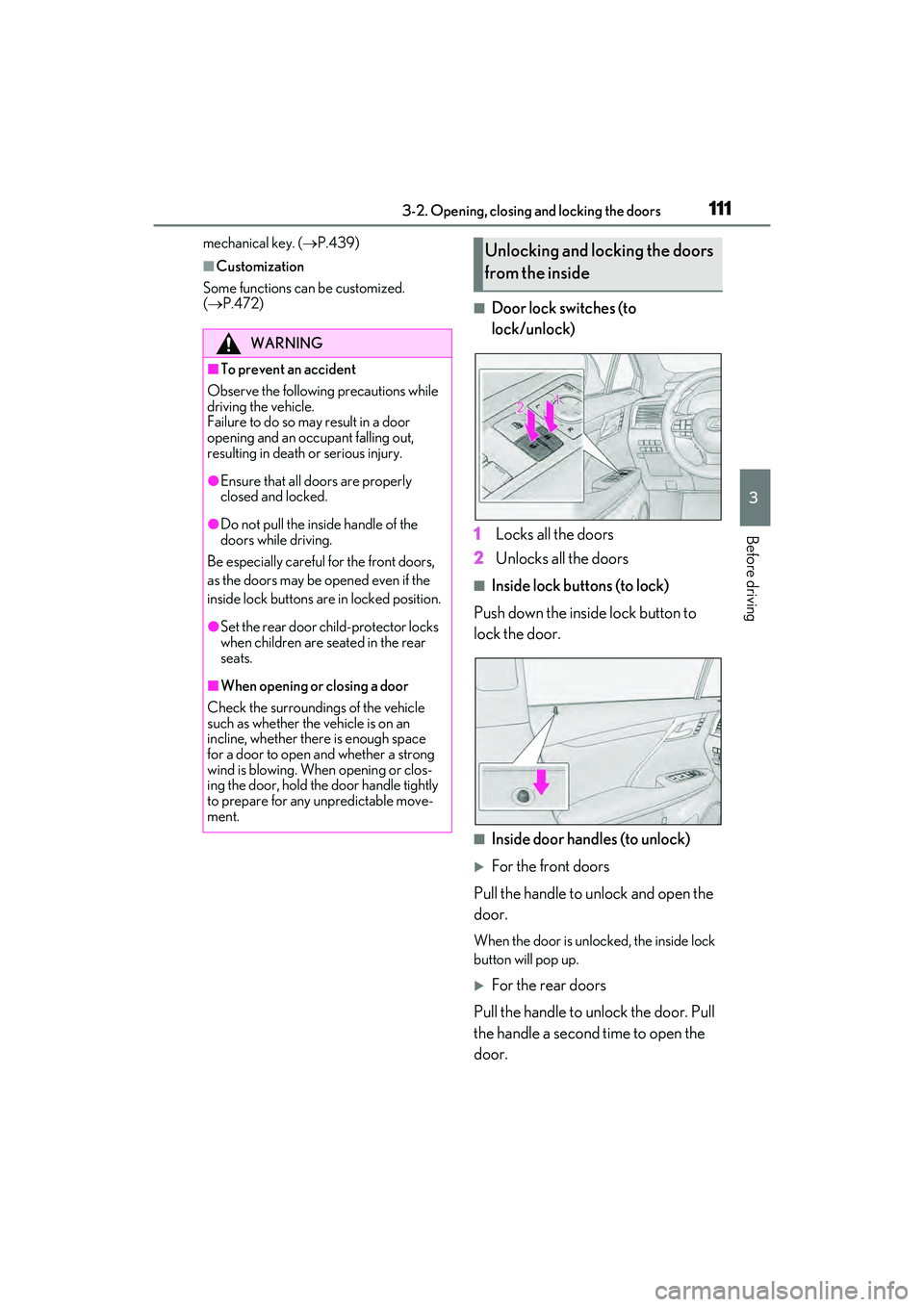
■Door lock switches (to
lock/unlock)
1 Locks all the doors
2 Unlocks all the doors
■Inside lock buttons (to lock)
Push down the inside lock button to
lock the door.
■Inside door handles (to unlock)
For the front doors
Pull the handle to unlock and open the
door.
When the door is unlocked, the inside lock
button will pop up.
For the rear doors
Pull the handle to unlock the door. Pull
the handle a second time to open the
door.
WARNING
■To prevent an accident
Observe the following precautions while
driving the vehicle.
Failure to do so may result in a door
opening and an occupant falling out,
resulting in death or serious injury.
●Ensure that all doors are properly
closed and locked.
●Do not pull the inside handle of the
doors while driving.
Be especially careful for the front doors,
as the doors may be opened even if the
inside lock buttons are in locked position.
●Set the rear door ch ild-protector locks
when children are seated in the rear
seats.
■When opening or closing a door
Check the surroundings of the vehicle
such as whether the vehicle is on an
incline, whether there is enough space
for a door to open and whether a strong
wind is blowing. When opening or clos-
ing the door, hold the door handle tightly
to prepare for any unpredictable move-
ment.
Unlocking and locking the doors
from the inside
Page 145 of 532
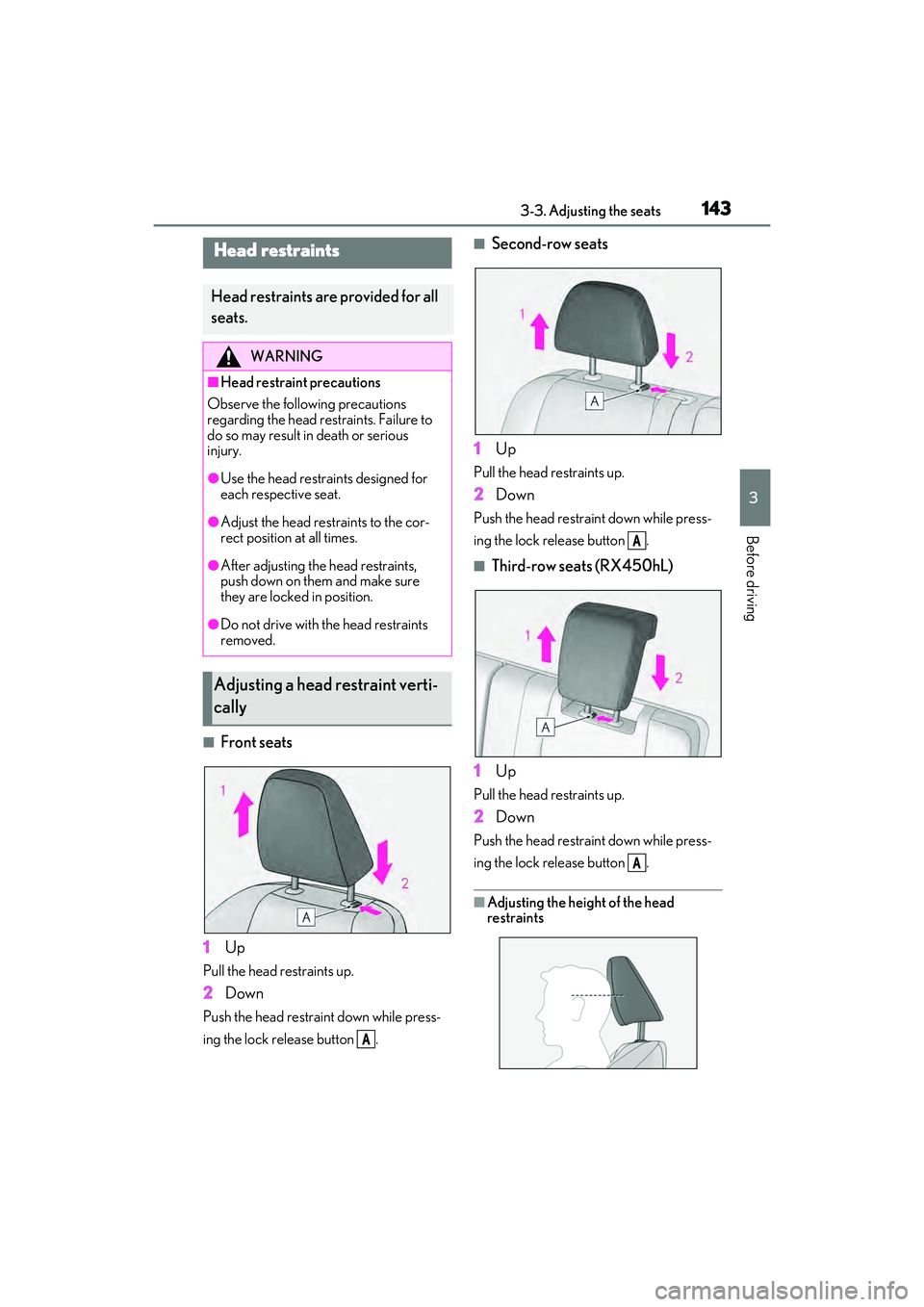
1433-3. Adjusting the seats
3
Before driving
■Front seats
1 Up
Pull the head restraints up.
2Down
Push the head restraint down while press-
ing the lock release button .
■Second-row seats
1 Up
Pull the head restraints up.
2Down
Push the head restra int down while press-
ing the lock release button .
■Third-row seats (RX450hL)
1 Up
Pull the head restraints up.
2Down
Push the head restra int down while press-
ing the lock release button .
■Adjusting the heig ht of the head
restraints
Head restraints
Head restraints are provided for all
seats.
WARNING
■Head restraint precautions
Observe the following precautions
regarding the head restraints. Failure to
do so may result in death or serious
injury.
●Use the head restraints designed for
each respective seat.
●Adjust the head restraints to the cor-
rect position at all times.
●After adjusting the head restraints,
push down on them and make sure
they are locked in position.
●Do not drive with the head restraints
removed.
Adjusting a head restraint verti-
cally
A
A
A