audio LEXUS SC300 1999 Owners Manual
[x] Cancel search | Manufacturer: LEXUS, Model Year: 1999, Model line: SC300, Model: LEXUS SC300 1999Pages: 432, PDF Size: 3.69 MB
Page 4 of 432

HOW TO USE THIS MANUAL
iv
SECTION 2 ± AIR CONDITIONING AND
AUDIO
The features of the vehicle's air conditioning and audio are
explained in detail. Be sure to read this section so that you can
make full use of them.
SECTION 3 ± STARTING AND DRIVING
Starting the engine, driving, stopping, operation of features
affecting vehicle handling, hints on vehicle safety and safe
driving techniques are all explained. Please read everything
in this section, and remember ± drive safely!
SECTION 4 ± IN CASE OF AN EMERGENCY
This section explains what to do in the event of an urgent
situation such as the engine not starting or getting a flat tire,
etc. If such a problem occurs, check the contents of this
Owner 's Manual and follow the instructions given.
SECTION 5 ± MAINTENANCE
This section explains the importance of regular maintenance.
Regular and periodic inspection and maintenance of your
Lexus will help to keep your vehicle in its best condition.
SECTION 6 ± SERVICE PROCEDURES AND
SPECIFICATIONS
Simple maintenance procedure and service data are provided
here for your reference should you wish to perform inspection
and maintenance yourself.
INDEX
The page number is listed for each item in the Owner's
Manual so that you can rapidly find the item and page you are
searching for.
GAS STATION INFORMATION
The information you need to know for appropriate servicing
at the gas station is provided here.
QUICK INDEX
This is designed so that you can quickly find the needed
information when an urgent situation arises.
Safety symbol
Page 8 of 432

For detailed information, refer to the description given in each section.
PICTORIAL INDEX
viiiPage
1
Driving position memory switch 168
. . . . . . . . . . . .
2 Power rear view mirror control switch 111 . . . . . . . .
3 Door lock switch and power window
switches 30, 40
. . . . . . . . . . . . . . . . . . . . . . . . . . . . . .
4 Fuel filler door opener 85
. . . . . . . . . . . . . . . . . . . . .
5 Trunk lid opener 84
. . . . . . . . . . . . . . . . . . . . . . . . . .
6 Hood lock release lever 81
. . . . . . . . . . . . . . . . . . . .
7 Headlight, turn signal and fog
light switch 32, 37
. . . . . . . . . . . . . . . . . . . . . . . . . . .
8 Traction control system off switch 246
. . . . . . . . . . .
9 Windshield wiper and washer switch 38
. . . . . . . . .
10 Cruise control switch 242
. . . . . . . . . . . . . . . . . . . . . Page
11 Emergency flasher switch
44
. . . . . . . . . . . . . . . . . .
12 Automatic air conditioning controls 177
. . . . . . . . .
13 Car audio 186
. . . . . . . . . . . . . . . . . . . . . . . . . . . . . .
14 Parking brake lever 215
. . . . . . . . . . . . . . . . . . . . . .
15 Driving pattern selector switch 220
. . . . . . . . . . . . .
16 Seat heater switches 45
. . . . . . . . . . . . . . . . . . . . . . .
17 Ashtray 69
. . . . . . . . . . . . . . . . . . . . . . . . . . . . . . . . .
18 Automatic transmission selector lever 217 . . . . . . .
19 Cup holder 76
. . . . . . . . . . . . . . . . . . . . . . . . . . . . . .
20 Cup holder 76
. . . . . . . . . . . . . . . . . . . . . . . . . . . . . .
21 Glovebox 72
. . . . . . . . . . . . . . . . . . . . . . . . . . . . . . . .
Page 10 of 432

For detailed information, refer to the description given in each section.
PICTORIAL INDEX
xPage
1
Driving position memory switch 168
. . . . . . . . . . . .
2 Power rear view mirror control switch 111 . . . . . . . .
3 Door lock switch and power window
switches 30, 40
. . . . . . . . . . . . . . . . . . . . . . . . . . . . . .
4 Fuel filler door opener 85
. . . . . . . . . . . . . . . . . . . . .
5 Trunk lid opener 84
. . . . . . . . . . . . . . . . . . . . . . . . . .
6 Hood lock release lever 81
. . . . . . . . . . . . . . . . . . . .
7 Headlight, turn signal and fog
light switch 32, 37
. . . . . . . . . . . . . . . . . . . . . . . . . . .
8 Traction control system off switch 246
. . . . . . . . . .
9 Windshield wiper and washer switch 38
. . . . . . . . .
10 Cruise control switch 242
. . . . . . . . . . . . . . . . . . . . . Page
11 Emergency flasher switch
44
. . . . . . . . . . . . . . . . . .
12 Automatic air conditioning controls 177
. . . . . . . . .
13 Car audio 186
. . . . . . . . . . . . . . . . . . . . . . . . . . . . . .
14 Parking brake lever 215
. . . . . . . . . . . . . . . . . . . . . .
15 Driving pattern selector switch 232
. . . . . . . . . . . . .
16 Seat heater switches 45
. . . . . . . . . . . . . . . . . . . . . . .
17 Ashtray 69
. . . . . . . . . . . . . . . . . . . . . . . . . . . . . . . . .
18 Automatic transmission selector lever 229 . . . . . . .
19 Cup holder 76
. . . . . . . . . . . . . . . . . . . . . . . . . . . . . .
20 Cup holder 76
. . . . . . . . . . . . . . . . . . . . . . . . . . . . . .
21 Glovebox 72
. . . . . . . . . . . . . . . . . . . . . . . . . . . . . . . .
Page 82 of 432
GAUGES, METERS AND SERVICE REMINDER INDICATORS
64
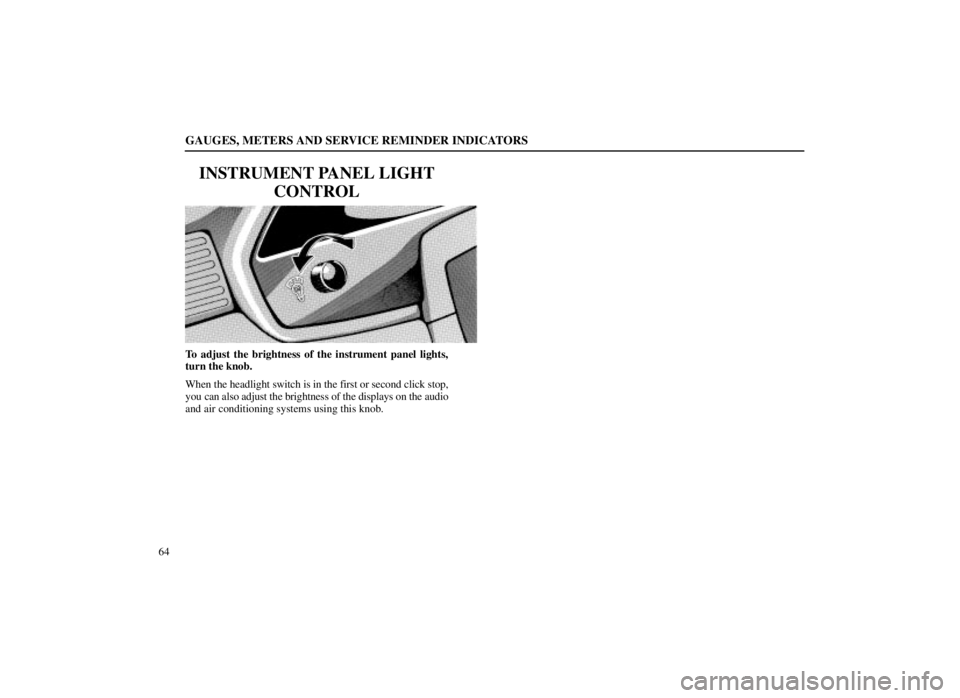
INSTRUMENT PANEL LIGHTCONTROL
To adjust the brightness of the instrument panel lights,
turn the knob.
When the headlight switch is in the first or second click stop,
you can also adjust the brightness of the displays on the audio
and air conditioning systems using this knob.
Page 194 of 432

SECTION 2
176AIR CONDITIONING AND AUDIO
Automatic
air conditioning controls .
. . . . . . . . . . . . . . . . . . .
177
Audio system . . . . . . . . . . . . . . . . . . . . . . . . . . . . . . . . . . . . \
.
186
Page 195 of 432

AIR CONDITIONING AND AUDIO
177
AUTOMATIC AIR CONDITIONING CONTROLS
Page 196 of 432

AIR CONDITIONING AND AUDIO
178
Page 197 of 432

AIR CONDITIONING AND AUDIO
179
Page 198 of 432

AIR CONDITIONING AND AUDIO
180The automatic air conditioning automatically maintains the
set temperature.
This air conditioning features automatic fan speed and air
flow
control which automatically selects the most suitable fan
speed and air flow to control the temperature. The ignition
key must be in the ºONº position.
You may use manual control to override the automatic
settings.
You can adjust the brightness of the display. See ºInstrument
panel light controlº on page 64 for details.
Page 199 of 432
AIR CONDITIONING AND AUDIO
181
(a) Climate control
SETTING OPERATION ± automatic control
1. Push the ºAUTOº knob.
Air flow quantity, switching of the diffusers, on±off of the air
conditioning, and switching of the air intake between
RECIRCULATED AIR and OUTSIDE AIR are
automatically adjusted. The operation status is shown by
each indicator.
When one of the manual control buttons is depressed while
operating in automatic mode, the operation corresponding to
the button depressed is set. Other conditions continue to be
adjusted automatically. 2. Turn the ºTEMPº knob until the desired temperature
is displayed.
The ºTEMPº knob is used to set the desired passenger
compartment temperature. The temperature of air delivered
to the passenger compartment will be controlled
automatically according to the setting. The figures on the
panel indicate degrees Fahrenheit.
SETTING OPERATION ± manual control
If manual air flow selection is desired ±
The outlets from which air is delivered can be selected
manually by pushing either side of the air flow control
(MODE) button. The mode appears on the display.
The function of each mode is as follows:
PANEL mode ± Directs air flow at face level.
BI±LEVEL mode ± Directs air flow at face level and
at floor level for both front and rear. Except in ventilation, the
air to the floor is slightly warmer than air to the face.
FLOOR mode ± Directs air flow mostly at floor level
for both front and rear.
FLOOR/WINDSHIELD mode ± Directs air flow to
the windshield and front side windows as well as floor level
for both front and rear.
FRONT WINDSHIELD mode ± Directs air flow
mostly to the windshield and front side windows.
When this mode is selected while operating in automatic
mode, the air conditioning is set to operate and the OUTSIDE