battery LEXUS UX 2022 Owners Manual
[x] Cancel search | Manufacturer: LEXUS, Model Year: 2022, Model line: UX, Model: LEXUS UX 2022Pages: 100, PDF Size: 6.15 MB
Page 12 of 100

11
UX250h_QG_OM76572U_(U)
Charge area
Shows regeneration
* status. Regenerated energy will be used to charge the hybrid
battery (traction battery).
*: When used in this manual, regeneration refers to the conversion of energy created by
the movement of the vehicle into electrical energy.
Hybrid Eco area
Shows that gasoline engine power is not being used very often.
The gasoline engine will automatically stop and restart under various conditions.
Eco area
Shows that the vehicle is being driven in an Eco-friendly manner.
By keeping the bar display within Eco area, more Eco-friendly driving can be achieved.
Power area
Shows that an Eco-friendly driving range is being exceeded (during full power driving
etc.)
Hybrid System
Your vehicle is a hybrid vehicle. It has characteristics different from conventional vehicles.
Be sure you are closely familiar with the charact eristics of your vehicle, and operate it with
care.
The hybrid system combines the use of a gaso line engine and an electric motor (traction
motor) according to driving conditions, improv ing fuel efficiency and reducing exhaust
emissions.
For details, refer to the “OWNER’S MANUAL”.
Hybrid System Indicator
Except F SPORT models F SPORT models
A
B
C
D
Page 13 of 100

12
UX250h_QG_OM76572U_(U)
If the shift lever is in N, the hybrid battery (traction battery) will not be charged even when
the engine is running. Therefore, if the vehicle is left with the shift lever in N for a long period
of time, the hybrid battery (traction battery) w ill discharge, and this may result in the vehicle
not being able to start.
In the following situations, kinetic energy is converted to electric energy and deceleration
force can be obtained in conjunction with the recharging of the hybrid battery (traction bat-
tery).
● The accelerator pedal is released while driving with the shift lever in D or S.
● The brake pedal is depressed while driving with the shift lever in D or S.
There may be no engine sound or vibration even though the vehicle is able to move with the
“READY” indicator is illuminated. For safety, apply the parking brake and make sure to shift
the shift lever to P when parked.
The following sounds or vibrations may occur when the hybrid system is operating and are
not a malfunction:
● Motor sounds may be heard from the engine compartment.
● Sounds may be heard from the hybrid battery (traction battery) behind the rear seats
when the hybrid system starts or stops.
● Relay operating sounds such as a snap or so ft clank will be emitted from the hybrid bat-
tery (traction battery), behind the rear seats, when the hybrid system is started or
stopped.
● Sounds from the hybrid system may be heard when the back door is open.
● Sounds may be heard from the hybrid transmission when the gasoline engine starts or
stops, when driving at low speeds, or during idling.
● Engine sounds may be heard when accelerating sharply.
● Sounds may be heard due to regenerative braking when the brake pedal is depressed or
as the accelerator pedal is released.
● Vibration may be felt when the gasoline engine starts or stops.
● Cooling fan sounds may be heard from the air intake vent under the right side of the rear
seat.
Hybrid battery (traction battery) charge
Regenerative braking
Sounds and vibrations spec ific to a hybrid vehicle
Page 16 of 100

15
UX250h_QG_OM76572U_(U)
●Smart access system with push-button
start ( P.17)
● Wireless remote control
*: If equipped
To take out the mechanical key, push the
release button and take the key out.
The mechanical key can only be inserted in
one direction, as the key only has grooves
on one side. If the key cannot be inserted in
a lock cylinder, turn it over and re-attempt
to insert it.
After using the mechanical key, store it in
the electronic key. Carry the mechanical
key together with the electronic key. If the
electronic key battery is depleted or the
entry function does not operate properly,
you will need the mechanical key.
Keys
Electronic key
Mechanical key
Page 23 of 100

22
UX250h_QG_OM76572U_(U)
Turns EV drive mode on/off
When EV drive mode is turned on, the EV
drive mode indicator will come on. Pressing
the switch when in EV drive mode will
return the vehicle to normal driving (using
the gasoline engine and electric motor
[traction motor]).
EV Drive Mode
In EV drive mode, electric power is supplied by the hybrid battery (traction battery), and
only the electric motor (traction motor) is used to drive the vehicle.
Page 49 of 100
48
UX250h_QG_OM76572U_(U)
■How to display on Center Display
Press the “MENU” button on the Remote Touch, and then select on the menu
screen.
If the “Trip Information” or “History” screen is displayed, select “Energy”.
■How to display on the multi-information display
Press or of the meter control switches and select , and then press or
to select the energy monitor display.
Energy Monitor/Consumption Screen
The status of your hybrid system and fuel consumption information can be displayed on
the multi-information display and Center Display.
10.3-inch display model: The energy monito r and consumption screen can be displayed
on the side display. For details, refer to the “OWNER’S MANUAL”.
Energy monitor
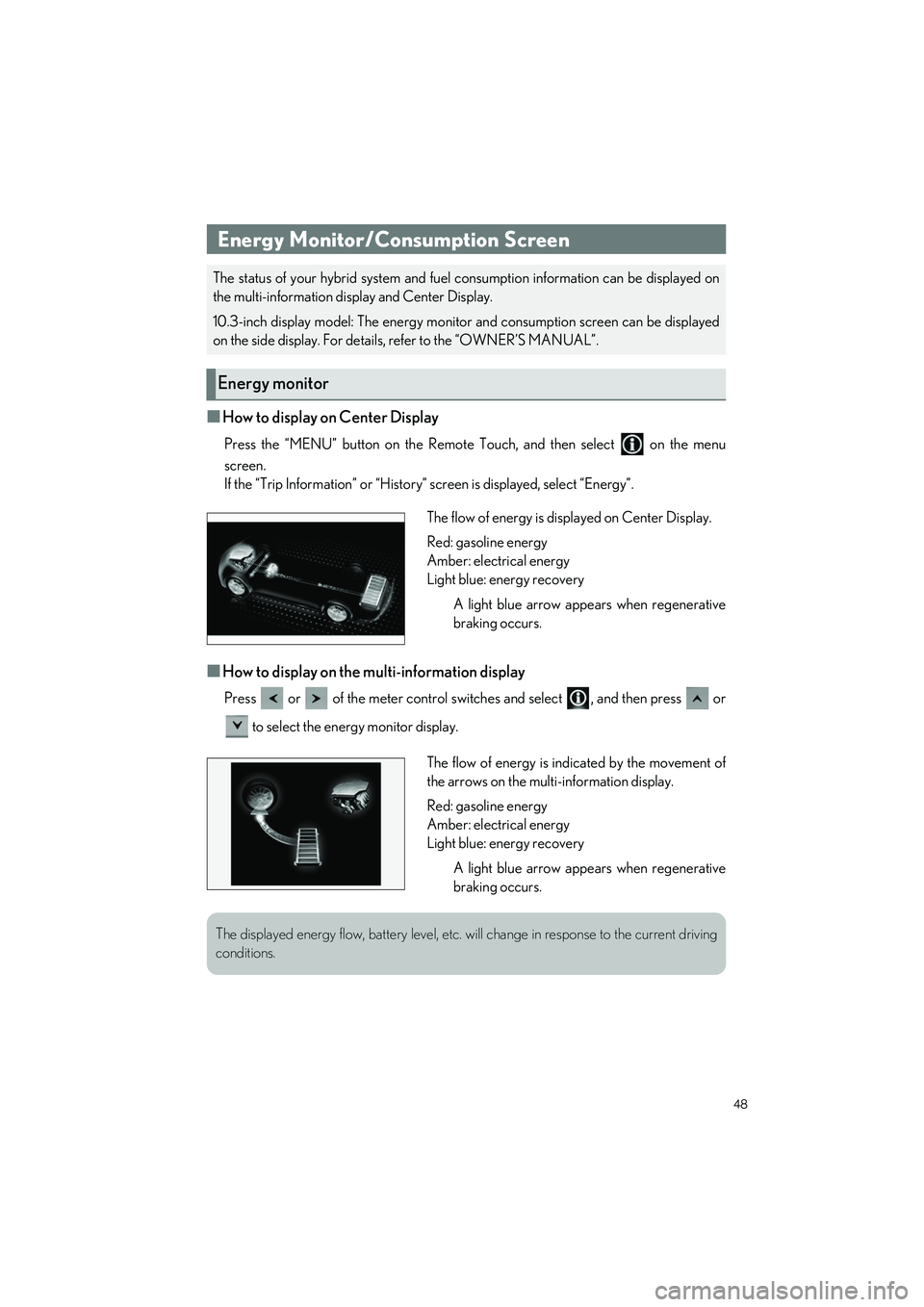
The flow of energy is displayed on Center Display.
Red: gasoline energy
Amber: electrical energy
Light blue: energy recovery
A light blue arrow appears when regenerative
braking occurs.
The flow of energy is indicated by the movement of
the arrows on the multi-information display.
Red: gasoline energy
Amber: electrical energy
Light blue: energy recoveryA light blue arrow appears when regenerative
braking occurs.
The displayed energy flow, battery level, etc. will change in response to the current driving
conditions.
Page 78 of 100
77
UX250h_QG_OM76572U_(U)
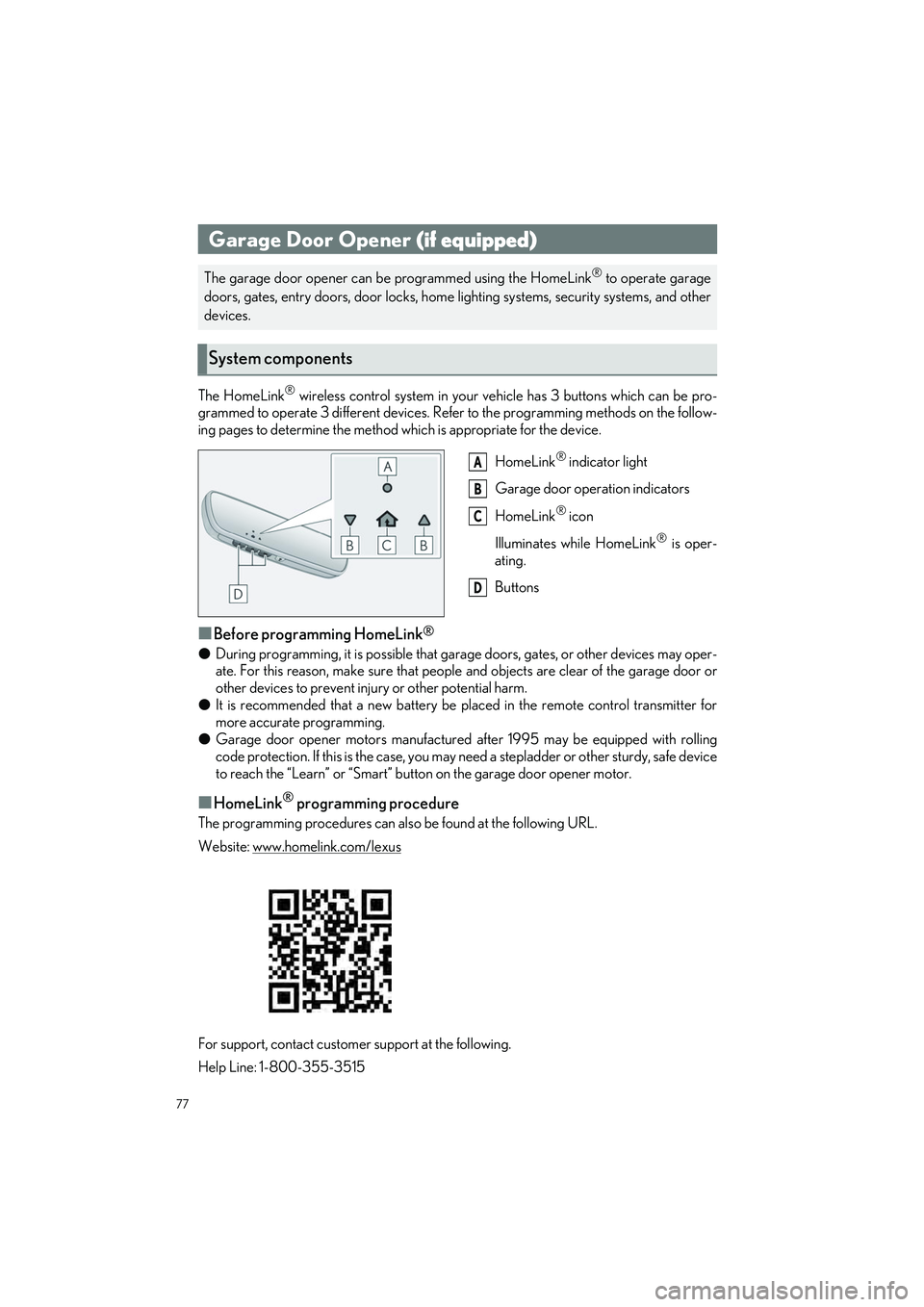
The HomeLink® wireless control system in your vehicle has 3 buttons which can be pro-
grammed to operate 3 different devices. Refer to the programming methods on the follow-
ing pages to determine the method which is appropriate for the device.
HomeLink
® indicator light
Garage door operation indicators
HomeLink
® icon
Illuminates while HomeLink
® is oper-
ating.
Buttons
■Before programming HomeLink®
● During programming, it is possible that garage doors, gates, or other devices may oper-
ate. For this reason, make sure that people and objects are clear of the garage door or
other devices to prevent inju ry or other potential harm.
● It is recommended that a new battery be placed in the remote control transmitter for
more accurate programming.
● Garage door opener motors manufactured after 1995 may be equipped with rolling
code protection. If this is the case, you may need a stepladder or other sturdy, safe device
to reach the “Learn” or “Smart” button on the garage door opener motor.
■HomeLink® programming procedure
The programming procedures can also be found at the following URL.
Website: www.homelink.com/lexus
For support, contact customer support at the following.
Help Line: 1-800-355-3515
Garage Door Opener (if equipped)
The garage door opener can be programmed using the HomeLink® to operate garage
doors, gates, entry doors, door locks, home lighting systems, security systems, and other
devices.
System components
A
B
C
D
Page 93 of 100

92
What to do if...
UX250h_QG_OM76572U_(U)
Follow the correction procedures.
Brake Override System
warning light/Drive-Start
Control warning light/PKSB
warning light
Rear passengers’ seat belt
reminder lights
(Blinking and then continu-
ously on)
Tire pressure warning light
(Orange)
LTA indicator
(Illuminates without
blinking)
Tire pressure warning light*
Low fuel level warning light
Driver’s and front passenger’s
seat belt reminder lightLow traction battery charge
warning light
Stop and check.
High coolant temperature
warning lightHybrid system overheat warn-
ing light
For further information, refer to the “OWNER’S MANUAL”.
Page 97 of 100

96
What to do if...
UX250h_QG_OM76572U_(U)
1Ensure that the shift lever is in P and depress the brake pedal.
2Touch the Lexus emblem side of the
electronic key to the power switch.
When the electronic key is detected, a
buzzer sounds and the power switch
will turn to ON.
When the smart access system with
push-button start is deactivated in cus-
tomization setting, the power switch
will turn to ACC.
3Firmly depress the brake pedal and check th at is shown on the multi-information
display.
4Press the power switch.
In the event that the hybrid system still cann ot be started, contact your Lexus dealer.
Starting the hybrid system
Replace the battery with a new one. For instruct ions on replacing the battery, refer to the
“OWNER’S MANUAL”.
If you need further assistance, contact your Lexus dealer.