ECO LEXUS UX200 2019 Owners Manual
[x] Cancel search | Manufacturer: LEXUS, Model Year: 2019, Model line: UX200, Model: LEXUS UX200 2019Pages: 452, PDF Size: 10.06 MB
Page 207 of 452
2074-5. Using the driving support systems
4
Driving
This mode employs a radar to detect the presence of vehicles up to approximately
328 ft. (100 m) ahead, determines the cu rrent vehicle-to-vehicle following dis-
tance, and operates to maintain a suitab le following distance from the vehicle
ahead. The desired vehicle-to-vehicle distance can also be set by operating the
vehicle-to-vehicle distance switch.
When driving on downhill slopes, the vehicl e-to-vehicle distance may become shorter.
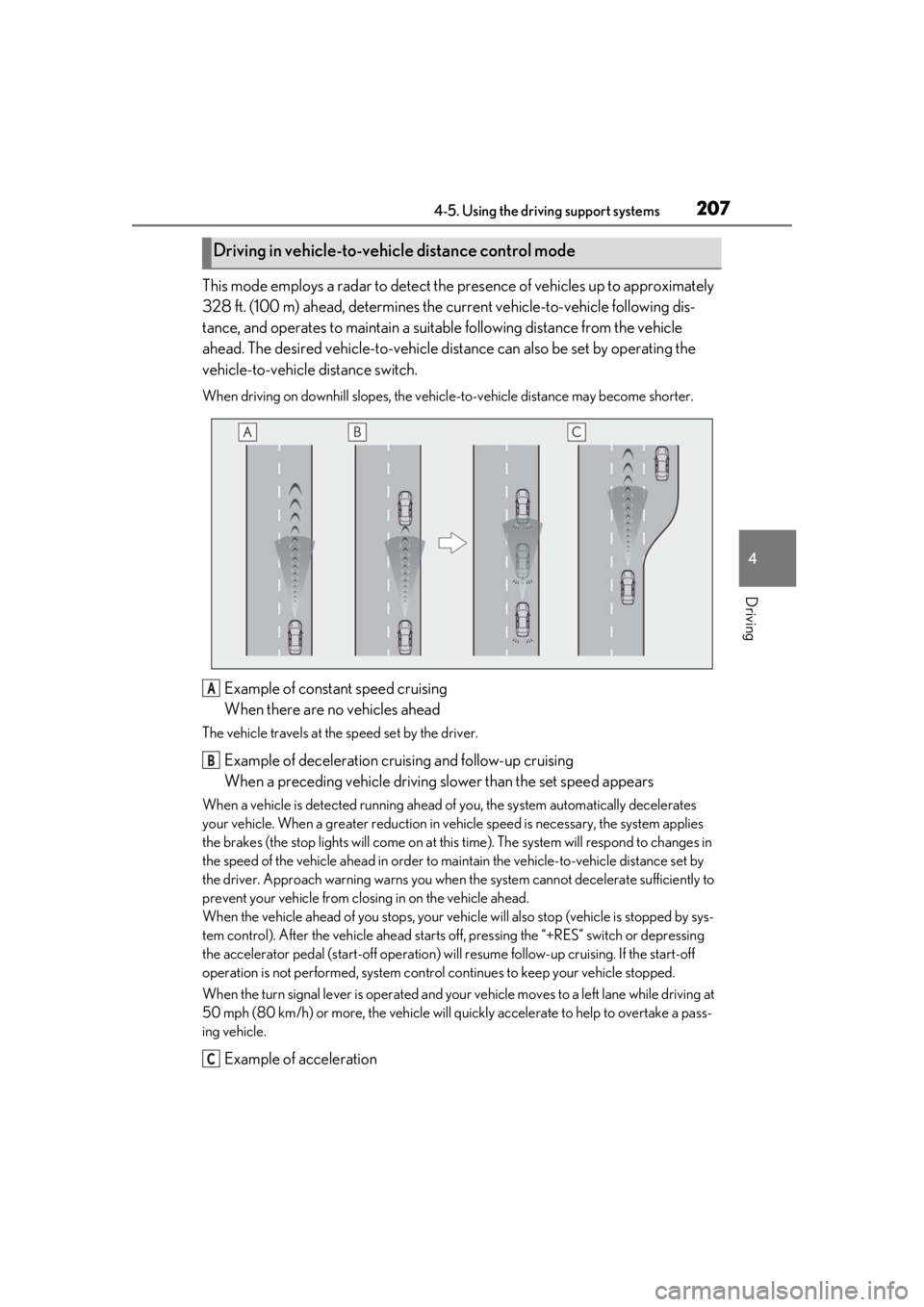
Example of constant speed cruising
When there are no vehicles ahead
The vehicle travels at the speed set by the driver.
Example of deceleration cruising and follow-up cruising
When a preceding vehicle driving slower than the set speed appears
When a vehicle is detected running ahead of you, the system automatically decelerates
your vehicle. When a greater reduction in vehicle speed is necessary, the system applies
the brakes (the stop lights will come on at this time). The sy stem will respond to changes in
the speed of the vehicle ahead in order to maintain the vehicle-to-vehicle distance set by
the driver. Approach warning warns you when th e system cannot decelerate sufficiently to
prevent your vehicle from closing in on the vehicle ahead.
When the vehicle ahead of you stops, your vehi cle will also stop (vehicle is stopped by sys-
tem control). After the vehicle ahead starts off, pressing the “+RES” switch or depressing
the accelerator pedal (start-off operation) will resume follow-up cruising. If the start-off
operation is not performed, system contro l continues to keep your vehicle stopped.
When the turn signal lever is operated and your vehicle moves to a left lane while driving at
50 mph (80 km/h) or more, the vehicle will quickly accelerate to help to overtake a pass-
ing vehicle.
Example of acceleration
Driving in vehicle-to-vehicle distance control mode
A
B
C
Page 208 of 452
2084-5. Using the driving support systems
When there are no longer any preceding vehicles driving slower than the set
speed
The system accelerates until the set speed is re ached. The system then returns to constant
speed cruising.
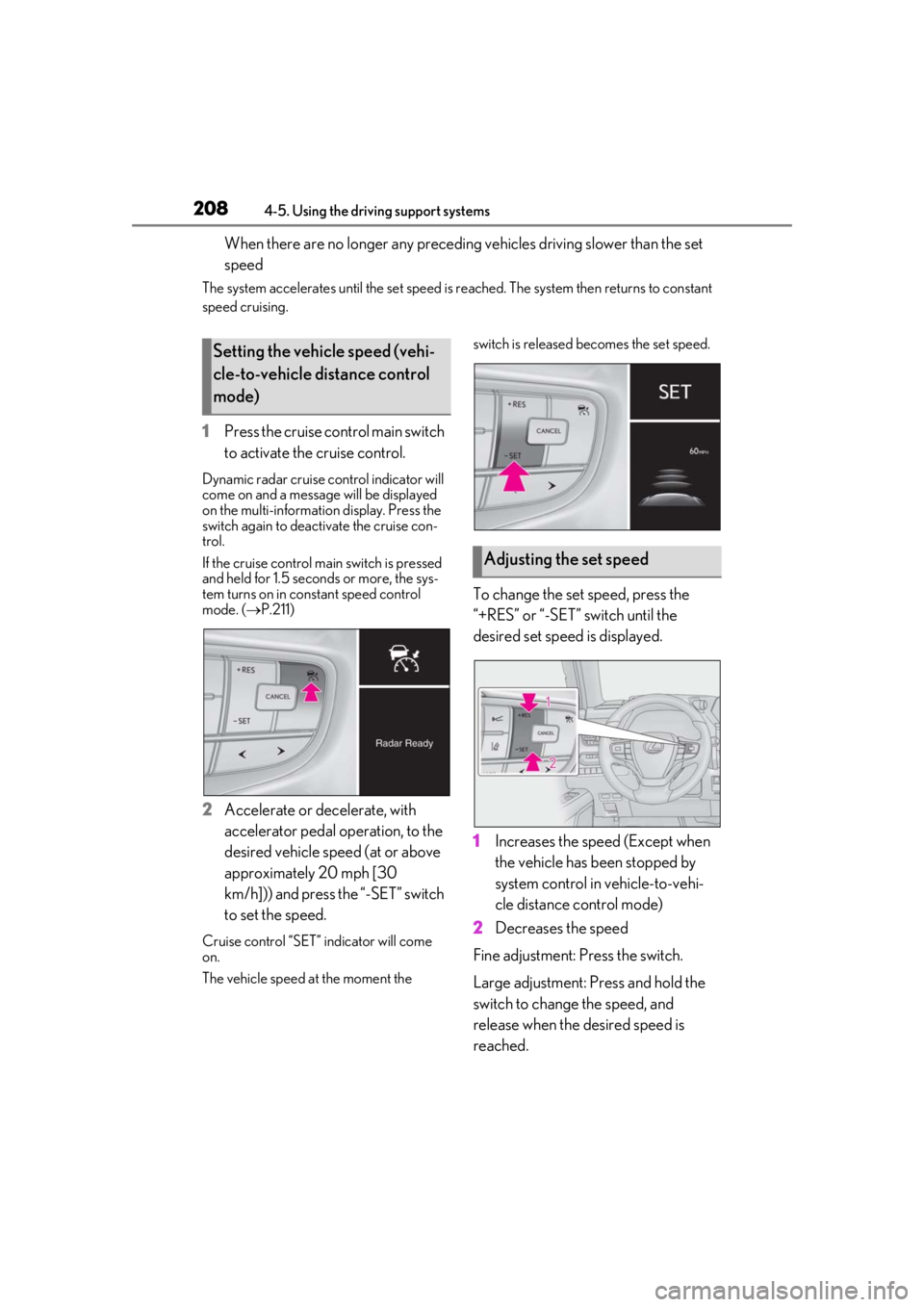
1 Press the cruise control main switch
to activate the cruise control.
Dynamic radar cruise control indicator will
come on and a message will be displayed
on the multi-information display. Press the
switch again to deactivate the cruise con-
trol.
If the cruise control ma in switch is pressed
and held for 1.5 seconds or more, the sys-
tem turns on in constant speed control
mode. ( P.211)
2 Accelerate or decelerate, with
accelerator pedal operation, to the
desired vehicle speed (at or above
approximately 20 mph [30
km/h])) and press the “-SET” switch
to set the speed.
Cruise control “SET” indicator will come
on.
The vehicle speed at the moment the switch is released becomes the set speed.
To change the set speed, press the
“+RES” or “-SET” switch until the
desired set speed is displayed.
1
Increases the speed (Except when
the vehicle has been stopped by
system control in vehicle-to-vehi-
cle distance control mode)
2 Decreases the speed
Fine adjustment: Press the switch.
Large adjustment: Press and hold the
switch to change the speed, and
release when the desired speed is
reached.
Setting the vehicle speed (vehi-
cle-to-vehicle distance control
mode)
Adjusting the set speed
Page 211 of 452
2114-5. Using the driving support systems
4
Driving
■Warnings may not occur when
In the following instances, warnings
may not occur even when the vehicle-
to-vehicle distance is small.
When the speed of the preceding
vehicle matches or exceeds your
vehicle speed
When the preceding vehicle is trav-
eling at an extremely slow speed
Immediately after the cruise control
speed was set
When depressing the accelerator
pedal
When constant speed control mode is
selected, your vehicle will maintain a
set speed without controlling the vehi-
cle-to-vehicle distance. Select this
mode only when vehicle-to-vehicle dis-
tance control mode does not function
correctly due to a dirty radar, etc.
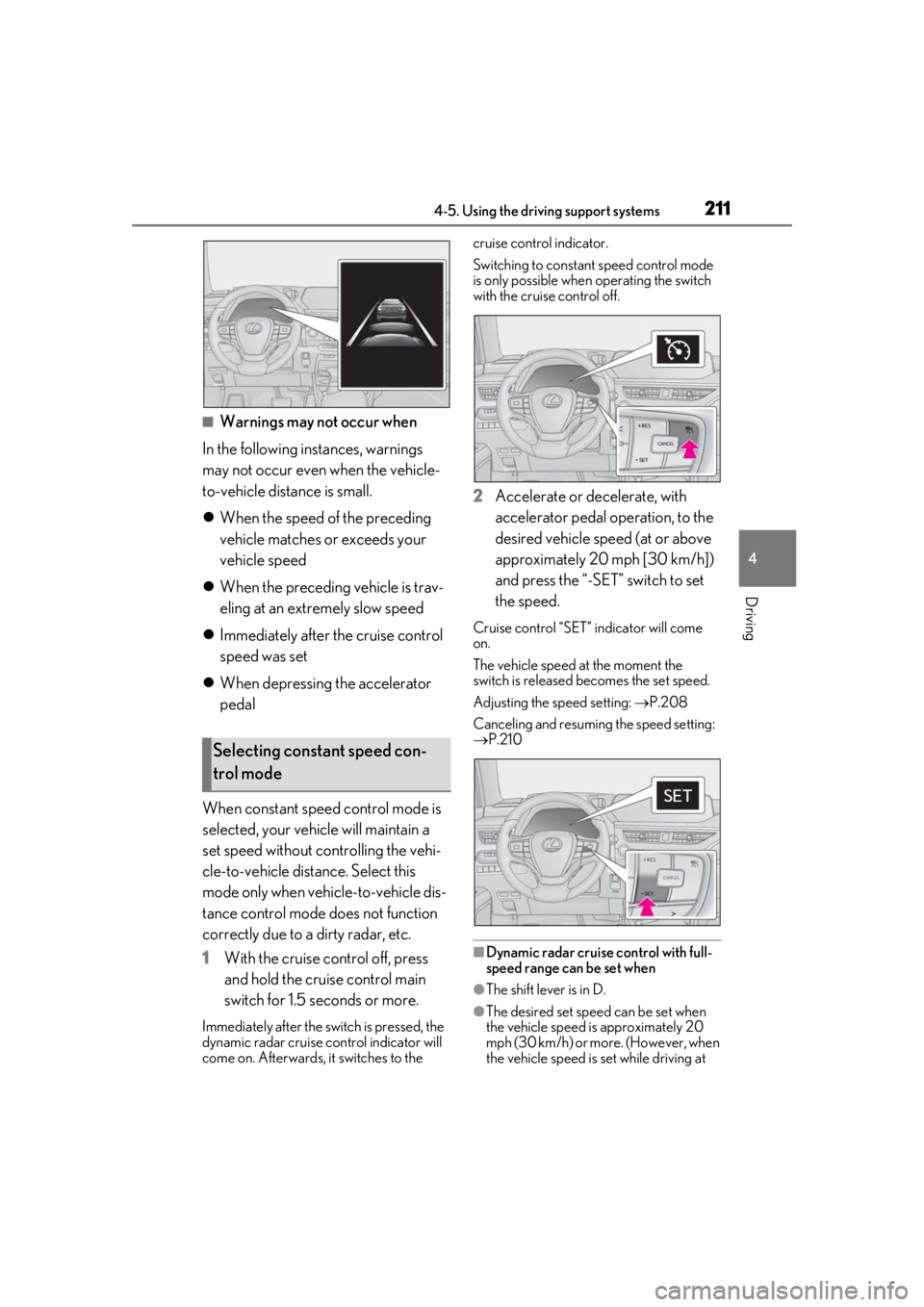
1 With the cruise control off, press
and hold the cruise control main
switch for 1.5 seconds or more.
Immediately after the switch is pressed, the
dynamic radar cruise control indicator will
come on. Afterwards, it switches to the cruise control indicator.
Switching to constant speed control mode
is only possible when
operating the switch
with the cruise control off.
2 Accelerate or decelerate, with
accelerator pedal operation, to the
desired vehicle speed (at or above
approximately 20 mph [30 km/h])
and press the “-SET” switch to set
the speed.
Cruise control “SET” indicator will come
on.
The vehicle speed at the moment the
switch is released becomes the set speed.
Adjusting the speed setting: P.208
Canceling and resuming the speed setting:
P.210
■Dynamic radar cruise control with full-
speed range can be set when
●The shift lever is in D.
●The desired set spee d can be set when
the vehicle speed is approximately 20
mph (30 km/h) or more. (However, when
the vehicle speed is set while driving at
Selecting constant speed con-
trol mode
Page 212 of 452
![LEXUS UX200 2019 Owners Manual 2124-5. Using the driving support systems
below approximately 20 mph [30 km/h],
the set speed will be set to approximately
20 mph [30 km/h].)
■Accelerating after setting the vehicle
speed
The veh](/img/36/58038/w960_58038-211.png "LEXUS UX200 2019 Owners Manual 2124-5. Using the driving support systems
below approximately 20 mph [30 km/h],
the set speed will be set to approximately
20 mph [30 km/h].)
■Accelerating after setting the vehicle
speed
The veh")
2124-5. Using the driving support systems
below approximately 20 mph [30 km/h],
the set speed will be set to approximately
20 mph [30 km/h].)
■Accelerating after setting the vehicle
speed
The vehicle can accelerate by operating the
accelerator pedal. After accelerating, the
set speed resumes. However, during vehi-
cle-to-vehicle distance control mode, the
vehicle speed may decrease below the set
speed in order to maintain the distance to
the preceding vehicle.
■When the vehicle stops while follow-up
cruising
●Pressing the “+RES” switch while the
vehicle ahead stops w ill resume follow-up
cruising if the vehicle ahead starts off
within approximately 3 seconds after the
switch is pressed.
●If the vehicle ahead starts off within 3 sec-
onds after your vehicle stops, follow-up
cruising will be resumed.
■Automatic cancelation of vehicle-to-
vehicle distance control mode
Vehicle-to-vehicle dist ance control mode is
automatically canceled in the following situ-
ations.
●VSC is activated.
●TRAC is activated for a period of time.
●When the VSC or TRAC system is
turned off.
●The sensor cannot detect correctly
because it is covered in some way.
●Pre-collision braking is activated.
●The parking brake is operated.
●The vehicle is stopped by system control
on a steep incline.
●The following are detected when the
vehicle has been stopped by system con-
trol:
• The driver is not wearing a seat belt.
• The driver’s door is opened.
• The vehicle has been stopped for about 3 minutes
If vehicle-to-vehicle distance control mode
is automatically canceled for any reasons
other than the above, there may be a mal- function in the system. Contact your Lexus
dealer.
■Automatic cancelation of constant
speed control mode
Constant speed control mode is automati-
cally canceled in the following situations:
●Actual vehicle speed is more than
approximately 10 mph (16 km/h) below
the set vehicle speed.
●Actual vehicle speed falls below approxi-
mately 20 mph (30 km/h).
●VSC is activated.
●TRAC is activated for a period of time.
●When the VSC or TRAC system is
turned off.
●Pre-collision braking is activated.
If constant speed control mode is automati-
cally canceled for any reasons other than
the above, there may be a malfunction in the
system. Contact your Lexus dealer.
■Brake operation
A brake operation sound may be heard and
the brake pedal response may change, but
these are not malfunctions.
■Warning messages and buzzers for
dynamic radar cruise control with full-
speed range
Warning messages and buzzers are used to
indicate a system malfunction or to inform
the driver of the need for caution while driv-
ing. If a warning messa ge is shown on the
multi-information displa y, read the message
and follow the instructions. ( P.184, 367)
■When the sensor may not be correctly
detecting the vehicle ahead
In the case of the fo llowing and depending
on the conditions, operate the brake pedal
when deceleration of the system is insuffi-
cient or operate the accelerator pedal
when acceleration is required.
As the sensor may not be able to correctly
detect these types of vehicles, the approach
warning ( P.210) may not be activated.
●Vehicles that cut in suddenly
●Vehicles traveling at low speeds
●Vehicles that are not moving in the same
Page 216 of 452
2164-5. Using the driving support systems
Use the meter control switches to turn
on/off the function (P.79).
1
Press or to select .
2
Press or to select and
then press “OK”.
WARNING
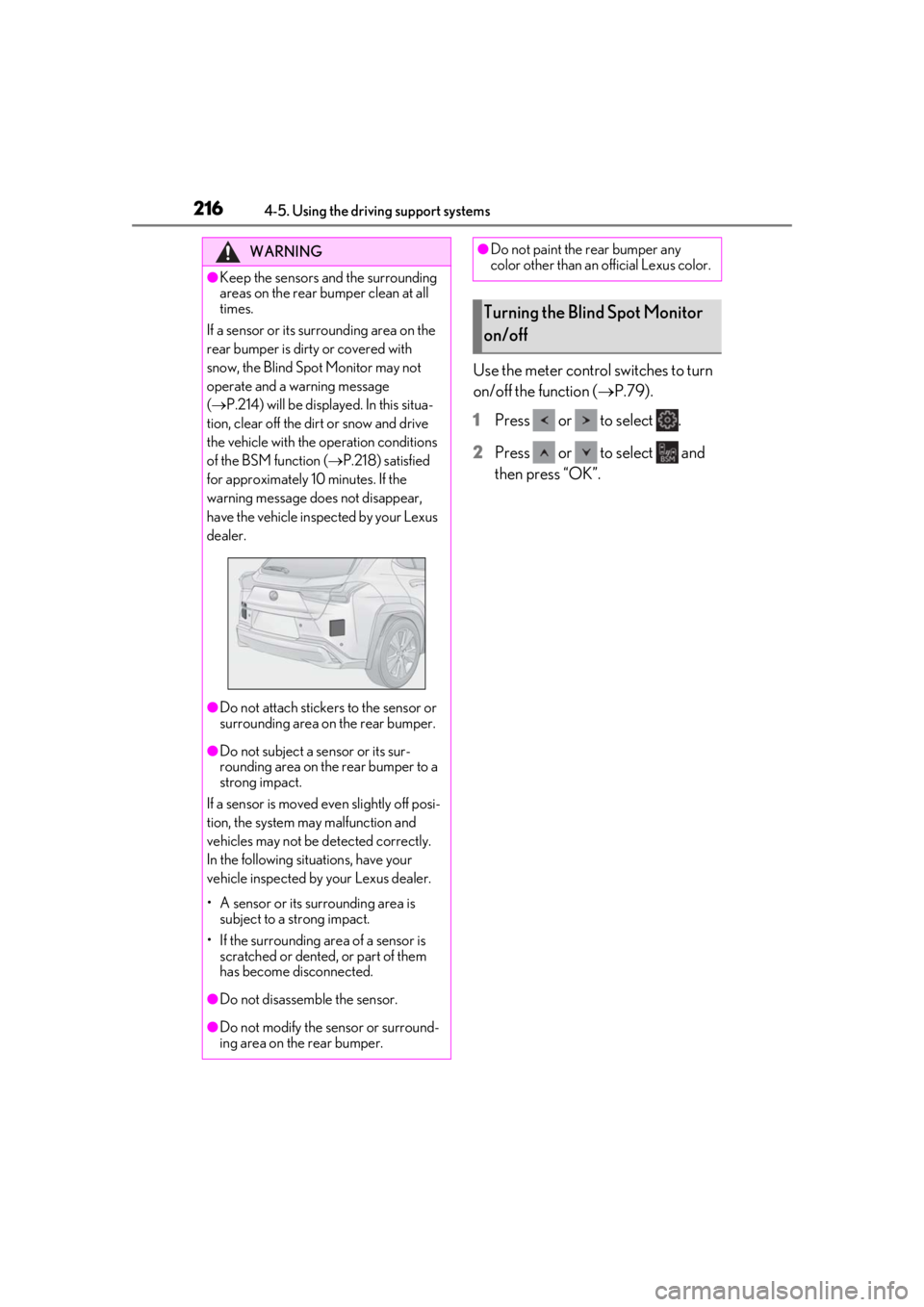
●Keep the sensors and the surrounding
areas on the rear bumper clean at all
times.
If a sensor or its surrounding area on the
rear bumper is dirty or covered with
snow, the Blind Spot Monitor may not
operate and a warning message
( P.214) will be displayed. In this situa-
tion, clear off the dirt or snow and drive
the vehicle with the operation conditions
of the BSM function ( P.218) satisfied
for approximately 10 minutes. If the
warning message does not disappear,
have the vehicle inspected by your Lexus
dealer.
●Do not attach stickers to the sensor or
surrounding area on the rear bumper.
●Do not subject a sensor or its sur-
rounding area on the rear bumper to a
strong impact.
If a sensor is moved even slightly off posi-
tion, the system may malfunction and
vehicles may not be detected correctly.
In the following situations, have your
vehicle inspected by your Lexus dealer.
• A sensor or its surrounding area is subject to a strong impact.
• If the surrounding area of a sensor is scratched or dented, or part of them
has become disconnected.
●Do not disassemb le the sensor.
●Do not modify the sensor or surround-
ing area on the rear bumper.
●Do not paint the rear bumper any
color other than an official Lexus color.
Turning the Blind Spot Monitor
on/off
Page 224 of 452
2244-5. Using the driving support systems
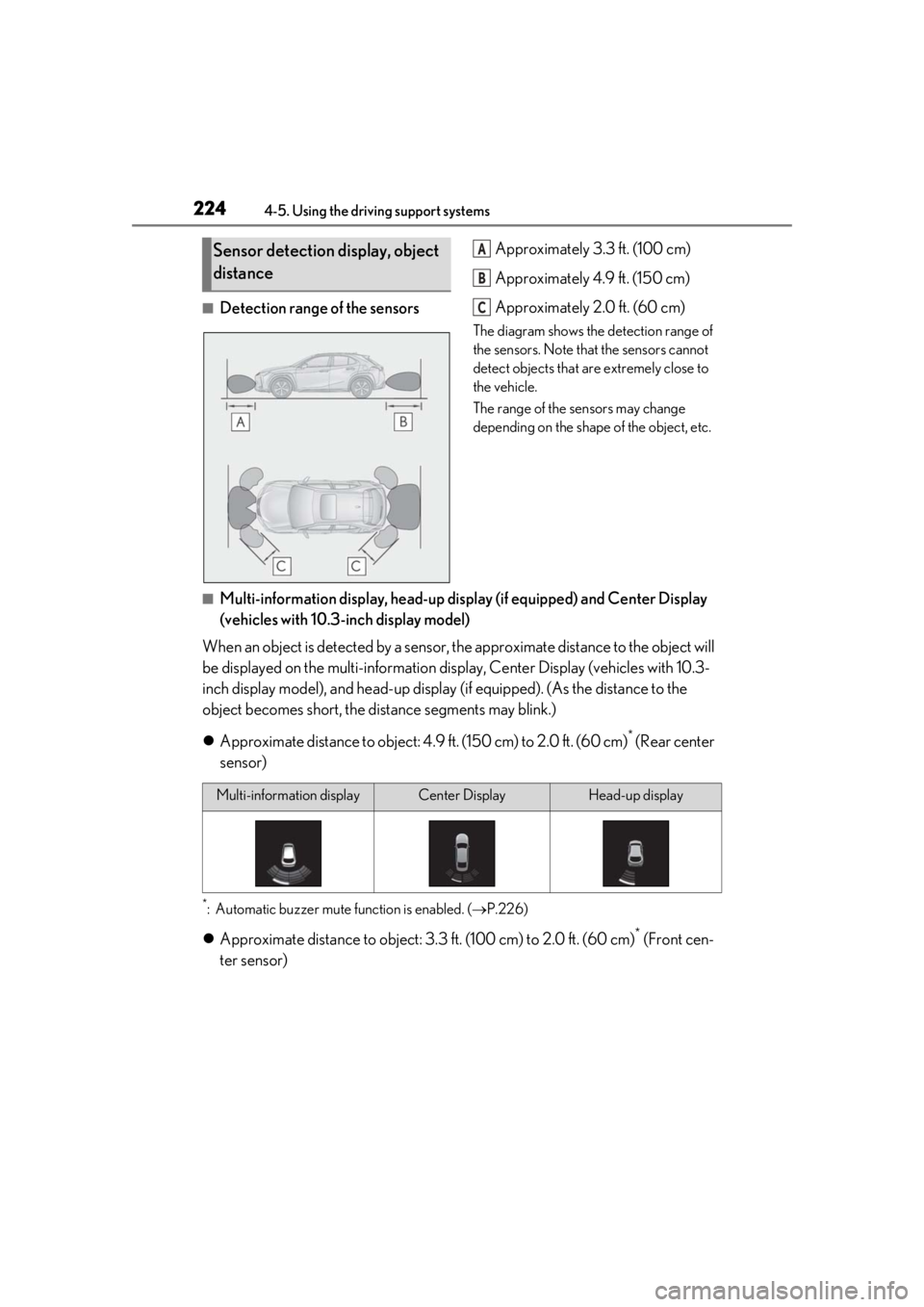
■Detection range of the sensorsApproximately 3.3 ft. (100 cm)
Approximately 4.9 ft. (150 cm)
Approximately 2.0 ft. (60 cm)
The diagram shows the detection range of
the sensors. Note that the sensors cannot
detect objects that are extremely close to
the vehicle.
The range of the sensors may change
depending on the shape of the object, etc.
■Multi-information display, head-up display (if equipped) and Center Display
(vehicles with 10.3-inch display model)
When an object is detected by a sensor, the approximate distance to the object will
be displayed on the multi-information disp lay, Center Display (vehicles with 10.3-
inch display model), and head-up display (if equipped). (As the distance to the
object becomes short, the distance segments may blink.)
Approximate distance to object: 4. 9 ft. (150 cm) to 2.0 ft. (60 cm)
* (Rear center
sensor)
*: Automatic buzzer mute function is enabled. ( P.226)
Approximate distance to object: 3. 3 ft. (100 cm) to 2.0 ft. (60 cm)* (Front cen-
ter sensor)
Sensor detection display, object
distanceA
B
C
Multi-information displayCenter DisplayHead-up display
Page 226 of 452
2264-5. Using the driving support systems
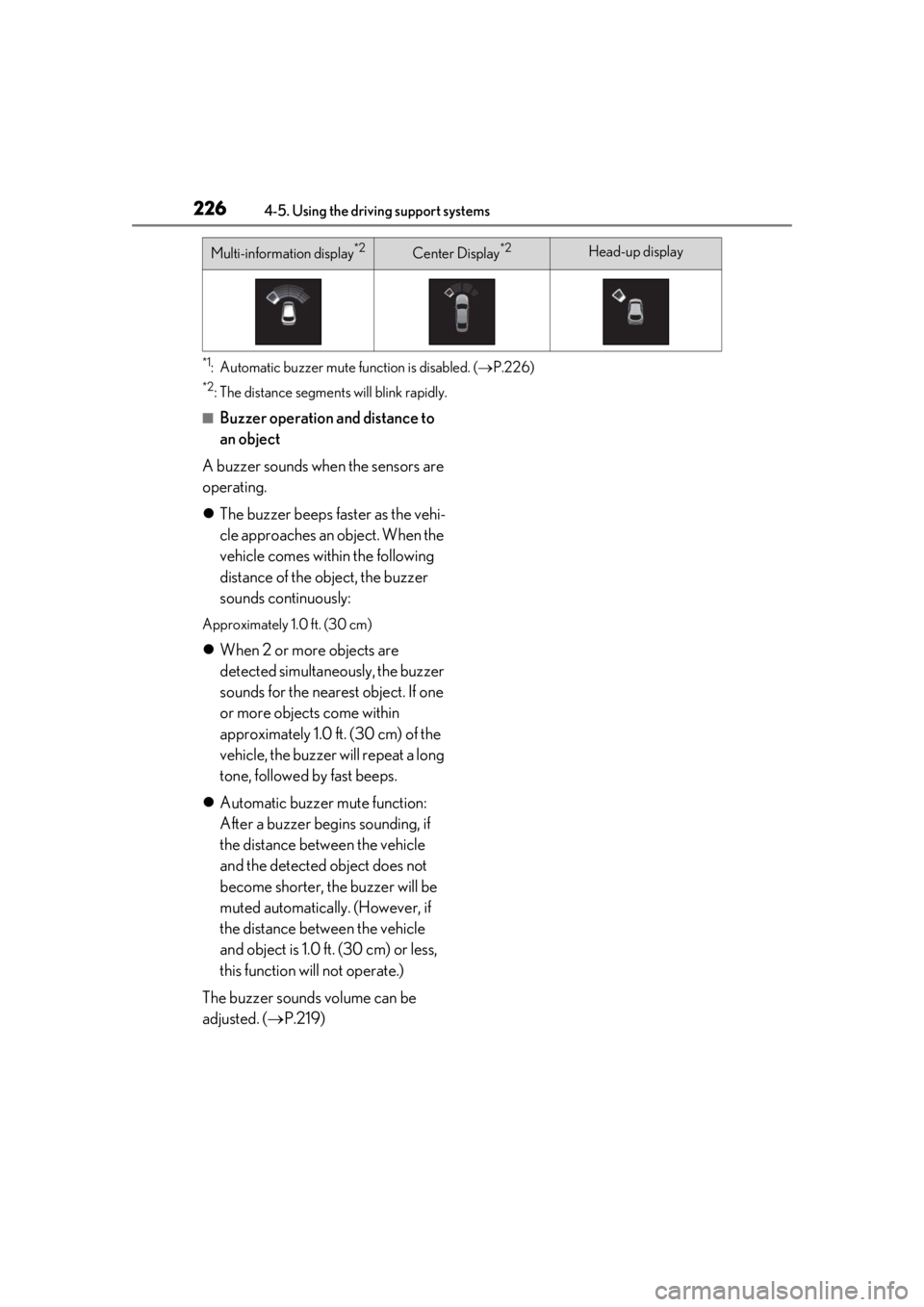
*1: Automatic buzzer mute function is disabled. (P.226)
*2: The distance segmen ts will blink rapidly.
■Buzzer operation and distance to
an object
A buzzer sounds when the sensors are
operating.
The buzzer beeps faster as the vehi-
cle approaches an object. When the
vehicle comes within the following
distance of the object, the buzzer
sounds continuously:
Approximately 1.0 ft. (30 cm)
When 2 or more objects are
detected simultaneously, the buzzer
sounds for the nearest object. If one
or more objects come within
approximately 1.0 ft. (30 cm) of the
vehicle, the buzzer will repeat a long
tone, followed by fast beeps.
Automatic buzzer mute function:
After a buzzer begins sounding, if
the distance between the vehicle
and the detected object does not
become shorter, the buzzer will be
muted automatically. (However, if
the distance between the vehicle
and object is 1.0 ft. (30 cm) or less,
this function will not operate.)
The buzzer sounds volume can be
adjusted. ( P.219)
Multi-information display*2Center Display*2Head-up display
Page 227 of 452
2274-5. Using the driving support systems
4
Driving
*:If equipped
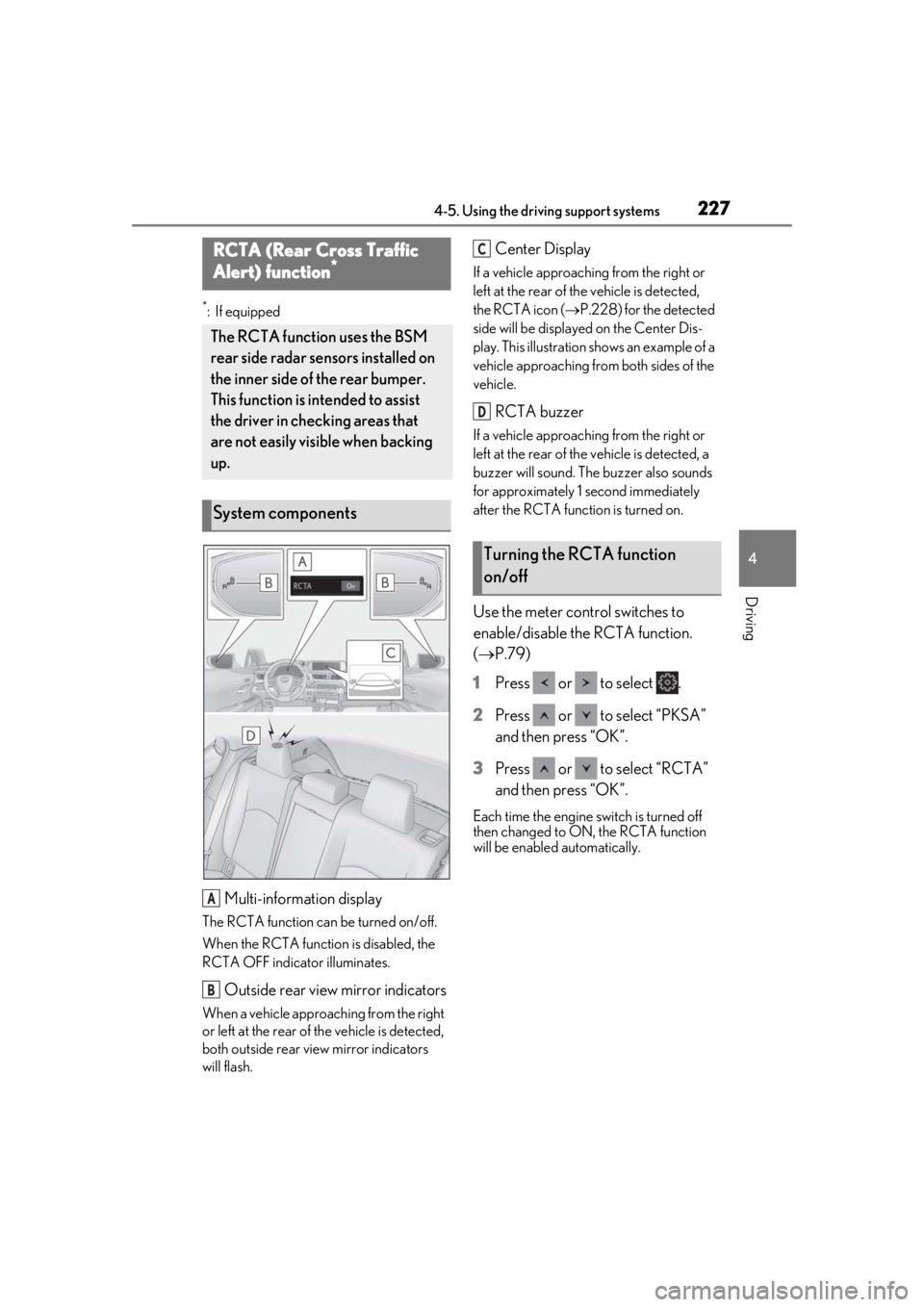
Multi-information display
The RCTA function can be turned on/off.
When the RCTA function is disabled, the
RCTA OFF indicator illuminates.
Outside rear view mirror indicators
When a vehicle approaching from the right
or left at the rear of the vehicle is detected,
both outside rear view mirror indicators
will flash.
Center Display
If a vehicle approaching from the right or
left at the rear of the vehicle is detected,
the RCTA icon ( P.228) for the detected
side will be displayed on the Center Dis-
play. This illustration shows an example of a
vehicle approaching from both sides of the
vehicle.
RCTA buzzer
If a vehicle approaching from the right or
left at the rear of th e vehicle is detected, a
buzzer will sound. The buzzer also sounds
for approximately 1 second immediately
after the RCTA function is turned on.
Use the meter control switches to
enable/disable the RCTA function.
( P.79)
1 Press or to select .
2 Press or to select “PKSA”
and then press “OK”.
3 Press or to select “RCTA”
and then press “OK”.
Each time the engine switch is turned off
then changed to ON, the RCTA function
will be enabled automatically.
RCTA (Rear Cross Traffic
Alert) function*
The RCTA function uses the BSM
rear side radar sensors installed on
the inner side of the rear bumper.
This function is intended to assist
the driver in checking areas that
are not easily visible when backing
up.
System components
A
B
Turning the RCTA function
on/off
C
D
Page 232 of 452
2324-5. Using the driving support systems
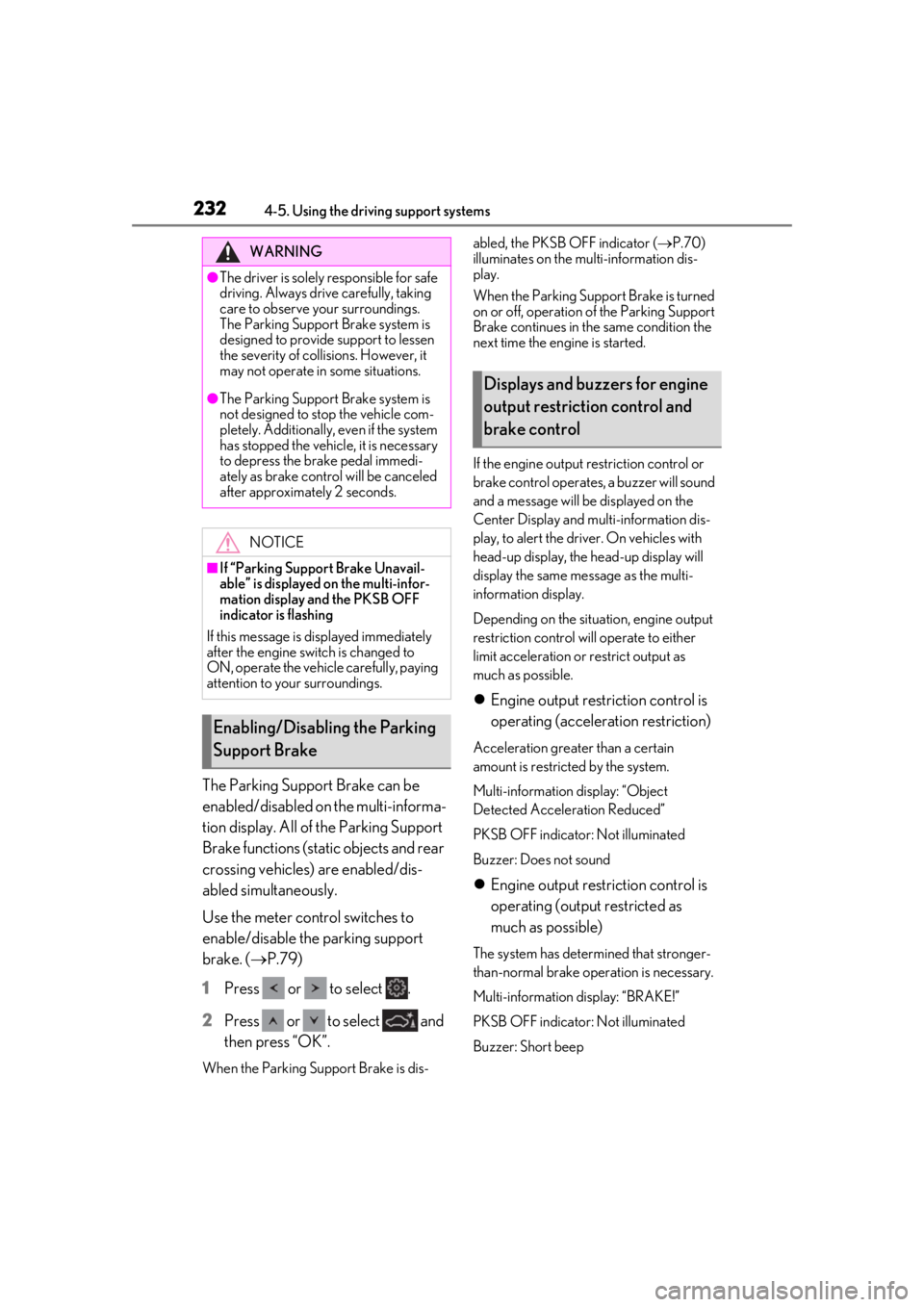
The Parking Support Brake can be
enabled/disabled on the multi-informa-
tion display. All of the Parking Support
Brake functions (static objects and rear
crossing vehicles) are enabled/dis-
abled simultaneously.
Use the meter control switches to
enable/disable the parking support
brake. (P.79)
1
Press or to select .
2
Press or to select and
then press “OK”.
When the Parking Support Brake is dis- abled, the PKSB OFF indicator (
P.70)
illuminates on the multi-information dis-
play.
When the Parking Support Brake is turned
on or off, operation of the Parking Support
Brake continues in the same condition the
next time the engine is started.
If the engine output restriction control or
brake control operates, a buzzer will sound
and a message will be displayed on the
Center Display and multi-information dis-
play, to alert the driver. On vehicles with
head-up display, the head-up display will
display the same message as the multi-
information display.
Depending on the situation, engine output
restriction control will operate to either
limit acceleration or restrict output as
much as possible.
Engine output restriction control is
operating (acceleration restriction)
Acceleration greater than a certain
amount is restricted by the system.
Multi-information display: “Object
Detected Acceleration Reduced”
PKSB OFF indicator: Not illuminated
Buzzer: Does not sound
Engine output restriction control is
operating (output restricted as
much as possible)
The system has determined that stronger-
than-normal brake operation is necessary.
Multi-information display: “BRAKE!”
PKSB OFF indicator: Not illuminated
Buzzer: Short beep
WARNING
●The driver is solely responsible for safe
driving. Always drive carefully, taking
care to observe your surroundings.
The Parking Support Brake system is
designed to provide support to lessen
the severity of collisions. However, it
may not operate in some situations.
●The Parking Support Brake system is
not designed to stop the vehicle com-
pletely. Additionally, even if the system
has stopped the vehicl e, it is necessary
to depress the brake pedal immedi-
ately as brake control will be canceled
after approximately 2 seconds.
NOTICE
■If “Parking Support Brake Unavail-
able” is displayed on the multi-infor-
mation display and the PKSB OFF
indicator is flashing
If this message is displayed immediately
after the engine switch is changed to
ON, operate the vehicle carefully, paying
attention to your surroundings.
Enabling/Disabling the Parking
Support Brake
Displays and buzzers for engine
output restriction control and
brake control
Page 234 of 452
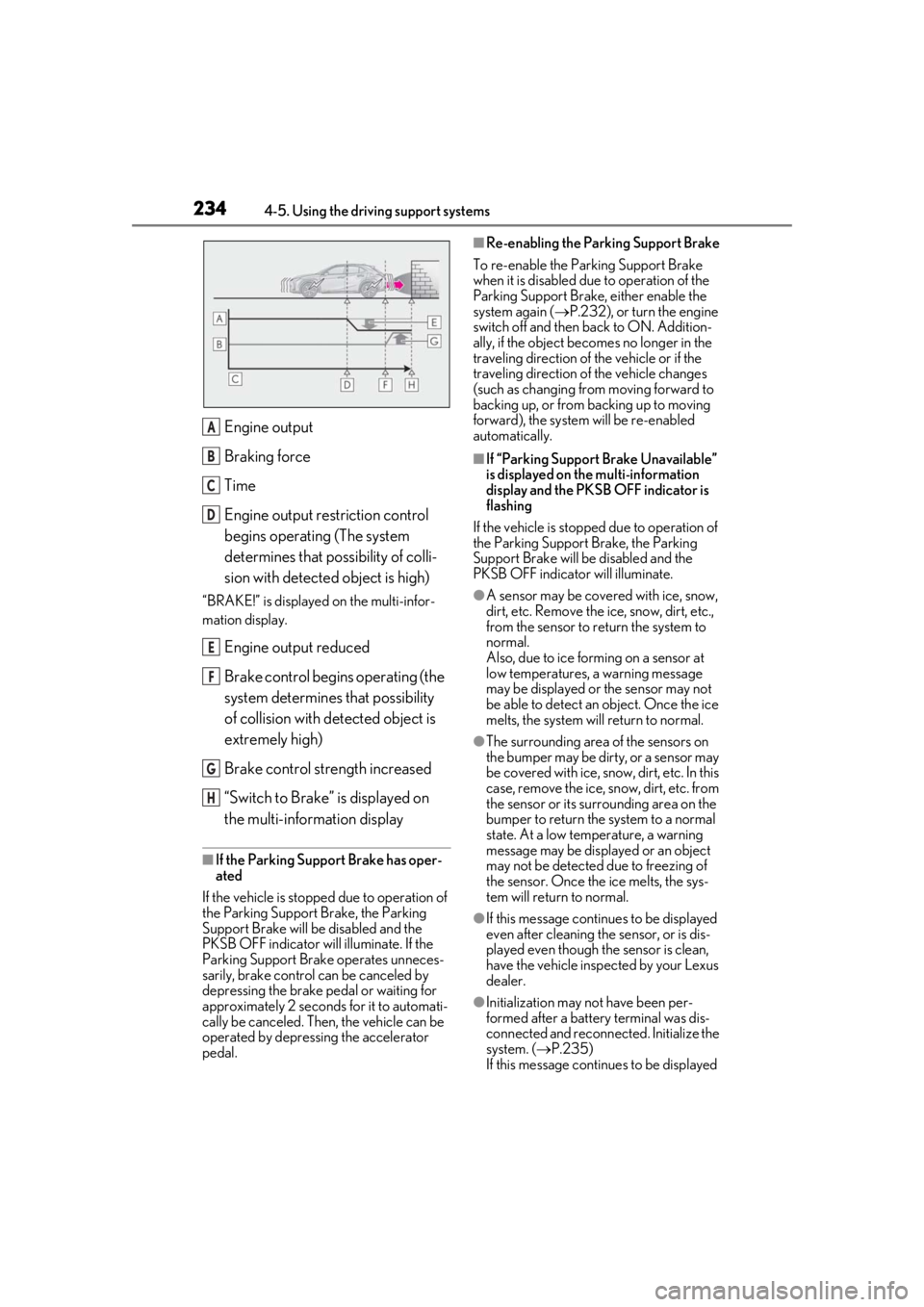
2344-5. Using the driving support systems
Engine output
Braking force
Time
Engine output restriction control
begins operating (The system
determines that possibility of colli-
sion with detected object is high)
“BRAKE!” is displayed on the multi-infor-
mation display.
Engine output reduced
Brake control begins operating (the
system determines that possibility
of collision with detected object is
extremely high)
Brake control strength increased
“Switch to Brake” is displayed on
the multi-information display
■If the Parking Support Brake has oper-
ated
If the vehicle is stopped due to operation of
the Parking Support Brake, the Parking
Support Brake will be disabled and the
PKSB OFF indicator will illuminate. If the
Parking Support Brake operates unneces-
sarily, brake control can be canceled by
depressing the brake pedal or waiting for
approximately 2 seconds for it to automati-
cally be canceled. Then, the vehicle can be
operated by depressing the accelerator
pedal.
■Re-enabling the Parking Support Brake
To re-enable the Parking Support Brake
when it is disabled due to operation of the
Parking Support Brake, either enable the
system again ( P.232), or turn the engine
switch off and then back to ON. Addition-
ally, if the object becomes no longer in the
traveling direction of the vehicle or if the
traveling direction of the vehicle changes
(such as changing from moving forward to
backing up, or from backing up to moving
forward), the system will be re-enabled
automatically.
■If “Parking Support Brake Unavailable”
is displayed on th e multi-information
display and the PKSB OFF indicator is
flashing
If the vehicle is stopped due to operation of
the Parking Support Brake, the Parking
Support Brake will be disabled and the
PKSB OFF indicator will illuminate.
●A sensor may be cove red with ice, snow,
dirt, etc. Remove the ice, snow, dirt, etc.,
from the sensor to return the system to
normal.
Also, due to ice forming on a sensor at
low temperatures, a warning message
may be displayed or the sensor may not
be able to detect an object. Once the ice
melts, the system wi ll return to normal.
●The surrounding area of the sensors on
the bumper may be dirty, or a sensor may
be covered with ice, snow, dirt, etc. In this
case, remove the ice, snow, dirt, etc. from
the sensor or its surrounding area on the
bumper to return the system to a normal
state. At a low temperature, a warning
message may be displayed or an object
may not be detected due to freezing of
the sensor. Once the ice melts, the sys-
tem will return to normal.
●If this message continues to be displayed
even after cleaning the sensor, or is dis-
played even though the sensor is clean,
have the vehicle inspected by your Lexus
dealer.
●Initialization may not have been per-
formed after a battery terminal was dis-
connected and reconnected. Initialize the
system. ( P.235)
If this message continues to be displayed
A
B
C
D
E
F
G
H