engine LEXUS UX200 2019 Owners Manual
[x] Cancel search | Manufacturer: LEXUS, Model Year: 2019, Model line: UX200, Model: LEXUS UX200 2019Pages: 452, PDF Size: 10.06 MB
Page 230 of 452
2304-5. Using the driving support systems
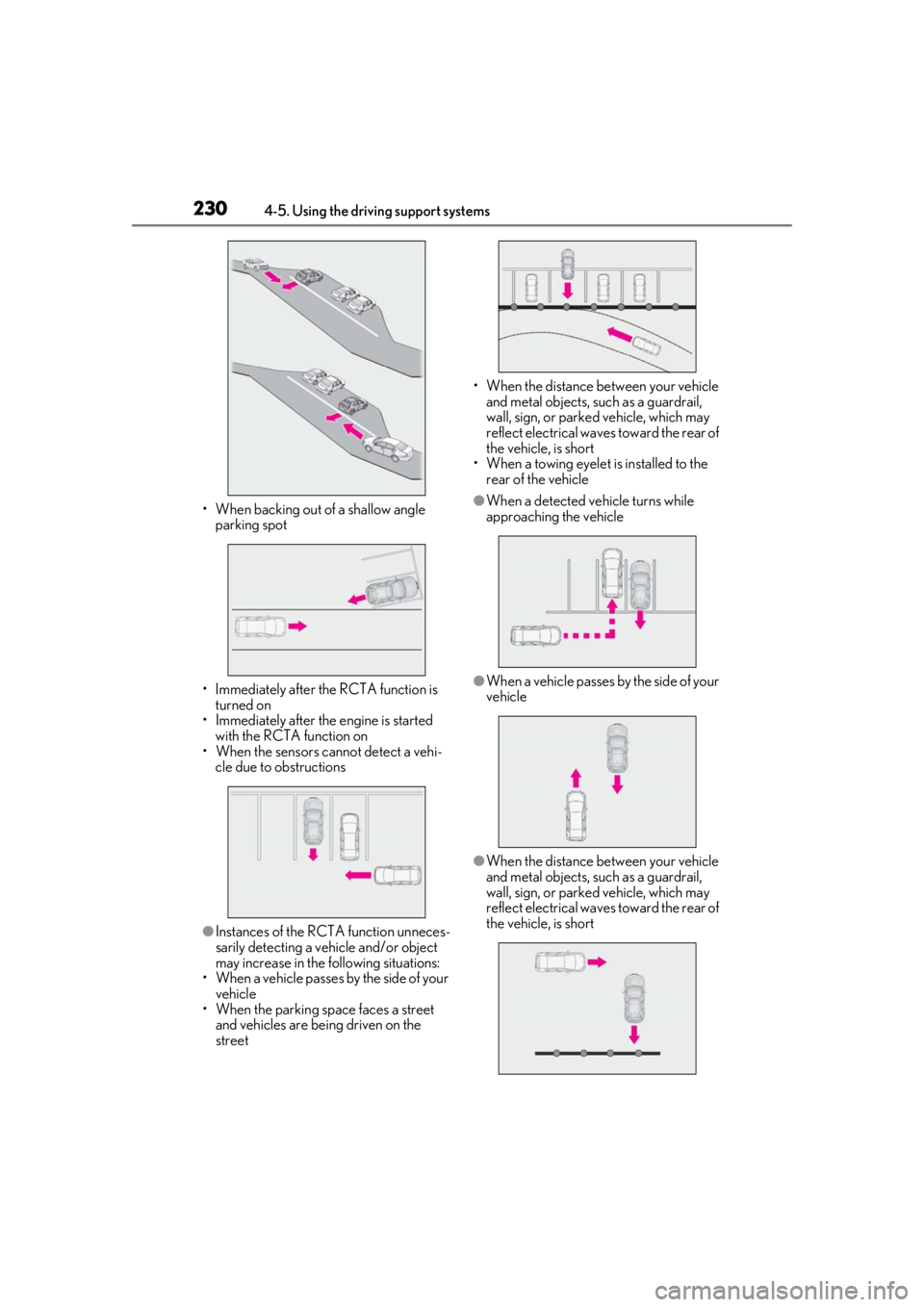
• When backing out of a shallow angle parking spot
• Immediately after the RCTA function is turned on
• Immediately after the engine is started
with the RCTA function on
• When the sensors cannot detect a vehi- cle due to obstructions
●Instances of the RCTA function unneces-
sarily detecting a vehicle and/or object
may increase in the following situations:
• When a vehicle passes by the side of your vehicle
• When the parking space faces a street and vehicles are being driven on the
street • When the distance between your vehicle
and metal objects, such as a guardrail,
wall, sign, or parked vehicle, which may
reflect electrical waves toward the rear of
the vehicle, is short
• When a towing eyelet is installed to the
rear of the vehicle
●When a detected vehicle turns while
approaching the vehicle
●When a vehicle passes by the side of your
vehicle
●When the distance between your vehicle
and metal objects, such as a guardrail,
wall, sign, or parked vehicle, which may
reflect electrical waves toward the rear of
the vehicle, is short
Page 232 of 452
2324-5. Using the driving support systems
The Parking Support Brake can be
enabled/disabled on the multi-informa-
tion display. All of the Parking Support
Brake functions (static objects and rear
crossing vehicles) are enabled/dis-
abled simultaneously.
Use the meter control switches to
enable/disable the parking support
brake. (P.79)
1
Press or to select .
2
Press or to select and
then press “OK”.
When the Parking Support Brake is dis- abled, the PKSB OFF indicator (
P.70)
illuminates on the multi-information dis-
play.
When the Parking Support Brake is turned
on or off, operation of the Parking Support
Brake continues in the same condition the
next time the engine is started.
If the engine output restriction control or
brake control operates, a buzzer will sound
and a message will be displayed on the
Center Display and multi-information dis-
play, to alert the driver. On vehicles with
head-up display, the head-up display will
display the same message as the multi-
information display.
Depending on the situation, engine output
restriction control will operate to either
limit acceleration or restrict output as
much as possible.
Engine output restriction control is
operating (acceleration restriction)
Acceleration greater than a certain
amount is restricted by the system.
Multi-information display: “Object
Detected Acceleration Reduced”
PKSB OFF indicator: Not illuminated
Buzzer: Does not sound
Engine output restriction control is
operating (output restricted as
much as possible)
The system has determined that stronger-
than-normal brake operation is necessary.
Multi-information display: “BRAKE!”
PKSB OFF indicator: Not illuminated
Buzzer: Short beep
WARNING
●The driver is solely responsible for safe
driving. Always drive carefully, taking
care to observe your surroundings.
The Parking Support Brake system is
designed to provide support to lessen
the severity of collisions. However, it
may not operate in some situations.
●The Parking Support Brake system is
not designed to stop the vehicle com-
pletely. Additionally, even if the system
has stopped the vehicl e, it is necessary
to depress the brake pedal immedi-
ately as brake control will be canceled
after approximately 2 seconds.
NOTICE
■If “Parking Support Brake Unavail-
able” is displayed on the multi-infor-
mation display and the PKSB OFF
indicator is flashing
If this message is displayed immediately
after the engine switch is changed to
ON, operate the vehicle carefully, paying
attention to your surroundings.
Enabling/Disabling the Parking
Support Brake
Displays and buzzers for engine
output restriction control and
brake control
Page 233 of 452
2334-5. Using the driving support systems
4
Driving
Brake control is operating
The system determined that emergency
braking is necessary.
Multi-information display: “BRAKE!”
PKSB OFF indicator: Not illuminated
Buzzer: Short beep
Vehicle stopped by system opera-
tion
The vehicle has been stopped by brake
control operation.
Multi-information display: “Switch to
Brake” (If the accelerator pedal is not
depressed, “Press Brake Pedal” will be dis-
played.)
PKSB OFF indicator: Illuminated
Buzzer: Short beep
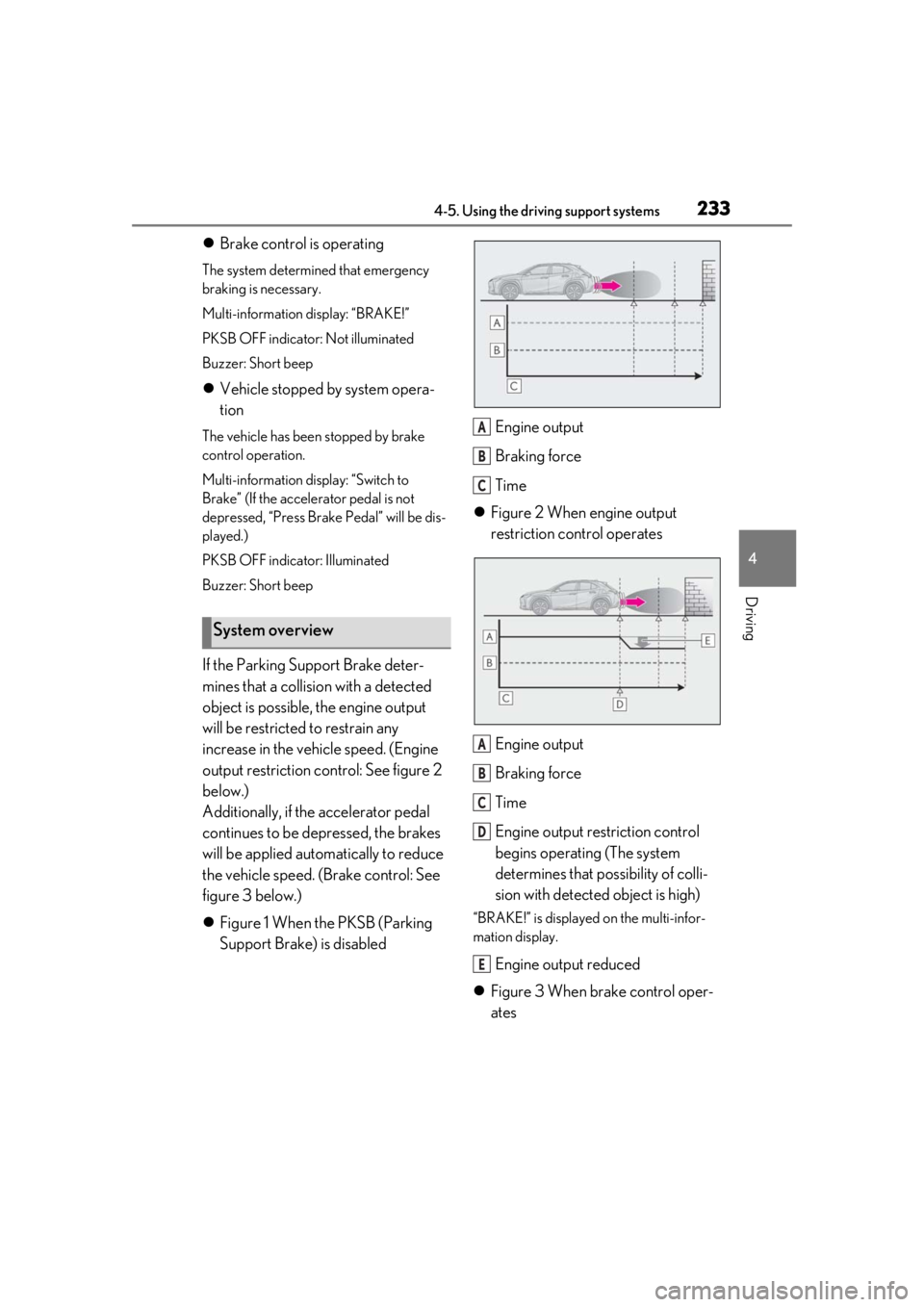
If the Parking Support Brake deter-
mines that a collision with a detected
object is possible, the engine output
will be restricted to restrain any
increase in the vehicle speed. (Engine
output restriction co ntrol: See figure 2
below.)
Additionally, if the accelerator pedal
continues to be depressed, the brakes
will be applied automatically to reduce
the vehicle speed. (Brake control: See
figure 3 below.)
Figure 1 When the PKSB (Parking
Support Brake) is disabled Engine output
Braking force
Time
Figure 2 When engine output
restriction control operates
Engine output
Braking force
Time
Engine output re striction control
begins operating (The system
determines that possibility of colli-
sion with detected object is high)
“BRAKE!” is displayed on the multi-infor-
mation display.
Engine output reduced
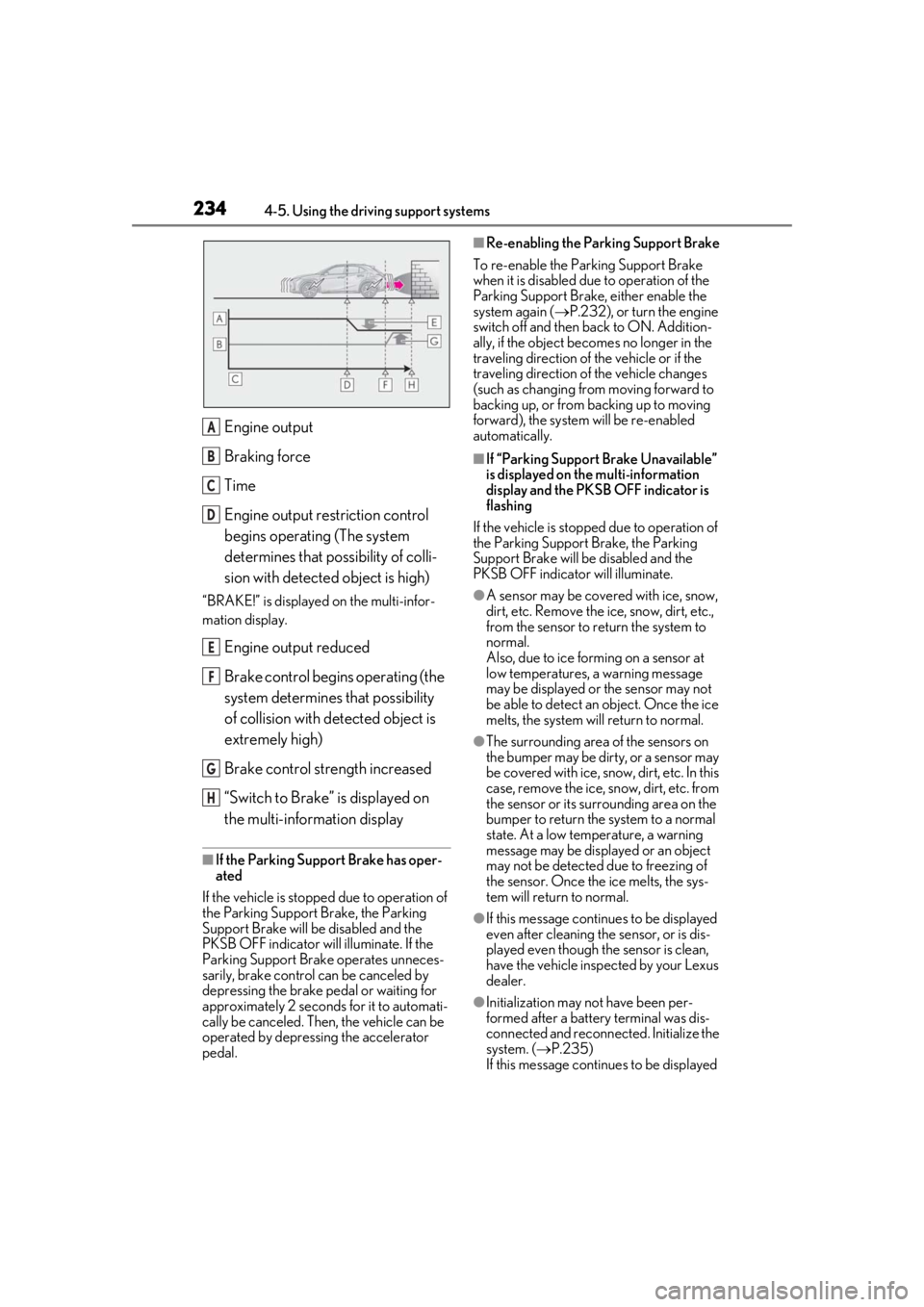
Figure 3 When brake control oper-
ates
System overview
A
B
C
A
B
C
D
E
Page 234 of 452
2344-5. Using the driving support systems
Engine output
Braking force
Time
Engine output restriction control
begins operating (The system
determines that possibility of colli-
sion with detected object is high)
“BRAKE!” is displayed on the multi-infor-
mation display.
Engine output reduced
Brake control begins operating (the
system determines that possibility
of collision with detected object is
extremely high)
Brake control strength increased
“Switch to Brake” is displayed on
the multi-information display
■If the Parking Support Brake has oper-
ated
If the vehicle is stopped due to operation of
the Parking Support Brake, the Parking
Support Brake will be disabled and the
PKSB OFF indicator will illuminate. If the
Parking Support Brake operates unneces-
sarily, brake control can be canceled by
depressing the brake pedal or waiting for
approximately 2 seconds for it to automati-
cally be canceled. Then, the vehicle can be
operated by depressing the accelerator
pedal.
■Re-enabling the Parking Support Brake
To re-enable the Parking Support Brake
when it is disabled due to operation of the
Parking Support Brake, either enable the
system again ( P.232), or turn the engine
switch off and then back to ON. Addition-
ally, if the object becomes no longer in the
traveling direction of the vehicle or if the
traveling direction of the vehicle changes
(such as changing from moving forward to
backing up, or from backing up to moving
forward), the system will be re-enabled
automatically.
■If “Parking Support Brake Unavailable”
is displayed on th e multi-information
display and the PKSB OFF indicator is
flashing
If the vehicle is stopped due to operation of
the Parking Support Brake, the Parking
Support Brake will be disabled and the
PKSB OFF indicator will illuminate.
●A sensor may be cove red with ice, snow,
dirt, etc. Remove the ice, snow, dirt, etc.,
from the sensor to return the system to
normal.
Also, due to ice forming on a sensor at
low temperatures, a warning message
may be displayed or the sensor may not
be able to detect an object. Once the ice
melts, the system wi ll return to normal.
●The surrounding area of the sensors on
the bumper may be dirty, or a sensor may
be covered with ice, snow, dirt, etc. In this
case, remove the ice, snow, dirt, etc. from
the sensor or its surrounding area on the
bumper to return the system to a normal
state. At a low temperature, a warning
message may be displayed or an object
may not be detected due to freezing of
the sensor. Once the ice melts, the sys-
tem will return to normal.
●If this message continues to be displayed
even after cleaning the sensor, or is dis-
played even though the sensor is clean,
have the vehicle inspected by your Lexus
dealer.
●Initialization may not have been per-
formed after a battery terminal was dis-
connected and reconnected. Initialize the
system. ( P.235)
If this message continues to be displayed
A
B
C
D
E
F
G
H
Page 237 of 452
2374-5. Using the driving support systems
4
Driving
■The Parking Support Brake function
(static object) will operate when
The function will operate when the PKSB
OFF indicator is not illuminated or flashing
( P.69, 70) and all of the following condi-
tions are met:
●Engine output restriction control
• The Parking Support Brake is enabled.
• The vehicle speed is 10 mph (15 km/h) or less.
• There is a static object in the traveling direction of the vehicle and 6 to 13 ft. (2
to 4 m) away.
• The Parking Support Brake determines that a stronger-than-normal brake opera-
tion is necessary to avoid a collision.
●Brake control
• Engine output restriction control is oper-
ating.
• The Parking Support Brake determines that an immediate brake operation is nec-
essary to avoid a collision.
■The Parking Support Brake function
(static objects) will stop operating when
The function will stop operating if any of the
following conditions are met:
●Engine output restriction control
• The Parking Support Brake is disabled.
• The system determines that the collision has become avoidable with normal brake
operation.
• The static object is no longer 6 to 13 ft. (2
to 4 m) away from the vehicle or in the
WARNING
■Handling the suspension
Do not modify the suspension, as
changes to the height or inclination of the
vehicle may prevent the sensors from
detecting objects correctly or cause the
system to not operate or operate unnec-
essarily.
■If the Parking Support Brake function
(static objects) operates unnecessar-
ily, such as at a railroad crossing
In the event that the Parking Support
Brake function (static objects) operates
unnecessarily, such as at a railroad cross-
ing, brake control w ill be canceled after
approximately 2 seconds, allowing you
to proceed forward and leave the area,
brake control can also be canceled by
depressing the brake pedal. Depressing
the accelerator pedal after brake control
is canceled will allow you to proceed for-
ward and leave the area.
■Notes when washing the vehicle
Do not apply intensive bursts of water or
steam to the sensor area.
Doing so may result in the sensor mal-
functioning.
●When using a high pressure washer to
wash the vehicle, do not spray the sen-
sors directly, as doing so may cause a
sensor to malfunction.
●When using steam to clean the vehicle,
do not direct steam too close to the
sensors as doing so may cause a sen-
sor to malfunction.
■When to disable the Parking Support
Brake (static objects)
In the following situations, disable the
Parking Support Brake (static objects) as
the system may operate even though
there is no possibility of a collision.
●When inspecting the vehicle using a
chassis roller, chassis dynamo or free
roller
●When loading the vehicle onto a boat,
truck or other transport vessel
●If the suspension has been modified or
tires of a size other than specified are
installed
●If the front of the vehicle is raised or
lowered due to the carried load
●When equipment that may obstruct a
sensor is installed, such as a towing
eyelet, bumper protector (an addi-
tional trim strip, etc.), bicycle carrier, or
snow plow
●When using an automatic car wash
Page 238 of 452
2384-5. Using the driving support systems
traveling direction of the vehicle.
●Brake control
• The Parking Support Brake is disabled.
• Approximately 2 seconds have elapsed since the vehicle was stopped by brake
control.
• The brake pedal is depressed after the vehicle is stopped by brake control.
• The static object is no longer 6 to 13 ft. (2 to 4 m) away from the vehicle or in the
traveling direction of the vehicle.
■Detection range of the Parking Support
Brake function (static objects)
The detection range of the Parking Support
Brake function (static objects) differs from
the detection range of the intuitive parking
assist. ( P.224) Therefore, even if the intui-
tive parking assist de tects an object and
provides a warning, the Parking Support
Brake function (static objects) may not start
operating.
■Objects that the Parking Support Brake
function (static obje cts) may not detect
The sensors may not be able to detect cer-
tain objects, such as the following:
●Pedestrian
●Cotton cloth, snow, and other materials
that are poor reflectors of ultrasonic
waves
●Objects which are not perpendicular to
the ground, are not perpendicular to the
traveling direction of the vehicle, are
uneven or are waving
●Low objects
●Thin objects such as wires, fences, ropes
and signposts
●Objects that are extremely close to the
bumper
■Situations in which the Parking Support
Brake function (stati c objects) may not
operate
When driving with the shift lever in N
■Intuitive parking assist buzzer
Regardless of whether the intuitive parking
assist function is enabled or not ( P.221), if
the Parking Support Brake function (static
objects) is enabled ( P.232), the front or
rear sensors detect an object and engine output restriction control or brake control is
performed, the intuitive parking assist
buzzer will sound to notify the driver of the
approximate distance to the object.
■Situations in which the Parking Support
Brake function (static objects) may
operate even if there is no possibility of a
collision
In some situations, such as the following, the
Parking Support Brake function (static
objects) may operate even though there is
no possibility of a collision.
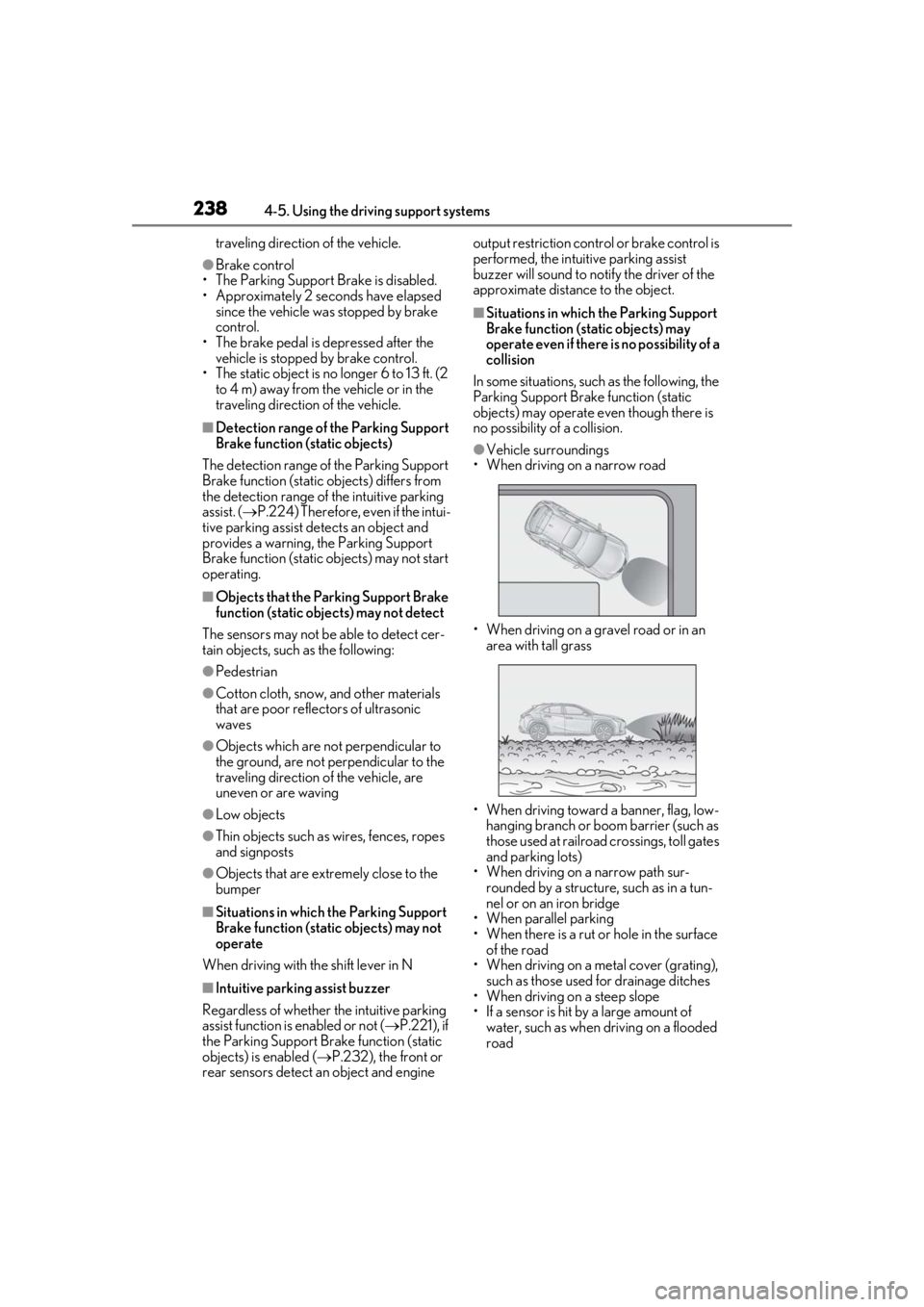
●Vehicle surroundings
• When driving on a narrow road
• When driving on a gravel road or in an area with tall grass
• When driving toward a banner, flag, low- hanging branch or boom barrier (such as
those used at railroad crossings, toll gates
and parking lots)
• When driving on a narrow path sur-
rounded by a structure, such as in a tun-
nel or on an iron bridge
• When parallel parking
• When there is a rut or hole in the surface
of the road
• When driving on a metal cover (grating),
such as those used for drainage ditches
• When driving on a steep slope
• If a sensor is hit by a large amount of water, such as when driving on a flooded
road
Page 239 of 452
2394-5. Using the driving support systems
4
Driving
●Weather
• If a sensor is covered with ice, snow, dirt, etc. (when cleared, the system will return
to normal)
• If heavy rain or water strikes a sensor
• When driving in incl ement weather such
as fog, snow or a sandstorm
●Other ultrasonic wave sources
• When vehicle horns, vehicle detectors, motorcycle engines, air brakes of large
vehicles, the clearance sonar of other
vehicles or other devices which produce
ultrasonic waves are near the vehicle
• If a sticker or an el ectronic component,
such as a backlit license plate (especially
fluorescent type), fog lights, fender pole
or wireless antenna is installed near a
sensor
●Changes in the vehicle posture
• If the vehicle is significantly tilted
• If the front of the vehicle is raised or low- ered due to the carried load
• If the orientation of a sensor has been changed due to a collision or other
impact
■Situations in which the Parking Support
Brake function (stati c objects) may not
operate properly
In some situations, such as the following, this
function may not operate properly.
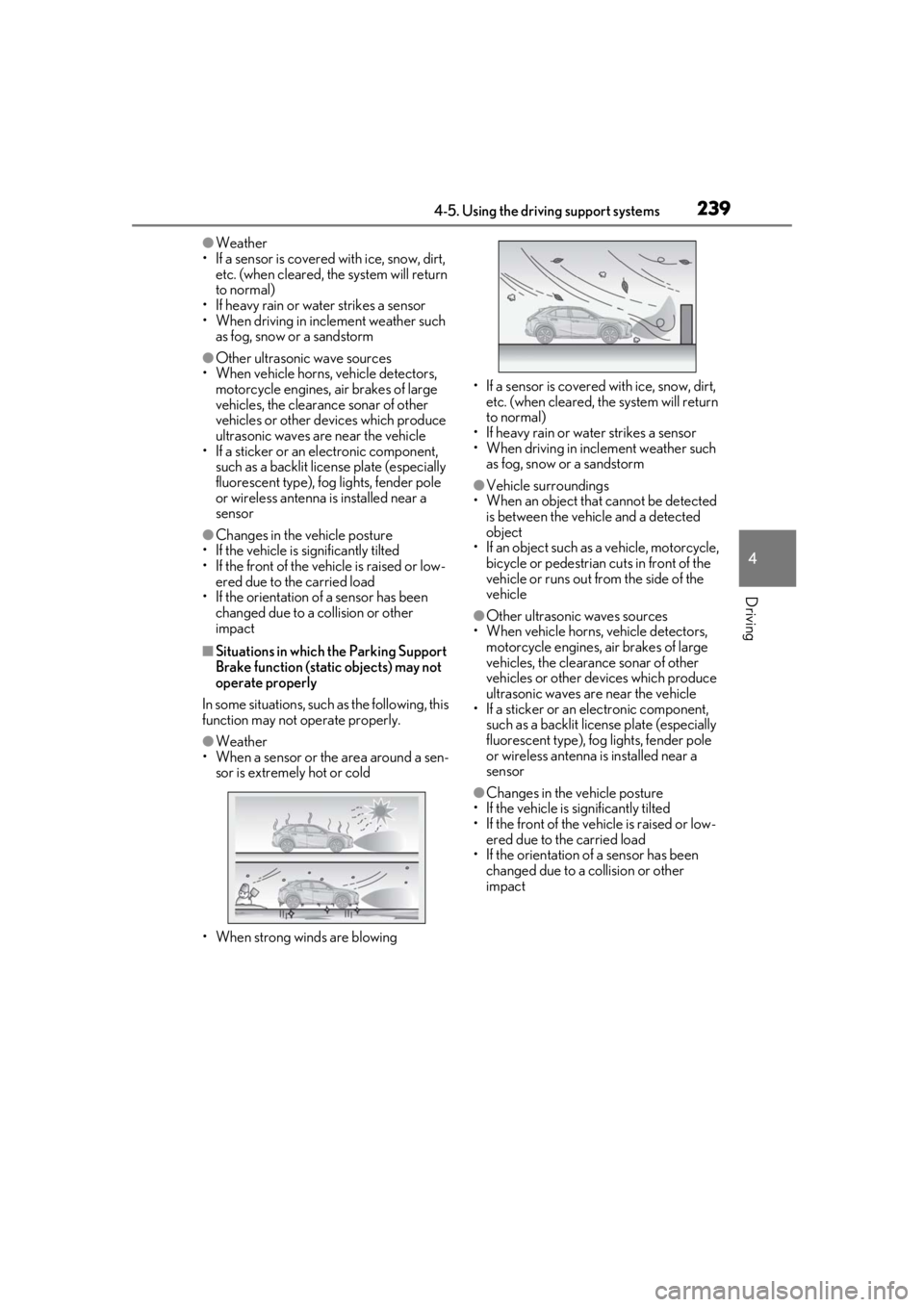
●Weather
• When a sensor or the area around a sen- sor is extremely hot or cold
• When strong winds are blowing • If a sensor is covered with ice, snow, dirt,
etc. (when cleared, the system will return
to normal)
• If heavy rain or water strikes a sensor
• When driving in incl ement weather such
as fog, snow or a sandstorm
●Vehicle surroundings
• When an object that cannot be detected
is between the vehicle and a detected
object
• If an object such as a vehicle, motorcycle,
bicycle or pedestrian cuts in front of the
vehicle or runs out from the side of the
vehicle
●Other ultrasonic waves sources
• When vehicle horns, vehicle detectors,
motorcycle engines, air brakes of large
vehicles, the clearance sonar of other
vehicles or other de vices which produce
ultrasonic waves are near the vehicle
• If a sticker or an electronic component, such as a backlit license plate (especially
fluorescent type), fog lights, fender pole
or wireless antenna is installed near a
sensor
●Changes in the vehicle posture
• If the vehicle is significantly tilted
• If the front of the vehicle is raised or low-
ered due to the carried load
• If the orientation of a sensor has been
changed due to a collision or other
impact
Page 240 of 452
2404-5. Using the driving support systems
*: If equipped
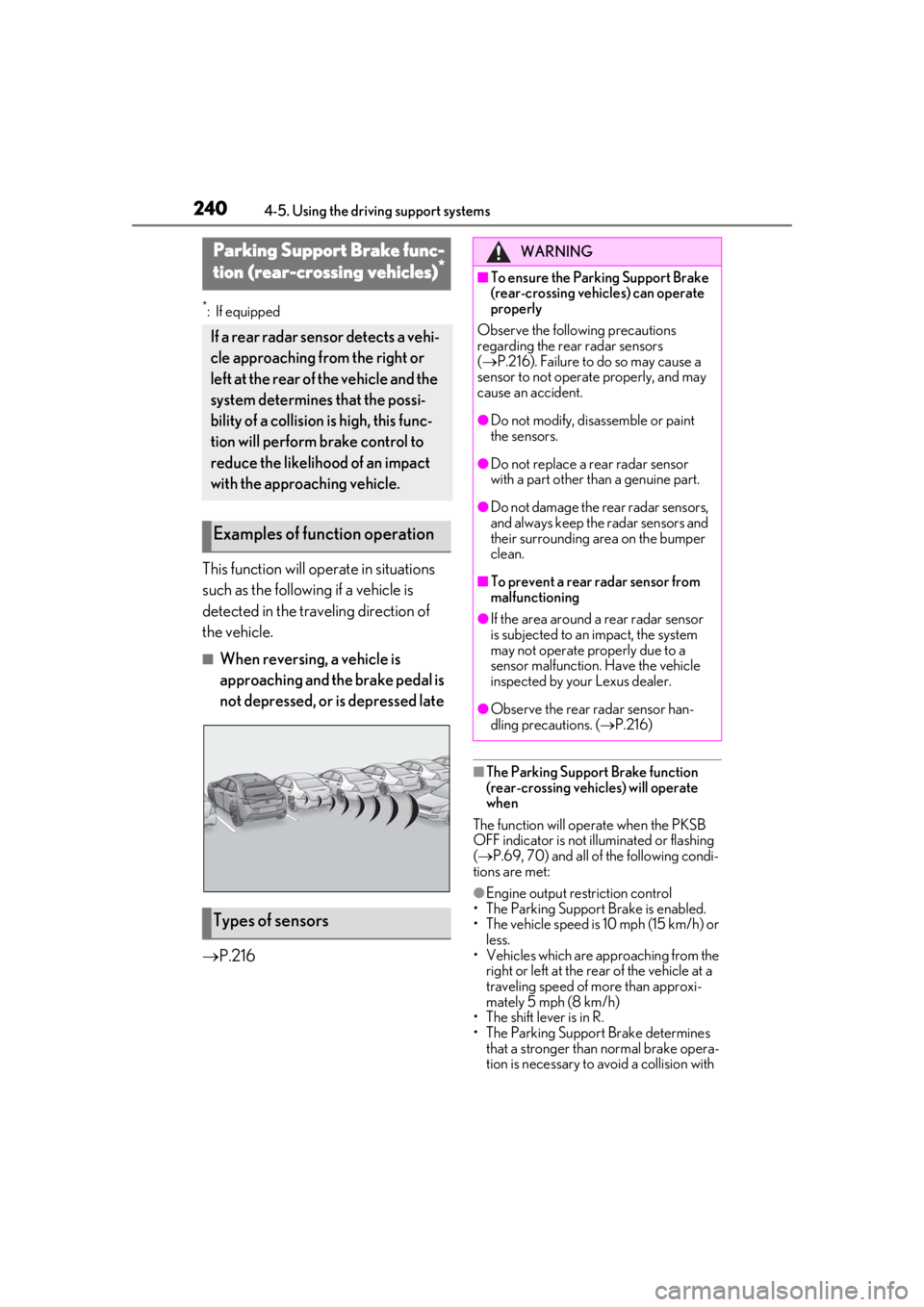
This function will operate in situations
such as the following if a vehicle is
detected in the traveling direction of
the vehicle.
■When reversing, a vehicle is
approaching and the brake pedal is
not depressed, or is depressed late
P.216
■The Parking Support Brake function
(rear-crossing vehicles) will operate
when
The function will operate when the PKSB
OFF indicator is not illuminated or flashing
( P.69, 70) and all of the following condi-
tions are met:
●Engine output restriction control
• The Parking Support Brake is enabled.
• The vehicle speed is 10 mph (15 km/h) or less.
• Vehicles which are ap proaching from the
right or left at the rear of the vehicle at a
traveling speed of more than approxi-
mately 5 mph (8 km/h)
• The shift lever is in R.
• The Parking Support Brake determines
that a stronger than normal brake opera-
tion is necessary to avoid a collision with
Parking Support Brake func-
tion (rear-crossing vehicles)*
If a rear radar sensor detects a vehi-
cle approaching from the right or
left at the rear of the vehicle and the
system determines that the possi-
bility of a collision is high, this func-
tion will perform brake control to
reduce the likelihood of an impact
with the approaching vehicle.
Examples of function operation
Types of sensors
WARNING
■To ensure the Parking Support Brake
(rear-crossing vehicles) can operate
properly
Observe the following precautions
regarding the rear radar sensors
( P.216). Failure to do so may cause a
sensor to not operate properly, and may
cause an accident.
●Do not modify, disassemble or paint
the sensors.
●Do not replace a rear radar sensor
with a part other than a genuine part.
●Do not damage the rear radar sensors,
and always keep the radar sensors and
their surrounding area on the bumper
clean.
■To prevent a rear radar sensor from
malfunctioning
●If the area around a rear radar sensor
is subjected to an impact, the system
may not operate properly due to a
sensor malfunction. Have the vehicle
inspected by your Lexus dealer.
●Observe the rear radar sensor han-
dling precautions. ( P.216)
Page 241 of 452
2414-5. Using the driving support systems
4
Driving
an approaching vehicle.
●Brake control
• Engine output restriction control is oper- ating
• The Parking Support Brake determines
that an emergency brake operation is
necessary to avoid a collision with an
approaching vehicle.
■The Parking Support Brake function
(rear-crossing vehicles) will stop operat-
ing when
The function will stop operating if any of the
following conditions are met:
●Engine output restriction control
• The Parking Support Brake is disabled.
• The collision becomes avoidable with normal brake operation.
• A vehicle is no longer approaching from the right or left at the rear of the vehicle.
●Brake control
• The Parking Support Brake is disabled.
• Approximately 2 seconds have elapsed
since the vehicle was stopped by brake
control.
• The brake pedal is depressed after the vehicle is stopped by brake control.
• A vehicle is no longer approaching from
the right or left at the rear of the vehicle.
■Detection area of the Parking Support
Brake function (rear-crossing vehicles)
The detection area of the Parking Support
Brake function (rear-crossing vehicles) dif-
fers from the detection area of the RCTA
function ( P.228). Therefore, even if the
RCTA function detects a vehicle and pro-
vides an alert, the Parking Support Brake
function (rear-crossing vehicles) may not
start operating.
■Conditions under which the Parking
Support Brake function (rear-crossing
vehicles) will not detect a vehicle
The Parking Support Brake function (rear-
crossing vehicles) is not designed to detect
the following types of vehicles and/or
objects:
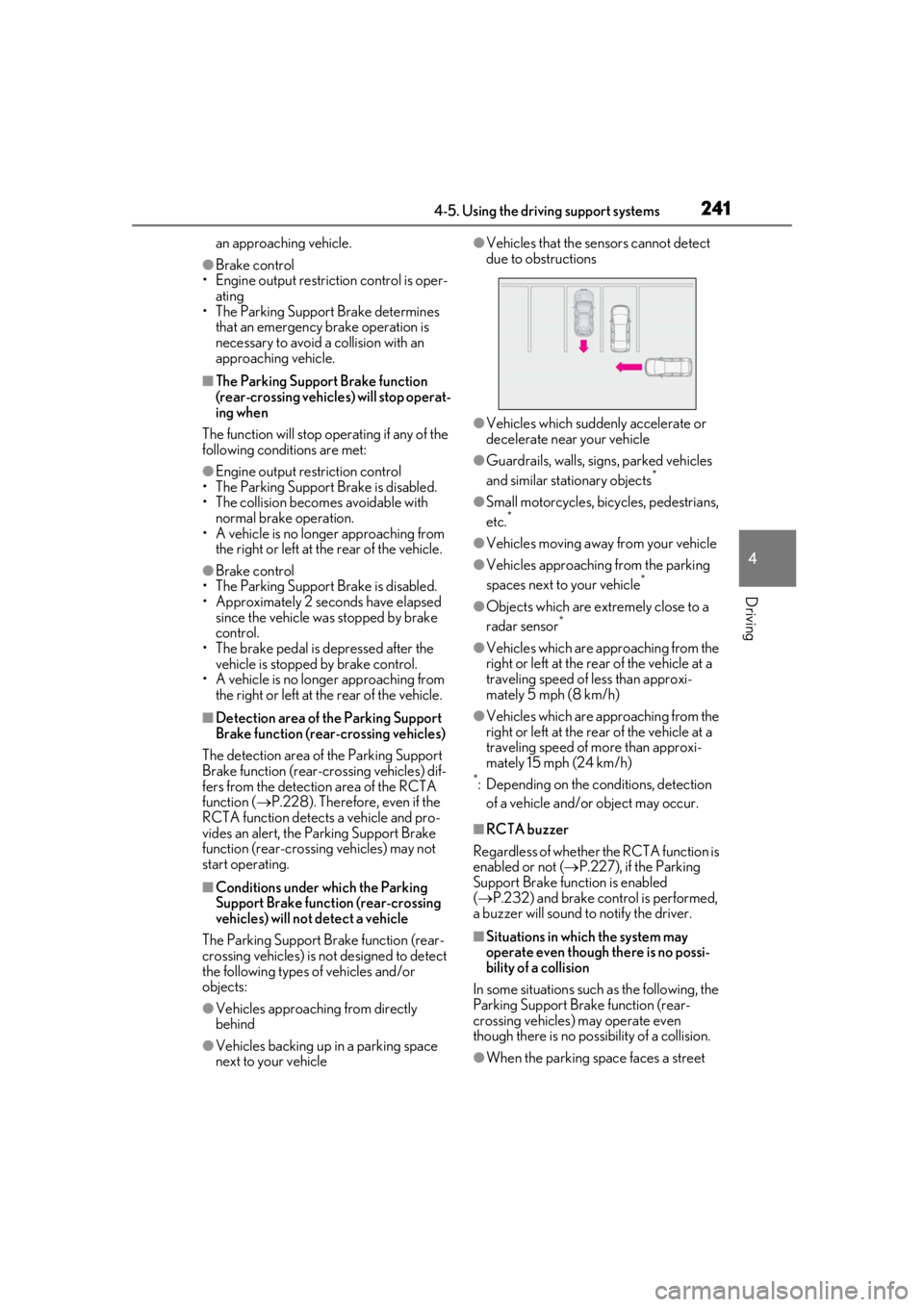
●Vehicles approaching from directly
behind
●Vehicles backing up in a parking space
next to your vehicle
●Vehicles that the sensors cannot detect
due to obstructions
●Vehicles which suddenly accelerate or
decelerate near your vehicle
●Guardrails, walls, signs, parked vehicles
and similar stationary objects*
●Small motorcycles, bicycles, pedestrians,
etc.*
●Vehicles moving away from your vehicle
●Vehicles approaching from the parking
spaces next to your vehicle*
●Objects which are extremely close to a
radar sensor*
●Vehicles which are approaching from the
right or left at the rear of the vehicle at a
traveling speed of less than approxi-
mately 5 mph (8 km/h)
●Vehicles which are approaching from the
right or left at the rear of the vehicle at a
traveling speed of more than approxi-
mately 15 mph (24 km/h)
*: Depending on the conditions, detection
of a vehicle and/or object may occur.
■RCTA buzzer
Regardless of whether th e RCTA function is
enabled or not ( P.227), if the Parking
Support Brake function is enabled
( P.232) and brake control is performed,
a buzzer will sound to notify the driver.
■Situations in which the system may
operate even though there is no possi-
bility of a collision
In some situations such as the following, the
Parking Support Brake function (rear-
crossing vehicles) may operate even
though there is no possibility of a collision.
●When the parking space faces a street
Page 244 of 452
2444-5. Using the driving support systems
the “Eco” indicator comes on.
3Sport mode
Assists acceleration response by con-
trolling the transmission, engine and steer-
ing. Suitable for when precise handling is
desirable, for example when driving on
mountain roads.
When not in Sport mode, if the driving
mode select switch is turned backward, the
“Sport” indicator comes on.
■Operation of the air conditioning sys-
tem in Eco drive mode
Eco drive mode controls the heating/cool-
ing operations and fan speed of the air con-
ditioning system to enhance fuel efficiency.
To improve air condit ioning performance,
perform the following operations:
●Turn off eco air conditioning mode
( P.264)
●Adjust the fan speed ( P.262, 265)
●Turn off Eco drive mode
■Automatic deactivation of Sport mode
If the engine switch is turned off after driv-
ing in Sport mode, the driving mode will be
changed to Normal mode.
■Driving mode pop-up display (vehicles
with 10.3-inch display model)
When the driving mode is changed, the
selected driving mode will be temporarily
displayed on the side display. ( P.259)
■ABS (Anti-lock Brake System)
Helps to prevent wheel lock when the
brakes are applied suddenly, or if the
brakes are applied while driving on a
slippery road surface
■Brake assist
Generates an increased level of brak-
ing force after the brake pedal is
depressed when the system detects a
panic stop situation.
■VSC (Vehicle Stability Control)
Helps the driver to control skidding
when swerving sudden ly or turning on
slippery road surfaces
■Enhanced VSC (Enhanced Vehi-
cle Stability Control)
Provides cooperative control of the
ABS, TRAC, VSC and EPS.
Helps to maintain directional stability
when swerving on slippery road sur-
faces by controlling steering perfor-
mance.
Driving assist systems
To keep driving safety and perfor-
mance, the following systems oper-
ate automatically in response to
various driving situations. Be aware,
however, that these systems are
supplementary and should not be
relied upon too heavily when oper-
ating the vehicle.
Summary of the driving assist
systems