cruise control LEXUS UX200 2019 User Guide
[x] Cancel search | Manufacturer: LEXUS, Model Year: 2019, Model line: UX200, Model: LEXUS UX200 2019Pages: 452, PDF Size: 10.06 MB
Page 204 of 452
2044-5. Using the driving support systems
currently traveled lane, such a sign exists
directly after a freeway branches, or in an
adjacent lane just before merging.
●Stickers are attached to the rear of the
preceding vehicle.
●A sign resembling a system compatible
sign is recognized.
●Side road speed signs may be detected
and displayed (if positioned in sight of the
front camera) while the vehicle is travel-
ing on the main road.
●Roundabout exit road speed signs may
be detected and displayed (if positioned
in sight of the front camera) while travel-
ing on a roundabout.
●The front of the vehicle is raised or low-
ered due to the carried load.
●The surrounding brightness is not suffi-
cient or changes suddenly.
●When a sign intended for trucks, etc. is
recognized.
●Vehicles with navigation system: The
speed information displayed on the
meter and that displayed on the naviga-
tion system may be different due to the
navigation system using map data.
■Speed limit sign display
If the engine switch wa s last turned off while
a speed limit sign wa s displayed on the
multi-information display, the same sign dis-
plays again when the engine switch is
turned to ON.
■Customization
Some functions can be customized. (Cus-
tomizable features: P.415)
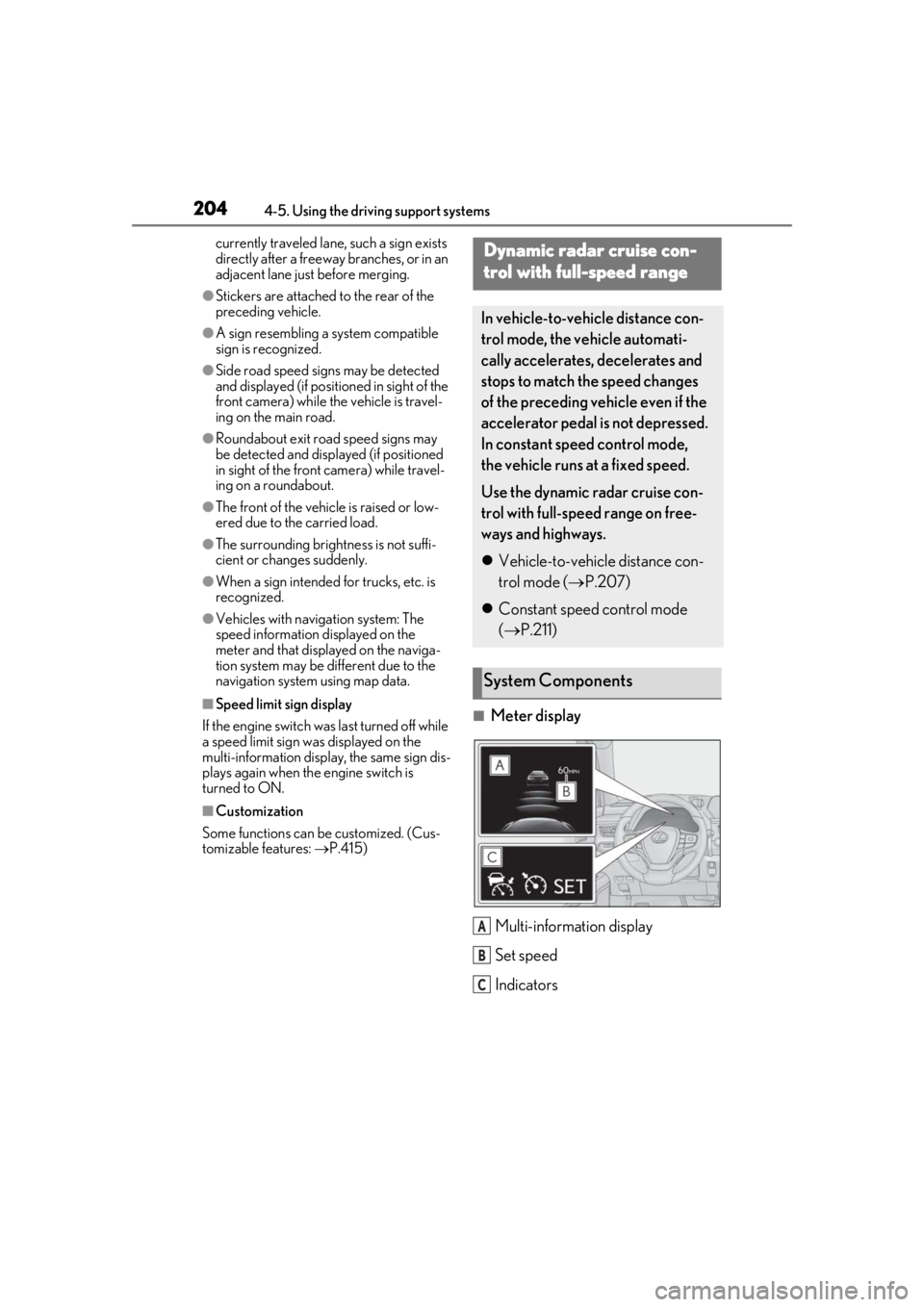
■Meter display
Multi-information display
Set speed
Indicators
Dynamic radar cruise con-
trol with full-speed range
In vehicle-to-vehicle distance con-
trol mode, the ve hicle automati-
cally accelerates, decelerates and
stops to match the speed changes
of the preceding vehicle even if the
accelerator pedal is not depressed.
In constant speed control mode,
the vehicle runs at a fixed speed.
Use the dynamic radar cruise con-
trol with full-speed range on free-
ways and highways.
Vehicle-to-vehicle distance con-
trol mode ( P.207)
Constant speed control mode
( P.211)
System Components
A
B
C
Page 205 of 452
2054-5. Using the driving support systems
4
Driving
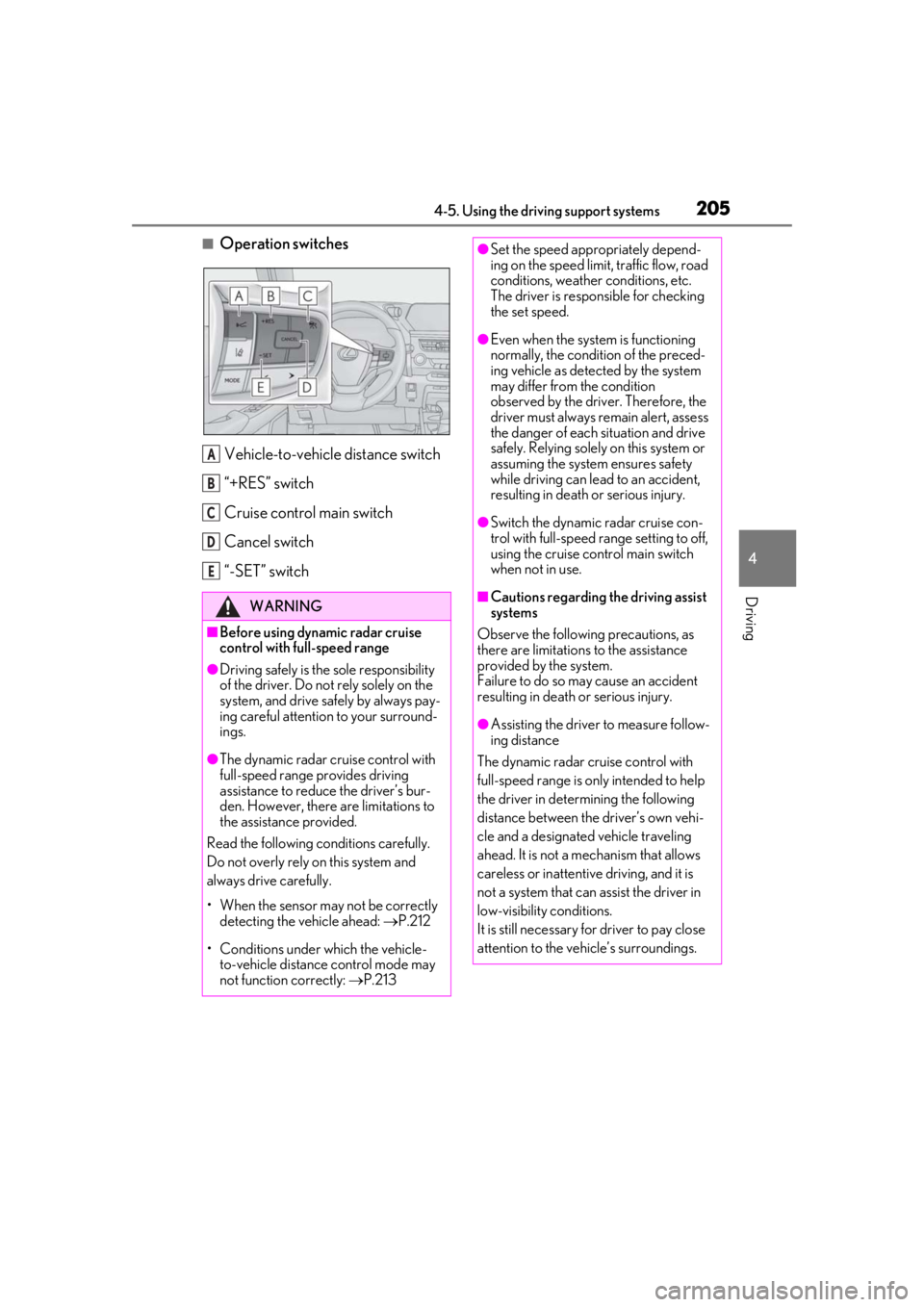
■Operation switchesVehicle-to-vehicle distance switch
“+RES” switch
Cruise control main switch
Cancel switch
“-SET” switch
WARNING
■Before using dynamic radar cruise
control with full-speed range
●Driving safely is the sole responsibility
of the driver. Do not rely solely on the
system, and drive safely by always pay-
ing careful attention to your surround-
ings.
●The dynamic radar cruise control with
full-speed range pr ovides driving
assistance to reduce the driver’s bur-
den. However, there are limitations to
the assistance provided.
Read the following co nditions carefully.
Do not overly rely on this system and
always drive carefully.
• When the sensor ma y not be correctly
detecting the vehicle ahead: P.212
• Conditions under which the vehicle- to-vehicle distance control mode may
not function correctly: P.213
A
B
C
D
E
●Set the speed appropriately depend-
ing on the speed limit, traffic flow, road
conditions, weather conditions, etc.
The driver is responsible for checking
the set speed.
●Even when the system is functioning
normally, the condition of the preced-
ing vehicle as detected by the system
may differ from the condition
observed by the driver. Therefore, the
driver must always remain alert, assess
the danger of each situation and drive
safely. Relying solely on this system or
assuming the system ensures safety
while driving can lead to an accident,
resulting in death or serious injury.
●Switch the dynamic radar cruise con-
trol with full-speed range setting to off,
using the cruise control main switch
when not in use.
■Cautions regarding the driving assist
systems
Observe the following precautions, as
there are limitations to the assistance
provided by the system.
Failure to do so may cause an accident
resulting in death or serious injury.
●Assisting the driver to measure follow-
ing distance
The dynamic radar cruise control with
full-speed range is only intended to help
the driver in determining the following
distance between the driver’s own vehi-
cle and a designated vehicle traveling
ahead. It is not a mechanism that allows
careless or inattentive driving, and it is
not a system that can assist the driver in
low-visibility conditions.
It is still necessary for driver to pay close
attention to the vehicle’s surroundings.
Page 206 of 452
2064-5. Using the driving support systems
WARNING
●Assisting the driver to judge proper
following distance
The dynamic radar cruise control with
full-speed range determines whether the
following distance be tween the driver’s
own vehicle and a designated vehicle
traveling ahead is within a set range. It is
not capable of making any other type of
judgement. Therefore, it is absolutely
necessary for the driver to remain vigi-
lant and to determine whether or not
there is a possibility of danger in any
given situation.
●Assisting the driver to operate the
vehicle
The dynamic radar cruise control with
full-speed range does not include func-
tions which will prevent or avoid colli-
sions with vehicles ahead of your vehicle.
Therefore, if there is ever any possibility
of danger, the driver must take immedi-
ate and direct control of the vehicle and
act appropriately in order to ensure the
safety of all involved.
■Situations unsuitable for dynamic
radar cruise control with full-speed
range
Do not use dynamic radar cruise control
with full-speed range in any of the follow-
ing situations.
Doing so may result in inappropriate
speed control and could cause an acci-
dent resulting in death or serious injury.
●Roads where there are pedestrians,
cyclists, etc.
●In heavy traffic
●On roads with sharp bends
●On winding roads
●On slippery roads, such as those cov-
ered with rain, ice or snow
●On steep downhills, or where there
are sudden changes between sharp up
and down gradients
Vehicle speed may exceed the set
speed when driving down a steep hill.
●At entrances to freeways and highways
●When weather conditions are bad
enough that they may prevent the sen-
sors from detectin g correctly (fog,
snow, sandstorm, heavy rain, etc.)
●When there is rain, snow, etc. on the
front surface of the radar or front cam-
era
●In traffic conditions that require fre-
quent repeated acceleration and
deceleration
●During emergency towing
●When an approach warning buzzer is
heard often
Page 208 of 452
2084-5. Using the driving support systems
When there are no longer any preceding vehicles driving slower than the set
speed
The system accelerates until the set speed is re ached. The system then returns to constant
speed cruising.
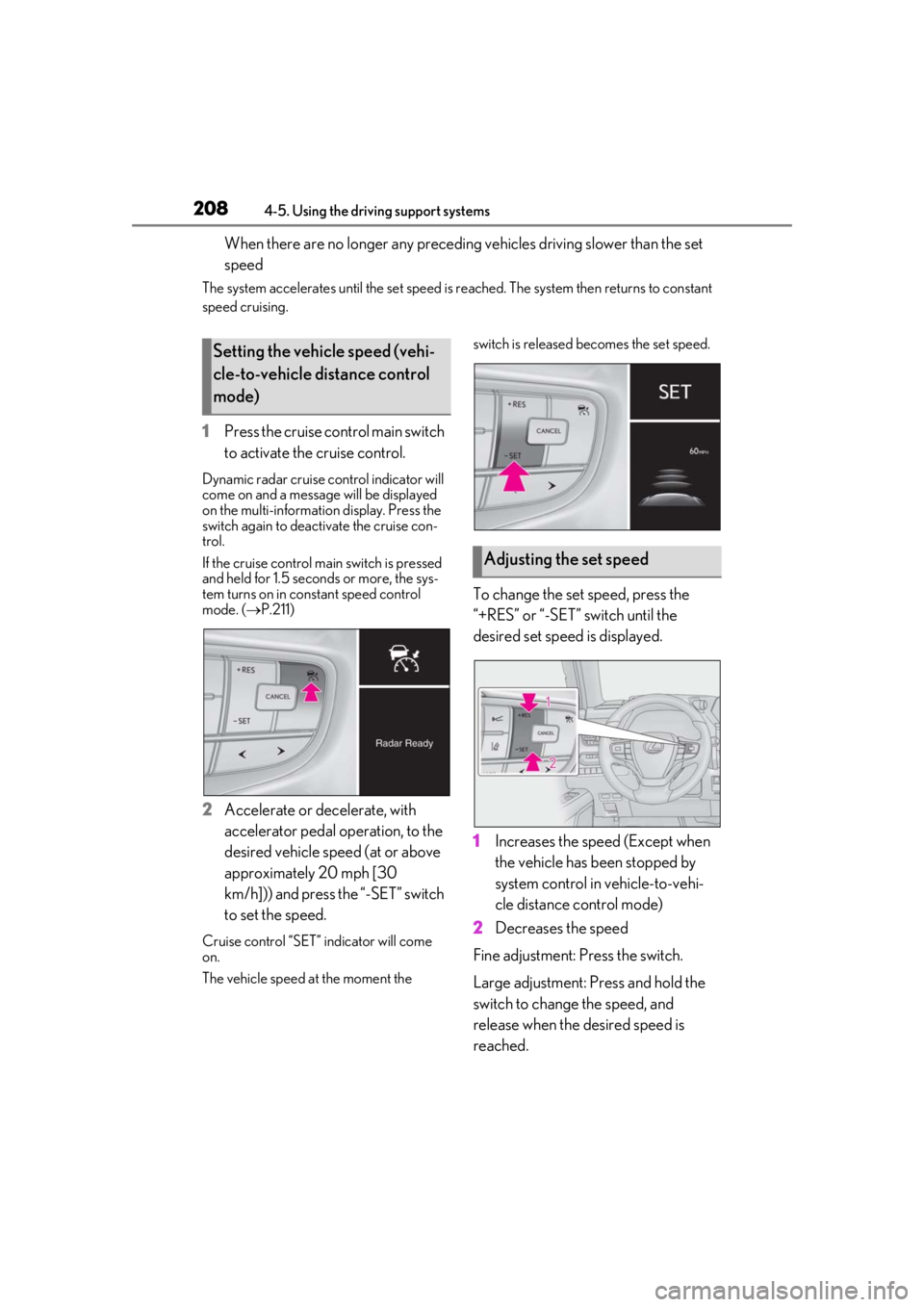
1 Press the cruise control main switch
to activate the cruise control.
Dynamic radar cruise control indicator will
come on and a message will be displayed
on the multi-information display. Press the
switch again to deactivate the cruise con-
trol.
If the cruise control ma in switch is pressed
and held for 1.5 seconds or more, the sys-
tem turns on in constant speed control
mode. ( P.211)
2 Accelerate or decelerate, with
accelerator pedal operation, to the
desired vehicle speed (at or above
approximately 20 mph [30
km/h])) and press the “-SET” switch
to set the speed.
Cruise control “SET” indicator will come
on.
The vehicle speed at the moment the switch is released becomes the set speed.
To change the set speed, press the
“+RES” or “-SET” switch until the
desired set speed is displayed.
1
Increases the speed (Except when
the vehicle has been stopped by
system control in vehicle-to-vehi-
cle distance control mode)
2 Decreases the speed
Fine adjustment: Press the switch.
Large adjustment: Press and hold the
switch to change the speed, and
release when the desired speed is
reached.
Setting the vehicle speed (vehi-
cle-to-vehicle distance control
mode)
Adjusting the set speed
Page 210 of 452
2104-5. Using the driving support systems
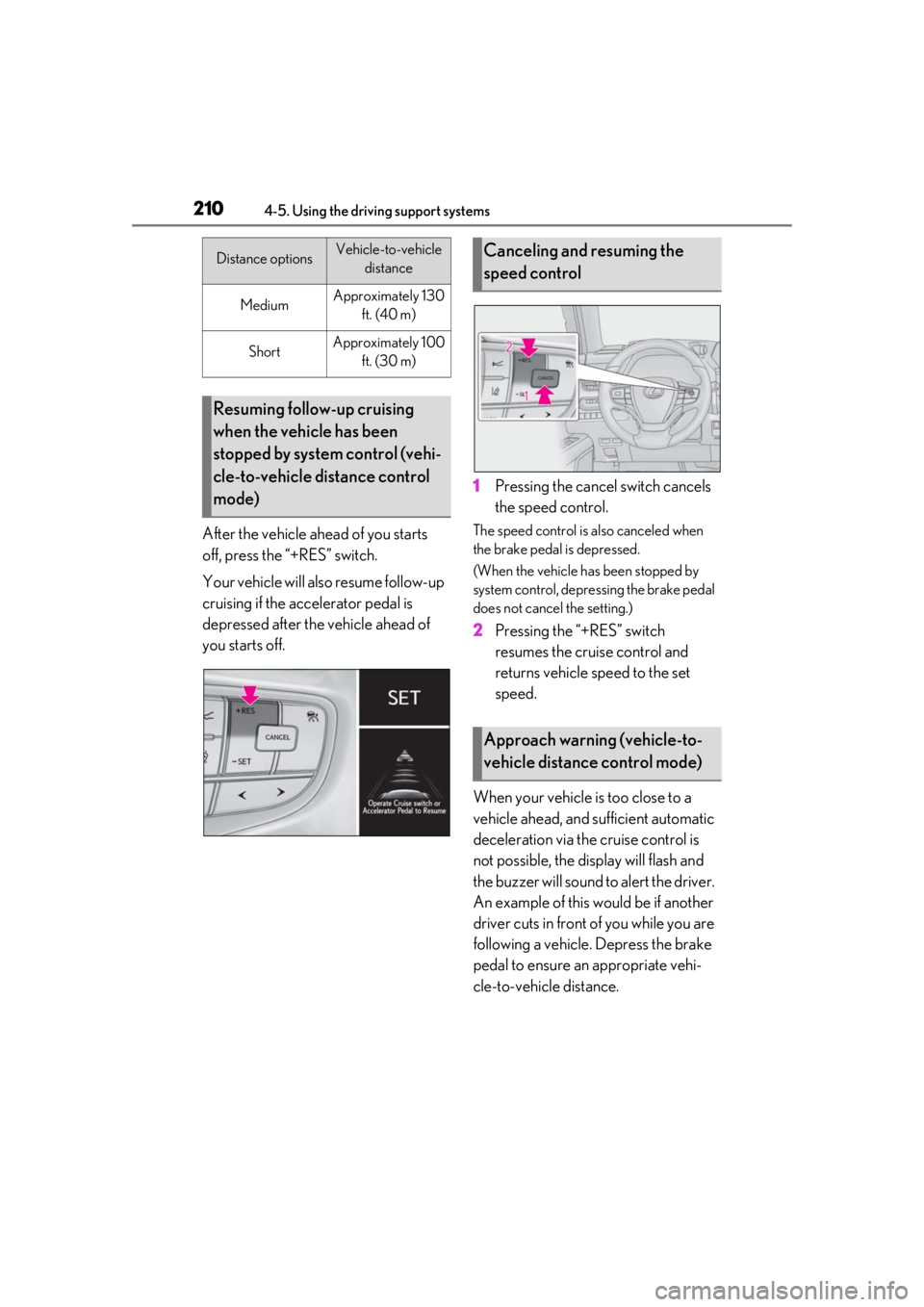
After the vehicle ahead of you starts
off, press the “+RES” switch.
Your vehicle will also resume follow-up
cruising if the accelerator pedal is
depressed after the vehicle ahead of
you starts off.1
Pressing the cancel switch cancels
the speed control.The speed control is also canceled when
the brake pedal is depressed.
(When the vehicle has been stopped by
system control, depressing the brake pedal
does not cancel the setting.)
2Pressing the “+RES” switch
resumes the cruise control and
returns vehicle speed to the set
speed.
When your vehicle is too close to a
vehicle ahead, and sufficient automatic
deceleration via the cruise control is
not possible, the display will flash and
the buzzer will sound to alert the driver.
An example of this would be if another
driver cuts in front of you while you are
following a vehicle. Depress the brake
pedal to ensure an appropriate vehi-
cle-to-vehicle distance.
MediumApproximately 130 ft. (40 m)
ShortApproximately 100 ft. (30 m)
Resuming follow-up cruising
when the vehicle has been
stopped by system control (vehi-
cle-to-vehicle distance control
mode)
Distance optionsVehicle-to-vehicle distanceCanceling and resuming the
speed control
Approach warning (vehicle-to-
vehicle distance control mode)
Page 211 of 452
2114-5. Using the driving support systems
4
Driving
■Warnings may not occur when
In the following instances, warnings
may not occur even when the vehicle-
to-vehicle distance is small.
When the speed of the preceding
vehicle matches or exceeds your
vehicle speed
When the preceding vehicle is trav-
eling at an extremely slow speed
Immediately after the cruise control
speed was set
When depressing the accelerator
pedal
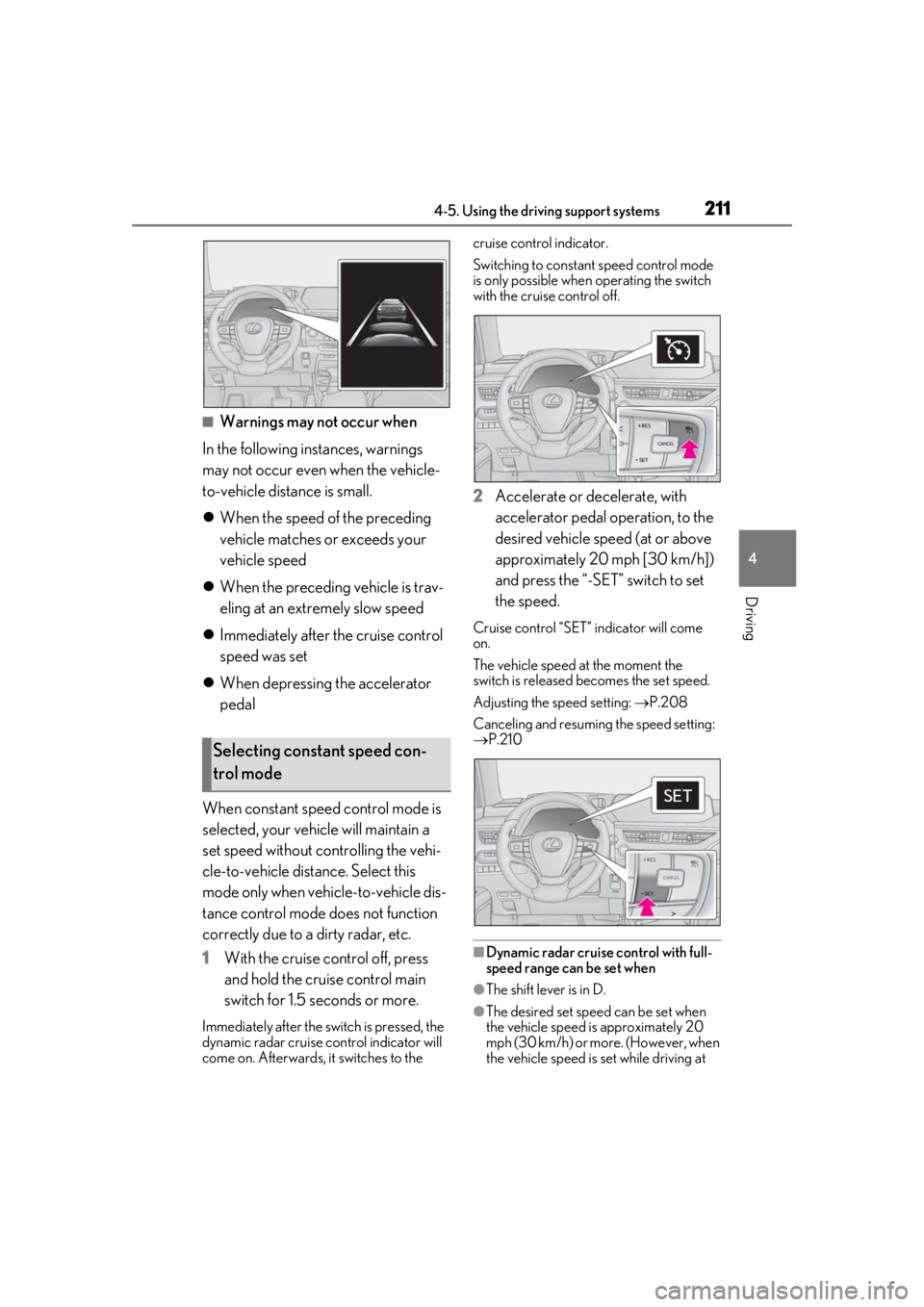
When constant speed control mode is
selected, your vehicle will maintain a
set speed without controlling the vehi-
cle-to-vehicle distance. Select this
mode only when vehicle-to-vehicle dis-
tance control mode does not function
correctly due to a dirty radar, etc.
1 With the cruise control off, press
and hold the cruise control main
switch for 1.5 seconds or more.
Immediately after the switch is pressed, the
dynamic radar cruise control indicator will
come on. Afterwards, it switches to the cruise control indicator.
Switching to constant speed control mode
is only possible when
operating the switch
with the cruise control off.
2 Accelerate or decelerate, with
accelerator pedal operation, to the
desired vehicle speed (at or above
approximately 20 mph [30 km/h])
and press the “-SET” switch to set
the speed.
Cruise control “SET” indicator will come
on.
The vehicle speed at the moment the
switch is released becomes the set speed.
Adjusting the speed setting: P.208
Canceling and resuming the speed setting:
P.210
■Dynamic radar cruise control with full-
speed range can be set when
●The shift lever is in D.
●The desired set spee d can be set when
the vehicle speed is approximately 20
mph (30 km/h) or more. (However, when
the vehicle speed is set while driving at
Selecting constant speed con-
trol mode
Page 212 of 452
![LEXUS UX200 2019 User Guide 2124-5. Using the driving support systems
below approximately 20 mph [30 km/h],
the set speed will be set to approximately
20 mph [30 km/h].)
■Accelerating after setting the vehicle
speed
The veh](/img/36/58038/w960_58038-211.png "LEXUS UX200 2019 User Guide 2124-5. Using the driving support systems
below approximately 20 mph [30 km/h],
the set speed will be set to approximately
20 mph [30 km/h].)
■Accelerating after setting the vehicle
speed
The veh")
2124-5. Using the driving support systems
below approximately 20 mph [30 km/h],
the set speed will be set to approximately
20 mph [30 km/h].)
■Accelerating after setting the vehicle
speed
The vehicle can accelerate by operating the
accelerator pedal. After accelerating, the
set speed resumes. However, during vehi-
cle-to-vehicle distance control mode, the
vehicle speed may decrease below the set
speed in order to maintain the distance to
the preceding vehicle.
■When the vehicle stops while follow-up
cruising
●Pressing the “+RES” switch while the
vehicle ahead stops w ill resume follow-up
cruising if the vehicle ahead starts off
within approximately 3 seconds after the
switch is pressed.
●If the vehicle ahead starts off within 3 sec-
onds after your vehicle stops, follow-up
cruising will be resumed.
■Automatic cancelation of vehicle-to-
vehicle distance control mode
Vehicle-to-vehicle dist ance control mode is
automatically canceled in the following situ-
ations.
●VSC is activated.
●TRAC is activated for a period of time.
●When the VSC or TRAC system is
turned off.
●The sensor cannot detect correctly
because it is covered in some way.
●Pre-collision braking is activated.
●The parking brake is operated.
●The vehicle is stopped by system control
on a steep incline.
●The following are detected when the
vehicle has been stopped by system con-
trol:
• The driver is not wearing a seat belt.
• The driver’s door is opened.
• The vehicle has been stopped for about 3 minutes
If vehicle-to-vehicle distance control mode
is automatically canceled for any reasons
other than the above, there may be a mal- function in the system. Contact your Lexus
dealer.
■Automatic cancelation of constant
speed control mode
Constant speed control mode is automati-
cally canceled in the following situations:
●Actual vehicle speed is more than
approximately 10 mph (16 km/h) below
the set vehicle speed.
●Actual vehicle speed falls below approxi-
mately 20 mph (30 km/h).
●VSC is activated.
●TRAC is activated for a period of time.
●When the VSC or TRAC system is
turned off.
●Pre-collision braking is activated.
If constant speed control mode is automati-
cally canceled for any reasons other than
the above, there may be a malfunction in the
system. Contact your Lexus dealer.
■Brake operation
A brake operation sound may be heard and
the brake pedal response may change, but
these are not malfunctions.
■Warning messages and buzzers for
dynamic radar cruise control with full-
speed range
Warning messages and buzzers are used to
indicate a system malfunction or to inform
the driver of the need for caution while driv-
ing. If a warning messa ge is shown on the
multi-information displa y, read the message
and follow the instructions. ( P.184, 367)
■When the sensor may not be correctly
detecting the vehicle ahead
In the case of the fo llowing and depending
on the conditions, operate the brake pedal
when deceleration of the system is insuffi-
cient or operate the accelerator pedal
when acceleration is required.
As the sensor may not be able to correctly
detect these types of vehicles, the approach
warning ( P.210) may not be activated.
●Vehicles that cut in suddenly
●Vehicles traveling at low speeds
●Vehicles that are not moving in the same
Page 369 of 452
3697-2. Steps to take in an emergency
7
When trouble arises
Please wait until the power supply returns to
normal.
■If “Headlight System Malfunction Visit
Your Dealer” is displayed
The following systems may be malfunction-
ing. Have the vehicle inspected by your
Lexus dealer immediately.
●The LED headlight system
●AFS (Adaptive Front-lighting System) (if
equipped)
●The automatic headlight leveling system
(if equipped)
●Automatic High Beam
■If “Radar Cruise Control Unavailable” is
shown
The dynamic radar cruise control with full-
speed range system cannot be used tempo-
rarily. Use the system when it becomes
available again.
■If “Front Camera Unavailable” or “Front
Camera Unavailable See Owner’s
Manual” is displayed
The following systems may be suspended
until the problem shown in the message is
resolved. ( P.184, 364)
●PCS (Pre-Collision System)
●LTA (Lane Tracing Assist)
●Automatic High Beam
●RSA (Road Sign Assist) (if equipped)
●Dynamic radar cruise control with full-
speed range
■If “Maintenance Required Soon” is dis-
played
Indicates that all maintenance according to
the driven distance on the maintenance
schedule
* should be performed soon.
Comes on approximately 4500 miles
(7200 km) after the message has been
reset. If necessary, perform maintenance.
Please reset the message after the mainte-
nance is performed. ( P.312)
*: Refer to the separa te “Scheduled Main-
tenance” or “Owner’s Manual Supple-
ment” for the maintenance interval
applicable to your vehicle.
■If “Maintenance Required Visit Your
Dealer” is displayed
Indicates that all mainte nance is required to
correspond to the driven distance on the
maintenance schedule
*.
Comes on approximately 5000 miles
(8000 km) after the message has been
reset. (The indicator will not work properly
unless the message ha s been reset.) Per-
form the necessary maintenance. Please
reset the message after the maintenance is
performed. ( P.312)
*: Refer to the separate “Scheduled Main-
tenance” or “Owner’s Manual Supple-
ment” for the main tenance interval
applicable to your vehicle.
■If “Oil Maintenance Required Soon” is
displayed
Indicates that the engine oil should be
scheduled to be changed.
Check the engine oil an d change it if neces-
sary. After changing th e engine oil, make
sure to reset the message. ( P.312)
■If “Oil Maintenance Required” is dis-
played
Indicates that the engine oil should be
changed.
Check and change the en gine oil, and oil fil-
ter by your Lexus dealer. After changing the
engine oil, make sure to reset the message.
( P.312)
■If a message that indicates the need for
visiting your Lexus dealer is displayed
The system or part shown on the multi-
information display is malfunctioning. Have
the vehicle inspected by your Lexus dealer
immediately.
■If a message that indicates the need for
referring to Owner’ s Manual is dis-
played
●If any of the following messages are
shown on the multi-information display,
follow the instructions.
• “Engine Coolant Temp High” ( P.386)
• “Transmission Oil Temp. High” ( P.155)
• “Front Camera Unavailable” ( P.184)
• “Radar Cruise Control Unavailable” ( P.184)
Page 376 of 452
3767-2. Steps to take in an emergency
1Replace a rear tire with the compact
spare tire.
2
Replace the flat front tire with the tire
removed from the rear of the vehicle.
3
Fit tire chains to the front tires.
WARNING
■When using the compact spare tire
●Remember that the spare tire provided
is specifically desi gned for use with
your vehicle. Do not use your spare
tire on another vehicle.
●Do not use more than one spare tire
simultaneously.
●Replace the spare tire with a standard
tire as soon as possible.
●Avoid sudden acceleration, abrupt
steering, sudden braking and shifting
operations that cause sudden engine
braking.
■When the compact spare tire is
attached
The vehicle speed may not be correctly
detected, and the following systems may
not operate correctly:
• ABS & Brake assist
• VSC
• TRAC
• Dynamic radar cruise control with full- speed range
• PCS (Pre-Collision System)
• EPS
• LTA (Lane Tracing Assist)
• Lexus parking assist monitor
• Intuitive parking assist (if equipped)
• Navigation system (if equipped)
• BSM (Blind Spot Monitor) (if equipped)
• Automatic High Beam
■Speed limit when using the compact
spare tire
Do not drive at speeds in excess of 50
mph (80 km/h) when a compact spare
tire is installed on the vehicle.
The compact spare tire is not designed
for driving at high speeds. Failure to
observe this precaution may lead to an
accident causing death or serious injury.
■After using the tools and jack
Before driving, make sure all the tools
and jack are securely in place in their
storage location to reduce the possibility
of personal injury during a collision or
sudden braking.
NOTICE
■Be careful when driving over bumps
with the compact spare tire installed
on the vehicle
The vehicle becomes lower when driving
with the compact spar e tire compared to
when driving with standard tires. Be
careful when driving over uneven road
surfaces.
■Driving with tire chains and the com-
pact spare tire
Do not fit tire chains to the compact
spare tire.
Tire chains may damage the vehicle body
and adversely affect driving perfor-
mance.
■When replacing the tires
When removing or fitting the wheels,
tires or the tire pr essure warning valve
and transmitter, contact your Lexus
dealer as the tire pressure warning valve
and transmitter may be damaged if not
handled correctly.
Page 438 of 452

438Alphabetical Index
C
Card key ............................................................ 94
CareAluminum wheels ......................................306
Exterior ...........................................................306
Interior .............................................................309
Seat belts........................................................309
Cargo capacity............................................... 147
Cargo hooks .................................................280
Center Display ............................................. 256
Chains ................................................................251
Child-protectors............................................. 101
Child restraint system................................... 44 Fixed with a LATCH system .................. 52
Fixed with a seat belt................................... 48
Front passenger occupant classification system ............................................................. 39
Points to remember .................................... 44
Riding with children ..................................... 44
Types of child restraint system installation method ........................................................... 46
Using an anchor bracket .......................... 54
Child safety ....................................................... 44 Airbag precautions...................................... 35
Back door precautions.............................102
Battery precautions ..................... 326, 385
Child restraint system................................. 44
Heated steering wheel and seat heater precautions.................................................. 271
How your child should wear the seat belt .............................................................................27
Moon roof precautions ............................139
Power window lock switch.....................136
Power window precautions ...................136
Rear door child-protectors ..................... 101
Removed key battery precautions ... 342
Seat belt extender precautions ..............27
Seat belt precautions .................................. 52
Cleaning.............................................. 306, 309 Aluminum wheels ......................................306
Exterior ...........................................................306 Interior ............................................................ 309
Radar sensor ...................................... 180, 215
Seat belts ....................................................... 309
Clock ................................................72, 75, 285
Coat hooks..................................................... 294
Compass .......................................................... 301
Condenser ..................................................... 324
Console box .................................................. 278
Consumption screen .................................... 90
Continuously variable transmission...... 155
Coolant Capacity .........................................................393
Checking ....................................................... 323
Preparing and checking before winter.......................................................................... 249
Cooling system............................................. 323 Engine overheating.................................. 386
Cornering lights ............................................. 167 Replacing light bulbs ................................346
Cruise control Dynamic radar cruise control with full-
speed range ..............................................204
Cup holders ................................................... 278
Current fuel consumption ............................81
Curtain shield airbags .................................. 30
Customizable features ..............................408
D
Daytime running light system ...................165
Deck board ......................................................281
Deck under tray ...........................................280
Defogger Outside rear view mirrors.....................263
Rear window ................................................263
Windshield ....................................................263
Dimension ...................................................... 390
Dinghy towing.................................................. 151
Display BSM (Blind Spot Monitor)......................214
Dynamic radar cruise control with full-
speed range ..............................................204
Head-up display............................................86