garage LEXUS UX200 2019 User Guide
[x] Cancel search | Manufacturer: LEXUS, Model Year: 2019, Model line: UX200, Model: LEXUS UX200 2019Pages: 452, PDF Size: 10.06 MB
Page 295 of 452
2955-6. Using the other interior features
5
Interior features
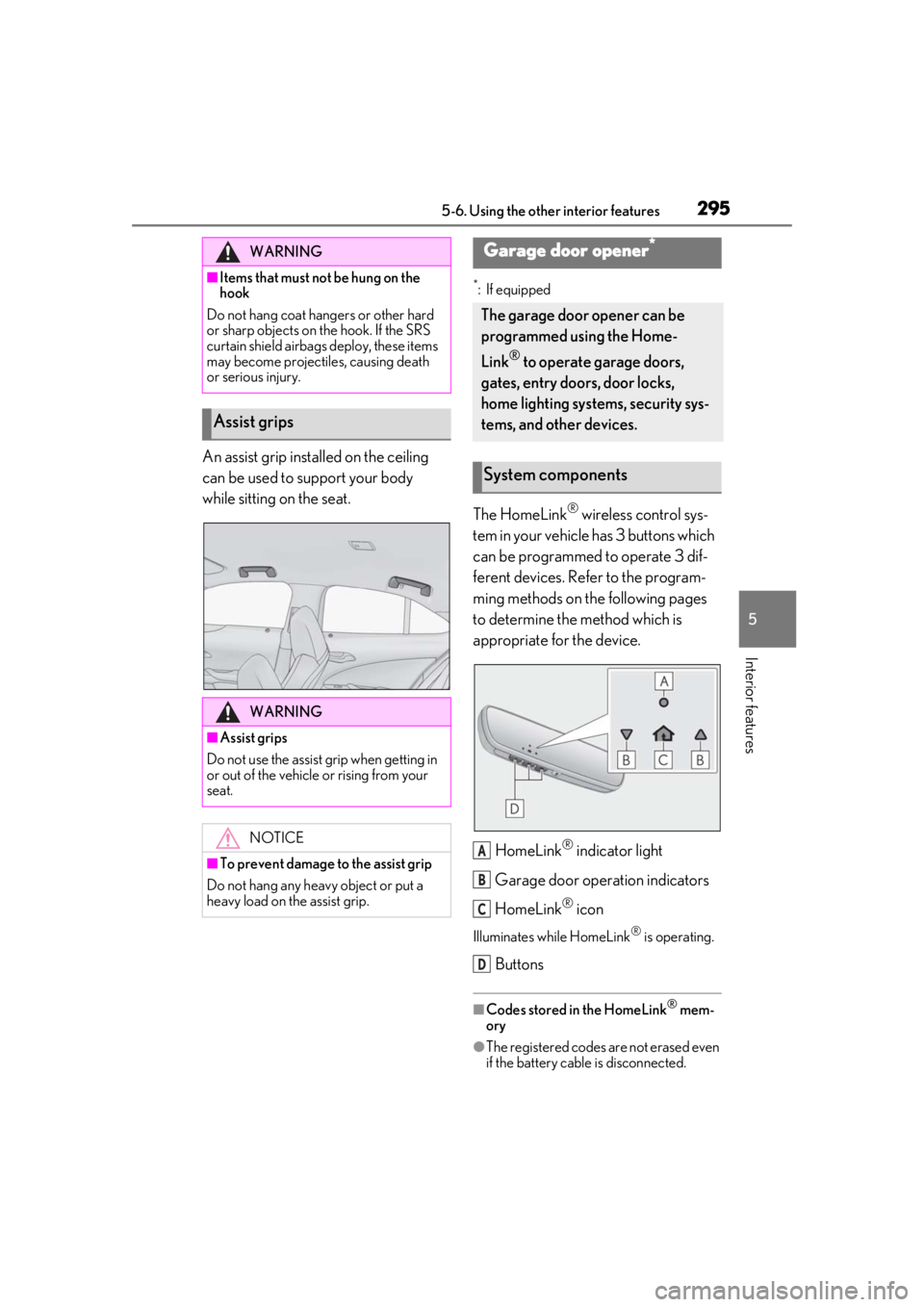
An assist grip installed on the ceiling
can be used to support your body
while sitting on the seat.
*: If equipped
The HomeLink® wireless control sys-
tem in your vehicle has 3 buttons which
can be programmed to operate 3 dif-
ferent devices. Refer to the program-
ming methods on the following pages
to determine the method which is
appropriate for the device.
HomeLink
® indicator light
Garage door operation indicators
HomeLink
® icon
Illuminates while HomeLink® is operating.
Buttons
■Codes stored in the HomeLink® mem-
ory
●The registered codes are not erased even
if the battery cable is disconnected.
WARNING
■Items that must not be hung on the
hook
Do not hang coat hangers or other hard
or sharp objects on the hook. If the SRS
curtain shield airbags deploy, these items
may become projectiles, causing death
or serious injury.
Assist grips
WARNING
■Assist grips
Do not use the assist grip when getting in
or out of the vehicle or rising from your
seat.
NOTICE
■To prevent damage to the assist grip
Do not hang any heavy object or put a
heavy load on th e assist grip.
Garage door opener*
The garage door opener can be
programmed using the Home-
Link
® to operate garage doors,
gates, entry doors, door locks,
home lighting systems, security sys-
tems, and other devices.
System components
A
B
C
D
Page 296 of 452
2965-6. Using the other interior features
●If learning failed when registering a dif-
ferent code to a HomeLink® button that
already has a code registered to it, the already registered code will not be
erased.
■Certification for the garage door opener
■When support is necessary
Visit on the web at
www.homelink.com/lexus
or call 1-800-355-3515.
■Before programming HomeLink®
During programming, it is possible
WARNING
■When programming a garage door or
other remote control device
The garage door or other device may
operate, so ensure people and objects
are out of danger to prevent potential
harm.
■Conforming to federal safety stan-
dards
Do not use the HomeLink
® compatible
transceiver with any garage door opener
or device that lacks safety stop and
reverse features as required by federal
safety standards.
This includes any garage door that can-
not detect an interf ering object. A door
or device without these features
increases the risk of death or serious
injury.
■When operating or programming
HomeLink®
Never allow a child to operate or play
with the HomeLink® buttons.
Programming the HomeLink®
Page 297 of 452
2975-6. Using the other interior features
5
Interior features
that garage doors, gates, or other
devices may operate. For this rea-
son, make sure that people and
objects are clear of the garage door
or other devices to prevent injury or
other potential harm.
It is recommended that a new bat-
tery be placed in the remote control
transmitter for more accurate pro-
gramming.
Garage door opener motors manu-
factured after 1995 may be
equipped with rolling code protec-
tion. If this is the case, you may need
a stepladder or other sturdy, safe
device to reach the “Learn” or
“Smart” button on the garage door
opener motor.
■Programming HomeLink®
Steps 1 through 3 must be performed
within 60 seconds, otherwise the indi-
cator light will stop flashing and pro-
gramming will not be able to be
completed.
1 Press and release the HomeLink
®
button you want to program and
check that the HomeLink
® indica-
tor light flashes (orange).
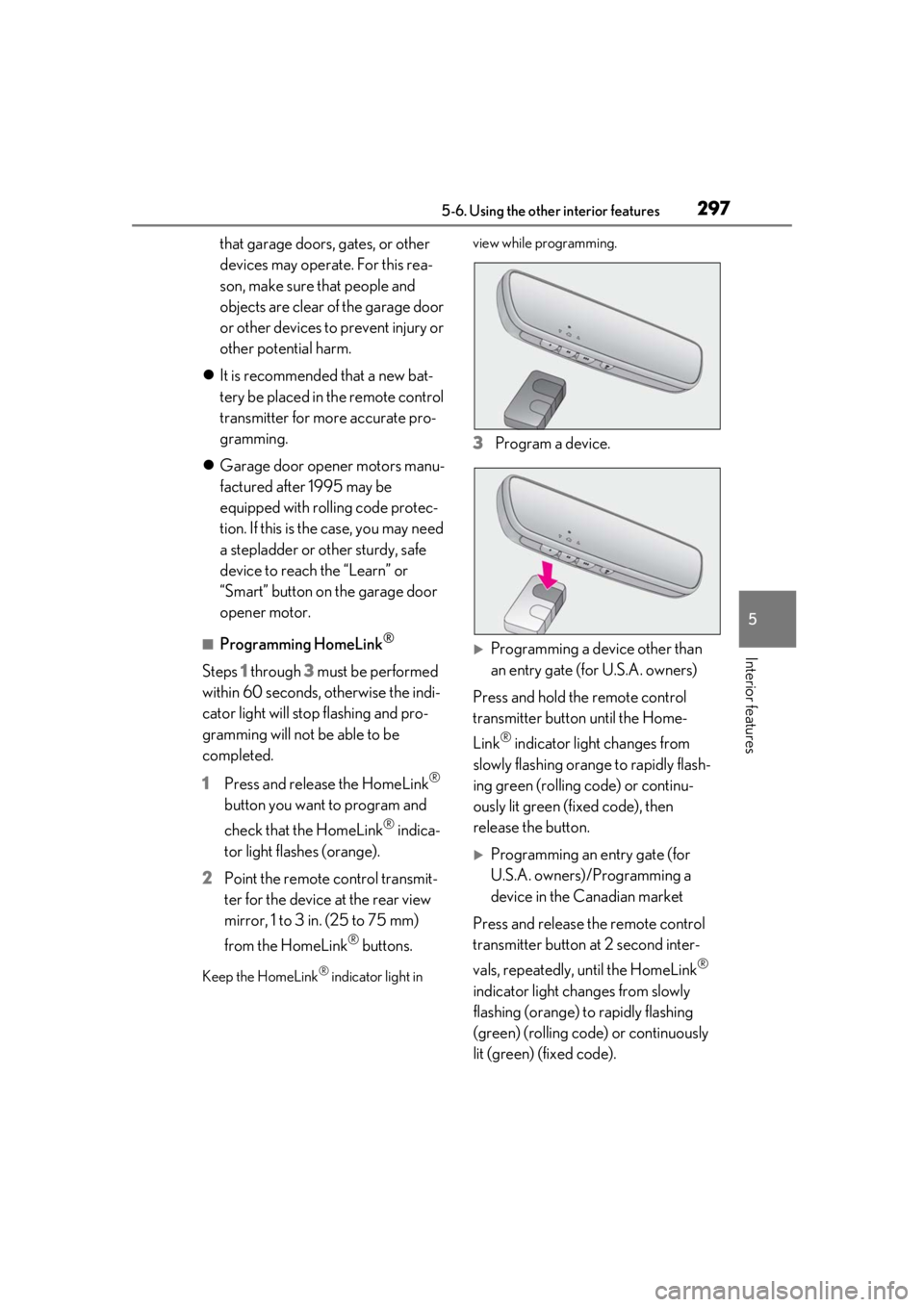
2 Point the remote control transmit-
ter for the device at the rear view
mirror, 1 to 3 in. (25 to 75 mm)
from the HomeLink
® buttons.
Keep the HomeLink® indicator light in view while programming.
3
Program a device.
Programming a device other than
an entry gate (for U.S.A. owners)
Press and hold the remote control
transmitter button until the Home-
Link
® indicator light changes from
slowly flashing orange to rapidly flash-
ing green (rolling code) or continu-
ously lit green (fixed code), then
release the button.
Programming an entry gate (for
U.S.A. owners)/Programming a
device in the Canadian market
Press and release the remote control
transmitter button at 2 second inter-
vals, repeatedly, until the HomeLink
®
indicator light changes from slowly
flashing (orange) to rapidly flashing
(green) (rolling code) or continuously
lit (green) (fixed code).
Page 298 of 452
2985-6. Using the other interior features
4Test the HomeLink® operation by
pressing the newly programmed
button and observing the indicator
light:
Indicator light illuminates: Program-
ming of a fixed code device has
completed. The garage door or
other device should operate when a
HomeLink
® button is pressed and
released.
Indicator light flashes rapidly: The
garage door opener motor or other
device is equipped with a rolling
code. To complete programming,
firmly press and hold the Home-
Link
® button for 2 seconds then
release it.
If the garage door or other device
does not operate, proceed to “Pro-
gramming a rolling code system”.
5 Repeat the steps above to program
another device for any of the
remaining HomeLink
® buttons.
■Programming a rolling code sys-
tem
2 or more people may be necessary to
complete rolling code programming.
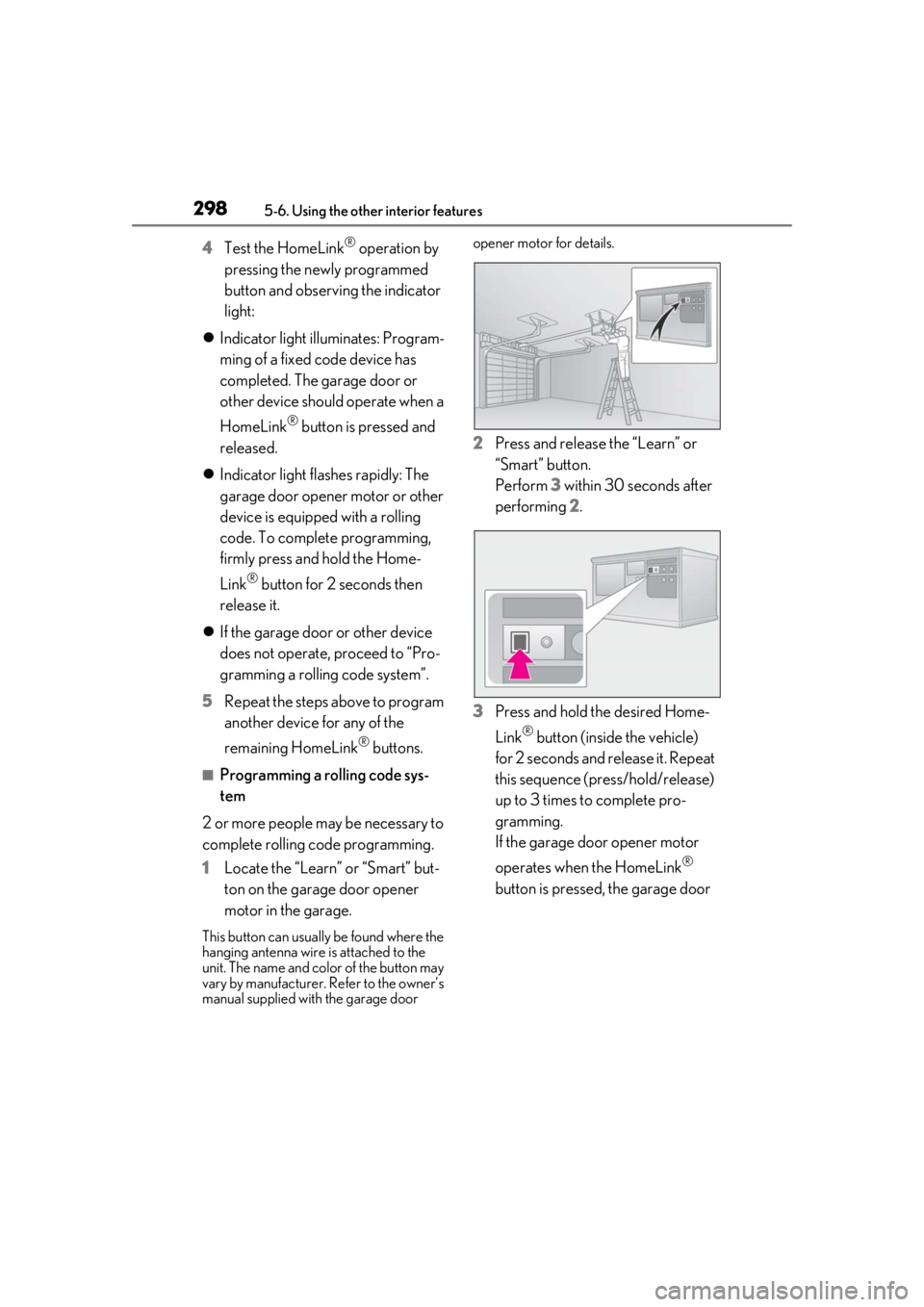
1 Locate the “Learn” or “Smart” but-
ton on the garage door opener
motor in the garage.
This button can usuall y be found where the
hanging antenna wire is attached to the
unit. The name and color of the button may
vary by manufacturer. Refer to the owner’s
manual supplied with the garage door opener motor for details.
2
Press and release the “Learn” or
“Smart” button.
Perform 3 within 30 seconds after
performing 2.
3 Press and hold the desired Home-
Link
® button (inside the vehicle)
for 2 seconds and release it. Repeat
this sequence (press/hold/release)
up to 3 times to complete pro-
gramming.
If the garage door opener motor
operates when the HomeLink
®
button is pressed, the garage door
Page 299 of 452
2995-6. Using the other interior features
5
Interior features
opener motor recognizes the
HomeLink
® signal.
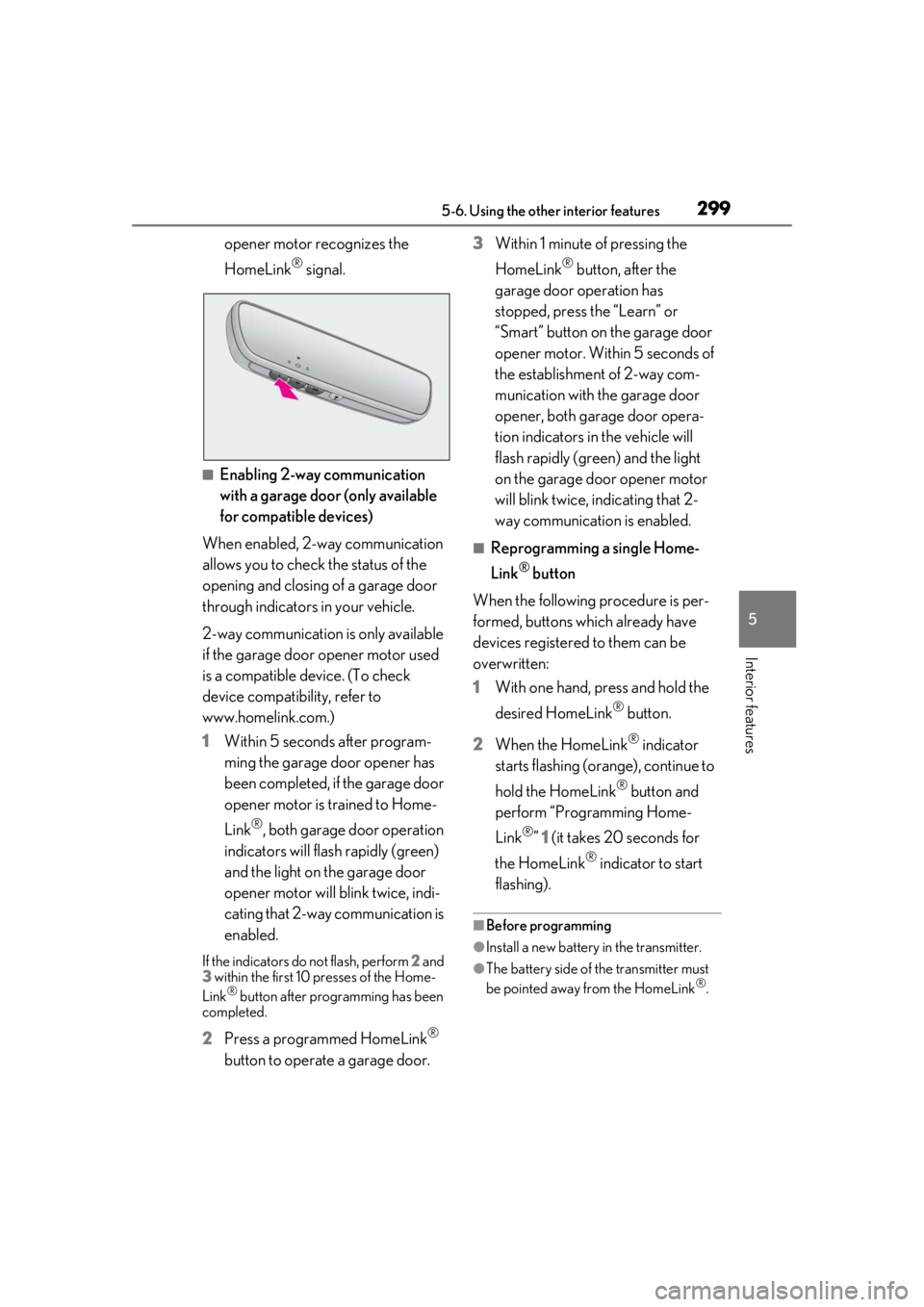
■Enabling 2-way communication
with a garage door (only available
for compatible devices)
When enabled, 2-way communication
allows you to check the status of the
opening and closing of a garage door
through indicators in your vehicle.
2-way communication is only available
if the garage door opener motor used
is a compatible device. (To check
device compatibility, refer to
www.homelink.com.)
1 Within 5 seconds after program-
ming the garage door opener has
been completed, if the garage door
opener motor is trained to Home-
Link
®, both garage door operation
indicators will flash rapidly (green)
and the light on the garage door
opener motor will b link twice, indi-
cating that 2-way communication is
enabled.
If the indicators do not flash, perform 2 and
3 within the first 10 presses of the Home-
Link
® button after programming has been
completed.
2 Press a programmed HomeLink®
button to operate a garage door. 3
Within 1 minute of pressing the
HomeLink
® button, after the
garage door operation has
stopped, press the “Learn” or
“Smart” button on the garage door
opener motor. Within 5 seconds of
the establishment of 2-way com-
munication with the garage door
opener, both garage door opera-
tion indicators in the vehicle will
flash rapidly (green) and the light
on the garage door opener motor
will blink twice, indicating that 2-
way communication is enabled.
■Reprogramming a single Home-
Link
® button
When the following procedure is per-
formed, buttons which already have
devices registered to them can be
overwritten:
1 With one hand, press and hold the
desired HomeLink
® button.
2 When the HomeLink
® indicator
starts flashing (orange), continue to
hold the HomeLink
® button and
perform “Programming Home-
Link
®” 1 (it takes 20 seconds for
the HomeLink
® indicator to start
flashing).
■Before programming
●Install a new battery in the transmitter.
●The battery side of the transmitter must
be pointed away from the HomeLink®.
Page 300 of 452
3005-6. Using the other interior features
Press the appropriate HomeLink®
button. The HomeLink
® indicator light
should turn on.
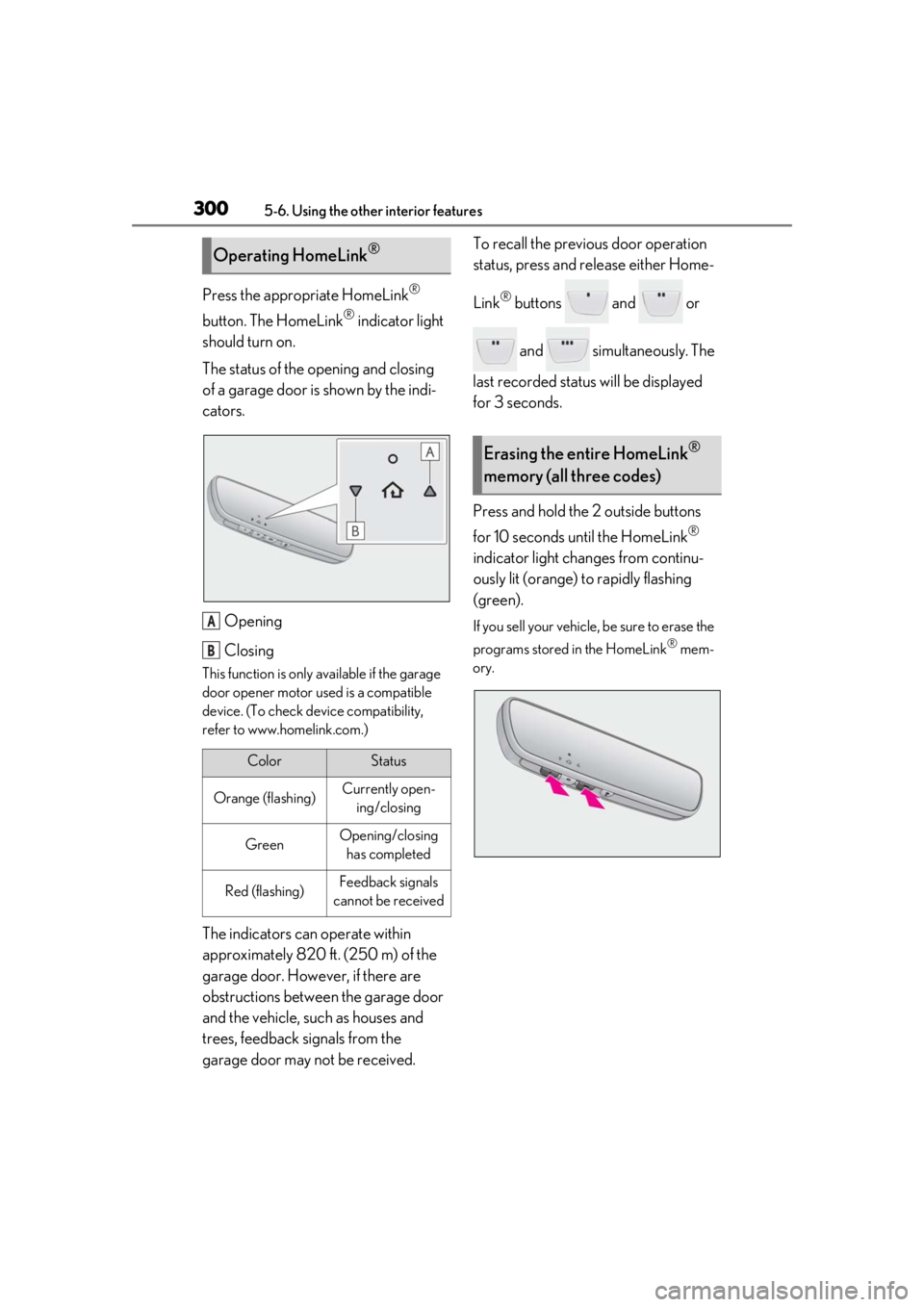
The status of the opening and closing
of a garage door is shown by the indi-
cators.
Opening
Closing
This function is only available if the garage
door opener motor used is a compatible
device. (To check device compatibility,
refer to www.homelink.com.)
The indicators can operate within
approximately 820 ft. (250 m) of the
garage door. However, if there are
obstructions between the garage door
and the vehicle, such as houses and
trees, feedback signals from the
garage door may not be received. To recall the previous door operation
status, press and release either Home-
Link
® buttons and or
and simultaneously. The
last recorded status will be displayed
for 3 seconds.
Press and hold the 2 outside buttons
for 10 seconds until the HomeLink
®
indicator light changes from continu-
ously lit (orange) to rapidly flashing
(green).
If you sell your vehicle, be sure to erase the
programs stored in the HomeLink
® mem-
ory.
Operating HomeLink®
ColorStatus
Orange (flashing)Currently open- ing/closing
GreenOpening/closing has completed
Red (flashing)Feedback signals
cannot be received
A
B
Erasing the entire HomeLink®
memory (all three codes)
Page 326 of 452
3266-3. Do-it-yourself maintenance
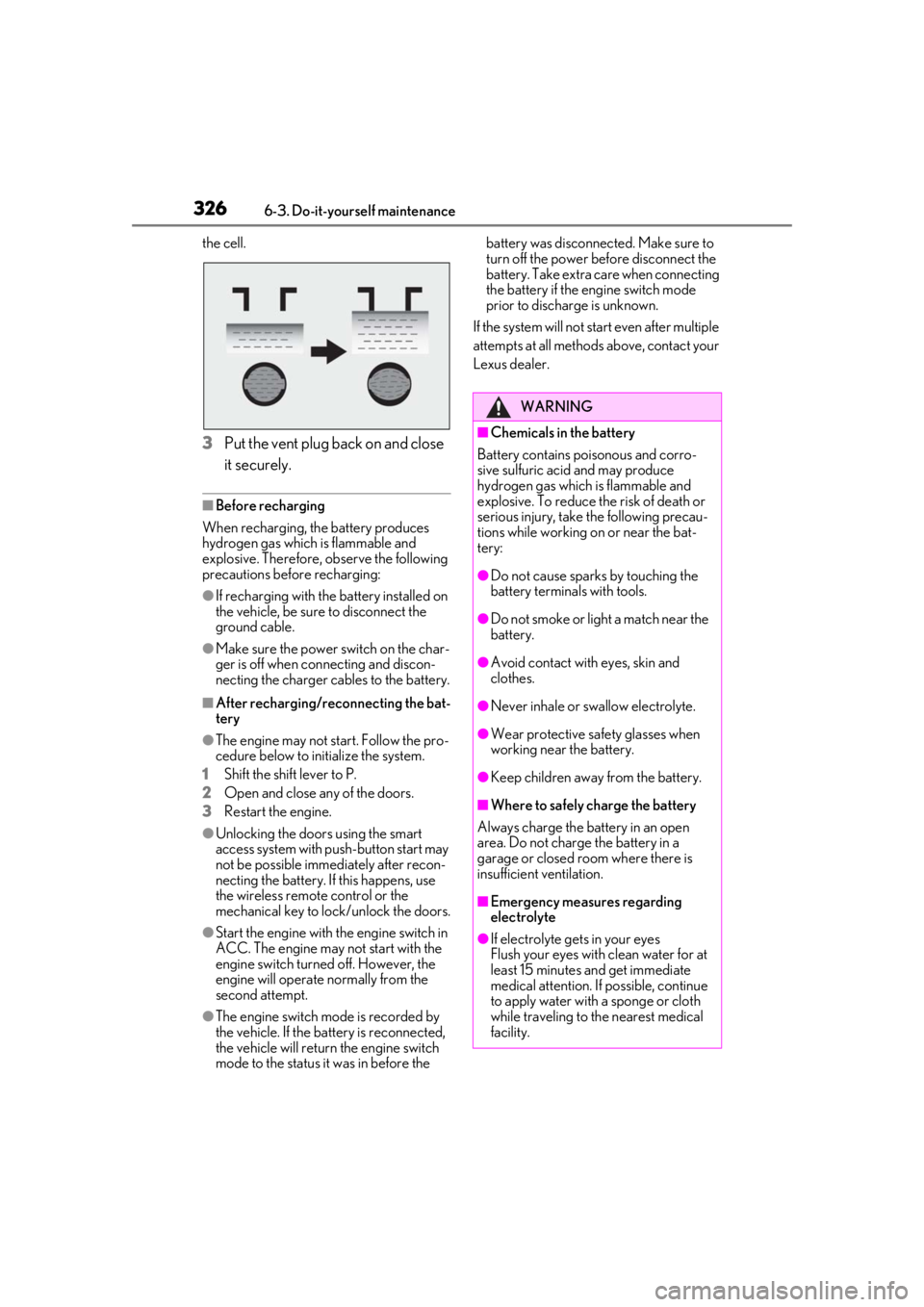
the cell.
3Put the vent plug back on and close
it securely.
■Before recharging
When recharging, the battery produces
hydrogen gas which is flammable and
explosive. Therefore, observe the following
precautions before recharging:
●If recharging with the battery installed on
the vehicle, be sure to disconnect the
ground cable.
●Make sure the power switch on the char-
ger is off when connecting and discon-
necting the charger cables to the battery.
■After recharging/reconnecting the bat-
tery
●The engine may not start. Follow the pro-
cedure below to initialize the system.
1
Shift the shift lever to P.
2
Open and close any of the doors.
3
Restart the engine.
●Unlocking the doors using the smart
access system with pu sh-button start may
not be possible immediately after recon-
necting the battery. If this happens, use
the wireless remote control or the
mechanical key to lock/unlock the doors.
●Start the engine with the engine switch in
ACC. The engine may not start with the
engine switch turned off. However, the
engine will operate normally from the
second attempt.
●The engine switch mode is recorded by
the vehicle. If the battery is reconnected,
the vehicle will return the engine switch
mode to the status it was in before the battery was disconnected. Make sure to
turn off the power before disconnect the
battery. Take extra care when connecting
the battery if the engine switch mode
prior to discharge is unknown.
If the system will not start even after multiple
attempts at all methods above, contact your
Lexus dealer.
WARNING
■Chemicals in the battery
Battery contains poisonous and corro-
sive sulfuric acid and may produce
hydrogen gas which is flammable and
explosive. To reduce the risk of death or
serious injury, take the following precau-
tions while working on or near the bat-
tery:
●Do not cause sparks by touching the
battery terminals with tools.
●Do not smoke or light a match near the
battery.
●Avoid contact with eyes, skin and
clothes.
●Never inhale or swallow electrolyte.
●Wear protective sa fety glasses when
working near the battery.
●Keep children away from the battery.
■Where to safely charge the battery
Always charge the battery in an open
area. Do not charge the battery in a
garage or closed room where there is
insufficient ventilation.
■Emergency measures regarding
electrolyte
●If electrolyte gets in your eyes
Flush your eyes with clean water for at
least 15 minutes and get immediate
medical attention. If possible, continue
to apply water with a sponge or cloth
while traveling to the nearest medical
facility.
Page 408 of 452
4088-2. Customization
8-2.Customization
■Changing using the meter control
switches
1
Press or of the meter con-
trol switches, and select .
2
Press or of the meter con-
trol switches, select the item, and
press “OK”.
3
Press or of the meter con-
trol switches, select the desired set-
ting, and press “OK”.
To go back to the previous screen or
exit the customize mode, press .
■Changing using the Remote Touch
1
Press the “MENU” button on the
Remote Touch. 2
Select “Setup” on the menu screen
and select “Vehicle”.
3
Select “Vehicle Customization”.
Various setting can be changed. Refer to
the list of settings th at can be changed for
details.
For details on the Remote Touch, refer
to the “NAVIGATION AND MULTI-
MEDIA SYSTEM OWNER’S MAN-
UAL”.
■When customizing using the Remote
Touch
Stop the vehicle in a safe place, apply the
parking brake, and shift the shift lever to P.
Also, to prevent battery discharge, leave
the engine running while customizing the
features.
Some function settings are changed simultaneously with other functions being cus-
tomized. Contact your Lexus dealer for further details.
Settings that can be changed using the Remote Touch
Settings that can be changed using the meter control switches
Customizable features
Your vehicle includes a variety of
electronic features that can be per-
sonalized to your preferences. The
settings of these features can be
changed by using the meter control
switches, the Remote Touch or at
your Lexus dealer.
Customizing vehicle features
WARNING
■Cautions during customization
As the engine needs to be running
during customization, ensure that the
vehicle is parked in a place with ade-
quate ventilation. In a closed area such as
a garage, exhaust gases including harm-
ful carbon monoxide (CO) may collect
and enter the vehicle. This may lead to
death or a serious health hazard.
NOTICE
■During customization
To prevent battery discharge, ensure that
the engine is running while customizing
features.
Customizable features
A
B
Page 440 of 452

440Alphabetical Index
Identification number .................................391
If your vehicle has to be stopped in an
emergency ............................................... 350
Ignition switch (engine switch) .............152
Overheating.................................................386
Tachometer ............................................. 72, 75
Engine coolant.............................................. 323 Capacity ......................................................... 393
Checking ....................................................... 323
Preparing and checking before winter......................................................................... 249
Engine coolant temperature gauge 72, 75
Engine immobilizer system ........................ 62
Engine oil Capacity ......................................................... 392
Checking ......................................................... 321
Warning light .............................................. 358
Engine oil maintenance data .................. 323
Engine switch Auto power off function ...........................154
Changing the engine switch modes..154
If your vehicle has to be stopped in an
emergency ............................................... 350
Starting the engine ......................................152
EPS (Electric Power Steering) .............. 245 Function .......................................................... 245
Warning light ...............................................360
Event data recorder (EDR) ........................... 8
F
Flat tire .................................................. 370, 377 Tire pressure warning system .............330
Floor mats .......................................................... 24
Fluid Automatic transmission .......................... 394
Brake................................................................ 394
Washer ........................................................... 327
Fog lights Replacing light bulbs................................ 346
Switch ..................................................................171
Front passenger occupant classification system .............................................................. 39 Front seats ......................................................... 121
Adjustment ....................................................... 121
Cleaning ........................................................ 309
Correct driving posture ............................ 25
Driving position memory .........................123
Head restraints..............................................126
Memory recall function............................ 125
Power easy access system .....................123
Seat heaters .................................................. 272
Seat position memory ...............................123
Seat ventilators ............................................ 272
Front side marker lights Light switch .................................................... 165
Front turn signal lights Replacing light bulbs ................................346
Turn signal lever .......................................... 159
Wattage ......................................................... 396
Fuel Capacity .......................................................... 391
Fuel gauge ................................................72, 75
Information .................................................... 397
Refueling.......................................................... 178
Type ................................................................... 391
Warning light ...............................................362
Fuel consumption Average fuel economy ............................... 81
Current fuel consumption ......................... 81
Fuel filler door .................................................178 Refueling.......................................................... 178
When the fuel filler door cannot be
opened........................................................ 380
Fuel gauge ..................................................72, 75
Fuses ................................................................. 343
G
Garage door opener ................................. 295
Gauges ........................................................72, 75
G-force............................................................... 82
Glove box ....................................................... 278
Glove box light ............................................. 278
Grocery bag hooks ....................................280
Page 446 of 452

446Alphabetical Index
Garage door opener switches .......... 295
Head-up display switch............................. 87
Heated steering wheel.............................. 271
Ignition switch................................................152
Instrument panel light control switches....................................................................74, 78
Intuitive parking assist switch................. 221
Light switch .................................................... 165
LTA (Lane-Tracing Assist) switch ..... 198
Meter control switches ................................81
Moon roof switches ................................... 137
Outside rear view mi rror switches ..... 132
Paddle shift switches ....................... 157, 158
Parking brake switch ................................ 160
PCS OFF switch ......................................... 188
PKSB (Parking Support Brake) switch ......................................................................... 232
Power back door opener and closer switch............................................................. 105
Power door lock switch .......................... 100
Power window switch ...............................135
RCTA switch.................................................227
Rear window and outside rear view mir- ror defoggers switch ............................ 263
Rear window wiper and washer switch ........................................................................... 176
Seat heater switches .................................272
Seat ventilator switches ...........................272
Tire pressure warning reset switch .. 333
Vehicle-to-vehicle distance switch ..205
VSC off switch ............................................ 245
Window lock switch ..................................136
Windshield wiper de-icer switch ...... 266
Windshield wipers and washer switch ........................................................................... 172
T
Tachometer................................................72, 75 Rev indicator .................................................... 77
Rev peak ............................................................ 77
Tail lights Light switch .................................................... 165 Replacing light bulbs ................................346
Theft deterrent system Alarm................................................................... 64
Engine immobilizer system...................... 62
Tire inflation pressure Maintenance data ..................................... 395
Tire inflation pressure display function......................................................................... 330
Warning light .............................................. 359
Tire information ............................................ 399 Glossary ........................................................ 403
Size ..................................................................... 401
Tire identification number....................... 401
Uniform Tire Quality Grading ............402
Tire pressure warning system Function ......................................................... 330
Initializing........................................................333
Installing tire pres sure warning valves
and transmitters....................................... 332
Registering ID codes ...............................335
Warning light .............................................. 359
Tires................................................................... 328 Chains .............................................................. 251
Checking .......................................................328
If you have a flat tire ...................... 370, 377
Inflation pressure ........................... 337, 395
Replacing .......................................................370
Rotating tires ............................................... 330
Run-flat tires......................................330, 377
Size ................................................................... 395
Snow tires ...................................................... 249
Spare tire ........................................................370
Tire pressure warning system ............ 330
Warning light .............................................. 359
Tools........................................................ 280, 371
Top tether strap............................................... 54
Total load capacity ...................................... 390
Towing Dinghy towing ................................................ 151
Emergency towing....................................353
Towing eyelet.............................................. 280
Trailer towing ................................................ 150