heating LEXUS UX200 2019 User Guide
[x] Cancel search | Manufacturer: LEXUS, Model Year: 2019, Model line: UX200, Model: LEXUS UX200 2019Pages: 452, PDF Size: 10.06 MB
Page 264 of 452

2645-3. Using the air conditioning system and defogger
■When the outside temperature exceeds
75°F (24°C) and the air conditioning
system is on
●In order to reduce the air conditioning
power consumption, the air conditioning
system may switch to recirculated air
mode automatically.
This may also reduce fuel consumption.
●Recirculated air mode is selected as a
default mode when the engine switch is
turned to ON.
●It is possible to switch to outside air mode
at any time by pressing the outside/recir-
culated air mode switch.
■Fogging up of the windows
●The windows will easily fog up when the
humidity in the vehicle is high. Pressing
“A/C” button or selecting “A/C” will
dehumidify the air from the outlets and
defog the windshield effectively.
●If you turn “A/C” off, the windows may fog
up more easily.
●The windows may fog up if the recircu-
lated air mode is used.
■Outside/recirculated air mode
●When driving on dusty roads such as tun-
nels or in heavy traffic, set the out-
side/recirculated air mode switch to the
recirculated air mode. This is effective in
preventing outside air from entering the
vehicle interior. During cooling opera-
tion, setting the recirculated air mode will
also cool the vehicle interior effectively.
●Outside/recirculated air mode may auto-
matically switch de pending on the tem-
perature setting or the inside
temperature.
■Registering air condit ioning settings to
electronic keys (vehicles with driving
position memory)
●Unlocking the vehicle using an electronic
key and turning the engine switch to ON
will recall that key’s registered air condi-
tioning settings.
●When the engine switch is turned off, the
current air conditioning settings will auto-
matically be registered to the electronic
key that was used to unlock the vehicle.
●The system may not operate correctly if
more than one electr onic key is in the
vicinity or if the smart access system with
push-button start is used to unlock a pas-
senger door.
●The doors that can recall the air condi-
tioning setting when unlocked using the
smart access system with push-button
start can be changed.
* For details, con-
tact your Lexus dealer.
*: The doors that can recall the driving posi-
tion memory are changed at the same
time.
■Operation of the air conditioning sys-
tem in Eco drive mode
●In Eco drive mode, the air conditioning
system is controlled as follows to priori-
tize fuel efficiency
• Engine speed and compressor operation controlled to restrict heating/cooling
capacity
• Fan speed restricted when automatic mode is selected
●To improve air conditioning performance,
perform the following operations
• Turn off eco air conditioning mode ( P.267)
• Adjust the fan speed
•Turn off Eco drive mode
■When the outside temperature is low
The dehumidification function may not
operate even when “A/C” is pressed or
“A/C” is selected.
■Ventilation and air conditioning odors
●To let fresh air in, set the air conditioning
system to the outside air mode.
●During use, various odors from inside and
outside the vehicle may enter into and
accumulate in the air conditioning sys-
tem. This may then cause odor to be
emitted from the vents.
●To reduce potential odors from occur-
ring:
• It is recommended that the air condition- ing system be set to outside air mode
prior to turning the vehicle off.
• The start timing of the blower may be delayed for a short pe riod of time imme-
Page 271 of 452
2715-3. Using the air conditioning system and defogger
5
Interior features
*: If equipped
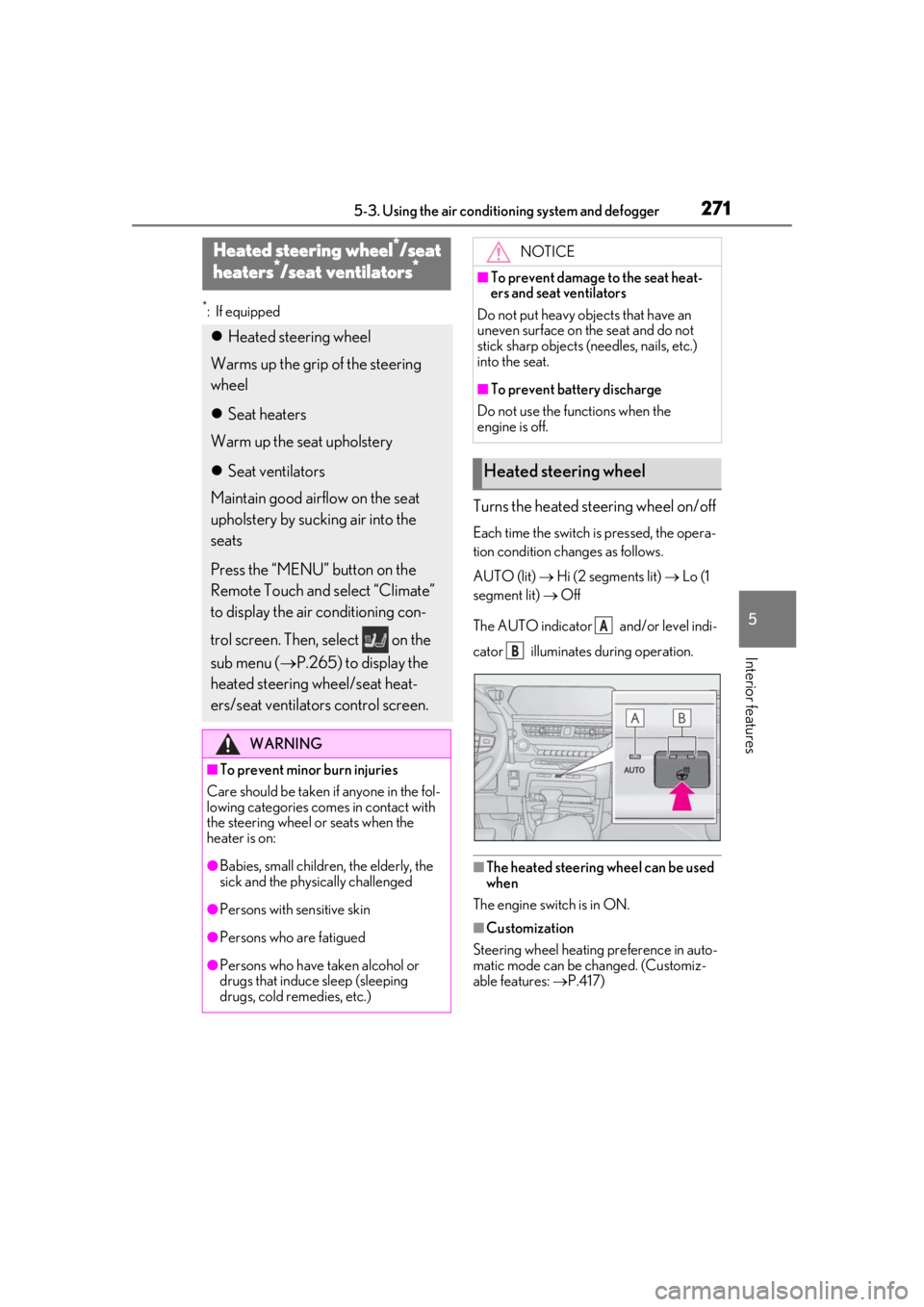
Turns the heated steering wheel on/off
Each time the switch is pressed, the opera-
tion condition changes as follows.
AUTO (lit) Hi (2 segments lit) Lo (1
segment lit) Off
The AUTO indicator and/or level indi-
cator illuminates during operation.
■The heated steering wheel can be used
when
The engine switch is in ON.
■Customization
Steering wheel heating preference in auto-
matic mode can be changed. (Customiz-
able features: P.417)
Heated steering wheel*/seat
h
eaters*/seat ventilators*
Heated steering wheel
Warms up the grip of the steering
wheel
Seat heaters
Warm up the seat upholstery
Seat ventilators
Maintain good airflow on the seat
upholstery by sucking air into the
seats
Press the “MENU” button on the
Remote Touch and select “Climate”
to display the air conditioning con-
trol screen. Then, select on the
sub menu ( P.265) to display the
heated steering wheel/seat heat-
ers/seat ventilators control screen.
WARNING
■To prevent minor burn injuries
Care should be taken if anyone in the fol-
lowing categories comes in contact with
the steering wheel or seats when the
heater is on:
●Babies, small children, the elderly, the
sick and the phys ically challenged
●Persons with sensitive skin
●Persons who are fatigued
●Persons who have taken alcohol or
drugs that induce sleep (sleeping
drugs, cold remedies, etc.)
NOTICE
■To prevent damage to the seat heat-
ers and seat ventilators
Do not put heavy objects that have an
uneven surface on the seat and do not
stick sharp objects (n eedles, nails, etc.)
into the seat.
■To prevent battery discharge
Do not use the functions when the
engine is off.
Heated steering wheel
A
B
Page 272 of 452
2725-3. Using the air conditioning system and defogger
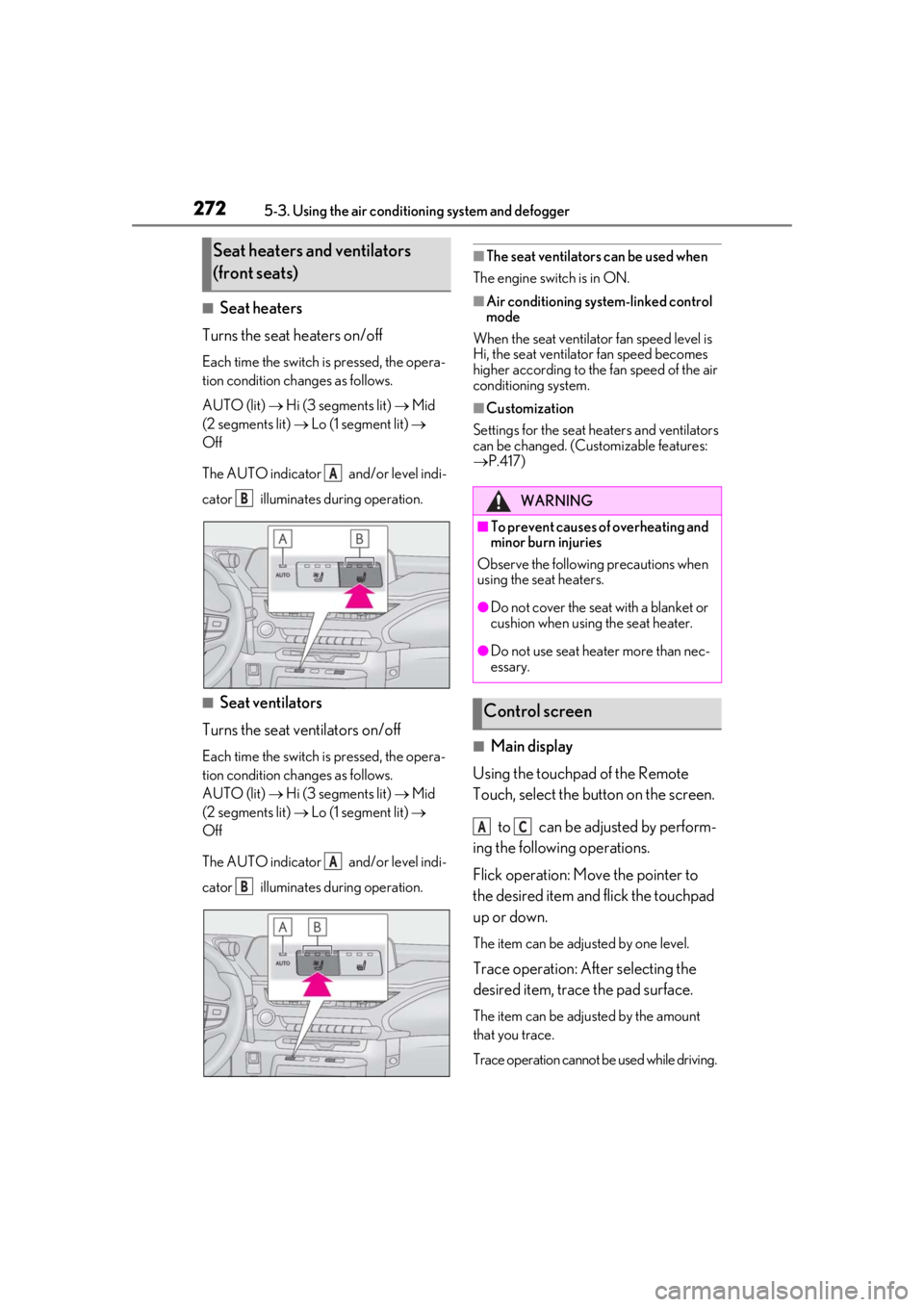
■Seat heaters
Turns the seat heaters on/off
Each time the switch is pressed, the opera-
tion condition changes as follows.
AUTO (lit) Hi (3 segments lit) Mid
(2 segments lit) Lo (1 segment lit)
Off
The AUTO indicator and/or level indi-
cator illuminates during operation.
■Seat ventilators
Turns the seat ventilators on/off
Each time the switch is pressed, the opera-
tion condition changes as follows.
AUTO (lit) Hi (3 segments lit) Mid
(2 segments lit) Lo (1 segment lit)
Off
The AUTO indicator and/or level indi-
cator illuminates during operation.
■The seat ventilators can be used when
The engine switch is in ON.
■Air conditioning system-linked control
mode
When the seat ventilator fan speed level is
Hi, the seat ventilator fan speed becomes
higher according to the fan speed of the air
conditioning system.
■Customization
Settings for the seat heaters and ventilators
can be changed. (Customizable features:
P.417)
■Main display
Using the touchpad of the Remote
Touch, select the button on the screen.
to can be adjusted by perform-
ing the following operations.
Flick operation: Move the pointer to
the desired item and flick the touchpad
up or down.
The item can be adjusted by one level.
Trace operation: After selecting the
desired item, trace the pad surface.
The item can be adjusted by the amount
that you trace.
Trace operation cannot be used while driving.
Seat heaters and ventilators
(front seats)
A
B
A
B
WARNING
■To prevent causes of overheating and
minor burn injuries
Observe the following precautions when
using the seat heaters.
●Do not cover the seat with a blanket or
cushion when using the seat heater.
●Do not use seat heater more than nec-
essary.
Control screen
AC
Page 386 of 452
3867-2. Steps to take in an emergency
1Stop the vehicle in a safe place and
turn off the air conditioning system,
and then stop the engine.
2 If you see steam:
Carefully lift the hood after the
steam subsides.
If you do not see steam:
Carefully lift the hood.
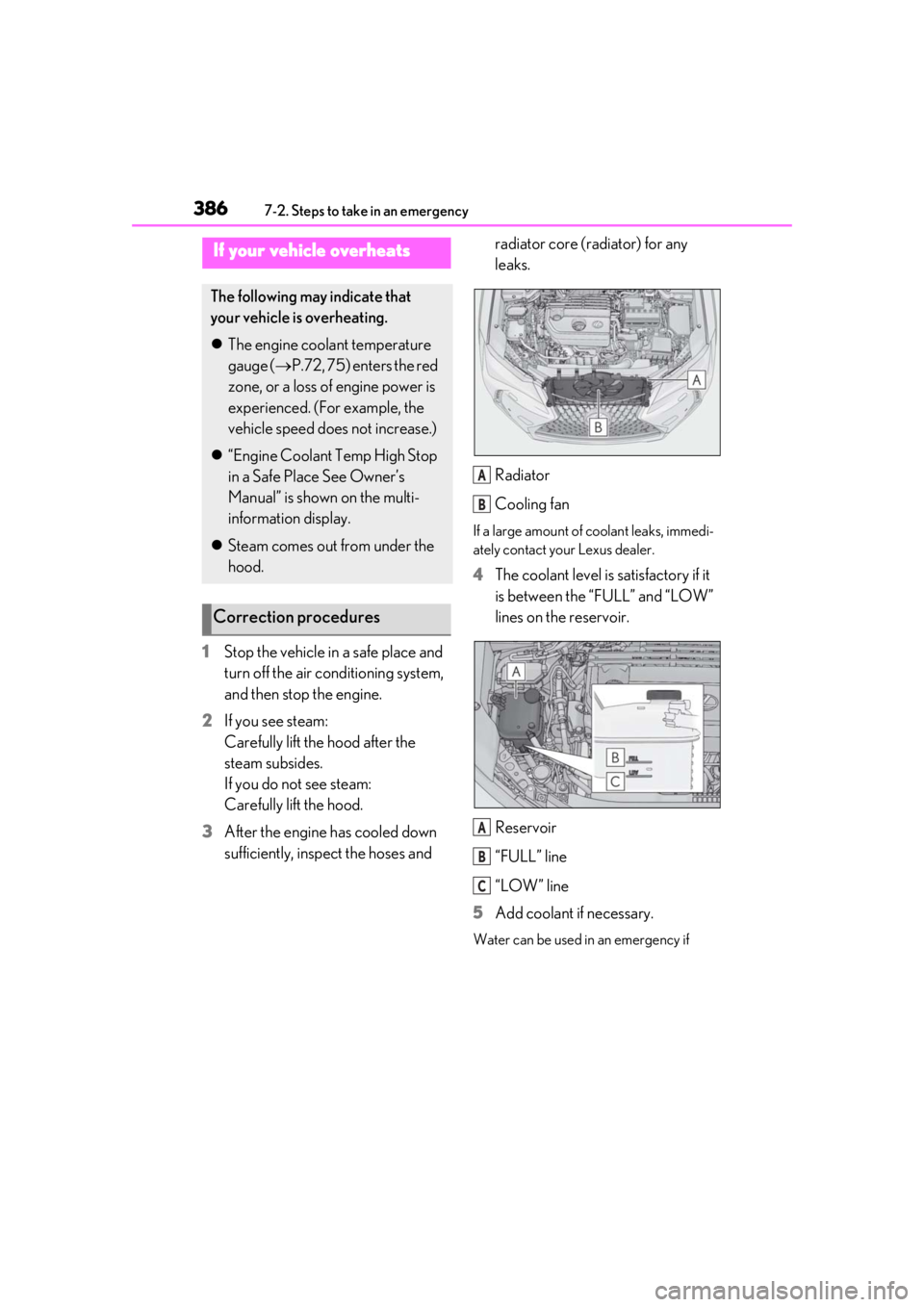
3 After the engine has cooled down
sufficiently, inspect the hoses and radiator core (radiator) for any
leaks.
Radiator
Cooling fan
If a large amount of coolant leaks, immedi-
ately contact your Lexus dealer.
4
The coolant level is satisfactory if it
is between the “FULL” and “LOW”
lines on the reservoir.
Reservoir
“FULL” line
“LOW” line
5 Add coolant if necessary.
Water can be used in an emergency if
If your vehicle overheats
The following may indicate that
your vehicle is overheating.
The engine coolant temperature
gauge ( P.72, 75) enters the red
zone, or a loss of engine power is
experienced. (For example, the
vehicle speed does not increase.)
“Engine Coolant Temp High Stop
in a Safe Place See Owner’s
Manual” is shown on the multi-
information display.
Steam comes out from under the
hood.
Correction procedures
A
B
A
B
C
Page 417 of 452
4178-2. Customization
8
Vehicle specifications
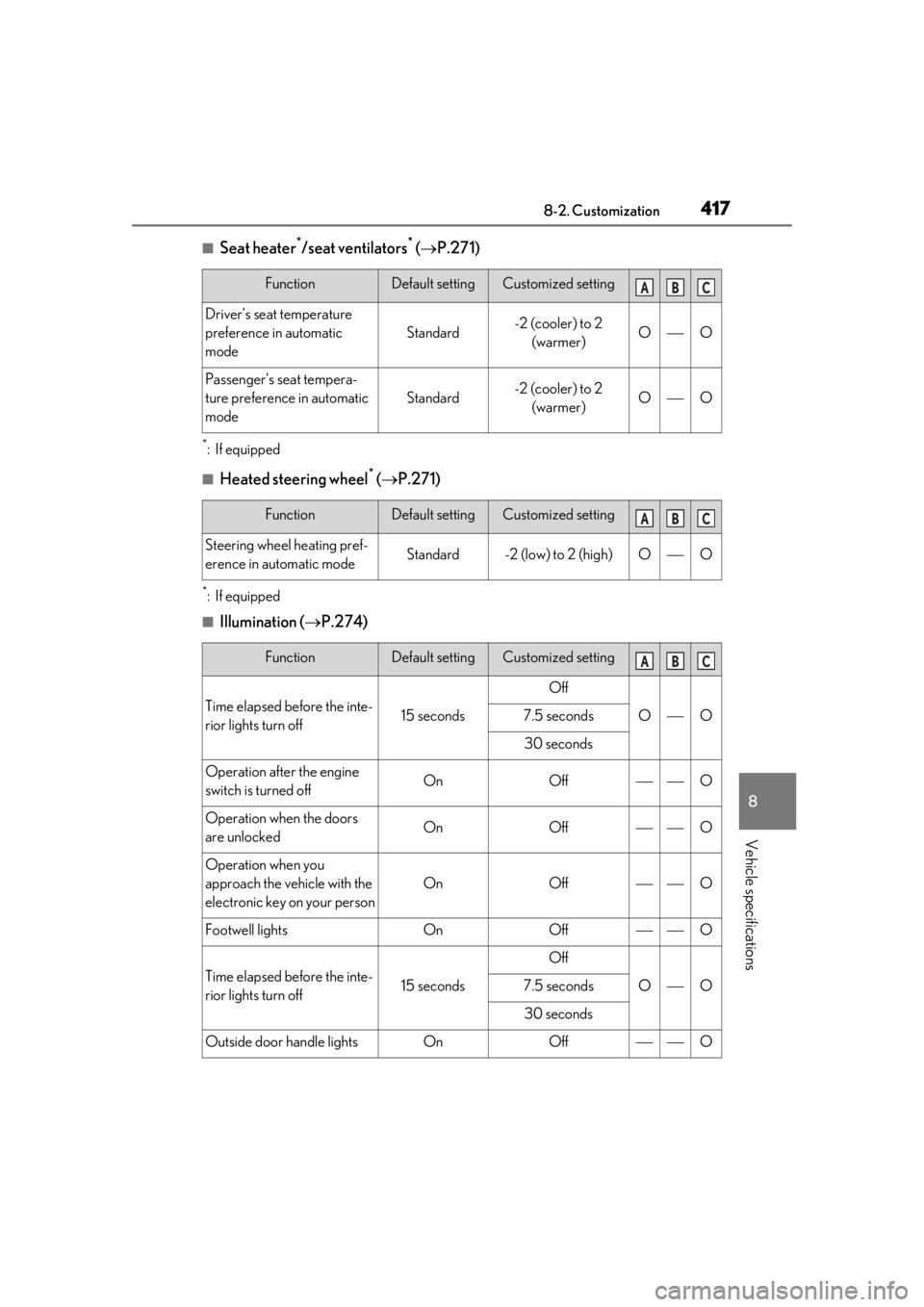
■Seat heater*/seat ventilators* ( P.271)
*:If equipped
■Heated steering wheel* ( P.271)
*:If equipped
■Illumination ( P.274)
FunctionDefault settingCustomized setting
Driver’s seat temperature
preference in automatic
mode
Standard-2 (cooler) to 2
(warmer)OO
Passenger’s seat tempera-
ture preference in automatic
mode
Standard-2 (cooler) to 2 (warmer)OO
FunctionDefault settingCustomized setting
Steering wheel heating pref-
erence in automatic modeStandard-2 (low) to 2 (high)OO
FunctionDefault settingCustomized setting
Time elapsed before the inte-
rior lights turn off15 seconds
Off
OO7.5 seconds
30 seconds
Operation after the engine
switch is turned offOnOffO
Operation when the doors
are unlockedOnOffO
Operation when you
approach the vehicle with the
electronic key on your person
OnOffO
Footwell lightsOnOffO
Time elapsed before the inte-
rior lights turn off15 seconds
Off
OO7.5 seconds
30 seconds
Outside door handle lightsOnOffO
ABC
ABC
ABC
Page 438 of 452

438Alphabetical Index
C
Card key ............................................................ 94
CareAluminum wheels ......................................306
Exterior ...........................................................306
Interior .............................................................309
Seat belts........................................................309
Cargo capacity............................................... 147
Cargo hooks .................................................280
Center Display ............................................. 256
Chains ................................................................251
Child-protectors............................................. 101
Child restraint system................................... 44 Fixed with a LATCH system .................. 52
Fixed with a seat belt................................... 48
Front passenger occupant classification system ............................................................. 39
Points to remember .................................... 44
Riding with children ..................................... 44
Types of child restraint system installation method ........................................................... 46
Using an anchor bracket .......................... 54
Child safety ....................................................... 44 Airbag precautions...................................... 35
Back door precautions.............................102
Battery precautions ..................... 326, 385
Child restraint system................................. 44
Heated steering wheel and seat heater precautions.................................................. 271
How your child should wear the seat belt .............................................................................27
Moon roof precautions ............................139
Power window lock switch.....................136
Power window precautions ...................136
Rear door child-protectors ..................... 101
Removed key battery precautions ... 342
Seat belt extender precautions ..............27
Seat belt precautions .................................. 52
Cleaning.............................................. 306, 309 Aluminum wheels ......................................306
Exterior ...........................................................306 Interior ............................................................ 309
Radar sensor ...................................... 180, 215
Seat belts ....................................................... 309
Clock ................................................72, 75, 285
Coat hooks..................................................... 294
Compass .......................................................... 301
Condenser ..................................................... 324
Console box .................................................. 278
Consumption screen .................................... 90
Continuously variable transmission...... 155
Coolant Capacity .........................................................393
Checking ....................................................... 323
Preparing and checking before winter.......................................................................... 249
Cooling system............................................. 323 Engine overheating.................................. 386
Cornering lights ............................................. 167 Replacing light bulbs ................................346
Cruise control Dynamic radar cruise control with full-
speed range ..............................................204
Cup holders ................................................... 278
Current fuel consumption ............................81
Curtain shield airbags .................................. 30
Customizable features ..............................408
D
Daytime running light system ...................165
Deck board ......................................................281
Deck under tray ...........................................280
Defogger Outside rear view mirrors.....................263
Rear window ................................................263
Windshield ....................................................263
Dimension ...................................................... 390
Dinghy towing.................................................. 151
Display BSM (Blind Spot Monitor)......................214
Dynamic radar cruise control with full-
speed range ..............................................204
Head-up display............................................86
Page 440 of 452

440Alphabetical Index
Identification number .................................391
If your vehicle has to be stopped in an
emergency ............................................... 350
Ignition switch (engine switch) .............152
Overheating.................................................386
Tachometer ............................................. 72, 75
Engine coolant.............................................. 323 Capacity ......................................................... 393
Checking ....................................................... 323
Preparing and checking before winter......................................................................... 249
Engine coolant temperature gauge 72, 75
Engine immobilizer system ........................ 62
Engine oil Capacity ......................................................... 392
Checking ......................................................... 321
Warning light .............................................. 358
Engine oil maintenance data .................. 323
Engine switch Auto power off function ...........................154
Changing the engine switch modes..154
If your vehicle has to be stopped in an
emergency ............................................... 350
Starting the engine ......................................152
EPS (Electric Power Steering) .............. 245 Function .......................................................... 245
Warning light ...............................................360
Event data recorder (EDR) ........................... 8
F
Flat tire .................................................. 370, 377 Tire pressure warning system .............330
Floor mats .......................................................... 24
Fluid Automatic transmission .......................... 394
Brake................................................................ 394
Washer ........................................................... 327
Fog lights Replacing light bulbs................................ 346
Switch ..................................................................171
Front passenger occupant classification system .............................................................. 39 Front seats ......................................................... 121
Adjustment ....................................................... 121
Cleaning ........................................................ 309
Correct driving posture ............................ 25
Driving position memory .........................123
Head restraints..............................................126
Memory recall function............................ 125
Power easy access system .....................123
Seat heaters .................................................. 272
Seat position memory ...............................123
Seat ventilators ............................................ 272
Front side marker lights Light switch .................................................... 165
Front turn signal lights Replacing light bulbs ................................346
Turn signal lever .......................................... 159
Wattage ......................................................... 396
Fuel Capacity .......................................................... 391
Fuel gauge ................................................72, 75
Information .................................................... 397
Refueling.......................................................... 178
Type ................................................................... 391
Warning light ...............................................362
Fuel consumption Average fuel economy ............................... 81
Current fuel consumption ......................... 81
Fuel filler door .................................................178 Refueling.......................................................... 178
When the fuel filler door cannot be
opened........................................................ 380
Fuel gauge ..................................................72, 75
Fuses ................................................................. 343
G
Garage door opener ................................. 295
Gauges ........................................................72, 75
G-force............................................................... 82
Glove box ....................................................... 278
Glove box light ............................................. 278
Grocery bag hooks ....................................280
Page 443 of 452

Alphabetical Index443
Multi-information display .............................79Audio system-linked display................... 83
Drive information 1/Drive information 2..............................................................................81
Driving information display........................81
Driving support system information dis- play ................................................................... 83
Dynamic radar cruise control with full- speed range .............................................. 204
Eco Driving Indicator ................................. 82
G-force.............................................................. 82
LTA (Lane-Tracing Assist) .................... 198
Menu icons ......................................................80
Meter control switches ................................81
Navigation system-linked display ........ 83
Pop-up display............................................... 79
Settings .............................................................. 84
Suggestion function.....................................85
Units .................................................................... 83
Warning messages .................................. 367
N
Navigation system-linked display... 83, 86
Noise from under vehicle ...............................6
O
Odometer ................................................. 73, 78
Odometer and trip meter display “ODO TRIP” switch ............................74, 78
Display items ...........................................73, 78
Pop-up display.......................................74, 78
“ODO TRIP” switch .............................. 74, 78
Oil Engine oil ....................................................... 392
Opener Back door............................................ 103, 105
Fuel filler door................................................178
Hood..................................................................319
Outside rear view mirrors .........................132 Adjustment...................................................... 132
BSM (Blind Spot Monitor) ..................... 214 Folding.............................................................. 133
Linked mirror functi
on when reversing
........................................................................... 133
Mirror position memory ...........................123
Outside rear view mirror defoggers263
RCTA function ............................................ 227
Outside temperature.............................72, 75
Overheating .................................................. 386
P
Paddle shift switches ......................... 157, 158
Panic mode ....................................................... 96
Parking assist sensors (intuitive parking assist) ............................................................. 220
Parking brake................................................. 160 Operation ....................................................... 160
Parking brake engaged warning buzzer............................................................................162
Warning light ................................................ 361
Warning message .......................................162
Parking lights Light switch .................................................... 165
Replacing light bulbs ................................346
Parking Support Brake function (rear- crossing vehicles) ........................... 231, 240Function ..........................................................240
Parking Support Brake function (static objects) ............................................... 231, 235Function ..........................................................235
PCS (Pre-Collision System) .................... 186 Function ........................................................... 186
PCS OFF switch ......................................... 188
Warning light ...............................................364
Personal lights................................................274
PKSA (Parking Support Alert) ................219
PKSB (Parking Support Brake)...............231 Warning message ..................................... 234
Power back door opener and closer ... 105
Power easy access system ........................123
Power outlets ................................................ 286
Power steering (Electric Power Steering system) .......................................................... 245