interior LEXUS UX200 2019 User Guide
[x] Cancel search | Manufacturer: LEXUS, Model Year: 2019, Model line: UX200, Model: LEXUS UX200 2019Pages: 452, PDF Size: 10.06 MB
Page 78 of 452
782-1. Instrument cluster
■Liquid crystal display
P.80
■Customization
The gauges and meters can be customized
on of the multi-information display.
( P.409)
■Display items
Odometer
Displays the total distance the vehicle has been driven.
Trip meter A/trip meter B
Displays the distance the vehicle has been
driven since the meter was last reset. Trip
meters A and B can be used to record and
display different distances independently.
Distance until next engine oil
change
Displays the distance the vehicle can be
driven until an oil change is necessary.
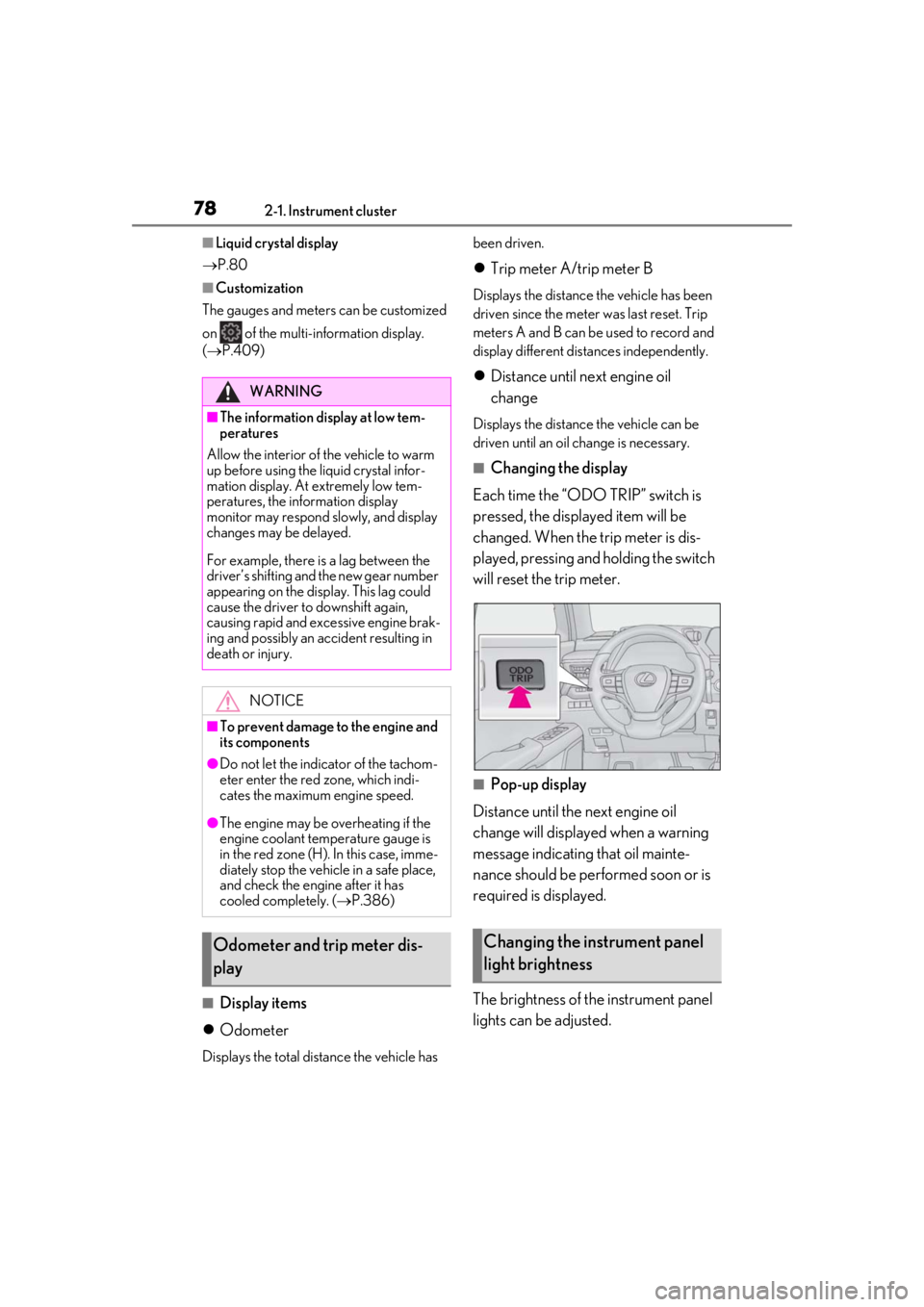
■Changing the display
Each time the “ODO TRIP” switch is
pressed, the displayed item will be
changed. When the trip meter is dis-
played, pressing and holding the switch
will reset the trip meter.
■Pop-up display
Distance until the next engine oil
change will displayed when a warning
message indicating that oil mainte-
nance should be performed soon or is
required is displayed.
The brightness of the instrument panel
lights can be adjusted.
WARNING
■The information display at low tem-
peratures
Allow the interior of the vehicle to warm
up before using the liquid crystal infor-
mation display. At extremely low tem-
peratures, the information display
monitor may respond slowly, and display
changes may be delayed.
For example, there is a lag between the
driver’s shifting and the new gear number
appearing on the display. This lag could
cause the driver to downshift again,
causing rapid and excessive engine brak-
ing and possibly an accident resulting in
death or injury.
NOTICE
■To prevent damage to the engine and
its components
●Do not let the indicator of the tachom-
eter enter the red zone, which indi-
cates the maximum engine speed.
●The engine may be overheating if the
engine coolant temperature gauge is
in the red zone (H). In this case, imme-
diately stop the vehicle in a safe place,
and check the engine after it has
cooled completely. ( P.386)
Odometer and trip meter dis-
playChanging the instrument panel
light brightness
Page 99 of 452
993-2. Opening, closing and locking the doors
3
Before driving
To prevent unintended triggering of the
alarm, unlock the doors using the wireless
remote control and open and close a door
once after the settings have been changed.
(If a door is not opened within 60 seconds
after is pressed, the doors will be
locked again and the alarm will automati-
cally be set.)
In a case that the alarm is triggered, imme-
diately stop the alarm. (P.64)
■Locking the front doors from the outside
without a key
1 Push down the inside lock button.
( P.100)
2 Close the door.
The door cannot be locked if the engine
switch is in ACC or ON, or the electronic
key is left inside the vehicle.
The key may not be detected correctly and
the door may be locked.
■Impact detection door lock release sys-
tem
In the event that the vehicle is subject to a
strong impact, all the doors are unlocked.
Depending on the force of the impact or the
type of accident, however, the system may not operate.
■Operation signals
A buzzer sounds and the emergency flash-
ers flash to indicate that the doors have
been locked/unlocked. (Locked: Once;
Unlocked: Twice)
A buzzer sounds to indicate that all win-
dows are opening.
■Security feature
If a door is not opened within approximately
60 seconds after the vehicle is unlocked,
the security feature automatically locks the
vehicle again.
■When the door cannot be locked by the
lock sensor on the upper part of the
door handle
When the door cannot be locked even if the
lock sensor on the upper part of the door
handle is touched by a finger, touch the lock
sensor with the palm.
When gloves are being worn, remove the
gloves.
■Open door warning buzzer
If an attempt to lock the doors is made when
a door is not fully closed, a buzzer sounds
continuously for 5 seconds. Fully close the
door to stop the buzzer, and lock the vehi-
cle once more.
■Setting the alarm
Locking the doors will set the alarm system.
( P.64)
■Conditions affecting the operation of
the smart access system with push-but-
ton start or wireless remote control
P.115
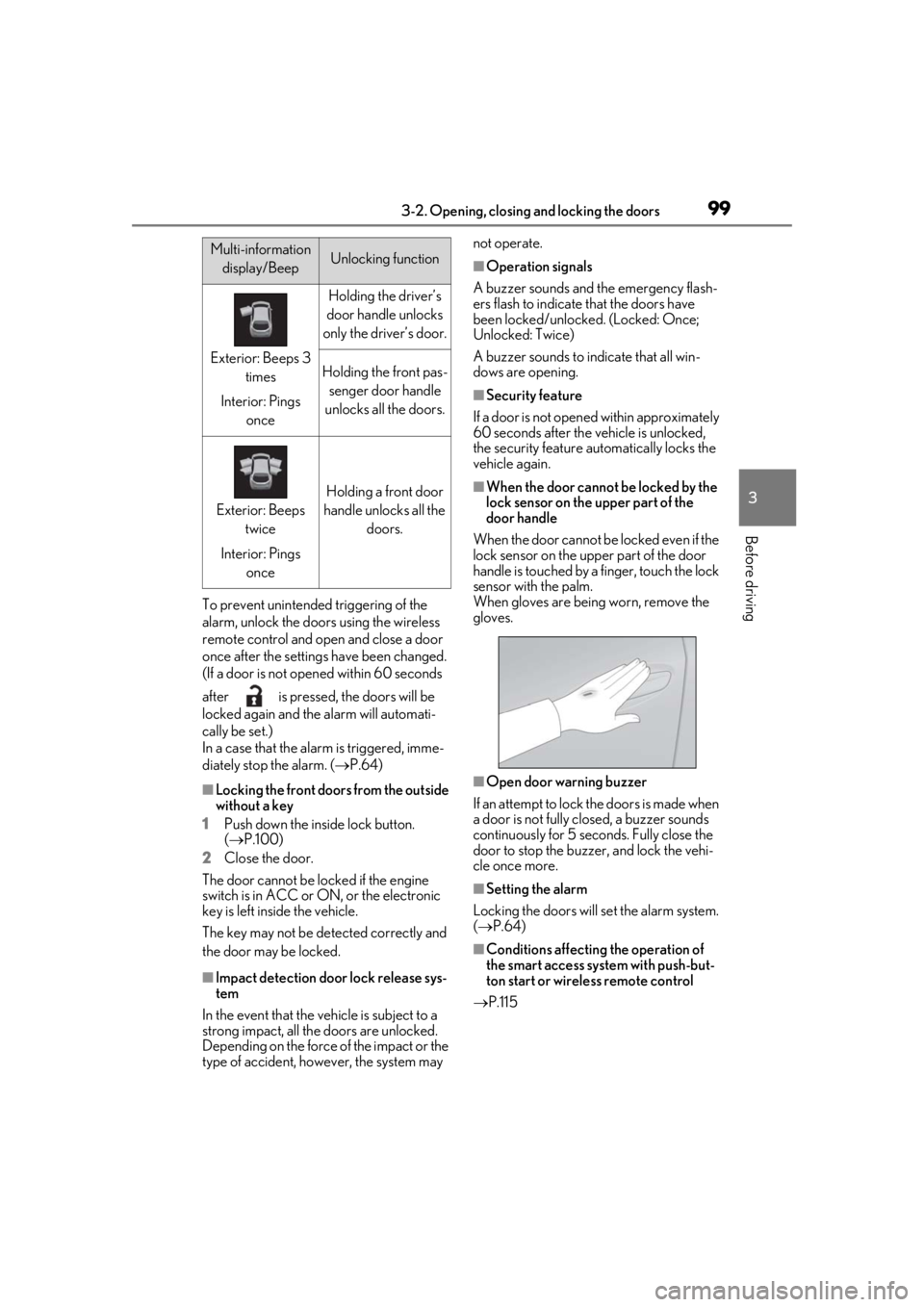
Multi-information
display/BeepUnlocking function
Exterior: Beeps 3 times
Interior: Pings once
Holding the driver’s
door handle unlocks
only the driver’s door.
Holding the front pas- senger door handle
unlocks all the doors.
Exterior: Beeps twice
Interior: Pings once
Holding a front door
handle unlocks all the doors.
Page 114 of 452
1143-2. Opening, closing and locking the doors
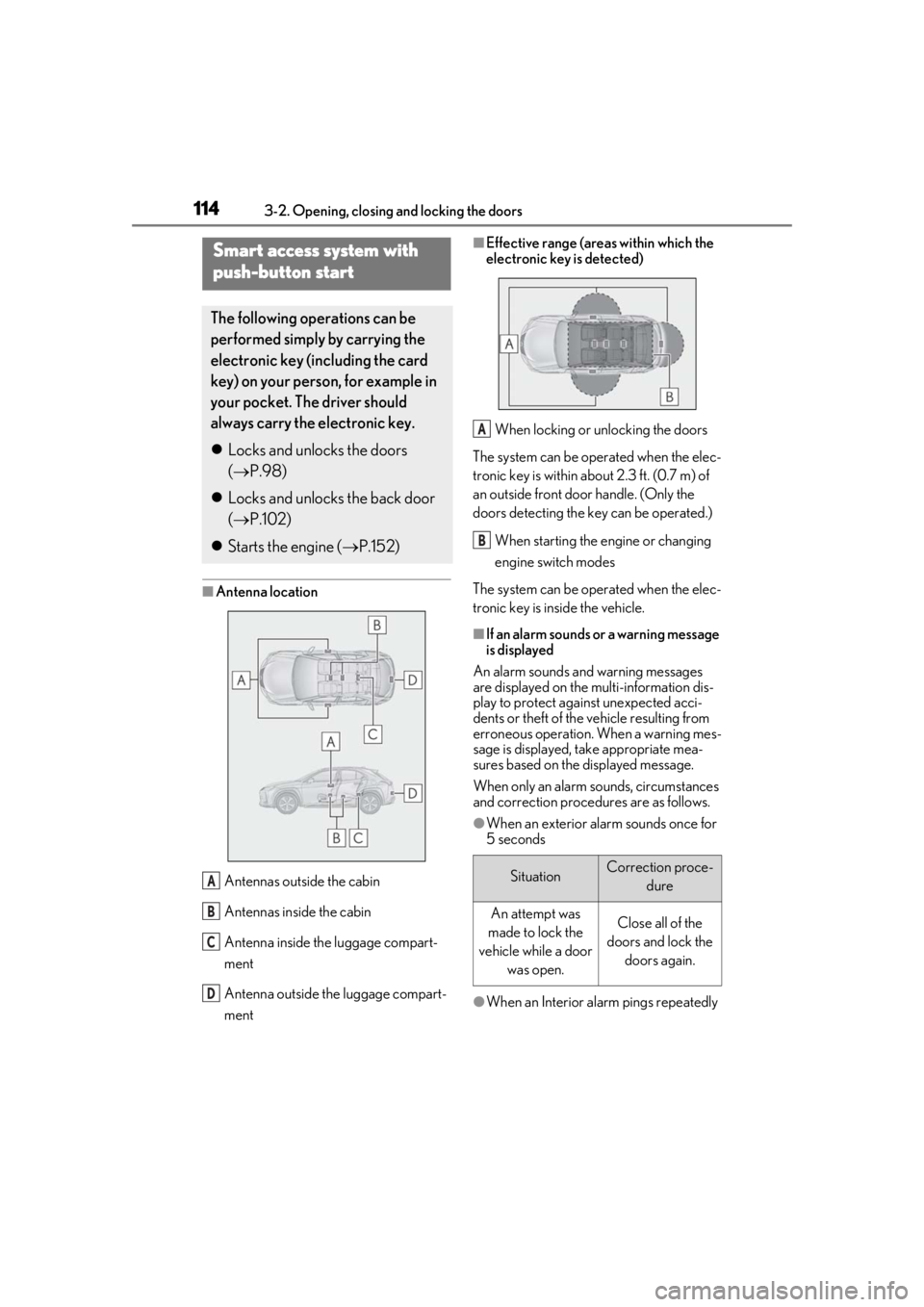
■Antenna locationAntennas outside the cabin
Antennas inside the cabin
Antenna inside the luggage compart-
ment
Antenna outside the luggage compart-
ment
■Effective range (areas within which the
electronic key is detected)When locking or unlocking the doors
The system can be operated when the elec-
tronic key is within about 2.3 ft. (0.7 m) of
an outside front door handle. (Only the
doors detecting the key can be operated.)
When starting the engine or changing
engine switch modes
The system can be operated when the elec-
tronic key is inside the vehicle.
■If an alarm sounds or a warning message
is displayed
An alarm sounds and warning messages
are displayed on the multi-information dis-
play to protect against unexpected acci-
dents or theft of the vehicle resulting from
erroneous operation. When a warning mes-
sage is displayed, take appropriate mea-
sures based on the displayed message.
When only an alarm sounds, circumstances
and correction procedures are as follows.
●When an exterior alarm sounds once for
5 seconds
●When an Interior alarm pings repeatedly
Smart access system with
push-button start
The following operations can be
performed simply by carrying the
electronic key (including the card
key) on your person, for example in
your pocket. The driver should
always carry the electronic key.
Locks and unlocks the doors
( P.98)
Locks and unlocks the back door
( P.102)
Starts the engine ( P.152)
A
B
C
D
SituationCorrection proce-
dure
An attempt was
made to lock the
vehicle while a door was open.Close all of the
doors and lock the doors again.
A
B
Page 145 of 452
1454-1. Before driving
4
Driving
WARNING
●Be careful not to shift the shift lever
with the accelerator pedal depressed.
Shifting the shift lever to any position
other than P or N may lead to unex-
pected rapid acceleration of the vehi-
cle that may cause an accident and
result in death or serious injury.
■If you hear a squealing or scraping
noise (brake pad wear limit indica-
tors)
Have the brake pads checked and
replaced by your Lexus dealer as soon as
possible. Rotor damage may result if the
pads are not replaced when needed.
It is dangerous to drive the vehicle when
the wear limits of the brake pads and/or
those of the brake discs are exceeded.
■When the vehicle is stopped
●Do not race the engine.
If the shift lever is in any position other
than P or N, the vehicle may acceler-
ate suddenly and unexpectedly, caus-
ing an accident.
●In order to prevent accidents due to
the vehicle rolling away, always keep
depressing the brake pedal while the
engine is running, and apply the park-
ing brake as necessary.
●If the vehicle is stopped on an incline,
in order to prevent accidents caused
by the vehicle rolling forward or back-
ward, always depress the brake pedal
and securely apply the parking brake
as needed.
●Avoid revving or racing the engine.
Running the engine at high speed
while the vehicle is stopped may cause
the exhaust system to overheat, which
could result in a fire if combustible
material is nearby.
■When the vehicle is parked
●Do not leave glasses, cigarette lighters,
spray cans, or soft drink cans in the
vehicle when it is in the sun.
Doing so may result in the following:
• Gas may leak from a cigarette lighter or spray can, and may lead to a fire.
• The temperature inside the vehicle may cause the plastic lenses and plas-
tic material of glasses to deform or
crack.
• Soft drink cans may fracture, causing the contents to spray over the interior
of the vehicle, and may also cause a
short circuit in the vehicle’s electrical
components.
●Do not leave cigarette lighters in the
vehicle. If a cigare tte lighter is in a
place such as the glove box or on the
floor, it may be lit accidentally when
luggage is loaded or the seat is
adjusted, causing a fire.
●Do not attach adhesive discs to the
windshield or windows. Do not place
containers such as air fresheners on
the instrument panel or dashboard.
Adhesive discs or containers may act
as lenses, causing a fire in the vehicle.
●Do not leave a door or window open if
the curved glass is coated with a met-
allized film such as a silver-colored
one. Reflected sunlight may cause the
glass to act as a lens, causing a fire.
●Always apply the parking brake, shift
the shift lever to P, stop the engine and
lock the vehicle.
Do not leave the vehicle unattended
while the engine is running.
If the vehicle is parked with the shift
lever in P but the parking brake is not
set, the vehicle may start to move, pos-
sibly leading to an accident.
●Do not touch the exhaust pipes while
the engine is running or immediately
after turning the engine off.
Doing so may cause burns.
Page 164 of 452
1644-2. Driving procedures
■If “Brake Hold Fault Depress Brake to
Deactivate Visit Your Dealer” or “Brake
Hold Malfunction Visit Your Dealer” is
displayed on the multi-information dis-
play
The system may be malfunctioning. Have
the vehicle inspected by your Lexus dealer.
■Warning messages and buzzers
Warning messages and buzzers are used to
indicate a system malfunction or to inform
the driver of the need for caution. If a warn-
ing message is shown on the multi-informa-
tion display, read the message and follow
the instructions.
■If the brake hold operated indicator
flashes
P.361
*: If equipped
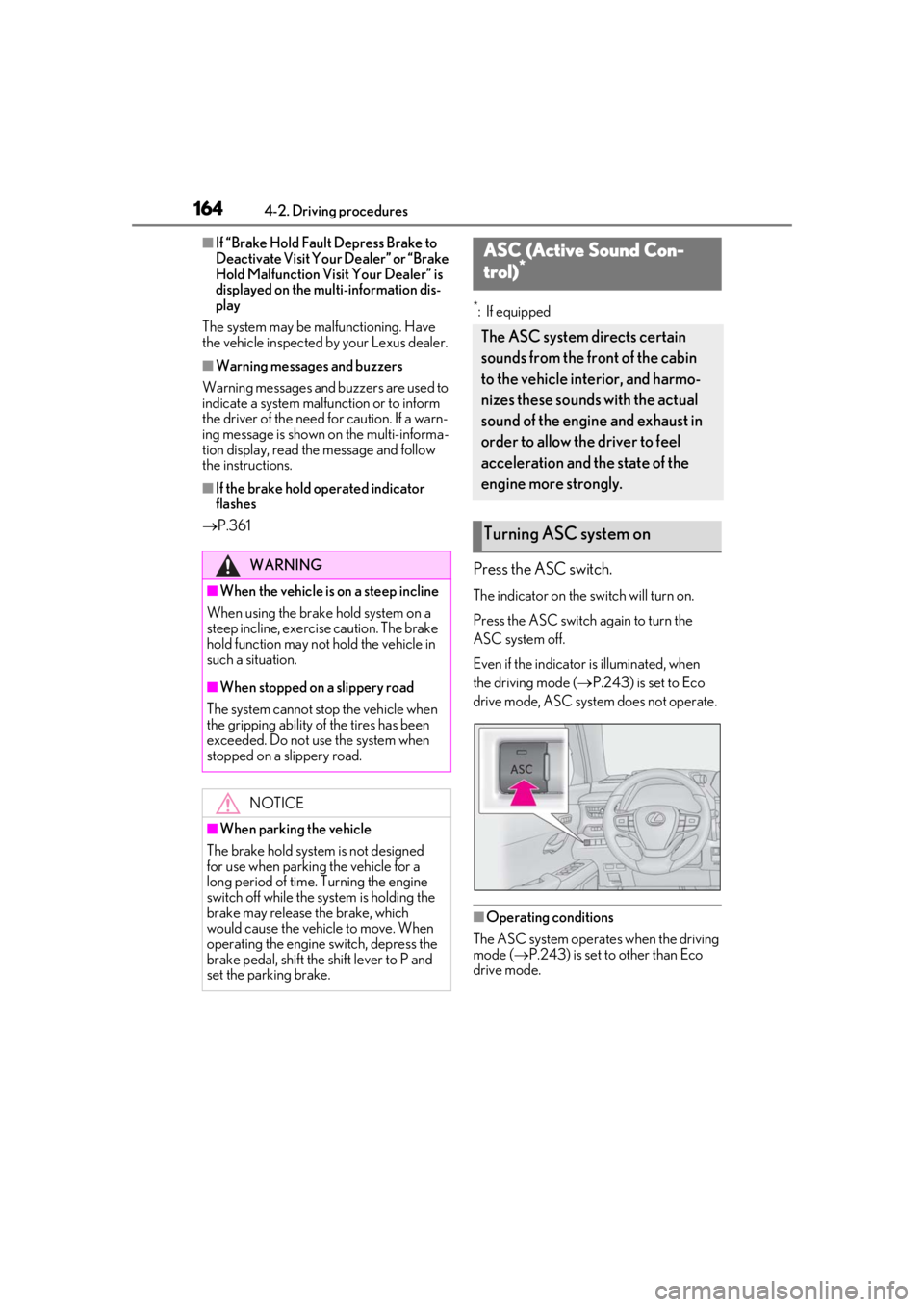
Press the ASC switch.
The indicator on the switch will turn on.
Press the ASC switch again to turn the
ASC system off.
Even if the indicator is illuminated, when
the driving mode ( P.243) is set to Eco
drive mode, ASC system does not operate.
■Operating conditions
The ASC system operates when the driving
mode ( P.243) is set to other than Eco
drive mode.
WARNING
■When the vehicle is on a steep incline
When using the brake hold system on a
steep incline, exercise caution. The brake
hold function may not hold the vehicle in
such a situation.
■When stopped on a slippery road
The system cannot stop the vehicle when
the gripping ability of the tires has been
exceeded. Do not use the system when
stopped on a slippery road.
NOTICE
■When parking the vehicle
The brake hold system is not designed
for use when parking the vehicle for a
long period of time. Turning the engine
switch off while the system is holding the
brake may release the brake, which
would cause the vehicle to move. When
operating the engine switch, depress the
brake pedal, shift the shift lever to P and
set the parking brake.
ASC (Active Sound Con-
trol)*
The ASC system directs certain
sounds from the front of the cabin
to the vehicle interior, and harmo-
nizes these sounds with the actual
sound of the engine and exhaust in
order to allow the driver to feel
acceleration and the state of the
engine more strongly.
Turning ASC system on
Page 255 of 452
255
5
5
Interior features
Interior features
5-1. Remote TouchRemote Touch ............................ 256
5-2. Lexus Climate Concierge Lexus Climate Concierge ..... 260
5-3. Using the air conditioning system and defogger
Automatic air conditioning system ........................................................ 262
Heated steering wheel/seat heat- ers/seat ventilators ................. 271
5-4. Using the interior lights Interior lights list......................... 274
5-5. Using the storage features List of storage features............ 277
Luggage compartment features ........................................................ 280
5-6. Using the other interior features Other interior features ........... 285
Garage door opener............... 295
Compass........................................ 301
Page 257 of 452
2575-1. Remote Touch
5
Interior features
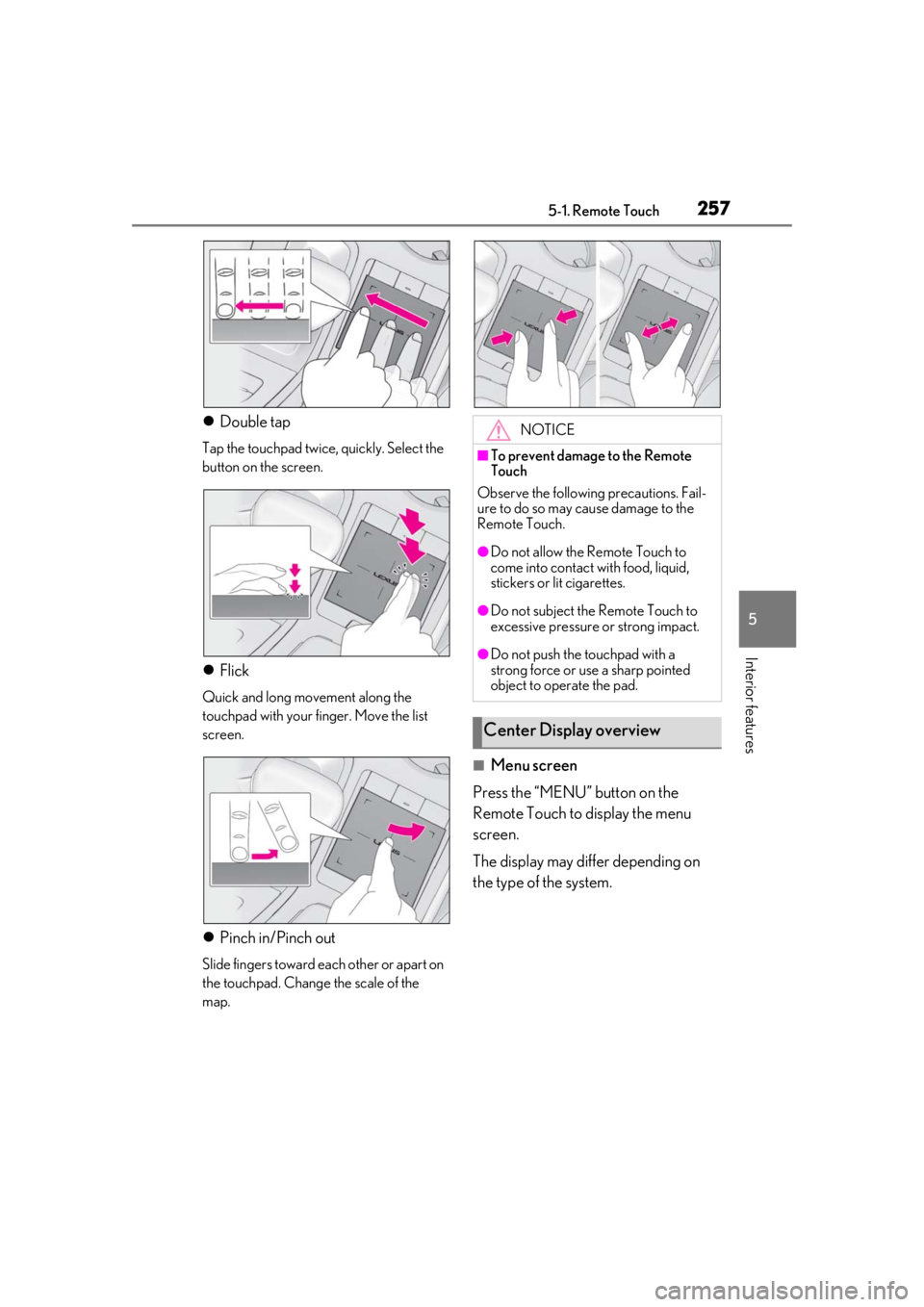
Double tap
Tap the touchpad twice, quickly. Select the
button on the screen.
Flick
Quick and long movement along the
touchpad with your finger. Move the list
screen.
Pinch in/Pinch out
Slide fingers toward each other or apart on
the touchpad. Change the scale of the
map.
■Menu screen
Press the “MENU” button on the
Remote Touch to display the menu
screen.
The display may differ depending on
the type of the system.
NOTICE
■To prevent damage to the Remote
Touch
Observe the following precautions. Fail-
ure to do so may cause damage to the
Remote Touch.
●Do not allow the Remote Touch to
come into contact with food, liquid,
stickers or lit cigarettes.
●Do not subject the Remote Touch to
excessive pressure or strong impact.
●Do not push the touchpad with a
strong force or use a sharp pointed
object to operate the pad.
Center Display overview
Page 259 of 452
2595-1. Remote Touch
5
Interior features
■Main display
For details about the functions and
operation of the main display, refer to
the respective section and “NAVIGA-
TION AND MULTIMEDIA SYSTEM
OWNER’S MANUAL”.
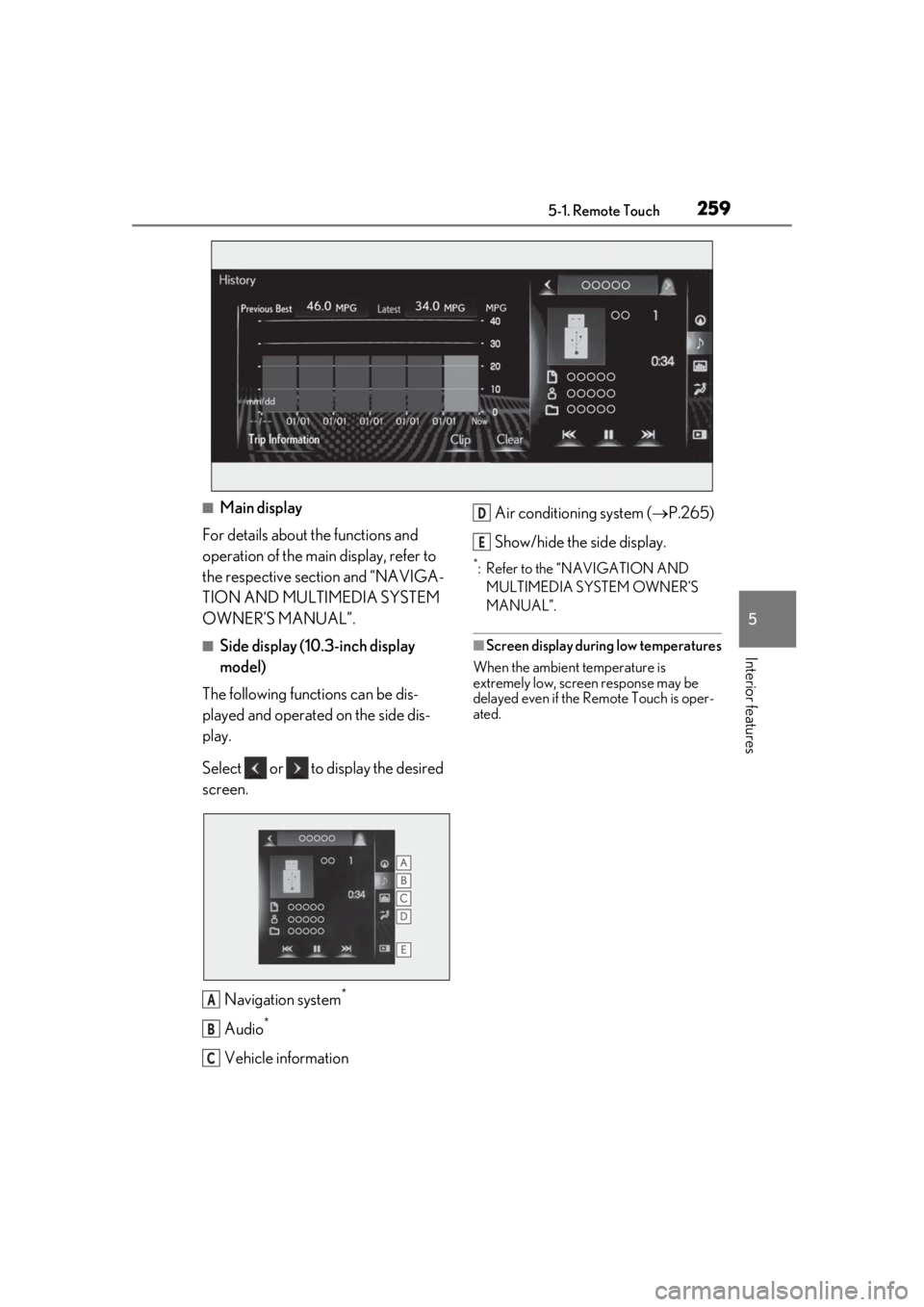
■Side display (10.3-inch display
model)
The following functions can be dis-
played and operated on the side dis-
play.
Select or to display the desired
screen.
Navigation system
*
Audio*
Vehicle information Air conditioning system (
P.265)
Show/hide the side display.
*: Refer to the “NAVIGATION AND MULTIMEDIA SYSTEM OWNER’S
MANUAL”.
■Screen display during low temperatures
When the ambient temperature is
extremely low, screen response may be
delayed even if the Remote Touch is oper-
ated.
A
B
C
D
E
Page 261 of 452

2615-2. Lexus Climate Concierge
5
Interior features
■Seat heater/ventilator operation
When automatic mode is selected using the
seat heater/ventilator switch, passenger
detection is not performed.
Page 263 of 452
2635-3. Using the air conditioning system and defogger
5
Interior features
Right-hand side temperature control switch
■Adjusting the temperature setting
Operate the temperature control
switch upwards to increase the tem-
perature and downwards to decrease
the temperature.
■Adjusting the fan speed setting
Operate the fan speed control switch
upwards to increase the fan speed and
downwards to decrease the fan speed.
Press the off switch to turn the fan off.
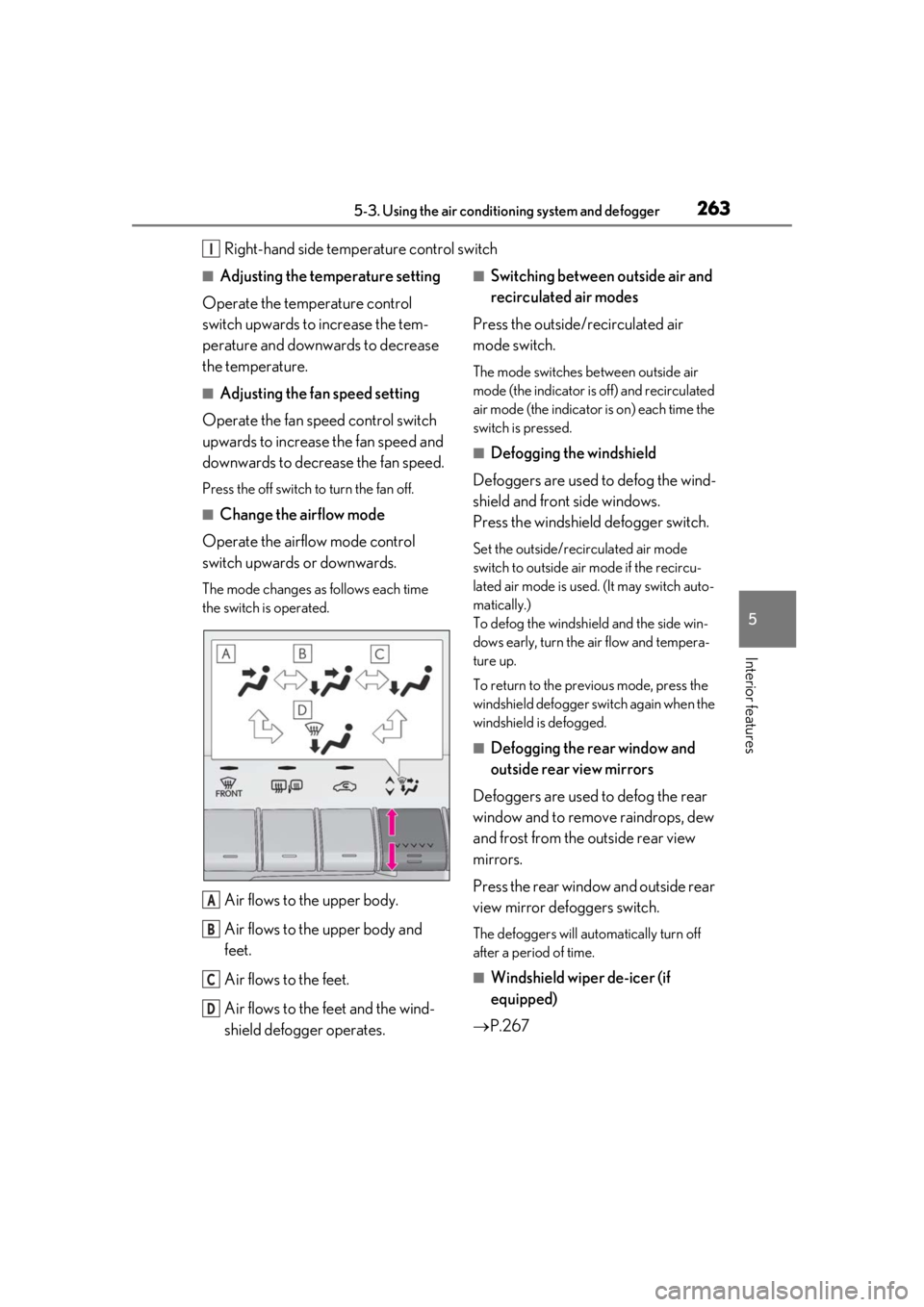
■Change the airflow mode
Operate the airflow mode control
switch upwards or downwards.
The mode changes as follows each time
the switch is operated.
Air flows to the upper body.
Air flows to the upper body and
feet.
Air flows to the feet.
Air flows to the feet and the wind-
shield defogger operates.
■Switching between outside air and
recirculated air modes
Press the outside/recirculated air
mode switch.
The mode switches between outside air
mode (the indicator is off) and recirculated
air mode (the indicator is on) each time the
switch is pressed.
■Defogging the windshield
Defoggers are used to defog the wind-
shield and front side windows.
Press the windshield defogger switch.
Set the outside/recirculated air mode
switch to outside air mode if the recircu-
lated air mode is used. (It may switch auto-
matically.)
To defog the windshield and the side win-
dows early, turn the air flow and tempera-
ture up.
To return to the previous mode, press the
windshield defogger sw itch again when the
windshield is defogged.
■Defogging the rear window and
outside rear view mirrors
Defoggers are used to defog the rear
window and to remove raindrops, dew
and frost from the outside rear view
mirrors.
Press the rear window and outside rear
view mirror defoggers switch.
The defoggers will automatically turn off
after a period of time.
■Windshield wiper de-icer (if
equipped)
P.267
I
A
B
C
D