lock LEXUS UX200 2019 User Guide
[x] Cancel search | Manufacturer: LEXUS, Model Year: 2019, Model line: UX200, Model: LEXUS UX200 2019Pages: 452, PDF Size: 10.06 MB
Page 44 of 452
441-2. Child safety
1-2.Child safety
Points to remember: P.44
Child restraint system: P.46
When using a child restraint system on
a passenger seat: P.47
When using a child restraint system on
a rear seat: P.48
Child restraint system installation
method
• Fixed with a seat belt: P.48
• Fixed with a child restraint LATCH anchor: P.52
• Using an anchor bracket (for top tether strap): P.54
The laws of all 50 states of the U.S.A.
as well as Canada now require the use
of child restraint systems.
Riding with children
Observe the following precautions
when children are in the vehicle.
Use a child restraint system appro-
priate for the child , until the child
becomes large enough to properly
wear the vehicle’s seat belt.
It is recommended that children
sit in the rear seats to avoid acci-
dental contact with the shift lever,
wiper switch, etc.
Use the rear door child-protector
lock or the window lock switch to
avoid children opening the door
while driving or operating the
power window accidentally.
( P.101, 136)
Do not let small children operate
equipment which may catch or
pinch body parts, such as the
power window, hood, back door,
seats, etc.
WARNING
■When children are in the vehicle
Never leave children unattended in the
vehicle, and never allow children to have
or use the key.
Children may be able to start the vehicle
or shift the vehicle into neutral. There is
also a danger that children may injure
themselves by playing with the windows,
the moon roof (if eq uipped) or other fea-
tures of the vehicle. In addition, heat
build-up or extremely cold temperatures
inside the vehicle can be fatal to children.
Child restraint systems
Before installing a child restraint
system in the vehicle, there are pre-
cautions that need to be observed,
different types of child restraint sys-
tems, as well as installation meth-
ods, etc., written in this manual.
Use a child restraint system when
riding with a small child that cannot
properly use a seat belt. For the
child’s safety, install the child restraint
system to a rear seat. Be sure to fol-
low the installation method that is in
the operation manual enclosed with
the restraint system.
Table of contents
Points to remember
Page 48 of 452
481-2. Child safety
A child restraint system for a small
child or baby must itself be properly
restrained on the seat with the lap por-
tion of the lap/shoulder belt.
■Installing child restraint system
using a seat belt (child restraint
lock function belt)
Install the child restraint system in
accordance to the operation manual
enclosed with the child restraint sys-
tem.
■Rear-facing Infant seat/con-
vertible seat
1
Adjust the seatback
If there is a gap between the child seat and
the seatback, adjust the seatback until
good contact is achieved.
WARNING
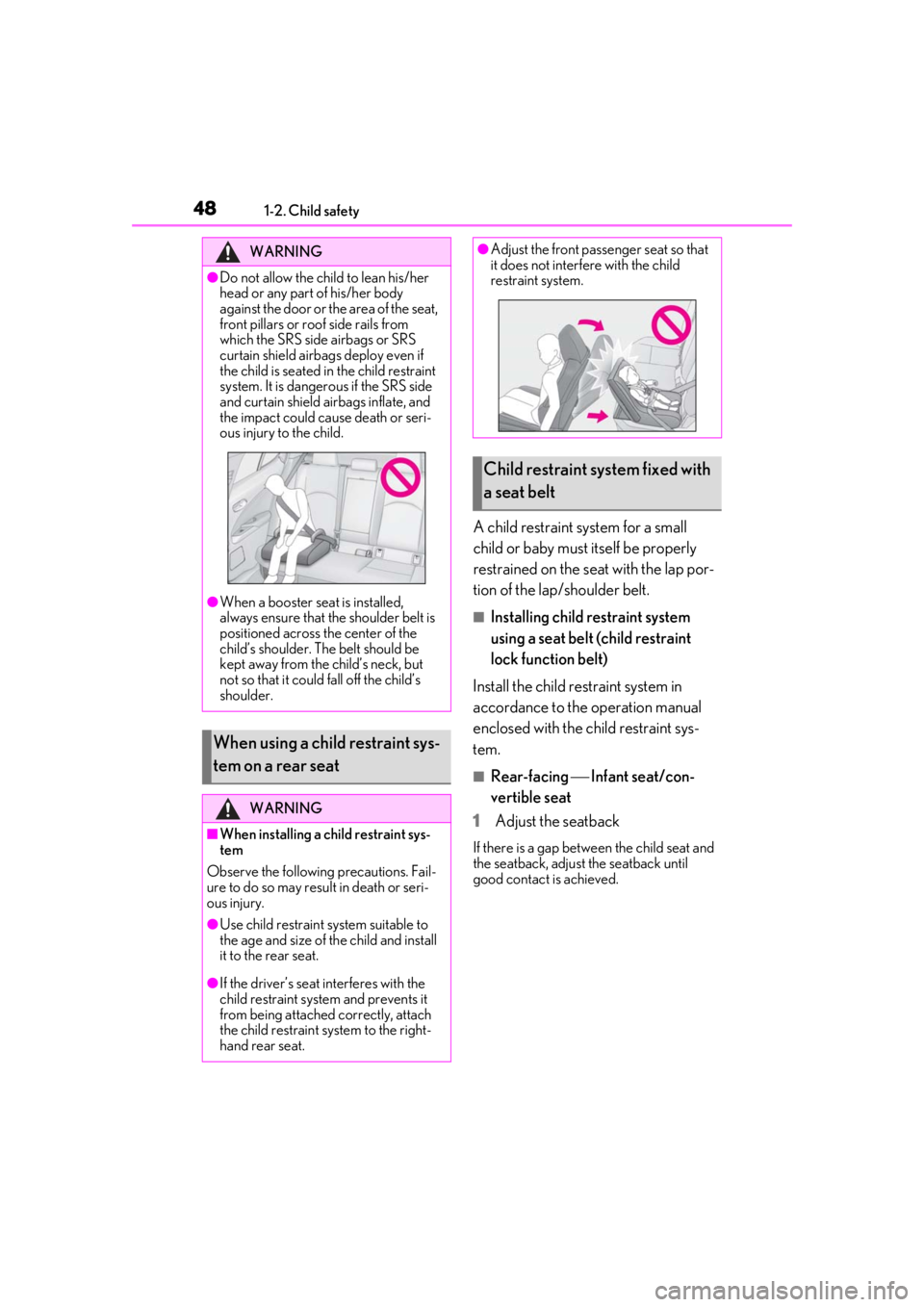
●Do not allow the child to lean his/her
head or any part of his/her body
against the door or the area of the seat,
front pillars or roof side rails from
which the SRS side airbags or SRS
curtain shield airbags deploy even if
the child is seated in the child restraint
system. It is dangerous if the SRS side
and curtain shield airbags inflate, and
the impact could cause death or seri-
ous injury to the child.
●When a booster seat is installed,
always ensure that th e shoulder belt is
positioned across the center of the
child’s shoulder. The belt should be
kept away from the child’s neck, but
not so that it could fall off the child’s
shoulder.
When using a child restraint sys-
tem on a rear seat
WARNING
■When installing a child restraint sys-
tem
Observe the following precautions. Fail-
ure to do so may result in death or seri-
ous injury.
●Use child restraint system suitable to
the age and size of the child and install
it to the rear seat.
●If the driver’s seat interferes with the
child restraint system and prevents it
from being attached correctly, attach
the child restraint system to the right-
hand rear seat.
●Adjust the front passe nger seat so that
it does not interfere with the child
restraint system.
Child restraint system fixed with
a seat belt
Page 49 of 452
491-2. Child safety
1
For safety and security
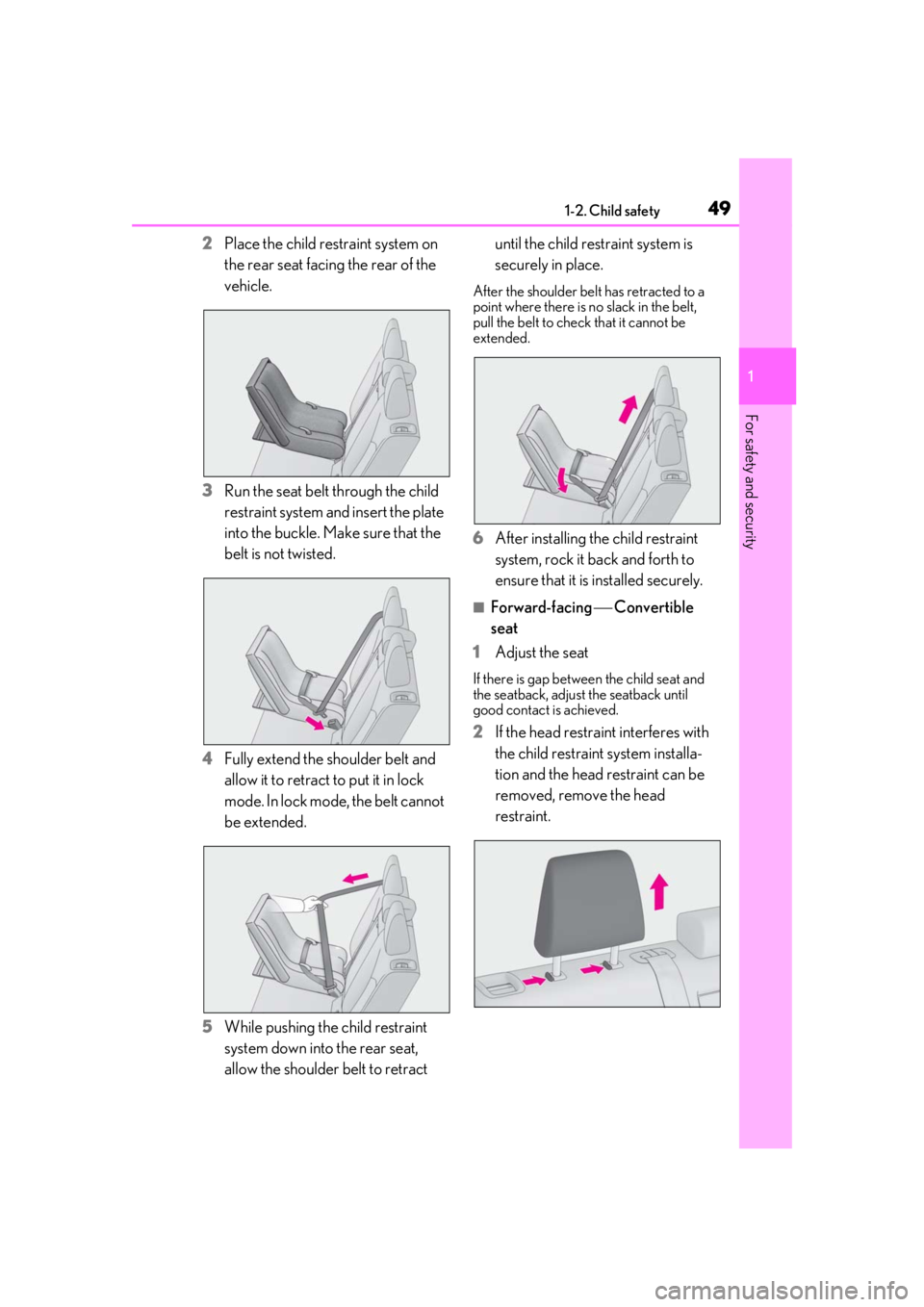
2Place the child restraint system on
the rear seat facing the rear of the
vehicle.
3 Run the seat belt through the child
restraint system and insert the plate
into the buckle. Make sure that the
belt is not twisted.
4 Fully extend the shoulder belt and
allow it to retract to put it in lock
mode. In lock mode, the belt cannot
be extended.
5 While pushing the child restraint
system down into the rear seat,
allow the shoulder belt to retract until the child restraint system is
securely in place.
After the shoulder belt has retracted to a
point where there is no slack in the belt,
pull the belt to check that it cannot be
extended.
6
After installing the child restraint
system, rock it back and forth to
ensure that it is installed securely.
■Forward-facing Convertible
seat
1 Adjust the seat
If there is gap between the child seat and
the seatback, adjust the seatback until
good contact is achieved.
2If the head restraint interferes with
the child restraint system installa-
tion and the head restraint can be
removed, remove the head
restraint.
Page 50 of 452
501-2. Child safety
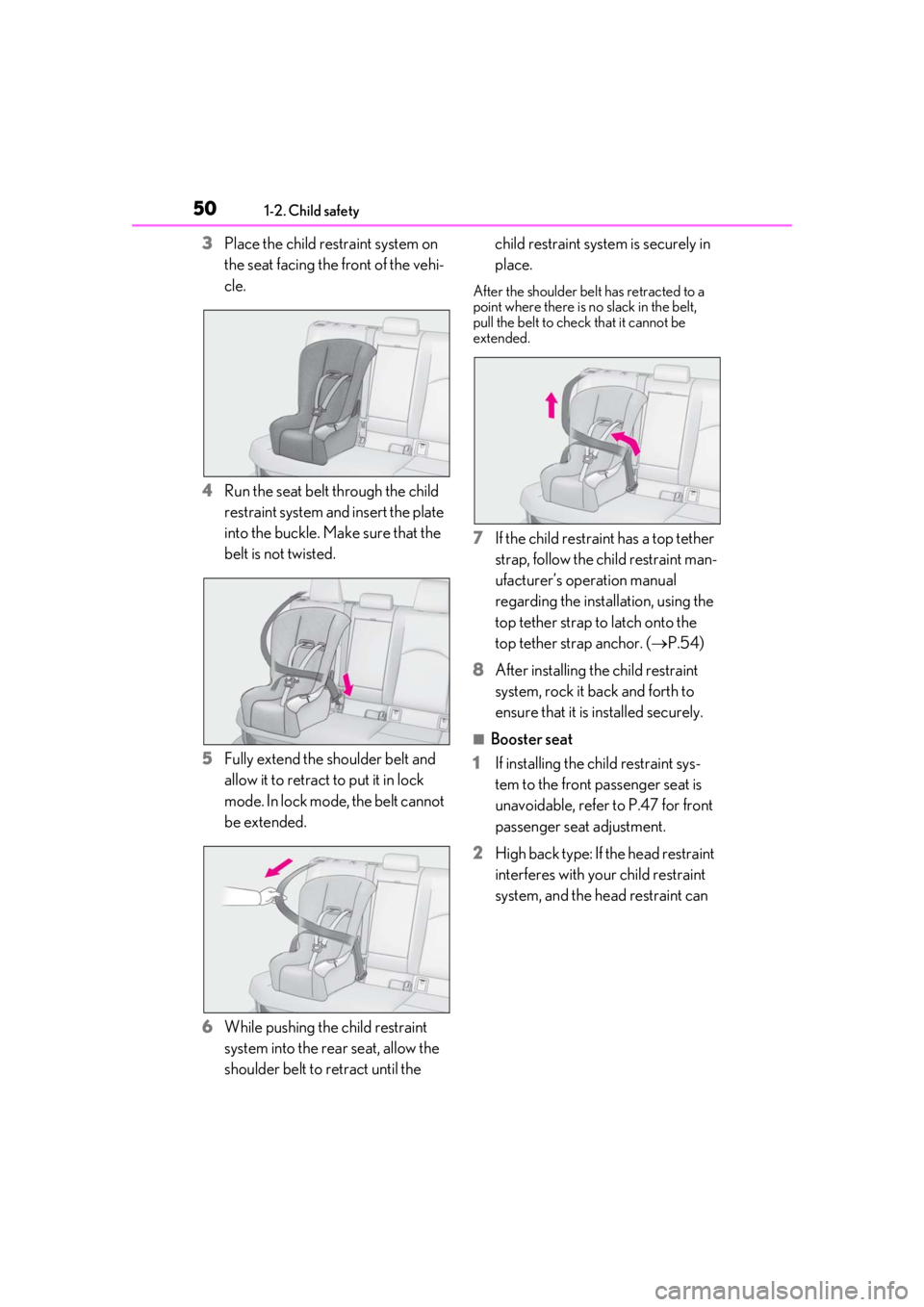
3Place the child restraint system on
the seat facing the front of the vehi-
cle.
4 Run the seat belt through the child
restraint system and insert the plate
into the buckle. Make sure that the
belt is not twisted.
5 Fully extend the shoulder belt and
allow it to retract to put it in lock
mode. In lock mode, the belt cannot
be extended.
6 While pushing the child restraint
system into the rear seat, allow the
shoulder belt to retract until the child restraint system is securely in
place.
After the shoulder belt has retracted to a
point where there is no slack in the belt,
pull the belt to check that it cannot be
extended.
7
If the child restraint has a top tether
strap, follow the child restraint man-
ufacturer’s operation manual
regarding the installation, using the
top tether strap to latch onto the
top tether strap anchor. ( P.54)
8 After installing the child restraint
system, rock it back and forth to
ensure that it is installed securely.
■Booster seat
1 If installing the child restraint sys-
tem to the front passenger seat is
unavoidable, refer to P.47 for front
passenger seat adjustment.
2 High back type: If the head restraint
interferes with your child restraint
system, and the head restraint can
Page 52 of 452
521-2. Child safety
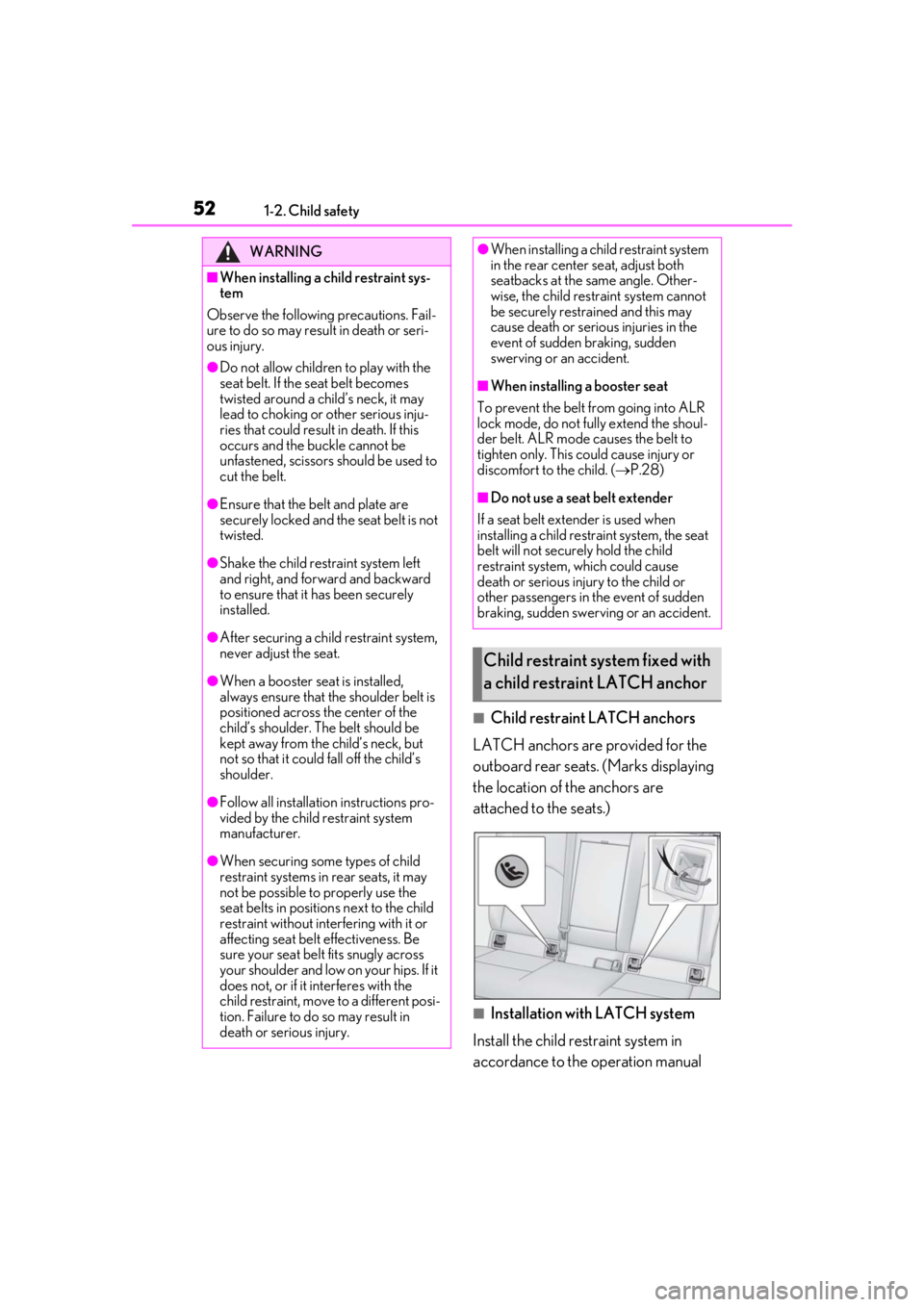
■Child restraint LATCH anchors
LATCH anchors are provided for the
outboard rear seats. (Marks displaying
the location of the anchors are
attached to the seats.)
■Installation with LATCH system
Install the child restraint system in
accordance to the operation manual
WARNING
■When installing a child restraint sys-
tem
Observe the following precautions. Fail-
ure to do so may result in death or seri-
ous injury.
●Do not allow children to play with the
seat belt. If the seat belt becomes
twisted around a child’s neck, it may
lead to choking or other serious inju-
ries that could result in death. If this
occurs and the buckle cannot be
unfastened, scissors should be used to
cut the belt.
●Ensure that the belt and plate are
securely locked and the seat belt is not
twisted.
●Shake the child restraint system left
and right, and forward and backward
to ensure that it has been securely
installed.
●After securing a child restraint system,
never adjust the seat.
●When a booster seat is installed,
always ensure that th e shoulder belt is
positioned across the center of the
child’s shoulder. The belt should be
kept away from the child’s neck, but
not so that it could fall off the child’s
shoulder.
●Follow all installation instructions pro-
vided by the child restraint system
manufacturer.
●When securing some types of child
restraint systems in rear seats, it may
not be possible to properly use the
seat belts in positions next to the child
restraint without inte rfering with it or
affecting seat belt effectiveness. Be
sure your seat belt fits snugly across
your shoulder and low on your hips. If it
does not, or if it interferes with the
child restraint, move to a different posi-
tion. Failure to do so may result in
death or serious injury.
●When installing a child restraint system
in the rear center seat, adjust both
seatbacks at the same angle. Other-
wise, the child restraint system cannot
be securely restrained and this may
cause death or serious injuries in the
event of sudden braking, sudden
swerving or an accident.
■When installing a booster seat
To prevent the belt from going into ALR
lock mode, do not fully extend the shoul-
der belt. ALR mode causes the belt to
tighten only. This could cause injury or
discomfort to the child. ( P.28)
■Do not use a seat belt extender
If a seat belt extender is used when
installing a child restra int system, the seat
belt will not securely hold the child
restraint system, which could cause
death or serious injury to the child or
other passengers in the event of sudden
braking, sudden swerving or an accident.
Child restraint system fixed with
a child restraint LATCH anchor
Page 64 of 452
641-4. Theft deterrent system
■Items to check before locking the
vehicle
To prevent unexpected triggering of
the alarm and vehicle theft, make sure
of the following:
Nobody is in the vehicle.
The windows and moon roof (if
equipped) are closed before the
alarm is set.
No valuables or other personal
items are left in the vehicle.
■Setting
Close the doors and hood, and lock all
the doors. The system will be set auto-
matically after 30 seconds.
The security indicator changes from being
on to flashing when the system is set.
■Canceling or stopping
Do one of the following to deactivate
or stop the alarms:
Unlock the doors.
Turn the engine switch to ACC or
ON, or start the engine. (The alarm
will be deactivated or stopped after
a few seconds.)
■System maintenance
The vehicle has a maintenance-free type
alarm system.
■Triggering of the alarm
The alarm may be triggered in the following
situations:
(Stopping the alarm deactivates the alarm
system.)
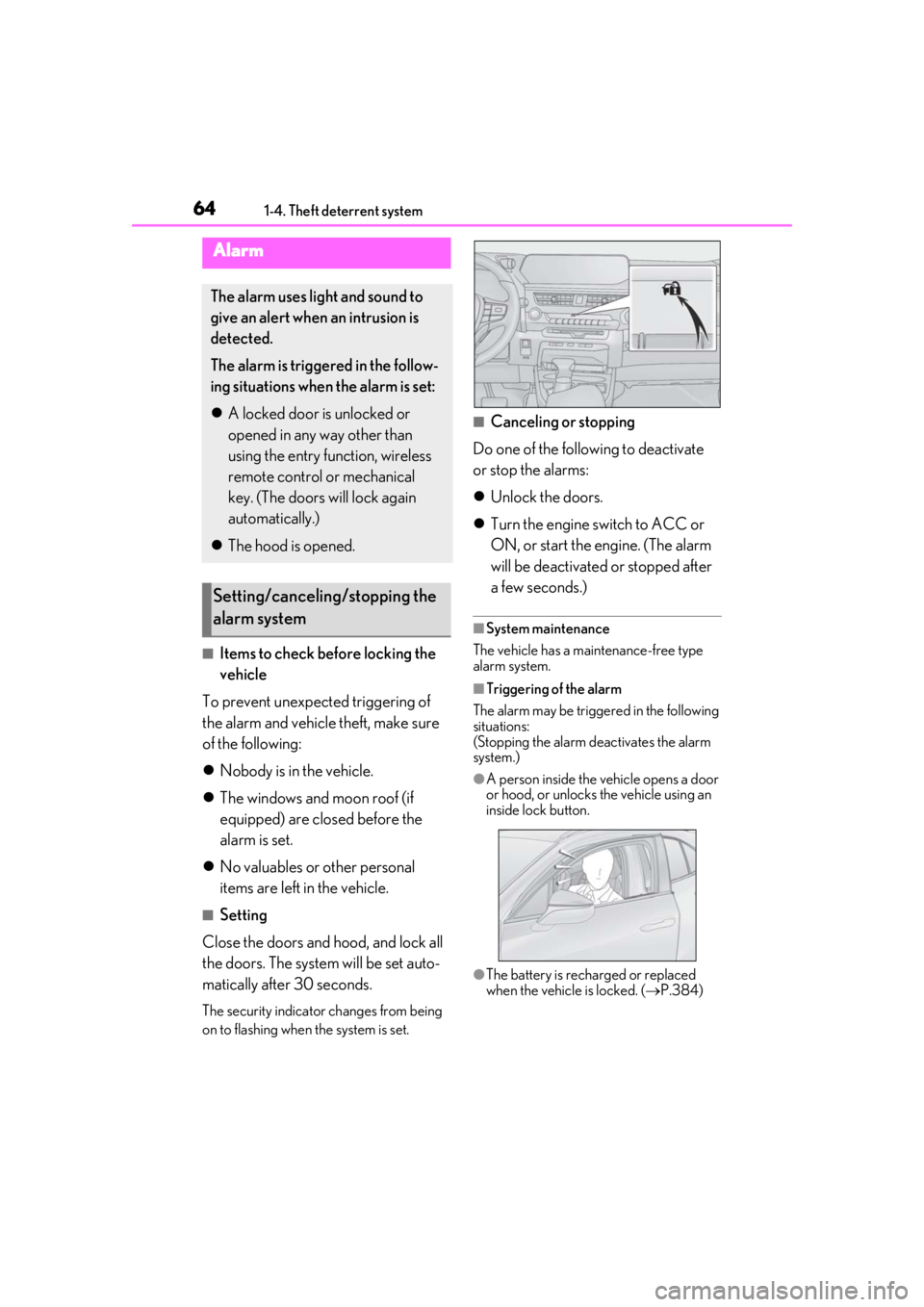
●A person inside the vehicle opens a door
or hood, or unlocks the vehicle using an
inside lock button.
●The battery is recharged or replaced
when the vehicle is locked. ( P.384)
Alarm
The alarm uses light and sound to
give an alert when an intrusion is
detected.
The alarm is triggered in the follow-
ing situations when the alarm is set:
A locked door is unlocked or
opened in any way other than
using the entry function, wireless
remote control or mechanical
key. (The doors will lock again
automatically.)
The hood is opened.
Setting/canceling/stopping the
alarm system
Page 65 of 452
651-4. Theft deterrent system
1
For safety and security
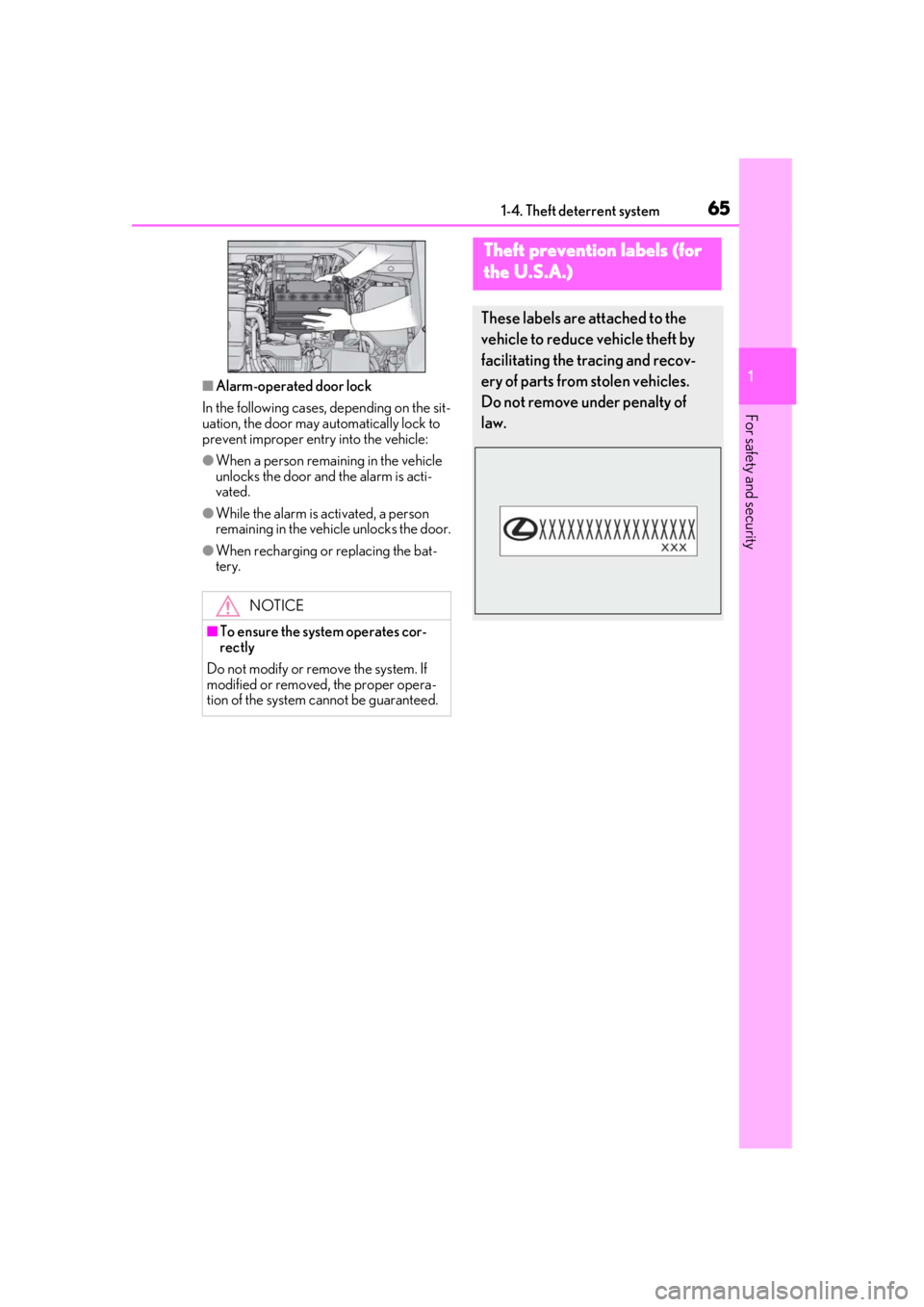
■Alarm-operated door lock
In the following cases, depending on the sit-
uation, the door may automatically lock to
prevent improper entry into the vehicle:
●When a person remaining in the vehicle
unlocks the door and the alarm is acti-
vated.
●While the alarm is activated, a person
remaining in the vehicle unlocks the door.
●When recharging or replacing the bat-
tery.
NOTICE
■To ensure the system operates cor-
rectly
Do not modify or remove the system. If
modified or removed, the proper opera-
tion of the system cannot be guaranteed.
Theft prevention labels (for
t
he U.S.A.)
These labels are attached to the
vehicle to reduce vehicle theft by
facilitating the tracing and recov-
ery of parts from stolen vehicles.
Do not remove under penalty of
law.
Page 72 of 452
722-1. Instrument cluster
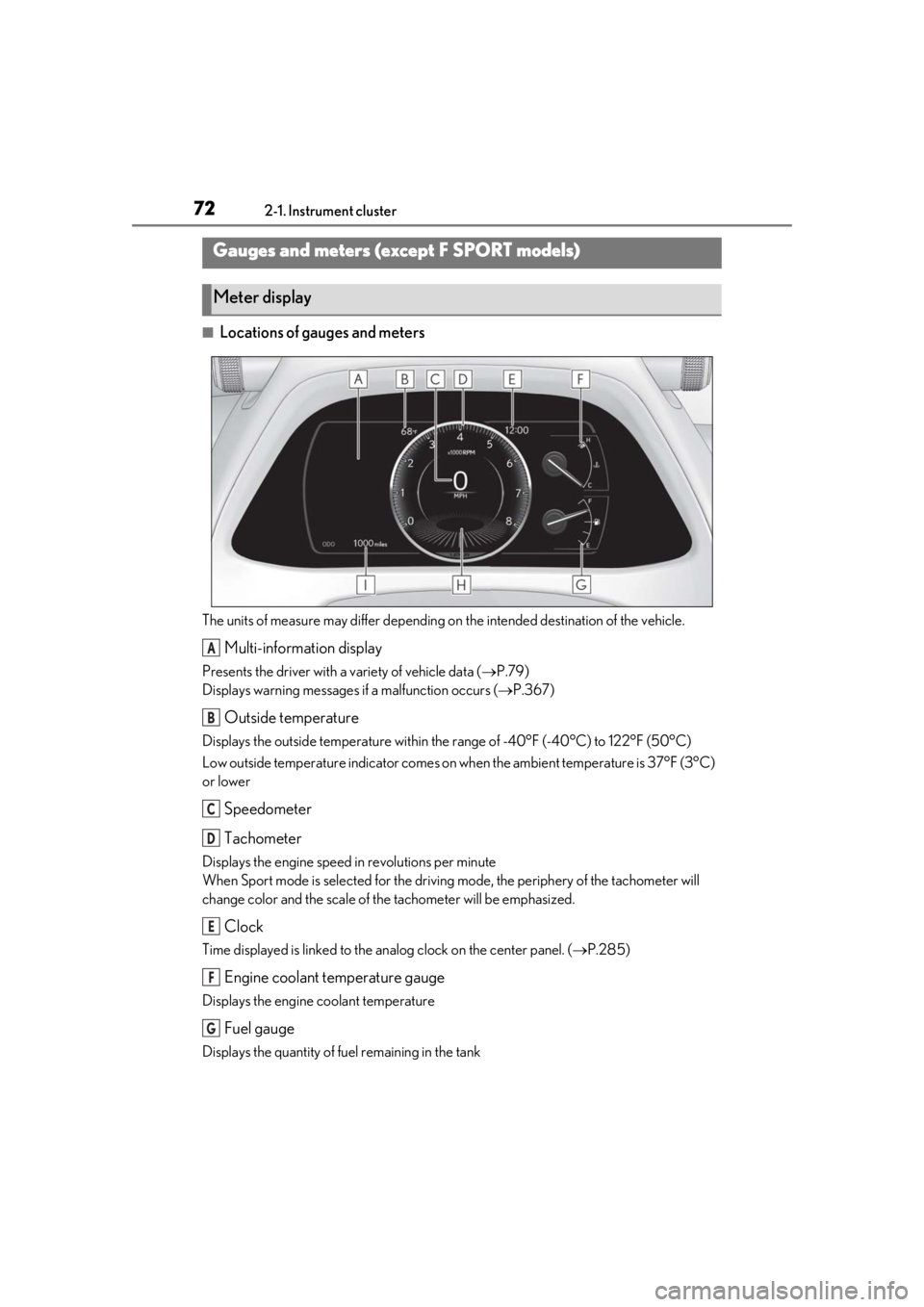
■Locations of gauges and meters
The units of measure may differ depending on the intended destination of the vehicle.
Multi-information display
Presents the driver with a variety of vehicle data ( P.79)
Displays warning messages if a malfunction occurs (P.367)
Outside temperature
Displays the outside temperature within the range of -40°F (-40°C) to 122°F (50°C)
Low outside temperature indicator comes on wh en the ambient temperature is 37°F (3°C)
or lower
Speedometer
Tachometer
Displays the engine speed in revolutions per minute
When Sport mode is se lected for the driving mode, the periphery of the tachometer will
change color and the scale of the tachometer will be emphasized.
Clock
Time displayed is linked to the analog clock on the center panel. (P.285)
Engine coolant temperature gauge
Displays the engine coolant temperature
Fuel gauge
Displays the quantity of fuel remaining in the tank
Gauges and meters (except F SPORT models)
Meter display
A
B
C
D
E
F
G
Page 75 of 452
752-1. Instrument cluster
2
Vehicle status information and indicators
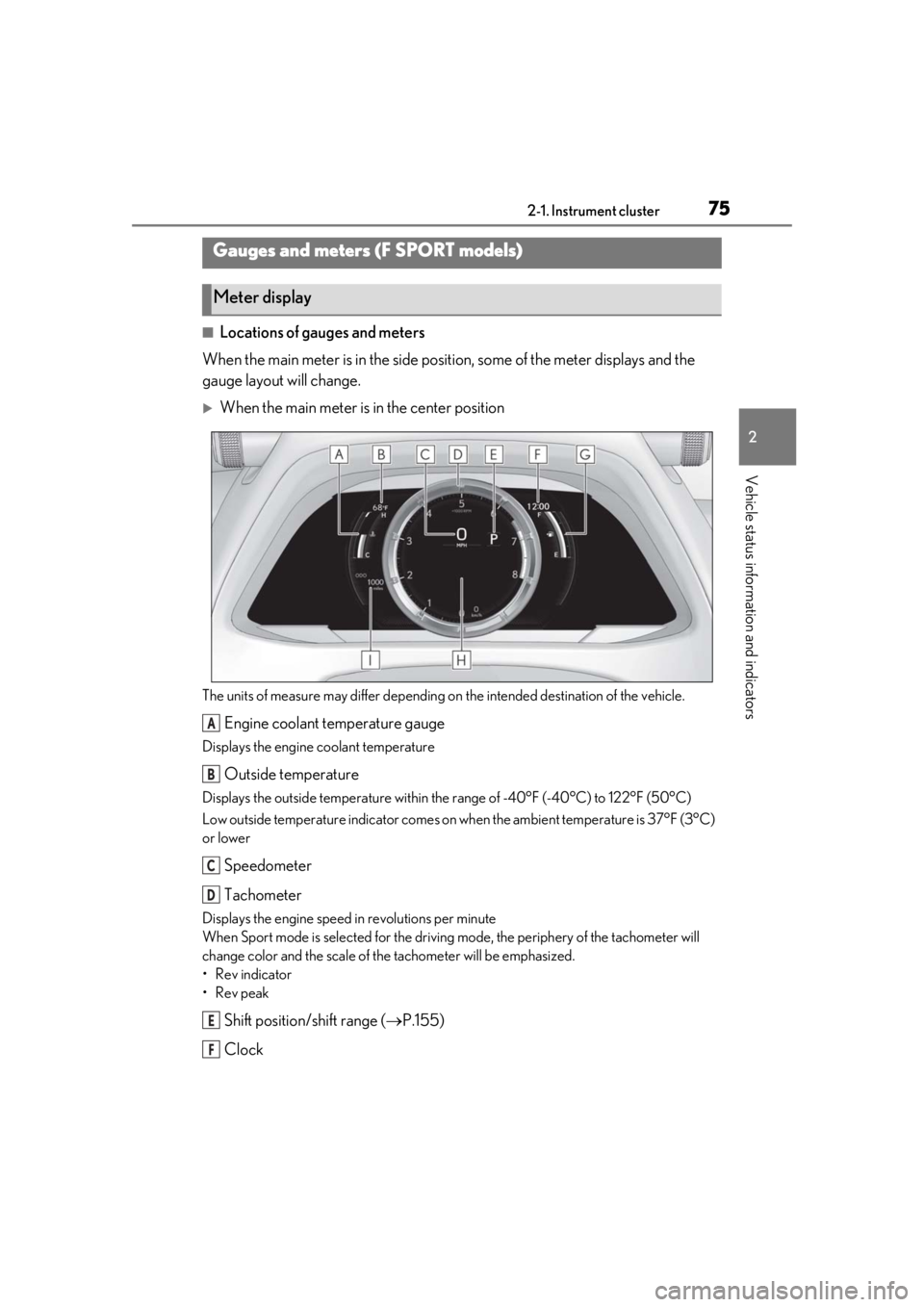
■Locations of gauges and meters
When the main meter is in the side posi tion, some of the meter displays and the
gauge layout will change.
When the main meter is in the center position
The units of measure may differ depending on the intended destination of the vehicle.
Engine coolant temperature gauge
Displays the engine coolant temperature
Outside temperature
Displays the outside temperature within the range of -40°F (-40°C) to 122°F (50°C)
Low outside temperature indicator comes on wh en the ambient temperature is 37°F (3°C)
or lower
Speedometer
Tachometer
Displays the engine speed in revolutions per minute
When Sport mode is se lected for the driving mode, the periphery of the tachometer will
change color and the scale of the tachometer will be emphasized.
• Rev indicator
•Rev peak
Shift position/shift range ( P.155)
Clock
Gauges and meters (F SPORT models)
Meter display
A
B
C
D
E
F
Page 76 of 452
762-1. Instrument cluster
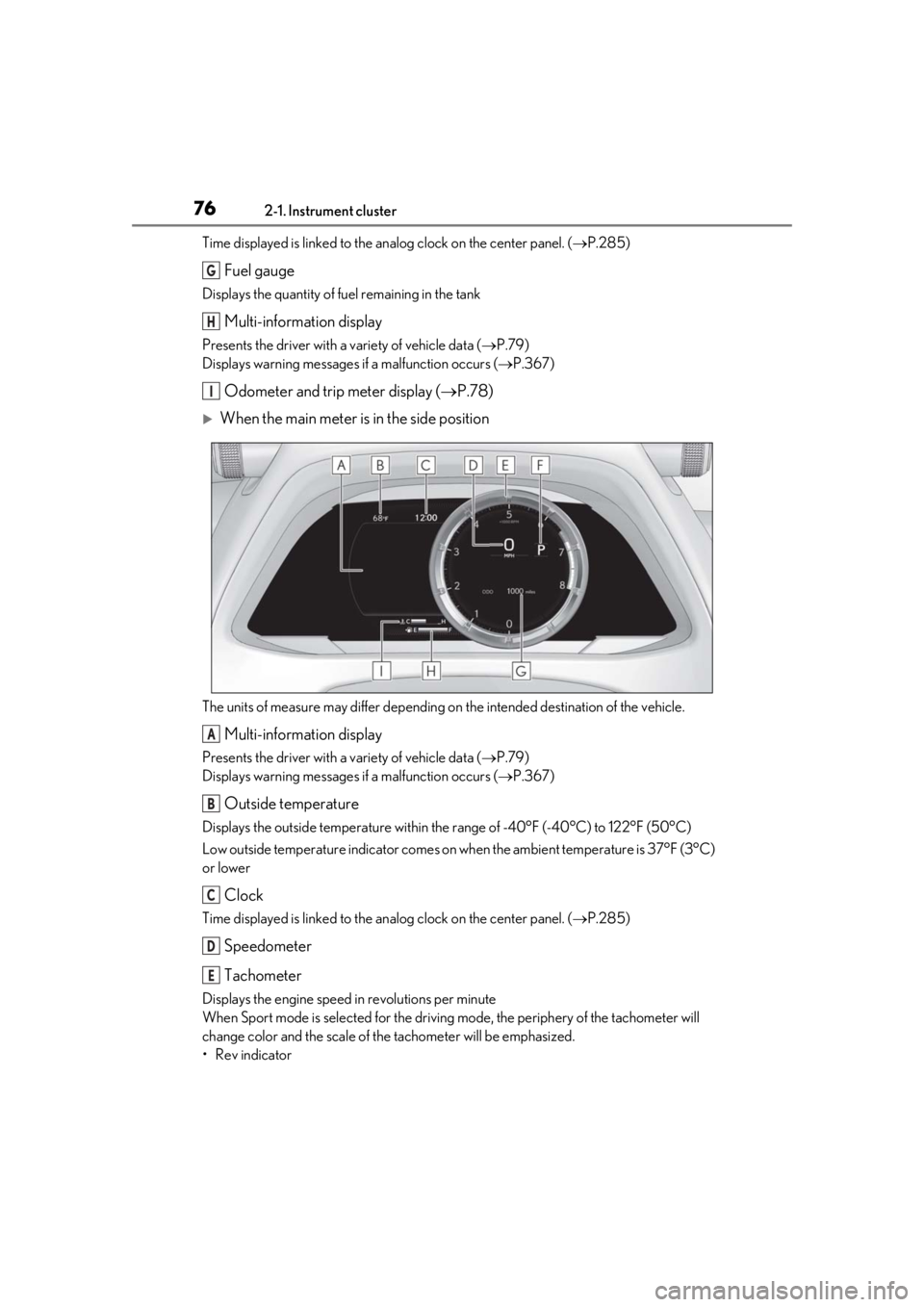
Time displayed is linked to the analog clock on the center panel. (P.285)
Fuel gauge
Displays the quantity of fuel remaining in the tank
Multi-information display
Presents the driver with a variety of vehicle data ( P.79)
Displays warning messages if a malfunction occurs (P.367)
Odometer and trip meter display ( P.78)
When the main meter is in the side position
The units of measure may differ depending on the intended destination of the vehicle.
Multi-information display
Presents the driver with a variety of vehicle data ( P.79)
Displays warning messages if a malfunction occurs (P.367)
Outside temperature
Displays the outside temperature within the range of -40°F (-40°C) to 122°F (50°C)
Low outside temperature indicator comes on wh en the ambient temperature is 37°F (3°C)
or lower
Clock
Time displayed is linked to the analog clock on the center panel. (P.285)
Speedometer
Tachometer
Displays the engine speed in revolutions per minute
When Sport mode is se lected for the driving mode, the periphery of the tachometer will
change color and the scale of the tachometer will be emphasized.
• Rev indicator
G
H
I
A
B
C
D
E