remote start LEXUS UX200 2019 User Guide
[x] Cancel search | Manufacturer: LEXUS, Model Year: 2019, Model line: UX200, Model: LEXUS UX200 2019Pages: 452, PDF Size: 10.06 MB
Page 116 of 452

1163-2. Opening, closing and locking the doors
• Cards to which aluminum foil is attached
• Cigarette boxes that have aluminum foil
inside
• Metallic wallets or bags
•Coins
• Hand warmers made of metal
• Media such as CDs and DVDs
●When other wireless ke ys (that emit radio
waves) are being used nearby
●When carrying the electronic key
together with the following devices that
emit radio waves
• Another vehicle’s electronic key or a
wireless key that emits radio waves
• Personal computers or personal digital assistants (PDAs)
• Digital audio players
• Portable game systems
●If window tint with a metallic content or
metallic objects are attached to the rear
window
●When the electronic key is placed near a
battery charger or electronic devices
●When the vehicle is parked in a pay park-
ing spot where radio waves are emitted.
■Note for the entry function
●Even when the electronic key is within the
effective range (detection areas), the sys-
tem may not operate properly in the fol-
lowing cases:
• The electronic key is too close to the win-
dow or outside door handle, near the
ground, or in a high place when the doors
are locked or unlocked.
• The electronic key is on the instrument panel, luggage room, floor, or in the door
pockets or glove box when the engine is
started or engine switch modes are
changed.
●Do not leave the electronic key on top of
the instrument panel or near the door
pockets when exiting the vehicle.
Depending on the radio wave reception
conditions, it may be detected by the
antenna outside the cabin and the door
will become lockable from the outside,
possibly trapping the electronic key
inside the vehicle.
●As long as the electron ic key is within the
effective range, the doors may be locked or unlocked by anyone. However, only
the doors detecting the electronic key
can be used to unlock the vehicle.
●Even if the electronic
key is not inside the
vehicle, it may be po ssible to start the
engine if the electronic key is near the
window.
●The doors may unlock if a large amount
of water splashes on the door handle,
such as in the rain or in a car wash when
the electronic key is within the effective
range. (The doors wi ll automatically be
locked after approximately 60 seconds if
the doors are not opened and closed.)
●If the wireless remote control is used to
lock the doors when the electronic key is
near the vehicle, there is a possibility that
the door may not be unlocked by the
entry function. (Use the wireless remote
control to unlock the doors.)
●Touching the door lock sensor while
wearing gloves may delay or prevent lock
operation. Remove the gloves and touch
the lock sensor again.
●When the lock operation is performed
using the lock sensor, recognition signals
will be shown up to two consecutive
times. After this, no recognition signals
will be given.
●If the door handle becomes wet while the
electronic key is within the effective
range, the door may lock and unlock
repeatedly. In that case, follow the follow-
ing correction procedures to wash the
vehicle:
• Place the electronic key in a location 6 ft.
(2 m) or more away from the vehicle.
(Take care to ensure that the key is not
stolen.)
• Set the electronic key to battery-saving mode to disable the smart access system
with push-button start. ( P.115)
●If the electronic key is inside the vehicle
and a door handle becomes wet during a
car wash, a buzzer may sound outside the
vehicle and “Key Detected in Vehicle”
may be shown on the multi-information
display. To turn off the alarm, lock all the
doors.
●The lock sensor may not work properly if
it comes into contact with ice, snow, mud,
Page 117 of 452

1173-2. Opening, closing and locking the doors
3
Before driving
etc. Clean the lock sensor and attempt to
operate it again.
●A sudden approach to the effective
range or door handle may prevent the
doors from being unlocked. In this case,
return the door handle to the original
position and check that the doors unlock
before pulling the door handle again.
●If there is another electronic key in the
detection area, it may take slightly longer
to unlock the doors after the door handle
is gripped.
■When the vehicle is not driven for
extended periods
●To prevent theft of the vehicle, do not
leave the electronic key within 6 ft. (2 m)
of the vehicle.
●The smart access syst em with push-but-
ton start can be deactivated in advance.
●Setting the electronic key to battery-sav-
ing mode helps to reduce key battery
depletion. ( P.115)
■To operate the system properly
Make sure to carry the electronic key when
operating the system. Do not get the elec-
tronic key too close to the vehicle when
operating the system from the outside of the
vehicle.
Depending on the position and holding
condition of the electronic key, the key may
not be detected correctly and the system
may not operate properly. (The alarm may
go off accidentally, or the door lock preven-
tion may not operate.)
■If the smart access system with push-
button start does not operate properly
●Locking and unlocking the doors: Use
the mechanical key. ( P.380)
●Starting the engine: P.381
■Customization
Settings (e.g. smart access system with
push-button start) can be changed. (Cus-
tomizable features: P.411)
If the smart access sy stem with push-button
start has been deactivated by a customized
setting, refer to the explanations for the fol-
lowing operations.
●Locking and unlo cking the doors:
Use the wireless remote control or
mechanical key. ( P.98, 380)
●Starting the engine and changing engine
switch modes: P.381
●Stopping the engine: P.153
Page 126 of 452
1263-3. Adjusting the seats
■Recall procedure
1
Make sure that the doors are
locked before recalling the driving
position.Carry the electronic key
that has been registered to the driv-
ing position, and then unlock and
open the driver’s door using the
smart access system with push-but-
ton start or wireless remote control.
The driving position will move to the
recorded position (not including the steer-
ing wheel and head-up display [if
equipped]). However, the seat will move to
a position slightly behind the recorded
position in order to make entering the vehi-
cle easier.
If the driving position is in a position that
has already been recorded, the seat and
outside rear view mirrors will not move.
2Turn the engine switch to ACC or
ON, or fasten a seat belt.
The seat, steering wheel and head-up dis-
play (if equipped) will move to the
recorded position.
■Recalling the driving position using the
memory recall function
●Different driving positions can be regis-
tered for each electronic key. Therefore,
the driving position that is recalled may
be different depending on the key being
carried.
●If a door other than the driver’s door is
unlocked with the smart access system
with push-button start, the driving posi-
tion cannot be recalled. In this case, press
the driving position button which has
been set.
■Customization
The unlock door settings of the memory
recall function can be customized. (Cus-
tomizable features: P.413)
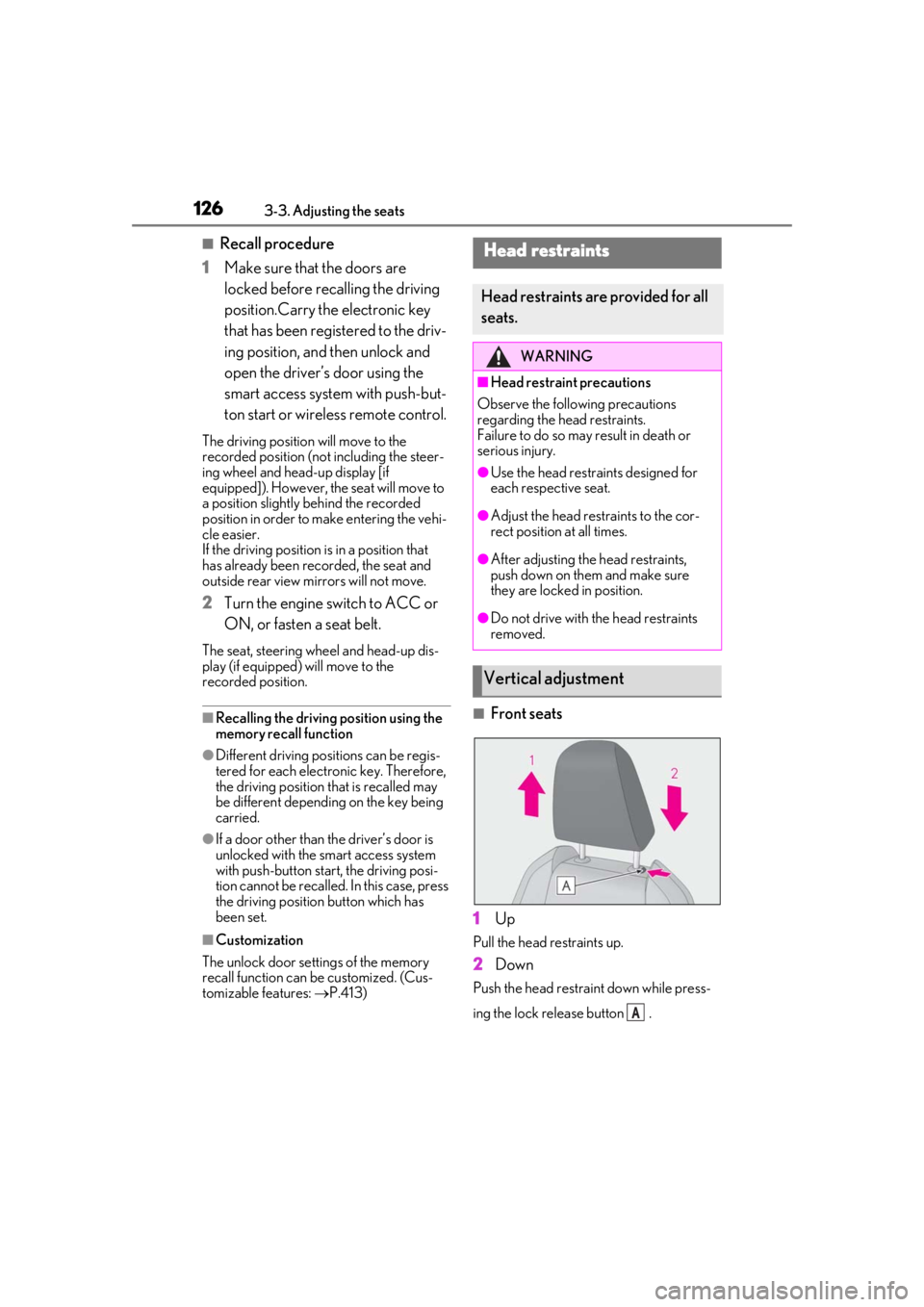
■Front seats
1
Up
Pull the head restraints up.
2Down
Push the head restraint down while press-
ing the lock release button .
Head restraints
Head restraints are provided for all
seats.
WARNING
■Head restraint precautions
Observe the following precautions
regarding the he ad restraints.
Failure to do so may result in death or
serious injury.
●Use the head restraints designed for
each respective seat.
●Adjust the head restraints to the cor-
rect position at all times.
●After adjusting the head restraints,
push down on them and make sure
they are locked in position.
●Do not drive with the head restraints
removed.
Vertical adjustment
A
Page 265 of 452
2655-3. Using the air conditioning system and defogger
5
Interior features
diately after the air conditioning system is
started in automatic mode.
■Air conditioning filter
P.340
■Customization
Settings (e.g. A/C automatic mode switch
operation) can be changed.
(Customizable features: P.416)
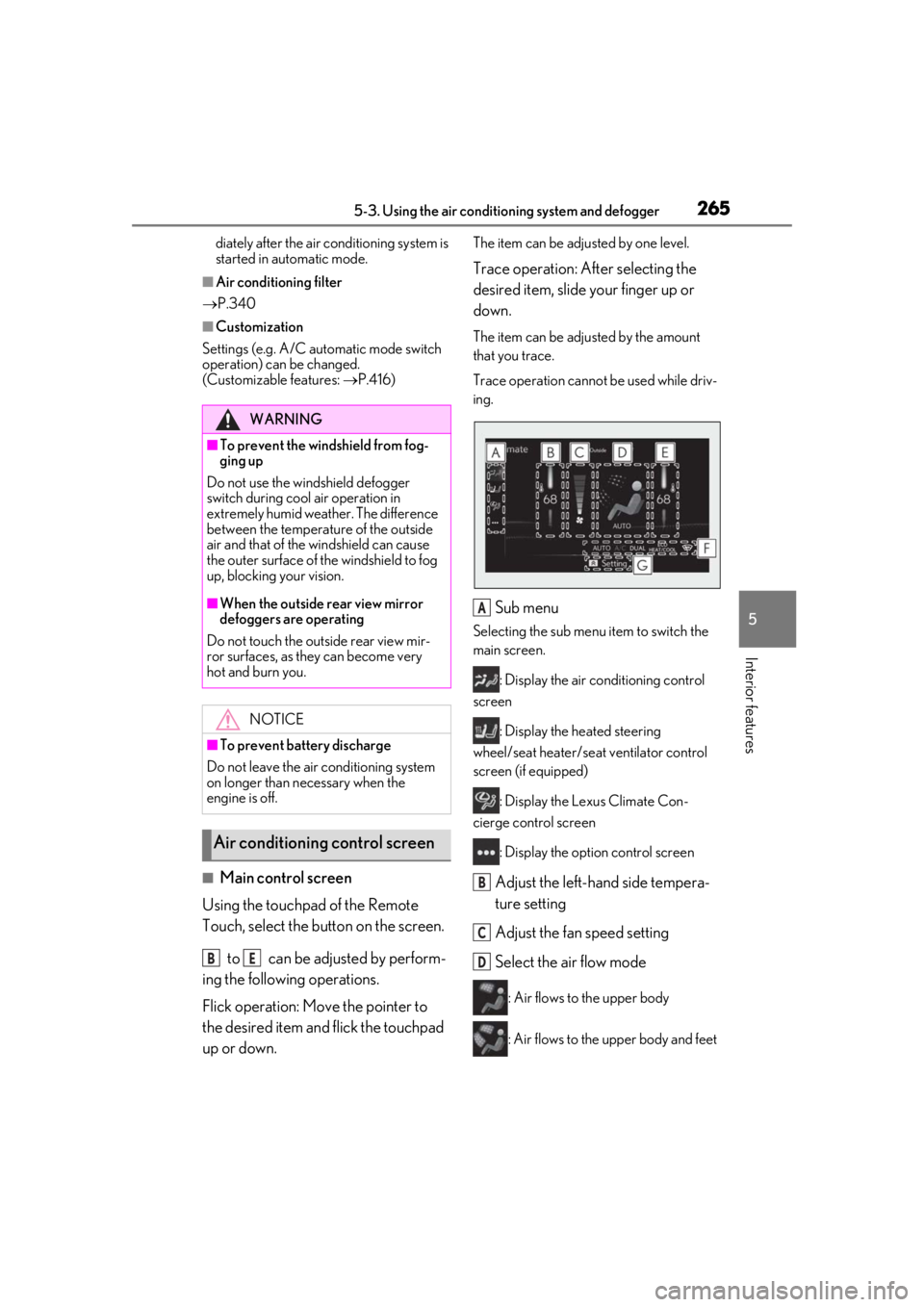
■Main control screen
Using the touchpad of the Remote
Touch, select the button on the screen.
to can be adjusted by perform-
ing the following operations.
Flick operation: Move the pointer to
the desired item and flick the touchpad
up or down.
The item can be adjusted by one level.
Trace operation: After selecting the
desired item, slide your finger up or
down.
The item can be adjusted by the amount
that you trace.
Trace operation cannot be used while driv-
ing.
Sub menu
Selecting the sub menu item to switch the
main screen.
: Display the air conditioning control
screen
: Display the heated steering
wheel/seat heater/sea t ventilator control
screen (if equipped)
: Display the Lexus Climate Con-
cierge control screen
: Display the option control screen
Adjust the left-hand side tempera-
ture setting
Adjust the fan speed setting
Select the air flow mode
: Air flows to the upper body
: Air flows to the upper body and feet
WARNING
■To prevent the windshield from fog-
ging up
Do not use the windshield defogger
switch during cool air operation in
extremely humid weather. The difference
between the temperature of the outside
air and that of the windshield can cause
the outer surface of the windshield to fog
up, blocking your vision.
■When the outside rear view mirror
defoggers are operating
Do not touch the outside rear view mir-
ror surfaces, as they can become very
hot and burn you.
NOTICE
■To prevent battery discharge
Do not leave the air conditioning system
on longer than necessary when the
engine is off.
Air conditioning control screen
BE
A
B
C
D
Page 326 of 452
3266-3. Do-it-yourself maintenance
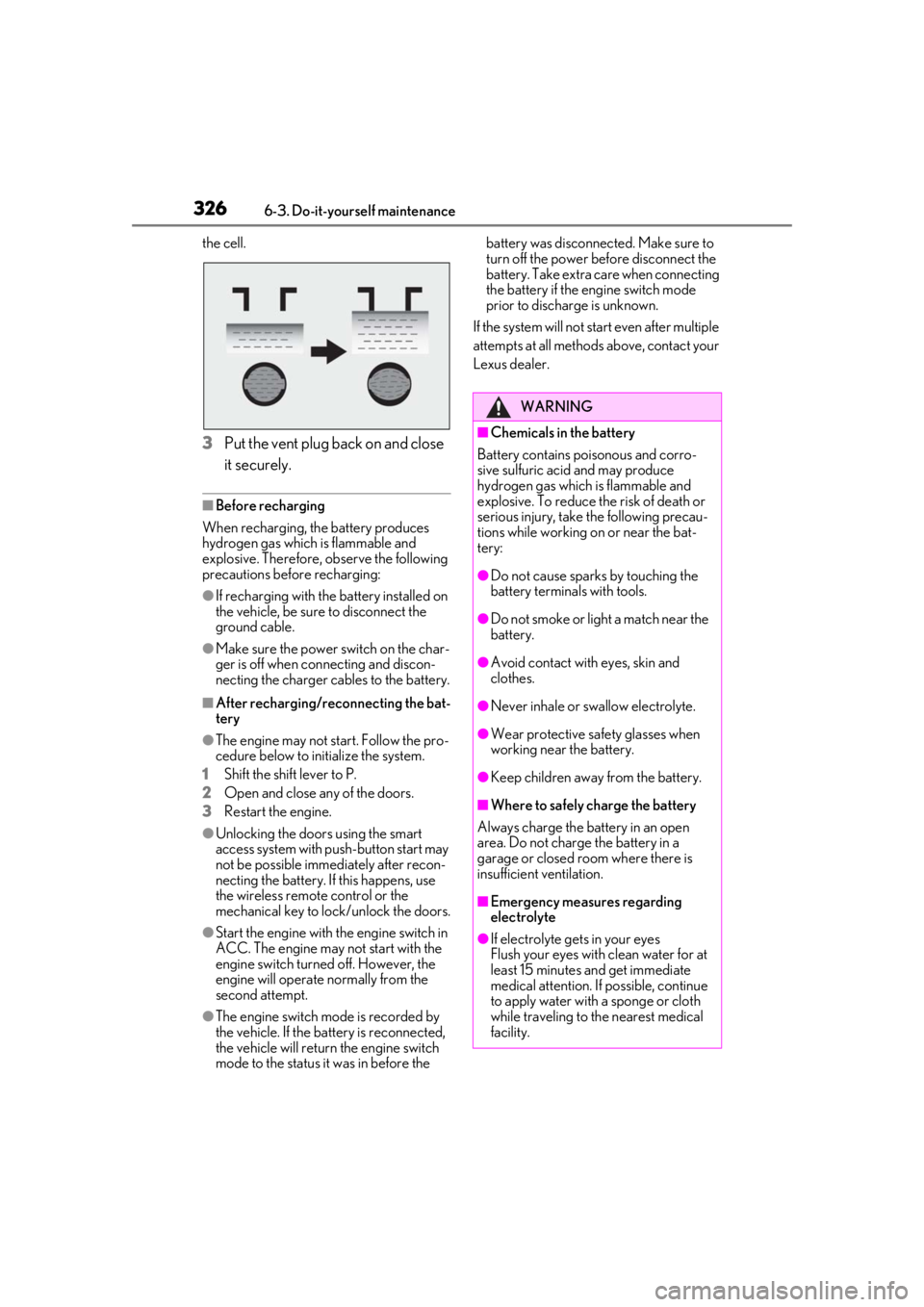
the cell.
3Put the vent plug back on and close
it securely.
■Before recharging
When recharging, the battery produces
hydrogen gas which is flammable and
explosive. Therefore, observe the following
precautions before recharging:
●If recharging with the battery installed on
the vehicle, be sure to disconnect the
ground cable.
●Make sure the power switch on the char-
ger is off when connecting and discon-
necting the charger cables to the battery.
■After recharging/reconnecting the bat-
tery
●The engine may not start. Follow the pro-
cedure below to initialize the system.
1
Shift the shift lever to P.
2
Open and close any of the doors.
3
Restart the engine.
●Unlocking the doors using the smart
access system with pu sh-button start may
not be possible immediately after recon-
necting the battery. If this happens, use
the wireless remote control or the
mechanical key to lock/unlock the doors.
●Start the engine with the engine switch in
ACC. The engine may not start with the
engine switch turned off. However, the
engine will operate normally from the
second attempt.
●The engine switch mode is recorded by
the vehicle. If the battery is reconnected,
the vehicle will return the engine switch
mode to the status it was in before the battery was disconnected. Make sure to
turn off the power before disconnect the
battery. Take extra care when connecting
the battery if the engine switch mode
prior to discharge is unknown.
If the system will not start even after multiple
attempts at all methods above, contact your
Lexus dealer.
WARNING
■Chemicals in the battery
Battery contains poisonous and corro-
sive sulfuric acid and may produce
hydrogen gas which is flammable and
explosive. To reduce the risk of death or
serious injury, take the following precau-
tions while working on or near the bat-
tery:
●Do not cause sparks by touching the
battery terminals with tools.
●Do not smoke or light a match near the
battery.
●Avoid contact with eyes, skin and
clothes.
●Never inhale or swallow electrolyte.
●Wear protective sa fety glasses when
working near the battery.
●Keep children away from the battery.
■Where to safely charge the battery
Always charge the battery in an open
area. Do not charge the battery in a
garage or closed room where there is
insufficient ventilation.
■Emergency measures regarding
electrolyte
●If electrolyte gets in your eyes
Flush your eyes with clean water for at
least 15 minutes and get immediate
medical attention. If possible, continue
to apply water with a sponge or cloth
while traveling to the nearest medical
facility.
Page 341 of 452
3416-3. Do-it-yourself maintenance
6
Maintenance and care
filter.
■If the electronic key battery is depleted
The following symptoms may occur:
●The smart access system with push-but-
ton start and wireless remote control will
not function properly.
●The operational range will be reduced.
■When the card key battery needs to be
replaced (if equipped)
The battery for the card key is available only
at Lexus dealers. Your Lexus dealer can
replace the battery for you.
Prepare the following before replacing
the battery:
Flathead screwdriver
Small flathead screwdriver
Lithium battery CR2032
■Use a CR2032 lithium battery
●Batteries can be purchased at your Lexus
dealer, local electrical appliance shops or
camera stores.
●Replace only with the same or equivalent
type recommended by the manufacturer.
●Dispose of used batteries according to
the local laws.
NOTICE
■When using the air conditioning sys-
tem
Make sure that a filter is always installed.
Using the air conditioning system without
a filter may cause damage to the system.
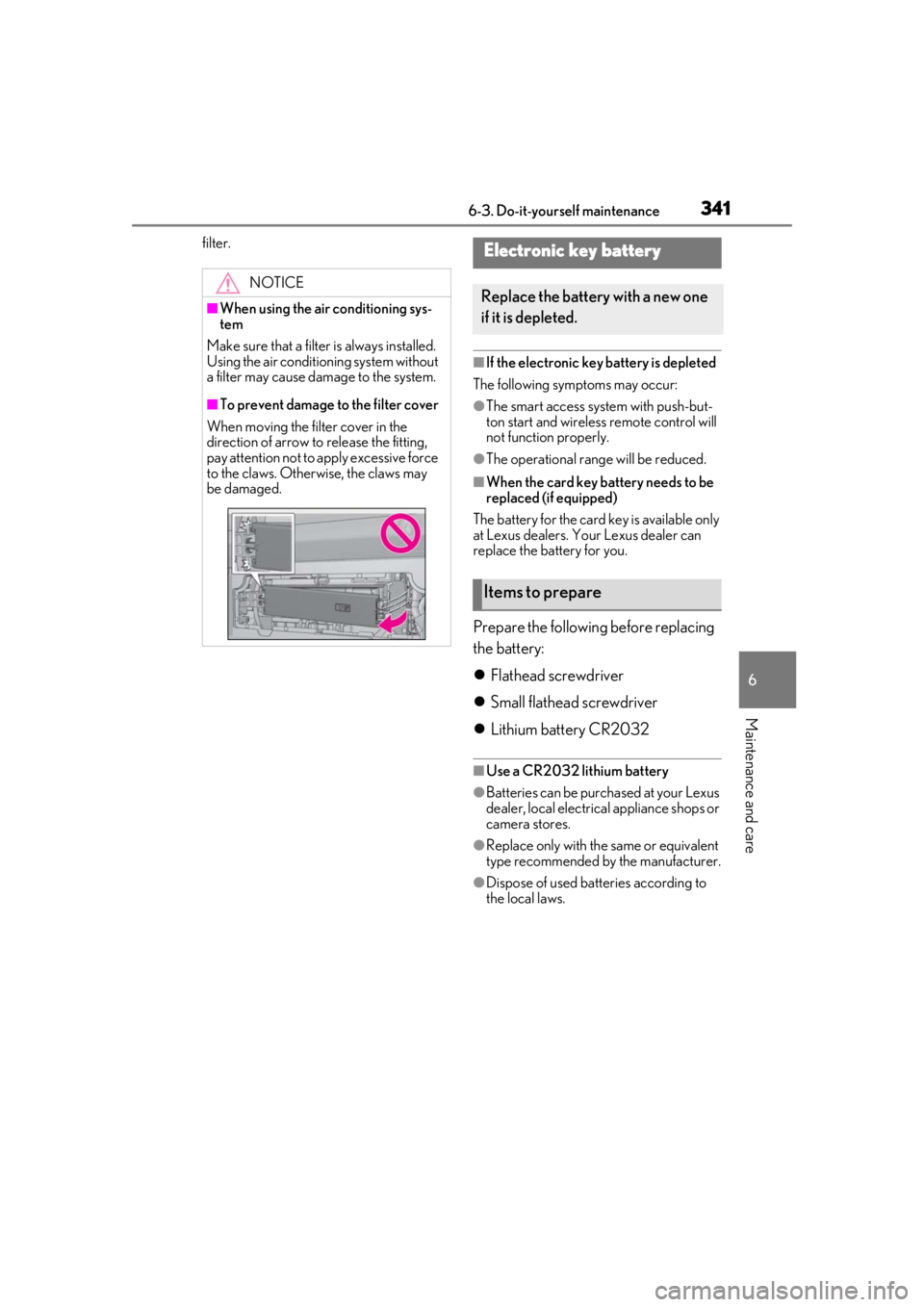
■To prevent damage to the filter cover
When moving the filter cover in the
direction of arrow to release the fitting,
pay attention not to apply excessive force
to the claws. Otherwise, the claws may
be damaged.
Electronic key battery
Replace the battery with a new one
if it is depleted.
Items to prepare
Page 380 of 452
3807-2. Steps to take in an emergency
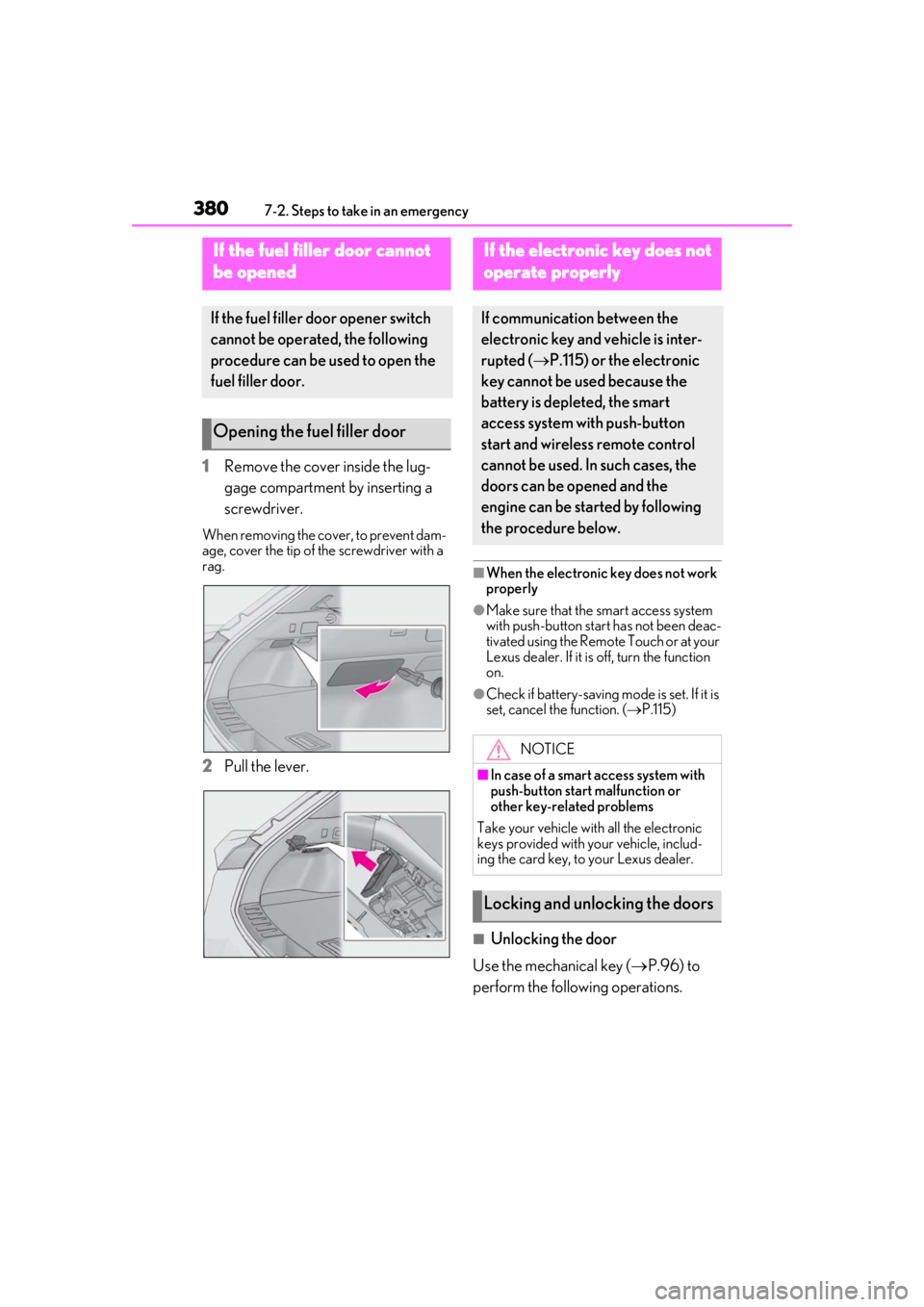
1Remove the cover inside the lug-
gage compartment by inserting a
screwdriver.
When removing the cover, to prevent dam-
age, cover the tip of the screwdriver with a
rag.
2Pull the lever.
■When the electronic key does not work
properly
●Make sure that the smart access system
with push-button start has not been deac-
tivated using the Remote Touch or at your
Lexus dealer. If it is off, turn the function
on.
●Check if battery-saving mode is set. If it is
set, cancel the function. (P.115)
■Unlocking the door
Use the mechanical key ( P.96) to
perform the following operations.
If the fuel filler door cannot
b
e opened
If the fuel filler door opener switch
cannot be operated, the following
procedure can be used to open the
fuel filler door.
Opening the fuel filler door
If the electronic key does not
o
perate properly
If communication between the
electronic key and vehicle is inter-
rupted ( P.115) or the electronic
key cannot be used because the
battery is depleted, the smart
access system with push-button
start and wireless remote control
cannot be used. In such cases, the
doors can be opened and the
engine can be started by following
the procedure below.
NOTICE
■In case of a smart access system with
push-button start malfunction or
other key-related problems
Take your vehicle with all the electronic
keys provided with your vehicle, includ-
ing the card key, to your Lexus dealer.
Locking and unlocking the doors
Page 384 of 452

3847-2. Steps to take in an emergency
6Open and close any of the doors of
your vehicle with the engine switch
OFF.
7 Maintain the engine speed of the
second vehicle and start the engine
of your vehicle by turning the
engine switch to ON.
8 Once the vehicle’s engine has
started, remove the jumper cables
in the exact reverse order from
which they were connected.
Once the engine starts, have the vehi-
cle inspected at your Lexus dealer as
soon as possible.■Starting the engine when the battery is
discharged
The engine cannot be started by push-start-
ing.
■To prevent battery discharge
●Turn off the headlights, the air condition-
ing system, the audio system, etc. while
the engine is off.
●Turn off any unnecessary electrical com-
ponents when the vehicle is running at a
low speed for an extended period, such
as in heavy traffic.
■Charging the battery
The electricity stored in the battery will dis-
charge gradually even when the vehicle is
not in use, due to natural discharge and the
draining effects of certain electrical appli-
ances. If the vehicle is left for a long time,
the battery may discharge, and the engine
may be unable to start. (The battery
recharges automatically during driving.)
■When the battery is removed or dis-
charged
●Information stored in the ECU is cleared.
When the battery is depleted, have the
vehicle inspected at your Lexus dealer.
●In some cases, it may not be possible to
unlock the doors using the smart access
system with push-button start when the
battery is discharged. Use the wireless
remote control or the mechanical key to
lock or unlock the doors.
●The engine may not start on the first
attempt after the battery has recharged
but will start normally after the second
attempt. This is not a malfunction.
●The engine switch mode is memorized by
the vehicle. When the battery is recon-
nected, the system will return to the
mode it was in before the battery was dis-
charged. Before disconnecting the bat-
tery, turn the engine switch off.
If you are unsure wh at mode the engine
switch was in before the battery dis-
charged, be especially careful when
reconnecting the battery.
●The power back door must be initialized.
( P.109)
Page 411 of 452
4118-2. Customization
8
Vehicle specifications
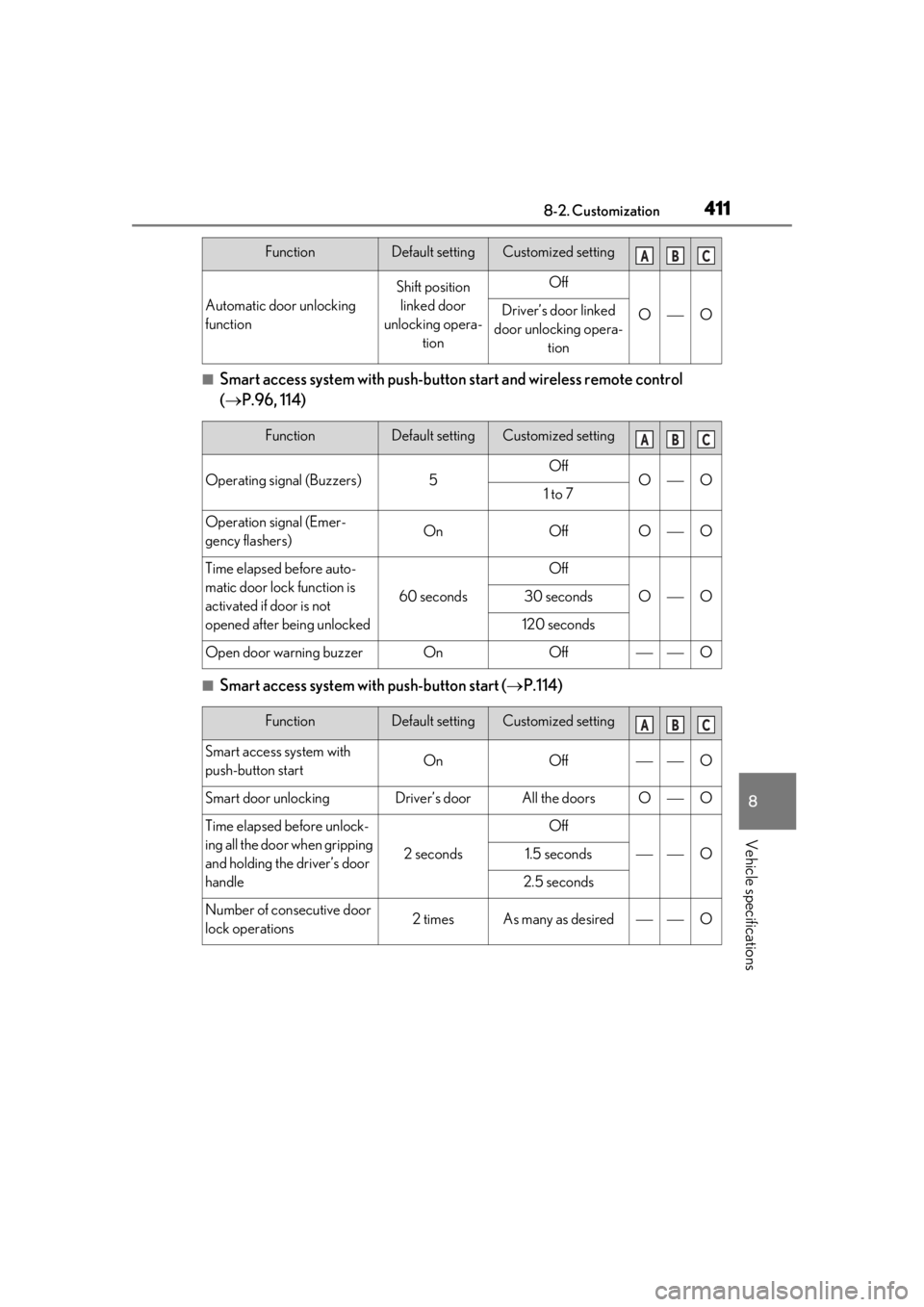
■Smart access system with push-button start and wireless remote control
( P.96, 114)
■Smart access system with push-button start ( P.114)
Automatic door unlocking
function
Shift position
linked door
unlocking opera- tionOff
OODriver’s door linked
door unlocking opera- tion
FunctionDefault settingCustomized setting
Operating signal (Buzzers)5OffOO1 to 7
Operation signal (Emer-
gency flashers)OnOffOO
Time elapsed before auto-
matic door lock function is
activated if door is not
opened after being unlocked
60 seconds
Off
OO30 seconds
120 seconds
Open door warning buzzerOnOffO
FunctionDefault settingCustomized setting
Smart access system with
push-button startOnOffO
Smart door unlockingDriver’s doorAll the doorsOO
Time elapsed before unlock-
ing all the door when gripping
and holding the driver’s door
handle
2 seconds
Off
O1.5 seconds
2.5 seconds
Number of consecutive door
lock operations2 timesAs many as desiredO
FunctionDefault settingCustomized settingABC
ABC
ABC
Page 437 of 452

437Alphabetical Index
Alphabetical Index
A
A/C ................................................................... 262Air conditioning filter ...............................340
Automatic air conditioning system ... 262
ABS (Anti-lock Brake System).............. 244 Function .......................................................... 244
Warning light ...............................................360
ACA (Active Cornering Assist) ........... 245
Active Cornering Assist (ACA) ........... 245
Active Sound Control (ASC) ..................164
Airbags ............................................................... 30 Airbag operating conditions....................32
Airbag precautions for your child ........ 35
Correct driving posture ............................ 25
Curtain shield airbag operating condi- tions .................................................................. 33
Curtain shield airbag precautions ....... 35
Front passenger occupant classification system ............................................................. 39
General airbag precautions ................... 35
Locations of airbags.................................... 30
Modification and disposal of airbags ..37
Side airbag operating conditions ......... 33
Side airbag precautions ............................ 35
Side and curtain shield airbags operating conditions...................................................... 33
Side and curtain shield airbags precau- tions .................................................................. 35
SRS airbags ..................................................... 30
SRS warning light ......................................360
Air conditioning filter ................................. 340
Air conditioning system ............................ 262 Air conditioning filter ...............................340
Automatic air conditioning system ... 262
Alarm ................................................................... 64 Warning buzzer ........................................ 358
Anchor brackets ..................................... 46, 54
Antennas (smart access system with push- button start) ................................................... 114
Anti-lock Brake System (ABS).............. 244 Function .......................................................... 244 Warning light .............................................. 360
Approach warning........................................210
Armrest............................................................ 294
ASC (Active Sound Control) ..................164
Assist grips ..................................................... 295
Audio system-linked display ...................... 83
Automatic headlight leveling system ....166
Automatic High Beam ............................... 168
Automatic light control system................165
Average fuel economy...................................81
Average vehicle speed ..................................81
B
Back door .........................................................102 Hands Free Power Back Door ........... 106
Power back door........................................ 105
Wireless remote control ........................... 96
Back-up lights Replacing light bulbs ................................346
Battery Battery checking ........................................325
If the battery is discharged ....................382
Preparing and checking before winter.......................................................................... 249
Replacing ...................................................... 385
Warning light .............................................. 358
Blind Spot Monitor (BSM)......................... 214
Bottle holders ................................................ 279
Brake Brake Hold..................................................... 163
Fluid...................................................................394
Parking brake ............................................... 160
Warning light .............................................. 358
Brake assist .................................................... 244
Brake Hold .......................................................163
Break-in tips.....................................................143
Brightness control Instrument panel light control........ 74, 78
BSM (Blind Spot Monitor)......................... 214