sport mode LEXUS UX200 2019 User Guide
[x] Cancel search | Manufacturer: LEXUS, Model Year: 2019, Model line: UX200, Model: LEXUS UX200 2019Pages: 452, PDF Size: 10.06 MB
Page 82 of 452
822-1. Instrument cluster
After reset: Displays average fuel con-
sumption since the display was reset
*1
After start: Displays average fuel con-
sumption since the engine was started
After refuel: Displays average fuel con-
sumption since refuel
Average vehicle speed
After reset: Displays average vehicle
speed since the display was reset
*1
After start: Displays average vehicle speed
since the engine was started
Driven distance
Displays the distance driven since the
engine was started
Elapsed time
After reset: Displays elapsed time since the
display was reset
*1
After start: Displays elapsed time since the
engine was started
Driving range
Displays driving ra nge with remaining
fuel
*2, 3
Other
No item
*1: To reset, display the desired item and
press and hold “OK” of the meter con-
trol switches.
*2: This distance is computed based on your average fuel consumption. As a
result, the actual distance that can be
driven may differ from that displayed.
*3: When only a small amount of fuel is added to the tank, the display may not
be updated.
When refueling, turn the engine switch
off. If the vehicle is refueled without
turning the engine switch off, the display
may not be updated.
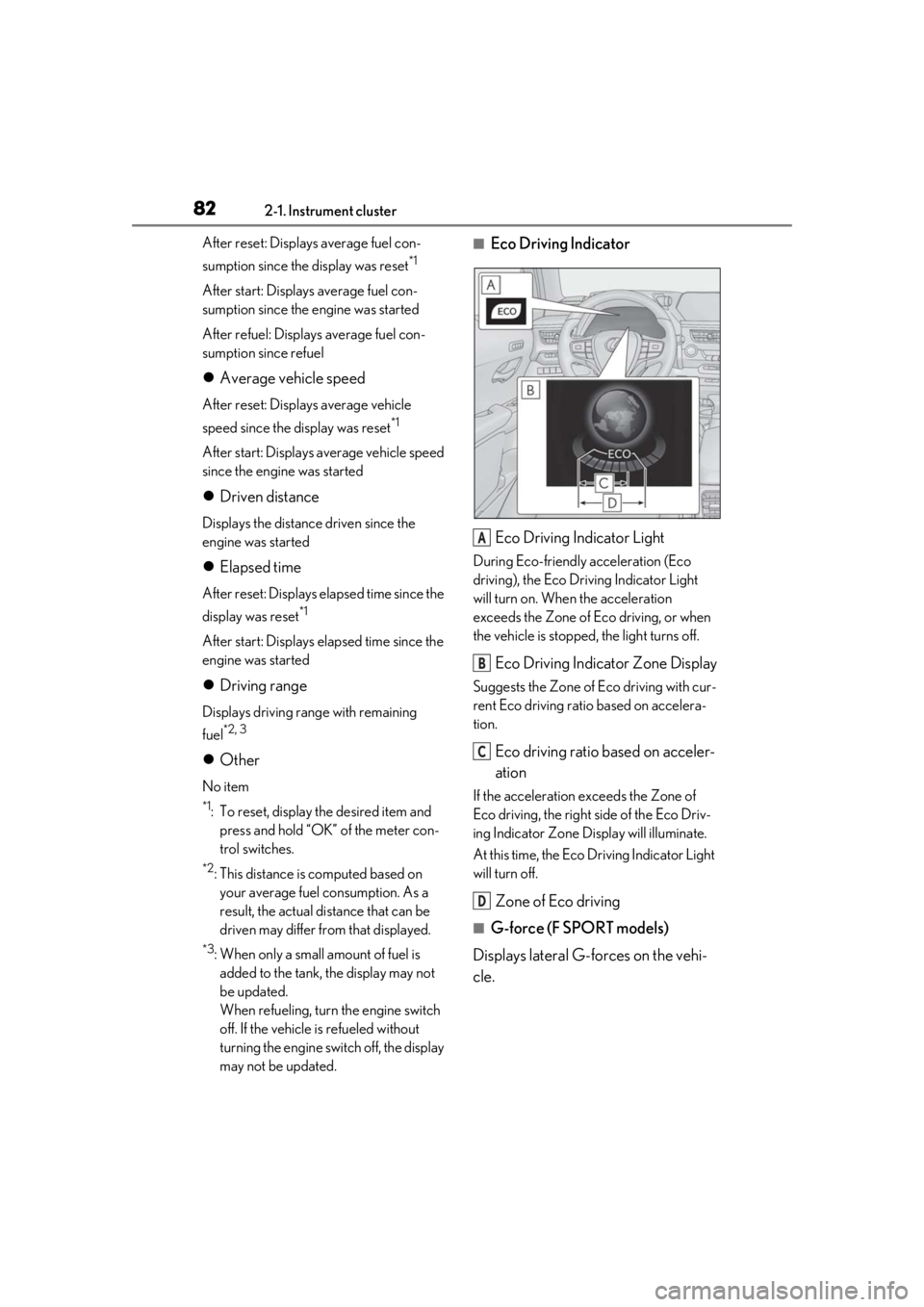
■Eco Driving Indicator
Eco Driving Indicator Light
During Eco-friendly acceleration (Eco
driving), the Eco Driving Indicator Light
will turn on. When the acceleration
exceeds the Zone of Eco driving, or when
the vehicle is stopped, the light turns off.
Eco Driving Indicator Zone Display
Suggests the Zone of Eco driving with cur-
rent Eco driving ratio based on accelera-
tion.
Eco driving ratio based on acceler-
ation
If the acceleration exceeds the Zone of
Eco driving, the right side of the Eco Driv-
ing Indicator Zone Display will illuminate.
At this time, the Eco Driving Indicator Light
will turn off.
Zone of Eco driving
■G-force (F SPORT models)
Displays lateral G-forces on the vehi-
cle.
A
B
C
D
Page 83 of 452
832-1. Instrument cluster
2
Vehicle status information and indicators
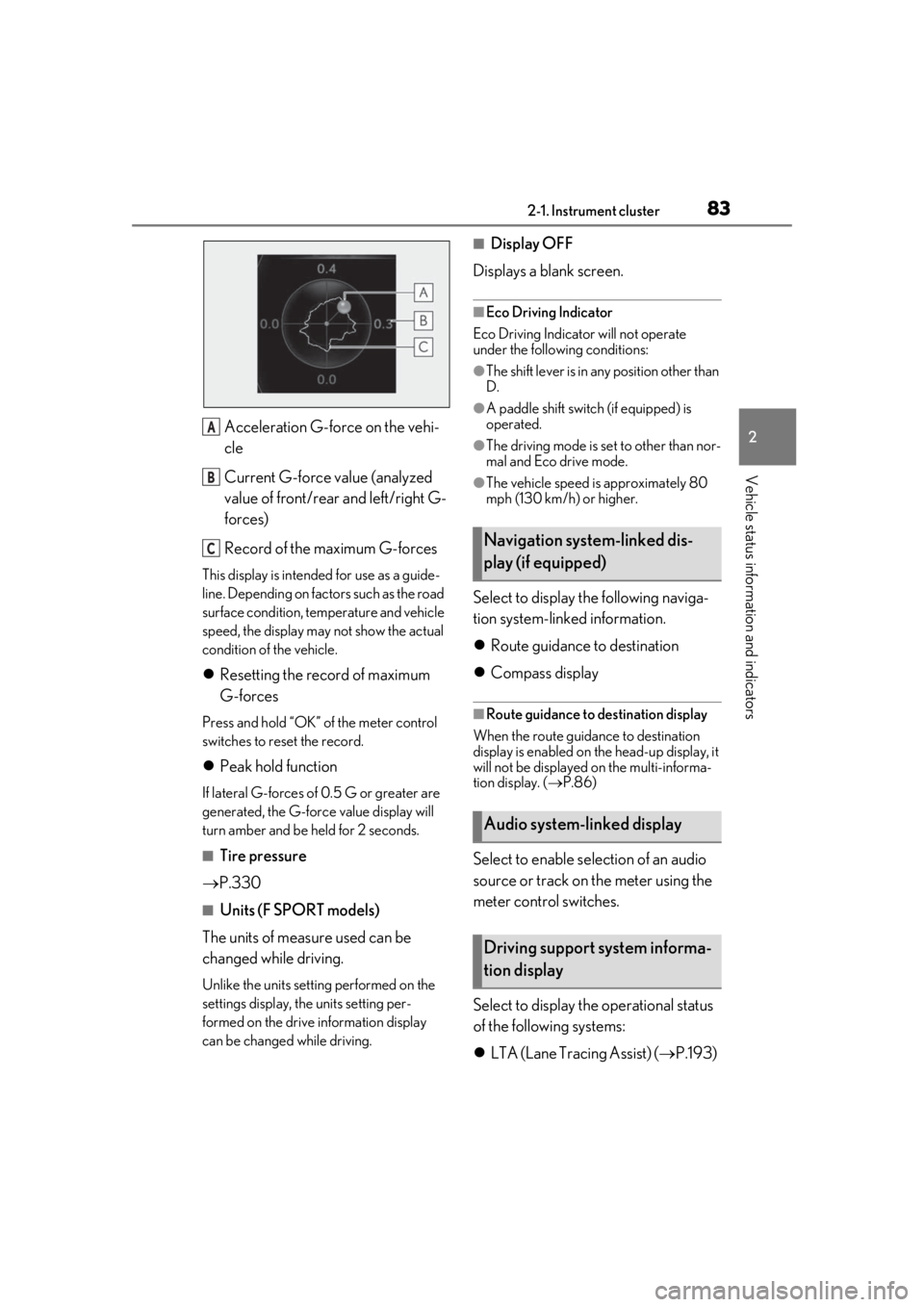
Acceleration G-force on the vehi-
cle
Current G-force value (analyzed
value of front/rear and left/right G-
forces)
Record of the maximum G-forces
This display is intended for use as a guide-
line. Depending on factors such as the road
surface condition, temperature and vehicle
speed, the display may not show the actual
condition of the vehicle.
Resetting the record of maximum
G-forces
Press and hold “OK” of the meter control
switches to reset the record.
Peak hold function
If lateral G-forces of 0.5 G or greater are
generated, the G-forc e value display will
turn amber and be held for 2 seconds.
■Tire pressure
P.330
■Units (F SPORT models)
The units of measure used can be
changed while driving.
Unlike the units setting performed on the
settings display, the units setting per-
formed on the drive information display
can be changed while driving.
■Display OFF
Displays a blank screen.
■Eco Driving Indicator
Eco Driving Indicator will not operate
under the following conditions:
●The shift lever is in an y position other than
D.
●A paddle shift switch (if equipped) is
operated.
●The driving mode is se t to other than nor-
mal and Eco drive mode.
●The vehicle speed is approximately 80
mph (130 km/h) or higher.
Select to display the following naviga-
tion system-linked information.
Route guidance to destination
Compass display
■Route guidance to destination display
When the route guidance to destination
display is enabled on th e head-up display, it
will not be displayed on the multi-informa-
tion display. ( P.86)
Select to enable se lection of an audio
source or track on the meter using the
meter control switches.
Select to display the operational status
of the following systems:
LTA (Lane Tracing Assist) ( P.193)
A
B
CNavigation system-linked dis-
play (if equipped)
Audio system-linked display
Driving support system informa-
tion display
Page 84 of 452
842-1. Instrument cluster
Dynamic radar cruise control with
full-speed range ( P.204)
RSA (Road Sign Assist) (if
equipped) ( P.202)
Select to display warning messages
and measures to be taken if a malfunc-
tion is detected. ( P.367)
■Meter display settings that can be
changed
Language
Select to change th e language displayed.
Units
Select to change the units of measure dis-
played.
Speedometer display (except F
SPORT models)
Select to set the display of the speedome-
ter to digital/analog.
Drive information 1/Drive informa-
tion 2
Select to select up to 2 items ( P.81) that
will be displayed on ea ch Drive information
screen (Drive information 1 screen and
Drive information 2 screen) respectively.
Clock
Select to switch be tween 12-hour display
and 24-hour display.
Pop-up display
Select to enable/disable some pop-up dis-
plays for each relevant system.
Accent color
Select to change the accent color on the
screen, such as the cursor color.
Rev indicator (F SPORT models)
• Select to enable/disable the rev indica-
tor.
• Select to set the engine speed at which the rev indicator (amber) will begin to be
displayed.
Rev peak (F SPORT models)
Select to enable/disable the rev peak.
Eco Driving Indicator Light
Select to enable/disable the Eco Driving
Indicator Light.
Default setting
Select to reset the meter display settings to
the default setting.
■Suspension of the settings display
●Some settings cannot be changed while
driving. When changing settings, park
the vehicle in a safe place.
●If a warning message is displayed, opera-
tion of the settings display will be sus-
pended.
Warning message display
Settings display
WARNING
■Cautions during setting up the dis-
play
As the engine needs to be running
during setting up the display, en sure that
the vehicle is parked in a place with ade-
quate ventilation. In a closed area such as
a garage, exhaust gases including harm-
ful carbon monoxide (CO) may collect
and enter the vehicle. This may lead to
death or a serious health hazard.
Page 142 of 452
1424-1. Before driving
4-1.Before driving
■Starting the engine
P.152
■Driving
1 With the brake pedal depressed,
shift the shift lever to D. ( P.155)
2 If the parking brake is in manual
mode, release the parking brake.
(P.160)
3 Gradually release the brake pedal
and gently depress the accelerator
pedal to accelerate the vehicle.
■Stopping
1 With the shift lever in D, depress the
brake pedal.
2 If necessary, set the parking brake.
(P.160)
If the vehicle is to be stopped for an
extended period of time, shift the shift lever
to P. ( P.155)
■Parking the vehicle
1 With the shift lever in D, depress the
brake pedal.
2 If the parking brake is in manual
mode, set the parking brake
(P.160), and shift the shift lever to
P ( P.155).
3 Press the engine switch to stop the
engine. 4
Lock the door, making sure that you
have the electronic key on your
person.
If parking on a hill, block the wheels as
needed.
■Starting off on a steep uphill
1 Make sure that the parking brake is
set with the brake pedal depressed,
and then shift the shift lever to D.
2 Release the brake pedal and gently
depress the accelerator pedal.
3 Release the parking brake.
■When starting off on a uphill
The hill-start assist control will be activated.
( P.245)
■Driving in the rain
●Drive carefully when it is raining, because
visibility will be reduced, the windows
may become fogged-up, and the road
will be slippery.
●Drive carefully when it starts to rain,
because the road surface will be espe-
cially slippery.
●Refrain from high speeds when driving on
an expressway in the rain, because there
may be a layer of wa ter between the tires
and the road surface, preventing the
steering and brakes from operating prop-
erly.
■Engine speed while driving
In the following conditions, the engine
speed may become high while driving. This
is due to automatic up-shifting control or
down-shifting implementation to meet driv-
ing conditions. It does not indicate sudden
acceleration.
●The vehicle is judged to be driving uphill
or downhill
●When the accelerato r pedal is released
●When the brake pedal is depressed while
Sport mode is selected
Driving the vehicle
The specified procedures should be
observed to ensure safe driving:
Driving procedure
Page 155 of 452
1554-2. Driving procedures
4
Driving
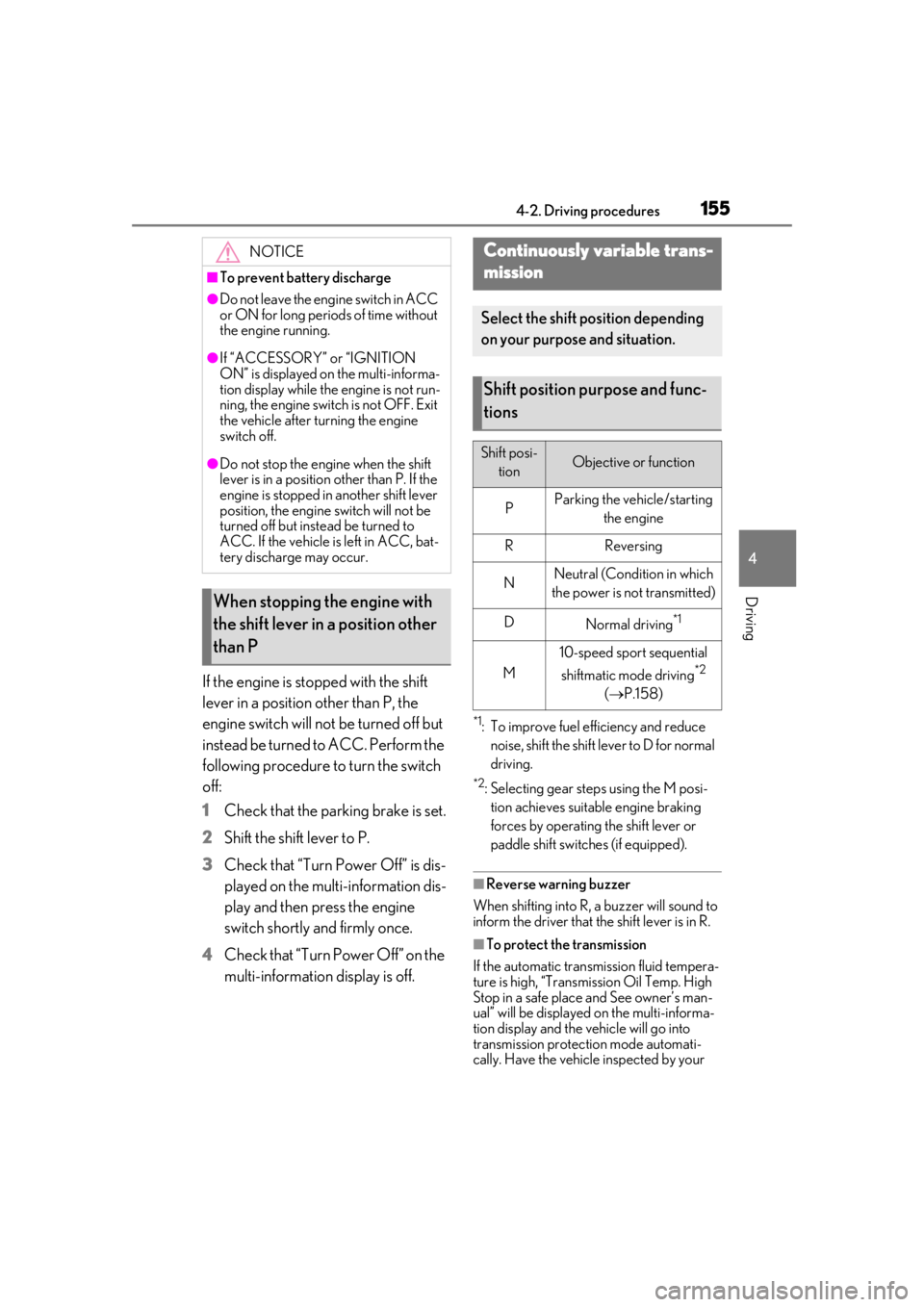
If the engine is stopped with the shift
lever in a position other than P, the
engine switch will not be turned off but
instead be turned to ACC. Perform the
following procedure to turn the switch
off:
1
Check that the parking brake is set.
2
Shift the shift lever to P.
3
Check that “Turn Power Off” is dis-
played on the multi-information dis-
play and then press the engine
switch shortly and firmly once.
4
Check that “Turn Power Off” on the
multi-information display is off.
*1: To improve fuel efficiency and reduce noise, shift the shift lever to D for normal
driving.
*2: Selecting gear steps using the M posi-tion achieves suitable engine braking
forces by operating the shift lever or
paddle shift switch es (if equipped).
■Reverse warning buzzer
When shifting into R, a buzzer will sound to
inform the driver that the shift lever is in R.
■To protect the transmission
If the automatic transmission fluid tempera-
ture is high, “Transmission Oil Temp. High
Stop in a safe place and See owner’s man-
ual” will be displayed on the multi-informa-
tion display and the vehicle will go into
transmission protection mode automati-
cally. Have the vehicle inspected by your
NOTICE
■To prevent battery discharge
●Do not leave the engine switch in ACC
or ON for long periods of time without
the engine running.
●If “ACCESSORY” or “IGNITION
ON” is displayed on the multi-informa-
tion display while the engine is not run-
ning, the engine switch is not OFF. Exit
the vehicle after turning the engine
switch off.
●Do not stop the engine when the shift
lever is in a position other than P. If the
engine is stopped in another shift lever
position, the engine switch will not be
turned off but instead be turned to
ACC. If the vehicle is left in ACC, bat-
tery discharge may occur.
When stopping the engine with
the shift lever in a position other
than P
Continuously variable trans-
mission
Select the shift position depending
on your purpose and situation.
Shift position purpose and func-
tions
Shift posi-
tionObjective or function
PParking the vehicle/starting the engine
RReversing
NNeutral (Condition in which
the power is not transmitted)
DNormal driving*1
M
10-speed sport sequential
shiftmatic mode driving
*2
( P.158)
Page 156 of 452
1564-2. Driving procedures
Lexus dealer.
■Continuously variable transmission fail-
safe control
The system detects ma lfunctioning parts
targeted (all of the so lenoids that perform
the shifting function) by the On-Board
Diagnostics, and performs fail-safe mecha-
nisms, such as restrict ing the shifting func-
tion or transmission ratio control. In this
event, the malfunction indicator lamp turns
on.
■When driving with dynamic radar cruise
control with full-speed range activated
Even when switching the driving mode to
Sport mode while driving in D position
( P.243) with the intent of enabling engine
braking, engine braking will not activate
because radar cruise control with full-
speed range will not be canceled.
■Restraining sudden start (Drive-Start
Control)
P.143
■AI-SHIFT
AI-SHIFT automatically selects the suitable
gear step according to driver performance
and driving conditions.
AI-SHIFT automatically operates when the
driving mode is set to Normal mode with
the shift lever in the D position. (Shifting the
shift lever to the M position cancels the
function.)
■G AI-SHIFT
G AI-SHIFT automatically selects the suit-
able gear step according to driver’s input
and driving conditions. G AI-SHIFT oper-
ates automatically when the shift lever is in
the D position and Sport mode is selected
for the driving mode. (Selecting normal
mode or shifting the shift lever to the M
position cancels the function.)
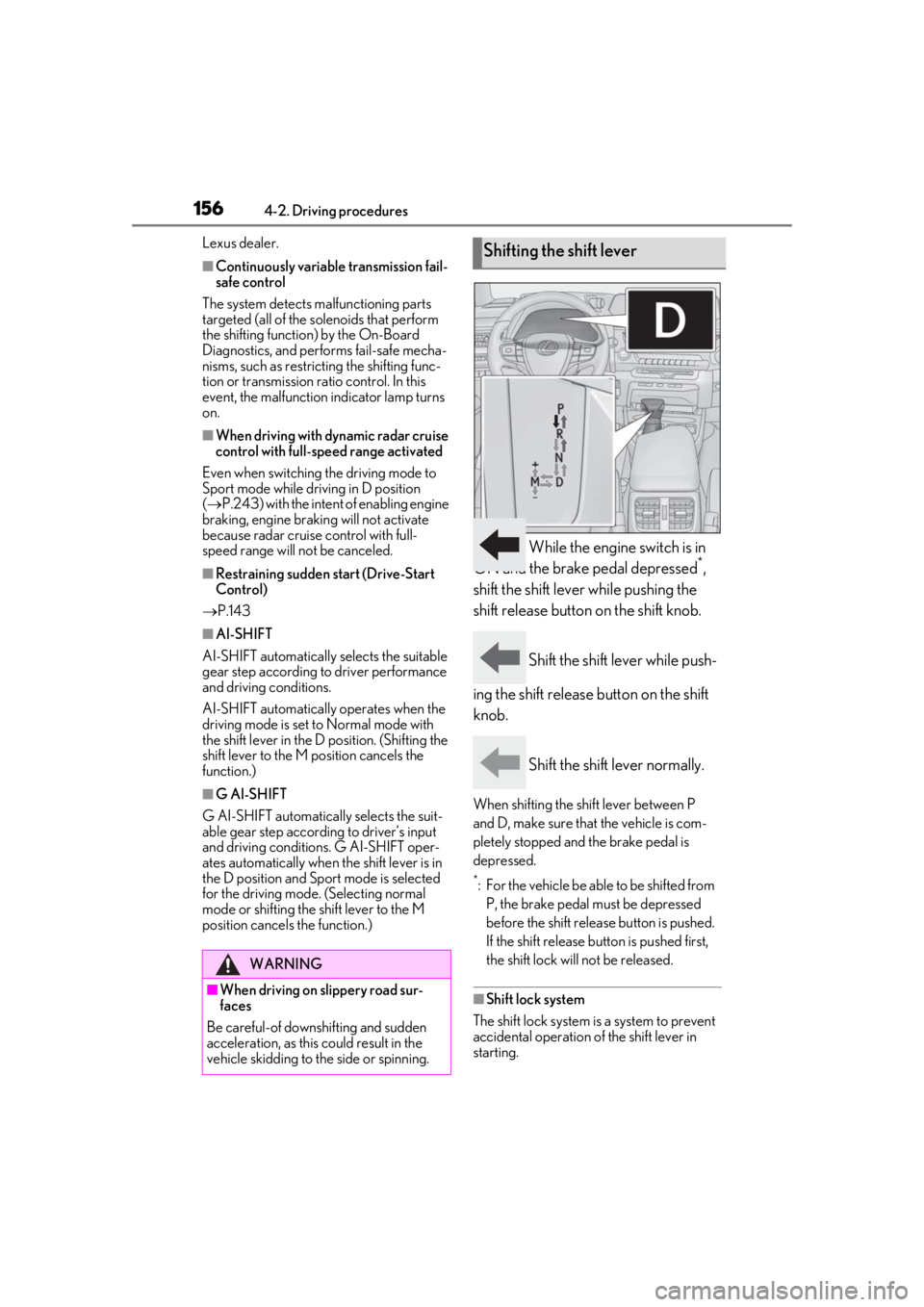
While the engine switch is in
ON and the brake pedal depressed*,
shift the shift lever while pushing the
shift release button on the shift knob.
Shift the shift lever while push-
ing the shift release button on the shift
knob.
Shift the shift lever normally.
When shifting the shift lever between P
and D, make sure that the vehicle is com-
pletely stopped and the brake pedal is
depressed.
*: For the vehicle be able to be shifted from P, the brake pedal must be depressed
before the shift releas e button is pushed.
If the shift release button is pushed first,
the shift lock will not be released.
■Shift lock system
The shift lock system is a system to prevent
accidental operation of the shift lever in
starting.
WARNING
■When driving on slippery road sur-
faces
Be careful-of downshifting and sudden
acceleration, as this could result in the
vehicle skidding to the side or spinning.
Shifting the shift lever
Page 158 of 452
1584-2. Driving procedures
The selected gear step, from D1 to D10, will
be displayed in the meter.
To return to normal D position driving, the
“+” paddle shift switch must be held down
for a period of time.
■Gear step functions
●10 levels of accelerating force and engine
braking can be selected.
●A lower gear step will provide greater
accelerating force and engine braking
force than a higher gear step, and the
engine revolutions will also increase.
■Automatic deactivation of gear step
selection in the D position
Gear step selection in the D position will be
deactivated in the following situations:
●When the vehicle comes to a stop
●If the accelerator pedal is depressed for
more than a certain period of time
●When the shift lever is shifted to a posi-
tion other than D
●When the “+” paddle shift switch is
pressed and held
■Downshifting restriction warning
buzzer
To help ensure safety and driving perfor-
mance, downshifting operation may some-
times be restricted. In some circumstances,
downshifting may not be possible even
when the shift lever or paddle shift switch is
operated. (A buzzer will sound twice.)
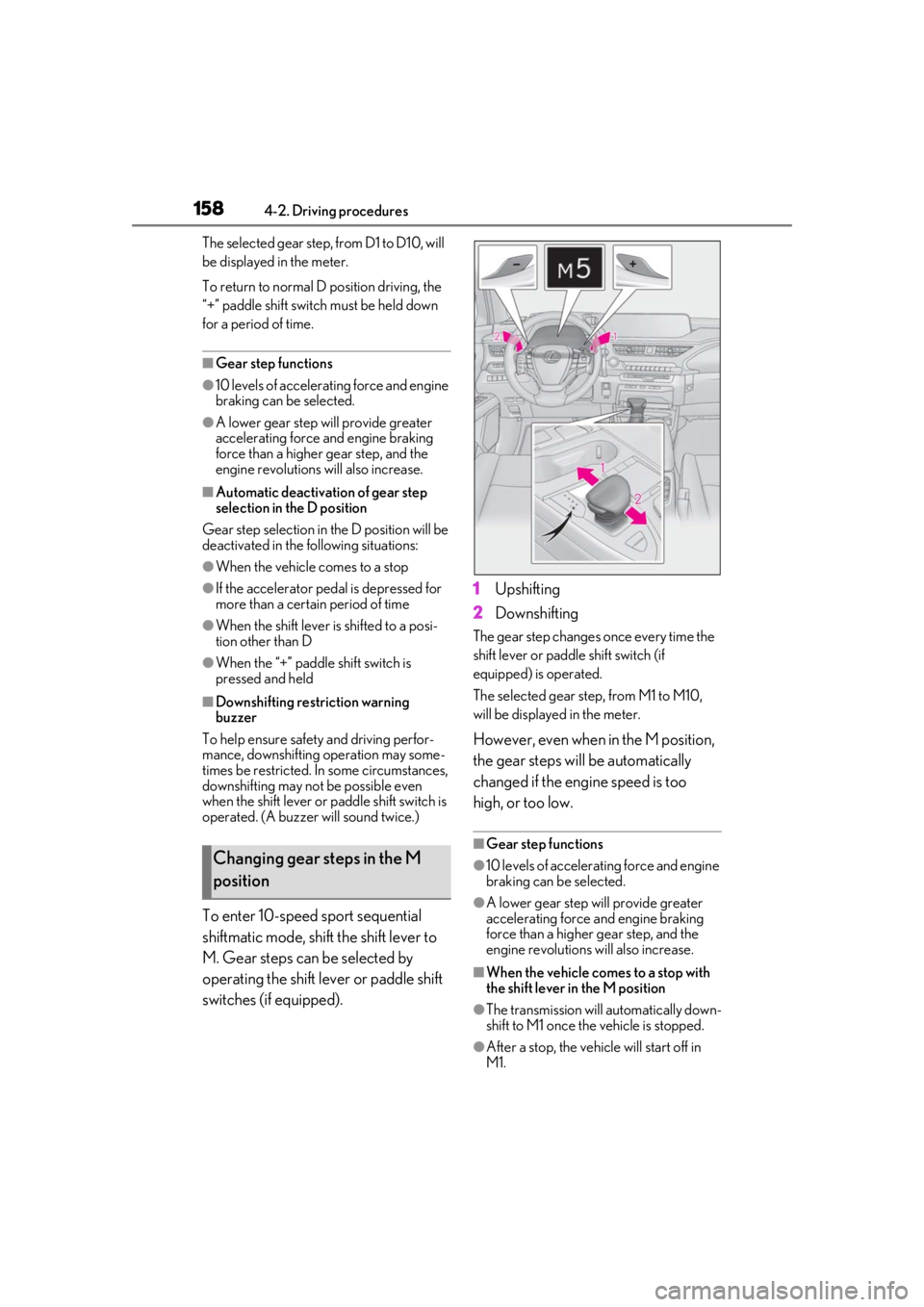
To enter 10-speed sport sequential
shiftmatic mode, shift the shift lever to
M. Gear steps can be selected by
operating the shift lever or paddle shift
switches (if equipped). 1
Upshifting
2 Downshifting
The gear step changes once every time the
shift lever or paddle shift switch (if
equipped) is operated.
The selected gear step , from M1 to M10,
will be displayed in the meter.
However, even when in the M position,
the gear steps will be automatically
changed if the engine speed is too
high, or too low.
■Gear step functions
●10 levels of accelerating force and engine
braking can be selected.
●A lower gear step will provide greater
accelerating force and engine braking
force than a higher gear step, and the
engine revolutions will also increase.
■When the vehicle comes to a stop with
the shift lever in the M position
●The transmission will automatically down-
shift to M1 once the vehicle is stopped.
●After a stop, the vehicle will start off in
M1.
Changing gear steps in the M
position
Page 243 of 452
2434-5. Using the driving support systems
4
Driving
• When backing out of a shallow angle parking spot
• When backing up on a slope with a sharp change in grade
• When a vehicle turns into the detection area
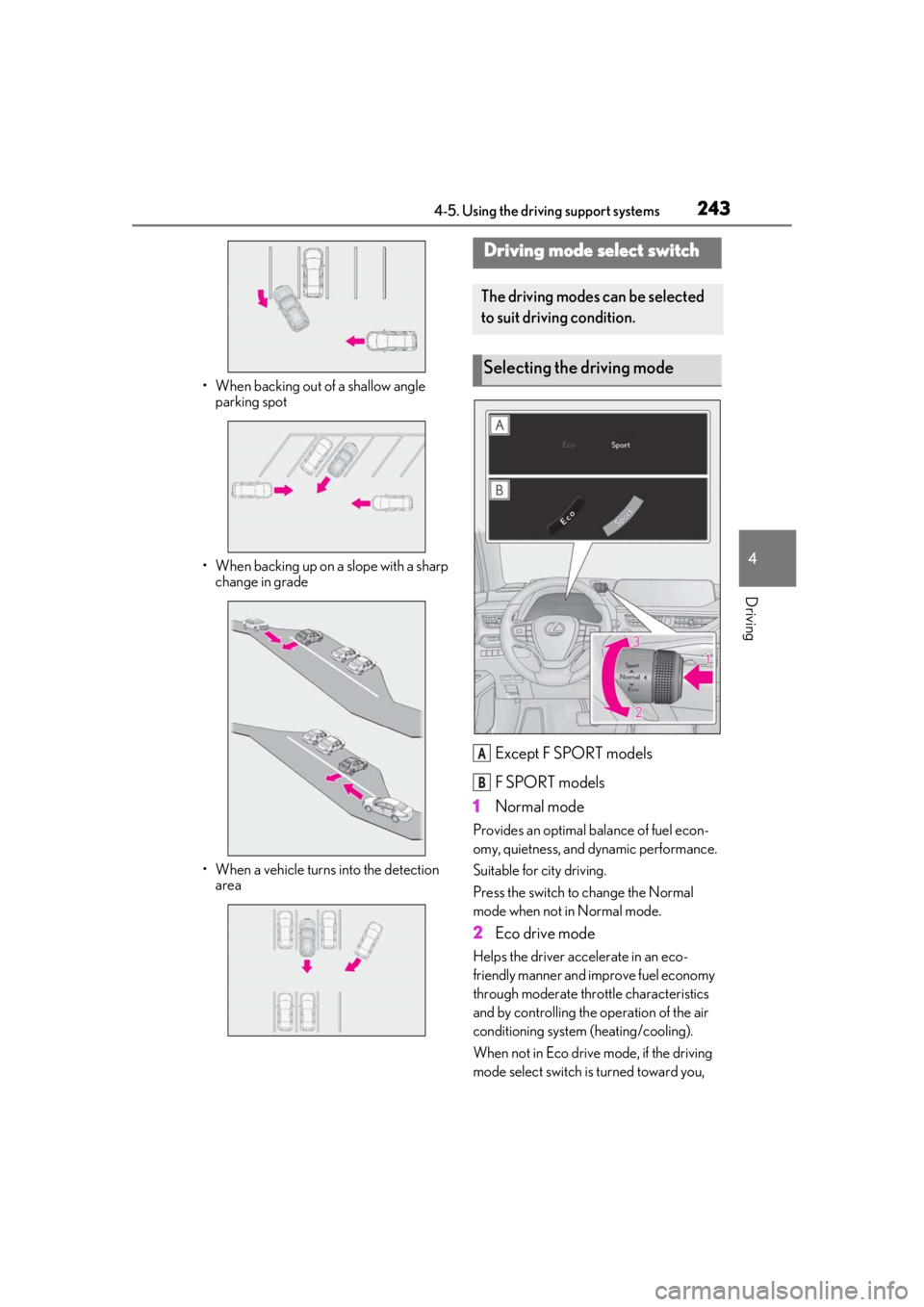
Except F SPORT models
F SPORT models
1 Normal mode
Provides an optimal ba lance of fuel econ-
omy, quietness, and dynamic performance.
Suitable for city driving.
Press the switch to change the Normal
mode when not in Normal mode.
2 Eco drive mode
Helps the driver acce lerate in an eco-
friendly manner and improve fuel economy
through moderate thro ttle characteristics
and by controlling the operation of the air
conditioning system (heating/cooling).
When not in Eco drive mode, if the driving
mode select switch is turned toward you,
Driving mode select switch
The driving modes can be selected
to suit driving condition.
Selecting the driving mode
A
B
Page 244 of 452
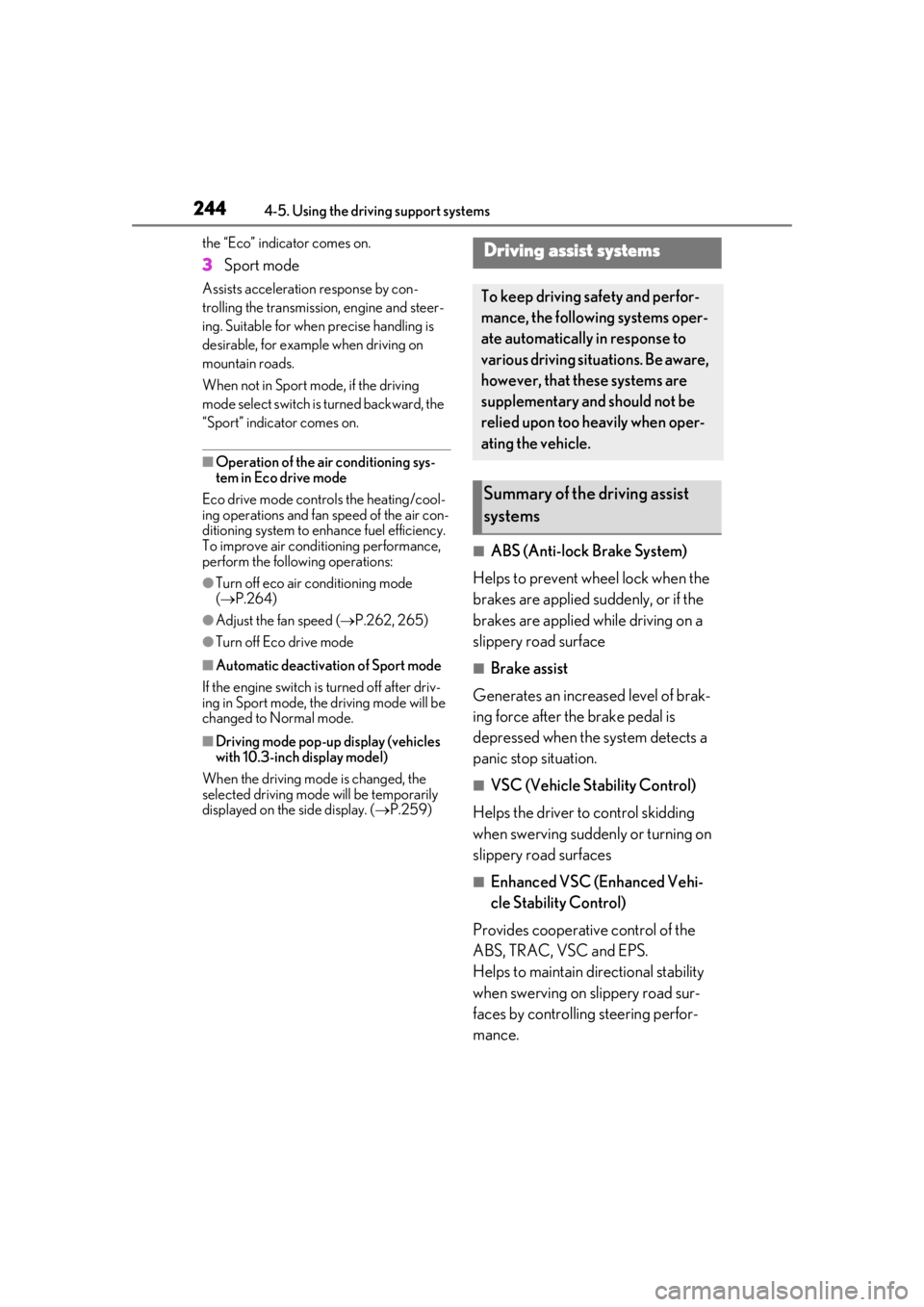
2444-5. Using the driving support systems
the “Eco” indicator comes on.
3Sport mode
Assists acceleration response by con-
trolling the transmission, engine and steer-
ing. Suitable for when precise handling is
desirable, for example when driving on
mountain roads.
When not in Sport mode, if the driving
mode select switch is turned backward, the
“Sport” indicator comes on.
■Operation of the air conditioning sys-
tem in Eco drive mode
Eco drive mode controls the heating/cool-
ing operations and fan speed of the air con-
ditioning system to enhance fuel efficiency.
To improve air condit ioning performance,
perform the following operations:
●Turn off eco air conditioning mode
( P.264)
●Adjust the fan speed ( P.262, 265)
●Turn off Eco drive mode
■Automatic deactivation of Sport mode
If the engine switch is turned off after driv-
ing in Sport mode, the driving mode will be
changed to Normal mode.
■Driving mode pop-up display (vehicles
with 10.3-inch display model)
When the driving mode is changed, the
selected driving mode will be temporarily
displayed on the side display. ( P.259)
■ABS (Anti-lock Brake System)
Helps to prevent wheel lock when the
brakes are applied suddenly, or if the
brakes are applied while driving on a
slippery road surface
■Brake assist
Generates an increased level of brak-
ing force after the brake pedal is
depressed when the system detects a
panic stop situation.
■VSC (Vehicle Stability Control)
Helps the driver to control skidding
when swerving sudden ly or turning on
slippery road surfaces
■Enhanced VSC (Enhanced Vehi-
cle Stability Control)
Provides cooperative control of the
ABS, TRAC, VSC and EPS.
Helps to maintain directional stability
when swerving on slippery road sur-
faces by controlling steering perfor-
mance.
Driving assist systems
To keep driving safety and perfor-
mance, the following systems oper-
ate automatically in response to
various driving situations. Be aware,
however, that these systems are
supplementary and should not be
relied upon too heavily when oper-
ating the vehicle.
Summary of the driving assist
systems
Page 410 of 452
4108-2. Customization
*2: The default setting varies according to country.
*3:Except F SPORT models
*4: 2 of the following items: current fuel consumption, average fuel economy (after reset),
average fuel economy (after start), average fuel economy (after refuel), average vehicle
speed (after reset), average vehicle speed (after start), elapsed time (after reset),
elapsed time (after start), distance (driving range), distance (after start), blank.
*5:F SPORT models
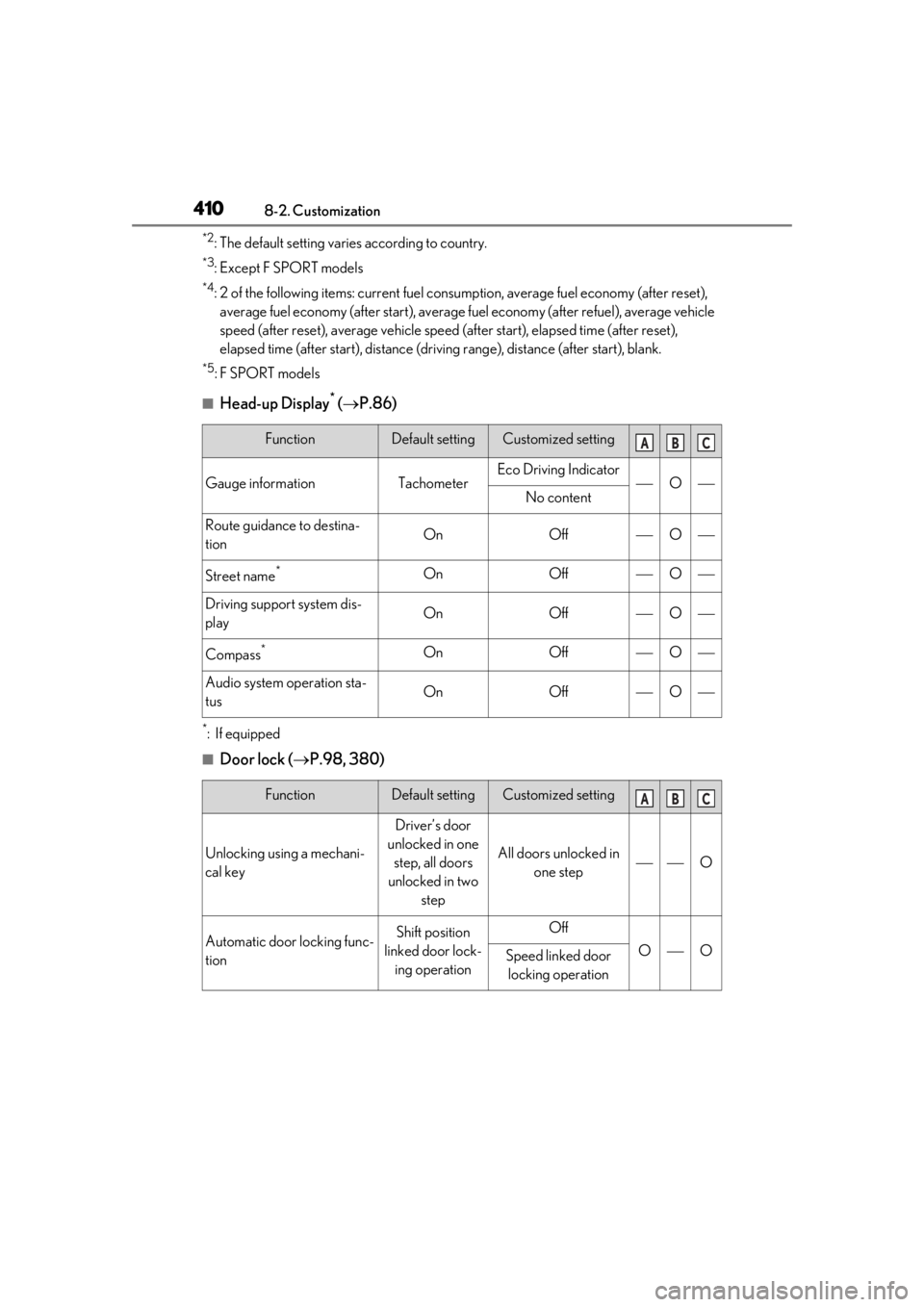
■Head-up Display* ( P.86)
*:If equipped
■Door lock ( P.98, 380)
FunctionDefault settingCustomized setting
Gauge informationTachometerEco Driving IndicatorONo content
Route guidance to destina-
tionOnOffO
Street name*OnOffO
Driving support system dis-
playOnOffO
Compass*OnOffO
Audio system operation sta-
tusOnOffO
FunctionDefault settingCustomized setting
Unlocking using a mechani-
cal key
Driver’s door
unlocked in one step, all doors
unlocked in two step
All doors unlocked in one stepO
Automatic door locking func-
tionShift position
linked door lock- ing operationOff
OOSpeed linked door locking operation
ABC
ABC