battery LEXUS UX200 2019 Owner's Manual
[x] Cancel search | Manufacturer: LEXUS, Model Year: 2019, Model line: UX200, Model: LEXUS UX200 2019Pages: 452, PDF Size: 10.06 MB
Page 171 of 452
1714-3. Operating the lights and wipers
4
Driving
*: If equipped
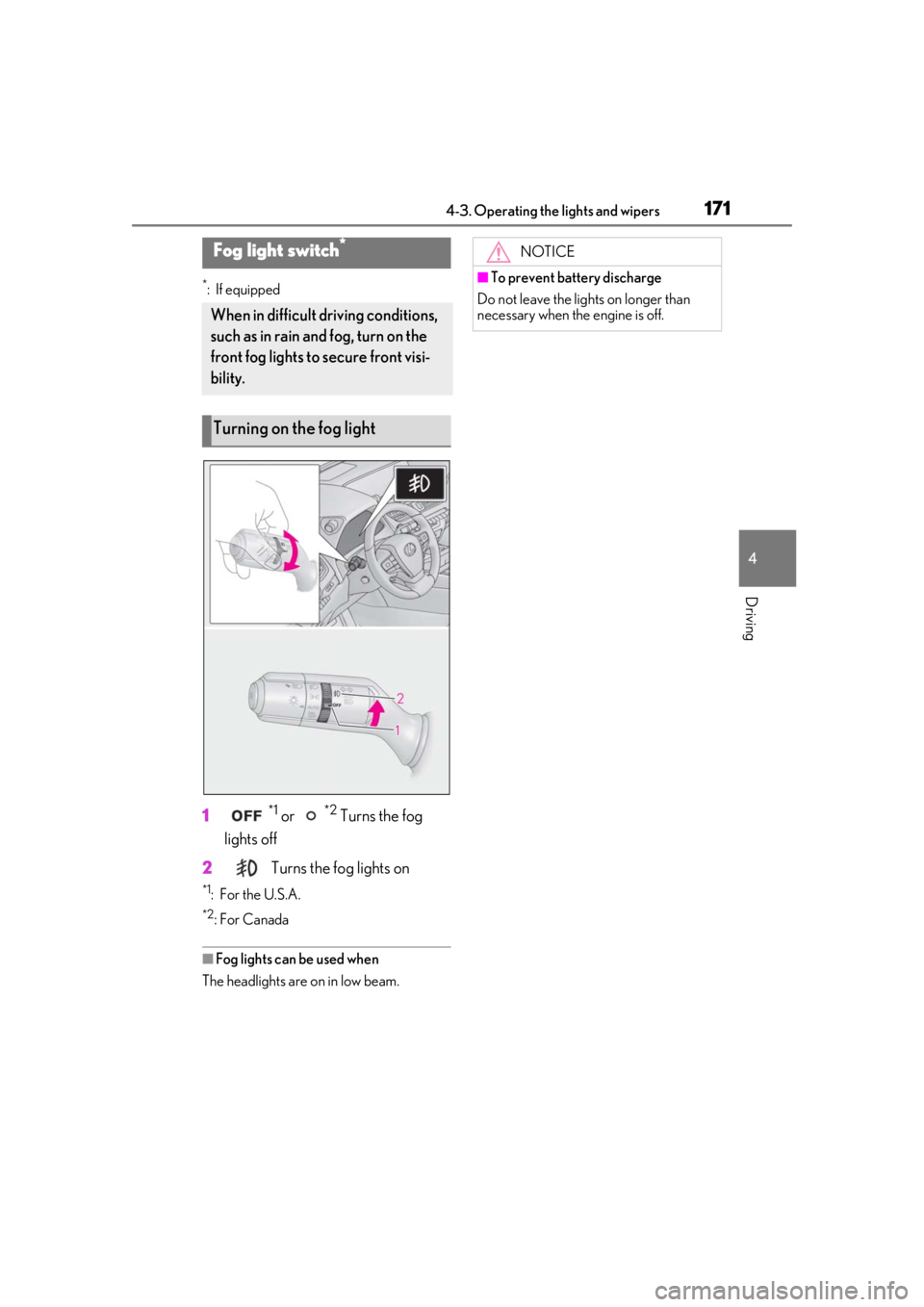
1*1 or *2 Turns the fog
lights off
2
Turns the fog lights on
*1: For the U.S.A.
*2: For Canada
■Fog lights can be used when
The headlights are on in low beam.
Fog light switch*
When in difficult driving conditions,
such as in rain and fog, turn on the
front fog lights to secure front visi-
bility.
Turning on the fog light
NOTICE
■To prevent battery discharge
Do not leave the lights on longer than
necessary when the engine is off.
Page 174 of 452
1744-3. Operating the lights and wipers
time the lever is pulled.
■The windshield wipers and washer can
be operated when
The engine switch is in ON.
■Effects of vehicle speed on wiper opera-
tion (vehicles with rain-sensing wind-
shield wipers)
Vehicle speed affects the Intermittent wiper
interval.
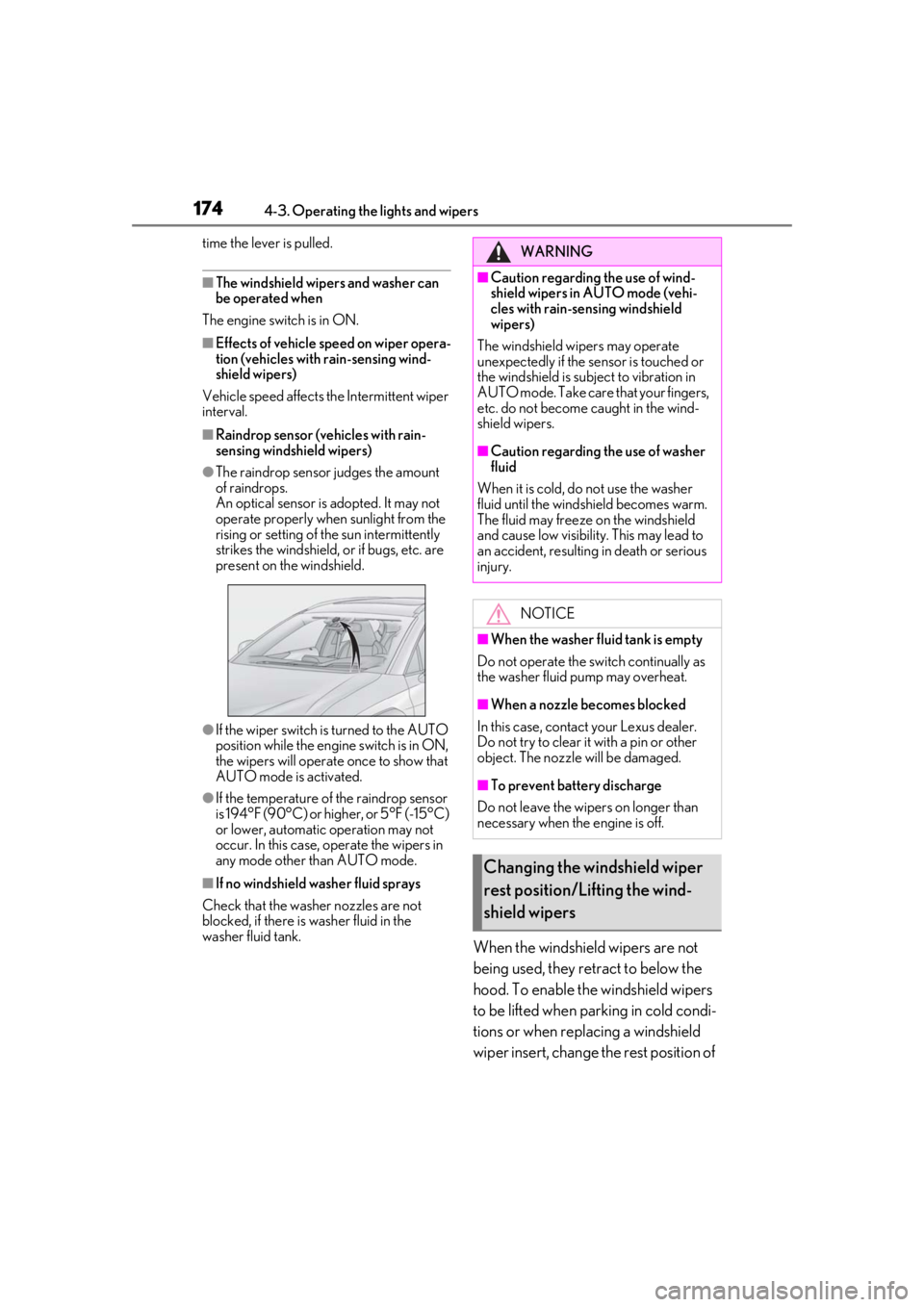
■Raindrop sensor (vehicles with rain-
sensing windshield wipers)
●The raindrop sensor judges the amount
of raindrops.
An optical sensor is adopted. It may not
operate properly when sunlight from the
rising or setting of the sun intermittently
strikes the windshield, or if bugs, etc. are
present on the windshield.
●If the wiper switch is turned to the AUTO
position while the engine switch is in ON,
the wipers will operate once to show that
AUTO mode is activated.
●If the temperature of the raindrop sensor
is 194°F (90°C) or higher, or 5°F (-15°C)
or lower, automatic operation may not
occur. In this case, operate the wipers in
any mode other than AUTO mode.
■If no windshield washer fluid sprays
Check that the washer nozzles are not
blocked, if there is washer fluid in the
washer fluid tank.
When the windshield wipers are not
being used, they retract to below the
hood. To enable the windshield wipers
to be lifted when parking in cold condi-
tions or when replacing a windshield
wiper insert, change the rest position of
WARNING
■Caution regarding the use of wind-
shield wipers in AUTO mode (vehi-
cles with rain-sensing windshield
wipers)
The windshield wipers may operate
unexpectedly if the sensor is touched or
the windshield is subject to vibration in
AUTO mode. Take care that your fingers,
etc. do not become caught in the wind-
shield wipers.
■Caution regarding the use of washer
fluid
When it is cold, do not use the washer
fluid until the windshield becomes warm.
The fluid may freeze on the windshield
and cause low visibility. This may lead to
an accident, resulting in death or serious
injury.
NOTICE
■When the washer fluid tank is empty
Do not operate the switch continually as
the washer fluid pump may overheat.
■When a nozzle becomes blocked
In this case, contact your Lexus dealer.
Do not try to clear it with a pin or other
object. The nozzle will be damaged.
■To prevent battery discharge
Do not leave the wipers on longer than
necessary when the engine is off.
Changing the windshield wiper
rest position/Lifting the wind-
shield wipers
Page 177 of 452

1774-3. Operating the lights and wipers
4
Driving
NOTICE
■When the washer fluid tank is empty
Do not operate the switch continually as
the washer fluid pump may overheat.
■When a nozzle becomes blocked
In this case, contact your Lexus dealer.
Do not try to clear it with a pin or other
object. The nozzle will be damaged.
■To prevent battery discharge
Do not leave the wipers on longer than
necessary when the engine is off.
Page 189 of 452
1894-5. Using the driving support systems
4
Driving
Each function is operational at the following speed
●Pre-collision warning
●Pre-collision brake assist
●Pre-collision braking
The system may not operate in the following situations:
●If a battery terminal has been disconnected and reconnected and then the vehicle has not
been driven for a certain amount of time
●If the shift lever is in R
●When the VSC OFF indicator is illuminated (only the pre-collision warning function will
be operational)
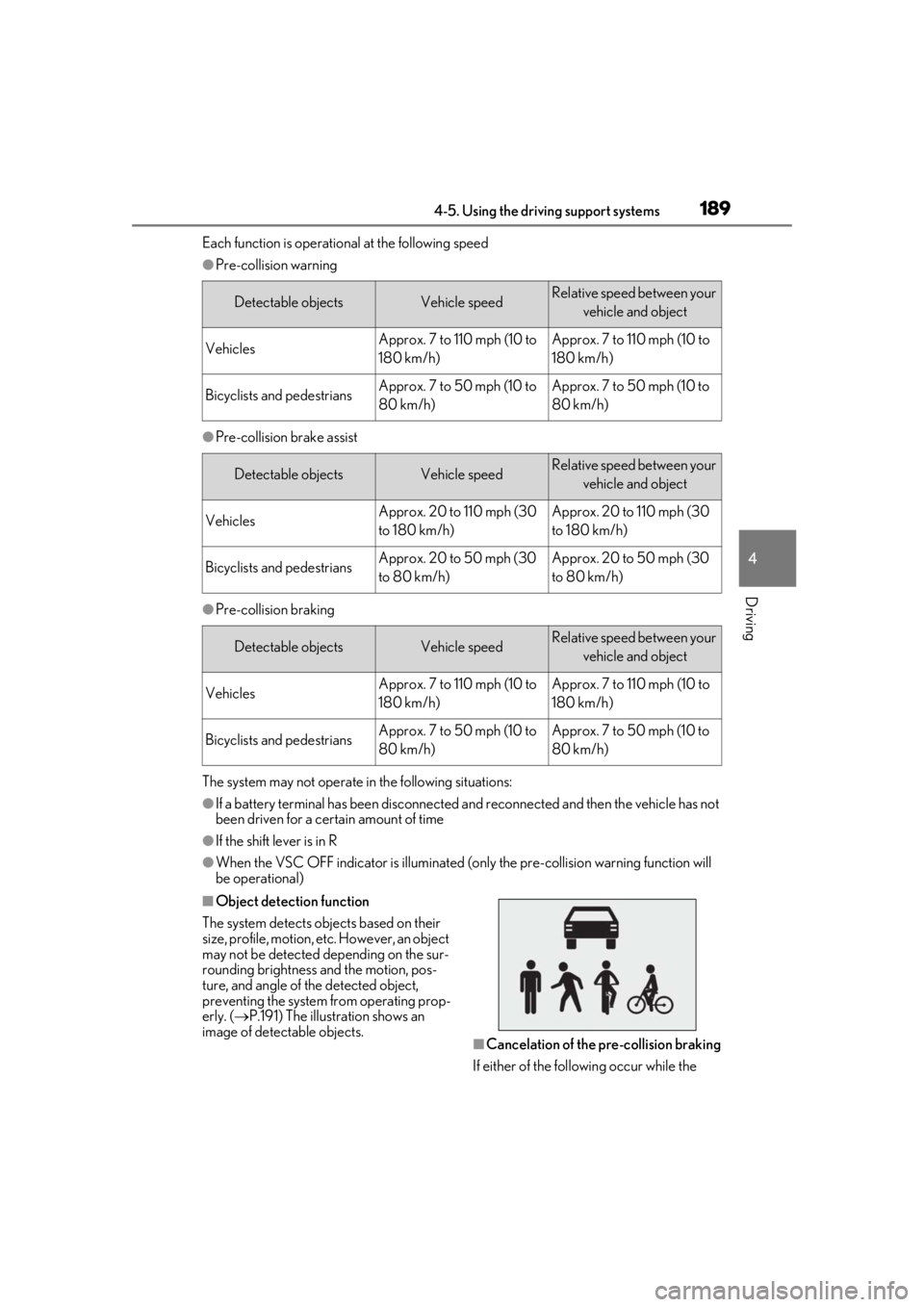
■Object detection function
The system detects ob jects based on their
size, profile, motion, etc. However, an object
may not be detected depending on the sur-
rounding brightness and the motion, pos-
ture, and angle of the detected object,
preventing the system from operating prop-
erly. ( P.191) The illustration shows an
image of detectable objects.
■Cancelation of the pre-collision braking
If either of the follo wing occur while the
Detectable objectsVehicle speedRelative speed between your
vehicle and object
VehiclesApprox. 7 to 110 mph (10 to
180 km/h)Approx. 7 to 110 mph (10 to
180 km/h)
Bicyclists and pedestriansApprox. 7 to 50 mph (10 to
80 km/h)Approx. 7 to 50 mph (10 to
80 km/h)
Detectable objectsVehicle speedRelative speed between your vehicle and object
VehiclesApprox. 20 to 110 mph (30
to 180 km/h)Approx. 20 to 110 mph (30
to 180 km/h)
Bicyclists and pedestriansApprox. 20 to 50 mph (30
to 80 km/h)Approx. 20 to 50 mph (30
to 80 km/h)
Detectable objectsVehicle speedRelative speed between your vehicle and object
VehiclesApprox. 7 to 110 mph (10 to
180 km/h)Approx. 7 to 110 mph (10 to
180 km/h)
Bicyclists and pedestriansApprox. 7 to 50 mph (10 to
80 km/h)Approx. 7 to 50 mph (10 to
80 km/h)
Page 234 of 452
2344-5. Using the driving support systems
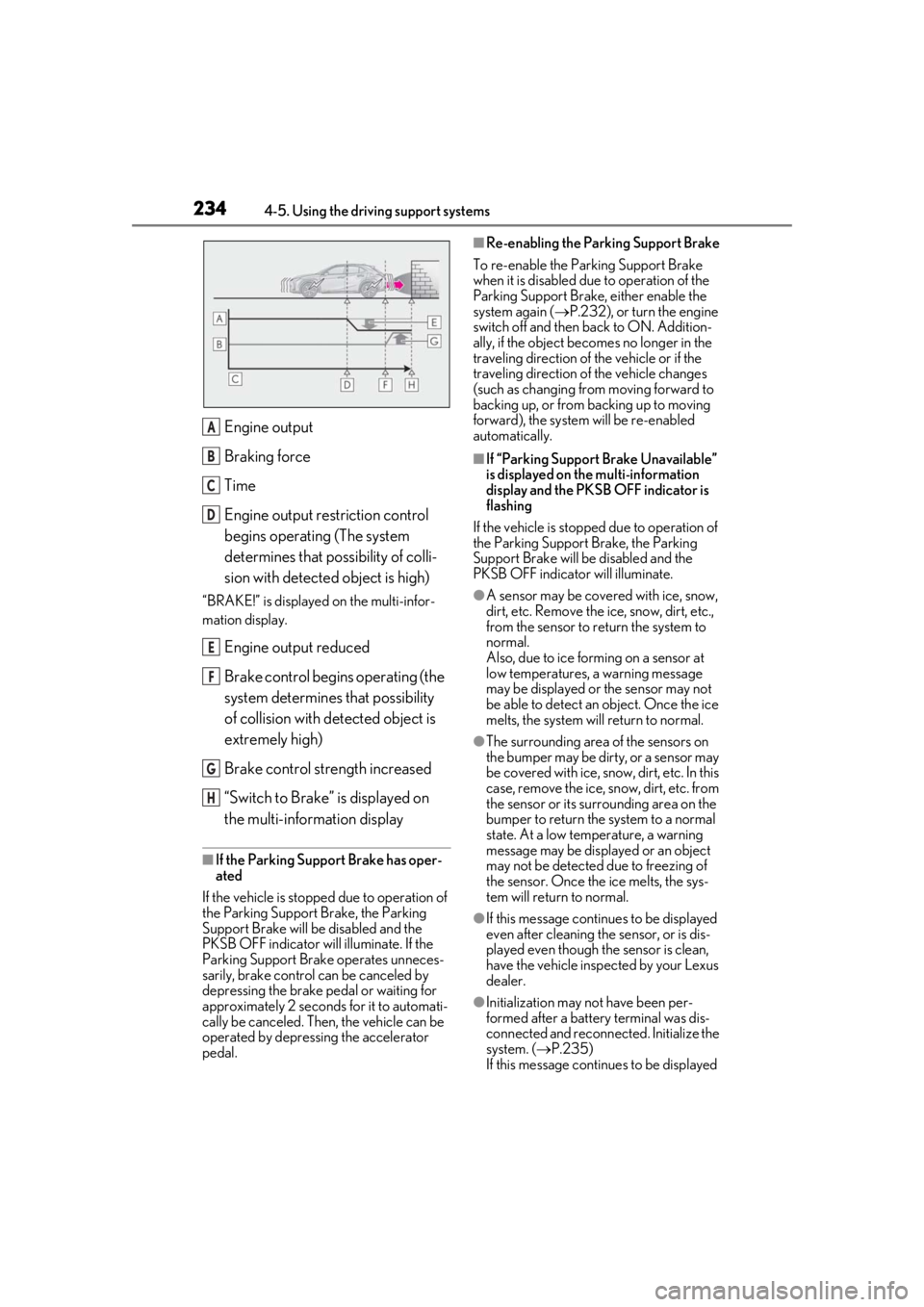
Engine output
Braking force
Time
Engine output restriction control
begins operating (The system
determines that possibility of colli-
sion with detected object is high)
“BRAKE!” is displayed on the multi-infor-
mation display.
Engine output reduced
Brake control begins operating (the
system determines that possibility
of collision with detected object is
extremely high)
Brake control strength increased
“Switch to Brake” is displayed on
the multi-information display
■If the Parking Support Brake has oper-
ated
If the vehicle is stopped due to operation of
the Parking Support Brake, the Parking
Support Brake will be disabled and the
PKSB OFF indicator will illuminate. If the
Parking Support Brake operates unneces-
sarily, brake control can be canceled by
depressing the brake pedal or waiting for
approximately 2 seconds for it to automati-
cally be canceled. Then, the vehicle can be
operated by depressing the accelerator
pedal.
■Re-enabling the Parking Support Brake
To re-enable the Parking Support Brake
when it is disabled due to operation of the
Parking Support Brake, either enable the
system again ( P.232), or turn the engine
switch off and then back to ON. Addition-
ally, if the object becomes no longer in the
traveling direction of the vehicle or if the
traveling direction of the vehicle changes
(such as changing from moving forward to
backing up, or from backing up to moving
forward), the system will be re-enabled
automatically.
■If “Parking Support Brake Unavailable”
is displayed on th e multi-information
display and the PKSB OFF indicator is
flashing
If the vehicle is stopped due to operation of
the Parking Support Brake, the Parking
Support Brake will be disabled and the
PKSB OFF indicator will illuminate.
●A sensor may be cove red with ice, snow,
dirt, etc. Remove the ice, snow, dirt, etc.,
from the sensor to return the system to
normal.
Also, due to ice forming on a sensor at
low temperatures, a warning message
may be displayed or the sensor may not
be able to detect an object. Once the ice
melts, the system wi ll return to normal.
●The surrounding area of the sensors on
the bumper may be dirty, or a sensor may
be covered with ice, snow, dirt, etc. In this
case, remove the ice, snow, dirt, etc. from
the sensor or its surrounding area on the
bumper to return the system to a normal
state. At a low temperature, a warning
message may be displayed or an object
may not be detected due to freezing of
the sensor. Once the ice melts, the sys-
tem will return to normal.
●If this message continues to be displayed
even after cleaning the sensor, or is dis-
played even though the sensor is clean,
have the vehicle inspected by your Lexus
dealer.
●Initialization may not have been per-
formed after a battery terminal was dis-
connected and reconnected. Initialize the
system. ( P.235)
If this message continues to be displayed
A
B
C
D
E
F
G
H
Page 235 of 452
2354-5. Using the driving support systems
4
Driving
even after initialization, have the vehicle
inspected by your Lexus dealer.
■If a battery terminal has been discon-
nected and reconnected
The system needs to be initialized. To initial-
ize the system, drive the vehicle straight
ahead for 5 seconds or more at a speed of
approximately 22 mph (35 km/h) or more.
*: If equipped
This function will operate in situations
such as the following if an object is
detected in the traveling direction of
the vehicle.
Parking Support Brake func-
tion (static objects)*
If the sensors detect a static object,
such as a wall, in the traveling direc-
tion of the vehi cle and the system
determines that a collision may
occur due to the vehicle suddenly
moving forward due to an acciden-
tal accelerator pedal operation, the
vehicle moving the unintended
direction due to the wrong shift
position being selected, or while
parking or traveling at low speeds,
the system will operate to lessen
the impact with the detected static
object and reduce the resulting
damage.
Examples of function operation
Page 249 of 452
2494-6. Driving tips
4
Driving
4-6.Driving tips
Use fluids that are appropriate to
the prevailing outside temperatures.
• Engine oil
• Engine coolant
• Washer fluid
Have a service technician inspect
the condition of the battery.
Vehicles without run-flat tires: Have
the vehicle fitted with four snow tires
or purchase a set of tire chains for
the front tires.
Ensure that all tires are the same size and
brand, and that chains match the size of the
tires.
Vehicles with run-flat tires: It is rec-
ommended that the vehicle is fitted
with four snow run-flat tires or pur-
chase a set of tire chains for the front
tires.
Ensure that all tires are the same size and
brand, and that chains match the size of the
tires.
Winter driving tips
Carry out the necessary prepara-
tions and inspections before driving
the vehicle in winter. Always drive
the vehicle in a manner appropriate
to the prevailing weather condi-
tions.
Preparation for winter
WARNING
■Driving with snow tires
Observe the following precautions to
reduce the risk of accidents.
Failure to do so may result in a loss of
vehicle control and cause death or seri-
ous injury.
●Use tires of the specified size.
●Maintain the recommended level of air
pressure.
●Do not drive in excess of 75 mph (120
km/h), regardless of the type of snow
tires being used.
●Use snow tires on all, not just some
wheels.
■Driving with tire chains
Observe the following precautions to
reduce the risk of accidents.
Failure to do so may result in the vehicle
being unable to be driven safely, and may
cause death or serious injury.
●Do not drive in excess of the speed
limit specified for the tire chains being
used, or 30 mph (50 km/h), which-
ever is lower.
●Avoid driving on bumpy road surfaces
or over potholes.
●Avoid sudden acceleration, abrupt
steering, sudden br aking and shifting
operations that cause sudden engine
braking.
●Slow down sufficiently before entering
a curve to ensure that vehicle control is
maintained.
●Do not use LTA (Lane Tracing Assist).
Page 265 of 452
2655-3. Using the air conditioning system and defogger
5
Interior features
diately after the air conditioning system is
started in automatic mode.
■Air conditioning filter
P.340
■Customization
Settings (e.g. A/C automatic mode switch
operation) can be changed.
(Customizable features: P.416)
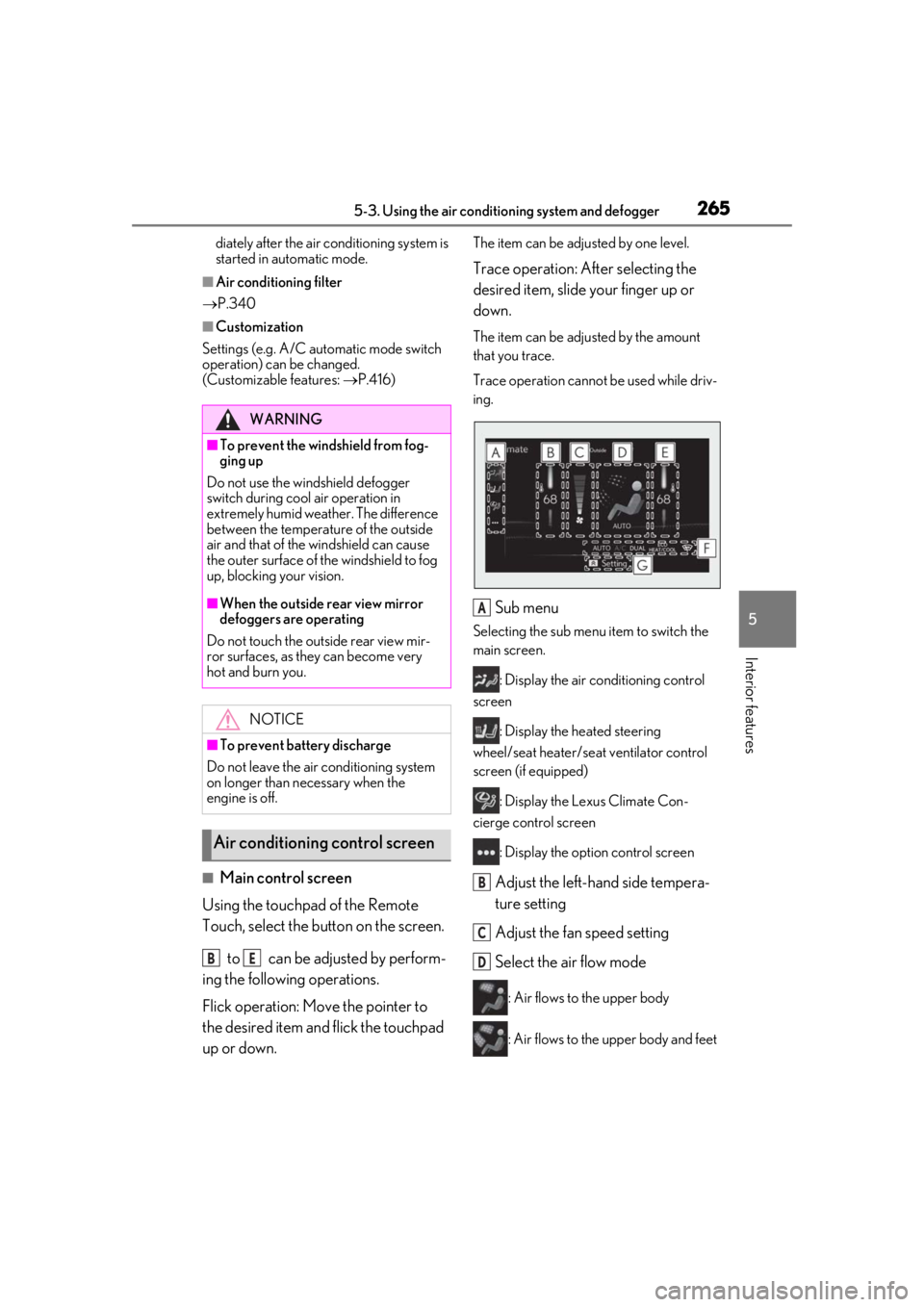
■Main control screen
Using the touchpad of the Remote
Touch, select the button on the screen.
to can be adjusted by perform-
ing the following operations.
Flick operation: Move the pointer to
the desired item and flick the touchpad
up or down.
The item can be adjusted by one level.
Trace operation: After selecting the
desired item, slide your finger up or
down.
The item can be adjusted by the amount
that you trace.
Trace operation cannot be used while driv-
ing.
Sub menu
Selecting the sub menu item to switch the
main screen.
: Display the air conditioning control
screen
: Display the heated steering
wheel/seat heater/sea t ventilator control
screen (if equipped)
: Display the Lexus Climate Con-
cierge control screen
: Display the option control screen
Adjust the left-hand side tempera-
ture setting
Adjust the fan speed setting
Select the air flow mode
: Air flows to the upper body
: Air flows to the upper body and feet
WARNING
■To prevent the windshield from fog-
ging up
Do not use the windshield defogger
switch during cool air operation in
extremely humid weather. The difference
between the temperature of the outside
air and that of the windshield can cause
the outer surface of the windshield to fog
up, blocking your vision.
■When the outside rear view mirror
defoggers are operating
Do not touch the outside rear view mir-
ror surfaces, as they can become very
hot and burn you.
NOTICE
■To prevent battery discharge
Do not leave the air conditioning system
on longer than necessary when the
engine is off.
Air conditioning control screen
BE
A
B
C
D
Page 271 of 452
2715-3. Using the air conditioning system and defogger
5
Interior features
*: If equipped
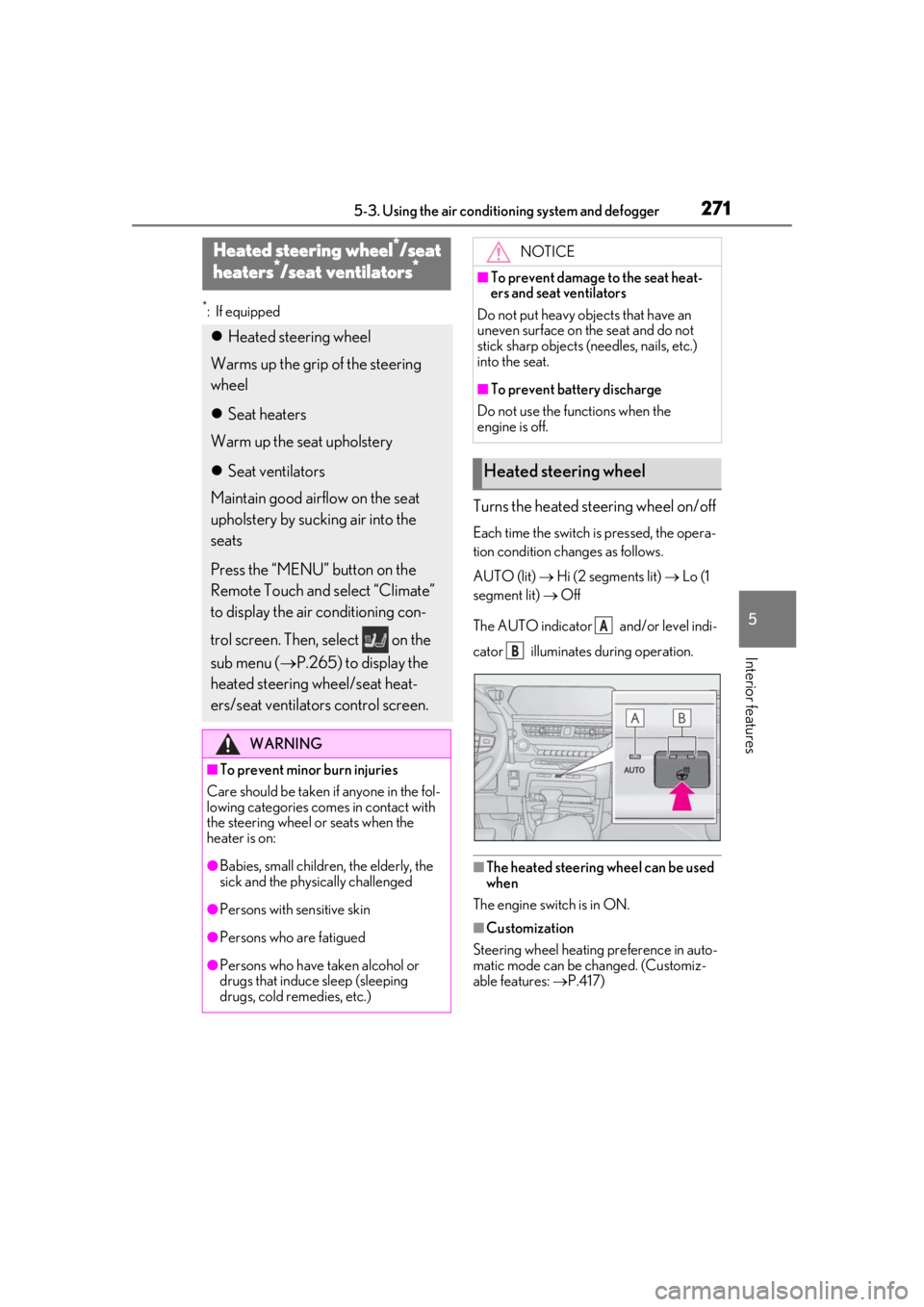
Turns the heated steering wheel on/off
Each time the switch is pressed, the opera-
tion condition changes as follows.
AUTO (lit) Hi (2 segments lit) Lo (1
segment lit) Off
The AUTO indicator and/or level indi-
cator illuminates during operation.
■The heated steering wheel can be used
when
The engine switch is in ON.
■Customization
Steering wheel heating preference in auto-
matic mode can be changed. (Customiz-
able features: P.417)
Heated steering wheel*/seat
h
eaters*/seat ventilators*
Heated steering wheel
Warms up the grip of the steering
wheel
Seat heaters
Warm up the seat upholstery
Seat ventilators
Maintain good airflow on the seat
upholstery by sucking air into the
seats
Press the “MENU” button on the
Remote Touch and select “Climate”
to display the air conditioning con-
trol screen. Then, select on the
sub menu ( P.265) to display the
heated steering wheel/seat heat-
ers/seat ventilators control screen.
WARNING
■To prevent minor burn injuries
Care should be taken if anyone in the fol-
lowing categories comes in contact with
the steering wheel or seats when the
heater is on:
●Babies, small children, the elderly, the
sick and the phys ically challenged
●Persons with sensitive skin
●Persons who are fatigued
●Persons who have taken alcohol or
drugs that induce sleep (sleeping
drugs, cold remedies, etc.)
NOTICE
■To prevent damage to the seat heat-
ers and seat ventilators
Do not put heavy objects that have an
uneven surface on the seat and do not
stick sharp objects (n eedles, nails, etc.)
into the seat.
■To prevent battery discharge
Do not use the functions when the
engine is off.
Heated steering wheel
A
B
Page 275 of 452
2755-4. Using the interior lights
5
Interior features
■Automatic turning on of the interior
lights
If any of the SRS airbags deploy (inflate) or
in the event of a strong rear impact, the inte-
rior lights will turn on automatically. The
interior lights will turn off automatically after
approximately 20 minutes. The interior
lights can be turned off manually. However,
in order to help prevent further collisions, it
is recommended that th ey be left on until
safety can be ensured. (The interior lights
may not turn on automatically depending
on the force of the impact and conditions of
the collision.)
■Customization
Setting (e.g. the time elapsed before lights
turn off) can be changed. (Customizable
features: P.412)
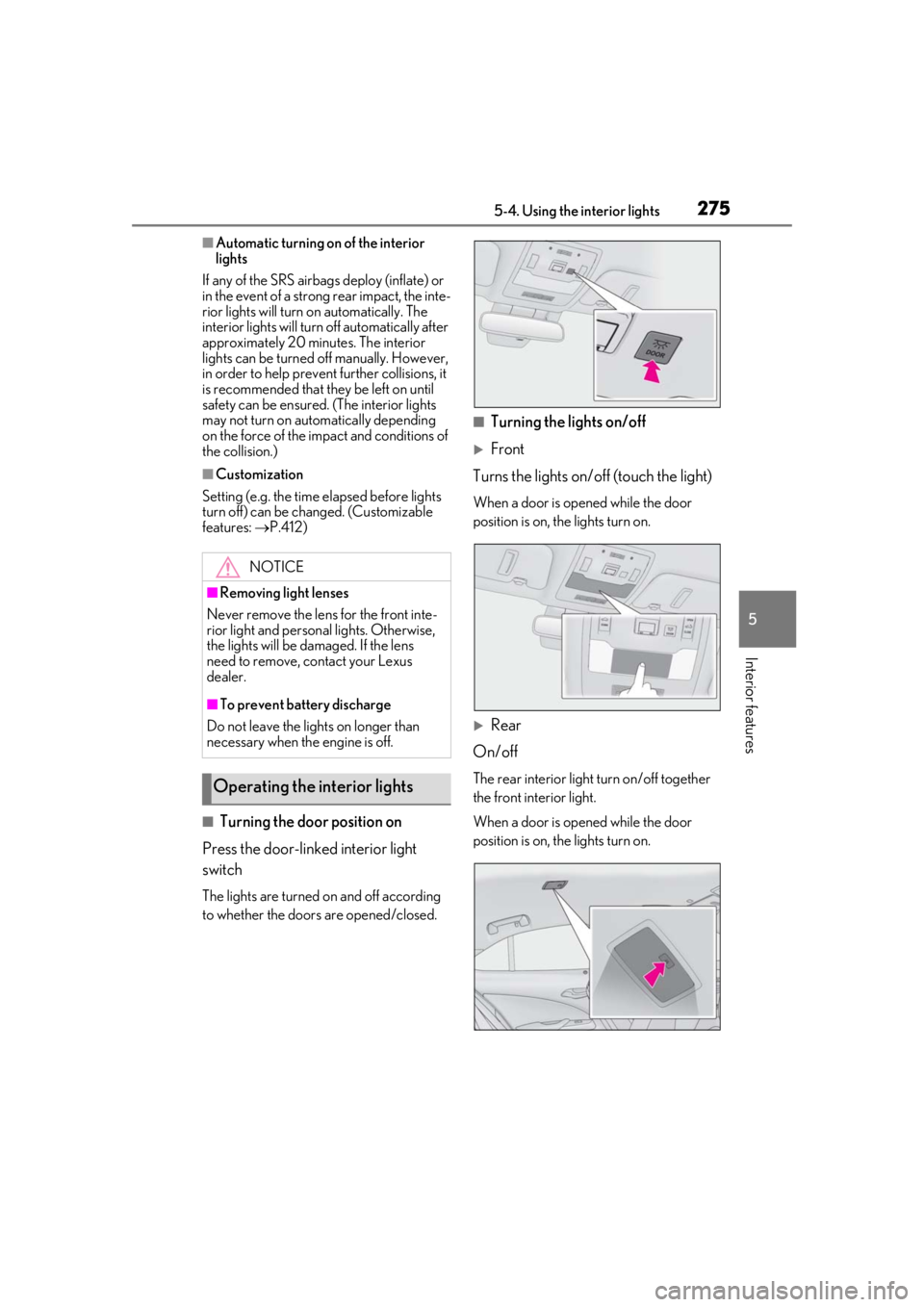
■Turning the door position on
Press the door-linked interior light
switch
The lights are turned on and off according
to whether the doors are opened/closed.
■Turning the lights on/off
Front
Turns the lights on/off (touch the light)
When a door is opened while the door
position is on, the lights turn on.
Rear
On/off
The rear interior light turn on/off together
the front interior light.
When a door is opened while the door
position is on, the lights turn on.
NOTICE
■Removing light lenses
Never remove the lens for the front inte-
rior light and personal lights. Otherwise,
the lights will be damaged. If the lens
need to remove, contact your Lexus
dealer.
■To prevent battery discharge
Do not leave the lights on longer than
necessary when the engine is off.
Operating the interior lights