power LEXUS UX200 2019 Owner's Manual
[x] Cancel search | Manufacturer: LEXUS, Model Year: 2019, Model line: UX200, Model: LEXUS UX200 2019Pages: 452, PDF Size: 10.06 MB
Page 113 of 452
1133-2. Opening, closing and locking the doors
3
Before driving
5ON and OFF will be switched over
with presses of “OK” on the meter
control switches.
If the Hands Free Power Back Door is dis-
abled, it will remain disabled unless it is
enabled on the multi-information display.
(It will not be enabled even when the
engine switch is turned off and then back to
ON.)
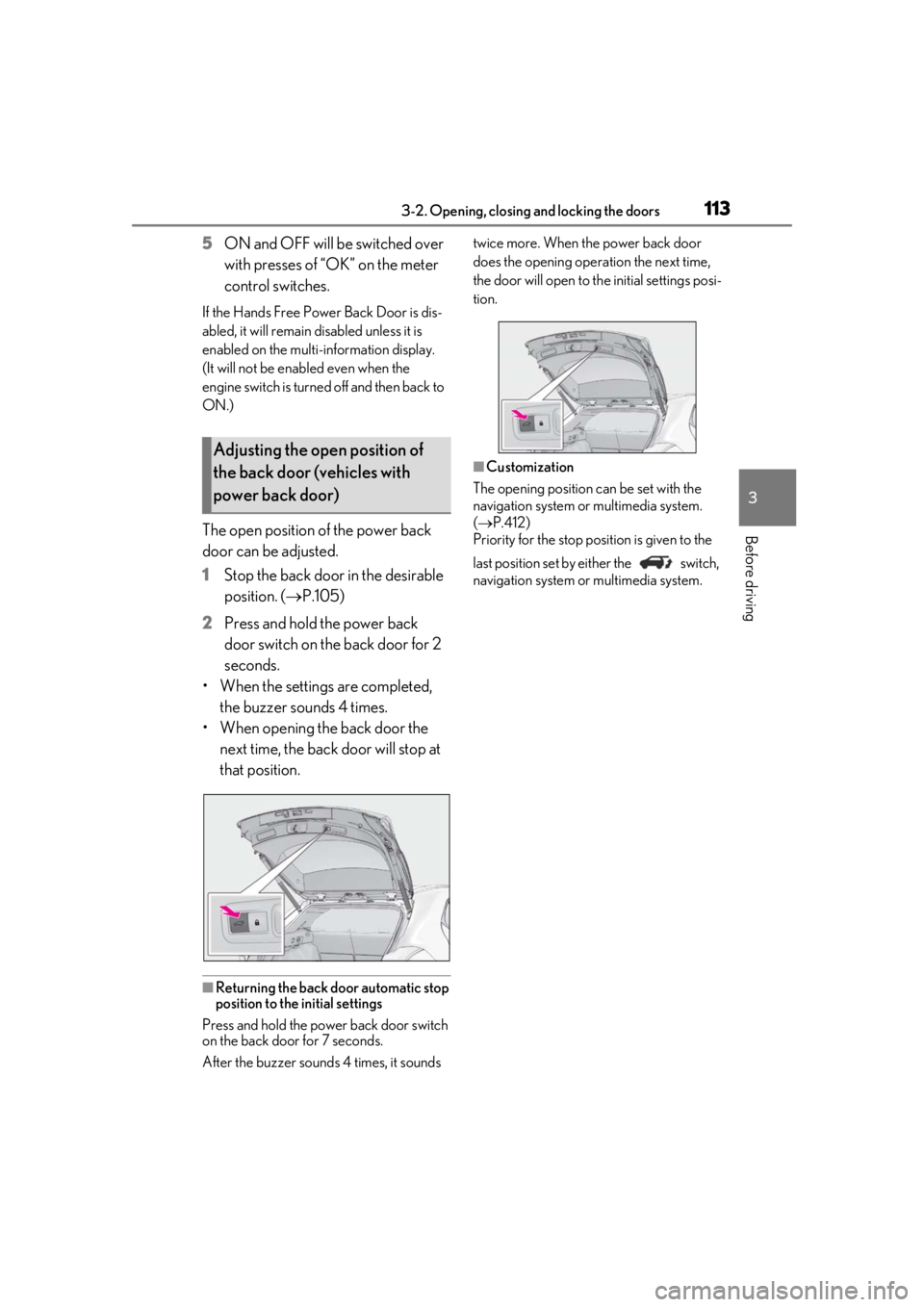
The open position of the power back
door can be adjusted.
1 Stop the back door in the desirable
position. ( P.105)
2 Press and hold the power back
door switch on the back door for 2
seconds.
• When the settings are completed, the buzzer sounds 4 times.
• When opening the back door the next time, the back door will stop at
that position.
■Returning the back door automatic stop
position to the initial settings
Press and hold the power back door switch
on the back door for 7 seconds.
After the buzzer sounds 4 times, it sounds twice more. When the power back door
does the opening operation the next time,
the door will open to th
e initial settings posi-
tion.
■Customization
The opening position can be set with the
navigation system or multimedia system.
( P.412)
Priority for the stop position is given to the
last position set by either the switch,
navigation system or multimedia system.
Adjusting the open position of
the back door (vehicles with
power back door)
Page 115 of 452
1153-2. Opening, closing and locking the doors
3
Before driving■If “Key Detected in Vehicle” is shown on
the multi-information display
An attempt was made to lock the doors
using the smart access system with push-
button start while the electronic key was still
inside the vehicle. Retrieve the electronic
key from the vehicle and lock the doors
again.
■Battery-saving function
The battery-saving fu nction will be acti-
vated in order to prevent the electronic key
battery and the battery from being dis-
charged while the vehicl e is not in operation
for a long time.
●In the following situations, the smart
access system with pu sh-button start may
take some time to unlock the doors.
• The electronic key has been left in an
area of approximately 6 ft. (2 m) of the
outside of the vehicle for 10 minutes or
longer.
• The smart access system with push-but- ton start has not been used for 5 days or
longer.
●If the smart access system with push-but-
ton start has not been used for 14 days or
longer, the doors cannot be unlocked at
any doors except the driver’s door. In this
case, take hold of the driver’s door han-
dle, or use the wireless remote control or
the mechanical key, to unlock the doors.
■Turning an electronic key to battery-
saving mode
●When battery-saving mode is set, battery
depletion is minimized by stopping the
electronic key from receiving radio
waves.
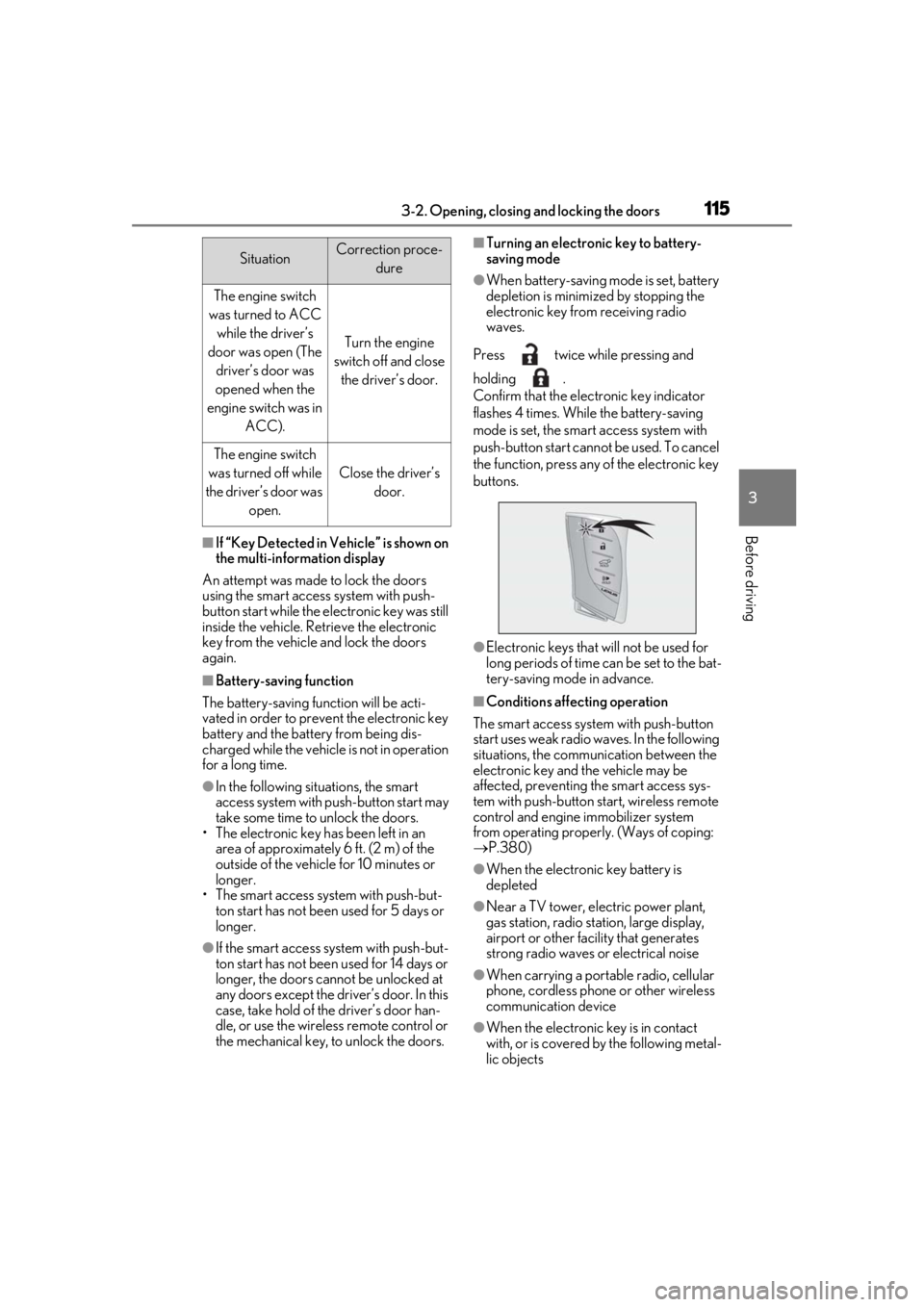
Press twice while pressing and
holding .
Confirm that the electronic key indicator
flashes 4 times. While the battery-saving
mode is set, the smart access system with
push-button start cannot be used. To cancel
the function, press any of the electronic key
buttons.
●Electronic keys that will not be used for
long periods of time can be set to the bat-
tery-saving mode in advance.
■Conditions affecting operation
The smart access system with push-button
start uses weak radio waves. In the following
situations, the communication between the
electronic key and the vehicle may be
affected, preventing the smart access sys-
tem with push-button start, wireless remote
control and engine immobilizer system
from operating properly. (Ways of coping:
P.380)
●When the electronic key battery is
depleted
●Near a TV tower, electric power plant,
gas station, radio stat ion, large display,
airport or other fac ility that generates
strong radio waves or electrical noise
●When carrying a portable radio, cellular
phone, cordless phone or other wireless
communication device
●When the electronic key is in contact
with, or is covered by the following metal-
lic objects
SituationCorrection proce-
dure
The engine switch
was turned to ACC while the driver’s
door was open (The driver’s door was
opened when the
engine switch was in ACC).
Turn the engine
switch off and close the driver’s door.
The engine switch
was turned off while
the driver’s door was open.
Close the driver’s door.
Page 121 of 452
1213-3. Adjusting the seats
3
Before driving
3-3.Adjusting the seats
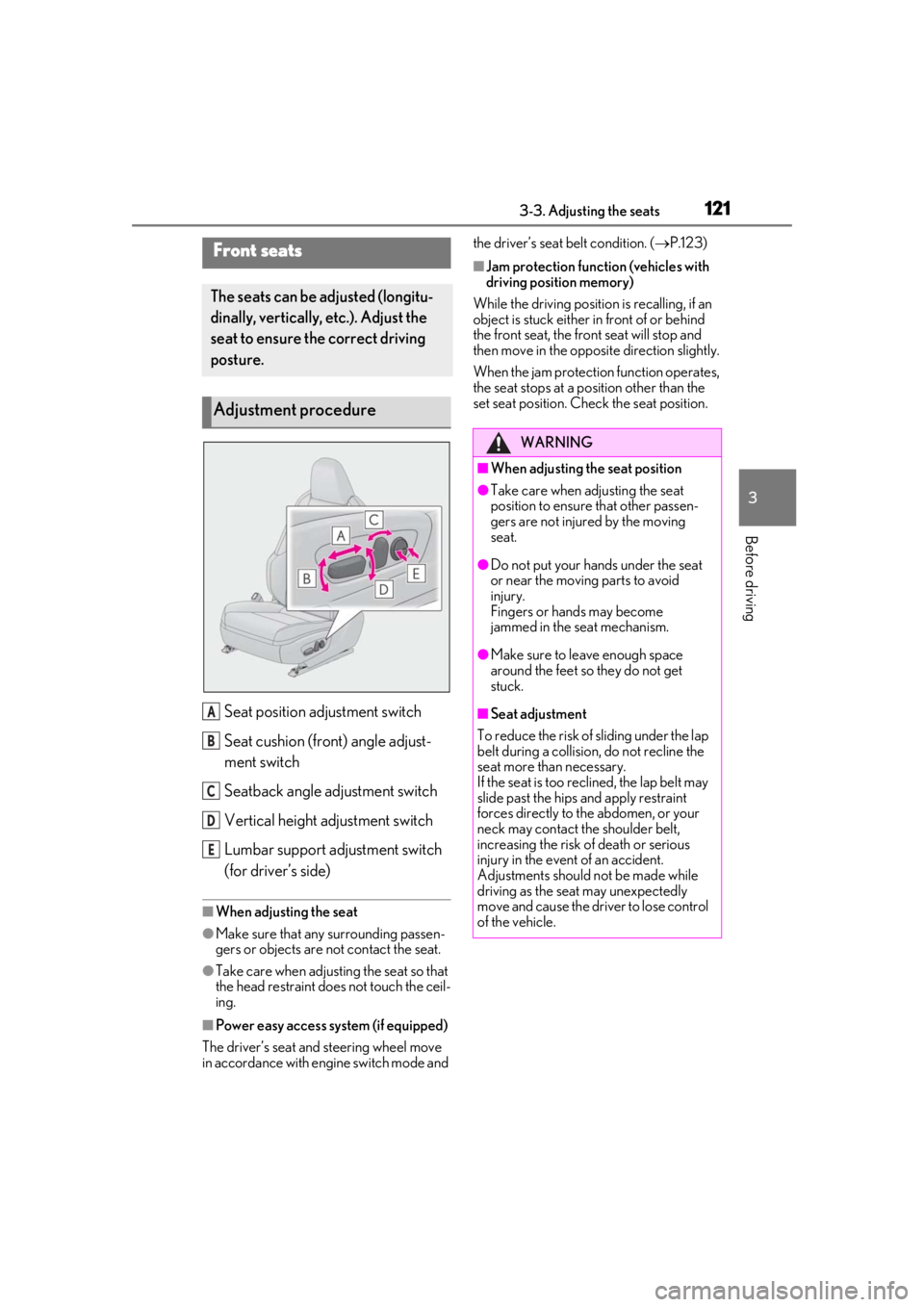
Seat position adjustment switch
Seat cushion (front) angle adjust-
ment switch
Seatback angle adjustment switch
Vertical height adjustment switch
Lumbar support adjustment switch
(for driver’s side)
■When adjusting the seat
●Make sure that any surrounding passen-
gers or objects are not contact the seat.
●Take care when adjusting the seat so that
the head restraint does not touch the ceil-
ing.
■Power easy access system (if equipped)
The driver’s seat and steering wheel move
in accordance with engine switch mode and the driver’s seat belt condition. (
P.123)
■Jam protection function (vehicles with
driving position memory)
While the driving position is recalling, if an
object is stuck either in front of or behind
the front seat, the front seat will stop and
then move in the opposite direction slightly.
When the jam protection function operates,
the seat stops at a po sition other than the
set seat position. Chec k the seat position.Front seats
The seats can be adjusted (longitu-
dinally, vertically, etc.). Adjust the
seat to ensure the correct driving
posture.
Adjustment procedure
A
B
C
D
E
WARNING
■When adjusting the seat position
●Take care when adjusting the seat
position to ensure that other passen-
gers are not injured by the moving
seat.
●Do not put your hands under the seat
or near the moving parts to avoid
injury.
Fingers or hands may become
jammed in the seat mechanism.
●Make sure to leave enough space
around the feet so they do not get
stuck.
■Seat adjustment
To reduce the risk of sliding under the lap
belt during a collision, do not recline the
seat more than necessary.
If the seat is too rec lined, the lap belt may
slide past the hips and apply restraint
forces directly to the abdomen, or your
neck may contact the shoulder belt,
increasing the risk of death or serious
injury in the event of an accident.
Adjustments should not be made while
driving as the seat may unexpectedly
move and cause the driver to lose control
of the vehicle.
Page 123 of 452
1233-3. Adjusting the seats
3
Before driving
*: If equipped
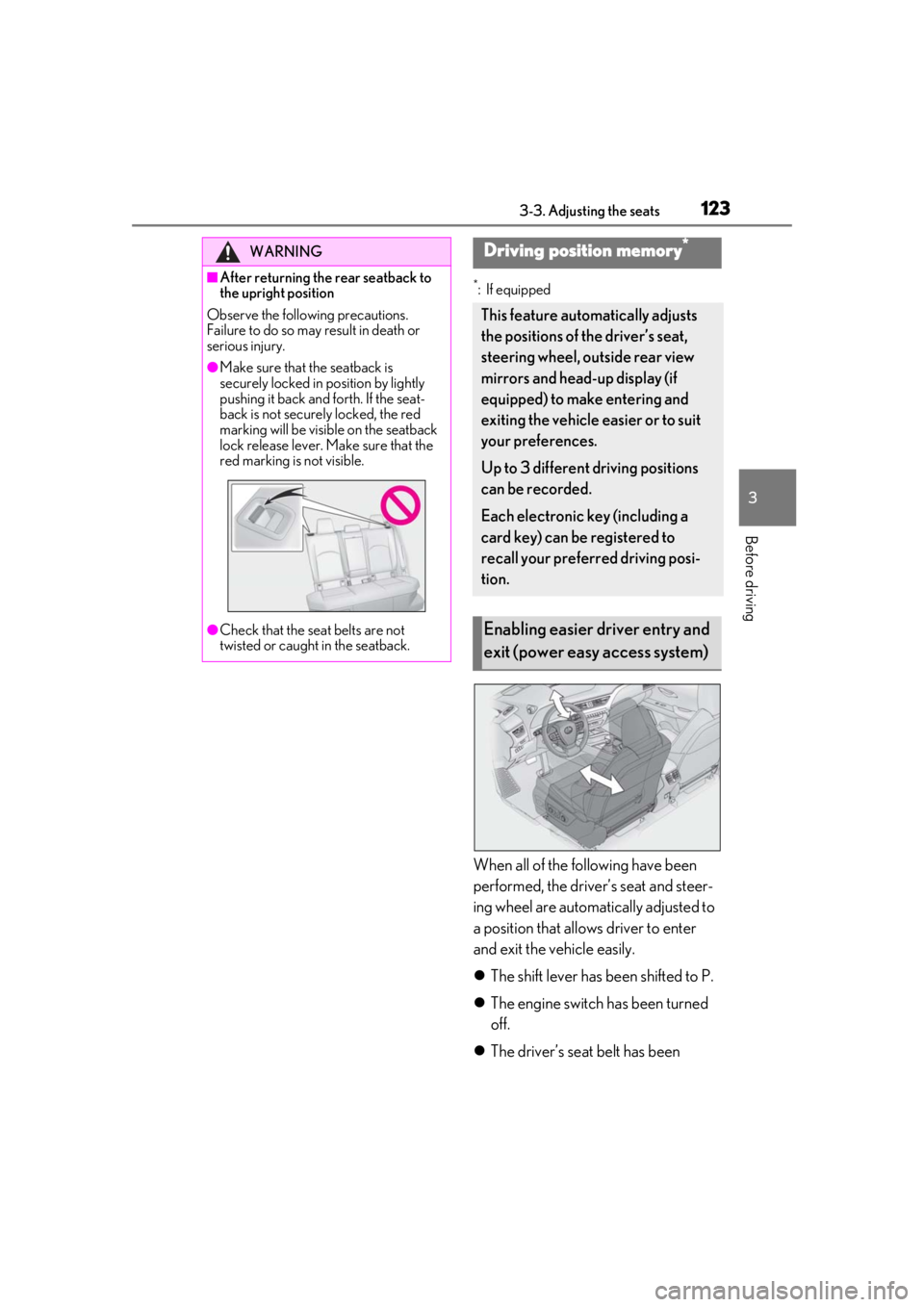
When all of the following have been
performed, the driver’s seat and steer-
ing wheel are automatically adjusted to
a position that allows driver to enter
and exit the vehicle easily.
The shift lever has been shifted to P.
The engine switch has been turned
off.
The driver’s seat belt has been
WARNING
■After returning the rear seatback to
the upright position
Observe the following precautions.
Failure to do so may result in death or
serious injury.
●Make sure that the seatback is
securely locked in position by lightly
pushing it back and forth. If the seat-
back is not securely locked, the red
marking will be visible on the seatback
lock release lever. Make sure that the
red marking is not visible.
●Check that the seat belts are not
twisted or caught in the seatback.
Driving position memory*
This feature automatically adjusts
the positions of the driver’s seat,
steering wheel, outside rear view
mirrors and head-up display (if
equipped) to make entering and
exiting the vehicle easier or to suit
your preferences.
Up to 3 different driving positions
can be recorded.
Each electronic key (including a
card key) can be registered to
recall your preferred driving posi-
tion.
Enabling easier driver entry and
exit (power easy access system)
Page 124 of 452
1243-3. Adjusting the seats
unfastened.
When any of the following has been
performed, the driver’s seat and steer-
ing wheel automatically return to their
original positions.
The engine switch has been turned
to ACC or ON.
The driver’s seat belt has been fas-
tened.
■Operation of the power easy access sys-
tem
When exiting the vehicle, the power easy
access system may not operate if the seat is
already close to the rearmost position, etc.
■Customization
The seat movement amou nt settings of the
power easy access sy stem can be custom-
ized. (Customizable features: P.413)
1Check that the shift lever is in P.
2
Turn the engine switch to ON.
3
Adjust the driver’s seat, steering
wheel, outside rear view mirrors
and head-up display (if equipped)
to the desired positions.
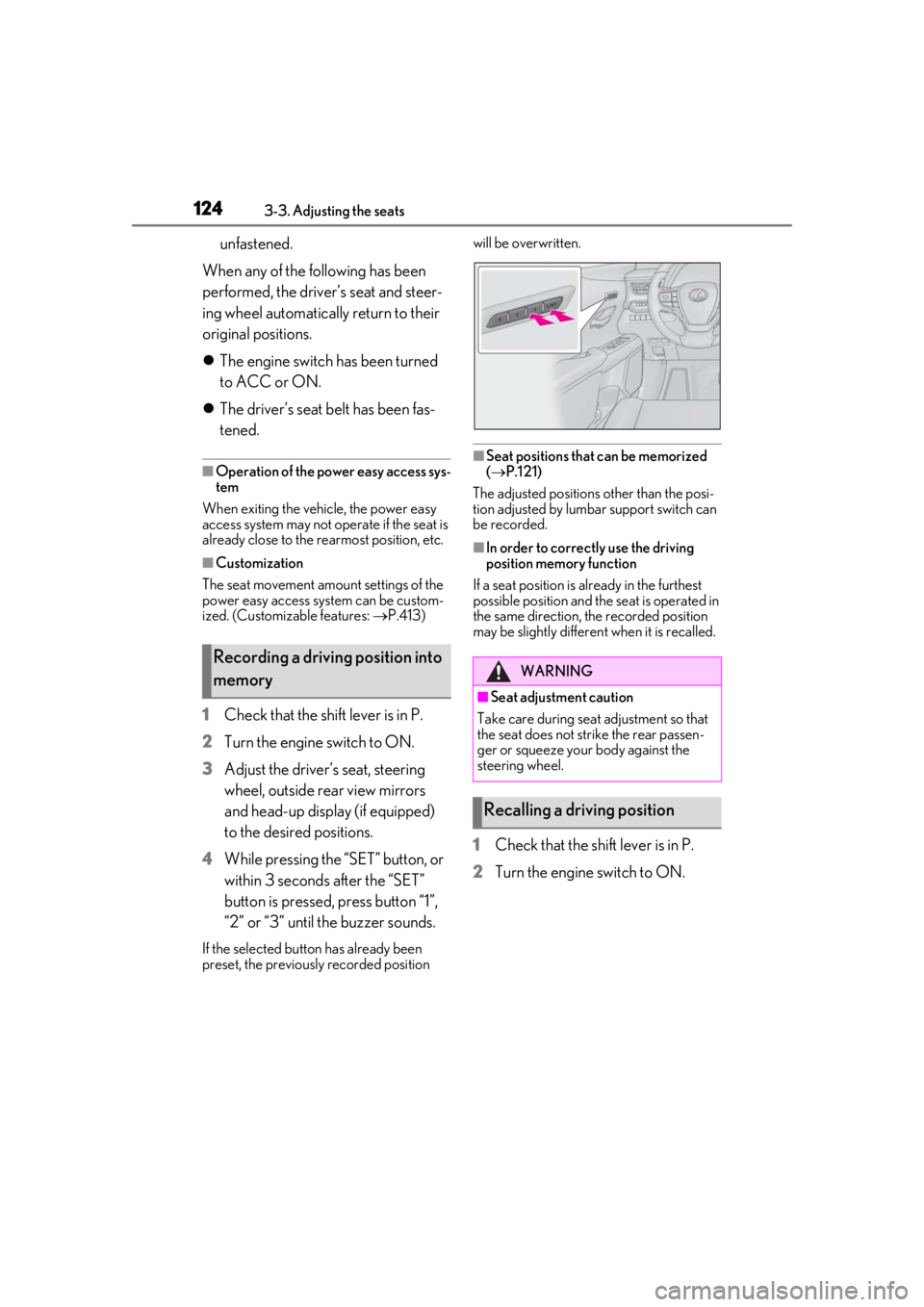
4
While pressing the “SET” button, or
within 3 seconds after the “SET”
button is pressed, press button “1”,
“2” or “3” until the buzzer sounds.
If the selected button has already been
preset, the previously recorded position will be overwritten.
■Seat positions that can be memorized
(
P.121)
The adjusted positions other than the posi-
tion adjusted by lumbar support switch can
be recorded.
■In order to correctly use the driving
position memory function
If a seat position is already in the furthest
possible position and the seat is operated in
the same direction, the recorded position
may be slightly differen t when it is recalled.
1Check that the shift lever is in P.
2
Turn the engine switch to ON.
Recording a driving position into
memoryWARNING
■Seat adjustme nt caution
Take care during seat adjustment so that
the seat does not strike the rear passen-
ger or squeeze your body against the
steering wheel.
Recalling a driving position
Page 129 of 452
1293-4. Adjusting the steering wheel and mirrors
3
Before driving
3-4.Adjusting the steering wheel and mirrors
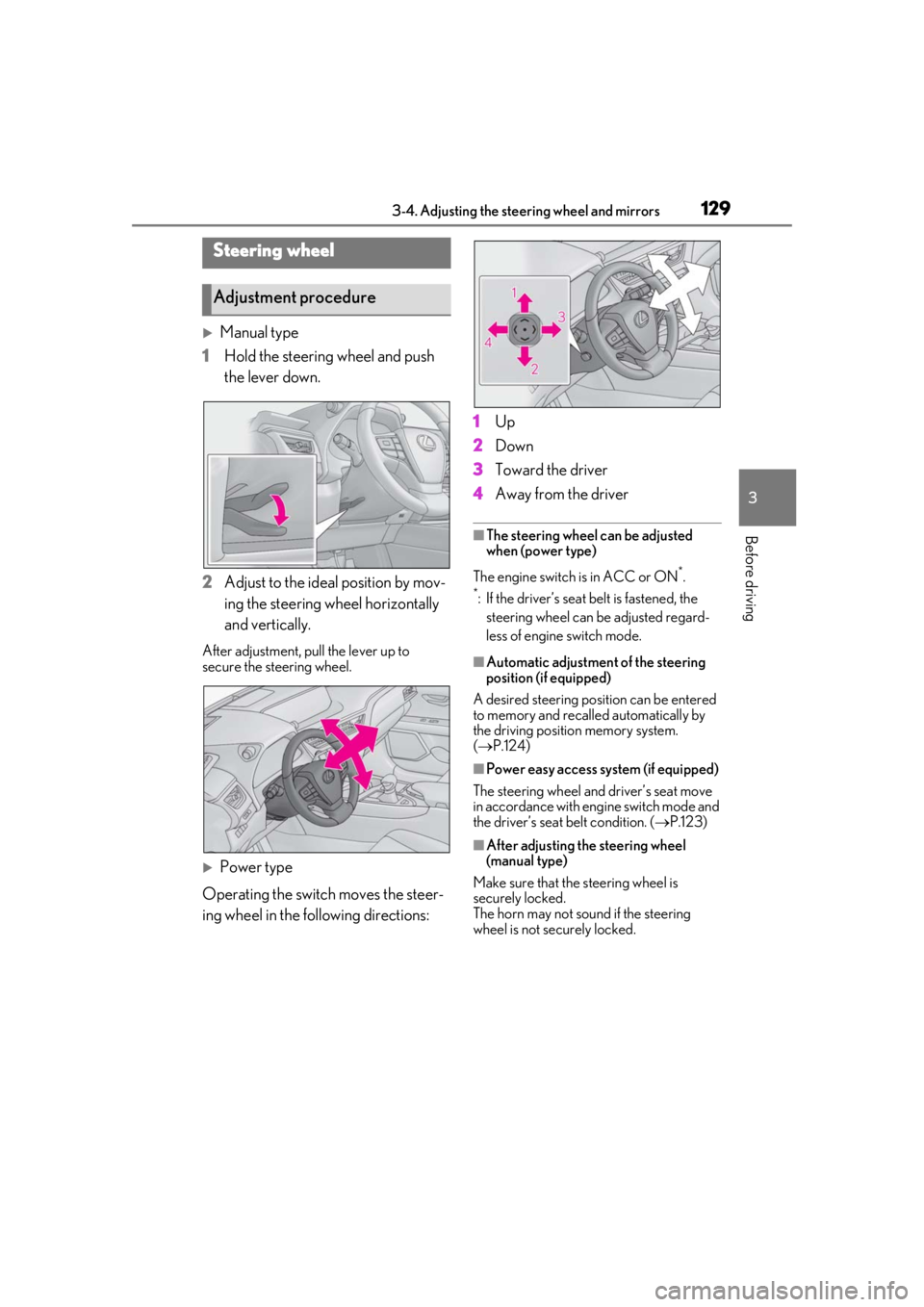
Manual type
1 Hold the steering wheel and push
the lever down.
2 Adjust to the ideal position by mov-
ing the steering wheel horizontally
and vertically.
After adjustment, pull the lever up to
secure the steering wheel.
Power type
Operating the switch moves the steer-
ing wheel in the following directions: 1
Up
2 Down
3 Toward the driver
4 Away from the driver
■The steering wheel can be adjusted
when (power type)
The engine switch is in ACC or ON
*.
*: If the driver’s seat belt is fastened, the
steering wheel can be adjusted regard-
less of engine switch mode.
■Automatic adjustment of the steering
position (if equipped)
A desired steering posi tion can be entered
to memory and recalled automatically by
the driving position memory system.
( P.124)
■Power easy access system (if equipped)
The steering wheel and driver’s seat move
in accordance with engine switch mode and
the driver’s seat belt condition. ( P.123)
■After adjusting the steering wheel
(manual type)
Make sure that the steering wheel is
securely locked.
The horn may not sound if the steering
wheel is not securely locked.
Steering wheel
Adjustment procedure
Page 133 of 452
1333-4. Adjusting the steering wheel and mirrors
3
Before driving
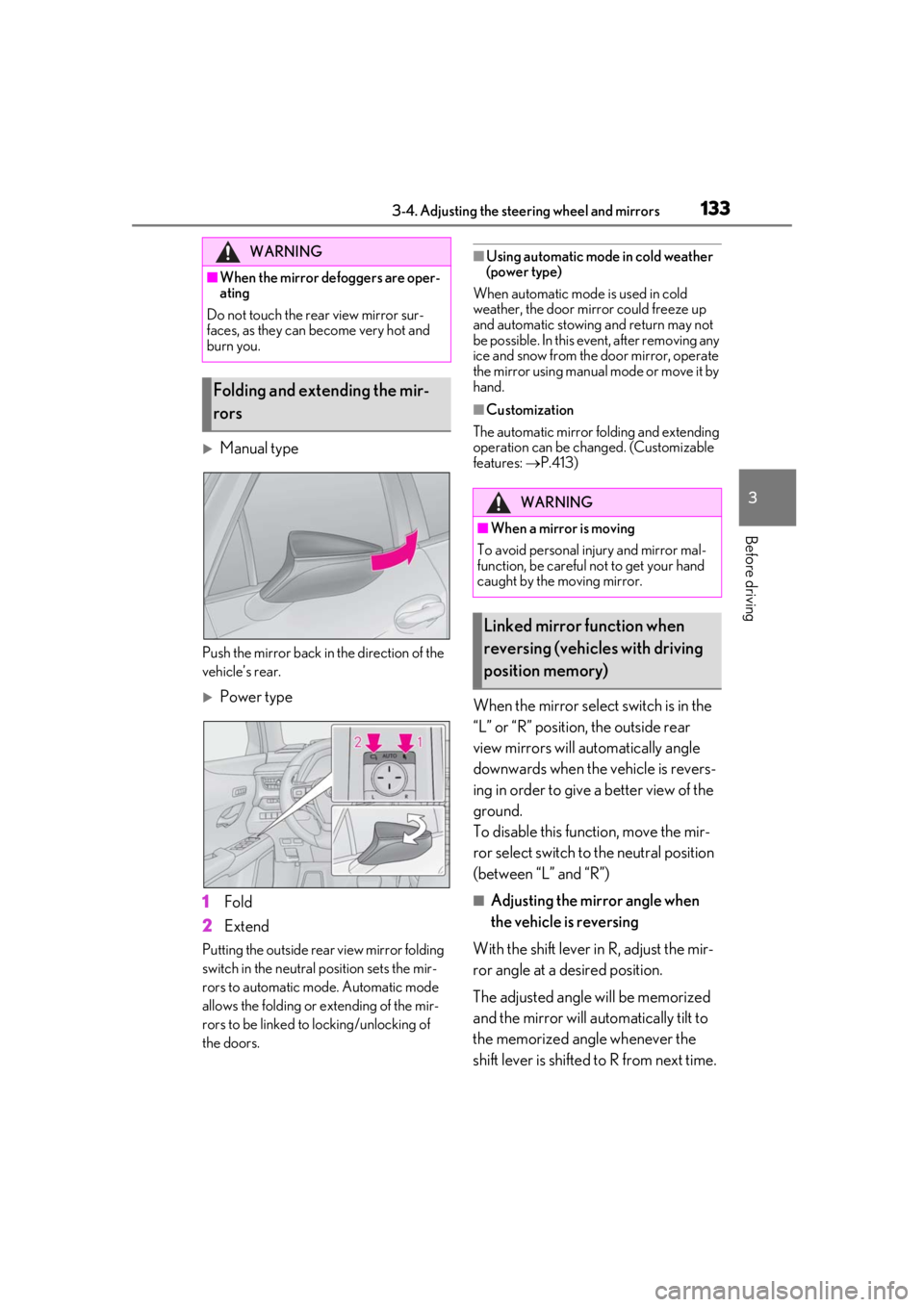
Manual type
Push the mirror back in the direction of the
vehicle’s rear.
Power type
1
Fold
2
Extend
Putting the outside rear view mirror folding
switch in the neutral position sets the mir-
rors to automatic mode. Automatic mode
allows the folding or extending of the mir-
rors to be linked to locking/unlocking of
the doors.
■Using automatic mode in cold weather
(power type)
When automatic mode is used in cold
weather, the door mirror could freeze up
and automatic stowing and return may not
be possible. In this event, after removing any
ice and snow from the door mirror, operate
the mirror using manual mode or move it by
hand.
■Customization
The automatic mirror folding and extending
operation can be changed. (Customizable
features: P.413)
When the mirror select switch is in the
“L” or “R” position, the outside rear
view mirrors will automatically angle
downwards when the vehicle is revers-
ing in order to give a better view of the
ground.
To disable this function, move the mir-
ror select switch to the neutral position
(between “L” and “R”)
■Adjusting the mirror angle when
the vehicle is reversing
With the shift lever in R, adjust the mir-
ror angle at a desired position.
The adjusted angle will be memorized
and the mirror will automatically tilt to
the memorized angle whenever the
shift lever is shifted to R from next time.
WARNING
■When the mirror defoggers are oper-
ating
Do not touch the rear view mirror sur-
faces, as they can become very hot and
burn you.
Folding and extending the mir-
rors
WARNING
■When a mirror is moving
To avoid personal injury and mirror mal-
function, be careful not to get your hand
caught by the moving mirror.
Linked mirror function when
reversing (vehicles with driving
position memory)
Page 135 of 452
1353-5. Opening, closing the windows and moon roof
3
Before driving
3-5.Opening, closing the windows and moon roof
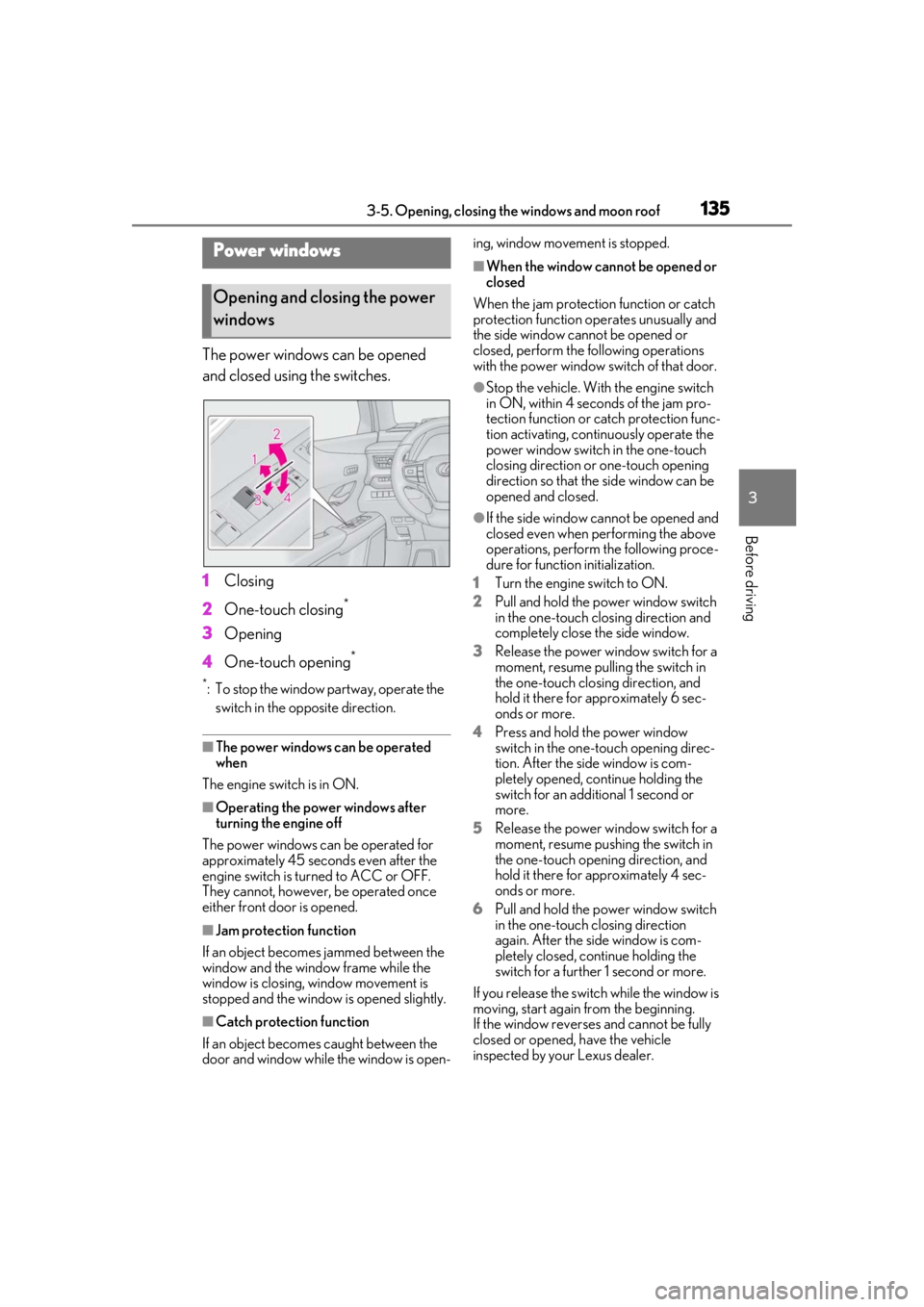
The power windows can be opened
and closed using the switches.
1Closing
2 One-touch closing
*
3Opening
4 One-touch opening
*
*: To stop the window partway, operate the
switch in the op posite direction.
■The power windows can be operated
when
The engine switch is in ON.
■Operating the power windows after
turning the engine off
The power windows can be operated for
approximately 45 seconds even after the
engine switch is turned to ACC or OFF.
They cannot, however, be operated once
either front door is opened.
■Jam protection function
If an object becomes jammed between the
window and the window frame while the
window is closing, window movement is
stopped and the window is opened slightly.
■Catch protection function
If an object becomes caught between the
door and window while the window is open- ing, window movement is stopped.
■When the window cannot be opened or
closed
When the jam protection function or catch
protection function operates unusually and
the side window cannot be opened or
closed, perform the following operations
with the power window switch of that door.
●Stop the vehicle. With the engine switch
in ON, within 4 seconds of the jam pro-
tection function or catch protection func-
tion activating, continuously operate the
power window switch in the one-touch
closing direction or one-touch opening
direction so that the side window can be
opened and closed.
●If the side window cannot be opened and
closed even when performing the above
operations, perform the following proce-
dure for function initialization.
1 Turn the engine switch to ON.
2 Pull and hold the power window switch
in the one-touch closing direction and
completely close the side window.
3 Release the power window switch for a
moment, resume pulling the switch in
the one-touch closing direction, and
hold it there for approximately 6 sec-
onds or more.
4 Press and hold the power window
switch in the one-touch opening direc-
tion. After the side window is com-
pletely opened, continue holding the
switch for an additional 1 second or
more.
5 Release the power window switch for a
moment, resume pushing the switch in
the one-touch opening direction, and
hold it there for approximately 4 sec-
onds or more.
6 Pull and hold the power window switch
in the one-touch closing direction
again. After the side window is com-
pletely closed, continue holding the
switch for a further 1 second or more.
If you release the switch while the window is
moving, start again from the beginning.
If the window reverses and cannot be fully
closed or opened, have the vehicle
inspected by your Lexus dealer.
Power windows
Opening and closing the power
windows
Page 136 of 452
1363-5. Opening, closing the windows and moon roof
■Door lock linked window operation
●The power windows can be opened and
closed using the mechanical key.*
( P.381)
●The power windows can be opened using
the wireless remote control.* ( P.98)
*: These settings must be customized at
your Lexus dealer.
■Power windows open warning buzzer
The buzzer sounds and “Window Open” is
shown on the multi-information display in
the instrument cluster when the engine
switch is turned off and the driver’s door is
opened with the power windows open.
■Customization
Setting (e.g. linked door lock operation) can
be changed.
(Customizable features: P.413)
This function is designed to prevent
children from accidentally opening or
closing a passenger window.
Press the switch.
WARNING
Observe the following precautions.
Failing to do so may result in death or
serious injury.
■Closing the windows
●The driver is responsible for all the
power window operations, including
the operation for the passengers. In
order to prevent accidental operation,
especially by a child, do not let a child
operate the power windows. It is possi-
ble for children and other passengers
to have body parts caught in the power
window. Also, when riding with a child,
it is recommended to use the window
lock switch. ( P.136)
●Check to make sure that all passen-
gers do not have any part of their body
in a position where it could be caught
when a window is being operated.
●When using the wireless remote con-
trol or mechanical key and operating
the power windows, operate the
power window after checking to make
sure that there is no possibility of any
passenger having any of their body
parts caught in the window. Also do
not let a child operate window by the
wireless remote control or mechanical
key. It is possible for children and other
passengers to get caught in the power
window.
●When exiting the vehicle, turn the
engine switch off, carry the key and
exit the vehicle along with the child.
There may be accidental operation,
due to mischief, etc., that may possibly
lead to an accident.
■Jam protection function
●Never use any part of your body to
intentionally activa te the jam protec-
tion function.
●The jam protection function may not
work if something gets jammed just
before the window is fully closed. Be
careful not to get any part of your body
jammed in the window.
■Catch protection function
●Never use any part of your body or
clothing to intentionally activate the
catch protection function.
●The catch protection function may not
work if something gets caught just
before the window is fully opened. Be
careful not to get any part of your body
or clothing caught in the window.
Preventing accidental operation
(window lock switch)
Page 137 of 452
1373-5. Opening, closing the windows and moon roof
3
Before driving
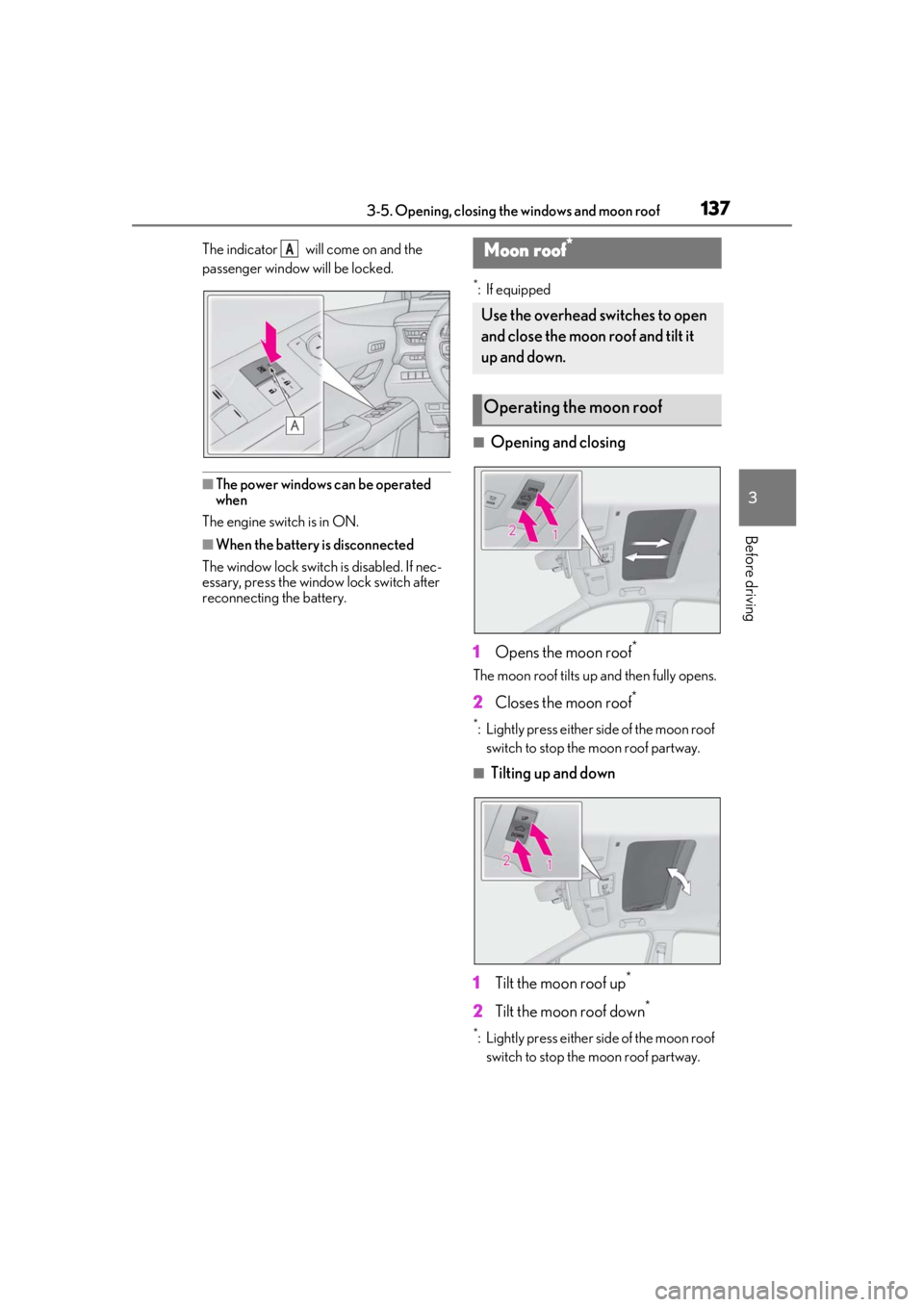
The indicator will come on and the
passenger window will be locked.
■The power windows can be operated
when
The engine switch is in ON.
■When the battery is disconnected
The window lock switch is disabled. If nec-
essary, press the window lock switch after
reconnecting the battery.
*: If equipped
■Opening and closing
1 Opens the moon roof
*
The moon roof tilts up and then fully opens.
2Closes the moon roof*
*: Lightly press either side of the moon roof
switch to stop the moon roof partway.
■Tilting up and down
1 Tilt the moon roof up
*
2Tilt the moon roof down*
*: Lightly press either side of the moon roof
switch to stop the moon roof partway.
AMoon roof*
Use the overhead switches to open
and close the moon roof and tilt it
up and down.
Operating the moon roof