stop LEXUS UX200 2019 Owner's Manual
[x] Cancel search | Manufacturer: LEXUS, Model Year: 2019, Model line: UX200, Model: LEXUS UX200 2019Pages: 452, PDF Size: 10.06 MB
Page 105 of 452
1053-2. Opening, closing and locking the doors
3
Before driving
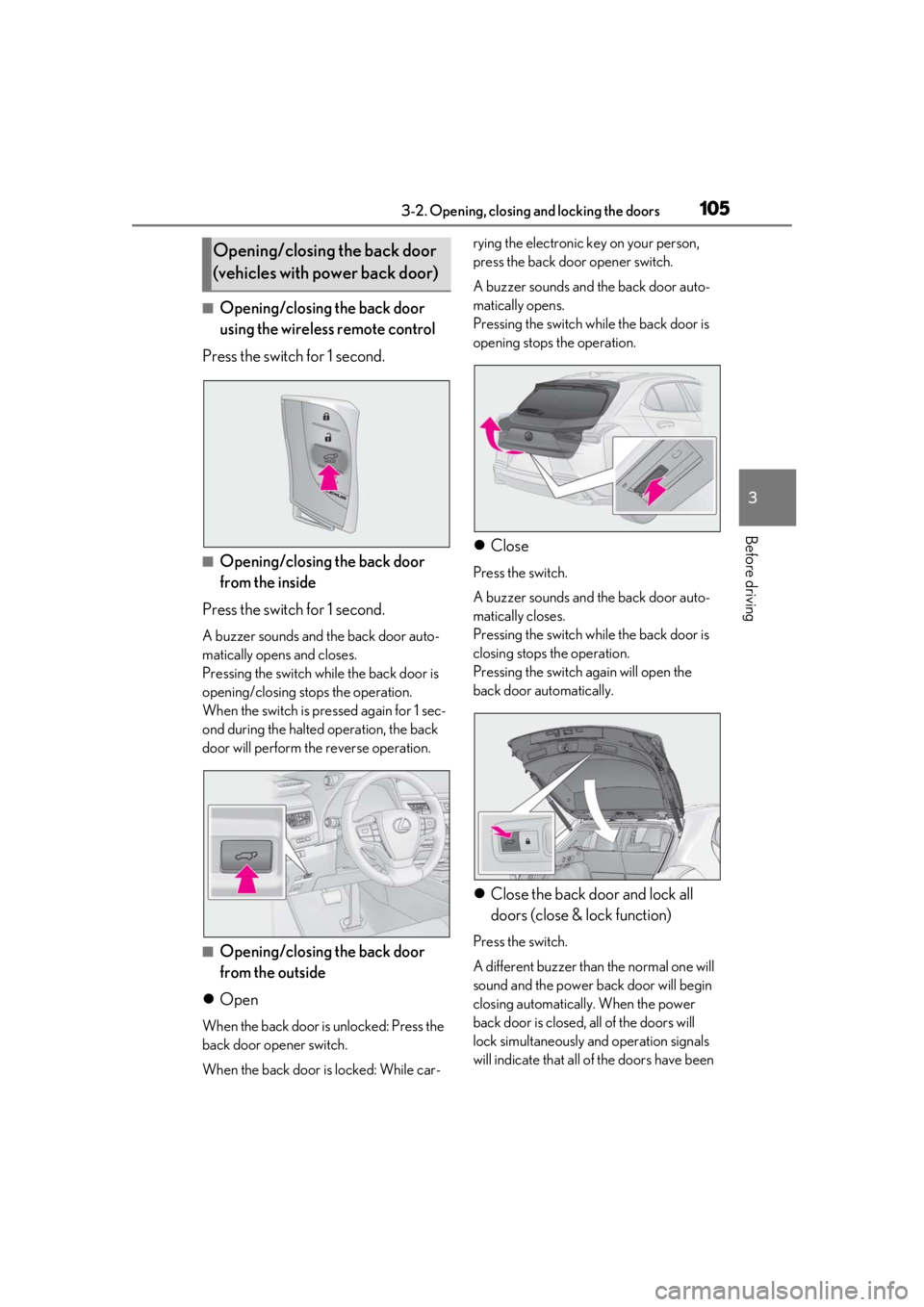
■Opening/closing the back door
using the wireless remote control
Press the switch for 1 second.
■Opening/closing the back door
from the inside
Press the switch for 1 second.
A buzzer sounds and the back door auto-
matically opens and closes.
Pressing the switch while the back door is
opening/closing stops the operation.
When the switch is pressed again for 1 sec-
ond during the halted operation, the back
door will perform th e reverse operation.
■Opening/closing the back door
from the outside
Open
When the back door is unlocked: Press the
back door opener switch.
When the back door is locked: While car- rying the electronic key on your person,
press the back door opener switch.
A buzzer sounds and the back door auto-
matically opens.
Pressing the switch while the back door is
opening stops the operation.
Close
Press the switch.
A buzzer sounds and the back door auto-
matically closes.
Pressing the switch while the back door is
closing stops the operation.
Pressing the switch again will open the
back door automatically.
Close the back door and lock all
doors (close & lock function)
Press the switch.
A different buzzer than the normal one will
sound and the power back door will begin
closing automatically. When the power
back door is closed, all of the doors will
lock simultaneously and operation signals
will indicate that all of the doors have been
Opening/closing the back door
(vehicles with power back door)
Page 106 of 452
1063-2. Opening, closing and locking the doors
locked.
If the switch is pressed while the power
back door is closing, the operation will
stop.
Pressing the switch again will close the
power back door automatically.
■Closing the back door using the
back door handle
Lower the back door using the back
door handle, then a buzzer sounds and
the back door automatically closes.
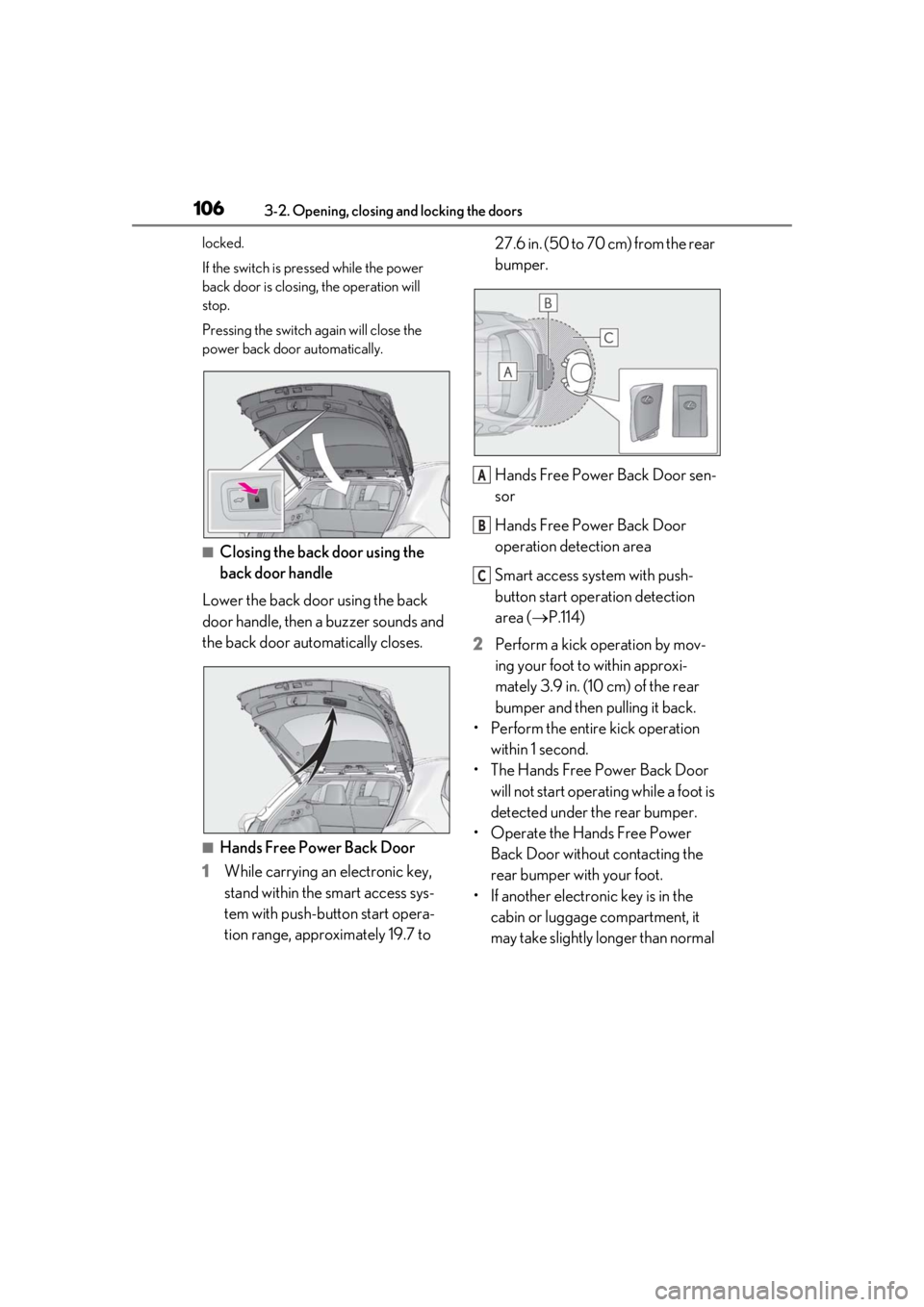
■Hands Free Power Back Door
1 While carrying an electronic key,
stand within the smart access sys-
tem with push-button start opera-
tion range, approximately 19.7 to 27.6 in. (50 to 70 cm) from the rear
bumper.
Hands Free Power Back Door sen-
sor
Hands Free Power Back Door
operation detection area
Smart access system with push-
button start operation detection
area (
P.114)
2 Perform a kick operation by mov-
ing your foot to within approxi-
mately 3.9 in. (10 cm) of the rear
bumper and then pulling it back.
• Perform the entire kick operation within 1 second.
• The Hands Free Power Back Door will not start operating while a foot is
detected under the rear bumper.
• Operate the Hands Free Power Back Door without contacting the
rear bumper with your foot.
• If another electronic key is in the cabin or luggage compartment, it
may take slightly longer than normal
A
B
C
Page 107 of 452

1073-2. Opening, closing and locking the doors
3
Before driving
for the operation to occur.
Hands Free Power Back Door sen-
sor
Hands Free Power Back Door
operation detection area
3 When the sensor detects that your
foot is pulled back, a buzzer will
sound and the back door will auto-
matically fully open/close.
If a foot is moved under the rear bumper
while the back door is opening, the back
door will stop moving.
If a foot is moved under the rear bumper
while the back door is closing, the back
door will open.
■Luggage compartment light
●The luggage compartment light turns on
when the back door is opened.
●If the luggage compartm ent light is left on
when the engine switch is turned off, the
light will go off automatically after 20
minutes.
■Power back door operating conditions
With the power back door operations set to
ON, it can automatically open and close for
the following conditions:
●The power back door is unlocked. How-
ever, the power back door will operate if
it is locked, in the following situations:
• When the electronic key is being carried
and the power back door opener switch
is pressed
• When the wireless remote control is
used
*
●When the engine switch is in ON, in addi-
tion to the above for the opening opera-
tions, the back door operates for any of
the following conditions:
• Parking brake is engaged
• The brake pedal is depressed
• The shift lever is in P
*: When configured with the customization
function so that it can be operated after
being unlocked, operate the back door
after it has been unlocked.
■Hands Free Power Back Door operating
conditions
●When the Hands Free Power Back Door
operation setting is turned on
●When an electronic key is carried within
the operation range
■Back door closer
In the event that the back door is left slightly
open, the back door closer will automati-
cally close it to the fully closed position.
Whatever the state of the engine switch, the
back door closer operates.
■Operation of the power back door
●A buzzer sounds and the emergency
flashers flash twice to indicate that the
back door is opening/closing.
●When the power back door operations
are OFF, the power back door does not
operate but it can be opened and closed
by hand.
●When the power back door automati-
cally opens, if an abnormality due to peo-
ple or objects is de tected, operation will
stop.
■Back door reserve lock function
This function reserves locking of all doors
beforehand, when the power back door is
open.
When the following procedure is per-
formed, all the doors except the power
back door are locked and then power back
door will also be locked at the same time it
is closed.
1 Close all doors, except the back door.
2 During the power back door closing
operation, lock the doors using the
A
B
Page 109 of 452
1093-2. Opening, closing and locking the doors
3
Before driving
■Preventing unintentional operation of
the Hands Free Power Back Door
When an electronic ke y is in the operation
range, the Hands Free Power Back Door
may operate unintentiona lly, so be careful in
the following situations.
●When a large amount of water is applied
to the rear bumper, such as when the
vehicle is being washed or in heavy rain
●When dirt is wiped off the rear bumper
●When a small animal or small object, such
as a ball, moves under the rear bumper
●When an object is moved from under the
rear bumper
●If someone is swinging their legs while sit-
ting on the rear bumper
●If the legs or another part of someone’s
body contacts the rear bumper while
passing by the vehicle
●When the vehicle is parked near an elec-
trical noise source which affects the sen-
sitivity of the Hands Free Power Back
Door, such as a pay parking spot, gas sta-
tion, electrically heated road, or fluores-
cent light
●When the vehicle is near a TV tower,
electric power plant, radio station, large
display, airport or other facility that gen-
erates strong radio waves or electrical
noise
●When the vehicle is parked in a place
where objects such as plants are near the
rear bumper
●If luggage, etc. is set near the rear
bumper
●If accessories or a vehicle cover is
installed/removed near the rear bumper
●When the vehicle is being towed
To prevent unintentional operation, turn the
Hands Free Power Back Door operation
setting off.
■When reconnecting the battery
To enable the power back door to operate
properly, close the back door manually.
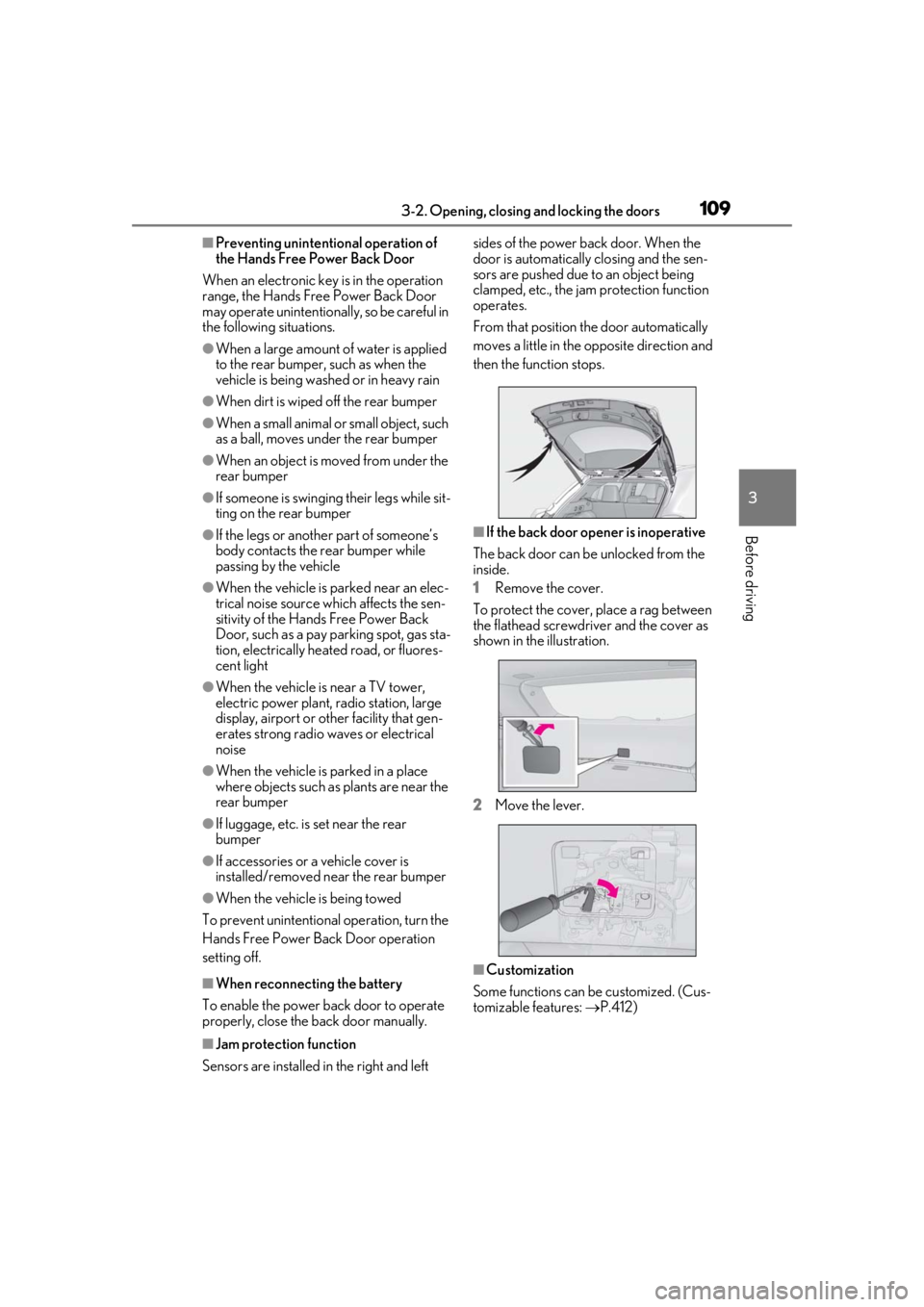
■Jam protection function
Sensors are installed in the right and left sides of the power back door. When the
door is automatically closing and the sen-
sors are pushed due to an object being
clamped, etc., the jam protection function
operates.
From that position the door automatically
moves a little in the opposite direction and
then the function stops.
■If the back door opener is inoperative
The back door can be unlocked from the
inside.
1 Remove the cover.
To protect the cover, place a rag between
the flathead screwdri ver and the cover as
shown in the illustration.
2 Move the lever.
■Customization
Some functions can be customized. (Cus-
tomizable features: P.412)
Page 110 of 452
1103-2. Opening, closing and locking the doors
WARNING
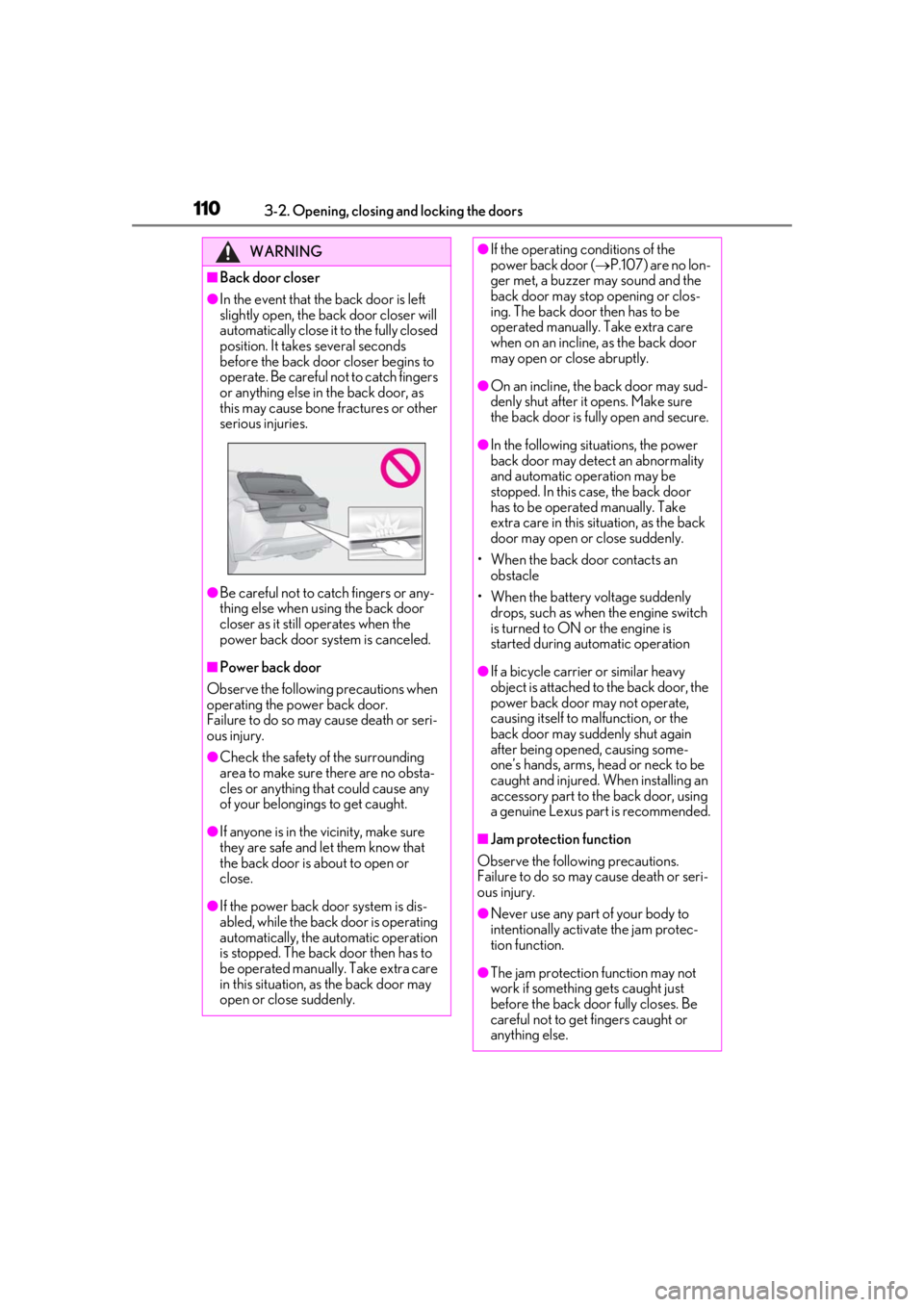
■Back door closer
●In the event that the back door is left
slightly open, the back door closer will
automatically close it to the fully closed
position. It takes several seconds
before the back door closer begins to
operate. Be careful not to catch fingers
or anything else in the back door, as
this may cause bone fractures or other
serious injuries.
●Be careful not to catch fingers or any-
thing else when using the back door
closer as it still operates when the
power back door system is canceled.
■Power back door
Observe the following precautions when
operating the power back door.
Failure to do so may cause death or seri-
ous injury.
●Check the safety of the surrounding
area to make sure there are no obsta-
cles or anything that could cause any
of your belongings to get caught.
●If anyone is in the vicinity, make sure
they are safe and let them know that
the back door is about to open or
close.
●If the power back door system is dis-
abled, while the back door is operating
automatically, the automatic operation
is stopped. The back door then has to
be operated manually. Take extra care
in this situation, as the back door may
open or close suddenly.
●If the operating conditions of the
power back door ( P.107) are no lon-
ger met, a buzzer may sound and the
back door may stop opening or clos-
ing. The back door then has to be
operated manually. Take extra care
when on an incline, as the back door
may open or close abruptly.
●On an incline, the back door may sud-
denly shut after it opens. Make sure
the back door is fully open and secure.
●In the following situations, the power
back door may detect an abnormality
and automatic operation may be
stopped. In this case, the back door
has to be operated manually. Take
extra care in this situation, as the back
door may open or close suddenly.
• When the back door contacts an obstacle
• When the battery voltage suddenly drops, such as when the engine switch
is turned to ON or the engine is
started during automatic operation
●If a bicycle carrier or similar heavy
object is attached to the back door, the
power back door may not operate,
causing itself to malfunction, or the
back door may suddenly shut again
after being opened, causing some-
one’s hands, arms, head or neck to be
caught and injured. When installing an
accessory part to the back door, using
a genuine Lexus part is recommended.
■Jam protection function
Observe the following precautions.
Failure to do so may cause death or seri-
ous injury.
●Never use any part of your body to
intentionally activa te the jam protec-
tion function.
●The jam protection function may not
work if something gets caught just
before the back door fully closes. Be
careful not to get fingers caught or
anything else.
Page 113 of 452
1133-2. Opening, closing and locking the doors
3
Before driving
5ON and OFF will be switched over
with presses of “OK” on the meter
control switches.
If the Hands Free Power Back Door is dis-
abled, it will remain disabled unless it is
enabled on the multi-information display.
(It will not be enabled even when the
engine switch is turned off and then back to
ON.)
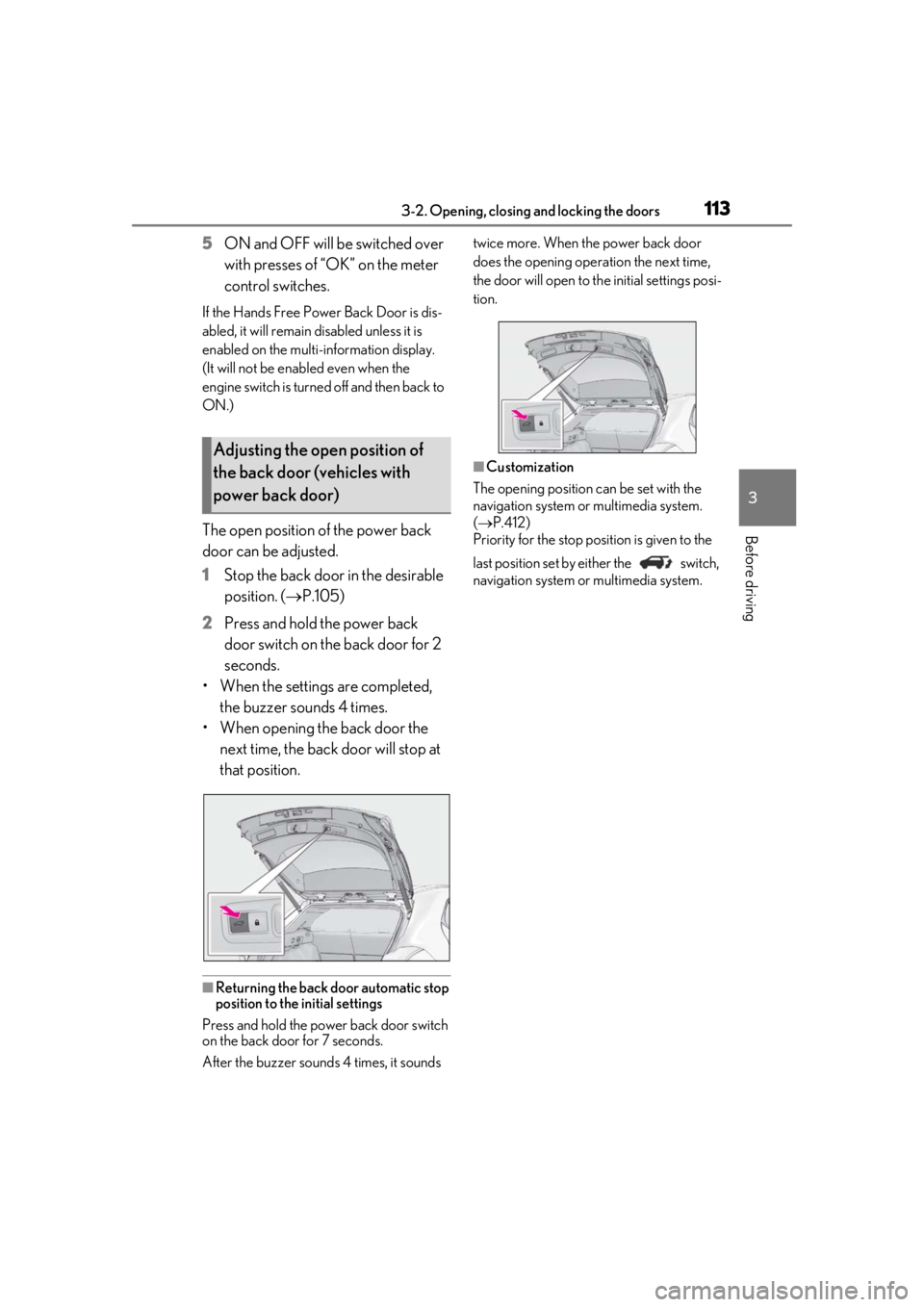
The open position of the power back
door can be adjusted.
1 Stop the back door in the desirable
position. ( P.105)
2 Press and hold the power back
door switch on the back door for 2
seconds.
• When the settings are completed, the buzzer sounds 4 times.
• When opening the back door the next time, the back door will stop at
that position.
■Returning the back door automatic stop
position to the initial settings
Press and hold the power back door switch
on the back door for 7 seconds.
After the buzzer sounds 4 times, it sounds twice more. When the power back door
does the opening operation the next time,
the door will open to th
e initial settings posi-
tion.
■Customization
The opening position can be set with the
navigation system or multimedia system.
( P.412)
Priority for the stop position is given to the
last position set by either the switch,
navigation system or multimedia system.
Adjusting the open position of
the back door (vehicles with
power back door)
Page 115 of 452
1153-2. Opening, closing and locking the doors
3
Before driving■If “Key Detected in Vehicle” is shown on
the multi-information display
An attempt was made to lock the doors
using the smart access system with push-
button start while the electronic key was still
inside the vehicle. Retrieve the electronic
key from the vehicle and lock the doors
again.
■Battery-saving function
The battery-saving fu nction will be acti-
vated in order to prevent the electronic key
battery and the battery from being dis-
charged while the vehicl e is not in operation
for a long time.
●In the following situations, the smart
access system with pu sh-button start may
take some time to unlock the doors.
• The electronic key has been left in an
area of approximately 6 ft. (2 m) of the
outside of the vehicle for 10 minutes or
longer.
• The smart access system with push-but- ton start has not been used for 5 days or
longer.
●If the smart access system with push-but-
ton start has not been used for 14 days or
longer, the doors cannot be unlocked at
any doors except the driver’s door. In this
case, take hold of the driver’s door han-
dle, or use the wireless remote control or
the mechanical key, to unlock the doors.
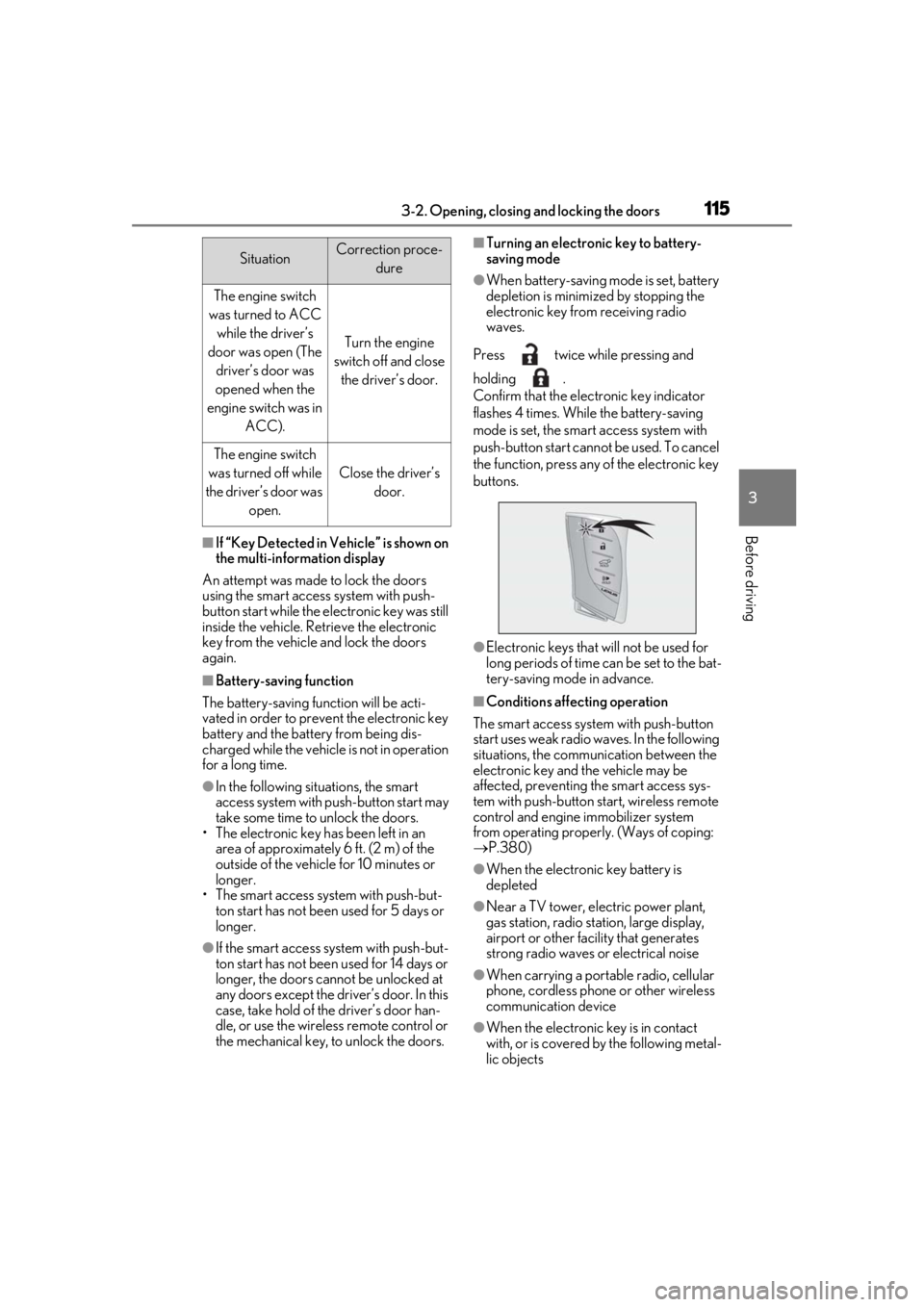
■Turning an electronic key to battery-
saving mode
●When battery-saving mode is set, battery
depletion is minimized by stopping the
electronic key from receiving radio
waves.
Press twice while pressing and
holding .
Confirm that the electronic key indicator
flashes 4 times. While the battery-saving
mode is set, the smart access system with
push-button start cannot be used. To cancel
the function, press any of the electronic key
buttons.
●Electronic keys that will not be used for
long periods of time can be set to the bat-
tery-saving mode in advance.
■Conditions affecting operation
The smart access system with push-button
start uses weak radio waves. In the following
situations, the communication between the
electronic key and the vehicle may be
affected, preventing the smart access sys-
tem with push-button start, wireless remote
control and engine immobilizer system
from operating properly. (Ways of coping:
P.380)
●When the electronic key battery is
depleted
●Near a TV tower, electric power plant,
gas station, radio stat ion, large display,
airport or other fac ility that generates
strong radio waves or electrical noise
●When carrying a portable radio, cellular
phone, cordless phone or other wireless
communication device
●When the electronic key is in contact
with, or is covered by the following metal-
lic objects
SituationCorrection proce-
dure
The engine switch
was turned to ACC while the driver’s
door was open (The driver’s door was
opened when the
engine switch was in ACC).
Turn the engine
switch off and close the driver’s door.
The engine switch
was turned off while
the driver’s door was open.
Close the driver’s door.
Page 117 of 452
1173-2. Opening, closing and locking the doors
3
Before driving
etc. Clean the lock sensor and attempt to
operate it again.
●A sudden approach to the effective
range or door handle may prevent the
doors from being unlocked. In this case,
return the door handle to the original
position and check that the doors unlock
before pulling the door handle again.
●If there is another electronic key in the
detection area, it may take slightly longer
to unlock the doors after the door handle
is gripped.
■When the vehicle is not driven for
extended periods
●To prevent theft of the vehicle, do not
leave the electronic key within 6 ft. (2 m)
of the vehicle.
●The smart access syst em with push-but-
ton start can be deactivated in advance.
●Setting the electronic key to battery-sav-
ing mode helps to reduce key battery
depletion. ( P.115)
■To operate the system properly
Make sure to carry the electronic key when
operating the system. Do not get the elec-
tronic key too close to the vehicle when
operating the system from the outside of the
vehicle.
Depending on the position and holding
condition of the electronic key, the key may
not be detected correctly and the system
may not operate properly. (The alarm may
go off accidentally, or the door lock preven-
tion may not operate.)
■If the smart access system with push-
button start does not operate properly
●Locking and unlocking the doors: Use
the mechanical key. ( P.380)
●Starting the engine: P.381
■Customization
Settings (e.g. smart access system with
push-button start) can be changed. (Cus-
tomizable features: P.411)
If the smart access sy stem with push-button
start has been deactivated by a customized
setting, refer to the explanations for the fol-
lowing operations.
●Locking and unlo cking the doors:
Use the wireless remote control or
mechanical key. ( P.98, 380)
●Starting the engine and changing engine
switch modes: P.381
●Stopping the engine: P.153
Page 121 of 452
1213-3. Adjusting the seats
3
Before driving
3-3.Adjusting the seats
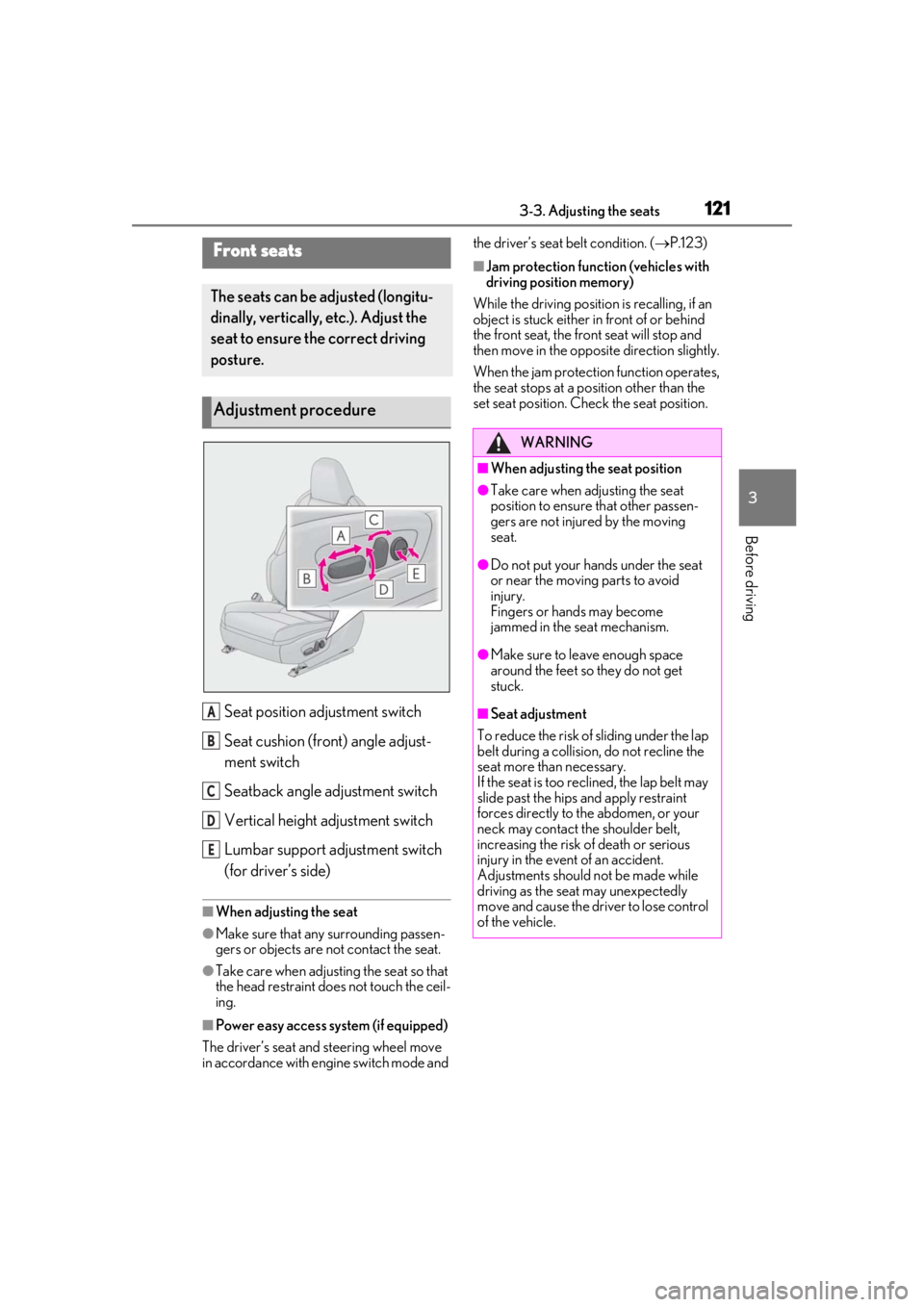
Seat position adjustment switch
Seat cushion (front) angle adjust-
ment switch
Seatback angle adjustment switch
Vertical height adjustment switch
Lumbar support adjustment switch
(for driver’s side)
■When adjusting the seat
●Make sure that any surrounding passen-
gers or objects are not contact the seat.
●Take care when adjusting the seat so that
the head restraint does not touch the ceil-
ing.
■Power easy access system (if equipped)
The driver’s seat and steering wheel move
in accordance with engine switch mode and the driver’s seat belt condition. (
P.123)
■Jam protection function (vehicles with
driving position memory)
While the driving position is recalling, if an
object is stuck either in front of or behind
the front seat, the front seat will stop and
then move in the opposite direction slightly.
When the jam protection function operates,
the seat stops at a po sition other than the
set seat position. Chec k the seat position.Front seats
The seats can be adjusted (longitu-
dinally, vertically, etc.). Adjust the
seat to ensure the correct driving
posture.
Adjustment procedure
A
B
C
D
E
WARNING
■When adjusting the seat position
●Take care when adjusting the seat
position to ensure that other passen-
gers are not injured by the moving
seat.
●Do not put your hands under the seat
or near the moving parts to avoid
injury.
Fingers or hands may become
jammed in the seat mechanism.
●Make sure to leave enough space
around the feet so they do not get
stuck.
■Seat adjustment
To reduce the risk of sliding under the lap
belt during a collision, do not recline the
seat more than necessary.
If the seat is too rec lined, the lap belt may
slide past the hips and apply restraint
forces directly to the abdomen, or your
neck may contact the shoulder belt,
increasing the risk of death or serious
injury in the event of an accident.
Adjustments should not be made while
driving as the seat may unexpectedly
move and cause the driver to lose control
of the vehicle.
Page 122 of 452
1223-3. Adjusting the seats
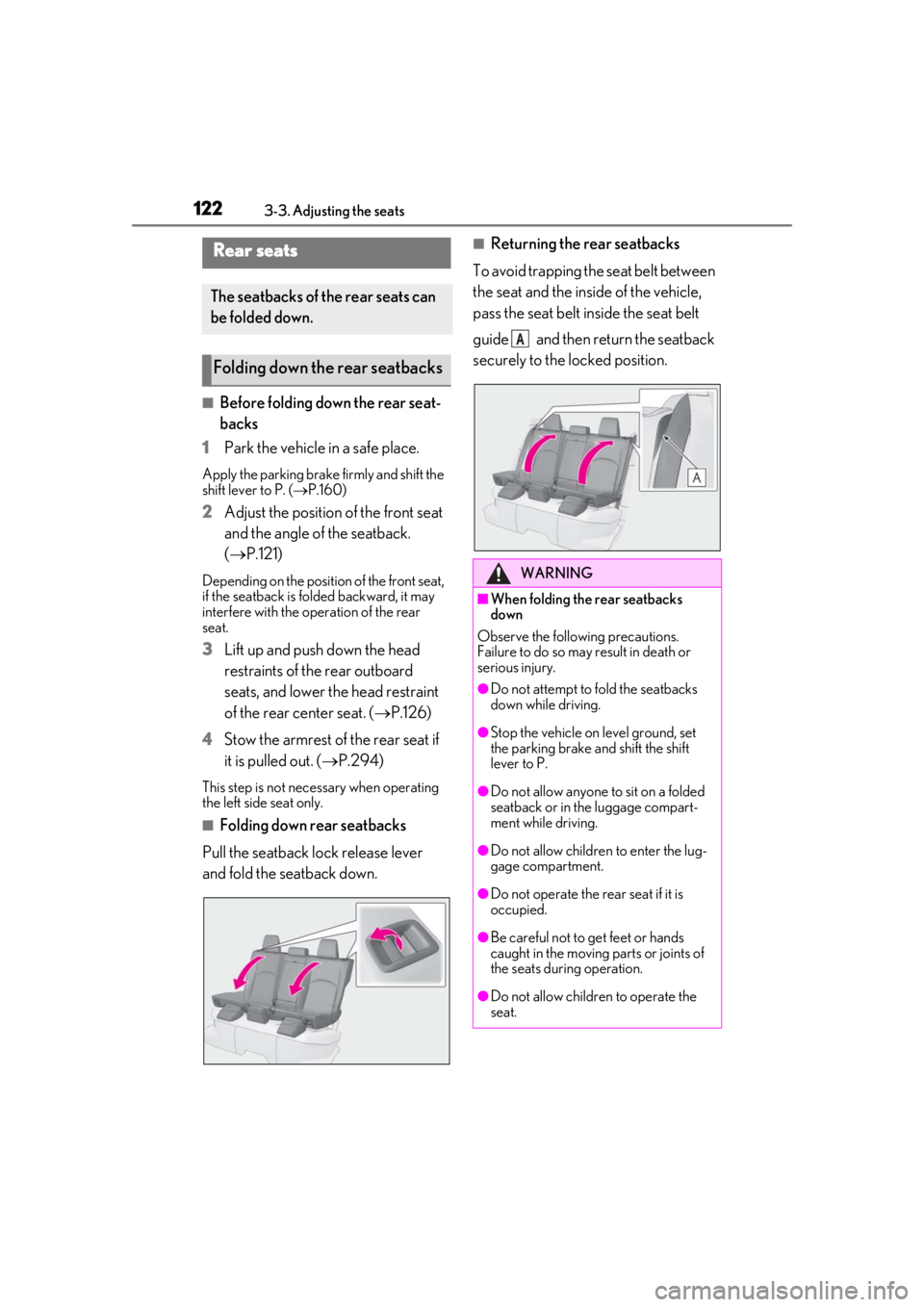
■Before folding down the rear seat-
backs
1
Park the vehicle in a safe place.
Apply the parking brake firmly and shift the
shift lever to P. ( P.160)
2Adjust the position of the front seat
and the angle of the seatback.
( P.121)
Depending on the position of the front seat,
if the seatback is fo lded backward, it may
interfere with the operation of the rear
seat.
3Lift up and push down the head
restraints of the rear outboard
seats, and lower the head restraint
of the rear center seat. ( P.126)
4
Stow the armrest of the rear seat if
it is pulled out. ( P.294)
This step is not necessary when operating
the left side seat only.
■Folding down rear seatbacks
Pull the seatback lock release lever
and fold the seatback down.
■Returning the rear seatbacks
To avoid trapping the seat belt between
the seat and the inside of the vehicle,
pass the seat belt inside the seat belt
guide and then return the seatback
securely to the locked position.Rear seats
The seatbacks of the rear seats can
be folded down.
Folding down the rear seatbacks
WARNING
■When folding the rear seatbacks
down
Observe the following precautions.
Failure to do so may result in death or
serious injury.
●Do not attempt to fold the seatbacks
down while driving.
●Stop the vehicle on level ground, set
the parking brake and shift the shift
lever to P.
●Do not allow anyone to sit on a folded
seatback or in the luggage compart-
ment while driving.
●Do not allow childre n to enter the lug-
gage compartment.
●Do not operate the rear seat if it is
occupied.
●Be careful not to get feet or hands
caught in the moving parts or joints of
the seats during operation.
●Do not allow children to operate the
seat.
A