wheel LEXUS UX200 2019 Workshop Manual
[x] Cancel search | Manufacturer: LEXUS, Model Year: 2019, Model line: UX200, Model: LEXUS UX200 2019Pages: 452, PDF Size: 10.06 MB
Page 255 of 452

255
5
5
Interior features
Interior features
5-1. Remote TouchRemote Touch ............................ 256
5-2. Lexus Climate Concierge Lexus Climate Concierge ..... 260
5-3. Using the air conditioning system and defogger
Automatic air conditioning system ........................................................ 262
Heated steering wheel/seat heat- ers/seat ventilators ................. 271
5-4. Using the interior lights Interior lights list......................... 274
5-5. Using the storage features List of storage features............ 277
Luggage compartment features ........................................................ 280
5-6. Using the other interior features Other interior features ........... 285
Garage door opener............... 295
Compass........................................ 301
Page 260 of 452
2605-2. Lexus Climate Concierge
5-2.Lexus Climate Concierge
Select
The indicator on the Lexus Climate Con-
cierge control screen illuminates, and the
automatic air conditioning system, seat
heaters and ventilators, (if equipped), and
heated steering wheel (if equipped) oper-
ate in automatic mode.
If any of the system is operated manually,
the indicator turns off. However, all other
functions continue to operate in automatic
mode.
■When using the Lexus Climate Con-
cierge
Lexus Climate Concierge can be operated
on the sub function menu or option control
screen. ( P.265)
■Automatic air conditioning system
( P.274)
The temperature can be adjusted inde-
pendently for the driver seat and pas-
senger seat.
■Seat heaters and ventilators (if
equipped) ( P.271)
Heating or ventilation is automatically
selected according to the set tempera-
ture of the air conditioning system, the
outside temperature, etc.
The seat heater and ventilator of the
front passenger seat operate in auto-
matic mode if a passenger is detected.
■Heated steering wheel (if
equipped) ( P.271)
Heated steering wheel operates auto-
matically according to the set tempera-
ture of the air conditioning system, the
outside temperature, etc.
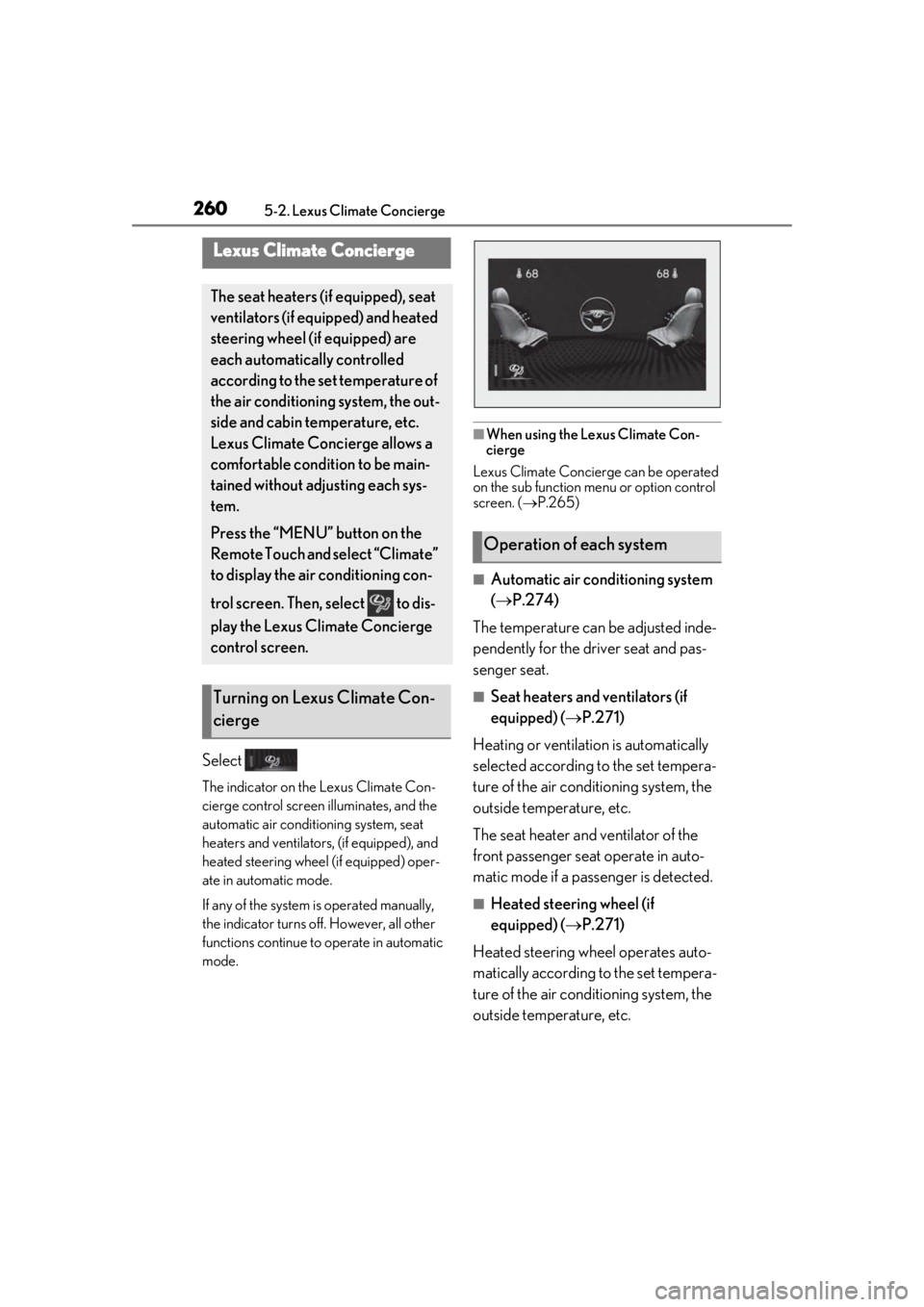
Lexus Climate Concierge
The seat heaters (if equipped), seat
ventilators (if equipped) and heated
steering wheel (if equipped) are
each automatically controlled
according to the set temperature of
the air conditioning system, the out-
side and cabin temperature, etc.
Lexus Climate Concierge allows a
comfortable condition to be main-
tained without adjusting each sys-
tem.
Press the “MENU” button on the
Remote Touch and select “Climate”
to display the air conditioning con-
trol screen. Then, select to dis-
play the Lexus Climate Concierge
control screen.
Turning on Lexus Climate Con-
cierge
Operation of each system
Page 265 of 452
2655-3. Using the air conditioning system and defogger
5
Interior features
diately after the air conditioning system is
started in automatic mode.
■Air conditioning filter
P.340
■Customization
Settings (e.g. A/C automatic mode switch
operation) can be changed.
(Customizable features: P.416)
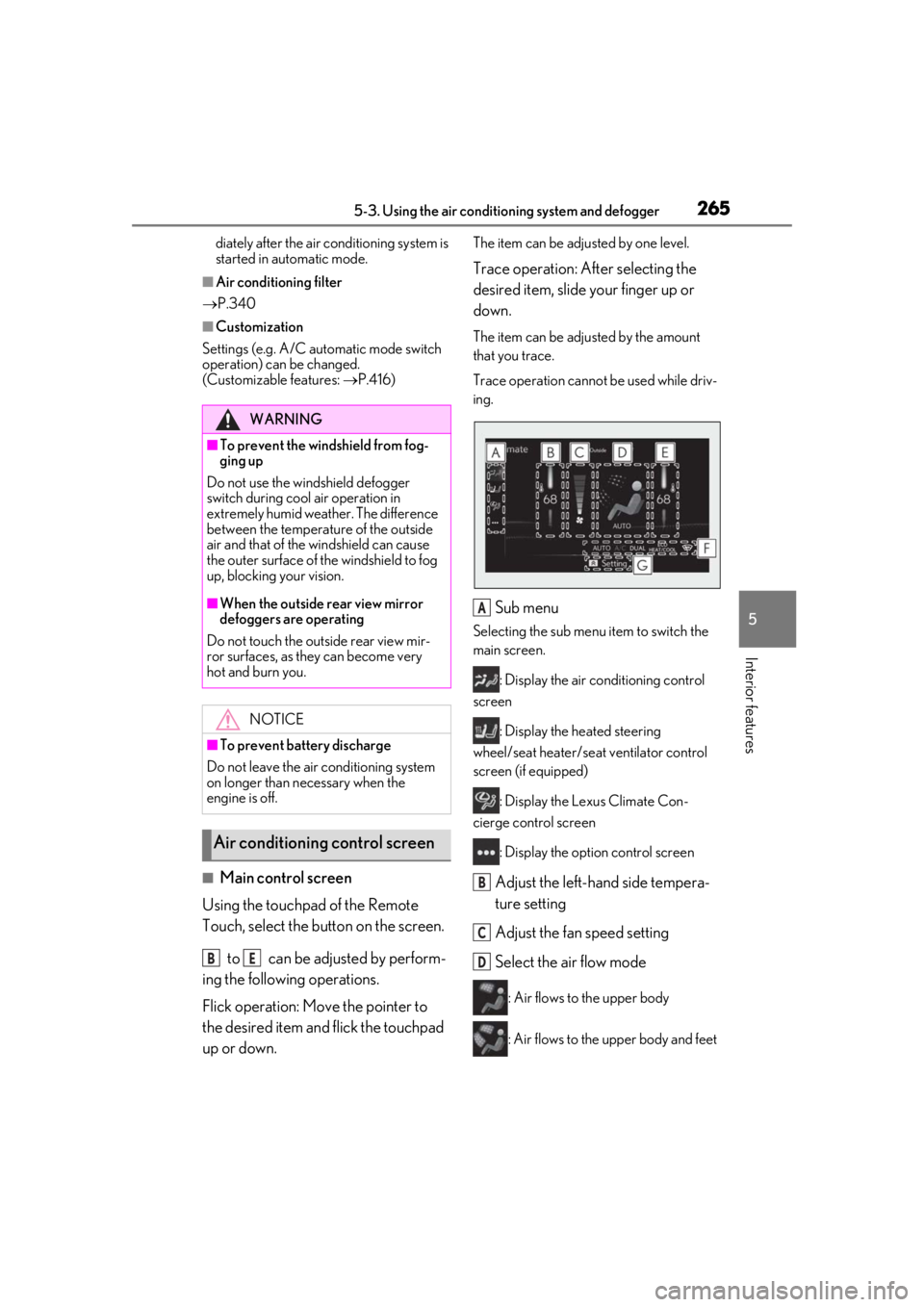
■Main control screen
Using the touchpad of the Remote
Touch, select the button on the screen.
to can be adjusted by perform-
ing the following operations.
Flick operation: Move the pointer to
the desired item and flick the touchpad
up or down.
The item can be adjusted by one level.
Trace operation: After selecting the
desired item, slide your finger up or
down.
The item can be adjusted by the amount
that you trace.
Trace operation cannot be used while driv-
ing.
Sub menu
Selecting the sub menu item to switch the
main screen.
: Display the air conditioning control
screen
: Display the heated steering
wheel/seat heater/sea t ventilator control
screen (if equipped)
: Display the Lexus Climate Con-
cierge control screen
: Display the option control screen
Adjust the left-hand side tempera-
ture setting
Adjust the fan speed setting
Select the air flow mode
: Air flows to the upper body
: Air flows to the upper body and feet
WARNING
■To prevent the windshield from fog-
ging up
Do not use the windshield defogger
switch during cool air operation in
extremely humid weather. The difference
between the temperature of the outside
air and that of the windshield can cause
the outer surface of the windshield to fog
up, blocking your vision.
■When the outside rear view mirror
defoggers are operating
Do not touch the outside rear view mir-
ror surfaces, as they can become very
hot and burn you.
NOTICE
■To prevent battery discharge
Do not leave the air conditioning system
on longer than necessary when the
engine is off.
Air conditioning control screen
BE
A
B
C
D
Page 266 of 452
2665-3. Using the air conditioning system and defogger
: Air flows to the feet
: Air flows to the feet and the wind-
shield defogger operates
Adjust the right-hand side tem-
perature setting
Function on/off indicators
When the function is on, the indicator illu-
minates on the control screen.
Sub function menu
When the sub function button on the
Remote Touch is pressed, the following
functions can be switched on and off.
: Set Lexus Climate Concierge
( P.260)
“AUTO”: Set automatic mode on/off
( P.267)
“OFF”: Turn the fan off
“A/C”: Set cooling and dehumidification
function
“DUAL”: Adjust the temperature for driver
and front passenger seats separately
(“DUAL” mode) ( P.268)
: Set eco air conditioning mode
■Option control screen
Select on the sub menu to display
the option control screen.
The functions can be switched on and off.
When the function is on, the indicator illu-
minates on the screen.
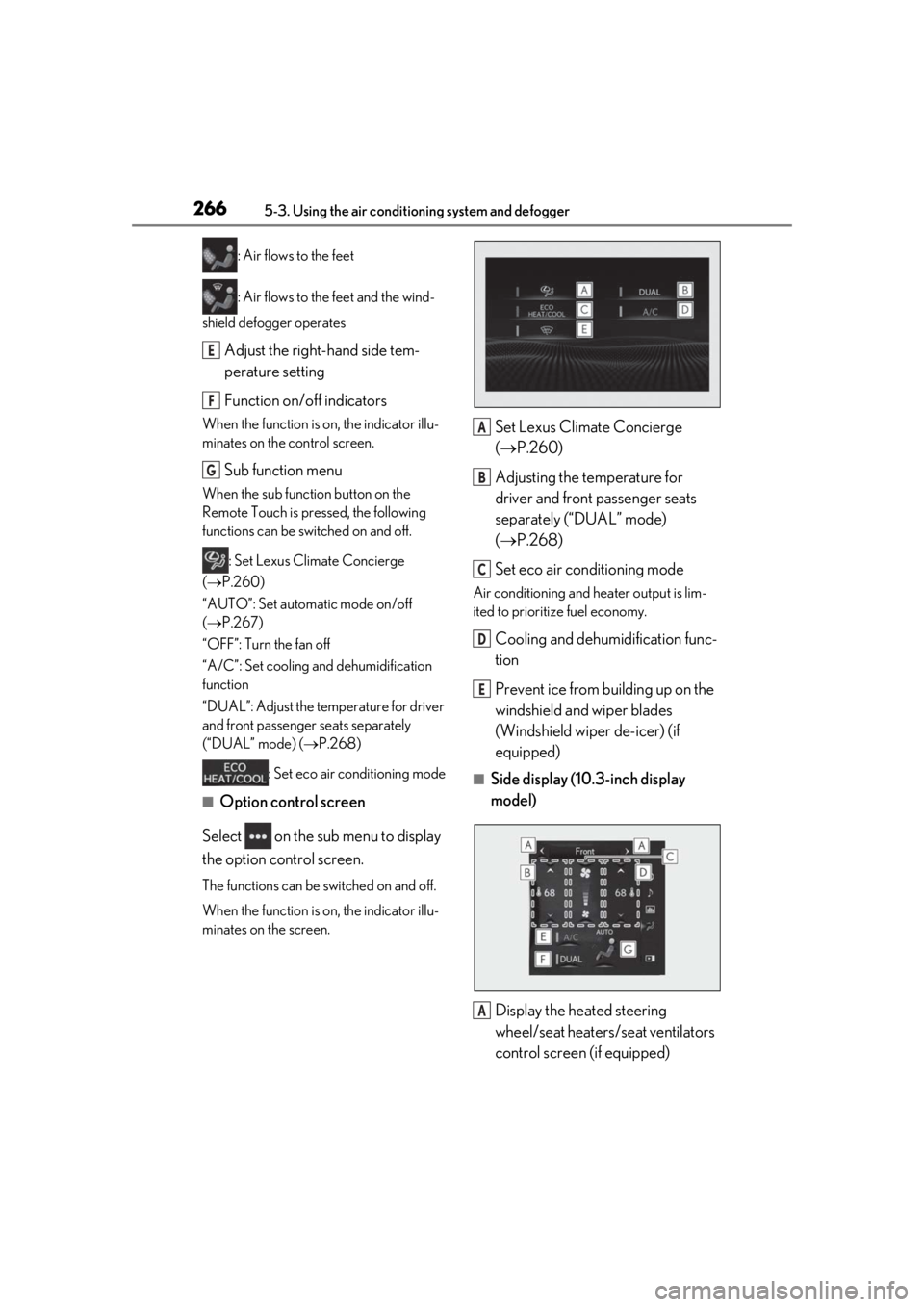
Set Lexus Climate Concierge
( P.260)
Adjusting the temperature for
driver and front passenger seats
separately (“DUAL” mode)
( P.268)
Set eco air conditioning mode
Air conditioning and heater output is lim-
ited to prioritize fuel economy.
Cooling and dehumidification func-
tion
Prevent ice from building up on the
windshield and wiper blades
(Windshield wiper de-icer) (if
equipped)
■Side display (10. 3-inch display
model)
Display the heated steering
wheel/seat heaters/seat ventilators
control screen (if equipped)
E
F
G
A
B
C
D
E
A
Page 271 of 452
2715-3. Using the air conditioning system and defogger
5
Interior features
*: If equipped
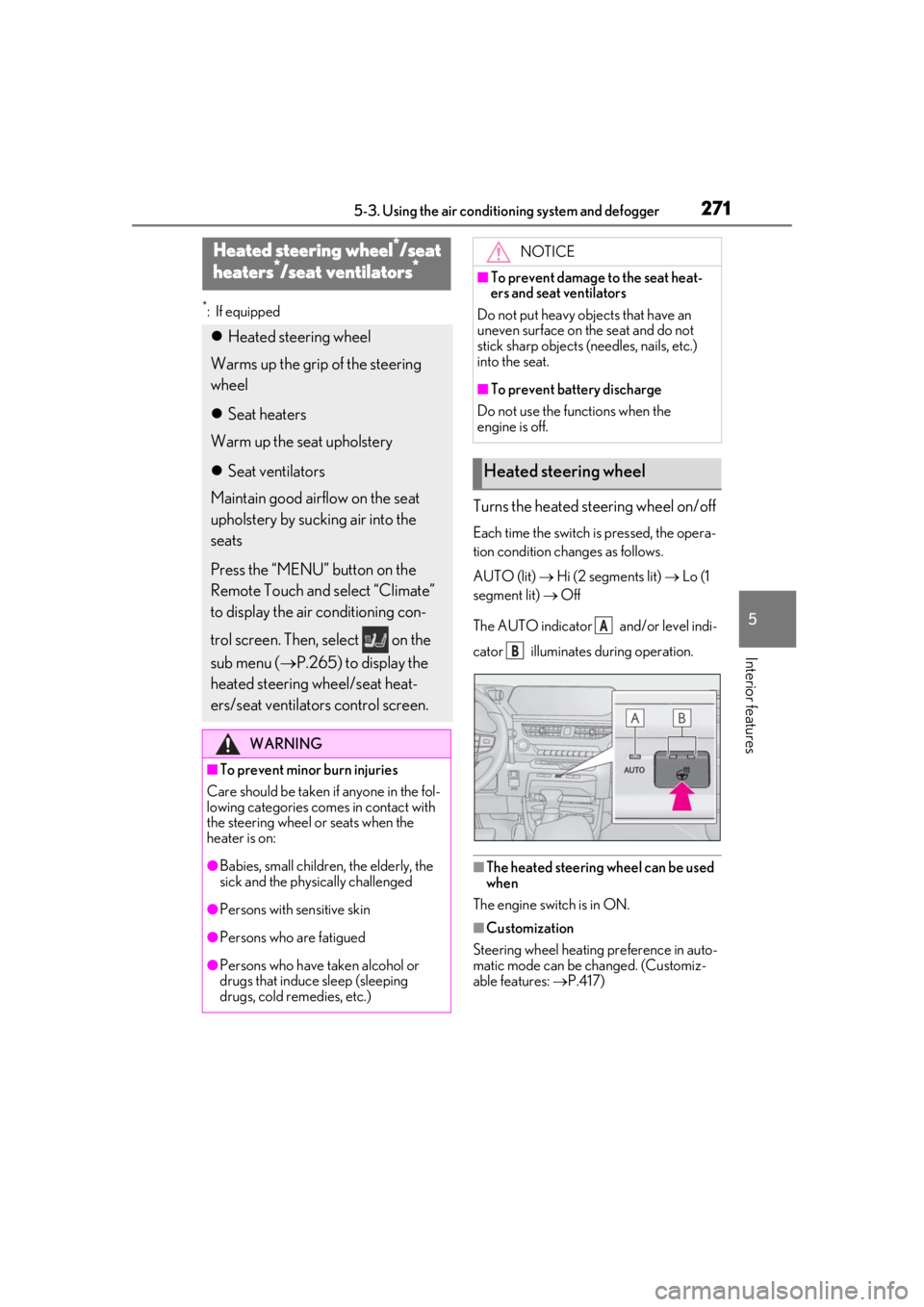
Turns the heated steering wheel on/off
Each time the switch is pressed, the opera-
tion condition changes as follows.
AUTO (lit) Hi (2 segments lit) Lo (1
segment lit) Off
The AUTO indicator and/or level indi-
cator illuminates during operation.
■The heated steering wheel can be used
when
The engine switch is in ON.
■Customization
Steering wheel heating preference in auto-
matic mode can be changed. (Customiz-
able features: P.417)
Heated steering wheel*/seat
h
eaters*/seat ventilators*
Heated steering wheel
Warms up the grip of the steering
wheel
Seat heaters
Warm up the seat upholstery
Seat ventilators
Maintain good airflow on the seat
upholstery by sucking air into the
seats
Press the “MENU” button on the
Remote Touch and select “Climate”
to display the air conditioning con-
trol screen. Then, select on the
sub menu ( P.265) to display the
heated steering wheel/seat heat-
ers/seat ventilators control screen.
WARNING
■To prevent minor burn injuries
Care should be taken if anyone in the fol-
lowing categories comes in contact with
the steering wheel or seats when the
heater is on:
●Babies, small children, the elderly, the
sick and the phys ically challenged
●Persons with sensitive skin
●Persons who are fatigued
●Persons who have taken alcohol or
drugs that induce sleep (sleeping
drugs, cold remedies, etc.)
NOTICE
■To prevent damage to the seat heat-
ers and seat ventilators
Do not put heavy objects that have an
uneven surface on the seat and do not
stick sharp objects (n eedles, nails, etc.)
into the seat.
■To prevent battery discharge
Do not use the functions when the
engine is off.
Heated steering wheel
A
B
Page 273 of 452
2735-3. Using the air conditioning system and defogger
5
Interior features
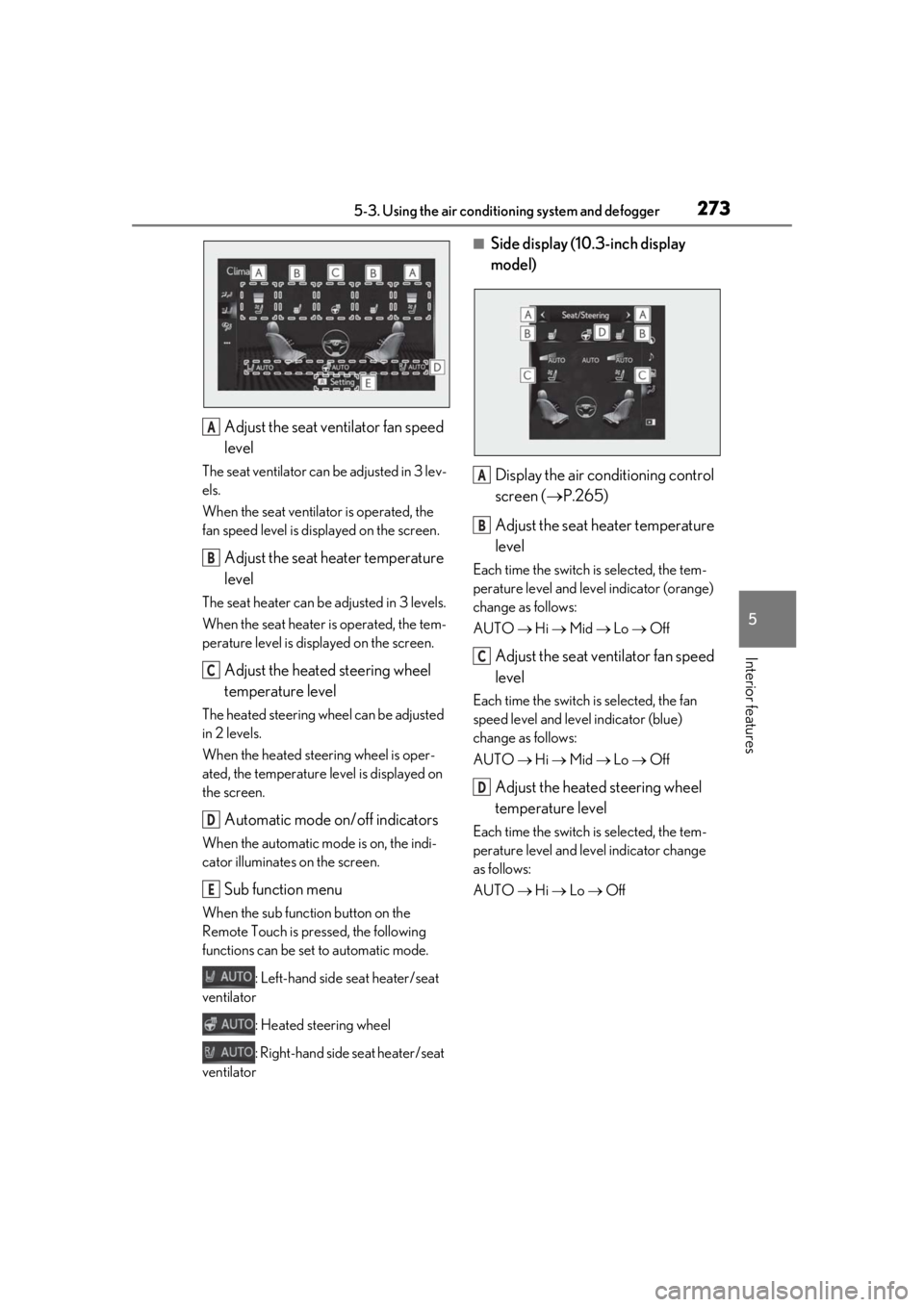
Adjust the seat ventilator fan speed
level
The seat ventilator can be adjusted in 3 lev-
els.
When the seat ventilator is operated, the
fan speed level is disp layed on the screen.
Adjust the seat heater temperature
level
The seat heater can be adjusted in 3 levels.
When the seat heater is operated, the tem-
perature level is displayed on the screen.
Adjust the heated steering wheel
temperature level
The heated steering wheel can be adjusted
in 2 levels.
When the heated steering wheel is oper-
ated, the temperature level is displayed on
the screen.
Automatic mode on/off indicators
When the automatic mode is on, the indi-
cator illuminates on the screen.
Sub function menu
When the sub function button on the
Remote Touch is pressed, the following
functions can be set to automatic mode.
: Left-hand side seat heater/seat
ventilator
: Heated steering wheel
: Right-hand side seat heater/seat
ventilator
■Side display (10. 3-inch display
model)
Display the air conditioning control
screen ( P.265)
Adjust the seat heater temperature
level
Each time the switch is selected, the tem-
perature level and level indicator (orange)
change as follows:
AUTO Hi Mid Lo Off
Adjust the seat ventilator fan speed
level
Each time the switch is selected, the fan
speed level and level indicator (blue)
change as follows:
AUTO Hi Mid Lo Off
Adjust the heated steering wheel
temperature level
Each time the switch is selected, the tem-
perature level and le vel indicator change
as follows:
AUTO Hi Lo Off
A
B
C
D
E
A
B
C
D
Page 280 of 452
2805-5. Using the storage features
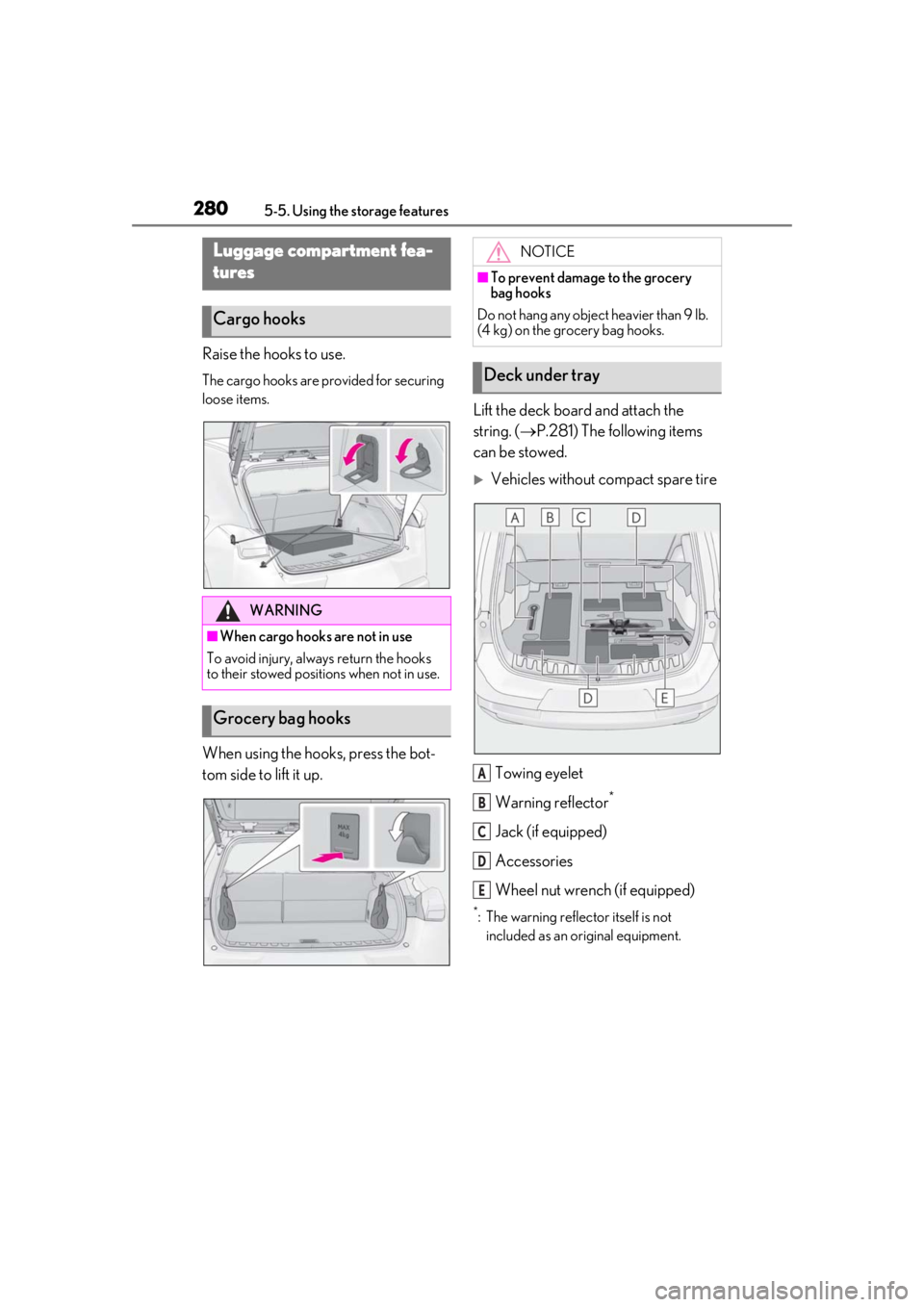
Raise the hooks to use.
The cargo hooks are provided for securing
loose items.
When using the hooks, press the bot-
tom side to lift it up.Lift the deck board and attach the
string. (
P.281) The following items
can be stowed.
Vehicles without compact spare tire
Towing eyelet
Warning reflector
*
Jack (if equipped)
Accessories
Wheel nut wrench (if equipped)
*: The warning reflec tor itself is not
included as an original equipment.
Luggage compartment fea-
tures
Cargo hooks
WARNING
■When cargo hooks are not in use
To avoid injury, always return the hooks
to their stowed positions when not in use.
Grocery bag hooks
NOTICE
■To prevent damage to the grocery
bag hooks
Do not hang any object heavier than 9 lb.
(4 kg) on the grocery bag hooks.
Deck under tray
A
B
C
D
E
Page 281 of 452
2815-5. Using the storage features
5
Interior features
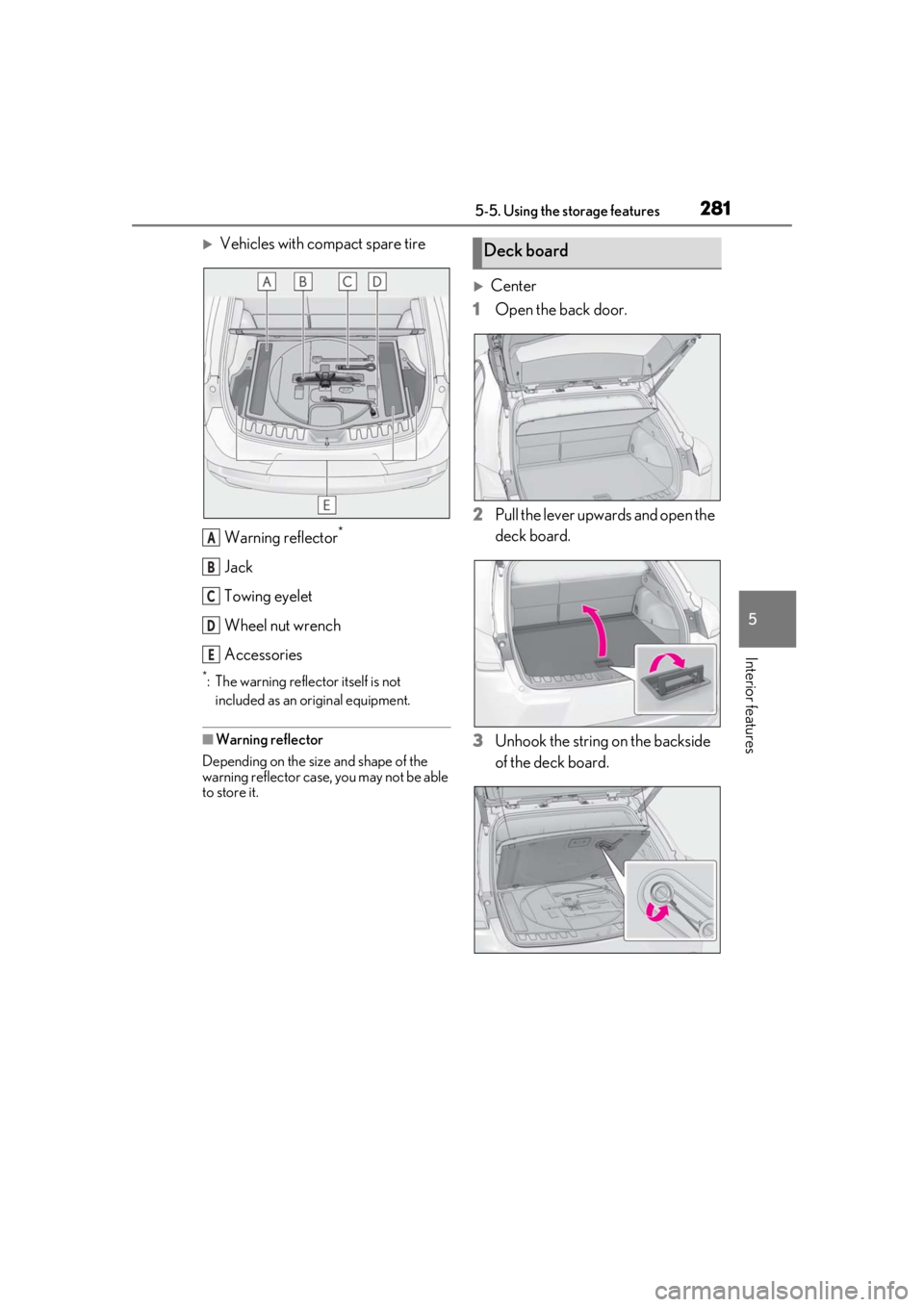
Vehicles with compact spare tireWarning reflector
*
Jack
Towing eyelet
Wheel nut wrench
Accessories
*: The warning reflector itself is not included as an original equipment.
■Warning reflector
Depending on the size and shape of the
warning reflector case, you may not be able
to store it.
Center
1 Open the back door.
2 Pull the lever upwards and open the
deck board.
3 Unhook the string on the backside
of the deck board.
A
B
C
D
E
Deck board
Page 305 of 452

305
6
6
Maintenance and care
Maintenance and care
6-1. Maintenance and careCleaning and protecting the vehi-cle exterior ................................ 306
Cleaning and protecting the vehi- cle interior ................................. 309
6-2. Maintenance Maintenance requirements ... 312
General maintenance .............. 313
Emission inspection and mainte- nance (I/M) programs .......... 316
6-3. Do-it-yourself maintenance Do-it-yourself service precautions......................................................... 317
Hood................................................ 319
Positioning a floor jack............ 320
Engine compartment................ 321
Tires ................................................ 328
Tire inflation pressure .............. 337
Wheels........................................... 339
Air conditioning filter...............340
Electronic key battery .............. 341
Checking and replacing fuses ........................................................ 343
Headlight aim.............................. 345
Light bulbs .................................... 346
Page 306 of 452

3066-1. Maintenance and care
6-1.Maintenance and care
Working from top to bottom, liber-
ally apply water to the vehicle body,
wheel wells and underside of the
vehicle to remove any dirt and dust.
Wash the vehicle body using a
sponge or soft cloth, such as a
chamois.
For hard-to-remove marks, use car
wash soap and rinse thoroughly with
water.
Wipe away any water.
Wax the vehicle when the water-
proof coating deteriorates.
If water does not bead on a clean surface,
apply wax when the vehicle body is cool.
■Self-restoring coat
The vehicle body has a self-restoring coat-
ing that is resistant to small surface
scratches caused in a car wash, etc.
●The coating lasts for 5 to 8 years from
when the vehicle is delivered from the
plant.
●The restoration time differs depending on
the depth of the scratch and outside tem-
perature. The restoration time may
become shorter when the coating is
warmed by applying warm water.
●Deep scratches caused by keys, coins,
etc. cannot be restored.
●Do not use wax that contain abrasives.
■Automatic car washes
●Before washing the vehicle:
• Fold the mirrors
• Turn off the power back door (if equipped)
Start washing from the front of the vehicle.
Extend the mirrors before driving.
●Brushes used in automatic car washes
may scratch the vehicl e surface and harm
your vehicle’s paint.
●Rear spoiler may not be washable in
some automatic car washes. There may
also be an increased risk of damage to
vehicle.
■High pressure car washes
●Do not allow the nozzles of the car wash
to come within close proximity of open-
ing and closing part of the doors or side
windows, and do not continuously let
water hit at the same place.
●Before using the car wash, check that the
fuel filler door on your vehicle is closed
properly.
■Note for a smart access system with
push-button start
●If the door handle becomes wet while the
electronic key is within the effective
range, the door may lock and unlock
repeatedly. In that case, follow the follow-
ing correction procedures to wash the
vehicle:
• Place the key in a position 6 ft. (2 m) or more separate from the vehicle while the
vehicle is being wash ed. (Take care to
ensure that the key is not stolen.)
• Set the electronic key to battery-saving
mode to disable the smart access system
with push-button start. ( P.115)
●If the electronic key is inside the vehicle
and a door handle becomes wet during a
car wash, a buzzer may sound outside the
vehicle and “Key Detected in Vehicle”
may be shown on the multi-information
display. To turn off the alarm, lock all the
doors.
■Aluminum wheels
●Remove any dirt immediately by using a
neutral detergent.
Cleaning and protecting the
vehicle exterior
Perform cleaning in a manner
appropriate to each component
and its material.
Cleaning instructions