fuel consumption LEXUS UX200 2019 Owners Manual
[x] Cancel search | Manufacturer: LEXUS, Model Year: 2019, Model line: UX200, Model: LEXUS UX200 2019Pages: 452, PDF Size: 10.06 MB
Page 2 of 452
2TABLE OF CONTENTS
For your information ......................................6
Reading this manual .................................... 10
How to search ................................................. 11
Pictorial index ................................................. 12
1-1. For safe use Before driving .................................... 24
For safe driving.................................. 25
Seat belts ............................................. 26
SRS airbags ....................................... 30
Front passenger occupant classifi- cation system ................................. 39
Exhaust gas precautions .............. 43
1-2. Child safety Riding with children........................ 44
Child restraint systems ................. 44
1-3. LEXUS Enform Lexus Enform Safety Connect .. 56
Lexus Enform Remote .................. 60
Lexus Enform Service Connect.. 61
1-4. Theft deterrent system Engine immobilizer system .......... 62
Alarm.................................................... 64
Theft prevention labels (for the U.S.A.)............................................... 65
2-1. Instrument cluster Warning lights and indicators .... 68
Gauges and meters (except F SPORT models) ............................ 72
Gauges and meters (F SPORT models) ............................................. 75
Multi-information display............. 79Head-up display ..............................
86
Fuel consumption information... 90
3-1. Key information Keys ....................................................... 94
3-2. Opening, closing and locking the doors
Side doors .......................................... 98
Back door......................................... 102
Smart access system with push-but- ton start ............................................ 114
3-3. Adjusting the seats Front seats.......................................... 121
Rear seats.......................................... 122
Driving position memory ............ 123
Head restraints ............................... 126
3-4. Adjusting the steering wheel and mirrors
Steering wheel ................................ 129
Inside rear view mirror ............... 130
Outside rear view mirrors.......... 132
3-5. Opening, closing the windows and moon roof
Power windows ............................. 135
Moon roof ......................................... 137
4-1. Before driving Driving the vehicle......................... 142
Cargo and luggage....................... 147
Vehicle load limits......................... 150
Trailer towing.................................. 150
Dinghy towing .................................. 151
1For safety and security
2Vehicle status information and
indicators
3Before driving
4Driving
Page 67 of 452
67
2
2
Vehicle status information and indicators
Vehicle status informationand indicators
2-1. Instrument cluster
Warning lights and indicators . 68
Gauges and meters (except F SPORT models) ......................... 72
Gauges and meters (F SPORT models) .......................................... 75
Multi-information display.......... 79
Head-up display ........................... 86
Fuel consumption information 90
Page 81 of 452
812-1. Instrument cluster
2
Vehicle status information and indicators
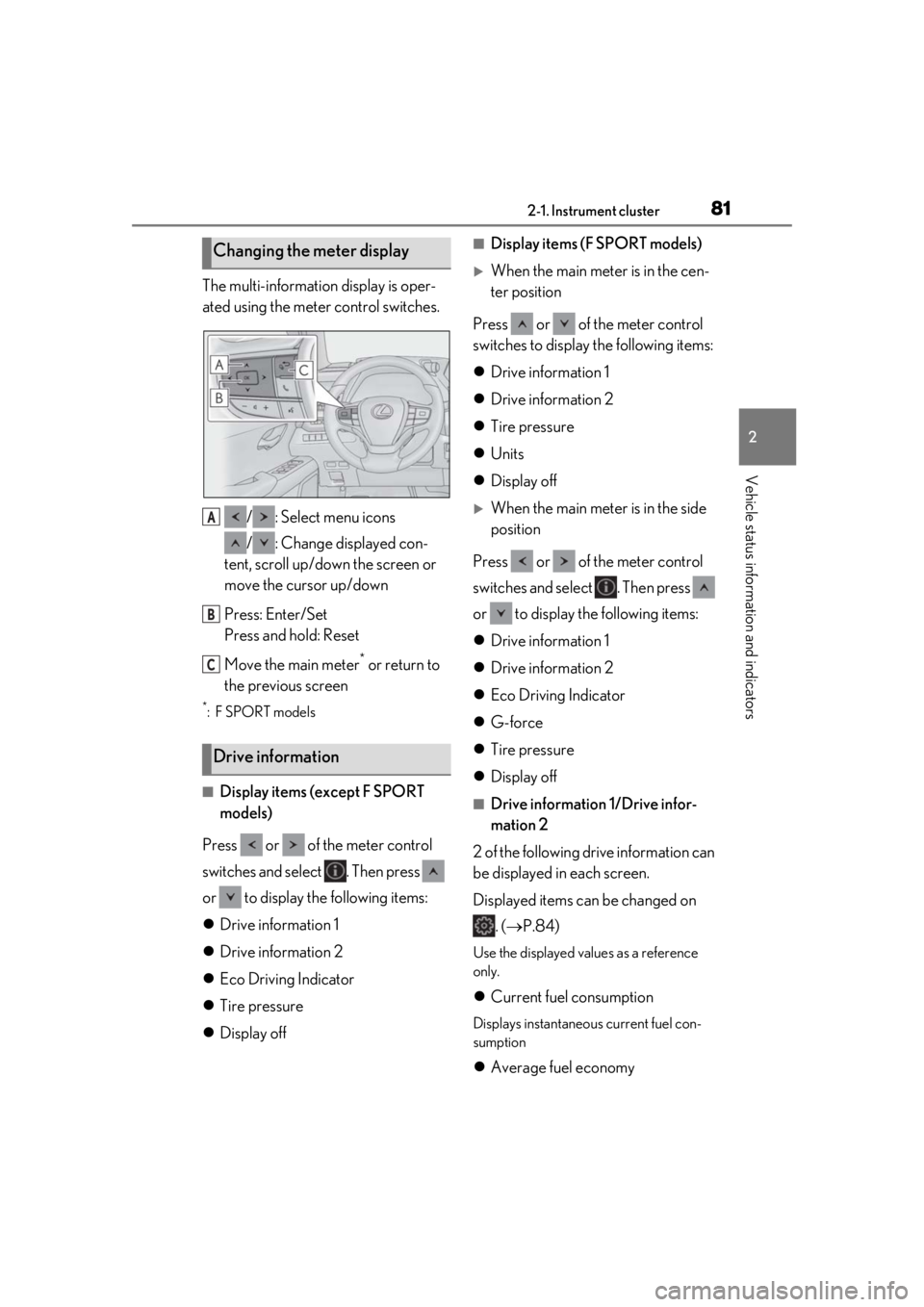
The multi-information display is oper-
ated using the meter control switches./ : Select menu icons
/ : Change displayed con-
tent, scroll up/down the screen or
move the cursor up/down
Press: Enter/Set
Press and hold: Reset
Move the main meter
* or return to
the previous screen
*:F SPORT models
■Display items (except F SPORT
models)
Press or of the meter control
switches and select . Then press
or to display the following items:
Drive information 1
Drive information 2
Eco Driving Indicator
Tire pressure
Display off
■Display items (F SPORT models)
When the main meter is in the cen-
ter position
Press or of the meter control
switches to display the following items:
Drive information 1
Drive information 2
Tire pressure
Units
Display off
When the main meter is in the side
position
Press or of the meter control
switches and select . Then press
or to display the following items:
Drive information 1
Drive information 2
Eco Driving Indicator
G-force
Tire pressure
Display off
■Drive information 1/Drive infor-
mation 2
2 of the following drive information can
be displayed in each screen.
Displayed items can be changed on . ( P.84)
Use the displayed values as a reference
only.
Current fuel consumption
Displays instantaneous current fuel con-
sumption
Average fuel economy
Changing the meter display
Drive information
A
B
C
Page 82 of 452
822-1. Instrument cluster
After reset: Displays average fuel con-
sumption since the display was reset
*1
After start: Displays average fuel con-
sumption since the engine was started
After refuel: Displays average fuel con-
sumption since refuel
Average vehicle speed
After reset: Displays average vehicle
speed since the display was reset
*1
After start: Displays average vehicle speed
since the engine was started
Driven distance
Displays the distance driven since the
engine was started
Elapsed time
After reset: Displays elapsed time since the
display was reset
*1
After start: Displays elapsed time since the
engine was started
Driving range
Displays driving ra nge with remaining
fuel
*2, 3
Other
No item
*1: To reset, display the desired item and
press and hold “OK” of the meter con-
trol switches.
*2: This distance is computed based on your average fuel consumption. As a
result, the actual distance that can be
driven may differ from that displayed.
*3: When only a small amount of fuel is added to the tank, the display may not
be updated.
When refueling, turn the engine switch
off. If the vehicle is refueled without
turning the engine switch off, the display
may not be updated.
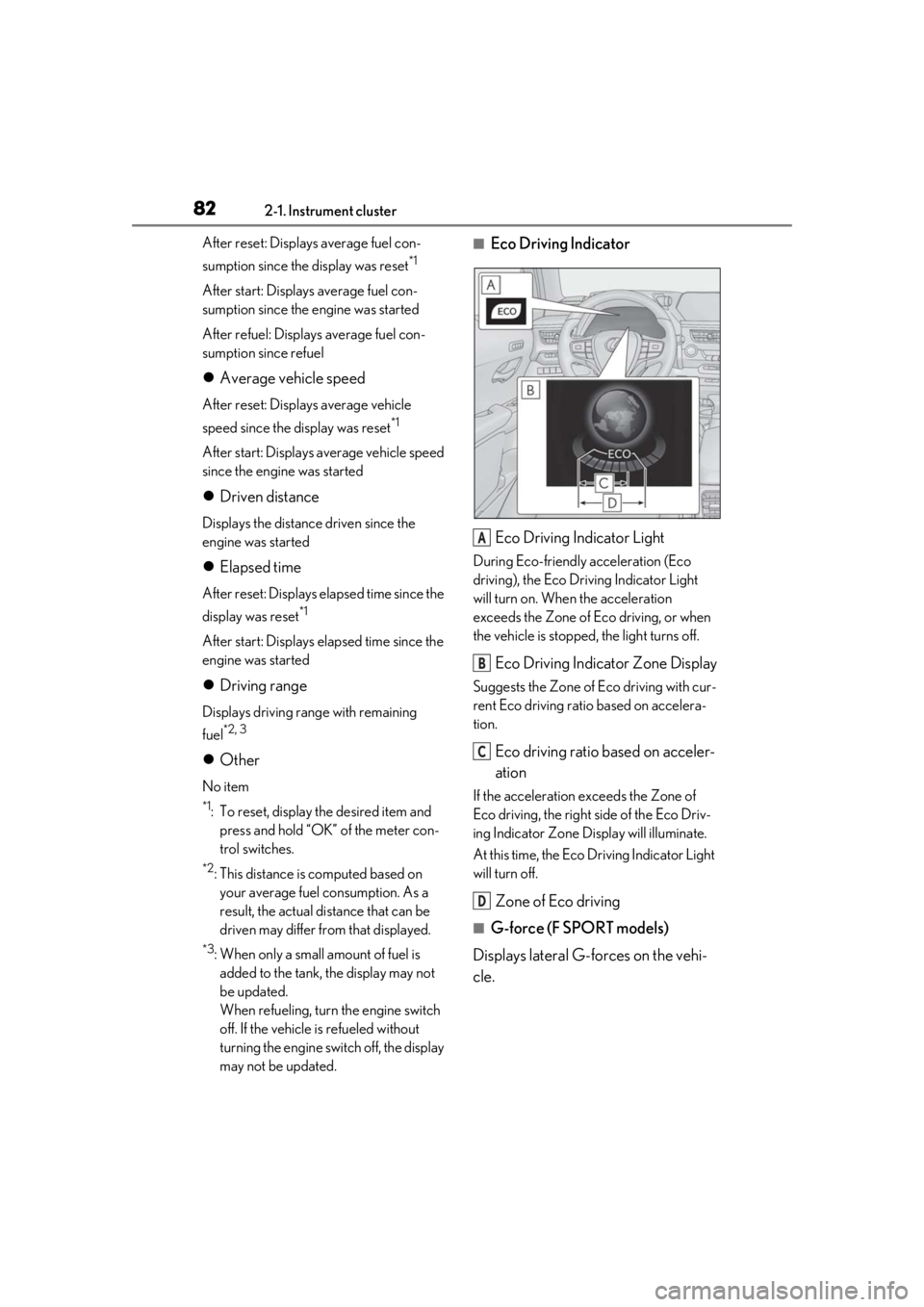
■Eco Driving Indicator
Eco Driving Indicator Light
During Eco-friendly acceleration (Eco
driving), the Eco Driving Indicator Light
will turn on. When the acceleration
exceeds the Zone of Eco driving, or when
the vehicle is stopped, the light turns off.
Eco Driving Indicator Zone Display
Suggests the Zone of Eco driving with cur-
rent Eco driving ratio based on accelera-
tion.
Eco driving ratio based on acceler-
ation
If the acceleration exceeds the Zone of
Eco driving, the right side of the Eco Driv-
ing Indicator Zone Display will illuminate.
At this time, the Eco Driving Indicator Light
will turn off.
Zone of Eco driving
■G-force (F SPORT models)
Displays lateral G-forces on the vehi-
cle.
A
B
C
D
Page 90 of 452
902-1. Instrument cluster
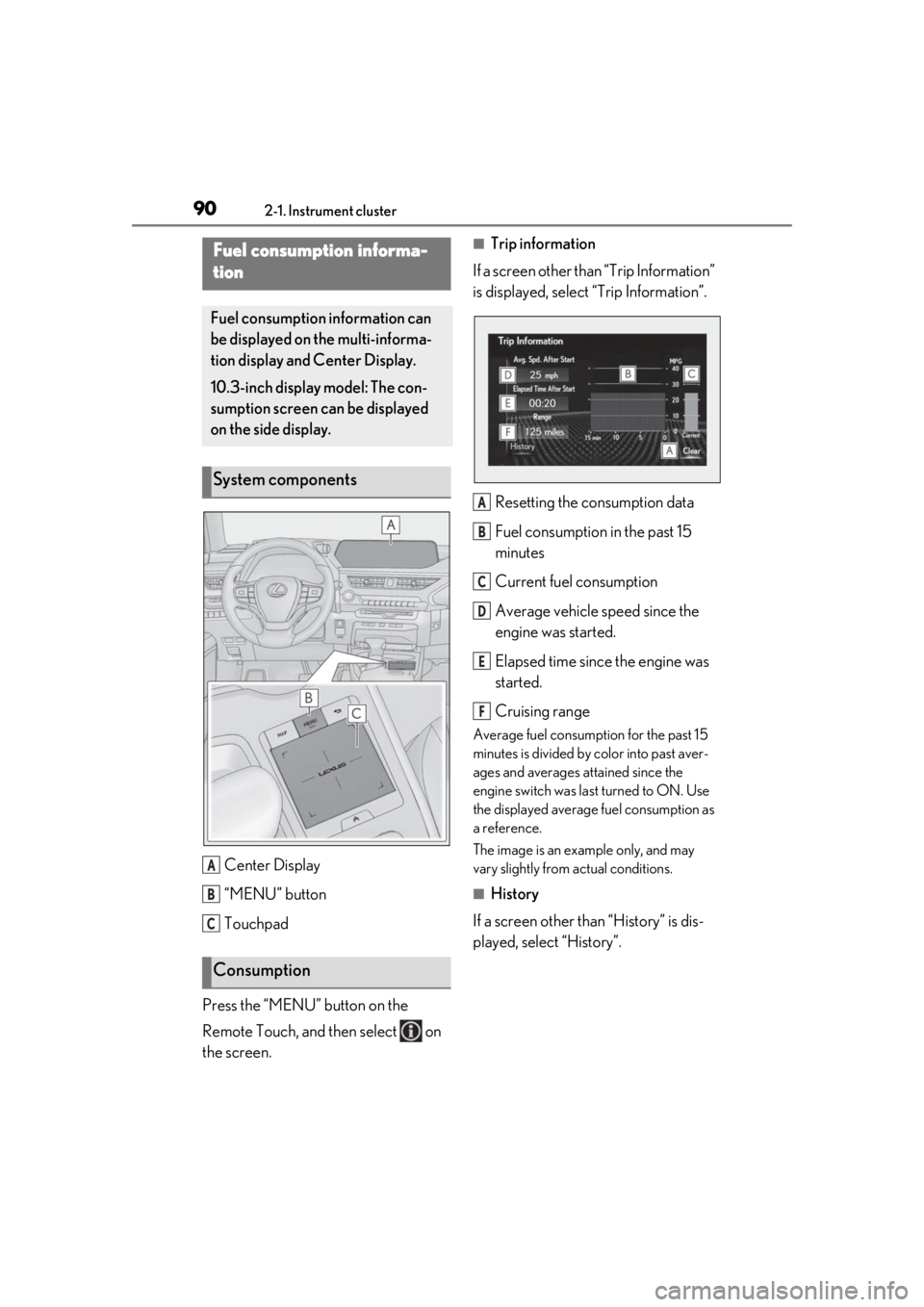
Center Display
“MENU” button
Touchpad
Press the “MENU” button on the
Remote Touch, and then select on
the screen.
■Trip information
If a screen other than “Trip Information”
is displayed, select “Trip Information”.
Resetting the consumption data
Fuel consumption in the past 15
minutes
Current fuel consumption
Average vehicle speed since the
engine was started.
Elapsed time since the engine was
started.
Cruising range
Average fuel consumption for the past 15
minutes is divided by color into past aver-
ages and averages attained since the
engine switch was last turned to ON. Use
the displayed average fuel consumption as
a reference.
The image is an example only, and may
vary slightly from actual conditions.
■History
If a screen other than “History” is dis-
played, select “History”.
Fuel consumption informa-
tion
Fuel consumption information can
be displayed on the multi-informa-
tion display and Center Display.
10.3-inch display model: The con-
sumption screen can be displayed
on the side display.
System components
Consumption
A
B
C
A
B
C
D
E
F
Page 91 of 452
912-1. Instrument cluster
2
Vehicle status information and indicators
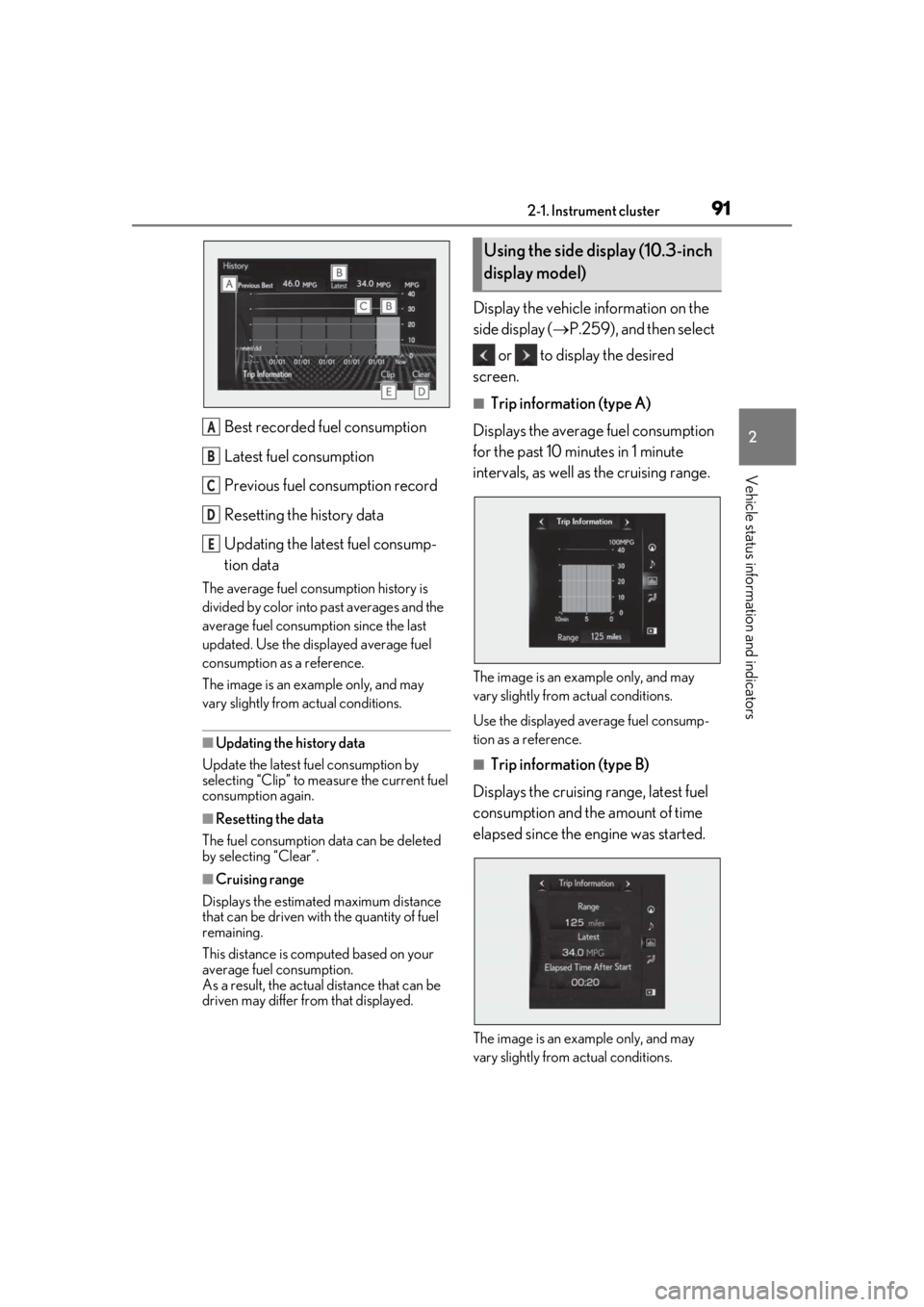
Best recorded fuel consumption
Latest fuel consumption
Previous fuel consumption record
Resetting the history data
Updating the latest fuel consump-
tion data
The average fuel consumption history is
divided by color into past averages and the
average fuel consumption since the last
updated. Use the displayed average fuel
consumption as a reference.
The image is an example only, and may
vary slightly from actual conditions.
■Updating the history data
Update the latest fuel consumption by
selecting “Clip” to measure the current fuel
consumption again.
■Resetting the data
The fuel consumption data can be deleted
by selecting “Clear”.
■Cruising range
Displays the estimated maximum distance
that can be driven with the quantity of fuel
remaining.
This distance is comp uted based on your
average fuel consumption.
As a result, the actual distance that can be
driven may differ from that displayed.
Display the vehicle information on the
side display ( P.259), and then select
or to display the desired
screen.
■Trip information (type A)
Displays the average fuel consumption
for the past 10 minutes in 1 minute
intervals, as well as the cruising range.
The image is an example only, and may
vary slightly from actual conditions.
Use the displayed average fuel consump-
tion as a reference.
■Trip information (type B)
Displays the cruising range, latest fuel
consumption and the amount of time
elapsed since the engine was started.
The image is an example only, and may
vary slightly from actual conditions.
A
B
C
D
E
Using the side display (10.3-inch
display model)
Page 92 of 452
922-1. Instrument cluster
Use the displayed average fuel consump-
tion as a reference.
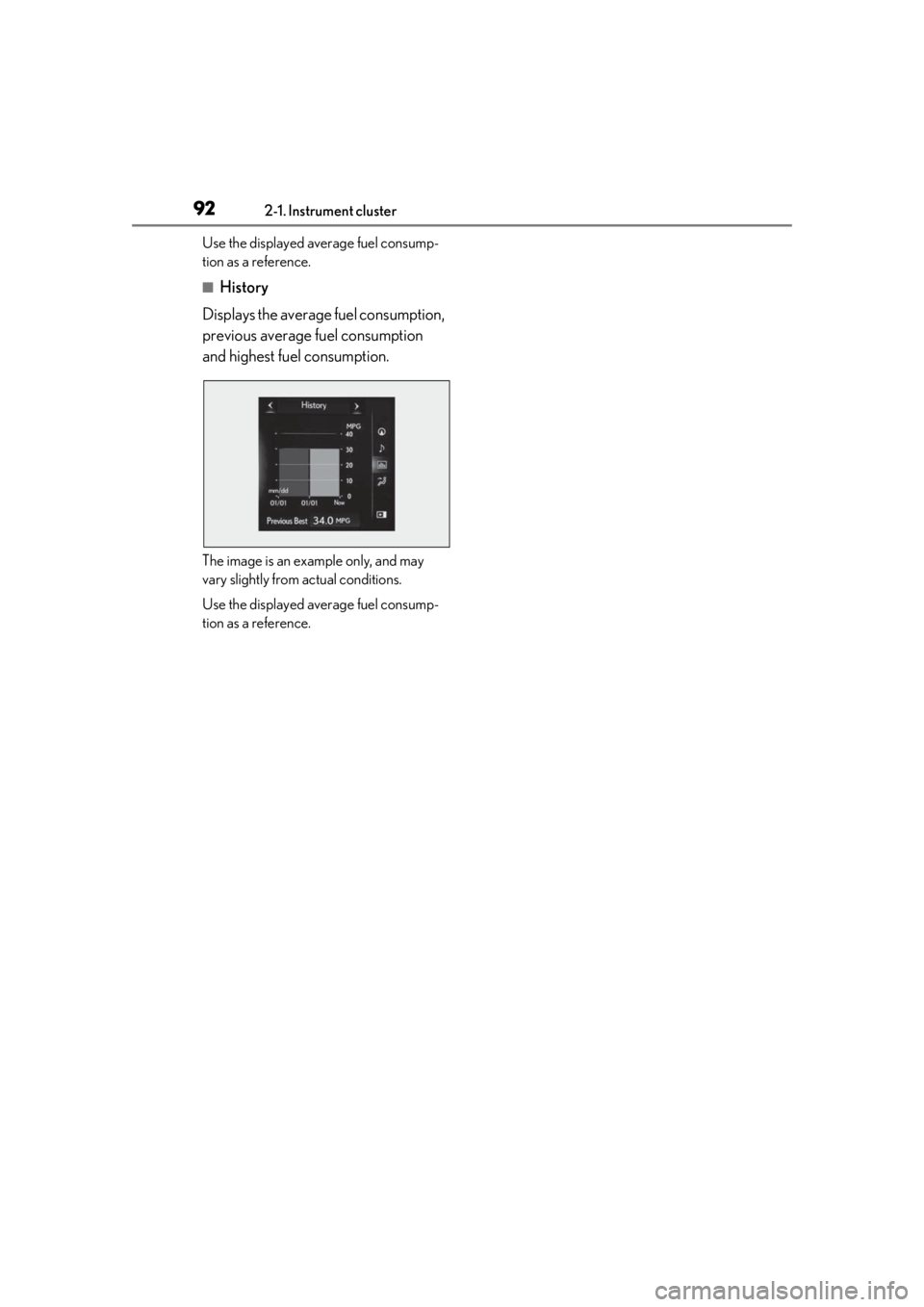
■History
Displays the average fuel consumption,
previous average fuel consumption
and highest fuel consumption.
The image is an example only, and may
vary slightly from actual conditions.
Use the displayed average fuel consump-
tion as a reference.
Page 258 of 452
2585-1. Remote Touch
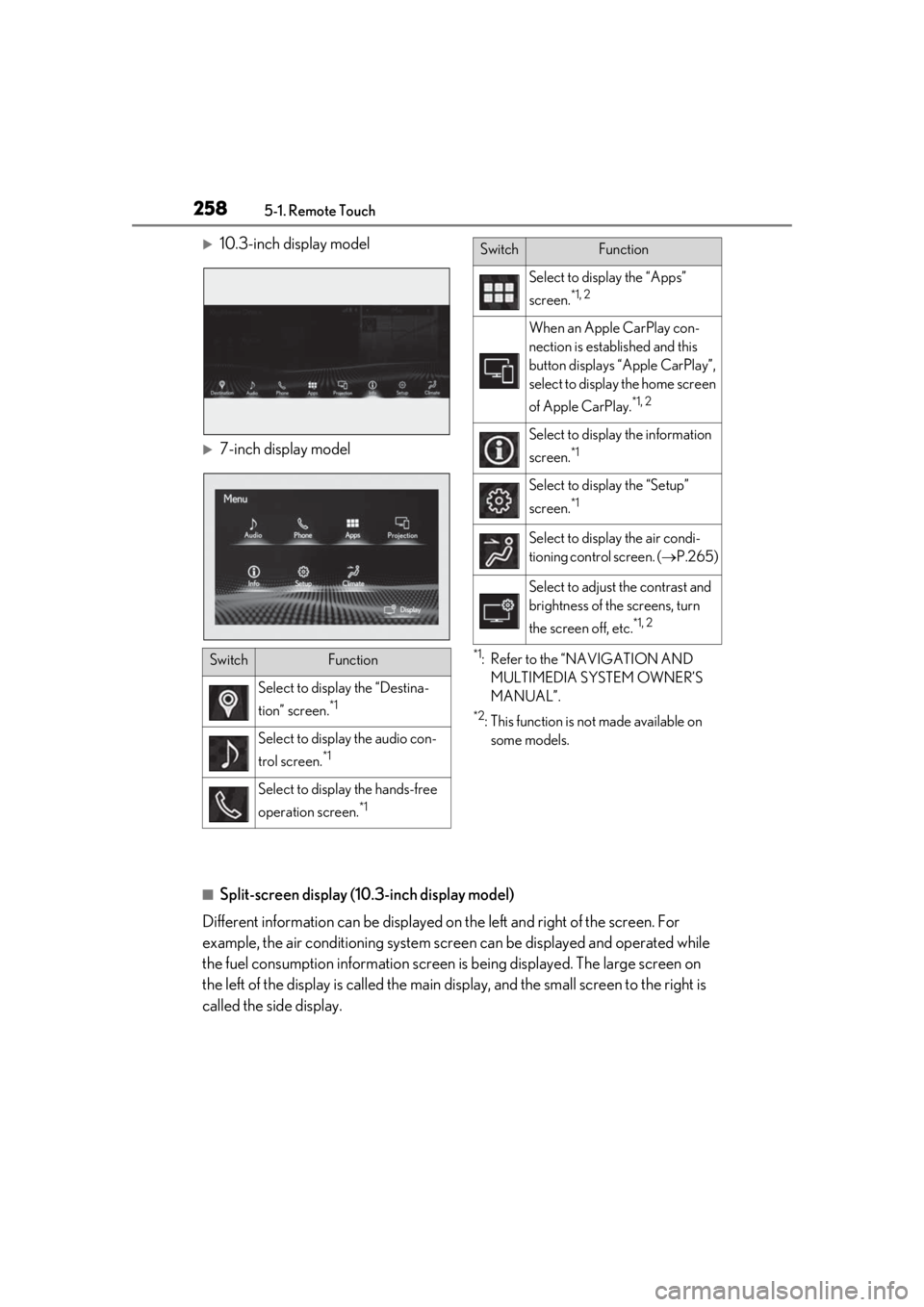
10.3-inch display model
7-inch display model
*1: Refer to the “NAVIGATION AND MULTIMEDIA SYSTEM OWNER’S
MANUAL”.
*2: This function is not made available on some models.
■Split-screen display (10.3-inch display model)
Different information can be displayed on the left and right of the screen. For
example, the air conditioning system scre en can be displayed and operated while
the fuel consumption informat ion screen is being displayed. The large screen on
the left of the display is called the main display, and the small screen to the right is
called the side display.
SwitchFunction
Select to display the “Destina-
tion” screen.
*1
Select to display the audio con-
trol screen.
*1
Select to display the hands-free
operation screen.
*1
Select to display the “Apps”
screen.
*1, 2
When an Apple CarPlay con-
nection is established and this
button displays “Apple CarPlay”,
select to display the home screen
of Apple CarPlay.
*1, 2
Select to displa y the information
screen.
*1
Select to display the “Setup”
screen.
*1
Select to display the air condi-
tioning control screen. ( P.265)
Select to adjust the contrast and
brightness of the screens, turn
the screen off, etc.
*1, 2
SwitchFunction
Page 264 of 452

2645-3. Using the air conditioning system and defogger
■When the outside temperature exceeds
75°F (24°C) and the air conditioning
system is on
●In order to reduce the air conditioning
power consumption, the air conditioning
system may switch to recirculated air
mode automatically.
This may also reduce fuel consumption.
●Recirculated air mode is selected as a
default mode when the engine switch is
turned to ON.
●It is possible to switch to outside air mode
at any time by pressing the outside/recir-
culated air mode switch.
■Fogging up of the windows
●The windows will easily fog up when the
humidity in the vehicle is high. Pressing
“A/C” button or selecting “A/C” will
dehumidify the air from the outlets and
defog the windshield effectively.
●If you turn “A/C” off, the windows may fog
up more easily.
●The windows may fog up if the recircu-
lated air mode is used.
■Outside/recirculated air mode
●When driving on dusty roads such as tun-
nels or in heavy traffic, set the out-
side/recirculated air mode switch to the
recirculated air mode. This is effective in
preventing outside air from entering the
vehicle interior. During cooling opera-
tion, setting the recirculated air mode will
also cool the vehicle interior effectively.
●Outside/recirculated air mode may auto-
matically switch de pending on the tem-
perature setting or the inside
temperature.
■Registering air condit ioning settings to
electronic keys (vehicles with driving
position memory)
●Unlocking the vehicle using an electronic
key and turning the engine switch to ON
will recall that key’s registered air condi-
tioning settings.
●When the engine switch is turned off, the
current air conditioning settings will auto-
matically be registered to the electronic
key that was used to unlock the vehicle.
●The system may not operate correctly if
more than one electr onic key is in the
vicinity or if the smart access system with
push-button start is used to unlock a pas-
senger door.
●The doors that can recall the air condi-
tioning setting when unlocked using the
smart access system with push-button
start can be changed.
* For details, con-
tact your Lexus dealer.
*: The doors that can recall the driving posi-
tion memory are changed at the same
time.
■Operation of the air conditioning sys-
tem in Eco drive mode
●In Eco drive mode, the air conditioning
system is controlled as follows to priori-
tize fuel efficiency
• Engine speed and compressor operation controlled to restrict heating/cooling
capacity
• Fan speed restricted when automatic mode is selected
●To improve air conditioning performance,
perform the following operations
• Turn off eco air conditioning mode ( P.267)
• Adjust the fan speed
•Turn off Eco drive mode
■When the outside temperature is low
The dehumidification function may not
operate even when “A/C” is pressed or
“A/C” is selected.
■Ventilation and air conditioning odors
●To let fresh air in, set the air conditioning
system to the outside air mode.
●During use, various odors from inside and
outside the vehicle may enter into and
accumulate in the air conditioning sys-
tem. This may then cause odor to be
emitted from the vents.
●To reduce potential odors from occur-
ring:
• It is recommended that the air condition- ing system be set to outside air mode
prior to turning the vehicle off.
• The start timing of the blower may be delayed for a short pe riod of time imme-
Page 410 of 452
4108-2. Customization
*2: The default setting varies according to country.
*3:Except F SPORT models
*4: 2 of the following items: current fuel consumption, average fuel economy (after reset),
average fuel economy (after start), average fuel economy (after refuel), average vehicle
speed (after reset), average vehicle speed (after start), elapsed time (after reset),
elapsed time (after start), distance (driving range), distance (after start), blank.
*5:F SPORT models
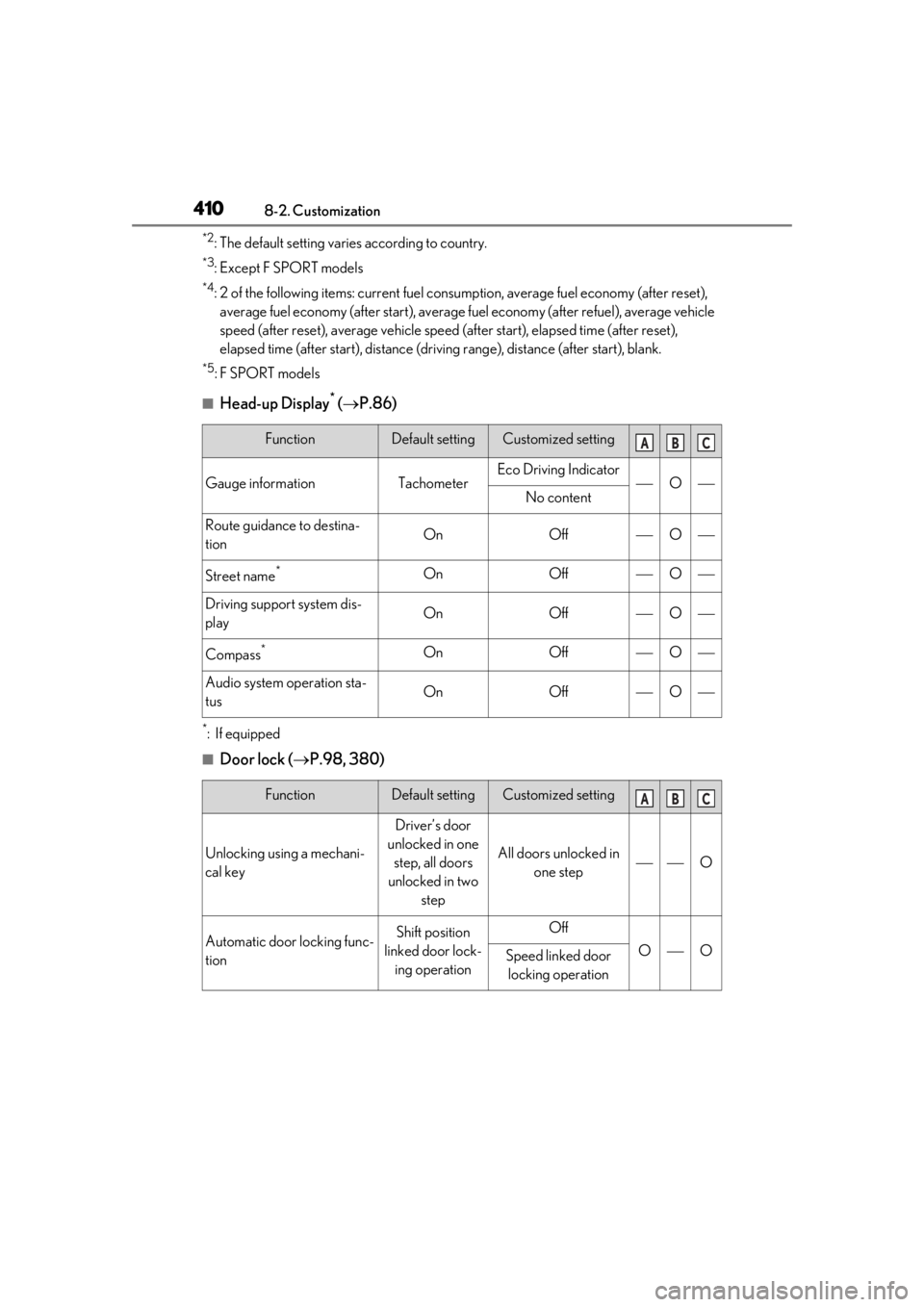
■Head-up Display* ( P.86)
*:If equipped
■Door lock ( P.98, 380)
FunctionDefault settingCustomized setting
Gauge informationTachometerEco Driving IndicatorONo content
Route guidance to destina-
tionOnOffO
Street name*OnOffO
Driving support system dis-
playOnOffO
Compass*OnOffO
Audio system operation sta-
tusOnOffO
FunctionDefault settingCustomized setting
Unlocking using a mechani-
cal key
Driver’s door
unlocked in one step, all doors
unlocked in two step
All doors unlocked in one stepO
Automatic door locking func-
tionShift position
linked door lock- ing operationOff
OOSpeed linked door locking operation
ABC
ABC