tire LEXUS UX200 2019 Owners Manual
[x] Cancel search | Manufacturer: LEXUS, Model Year: 2019, Model line: UX200, Model: LEXUS UX200 2019Pages: 452, PDF Size: 10.06 MB
Page 1 of 452
UX200_OM_OM76256U_(U)
1
2
3
4
5
6
7
8
9
Pictorial indexSearch by illustration
For safety
and securityMake sure to read through them
(Main topics: Child seat, theft deterrent system)
Vehicle status
information and
indicatorsReading driving-related information
(Main topics: Meters, multi-information display)
Before drivingOpening and closing the doors and windows,
adjustment before driving
(Main topics: Keys, doors, seats)
DrivingOperations and advice which are necessary for driving
(Main topics: Starting engine, refueling)
Interior featuresUsage of the interior features
(Main topics: Air conditioner, storage features)
Maintenance
and careCaring for your vehicle and maintenance procedures
(Main topics: Interior and exterior, light bulbs)
When trouble
arisesWhat to do in case of malfunction and emergency
(Main topics: Battery discharge, flat tire)
Vehicle
specificationsVehicle specifications, customizable features
(Main topics: Fuel, oil, tire inflation pressure)
For ownersReporting safety defects for U.S. owners, and seat belt,
SRS airbag and headlight aim instructions for Canadian
owners
IndexSearch by symptom
Search alphabetically
Page 4 of 452
4TABLE OF CONTENTS
General maintenance .................313
Emission inspection and mainte- nance (I/M) programs ............. 316
6-3. Do-it-yourself maintenance Do-it-yourself service precautions............................................................ 317
Hood................................................... 319
Positioning a floor jack............... 320
Engine compartment................... 321
Tires ................................................... 328
Tire inflation pressure ................. 337
Wheels.............................................. 339
Air conditioning filter..................340
Electronic key battery ................. 341
Checking and replacing fuses 343
Headlight aim................................. 345
Light bulbs ....................................... 346
7-1. Essential information Emergency flashers..................... 350
If your vehicle has to be stopped in an emergency ............................. 350
If the vehicle is trapped in rising water................................................ 351
7-2. Steps to take in an emergency If your vehicle needs to be towed........................................................... 353
If you think something is wrong ........................................................... 356
Fuel pump shut off system ........ 357
If a warning light turns on or a warn- ing buzzer sounds ..................... 358
If a warning message is displayed ........................................................... 367If you have a flat tire (vehicles with
spare tire) ..................................... 370
If you have a flat tire (vehicles with- out spare tire) ............................. 377
If the engine will not start .......... 378
If you lose your keys.................... 379
If the fuel filler door cannot be opened .......................................... 380
If the electronic key does not oper- ate properly ................................. 380
If the vehicle battery is discharged .......................................................... 382
If your vehicle overheats ........... 386
If the vehicle becomes stuck ... 388
8-1. Specifications Maintenance data (fuel, oil level, etc.) ................................................. 390
Fuel information............................ 397
Tire information ............................ 399
8-2. Customization Customizable features .............. 408
8-3. Initialization Items to initialize ............................ 419
9-1. For owners Reporting safety defects for U.S. owners ............................................ 422
Seat belt instructions for Canadian owners (in French) .................... 422
SRS airbag instructions for Cana- dian owners (in French) .......... 424
7When trouble arises
8Vehicle specifications
9For owners
Page 13 of 452
13Pictorial index
Windshield wipers .................................................................................................. P.172
Precautions against winter season ............................................................................ P.249
To prevent freezing (windshield wiper de-icer)
*................................................. P.267
Precautions against car wash (r ain-sensing windshield wipers)
*................. P.307
Fuel filler door .......................................................................................................... P.178
Refueling method .............................................................................................................. P .178
Fuel type/fuel tank capacity ...... .................................................................................... P.391
Tires.......................................................................................................................... .P.328
Tire size/inflation pressure ...........................................................................................P.395
Winter tires/tire chain .................................................................................................... P.24 9
Checking/rotation/tire pressure warning system..............................................P.328
Coping with flat tires............................................................................................. P.370, 377
Hood ........................................................................................................................... P.319
Opening ........................................................................................................................ ........ P.319
Engine oil ..................................................................................................................... ......... P.392
Coping with overheat .....................................................................................................P.386
Warning messages .......................................................................................................... P.367
Headlights ................................................................................................................. P.16 5
Parking lights/daytime running lights............................................................... P.165
Fog lights
*................................................................................................................... P.171
Cornering lights
*..................................................................................................... P.167
Turn signal lights ...................................................................................................... P.159
Tail lights/stop lights............................................................................................... P.165
Stop lights
License plate lights ................................................................................................. P.165
Back-up lights
Shifting the shift lever to R .............................................................................................. P.155
Light bulbs of the exterior lights for driving
(Replacing method: P.346, Watts: P.396)
D
E
F
G
H
I
J
K
L
M
N
O
P
Page 25 of 452
251-1. For safe use
1
For safety and security
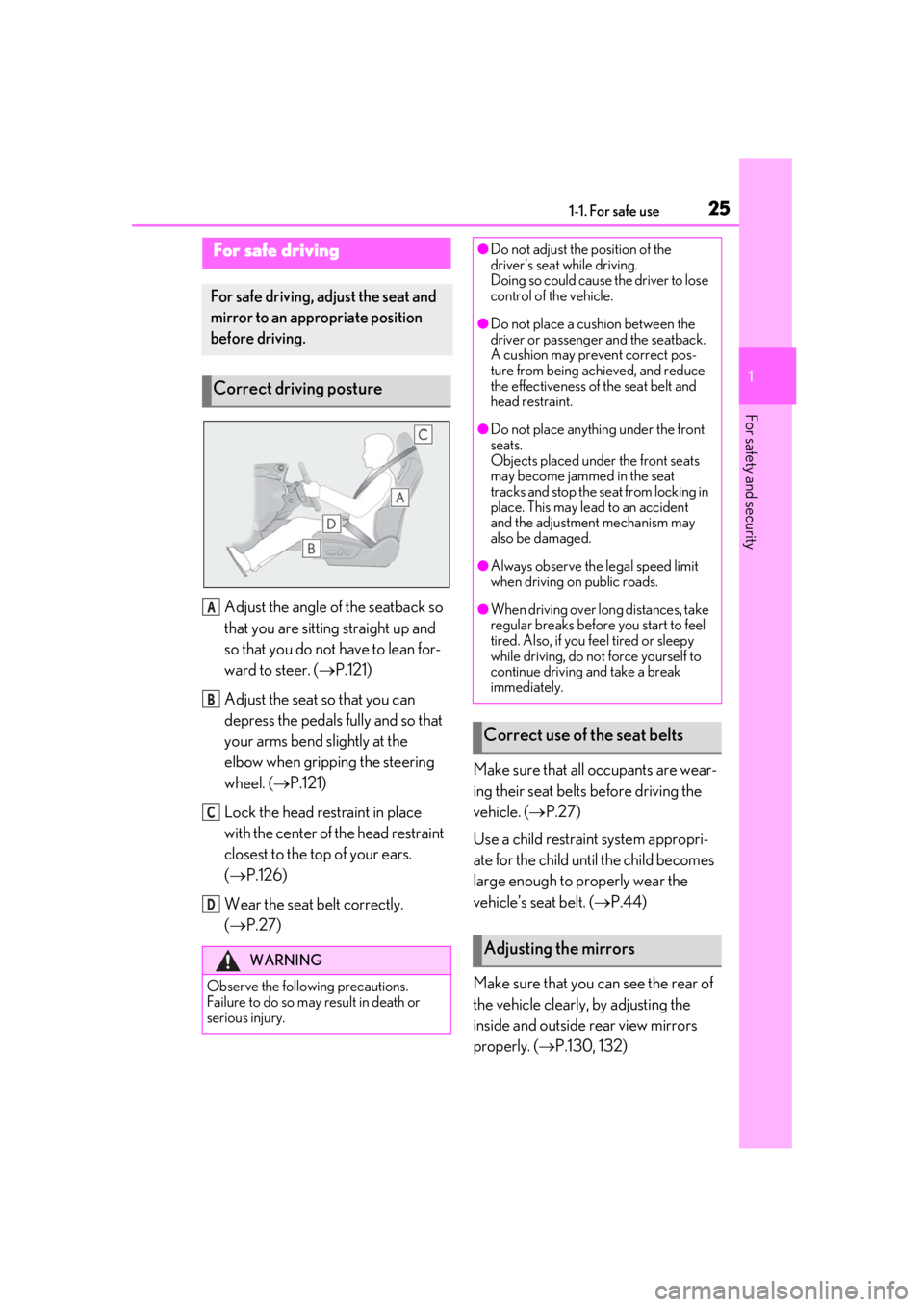
Adjust the angle of the seatback so
that you are sitting straight up and
so that you do not have to lean for-
ward to steer. (P.121)
Adjust the seat so that you can
depress the pedals fully and so that
your arms bend slightly at the
elbow when gripping the steering
wheel. ( P.121)
Lock the head restraint in place
with the center of the head restraint
closest to the top of your ears.
( P.126)
Wear the seat belt correctly.
( P.27) Make sure that all occupants are wear-
ing their seat belts before driving the
vehicle. (
P.27)
Use a child restraint system appropri-
ate for the child until the child becomes
large enough to properly wear the
vehicle’s seat belt. ( P.44)
Make sure that you can see the rear of
the vehicle clearly, by adjusting the
inside and outside rear view mirrors
properly. ( P.130, 132)
For safe driving
For safe driving, adjust the seat and
mirror to an appropriate position
before driving.
Correct driving posture
WARNING
Observe the following precautions.
Failure to do so may result in death or
serious injury.
A
B
C
D
●Do not adjust the position of the
driver’s seat while driving.
Doing so could cause the driver to lose
control of the vehicle.
●Do not place a cushion between the
driver or passenger and the seatback.
A cushion may prevent correct pos-
ture from being achieved, and reduce
the effectiveness of the seat belt and
head restraint.
●Do not place anything under the front
seats.
Objects placed under the front seats
may become jammed in the seat
tracks and stop the seat from locking in
place. This may lead to an accident
and the adjustment mechanism may
also be damaged.
●Always observe the legal speed limit
when driving on public roads.
●When driving over long distances, take
regular breaks before you start to feel
tired. Also, if you feel tired or sleepy
while driving, do not force yourself to
continue driving and take a break
immediately.
Correct use of the seat belts
Adjusting the mirrors
Page 59 of 452
591-3. LEXUS Enform
1
For safety and security
Red indicator light (except at vehi-
cle start-up) = System malfunction
(contact your Lexus dealer)
No indicator light (off) = Safety
Connect service not active
■Automatic Collision Notification
In case of either airbag deployment or
severe rear-end collision, the system is
designed to automatically call the
response center. The responding agent
receives the vehicle’s location and
attempts to speak with the vehicle
occupants to assess the level of emer-
gency. If the occupants are unable to
communicate, the ag ent automatically
treats the call as an emergency, con-
tacts the nearest emergency services
provider to describe the situation, and
requests that assistance be sent to the
location.
■Stolen Vehicle Location
If your vehicle is stolen, Safety Connect
can work with local authorities to assist
them in locating and recovering the
vehicle. After filing a police report, call
the Safety Connect response center at
1-800-25-LEXUS (1-800-255-
3987) in the United States, 1-877-
539-8777 in Puerto Rico or 1-800-
265-3987 in Canada, and follow the
prompts for Safety Connect to initiate
this service.
In addition to assisting law enforce-
ment with recovery of a stolen vehicle,
Safety-Connect-equipped vehicle
location data may, under certain cir- cumstances, be shared with third par-
ties to locate your vehicle. Further
information is available at Lexus.com.
■Emergency Assistance Button
(“SOS”)
In the event of an emergency on the
road, push the “SOS” button to reach
the Safety Connect response center.
The answering agent will determine
your vehicle’s location, assess the
emergency, and dispatch the neces-
sary assistance required.
If you accidentally press the “SOS” button,
tell the response-center agent that you are
not experiencing an emergency.
■Enhanced Roadside Assistance
Enhanced Roadside Assistance adds
GPS data to the already included war-
ranty-based Lexus roadside service.
Subscribers can press the “SOS” but-
ton to reach a Safety Connect
response-center agent, who can help
with a wide range of needs, such as:
towing, flat tire, fuel delivery, etc. For a
description of the Roadside Assistance
services and their limitations, please
see the Safety Connect Terms and
Conditions, which are available at
Lexus.com.
Important! Read this information about
exposure to radio frequency signals
before using Safety Connect;
The Safety Connect system installed in
your vehicle is a low-power radio trans-
Safety Connect services
Safety information for Safety
Connect
Page 69 of 452
692-1. Instrument cluster
2
Vehicle status information and indicators
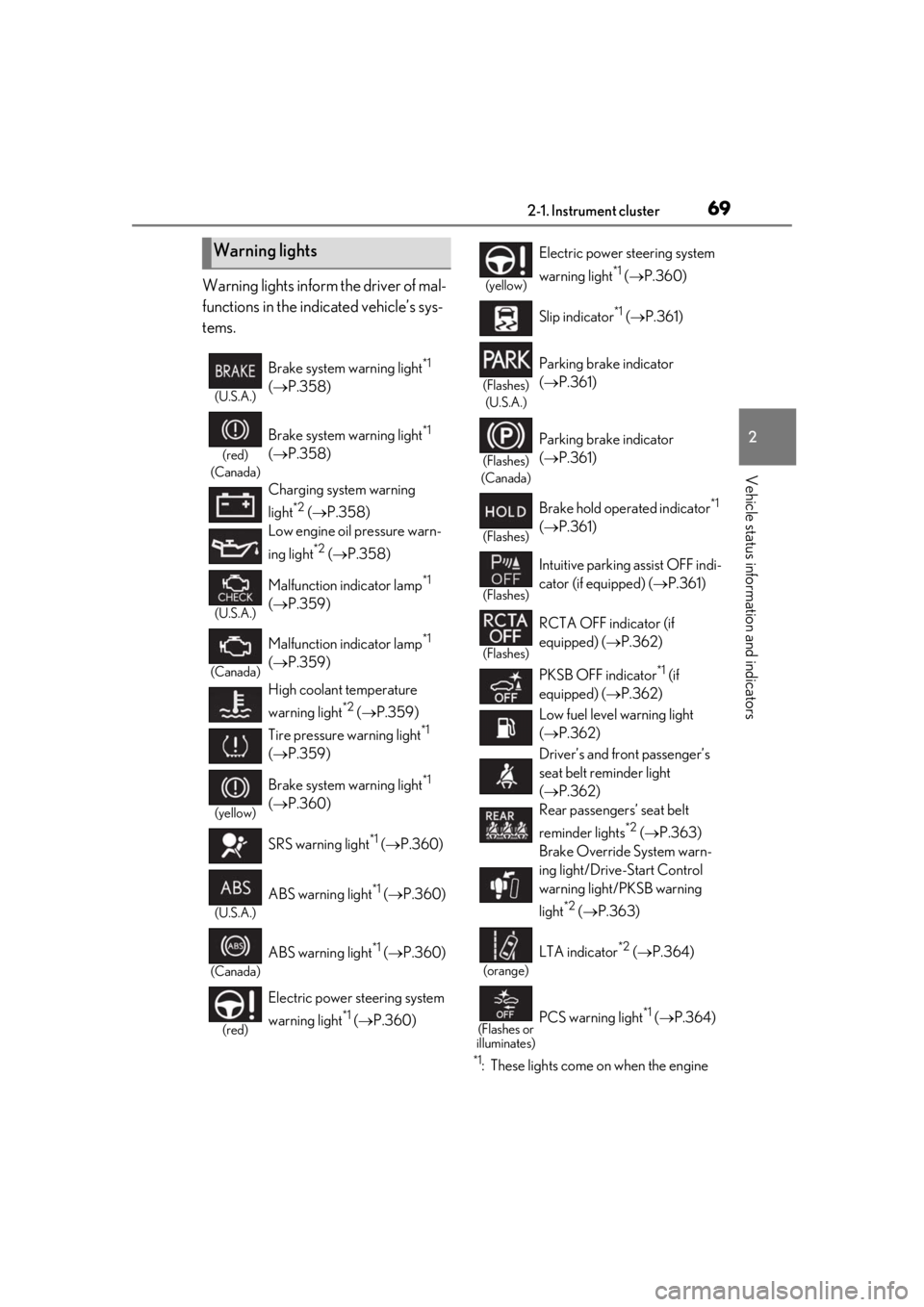
Warning lights inform the driver of mal-
functions in the indicated vehicle’s sys-
tems.
*1: These lights come on when the engine
Warning lights
(U.S.A.)
Brake system warning light*1
( P.358)
(red)
(Canada)
Brake system warning light*1
( P.358)
Charging system warning
light
*2 ( P.358)
Low engine oil pressure warn-
ing light
*2 ( P.358)
(U.S.A.)
Malfunction indicator lamp*1
( P.359)
(Canada)
Malfunction indicator lamp*1
( P.359)
High coolant temperature
warning light
*2 ( P.359)
Tire pressure warning light
*1
( P.359)
(yellow)
Brake system warning light*1
( P.360)
SRS warning light
*1 ( P.360)
(U.S.A.)
ABS warning light*1 ( P.360)
(Canada)
ABS warning light*1 ( P.360)
(red)
Electric power st eering system
warning light
*1 ( P.360)
(yellow)
Electric power steering system
warning light
*1 ( P.360)
Slip indicator
*1 ( P.361)
(Flashes)
(U.S.A.)
Parking brake indicator
( P.361)
(Flashes)
(Canada)
Parking brake indicator
( P.361)
(Flashes)
Brake hold operated indicator*1
( P.361)
(Flashes)
Intuitive parking assist OFF indi-
cator (if equipped) ( P.361)
(Flashes)
RCTA OFF indicator (if
equipped) ( P.362)
PKSB OFF indicator
*1 (if
equipped) ( P.362)
Low fuel level warning light
( P.362)
Driver’s and front passenger’s
seat belt re minder light
( P.362)
Rear passengers’ seat belt
reminder lights
*2 ( P.363)
Brake Override System warn-
ing light/Drive-Start Control
warning light/PKSB warning
light
*2 ( P.363)
(orange)
LTA indicator*2 ( P.364)
(Flashes or
illuminates)PCS warning light*1 ( P.364)
Page 81 of 452
812-1. Instrument cluster
2
Vehicle status information and indicators
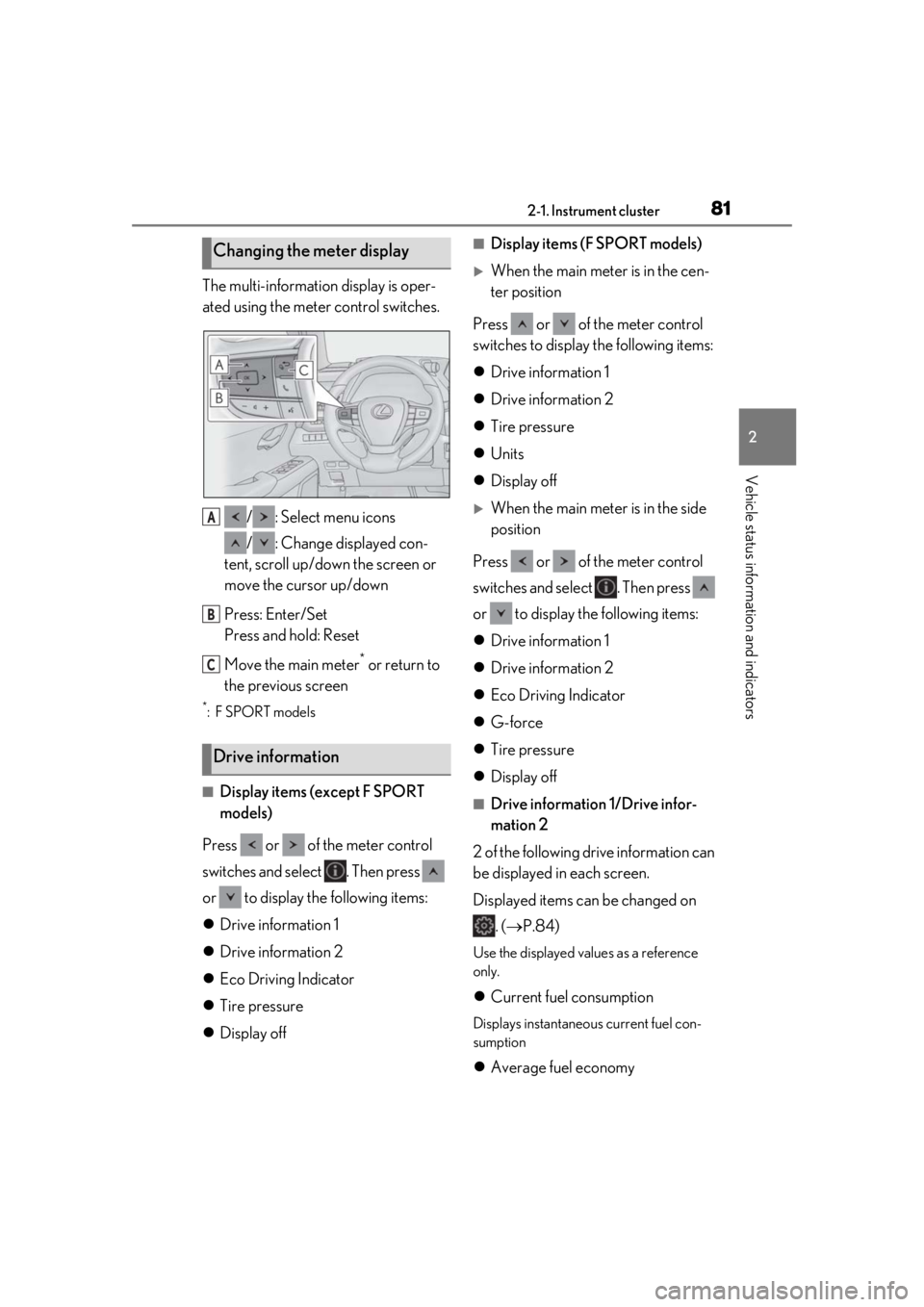
The multi-information display is oper-
ated using the meter control switches./ : Select menu icons
/ : Change displayed con-
tent, scroll up/down the screen or
move the cursor up/down
Press: Enter/Set
Press and hold: Reset
Move the main meter
* or return to
the previous screen
*:F SPORT models
■Display items (except F SPORT
models)
Press or of the meter control
switches and select . Then press
or to display the following items:
Drive information 1
Drive information 2
Eco Driving Indicator
Tire pressure
Display off
■Display items (F SPORT models)
When the main meter is in the cen-
ter position
Press or of the meter control
switches to display the following items:
Drive information 1
Drive information 2
Tire pressure
Units
Display off
When the main meter is in the side
position
Press or of the meter control
switches and select . Then press
or to display the following items:
Drive information 1
Drive information 2
Eco Driving Indicator
G-force
Tire pressure
Display off
■Drive information 1/Drive infor-
mation 2
2 of the following drive information can
be displayed in each screen.
Displayed items can be changed on . ( P.84)
Use the displayed values as a reference
only.
Current fuel consumption
Displays instantaneous current fuel con-
sumption
Average fuel economy
Changing the meter display
Drive information
A
B
C
Page 83 of 452
832-1. Instrument cluster
2
Vehicle status information and indicators
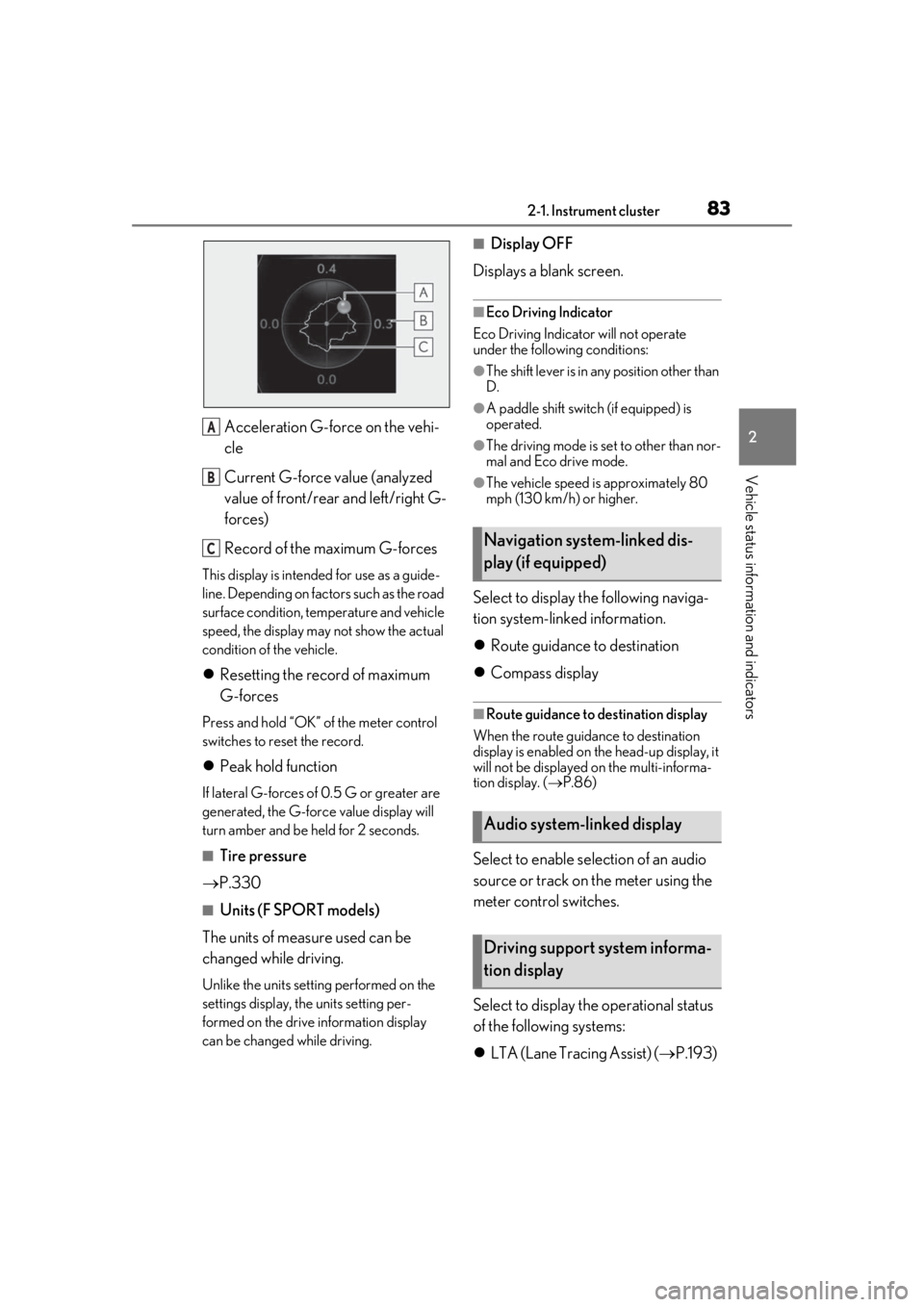
Acceleration G-force on the vehi-
cle
Current G-force value (analyzed
value of front/rear and left/right G-
forces)
Record of the maximum G-forces
This display is intended for use as a guide-
line. Depending on factors such as the road
surface condition, temperature and vehicle
speed, the display may not show the actual
condition of the vehicle.
Resetting the record of maximum
G-forces
Press and hold “OK” of the meter control
switches to reset the record.
Peak hold function
If lateral G-forces of 0.5 G or greater are
generated, the G-forc e value display will
turn amber and be held for 2 seconds.
■Tire pressure
P.330
■Units (F SPORT models)
The units of measure used can be
changed while driving.
Unlike the units setting performed on the
settings display, the units setting per-
formed on the drive information display
can be changed while driving.
■Display OFF
Displays a blank screen.
■Eco Driving Indicator
Eco Driving Indicator will not operate
under the following conditions:
●The shift lever is in an y position other than
D.
●A paddle shift switch (if equipped) is
operated.
●The driving mode is se t to other than nor-
mal and Eco drive mode.
●The vehicle speed is approximately 80
mph (130 km/h) or higher.
Select to display the following naviga-
tion system-linked information.
Route guidance to destination
Compass display
■Route guidance to destination display
When the route guidance to destination
display is enabled on th e head-up display, it
will not be displayed on the multi-informa-
tion display. ( P.86)
Select to enable se lection of an audio
source or track on the meter using the
meter control switches.
Select to display the operational status
of the following systems:
LTA (Lane Tracing Assist) ( P.193)
A
B
CNavigation system-linked dis-
play (if equipped)
Audio system-linked display
Driving support system informa-
tion display
Page 106 of 452
1063-2. Opening, closing and locking the doors
locked.
If the switch is pressed while the power
back door is closing, the operation will
stop.
Pressing the switch again will close the
power back door automatically.
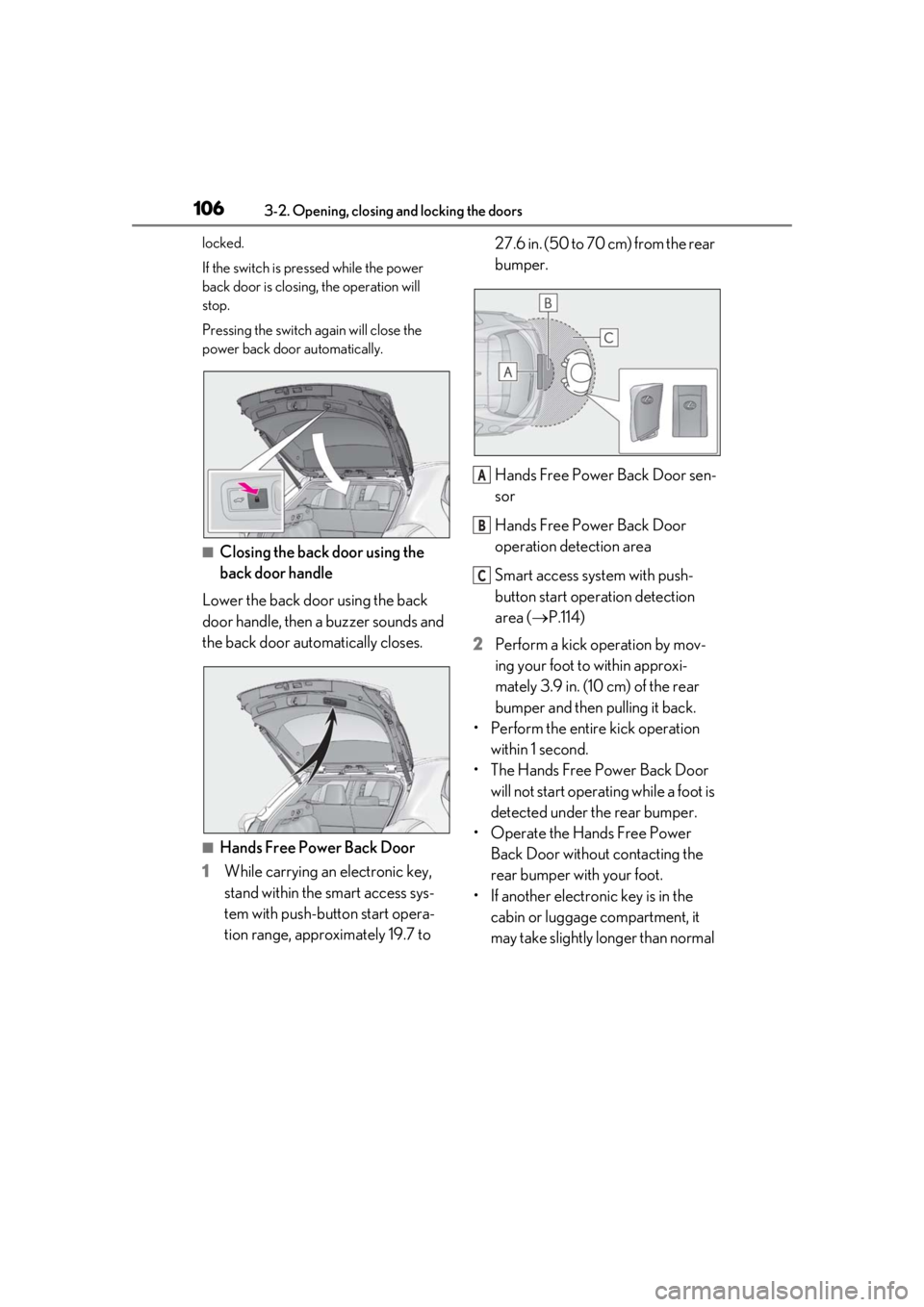
■Closing the back door using the
back door handle
Lower the back door using the back
door handle, then a buzzer sounds and
the back door automatically closes.
■Hands Free Power Back Door
1 While carrying an electronic key,
stand within the smart access sys-
tem with push-button start opera-
tion range, approximately 19.7 to 27.6 in. (50 to 70 cm) from the rear
bumper.
Hands Free Power Back Door sen-
sor
Hands Free Power Back Door
operation detection area
Smart access system with push-
button start operation detection
area (
P.114)
2 Perform a kick operation by mov-
ing your foot to within approxi-
mately 3.9 in. (10 cm) of the rear
bumper and then pulling it back.
• Perform the entire kick operation within 1 second.
• The Hands Free Power Back Door will not start operating while a foot is
detected under the rear bumper.
• Operate the Hands Free Power Back Door without contacting the
rear bumper with your foot.
• If another electronic key is in the cabin or luggage compartment, it
may take slightly longer than normal
A
B
C
Page 142 of 452
1424-1. Before driving
4-1.Before driving
■Starting the engine
P.152
■Driving
1 With the brake pedal depressed,
shift the shift lever to D. ( P.155)
2 If the parking brake is in manual
mode, release the parking brake.
(P.160)
3 Gradually release the brake pedal
and gently depress the accelerator
pedal to accelerate the vehicle.
■Stopping
1 With the shift lever in D, depress the
brake pedal.
2 If necessary, set the parking brake.
(P.160)
If the vehicle is to be stopped for an
extended period of time, shift the shift lever
to P. ( P.155)
■Parking the vehicle
1 With the shift lever in D, depress the
brake pedal.
2 If the parking brake is in manual
mode, set the parking brake
(P.160), and shift the shift lever to
P ( P.155).
3 Press the engine switch to stop the
engine. 4
Lock the door, making sure that you
have the electronic key on your
person.
If parking on a hill, block the wheels as
needed.
■Starting off on a steep uphill
1 Make sure that the parking brake is
set with the brake pedal depressed,
and then shift the shift lever to D.
2 Release the brake pedal and gently
depress the accelerator pedal.
3 Release the parking brake.
■When starting off on a uphill
The hill-start assist control will be activated.
( P.245)
■Driving in the rain
●Drive carefully when it is raining, because
visibility will be reduced, the windows
may become fogged-up, and the road
will be slippery.
●Drive carefully when it starts to rain,
because the road surface will be espe-
cially slippery.
●Refrain from high speeds when driving on
an expressway in the rain, because there
may be a layer of wa ter between the tires
and the road surface, preventing the
steering and brakes from operating prop-
erly.
■Engine speed while driving
In the following conditions, the engine
speed may become high while driving. This
is due to automatic up-shifting control or
down-shifting implementation to meet driv-
ing conditions. It does not indicate sudden
acceleration.
●The vehicle is judged to be driving uphill
or downhill
●When the accelerato r pedal is released
●When the brake pedal is depressed while
Sport mode is selected
Driving the vehicle
The specified procedures should be
observed to ensure safe driving:
Driving procedure