engine LEXUS UX250H 2019 User Guide
[x] Cancel search | Manufacturer: LEXUS, Model Year: 2019, Model line: UX250H, Model: LEXUS UX250H 2019Pages: 476, PDF Size: 10.51 MB
Page 80 of 476
802-1. Instrument cluster
( P.435)
■Display items
Odometer
Displays the total distance the vehicle has
been driven.
Trip meter A/trip meter B
Displays the distance the vehicle has been
driven since the meter was last reset. Trip
meters A and B can be used to record and display different distances independently.
Distance until next engine oil
change
Displays the distance the vehicle can be
driven until an oil change is necessary.
■Changing the display
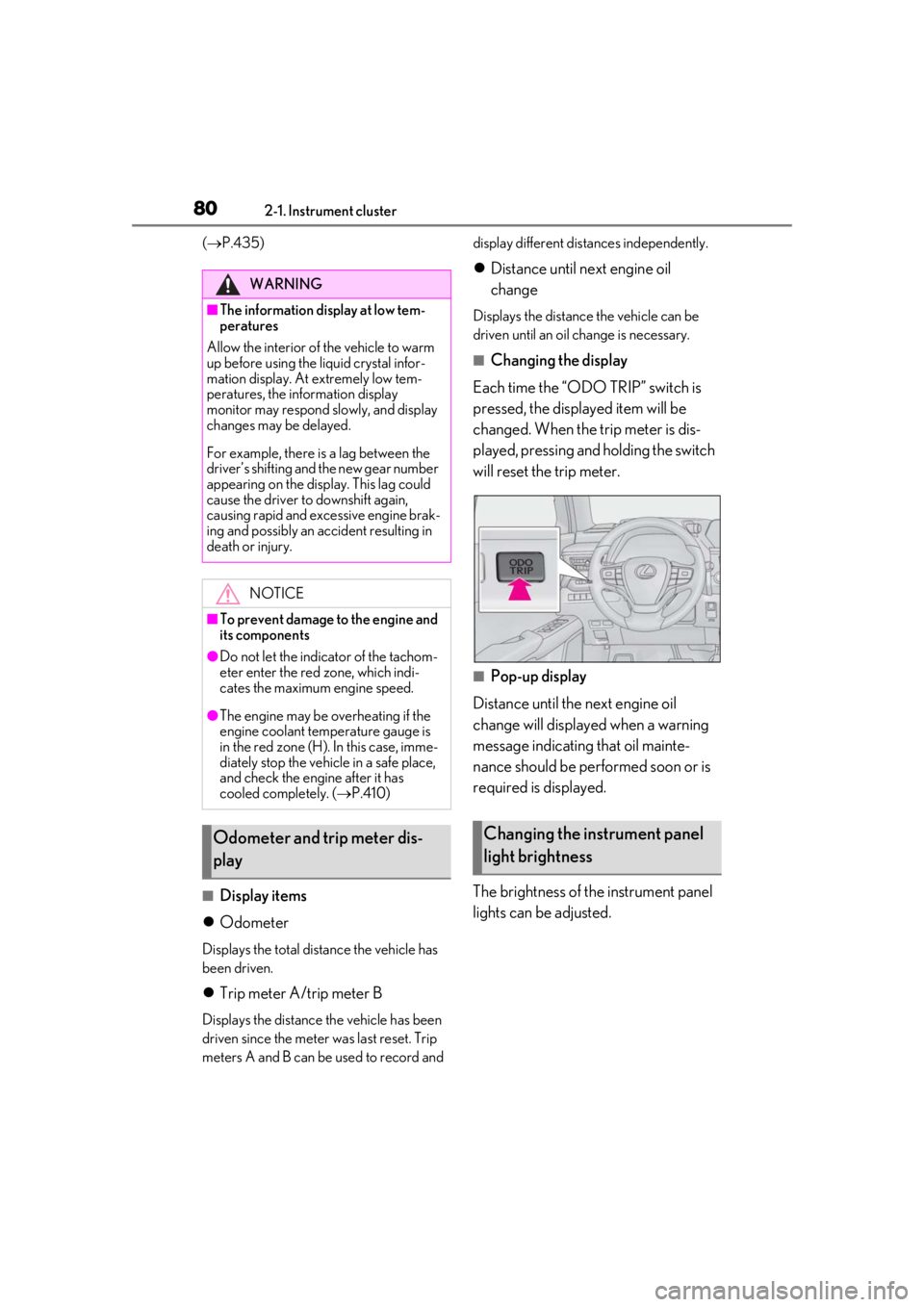
Each time the “ODO TRIP” switch is
pressed, the displayed item will be
changed. When the trip meter is dis-
played, pressing and holding the switch
will reset the trip meter.
■Pop-up display
Distance until the next engine oil
change will displayed when a warning
message indicating that oil mainte-
nance should be performed soon or is
required is displayed.
The brightness of the instrument panel
lights can be adjusted.
WARNING
■The information display at low tem-
peratures
Allow the interior of the vehicle to warm
up before using the liquid crystal infor-
mation display. At extremely low tem-
peratures, the information display
monitor may respond slowly, and display
changes may be delayed.
For example, there is a lag between the
driver’s shifting and the new gear number
appearing on the display. This lag could
cause the driver to downshift again,
causing rapid and excessive engine brak-
ing and possibly an accident resulting in
death or injury.
NOTICE
■To prevent damage to the engine and
its components
●Do not let the indicator of the tachom-
eter enter the red zone, which indi-
cates the maximum engine speed.
●The engine may be overheating if the
engine coolant temperature gauge is
in the red zone (H). In this case, imme-
diately stop the vehicle in a safe place,
and check the engine after it has
cooled completely. ( P.410)
Odometer and trip meter dis-
playChanging the instrument panel
light brightness
Page 82 of 476
822-1. Instrument cluster
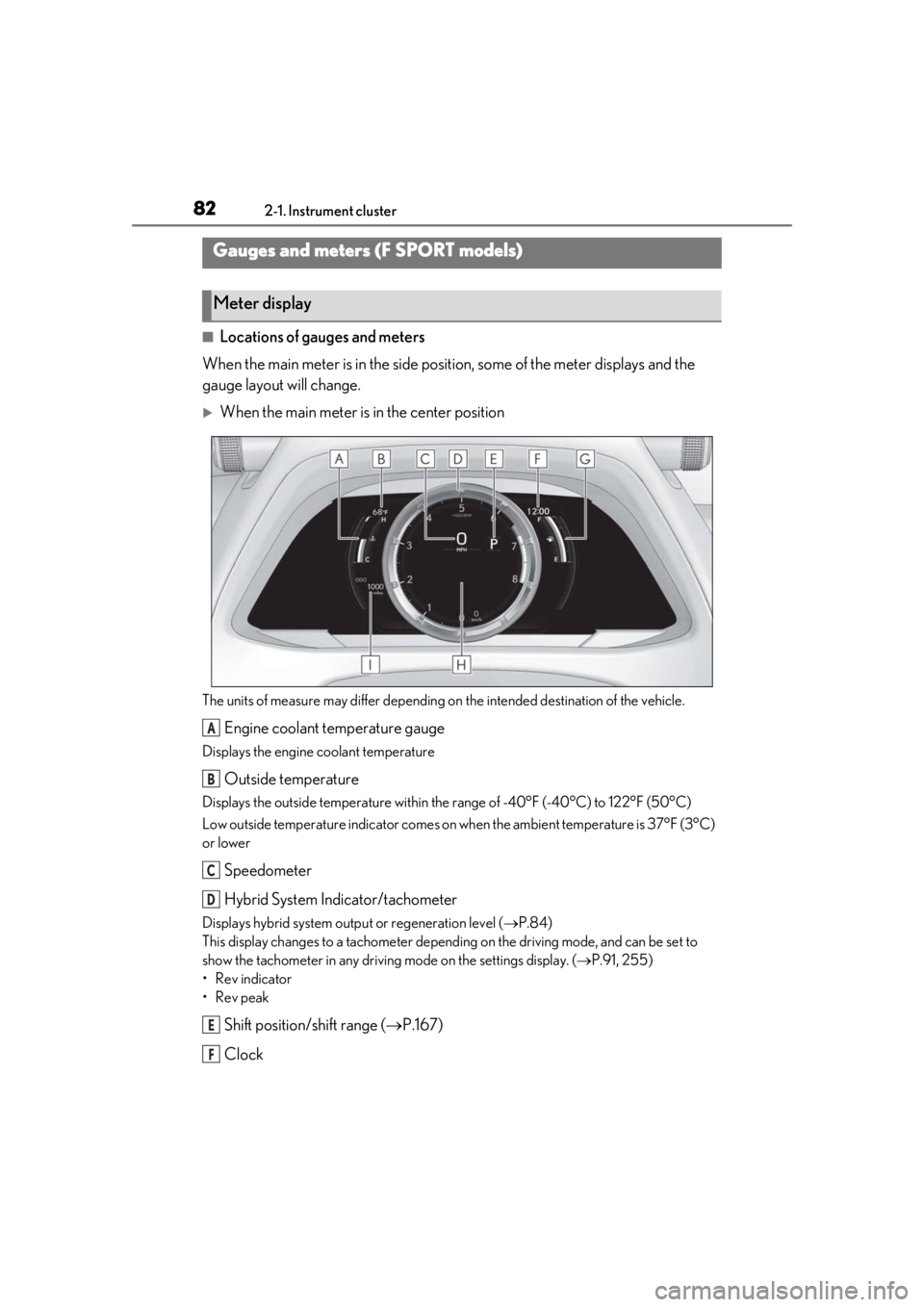
■Locations of gauges and meters
When the main meter is in the side posi tion, some of the meter displays and the
gauge layout will change.
When the main meter is in the center position
The units of measure may differ depending on the intended destination of the vehicle.
Engine coolant temperature gauge
Displays the engine coolant temperature
Outside temperature
Displays the outside temperature within the range of -40°F (-40°C) to 122°F (50°C)
Low outside temperature indicator comes on wh en the ambient temperature is 37°F (3°C)
or lower
Speedometer
Hybrid System Indicator/tachometer
Displays hybrid system outp ut or regeneration level (P.84)
This display changes to a tachometer depending on the driving mode, and can be set to
show the tachometer in any driving mode on the settings display. (P.91, 255)
• Rev indicator
•Rev peak
Shift position/shift range ( P.167)
Clock
Gauges and meters (F SPORT models)
Meter display
A
B
C
D
E
F
Page 84 of 476
842-1. Instrument cluster
•Rev peak
Shift position/shift range (P.167)
Odometer and trip meter display ( P.86)
Fuel gauge
Displays the quantity of fuel remaining in the tank
Engine coolant temperature gauge
Displays the engine coolant temperature
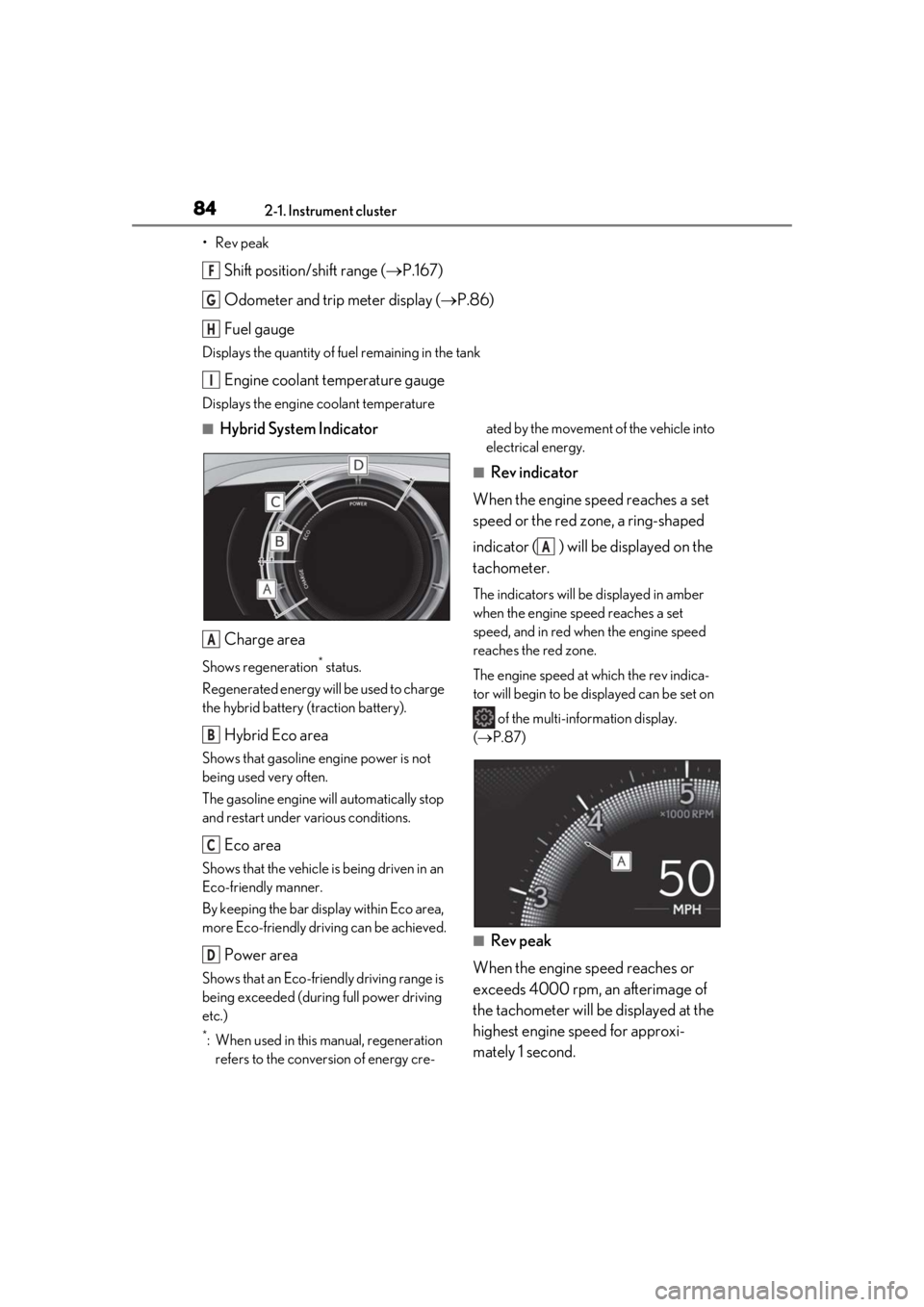
■Hybrid System Indicator
Charge area
Shows regeneration* status.
Regenerated energy will be used to charge
the hybrid battery (traction battery).
Hybrid Eco area
Shows that gasoline engine power is not
being used very often.
The gasoline engine will automatically stop
and restart under various conditions.
Eco area
Shows that the vehicle is being driven in an
Eco-friendly manner.
By keeping the bar display within Eco area,
more Eco-friendly driv ing can be achieved.
Power area
Shows that an Eco-friendly driving range is
being exceeded (durin g full power driving
etc.)
*: When used in this manual, regeneration refers to the conversion of energy cre- ated by the movement of the vehicle into
electrical energy.
■Rev indicator
When the engine speed reaches a set
speed or the red zone, a ring-shaped
indicator ( ) will be displayed on the
tachometer.
The indicators will be displayed in amber
when the engine speed reaches a set
speed, and in red when the engine speed
reaches the red zone.
The engine speed at which the rev indica-
tor will begin to be displayed can be set on
of the multi-information display.
( P.87)
■Rev peak
When the engine speed reaches or
exceeds 4000 rpm, an afterimage of
the tachometer will be displayed at the
highest engine speed for approxi-
mately 1 second.
F
G
H
I
A
B
C
D
A
Page 85 of 476
852-1. Instrument cluster
2
Vehicle status information and indicators
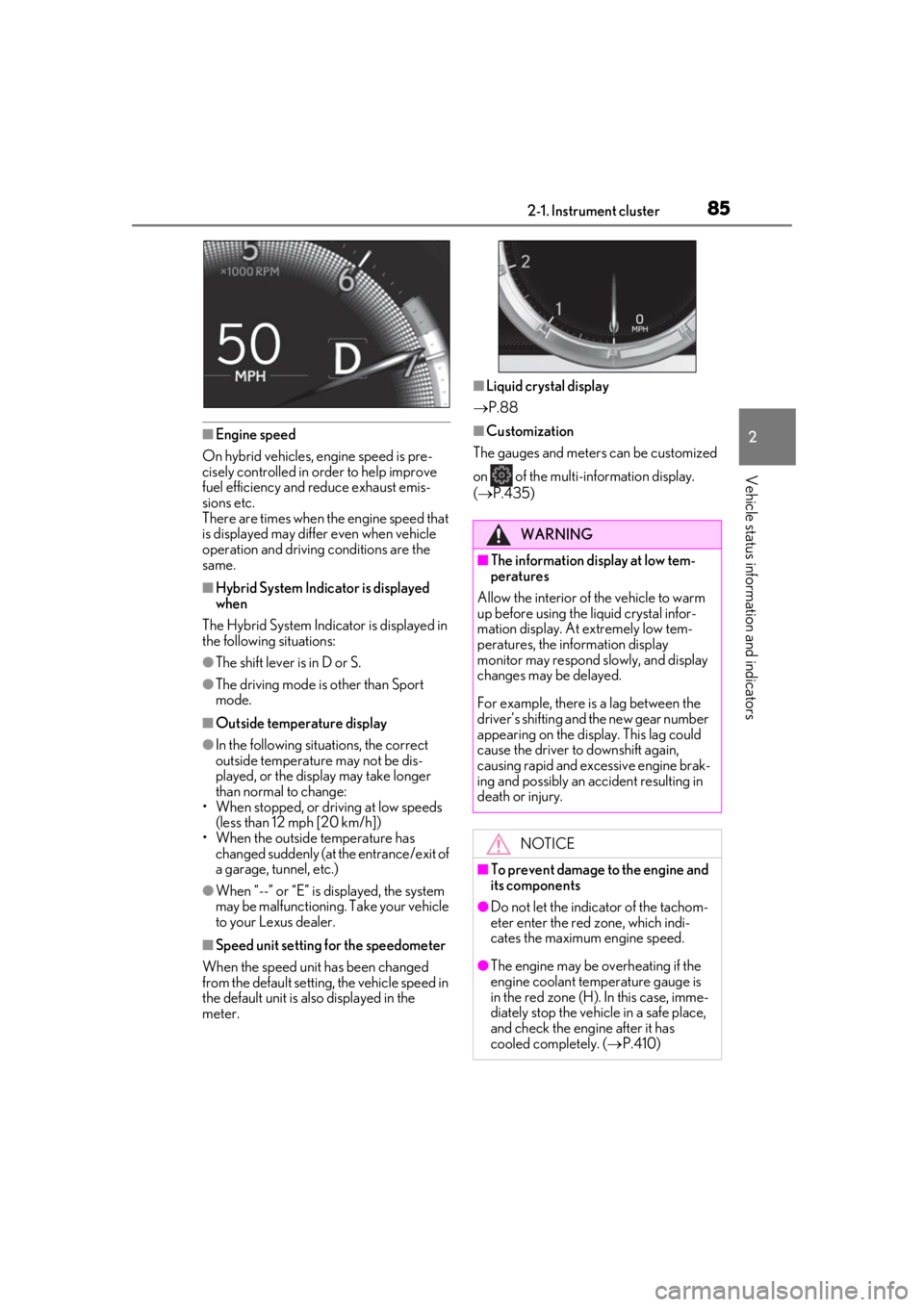
■Engine speed
On hybrid vehicles, engine speed is pre-
cisely controlled in order to help improve
fuel efficiency and reduce exhaust emis-
sions etc.
There are times when the engine speed that
is displayed may differ even when vehicle
operation and driving conditions are the
same.
■Hybrid System Indicator is displayed
when
The Hybrid System Indicator is displayed in
the following situations:
●The shift lever is in D or S.
●The driving mode is other than Sport
mode.
■Outside temperature display
●In the following situations, the correct
outside temperature may not be dis-
played, or the display may take longer
than normal to change:
• When stopped, or driving at low speeds (less than 12 mph [20 km/h])
• When the outside temperature has changed suddenly (at the entrance/exit of
a garage, tunnel, etc.)
●When “--” or “E” is displayed, the system
may be malfunctioning. Take your vehicle
to your Lexus dealer.
■Speed unit setting for the speedometer
When the speed unit has been changed
from the default setting, the vehicle speed in
the default unit is also displayed in the
meter.
■Liquid crystal display
P.88
■Customization
The gauges and meters can be customized
on of the multi-information display.
( P.435)
WARNING
■The information display at low tem-
peratures
Allow the interior of the vehicle to warm
up before using the liquid crystal infor-
mation display. At extremely low tem-
peratures, the information display
monitor may respond slowly, and display
changes may be delayed.
For example, there is a lag between the
driver’s shifting and the new gear number
appearing on the display. This lag could
cause the driver to downshift again,
causing rapid and excessive engine brak-
ing and possibly an accident resulting in
death or injury.
NOTICE
■To prevent damage to the engine and
its components
●Do not let the indicator of the tachom-
eter enter the red zone, which indi-
cates the maximum engine speed.
●The engine may be overheating if the
engine coolant temperature gauge is
in the red zone (H). In this case, imme-
diately stop the vehicle in a safe place,
and check the engine after it has
cooled completely. ( P.410)
Page 86 of 476
862-1. Instrument cluster
■Display items
Odometer
Displays the total distance the vehicle has
been driven.
Trip meter A/trip meter B
Displays the distance the vehicle has been
driven since the meter was last reset. Trip
meters A and B can be used to record and
display different distances independently.
Distance until next engine oil
change
Displays the distance the vehicle can be
driven until an oil change is necessary.
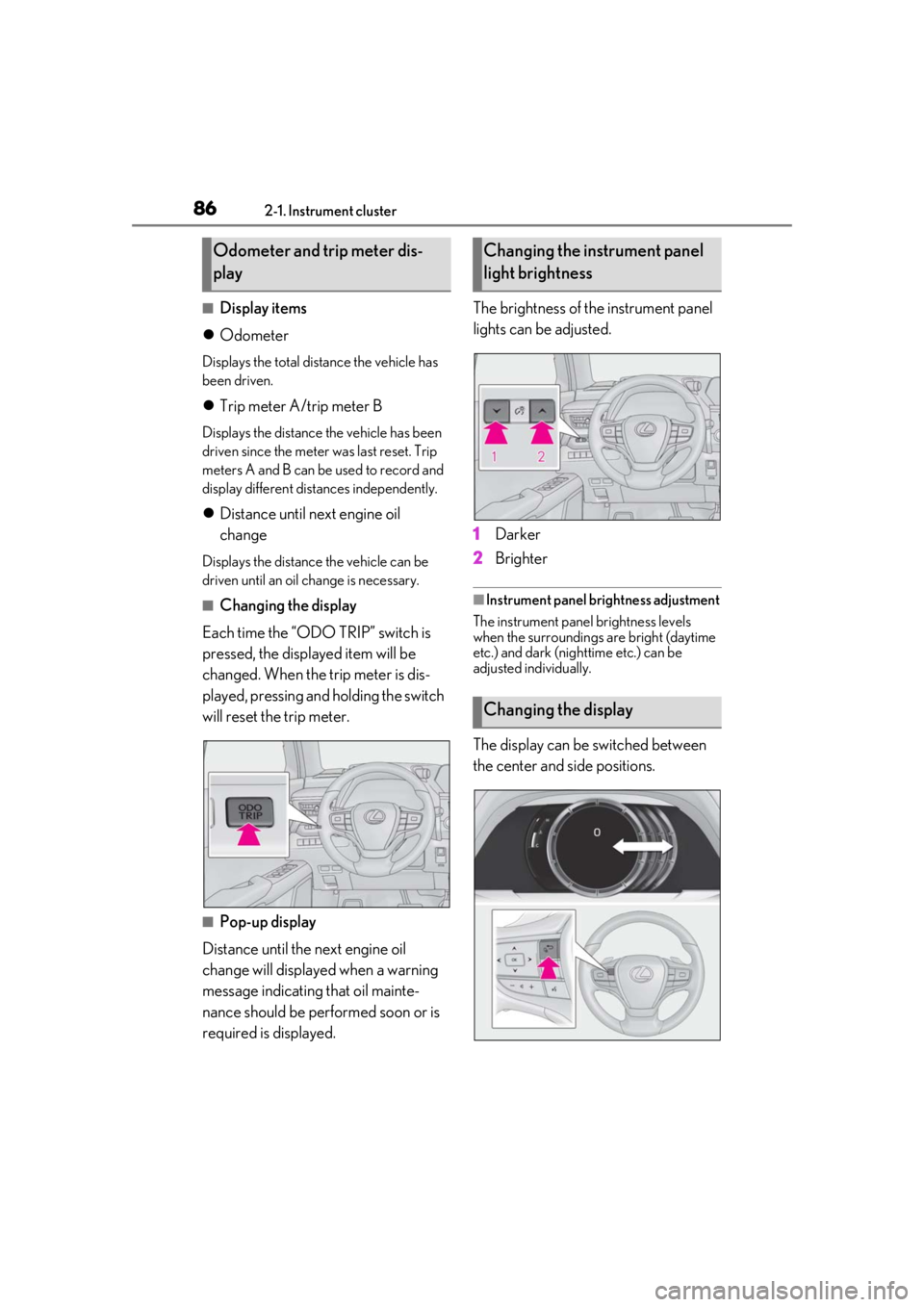
■Changing the display
Each time the “ODO TRIP” switch is
pressed, the displayed item will be
changed. When the trip meter is dis-
played, pressing and holding the switch
will reset the trip meter.
■Pop-up display
Distance until the next engine oil
change will displayed when a warning
message indicating that oil mainte-
nance should be performed soon or is
required is displayed. The brightness of the instrument panel
lights can be adjusted.
1
Darker
2 Brighter
■Instrument panel brightness adjustment
The instrument panel brightness levels
when the surroundings are bright (daytime
etc.) and dark (nighttime etc.) can be
adjusted individually.
The display can be switched between
the center and side positions.
Odometer and trip meter dis-
playChanging the instrument panel
light brightness
Changing the display
Page 91 of 476
912-1. Instrument cluster
2
Vehicle status information and indicators
Select to display warning messages
and measures to be taken if a malfunc-
tion is detected. (P.395)
■Meter display settings that can be
changed
Language
Select to change th e language displayed.
Units
Select to change the units of measure dis-
played.
Speedometer display (except F
SPORT models)
Select to set the display of the speedome-
ter to digital/analog.
Drive information 1/Drive informa-
tion 2
Select to select up to 2 items ( P.89) that
will be displayed on ea ch Drive information
screen (Drive information 1 screen and
Drive information 2 screen) respectively.
Clock
Select to switch be tween 12-hour display
and 24-hour display.
Pop-up display
Select to enable/disable some pop-up dis-
plays for each relevant system.
Accent color
Select to change the accent color on the
screen, such as the cursor color.
Tachometer setting
Select to set the display of the Hybrid Sys-
tem Indicator or tachometer for each driv- ing mode.
Rev indicator (F SPORT models)
• Select to enable/disable the rev indica-
tor.
• Select to set the engine speed at which the rev indicator (amber) will begin to be
displayed.
Rev peak (F SPORT models)
Select to enable/disable the rev peak.
EV indicator
Select to enable/disable the EV indicator.
Default setting
Select to reset the meter display settings to
the default setting.
■Suspension of the settings display
●Some settings cannot be changed while
driving. When changing settings, park
the vehicle in a safe place.
●If a warning message is displayed, opera-
tion of the settings display will be sus-
pended.
Warning message display
Settings display
WARNING
■Cautions during setting up the dis-
play
As the hybrid system needs to be operat-
ing during setting up the display, ensure
that the vehicle is parked in a place with
adequate ventilation. In a closed area
such as a garage, ex haust gases includ-
ing harmful carbon monoxide (CO) may
collect and enter the vehicle. This may
lead to death or a serious health hazard.
NOTICE
■During setting up the display
To prevent 12-volt battery discharge,
ensure that the hybrid system is operat-
ing while setting up the display features.
Page 96 of 476
962-1. Instrument cluster
Drive-Start Control ( P.153)
Details of content di splayed on the head-
up display may differ from that displayed
on the multi-information display. For
details, refer to the explanation of each sys-
tem.
■/ icons
These icons are linked to the multi-
information display
: Master warning icon
Displayed when a warning message is dis-
played on the multi-information display.
( P.395)
: Information icon
Displayed when a suggestion pop-up dis-
play ( P.92) or advice pop-up display is
displayed on the multi-information display.
■Warning message
Some warning messages are displayed
when necessary, according to certain
conditions.
Details of content di splayed on the head-
up display may differ from that displayed
on the multi-information display.
■Audio system operation status
Displayed when an audio remote con-
trol switch on the steering wheel is
operated.
■Hands-free system status
Displayed when the hands-free system
is operated.
■When a pop-up display is displayed
When a pop-up display is displayed, a cur-
rent display may no longer be displayed. In
this case, the display will return after the
pop-up display disappears.
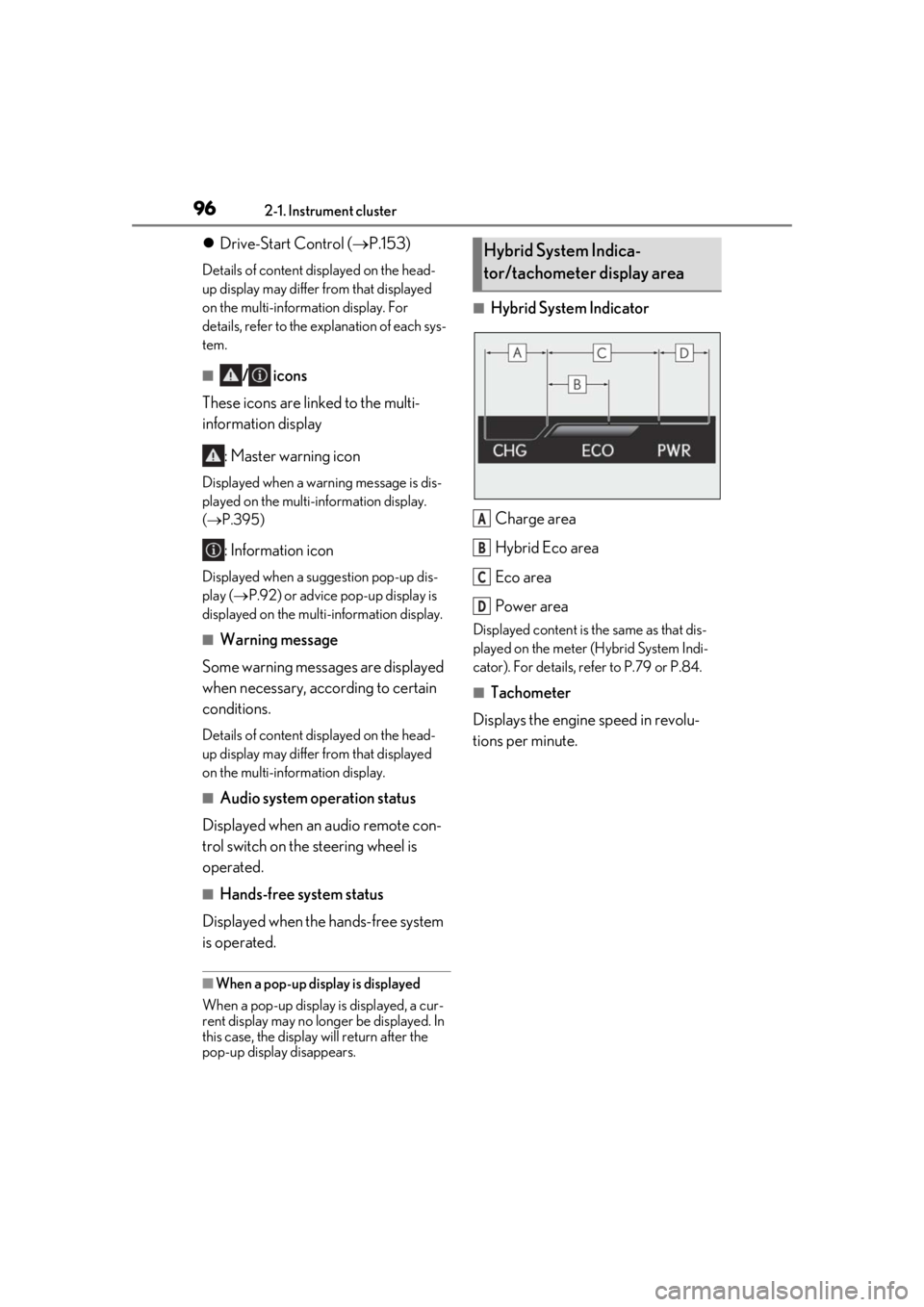
■Hybrid System Indicator
Charge area
Hybrid Eco area
Eco area
Power area
Displayed content is th e same as that dis-
played on the meter (Hybrid System Indi-
cator). For details, refe r to P.79 or P.84.
■Tachometer
Displays the engine speed in revolu-
tions per minute.
Hybrid System Indica-
tor/tachometer display area
A
B
C
D
Page 98 of 476
982-1. Instrument cluster
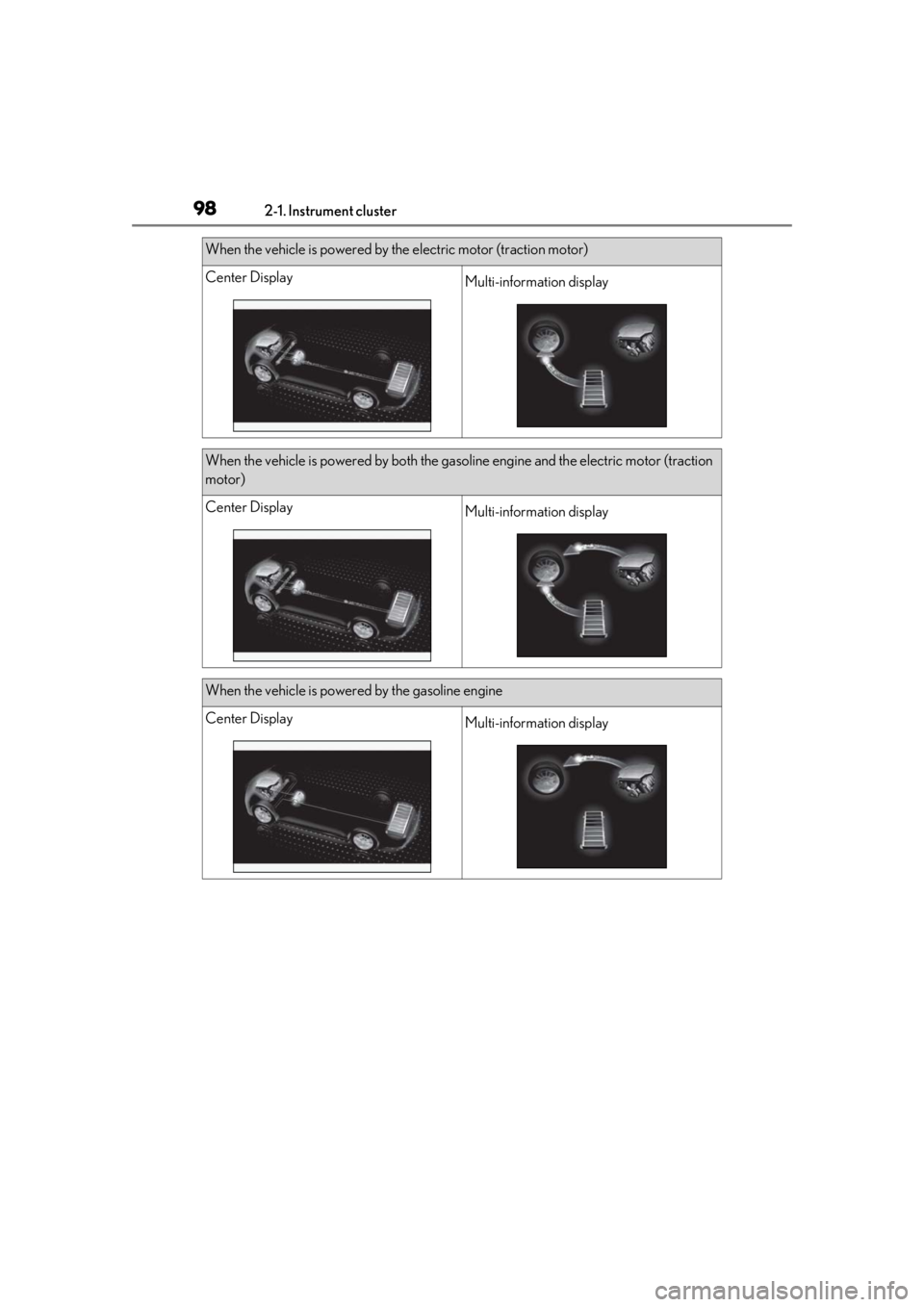
When the vehicle is powered by the electric motor (traction motor)
Center DisplayMulti-information display
When the vehicle is powered by both the gasoline engine and the electric motor (traction
motor)
Center DisplayMulti-information display
When the vehicle is powered by the gasoline engine
Center DisplayMulti-information display
Page 153 of 476
1534-1. Before driving
4
Driving
■Restraining sudden start (Drive-Start
Control)
●When the following unusual operation is
performed, the hybrid system output may
be restrained.
• When the shift lever is shifted from R to D, D to R, N to R, P to D, or P to R (D
includes S) with the accelerator pedal
depressed, a warning message appears
on the multi-information display and
head-up display (if equipped). If a warn-
ing message is shown on the multi-infor-
mation display and head-up display, read
the message and follow the instructions.
• When the accelerator pedal is depressed
too much while the vehicle is in reverse.
●While Drive-Start Control is being acti-
vated, your vehicle may have trouble
escaping from the mud or fresh snow. In
such case, deactivate TRAC ( P.257)
to cancel Drive- Start Control so that the
vehicle may become able to escape from
the mud or fresh snow.
■Breaking in your new Lexus
To extend the life of the vehicle, observing
the following precautions is recommended:
●For the first 200 miles (300 km):
Avoid sudden stops.
●For the first 1000 miles (1600 km):
• Do not drive at extremely high speeds.
• Avoid sudden acceleration.
• Do not drive continuously in low gears.
• Do not drive at a constant speed for extended periods.
■Operating your vehicle in a foreign
country
Comply with the relevant vehicle registra-
tion laws and confirm the availability of the
correct fuel. ( P.417)
WARNING
Observe the following precautions.
Failure to do so may result in death or
serious injury.
■When starting the vehicle
Always keep your foot on the brake
pedal while stopped with the “READY”
indicator is illuminated. This prevents the
vehicle from creeping.
■When driving the vehicle
●Do not drive if you are unfamiliar with
the location of the brake and accelera-
tor pedals to avoid depressing the
wrong pedal.
• Accidentally depressing the accelera- tor pedal instead of the brake pedal
will result in sudden acceleration that
may lead to an accident.
• When backing up, you may twist your body around, leading to difficulty in
operating the pedals. Make sure to
operate the pedals properly.
• Make sure to keep a correct driving posture even when moving the vehicle
only slightly. This allows you to depress
the brake and accelerator pedals
properly.
• Depress the brake pedal using your right foot. Depressing the brake pedal
using your left foot may delay
response in an emergency, resulting in
an accident.
●The driver should pay extra attention
to pedestrians when the vehicle is
powered only by the electric motor
(traction motor). As there is no engine
noise, the pedestrians may misjudge
the vehicle’s movement. Even though
the vehicle is equipped with the vehicle
proximity notification system, drive
with care as pedestrians in the vicinity
may still not notice the vehicle if the
surrounding area is noisy.
●Do not drive the vehicle over or stop
the vehicle near flammable materials.
The exhaust system and exhaust gases
can be extremely hot. These hot parts
may cause a fire if there is any flamma-
ble material nearby.
Page 154 of 476
1544-1. Before driving
WARNING
●During normal driving, do not turn off
the hybrid system. Turning the hybrid
system off while driving will not cause
loss of steering or braking control,
however, power assist to the steering
will be lost. This will make it more diffi-
cult to steer smoothly, so you should
pull over and stop the vehicle as soon
as it is safe to do so.
In the event of an emergency, such as if
it becomes impossible to stop the vehi-
cle in the normal way: P.378
●Use engine braking (downshift) to
maintain a safe speed when driving
down a steep hill.
Using the brakes continuously may
cause the brakes to overheat and lose
effectiveness. ( P.167)
●Do not adjust the positions of the
steering wheel, the seat, or the inside
or outside rear view mirrors while driv-
ing.
Doing so may result in a loss of vehicle
control.
●Always check that all passengers’
arms, heads or other parts of their
body are not outside the vehicle.
●AWD models: Do not drive the vehicle
off-road.
This is not an AWD vehicle designed
for off-road driving. Proceed with all
due caution if it becomes unavoidable
to drive off-road.
●Do not drive across a river or through
other bodies of water.
This may cause electric/electronic
components to short circuit, damage
the hybrid system or cause other seri-
ous damage to the vehicle.
●Do not drive in excess of the speed
limit. Even if the legal speed limit per-
mits it, do not drive over 85 mph (140
km/h) unless your vehicle has high-
speed capability tires.
Driving over 85 mph (140 km/h) may
result in tire failure, loss of control and
possible injury. Be sure to consult a tire
dealer to determine whether the tires
on your vehicle are high-speed capa-
bility tires or not befo re driving at such
speeds.
■When driving on slippery road sur-
faces
●Sudden braking, acceleration and
steering may cause tire slippage and
reduce your ability to control the vehi-
cle.
●Sudden acceleration, engine braking
due to shifting, or changes in engine
speed could cause the vehicle to skid,
resulting in an accident.
●After driving through a puddle, lightly
depress the brake pedal to make sure
that the brakes are functioning prop-
erly. Wet brake pads may prevent the
brakes from functioning properly. If the
brakes on only one side are wet and
not functioning properly, steering con-
trol may be affected.
■When shifting the shift lever
●Do not let the vehicle roll backward
while the shift lever is in a driving posi-
tion, or roll forward while the shift lever
is in R.
Doing so may result in an accident or
damage to the vehicle.
●Do not shift the shif t lever to P while
the vehicle is moving.
Doing so can damage the hybrid trans-
mission and may result in a loss of vehi-
cle control.
●Do not shift the shift lever to R while
the vehicle is moving forward.
Doing so can damage the hybrid trans-
mission and may result in a loss of vehi-
cle control.