garage LEXUS UX250H 2019 User Guide
[x] Cancel search | Manufacturer: LEXUS, Model Year: 2019, Model line: UX250H, Model: LEXUS UX250H 2019Pages: 476, PDF Size: 10.51 MB
Page 311 of 476
3115-6. Using the other interior features
5
Interior features
An assist grip installed on the ceiling
can be used to support your body
while sitting on the seat.
*: If equipped
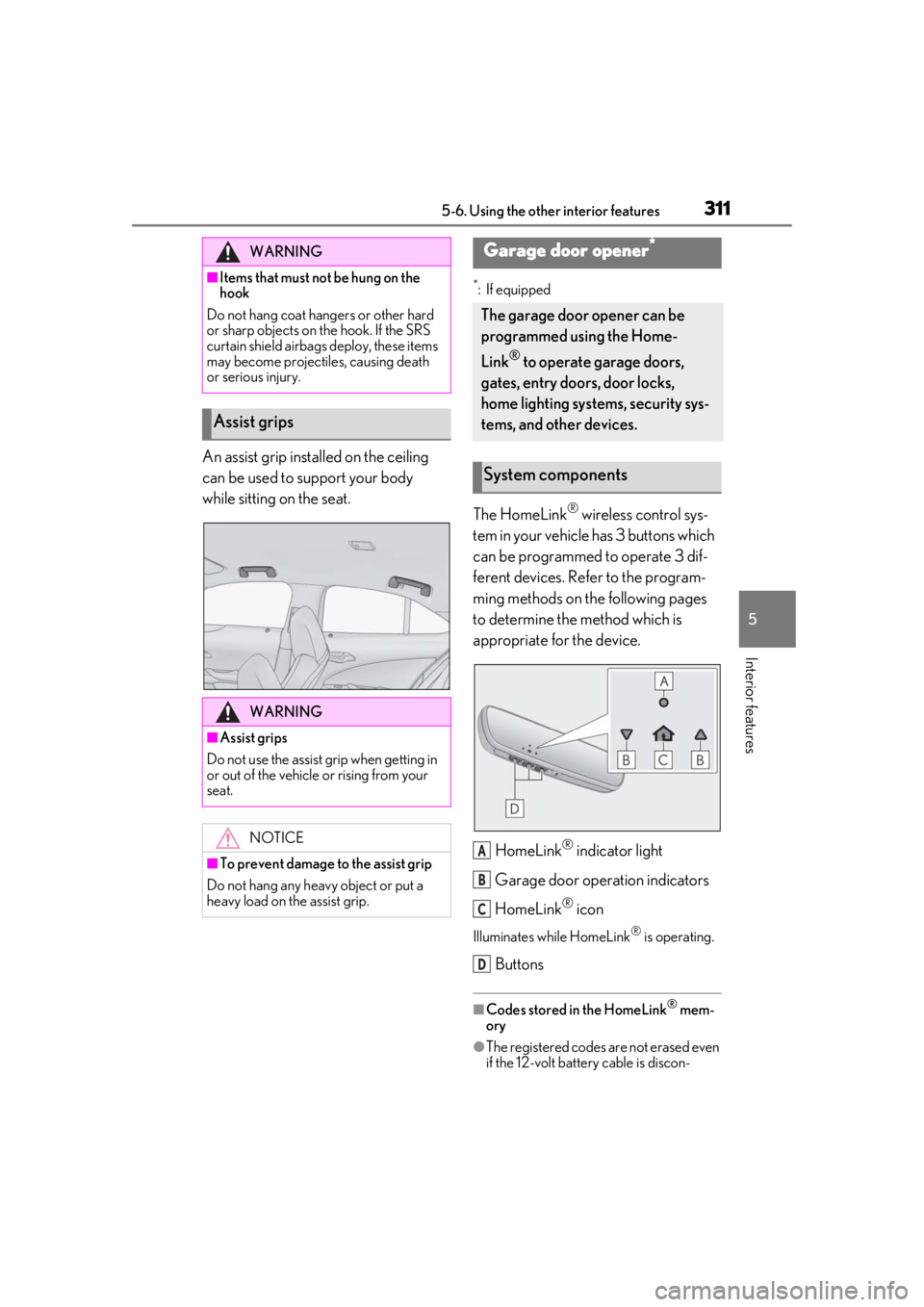
The HomeLink® wireless control sys-
tem in your vehicle has 3 buttons which
can be programmed to operate 3 dif-
ferent devices. Refer to the program-
ming methods on the following pages
to determine the method which is
appropriate for the device.
HomeLink
® indicator light
Garage door operation indicators
HomeLink
® icon
Illuminates while HomeLink® is operating.
Buttons
■Codes stored in the HomeLink® mem-
ory
●The registered codes are not erased even
if the 12-volt battery cable is discon-
WARNING
■Items that must not be hung on the
hook
Do not hang coat hangers or other hard
or sharp objects on the hook. If the SRS
curtain shield airbags deploy, these items
may become projectiles, causing death
or serious injury.
Assist grips
WARNING
■Assist grips
Do not use the assist grip when getting in
or out of the vehicle or rising from your
seat.
NOTICE
■To prevent damage to the assist grip
Do not hang any heavy object or put a
heavy load on th e assist grip.
Garage door opener*
The garage door opener can be
programmed using the Home-
Link
® to operate garage doors,
gates, entry doors, door locks,
home lighting systems, security sys-
tems, and other devices.
System components
A
B
C
D
Page 312 of 476
3125-6. Using the other interior features
nected.
●If learning failed when registering a dif-
ferent code to a HomeLink® button that already has a code registered to it, the
already registered code will not be
erased.
■Certification for the garage door opener
■When support is necessary
Visit on the web at
www.homelink.com/lexus
or call 1-800-355-3515.
■Before programming HomeLink®
During programming, it is possible
WARNING
■When programming a garage door or
other remote control device
The garage door or other device may
operate, so ensure people and objects
are out of danger to prevent potential
harm.
■Conforming to federal safety stan-
dards
Do not use the HomeLink
® compatible
transceiver with any garage door opener
or device that lacks safety stop and
reverse features as required by federal
safety standards.
This includes any garage door that can-
not detect an interf ering object. A door
or device without these features
increases the risk of death or serious
injury.
■When operating or programming
HomeLink®
Never allow a child to operate or play
with the HomeLink® buttons.
Programming the HomeLink®
Page 313 of 476
3135-6. Using the other interior features
5
Interior features
that garage doors, gates, or other
devices may operate. For this rea-
son, make sure that people and
objects are clear of the garage door
or other devices to prevent injury or
other potential harm.
It is recommended that a new bat-
tery be placed in the remote control
transmitter for more accurate pro-
gramming.
Garage door opener motors manu-
factured after 1995 may be
equipped with rolling code protec-
tion. If this is the case, you may need
a stepladder or other sturdy, safe
device to reach the “Learn” or
“Smart” button on the garage door
opener motor.
■Programming HomeLink®
Steps 1 through 3 must be performed
within 60 seconds, otherwise the indi-
cator light will stop flashing and pro-
gramming will not be able to be
completed.
1 Press and release the HomeLink
®
button you want to program and
check that the HomeLink
® indica-
tor light flashes (orange).
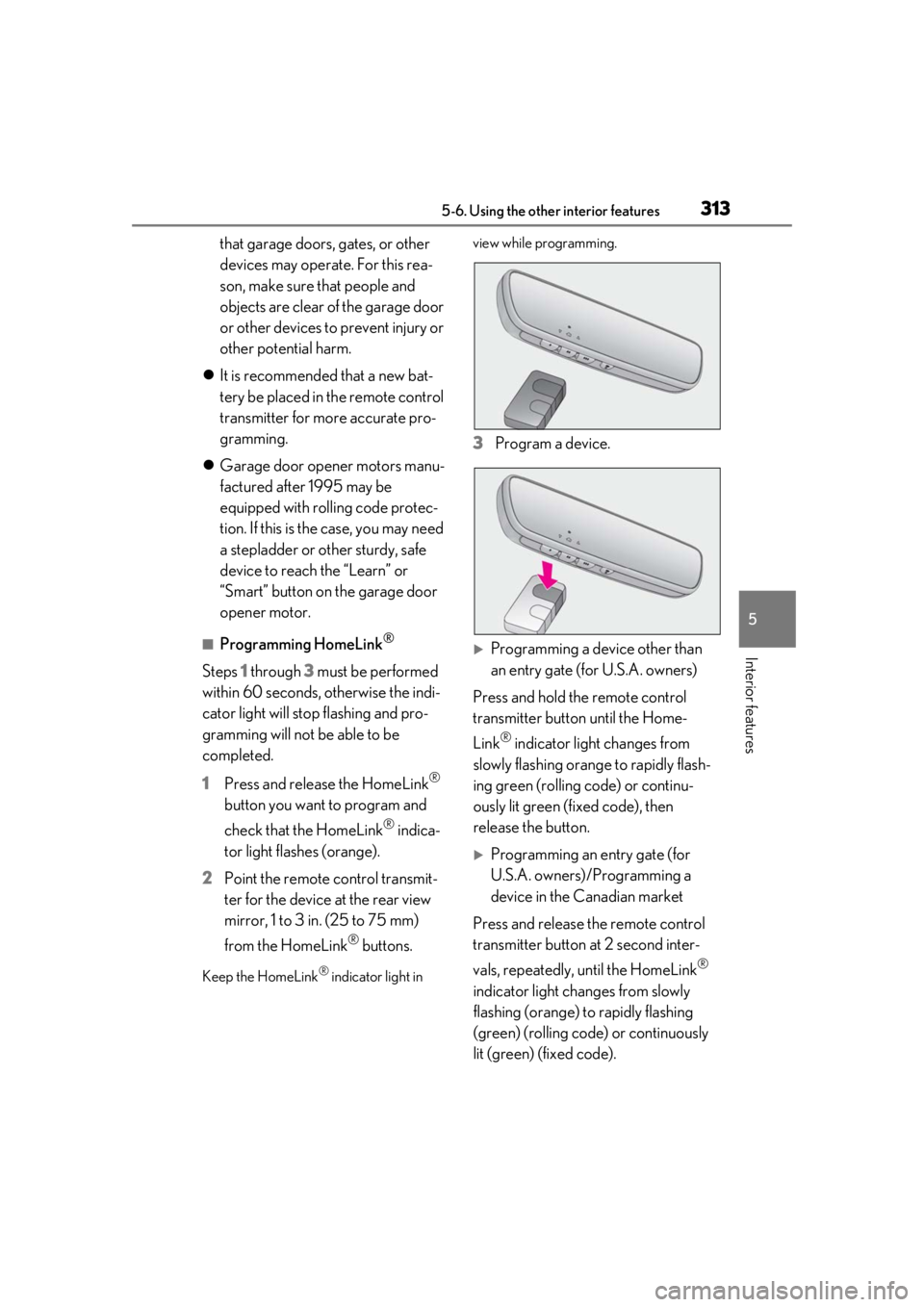
2 Point the remote control transmit-
ter for the device at the rear view
mirror, 1 to 3 in. (25 to 75 mm)
from the HomeLink
® buttons.
Keep the HomeLink® indicator light in view while programming.
3
Program a device.
Programming a device other than
an entry gate (for U.S.A. owners)
Press and hold the remote control
transmitter button until the Home-
Link
® indicator light changes from
slowly flashing orange to rapidly flash-
ing green (rolling code) or continu-
ously lit green (fixed code), then
release the button.
Programming an entry gate (for
U.S.A. owners)/Programming a
device in the Canadian market
Press and release the remote control
transmitter button at 2 second inter-
vals, repeatedly, until the HomeLink
®
indicator light changes from slowly
flashing (orange) to rapidly flashing
(green) (rolling code) or continuously
lit (green) (fixed code).
Page 314 of 476
3145-6. Using the other interior features
4Test the HomeLink® operation by
pressing the newly programmed
button and observing the indicator
light:
Indicator light illuminates: Program-
ming of a fixed code device has
completed. The garage door or
other device should operate when a
HomeLink
® button is pressed and
released.
Indicator light flashes rapidly: The
garage door opener motor or other
device is equipped with a rolling
code. To complete programming,
firmly press and hold the Home-
Link
® button for 2 seconds then
release it.
If the garage door or other device
does not operate, proceed to “Pro-
gramming a rolling code system”.
5 Repeat the steps above to program
another device for any of the
remaining HomeLink
® buttons.
■Programming a rolling code sys-
tem
2 or more people may be necessary to
complete rolling code programming.
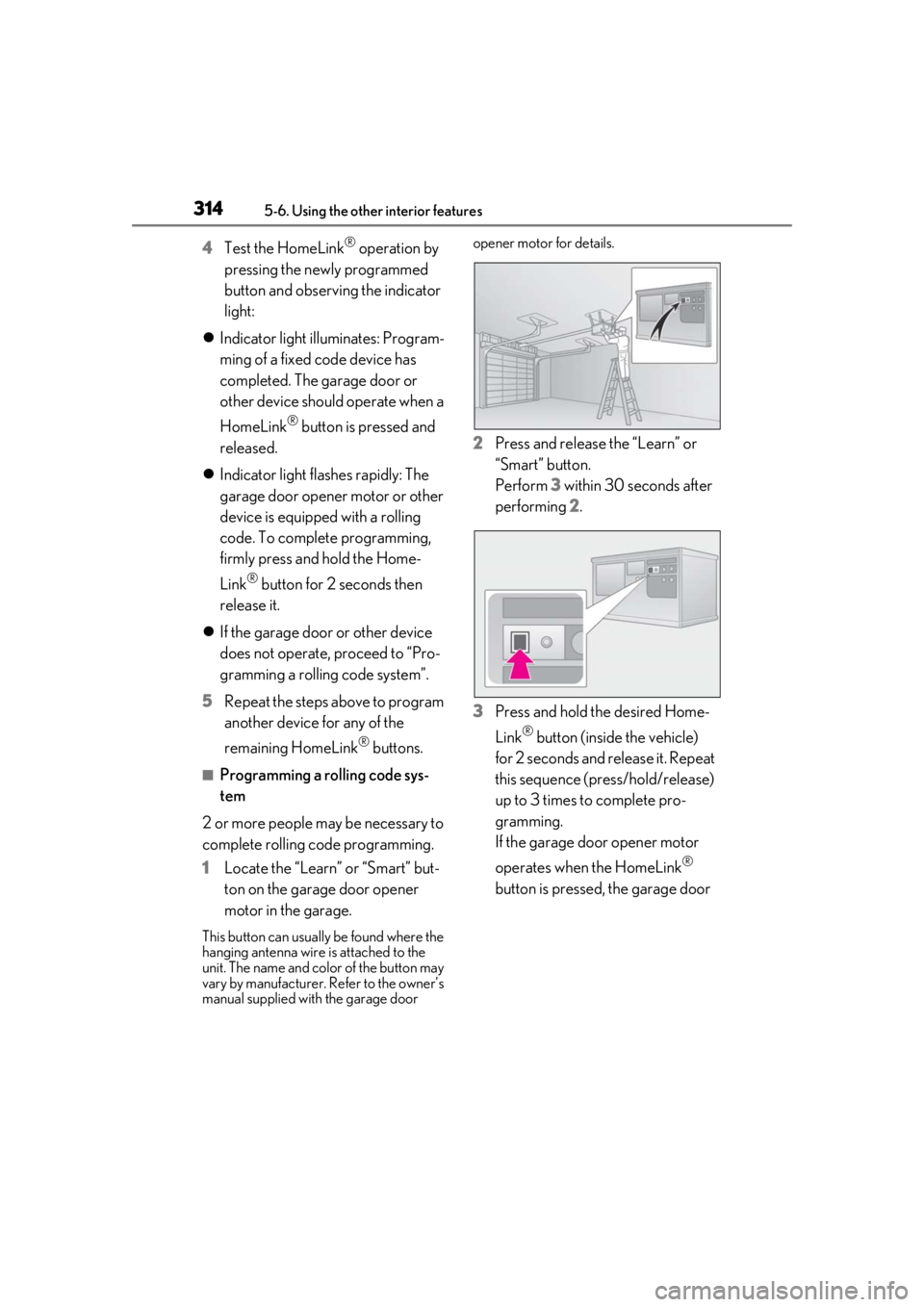
1 Locate the “Learn” or “Smart” but-
ton on the garage door opener
motor in the garage.
This button can usuall y be found where the
hanging antenna wire is attached to the
unit. The name and color of the button may
vary by manufacturer. Refer to the owner’s
manual supplied with the garage door opener motor for details.
2
Press and release the “Learn” or
“Smart” button.
Perform 3 within 30 seconds after
performing 2.
3 Press and hold the desired Home-
Link
® button (inside the vehicle)
for 2 seconds and release it. Repeat
this sequence (press/hold/release)
up to 3 times to complete pro-
gramming.
If the garage door opener motor
operates when the HomeLink
®
button is pressed, the garage door
Page 315 of 476
3155-6. Using the other interior features
5
Interior features
opener motor recognizes the
HomeLink
® signal.
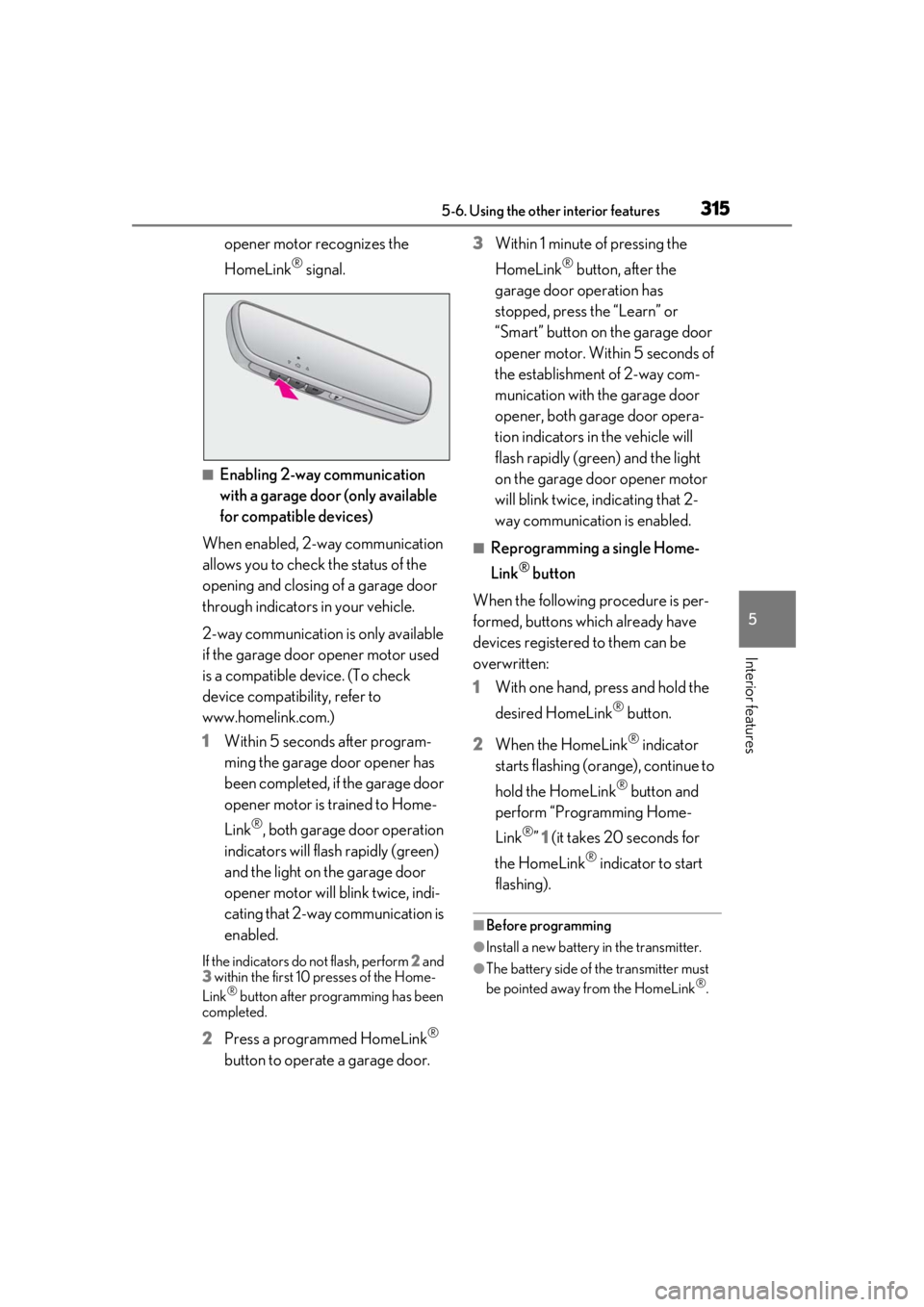
■Enabling 2-way communication
with a garage door (only available
for compatible devices)
When enabled, 2-way communication
allows you to check the status of the
opening and closing of a garage door
through indicators in your vehicle.
2-way communication is only available
if the garage door opener motor used
is a compatible device. (To check
device compatibility, refer to
www.homelink.com.)
1 Within 5 seconds after program-
ming the garage door opener has
been completed, if the garage door
opener motor is trained to Home-
Link
®, both garage door operation
indicators will flash rapidly (green)
and the light on the garage door
opener motor will b link twice, indi-
cating that 2-way communication is
enabled.
If the indicators do not flash, perform 2 and
3 within the first 10 presses of the Home-
Link
® button after programming has been
completed.
2 Press a programmed HomeLink®
button to operate a garage door. 3
Within 1 minute of pressing the
HomeLink
® button, after the
garage door operation has
stopped, press the “Learn” or
“Smart” button on the garage door
opener motor. Within 5 seconds of
the establishment of 2-way com-
munication with the garage door
opener, both garage door opera-
tion indicators in the vehicle will
flash rapidly (green) and the light
on the garage door opener motor
will blink twice, indicating that 2-
way communication is enabled.
■Reprogramming a single Home-
Link
® button
When the following procedure is per-
formed, buttons which already have
devices registered to them can be
overwritten:
1 With one hand, press and hold the
desired HomeLink
® button.
2 When the HomeLink
® indicator
starts flashing (orange), continue to
hold the HomeLink
® button and
perform “Programming Home-
Link
®” 1 (it takes 20 seconds for
the HomeLink
® indicator to start
flashing).
■Before programming
●Install a new battery in the transmitter.
●The battery side of the transmitter must
be pointed away from the HomeLink®.
Page 316 of 476
3165-6. Using the other interior features
Press the appropriate HomeLink®
button. The HomeLink
® indicator light
should turn on.
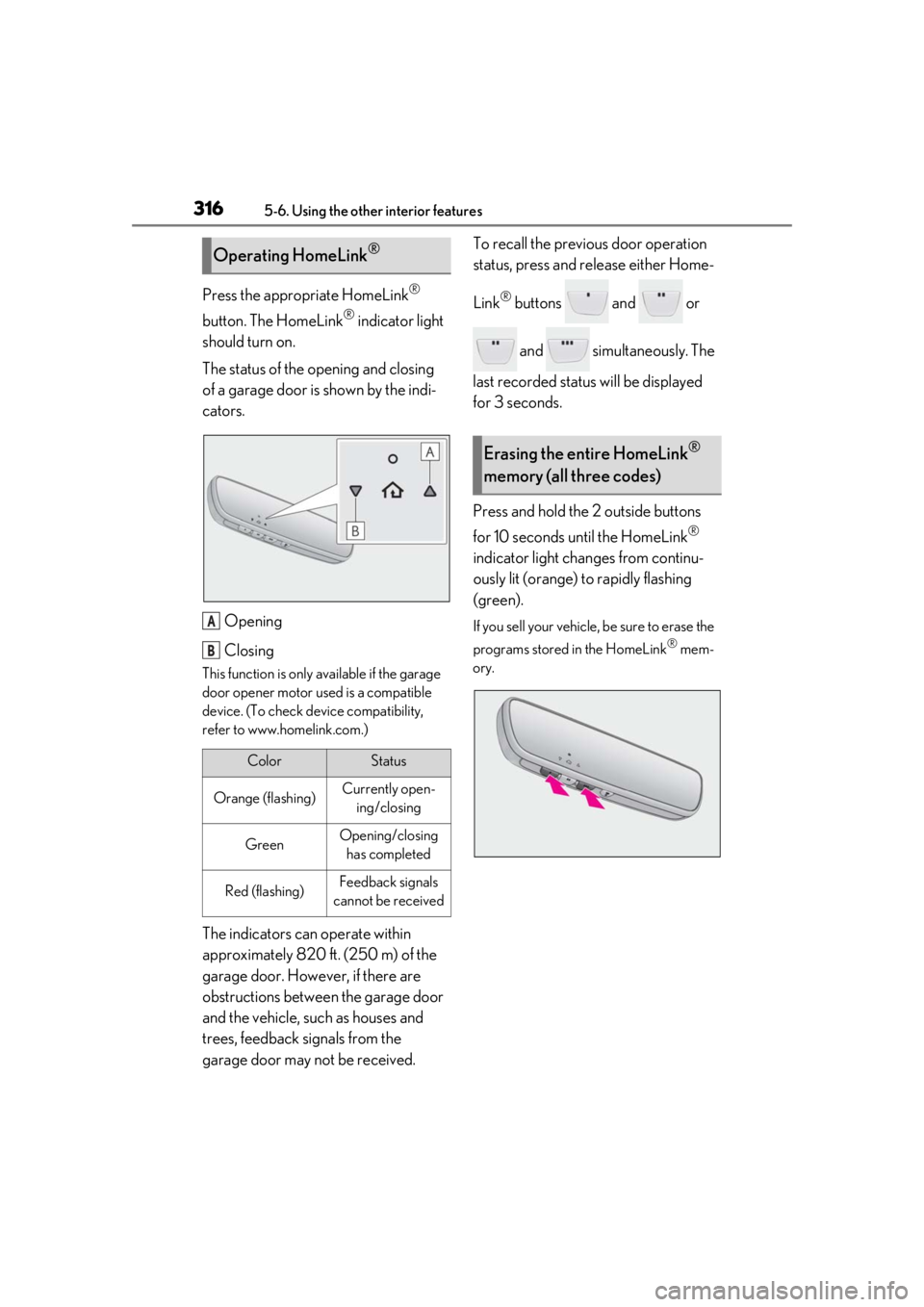
The status of the opening and closing
of a garage door is shown by the indi-
cators.
Opening
Closing
This function is only available if the garage
door opener motor used is a compatible
device. (To check device compatibility,
refer to www.homelink.com.)
The indicators can operate within
approximately 820 ft. (250 m) of the
garage door. However, if there are
obstructions between the garage door
and the vehicle, such as houses and
trees, feedback signals from the
garage door may not be received. To recall the previous door operation
status, press and release either Home-
Link
® buttons and or
and simultaneously. The
last recorded status will be displayed
for 3 seconds.
Press and hold the 2 outside buttons
for 10 seconds until the HomeLink
®
indicator light changes from continu-
ously lit (orange) to rapidly flashing
(green).
If you sell your vehicle, be sure to erase the
programs stored in the HomeLink
® mem-
ory.
Operating HomeLink®
ColorStatus
Orange (flashing)Currently open- ing/closing
GreenOpening/closing has completed
Red (flashing)Feedback signals
cannot be received
A
B
Erasing the entire HomeLink®
memory (all three codes)
Page 343 of 476
3436-3. Do-it-yourself maintenance
6
Maintenance and care
not start with the power switch turned off.
However, the hybrid system will operate
normally from the second attempt.
●The power switch mode is recorded by
the vehicle. If the 12-volt battery is recon-
nected, the vehicle will return the power
switch mode to the status it was in before
the 12-volt battery was disconnected.
Make sure to turn off the power before
disconnect the 12- volt battery. Take extra
care when connecting the 12-volt battery
if the power switch mode prior to dis-
charge is unknown.
If the system will not st art even after multiple
attempts at all methods above, contact your
Lexus dealer.
1Open the right side deck board.
( P.297)
WARNING
■Chemicals in the 12-volt battery
The 12-volt battery contains poisonous
and corrosive sulfuric acid and may pro-
duce hydrogen gas which is flammable
and explosive. To reduce the risk of death
or serious injury, take the following pre-
cautions while working on or near the 12-
volt battery:
●Do not cause sparks by touching the
12-volt battery terminals with tools.
●Do not smoke or light a match near the
12-volt battery.
●Avoid contact with eyes, skin and
clothes.
●Never inhale or swallow electrolyte.
●Wear protective safety glasses when
working near the 12-volt battery.
●Keep children away from the 12-volt
battery.
■Where to safely charge the 12-volt
battery
Always charge the 12-volt battery in an
open area. Do not charge the 12-volt bat-
tery in a garage or closed room where
there is insufficient ventilation.
■Emergency measures regarding
electrolyte
●If electrolyte gets in your eyes
Flush your eyes with clean water for at
least 15 minutes and get immediate
medical attention. If possible, continue
to apply water with a sponge or cloth
while traveling to the nearest medical
facility.
●If electrolyte gets on your skin
Wash the affected area thoroughly. If
you feel pain or burning, get medical
attention immediately.
●If electrolyte gets on your clothes
It can soak through clothing on to your
skin. Immediately take off the clothing
and follow the procedure above if nec-
essary.
●If you accidentally swallow electrolyte
Drink a large quantity of water or milk.
Get emergency medical attention
immediately.
■When handling the 12-volt battery
P.409
NOTICE
■When recharging the 12-volt battery
Never recharge the 12-volt battery while
the hybrid system is operating. Also, be
sure all accessories are turned off.
Removing the 12-volt battery
cover
Page 434 of 476
4348-2. Customization
8-2.Customization
■Changing using the meter control
switches
1
Press or of the meter con-
trol switches, and select .
2
Press or of the meter con-
trol switches, select the item, and
press “OK”.
3
Press or of the meter con-
trol switches, select the desired set-
ting, and press “OK”.
To go back to the previous screen or
exit the customize mode, press .
■Changing using the Remote Touch
1
Press the “MENU” button on the
Remote Touch.
2
Select “Setup” on the menu screen
and select “Vehicle”. 3
Select “Vehicle Customization”.
Various setting can be changed. Refer to
the list of settings th
at can be changed for
details.
For details on the Remote Touch, refer
to the “NAVIGATION AND MULTI-
MEDIA SYSTEM OWNER’S MAN-
UAL”.
■When customizing using the Remote
Touch
Stop the vehicle in a safe place, apply the
parking brake, and shift the shift lever to P.
Also, to prevent 12-volt battery discharge,
leave the hybrid system operating while
customizing the features.
Some function settings are changed simultaneously with other functions being cus-
tomized. Contact your Lexus dealer for further details.
Settings that can be changed using the Remote Touch
Settings that can be changed using the meter control switches
Customizable features
Your vehicle includes a variety of
electronic features that can be per-
sonalized to your preferences. The
settings of these features can be
changed by using the meter control
switches, the Remote Touch or at
your Lexus dealer.
Customizing vehicle features
WARNING
■Cautions during customization
As the hybrid system needs to be operat-
ing during customizatio n, ensure that the
vehicle is parked in a place with ade-
quate ventilation. In a closed area such as
a garage, exhaust gases including harm-
ful carbon monoxide (CO) may collect
and enter the vehicle. This may lead to
death or a serious health hazard.
NOTICE
■During customization
To prevent 12-volt battery discharge,
ensure that the hybrid system is operat-
ing while customizing features.
Customizable features
A
B
Page 466 of 476

466Alphabetical Index
Emergency flashers .................................... 378
Energy monitor ................................................97
EngineACC ..................................................................164
Compartment ............................................. 337
Hood................................................................335
How to start the hybrid system ............ 162
Identification number ................................. 417
If your vehicle has to be stopped in an
emergency ................................................ 378
Ignition switch (power switch) .............. 162
Overheating.................................................. 410
Power switch ................................................. 162
Tachometer ............................................ 78, 82
Engine coolant.............................................. 339 Capacity ...........................................................419
Checking ....................................................... 339
Preparing and checking before winter......................................................................... 263
Engine coolant temperature gauge78, 82
Engine oil Capacity .......................................................... 418
Checking ....................................................... 337
Warning light ...............................................386
Engine oil maintenance data .................. 339
EPS (Electric Power Steering) .............. 257 Function .......................................................... 257
Warning light .............................................. 388
EV drive mode................................................165
Event data recorder (EDR) ........................... 8
EV indicator ...................................................... 63
F
Flat tire ............................................................. 399 Tire pressure warning system .............348
Floor mats .......................................................... 24
Fluid Brake.................................................................. 421
Hybrid transmission ................................. 420
Washer ............................................................. 341
Fog lights Replacing light bulbs................................ 374 Switch................................................................ 183
Front passenger occupant classification system .............................................................. 39
Front seats ......................................................... 131 Adjustment ....................................................... 131
Cleaning .........................................................325
Correct driving posture ............................ 25
Driving position memory ........................ 133
Head restraints............................................. 136
Memory recall function............................ 135
Power easy access system .................... 133
Seat heaters ..................................................287
Seat position memory .............................. 133
Seat ventilators ............................................287
Front side marker lights Light switch ..................................................... 177
Front turn signal lights Replacing light bulbs ................................375
Turn signal lever ............................................ 171
Wattage .......................................................... 422
Fuel Capacity ...........................................................417
Fuel gauge ............................................... 78, 82
Information .................................................... 423
Refueling.......................................................... 190
Type ....................................................................417
Warning light .............................................. 390
Fuel consumption Average fuel economy ..............................89
Current fuel consumption ........................89
Fuel filler door ................................................ 190 Refueling.......................................................... 190
When the fuel filler door cannot be
opened.........................................................402
Fuel gauge ................................................. 78, 82
Fuses ................................................................. 370
G
Garage door opener .................................... 311
Gauges ....................................................... 78, 82
G-force............................................................... 90
Glove box ....................................................... 294
Page 472 of 476

472Alphabetical Index
Speedometer ........................................... 78, 82
Sport mode .................................................... 255
Steering lockColumn lock release..................................163
Steering lock system warning message...........................................................................163
Steering wheel Adjustment......................................................139
Heated steering wheel............................286
Meter control switches ..............................88
Power easy access system .....................133
Steering wheel position memory ........133
Stop lights Replacing light bulbs................................ 374
Storage feature ............................................ 293
Stuck If the vehicle becomes stuck..................413
Suggestion function....................................... 92
Sunshade.......................................................... 148
Sun visors ......................................................... 301
Switches “ODO TRIP” switch .......................... 80, 86
“SOS” button .................................................. 56
ASC (Active Sound Control) switch 176
Automatic High Beam system............. 180
Brake hold switch........................................ 175
BSM (Blind Spot Monitor) switch .... 228
Door lock switches ...................................... 110
Driving mode select switch .................. 255
Driving position memory switches .....133
Dynamic radar cruise control with full-speed range switch ................................. 217
Emergency flashers switch ................... 378
EV drive mode switch ............................. 165
Fog light switch ............................................ 183
Garage door opener switches ............. 311
Head-up display switch............................. 94
Heated steering wheel............................286
Ignition switch................................................ 162
Instrument panel light control switches .................................................................. 80, 86
Intuitive parking assist switch............... 233 Light switch ..................................................... 177
LTA (Lane-Tracing Assist) switch ..... 210
Meter control switches ............................. 88
Moon roof switches....................................147
Outside rear view mi
rror switches .....142
Paddle shift switches .......................169, 170
Parking brake switch.................................. 172
PCS OFF switch ....................................... 200
PKSB (Parking Support Brake) switch .......................................................................... 244
Power back door opener and closer switch ............................................................... 115
Power door lock switch ............................ 110
Power switch..................................................162
Power window switch .............................. 145
RCTA switch ................................................239
Rear window and outside rear view mir- ror defoggers switch ............................ 277
Rear window wiper and washer switch ........................................................................... 188
Seat heater switches.................................287
Seat ventilator switches .......................... 287
Tire pressure warning reset switch.... 351
Vehicle-to-vehicle di stance switch..... 217
VSC off switch ............................................ 257
Window lock switch.................................. 146
Windshield wiper de-icer switch....... 279
Windshield wipers and washer switch ........................................................................... 184
T
Tachometer............................................... 78, 82 Rev indicator ...................................................84
Rev peak............................................................84
Tail lights Light switch ..................................................... 177
Replacing light bulbs ................................ 374
Theft deterrent system Alarm..................................................................... 71
Immobilizer system ......................................69
Tire inflation pressure Maintenance data ...................................... 422