instrument panel LEXUS UX250H 2019 User Guide
[x] Cancel search | Manufacturer: LEXUS, Model Year: 2019, Model line: UX250H, Model: LEXUS UX250H 2019Pages: 476, PDF Size: 10.51 MB
Page 81 of 476

812-1. Instrument cluster
2
Vehicle status information and indicators
1Darker
2 Brighter
■Instrument panel brightness adjustment
The instrument panel brightness levels
when the surroundings are bright (daytime
etc.) and dark (nighttime etc.) can be
adjusted individually.
Page 83 of 476
832-1. Instrument cluster
2
Vehicle status information and indicators
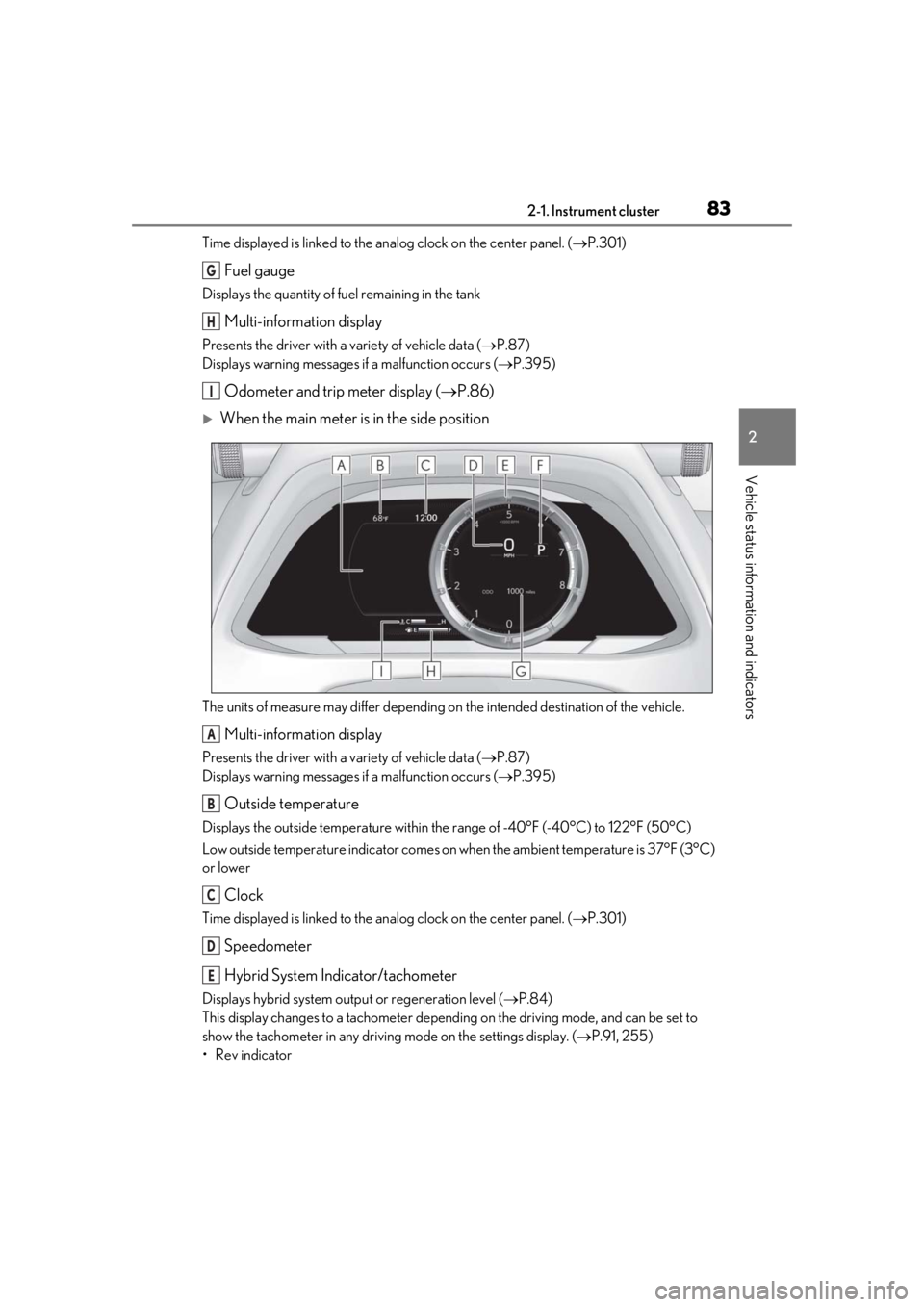
Time displayed is linked to the analog clock on the center panel. (P.301)
Fuel gauge
Displays the quantity of fuel remaining in the tank
Multi-information display
Presents the driver with a variety of vehicle data ( P.87)
Displays warning messages if a malfunction occurs (P.395)
Odometer and trip meter display ( P.86)
When the main meter is in the side position
The units of measure may differ depending on the intended destination of the vehicle.
Multi-information display
Presents the driver with a variety of vehicle data ( P.87)
Displays warning messages if a malfunction occurs (P.395)
Outside temperature
Displays the outside temperature within the range of -40°F (-40°C) to 122°F (50°C)
Low outside temperature indicator comes on wh en the ambient temperature is 37°F (3°C)
or lower
Clock
Time displayed is linked to the analog clock on the center panel. (P.301)
Speedometer
Hybrid System Indicator/tachometer
Displays hybrid system outp ut or regeneration level (P.84)
This display changes to a tachometer depending on the driving mode, and can be set to
show the tachometer in any driving mode on the settings display. (P.91, 255)
• Rev indicator
G
H
I
A
B
C
D
E
Page 86 of 476
862-1. Instrument cluster
■Display items
Odometer
Displays the total distance the vehicle has
been driven.
Trip meter A/trip meter B
Displays the distance the vehicle has been
driven since the meter was last reset. Trip
meters A and B can be used to record and
display different distances independently.
Distance until next engine oil
change
Displays the distance the vehicle can be
driven until an oil change is necessary.
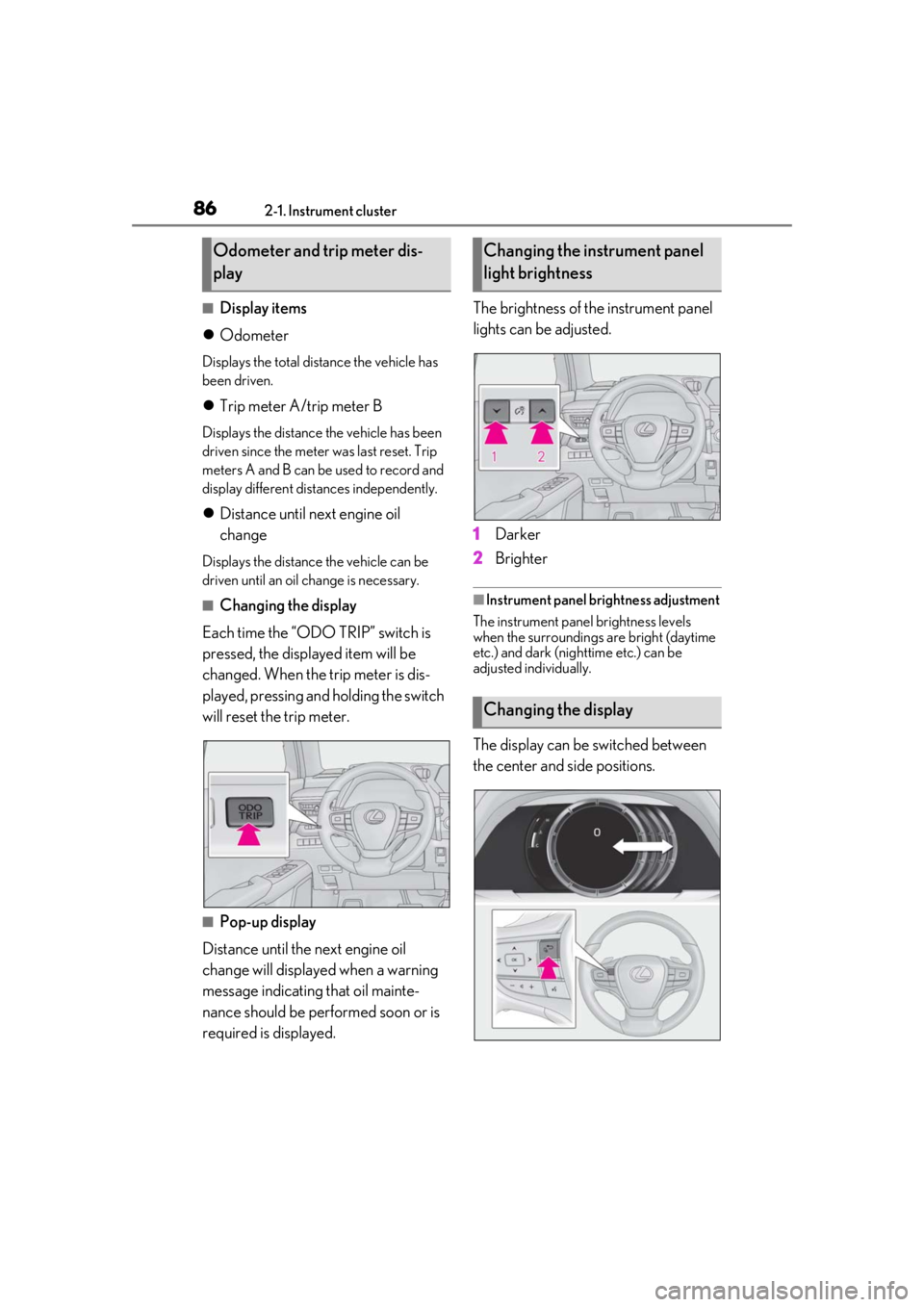
■Changing the display
Each time the “ODO TRIP” switch is
pressed, the displayed item will be
changed. When the trip meter is dis-
played, pressing and holding the switch
will reset the trip meter.
■Pop-up display
Distance until the next engine oil
change will displayed when a warning
message indicating that oil mainte-
nance should be performed soon or is
required is displayed. The brightness of the instrument panel
lights can be adjusted.
1
Darker
2 Brighter
■Instrument panel brightness adjustment
The instrument panel brightness levels
when the surroundings are bright (daytime
etc.) and dark (nighttime etc.) can be
adjusted individually.
The display can be switched between
the center and side positions.
Odometer and trip meter dis-
playChanging the instrument panel
light brightness
Changing the display
Page 92 of 476

922-1. Instrument cluster
Displays suggestions to the driver in
the following situations. To select a
response to a displayed suggestion,
use the meter control switches.
■Suggestion to enable the power
back door
If the power back door system is dis-
abled on of the multi-information
display ( P.87) and the power back
door switch on the instrument panel is
operated, a suggestion message will be
displayed asking if you wish to enable
the power back door system. To enable
the power back door system, select
“Yes”.
After enabling the power back door
system, press the power back door
switch again to open or close the
power back door.
■Suggestion to turn on the head-
lights
If the headlight switch is in other than
or position, and the vehicle
speed is 3 mph (5 km/h) or higher for
a certain amount of time when the sur-
roundings are dark, a suggestion mes-
sage will be displayed.
■Suggestion to turn off the head-
lights
If the headlights are left on for a certain
amount of time with the headlight
switch in or position after the
power switch has been turned off, a
suggestion message will be displayed
asking if you wish to turn the headlights off.
To turn the headlight
s off, select “Yes”.
If a front door is opened after the power
switch is turned off, this suggestion mes-
sage will not be displayed.
■Customization
Some functions can be customized.
( P.435)
Suggestion function
Page 126 of 476

1263-2. Opening, closing and locking the doors
• Cigarette boxes that have aluminum foil
inside
• Metallic wallets or bags
•Coins
• Hand warmers made of metal
• Media such as CDs and DVDs
●When other wireless ke ys (that emit radio
waves) are being used nearby
●When carrying the electronic key
together with the following devices that
emit radio waves
• Another vehicle’s electronic key or a wireless key that emits radio waves
• Personal computers or personal digital assistants (PDAs)
• Digital audio players
• Portable game systems
●If window tint with a metallic content or
metallic objects are attached to the rear
window
●When the electronic key is placed near a
battery charger or electronic devices
●When the vehicle is parked in a pay park-
ing spot where radio waves are emitted.
■Note for the entry function
●Even when the electronic key is within the
effective range (detection areas), the sys-
tem may not operate properly in the fol-
lowing cases:
• The electronic key is too close to the win- dow or outside door handle, near the
ground, or in a high place when the doors
are locked or unlocked.
• The electronic key is on the instrument
panel, luggage room, floor, or in the door
pockets or glove box when the hybrid
system is started or power switch modes
are changed.
●Do not leave the electronic key on top of
the instrument panel or near the door
pockets when exiting the vehicle.
Depending on the radio wave reception
conditions, it may be detected by the
antenna outside the cabin and the door
will become lockable from the outside,
possibly trapping the electronic key
inside the vehicle.
●As long as the electron ic key is within the
effective range, the doors may be locked
or unlocked by anyone. However, only the doors detecting the electronic key
can be used to unlock the vehicle.
●Even if the electronic
key is not inside the
vehicle, it may be po ssible to start the
hybrid system if the el ectronic key is near
the window.
●The doors may unlock if a large amount
of water splashes on the door handle,
such as in the rain or in a car wash when
the electronic key is within the effective
range. (The doors wi ll automatically be
locked after approximately 60 seconds if
the doors are not opened and closed.)
●If the wireless remote control is used to
lock the doors when the electronic key is
near the vehicle, there is a possibility that
the door may not be unlocked by the
entry function. (Use the wireless remote
control to unlock the doors.)
●Touching the door lock sensor while
wearing gloves may delay or prevent lock
operation. Remove the gloves and touch
the lock sensor again.
●When the lock operation is performed
using the lock sensor, recognition signals
will be shown up to two consecutive
times. After this, no recognition signals
will be given.
●If the door handle becomes wet while the
electronic key is within the effective
range, the door may lock and unlock
repeatedly. In that case, follow the follow-
ing correction procedures to wash the
vehicle:
• Place the electronic key in a location 6 ft. (2 m) or more away from the vehicle.
(Take care to ensure that the key is not
stolen.)
• Set the electronic key to battery-saving
mode to disable the smart access system
with push-button start. ( P.125)
●If the electronic key is inside the vehicle
and a door handle becomes wet during a
car wash, a buzzer may sound outside the
vehicle and “Key Detected in Vehicle”
may be shown on the multi-information
display. To turn off the alarm, lock all the
doors.
●The lock sensor may not work properly if
it comes into contact with ice, snow, mud,
etc. Clean the lock sensor and attempt to
Page 155 of 476
1554-1. Before driving
4
Driving
WARNING
●Do not shift the shift lever to a driving
position while the vehicle is moving
backward.
Doing so can damage the hybrid trans-
mission and may result in a loss of vehi-
cle control.
●Shifting the shift lever to N while the
vehicle is moving will disengage the
hybrid system. Engine braking is not
available with the hybrid system disen-
gaged.
●Be careful not to shift the shift lever
with the accelerator pedal depressed.
Shifting the shift lever to any position
other than P or N may lead to unex-
pected rapid acceleration of the vehi-
cle that may cause an accident and
result in death or serious injury.
■If you hear a squealing or scraping
noise (brake pad wear limit indica-
tors)
Have the brake pads checked and
replaced by your Lexus dealer as soon as
possible. Rotor damage may result if the
pads are not replaced when needed.
It is dangerous to drive the vehicle when
the wear limits of the brake pads and/or
those of the brake discs are exceeded.
■When the vehicle is stopped
●Do not depress the accelerator pedal
unnecessarily.
If the shift lever is in any position other
than P or N, the vehicle may acceler-
ate suddenly and unexpectedly, caus-
ing an accident.
●In order to prevent accidents due to
the vehicle rolling away, always keep
depressing the brake pedal while
stopped with the “READY” indicator is
illuminated, and apply the parking
brake as necessary.
●If the vehicle is stopped on an incline,
in order to prevent accidents caused
by the vehicle rolling forward or back-
ward, always depress the brake pedal
and securely apply the parking brake
as needed.
●Avoid revving or racing the engine.
Running the engine at high speed
while the vehicle is stopped may cause
the exhaust system to overheat, which
could result in a fire if combustible
material is nearby.
■When the vehicle is parked
●Do not leave glasses, cigarette lighters,
spray cans, or soft drink cans in the
vehicle when it is in the sun.
Doing so may result in the following:
• Gas may leak from a cigarette lighter or spray can, and may lead to a fire.
• The temperature inside the vehicle may cause the plastic lenses and plas-
tic material of glasses to deform or
crack.
• Soft drink cans may fracture, causing the contents to spray over the interior
of the vehicle, and may also cause a
short circuit in the vehicle’s electrical
components.
●Do not leave cigarette lighters in the
vehicle. If a cigare tte lighter is in a
place such as the glove box or on the
floor, it may be lit accidentally when
luggage is loaded or the seat is
adjusted, causing a fire.
●Do not attach adhesive discs to the
windshield or windows. Do not place
containers such as air fresheners on
the instrument panel or dashboard.
Adhesive discs or containers may act
as lenses, causing a fire in the vehicle.
●Do not leave a door or window open if
the curved glass is coated with a met-
allized film such as a silver-colored
one. Reflected sunlight may cause the
glass to act as a lens, causing a fire.
Page 158 of 476
1584-1. Before driving
Cargo capacity depends on the total
weight of the occupants.
(Cargo capacity) = (Total load capac-
ity) (Total weight of occupants)
Steps for Determining Correct Load
Limit
(1) Locate the statement “The com-
bined weight of occupants and cargo
should never exceed XXX kg or XXX
lbs.” on your vehicle’s placard.
(2) Determine the combined weight of
the driver and passengers that will be
riding in your vehicle.
(3) Subtract the combined weight of
the driver and passengers from XXX
kg or XXX lbs.
(4) The resulting figure equals the
available amount of cargo and luggage
load capacity.
For example, if the “XXX” amount
equals 1400 lbs. and there will be five
150 lb passengers in your vehicle, the
amount of available cargo and luggage
load capacity is 650 lbs. (1400 − 750
(5 150) = 650 lbs.)
(5) Determine the combined weight of
luggage and cargo being loaded on
the vehicle. That weight may not safely
exceed the available cargo and lug-
gage load capacity calculated in Step
WARNING
●Do not place cargo or luggage in or on
the following locations.
• At the feet of the driver
• On the front passenger or rear seats (when stacking items)
• On the luggage cover
• On the instrument panel
• On the dashboard
• In front of the Center Display
●Secure all items in the occupant com-
partment.
■When using a roof luggage carrier
Observe the following precautions:
●Place the cargo so that its weight is dis-
tributed evenly between the front and
rear axles.
●If loading long or wide cargo, never
exceed the vehicle overall length or
width. ( P.416)
●Before driving, make sure the cargo is
securely fastened on the roof luggage
carrier.
●Loading cargo on the roof luggage
carrier will make the center of gravity
of the vehicle higher. Avoid high
speeds, sudden starts, sharp turns,
sudden braking or abrupt maneuvers,
otherwise it may result in loss of con-
trol or vehicle rollover due to failure to
operate this vehicle correctly and
result in death or serious injury.
●If driving for a long distance, on rough
roads, or at high speeds, stop the vehi-
cle now and then during the trip to
make sure the cargo remains in its
place.
●Do not exceed 176.3 lb. (80 kg) cargo
weight on the roof luggage carrier.
NOTICE
■When loading cargo (vehicles with
moon roof)
Be careful not to scratch the surface of
the moon roof.
Capacity and distribution
Page 177 of 476
1774-3. Operating the lights and wipers
4
Driving
4-3.Operating the lights and wipers
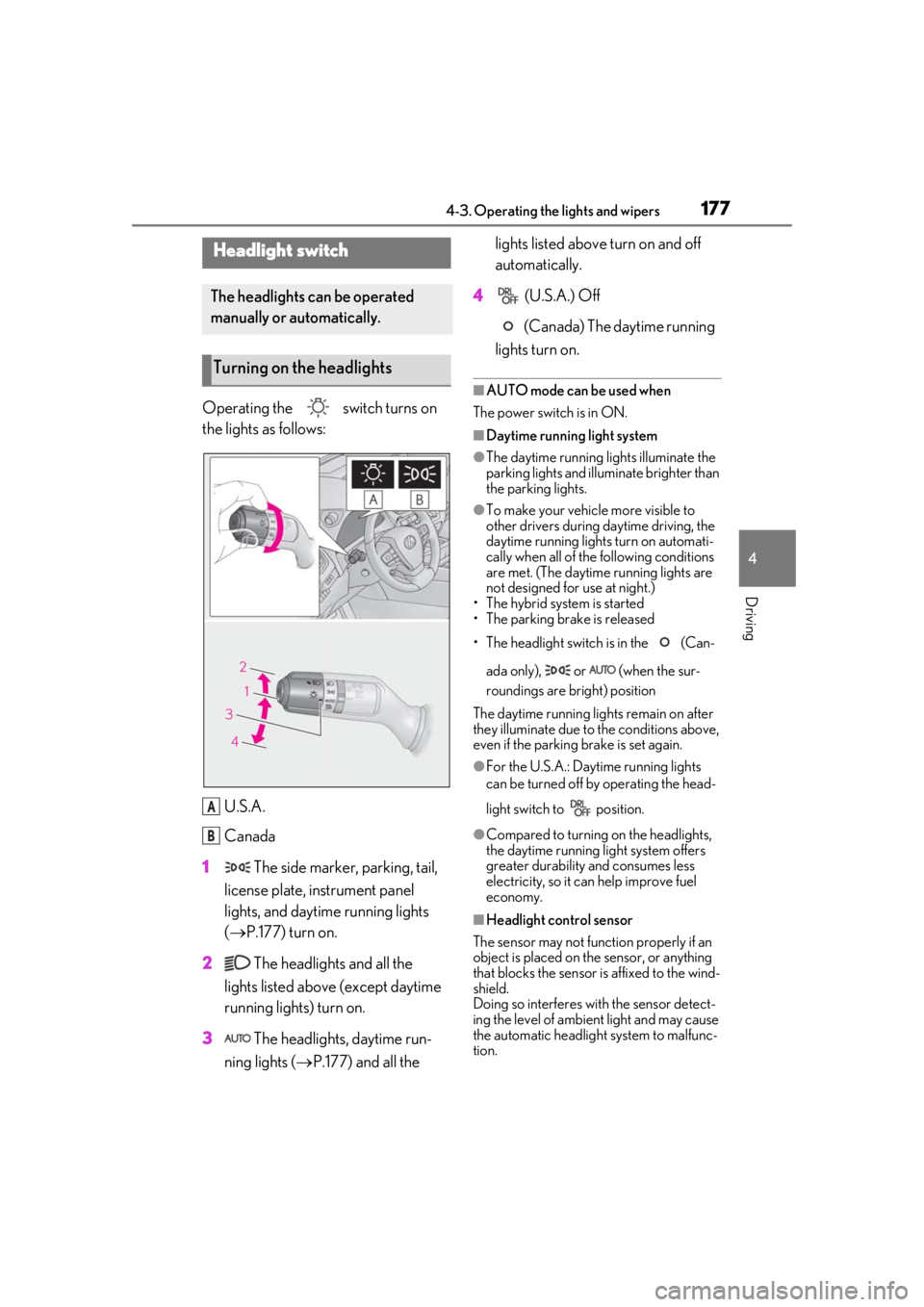
Operating the switch turns on
the lights as follows:U.S.A.
Canada
1 The side marker, parking, tail,
license plate, instrument panel
lights, and daytime running lights
( P.177) turn on.
2 The headlights and all the
lights listed above (except daytime
running lights) turn on.
3 The headlights, daytime run-
ning lights ( P.177) and all the lights listed above turn on and off
automatically.
4 (U.S.A.) Off
(Canada) The daytime running
lights turn on.
■AUTO mode can be used when
The power switch is in ON.
■Daytime running light system
●The daytime running lights illuminate the
parking lights and illuminate brighter than
the parking lights.
●To make your vehicle more visible to
other drivers during daytime driving, the
daytime running lights turn on automati-
cally when all of the following conditions
are met. (The daytime running lights are
not designed for use at night.)
• The hybrid system is started
• The parking brake is released
• The headlight switch is in the (Can-
ada only), or (when the sur-
roundings are bright) position
The daytime running lights remain on after
they illuminate due to the conditions above,
even if the parking brake is set again.
●For the U.S.A.: Daytime running lights
can be turned off by operating the head-
light switch to position.
●Compared to turning on the headlights,
the daytime running light system offers
greater durability and consumes less
electricity, so it can help improve fuel
economy.
■Headlight control sensor
The sensor may not function properly if an
object is placed on the sensor, or anything
that blocks the sensor is affixed to the wind-
shield.
Doing so interferes with the sensor detect-
ing the level of ambien t light and may cause
the automatic headlight system to malfunc-
tion.
Headlight switch
The headlights can be operated
manually or automatically.
Turning on the headlights
A
B
Page 285 of 476
2855-3. Using the air conditioning system and defogger
5
Interior features
WARNING
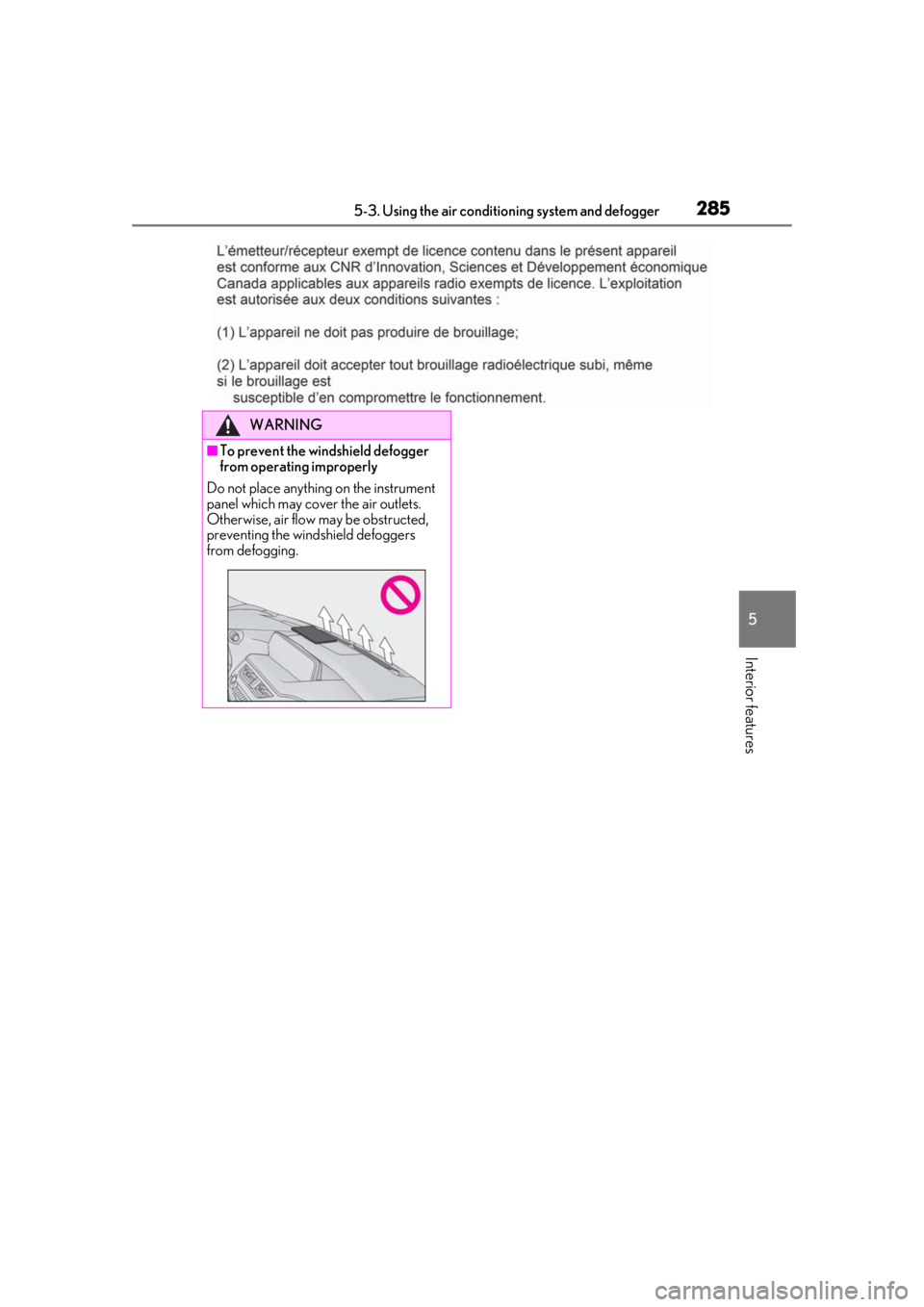
■To prevent the windshield defogger
from operating improperly
Do not place anything on the instrument
panel which may cover the air outlets.
Otherwise, air flow may be obstructed,
preventing the windshield defoggers
from defogging.
Page 302 of 476
3025-6. Using the other interior features
Please use a power supply for elec-
tronic goods that use less than 12
VDC/10 A (power consumption of
120 W).
When using electronic goods, make
sure that the power consumption of all
the connected power outlets is less
than 120 W.
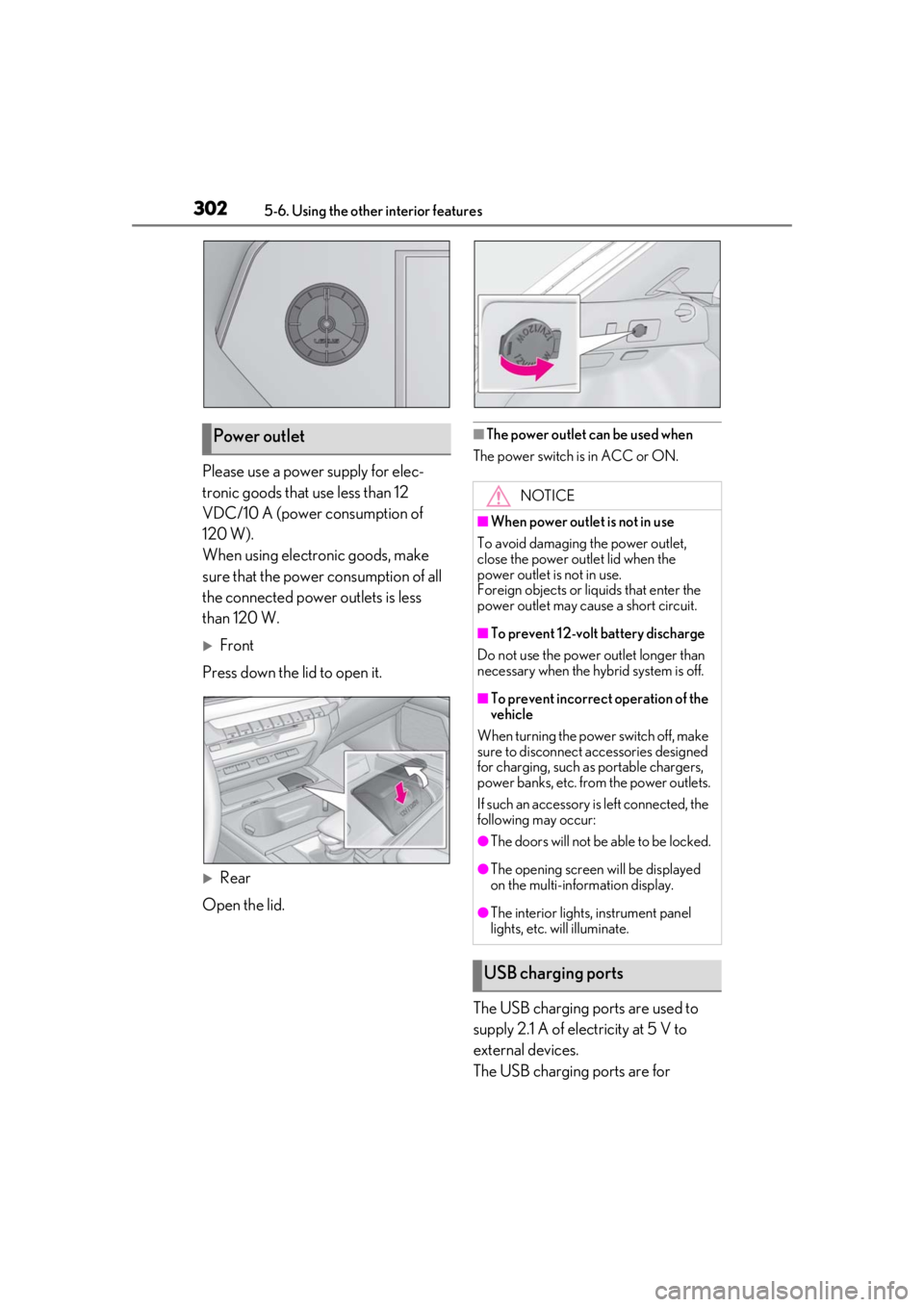
Front
Press down the lid to open it.
Rear
Open the lid.
■The power outlet can be used when
The power switch is in ACC or ON.
The USB charging ports are used to
supply 2.1 A of electricity at 5 V to
external devices.
The USB charging ports are for
Power outlet
NOTICE
■When power outlet is not in use
To avoid damaging the power outlet,
close the power outlet lid when the
power outlet is not in use.
Foreign objects or li quids that enter the
power outlet may cause a short circuit.
■To prevent 12-volt battery discharge
Do not use the power outlet longer than
necessary when the hy brid system is off.
■To prevent incorrect operation of the
vehicle
When turning the powe r switch off, make
sure to disconnect accessories designed
for charging, such as portable chargers,
power banks, etc. from the power outlets.
If such an accessory is left connected, the
following may occur:
●The doors will not be able to be locked.
●The opening screen will be displayed
on the multi-information display.
●The interior lights, instrument panel
lights, etc. will illuminate.
USB charging ports