wheel LEXUS UX250H 2019 User Guide
[x] Cancel search | Manufacturer: LEXUS, Model Year: 2019, Model line: UX250H, Model: LEXUS UX250H 2019Pages: 476, PDF Size: 10.51 MB
Page 63 of 476
631-4. Hybrid system
1
For safety and security
charged.
*: When the hybrid battery (traction bat-tery) requires charging or the engine is
warming up, etc., the gasoline engine will
not automatically stop. ( P.63)
■During normal driving
The gasoline engine is predominantly
used. The electric motor (traction
motor) charges the hybrid battery
(traction battery) as necessary.
■When accelerating sharply
When the accelerator pedal is
depressed heavily, the power of the
hybrid battery (traction battery) is
added to that of the gasoline engine via
the electric motor (traction motor).
■When braking (regenerative brak-
ing)
The wheels operate the electric motor
(traction motor) as a power generator,
and the hybrid battery (traction bat-
tery) is charged.
■Regenerative braking
In the following situations, kinetic energy is
converted to electric energy and decelera-
tion force can be obta ined in conjunction
with the recharging of the hybrid battery
(traction battery).
●The accelerator pedal is released while
driving with the shift lever in D or S.
●The brake pedal is depressed while driv-
ing with the shift lever in D or S.
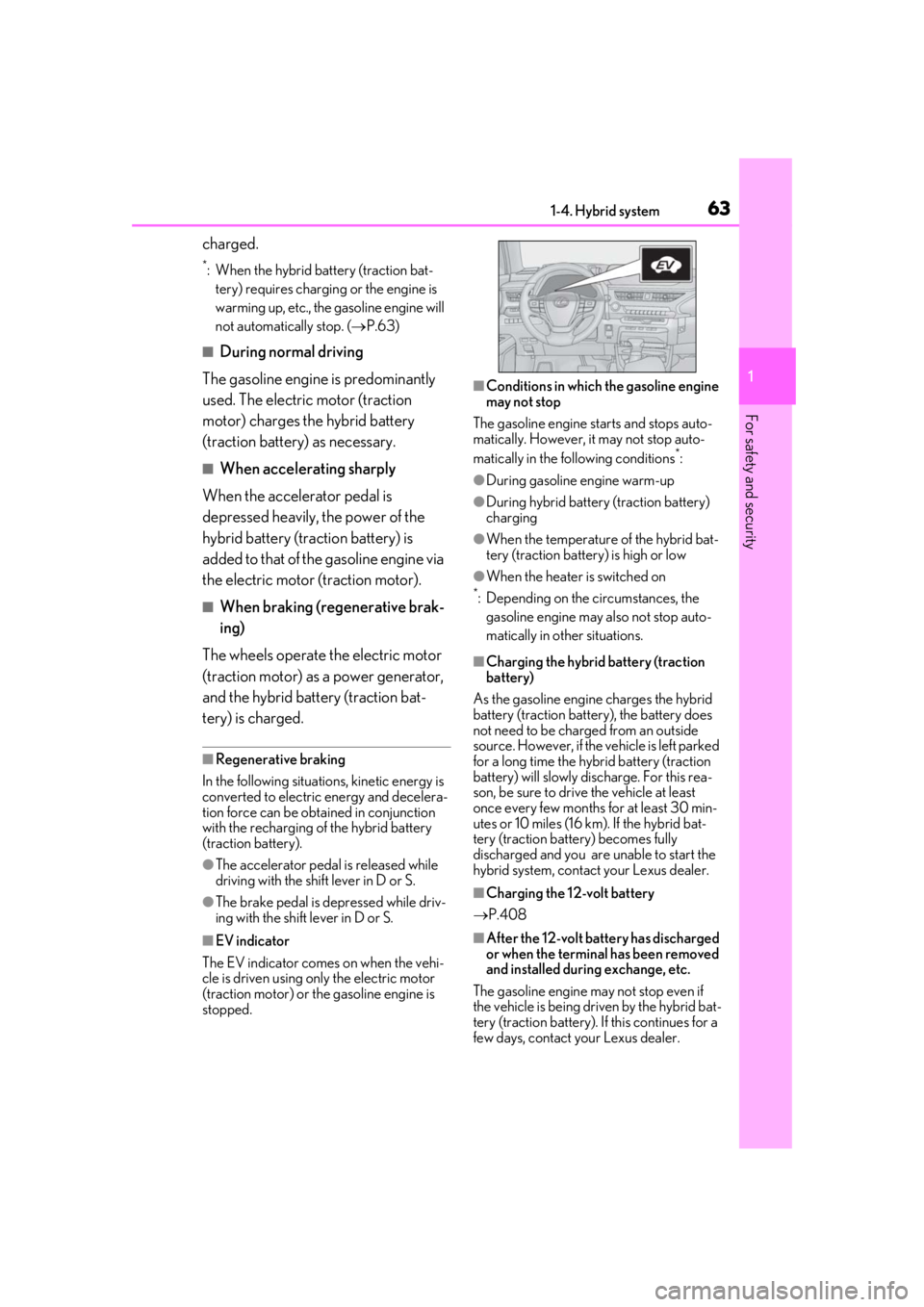
■EV indicator
The EV indicator comes on when the vehi-
cle is driven using only the electric motor
(traction motor) or th e gasoline engine is
stopped.
■Conditions in which the gasoline engine
may not stop
The gasoline engine starts and stops auto-
matically. However, it may not stop auto-
matically in the following conditions
*:
●During gasoline engine warm-up
●During hybrid battery (traction battery)
charging
●When the temperature of the hybrid bat-
tery (traction battery) is high or low
●When the heater is switched on
*: Depending on the circumstances, the gasoline engine may also not stop auto-
matically in other situations.
■Charging the hybrid battery (traction
battery)
As the gasoline engine charges the hybrid
battery (traction battery), the battery does
not need to be charged from an outside
source. However, if the vehicle is left parked
for a long time the hybrid battery (traction
battery) will slowly discharge. For this rea-
son, be sure to drive the vehicle at least
once every few months for at least 30 min-
utes or 10 miles (16 km ). If the hybrid bat-
tery (traction battery) becomes fully
discharged and you are unable to start the
hybrid system, contact your Lexus dealer.
■Charging the 12-volt battery
P.408
■After the 12-volt battery has discharged
or when the terminal has been removed
and installed during exchange, etc.
The gasoline engine may not stop even if
the vehicle is being driven by the hybrid bat-
tery (traction battery). If this continues for a
few days, contact your Lexus dealer.
Page 67 of 476
671-4. Hybrid system
1
For safety and security
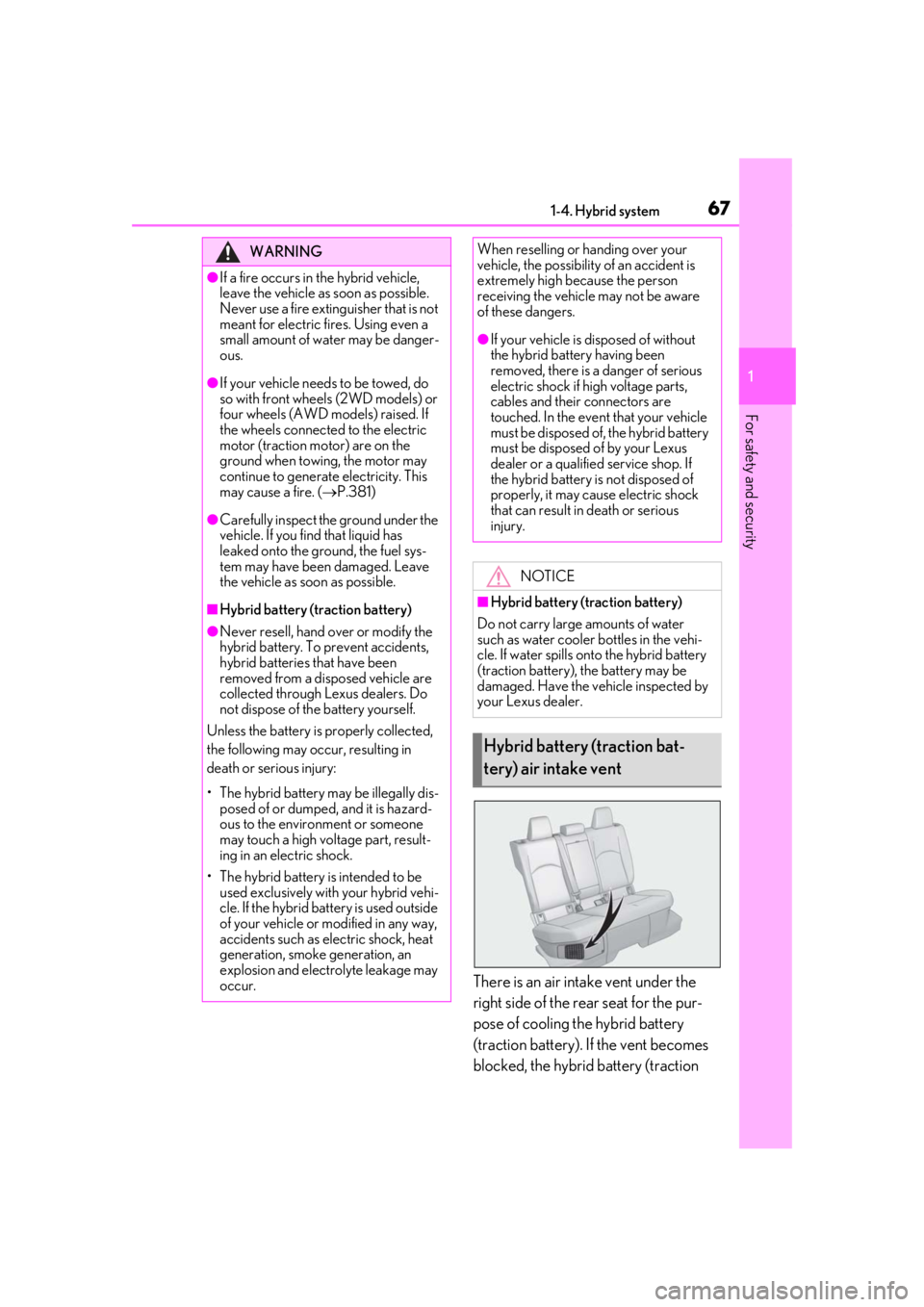
There is an air intake vent under the
right side of the rear seat for the pur-
pose of cooling the hybrid battery
(traction battery). If the vent becomes
blocked, the hybrid battery (traction
WARNING
●If a fire occurs in the hybrid vehicle,
leave the vehicle as soon as possible.
Never use a fire extinguisher that is not
meant for electric fires. Using even a
small amount of water may be danger-
ous.
●If your vehicle needs to be towed, do
so with front wheels (2WD models) or
four wheels (AWD models) raised. If
the wheels connected to the electric
motor (traction motor) are on the
ground when towing, the motor may
continue to generate electricity. This
may cause a fire. ( P.381)
●Carefully inspect the ground under the
vehicle. If you find that liquid has
leaked onto the ground, the fuel sys-
tem may have been damaged. Leave
the vehicle as soon as possible.
■Hybrid battery (traction battery)
●Never resell, hand over or modify the
hybrid battery. To prevent accidents,
hybrid batteries that have been
removed from a disposed vehicle are
collected through Lexus dealers. Do
not dispose of the battery yourself.
Unless the battery is properly collected,
the following may occur, resulting in
death or serious injury:
• The hybrid battery may be illegally dis- posed of or dumped, and it is hazard-
ous to the environment or someone
may touch a high voltage part, result-
ing in an electric shock.
• The hybrid battery is intended to be used exclusively with your hybrid vehi-
cle. If the hybrid battery is used outside
of your vehicle or modified in any way,
accidents such as electric shock, heat
generation, smoke generation, an
explosion and electrolyte leakage may
occur.
When reselling or handing over your
vehicle, the possibility of an accident is
extremely high because the person
receiving the vehicle may not be aware
of these dangers.
●If your vehicle is disposed of without
the hybrid battery having been
removed, there is a danger of serious
electric shock if hi gh voltage parts,
cables and their connectors are
touched. In the event that your vehicle
must be disposed of, the hybrid battery
must be disposed of by your Lexus
dealer or a qualified service shop. If
the hybrid battery is not disposed of
properly, it may cause electric shock
that can result in death or serious
injury.
NOTICE
■Hybrid battery (traction battery)
Do not carry large amounts of water
such as water cooler bottles in the vehi-
cle. If water spills onto the hybrid battery
(traction battery), the battery may be
damaged. Have the vehicle inspected by
your Lexus dealer.
Hybrid battery (traction bat-
tery) air intake vent
Page 96 of 476
962-1. Instrument cluster
Drive-Start Control ( P.153)
Details of content di splayed on the head-
up display may differ from that displayed
on the multi-information display. For
details, refer to the explanation of each sys-
tem.
■/ icons
These icons are linked to the multi-
information display
: Master warning icon
Displayed when a warning message is dis-
played on the multi-information display.
( P.395)
: Information icon
Displayed when a suggestion pop-up dis-
play ( P.92) or advice pop-up display is
displayed on the multi-information display.
■Warning message
Some warning messages are displayed
when necessary, according to certain
conditions.
Details of content di splayed on the head-
up display may differ from that displayed
on the multi-information display.
■Audio system operation status
Displayed when an audio remote con-
trol switch on the steering wheel is
operated.
■Hands-free system status
Displayed when the hands-free system
is operated.
■When a pop-up display is displayed
When a pop-up display is displayed, a cur-
rent display may no longer be displayed. In
this case, the display will return after the
pop-up display disappears.
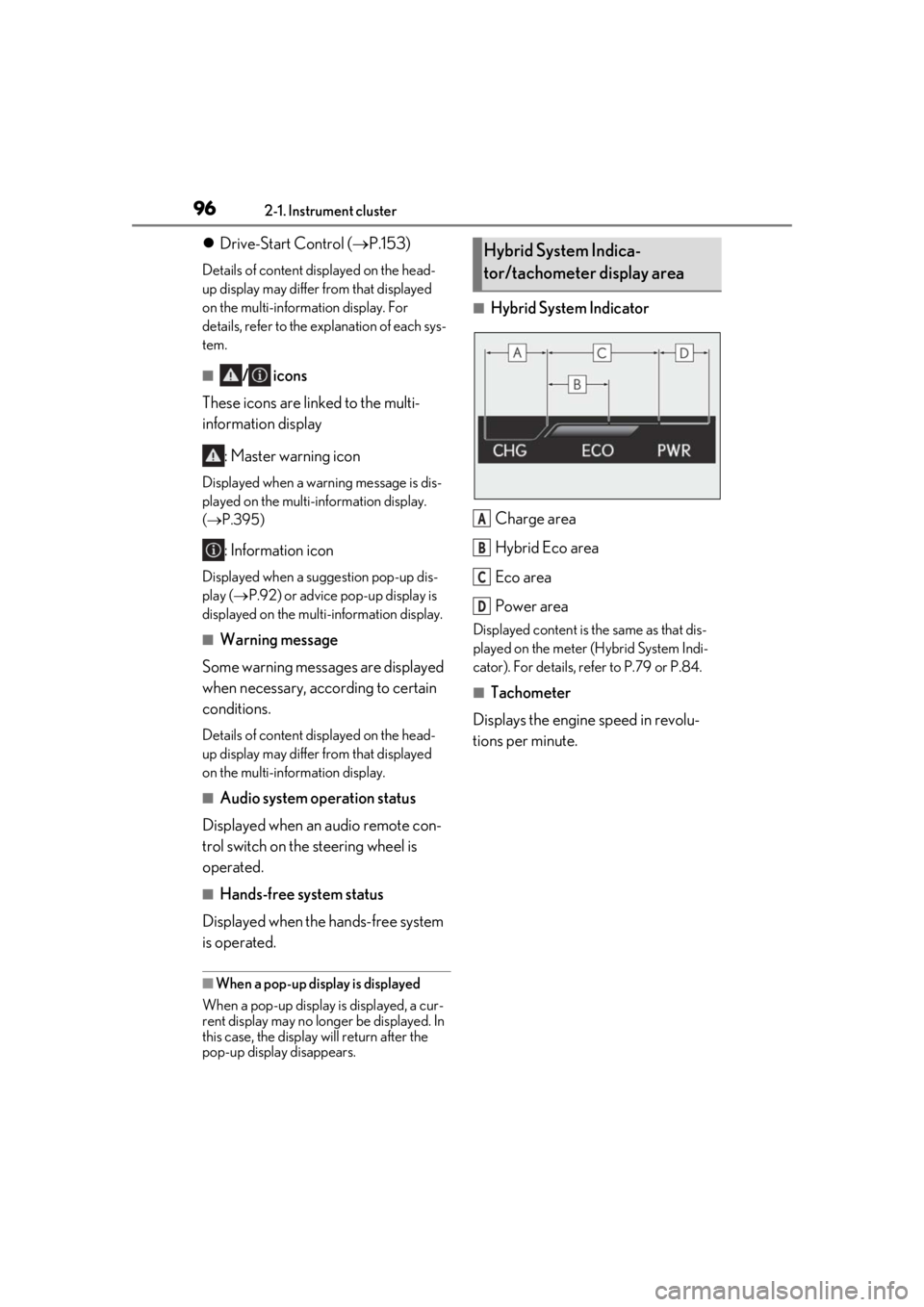
■Hybrid System Indicator
Charge area
Hybrid Eco area
Eco area
Power area
Displayed content is th e same as that dis-
played on the meter (Hybrid System Indi-
cator). For details, refe r to P.79 or P.84.
■Tachometer
Displays the engine speed in revolu-
tions per minute.
Hybrid System Indica-
tor/tachometer display area
A
B
C
D
Page 103 of 476
103
3
3
Before driving
Before driving
3-1. Key informationKeys ................................................. 104
3-2. Opening, closing and locking the doors
Side doors ..................................... 108
Back door ....................................... 112
Smart access system with push- button start ................................. 124
3-3. Adjusting the seats Front seats ...................................... 131
Rear seats ...................................... 132
Driving position memory ........ 133
Head restraints............................ 136
3-4. Adjusting the steering wheel and mirrors
Steering wheel............................. 139
Inside rear view mirror............. 140
Outside rear view mirrors ...... 142
3-5. Opening, closing the windows and moon roof
Power windows........................... 145
Moon roof ..................................... 147
Page 131 of 476
1313-3. Adjusting the seats
3
Before driving
3-3.Adjusting the seats
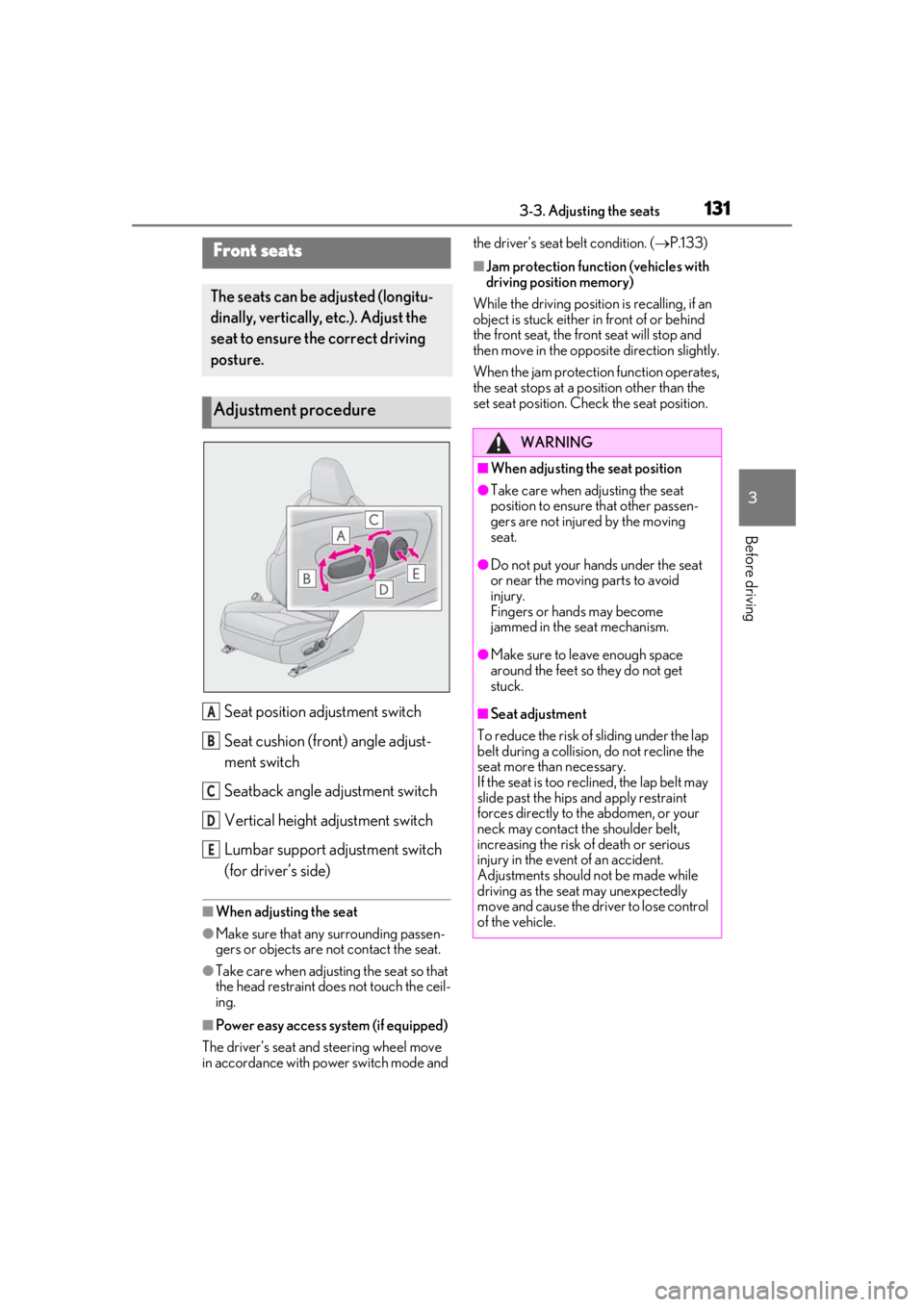
Seat position adjustment switch
Seat cushion (front) angle adjust-
ment switch
Seatback angle adjustment switch
Vertical height adjustment switch
Lumbar support adjustment switch
(for driver’s side)
■When adjusting the seat
●Make sure that any surrounding passen-
gers or objects are not contact the seat.
●Take care when adjusting the seat so that
the head restraint does not touch the ceil-
ing.
■Power easy access system (if equipped)
The driver’s seat and steering wheel move
in accordance with power switch mode and the driver’s seat belt condition. (
P.133)
■Jam protection function (vehicles with
driving position memory)
While the driving position is recalling, if an
object is stuck either in front of or behind
the front seat, the front seat will stop and
then move in the opposite direction slightly.
When the jam protection function operates,
the seat stops at a po sition other than the
set seat position. Chec k the seat position.Front seats
The seats can be adjusted (longitu-
dinally, vertically, etc.). Adjust the
seat to ensure the correct driving
posture.
Adjustment procedure
A
B
C
D
E
WARNING
■When adjusting the seat position
●Take care when adjusting the seat
position to ensure that other passen-
gers are not injured by the moving
seat.
●Do not put your hands under the seat
or near the moving parts to avoid
injury.
Fingers or hands may become
jammed in the seat mechanism.
●Make sure to leave enough space
around the feet so they do not get
stuck.
■Seat adjustment
To reduce the risk of sliding under the lap
belt during a collision, do not recline the
seat more than necessary.
If the seat is too rec lined, the lap belt may
slide past the hips and apply restraint
forces directly to the abdomen, or your
neck may contact the shoulder belt,
increasing the risk of death or serious
injury in the event of an accident.
Adjustments should not be made while
driving as the seat may unexpectedly
move and cause the driver to lose control
of the vehicle.
Page 133 of 476
1333-3. Adjusting the seats
3
Before driving
*: If equipped
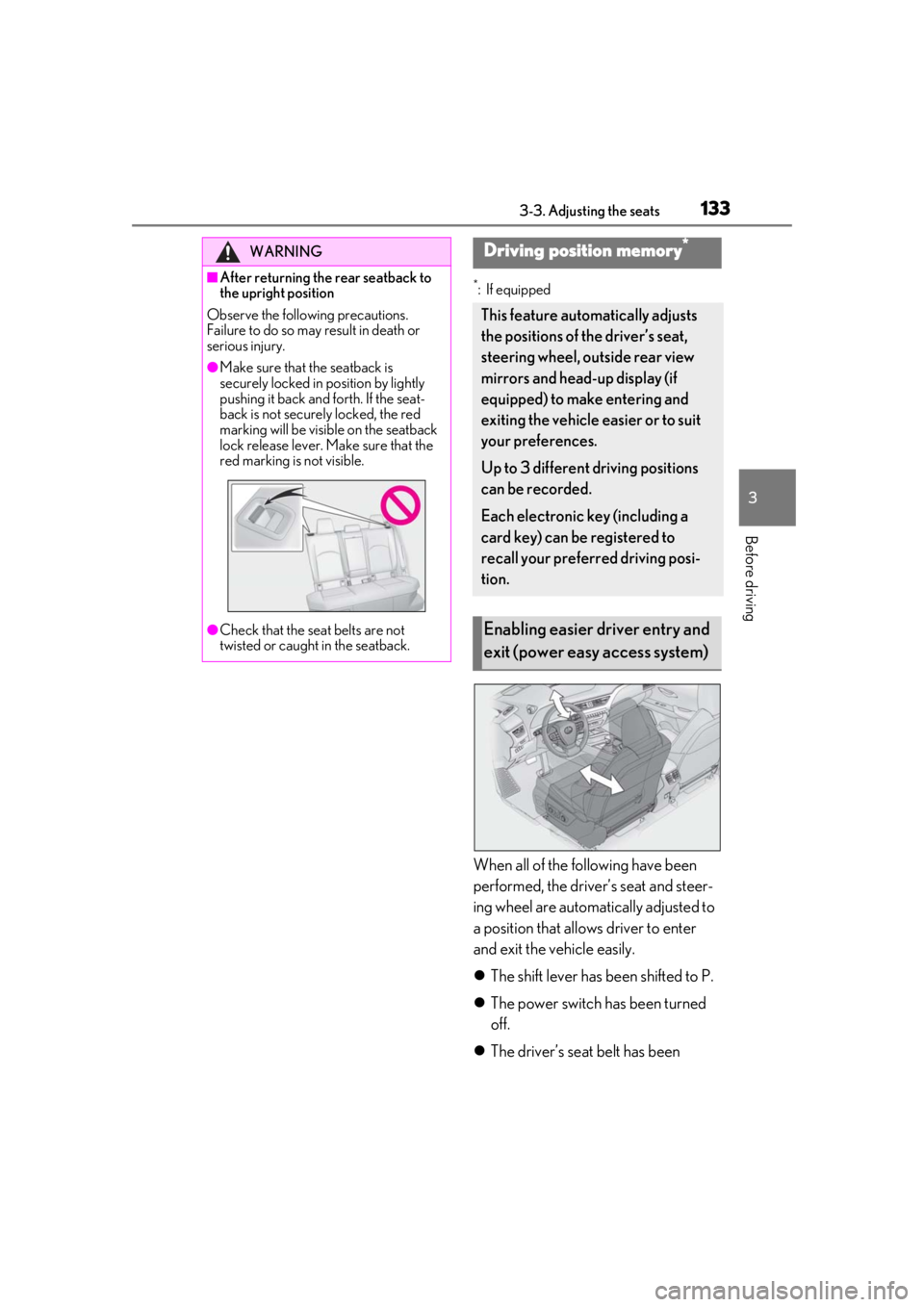
When all of the following have been
performed, the driver’s seat and steer-
ing wheel are automatically adjusted to
a position that allows driver to enter
and exit the vehicle easily.
The shift lever has been shifted to P.
The power switch has been turned
off.
The driver’s seat belt has been
WARNING
■After returning the rear seatback to
the upright position
Observe the following precautions.
Failure to do so may result in death or
serious injury.
●Make sure that the seatback is
securely locked in position by lightly
pushing it back and forth. If the seat-
back is not securely locked, the red
marking will be visible on the seatback
lock release lever. Make sure that the
red marking is not visible.
●Check that the seat belts are not
twisted or caught in the seatback.
Driving position memory*
This feature automatically adjusts
the positions of the driver’s seat,
steering wheel, outside rear view
mirrors and head-up display (if
equipped) to make entering and
exiting the vehicle easier or to suit
your preferences.
Up to 3 different driving positions
can be recorded.
Each electronic key (including a
card key) can be registered to
recall your preferred driving posi-
tion.
Enabling easier driver entry and
exit (power easy access system)
Page 134 of 476
1343-3. Adjusting the seats
unfastened.
When any of the following has been
performed, the driver’s seat and steer-
ing wheel automatically return to their
original positions.
The power switch has been turned
to ACC or ON.
The driver’s seat belt has been fas-
tened.
■Operation of the power easy access sys-
tem
When exiting the vehicle, the power easy
access system may not operate if the seat is
already close to the rearmost position, etc.
■Customization
The seat movement amou nt settings of the
power easy access sy stem can be custom-
ized. (Customizable features: P.439)
1Check that the shift lever is in P.
2
Turn the power switch to ON.
3
Adjust the driver’s seat, steering
wheel, outside rear view mirrors
and head-up display (if equipped)
to the desired positions.
4
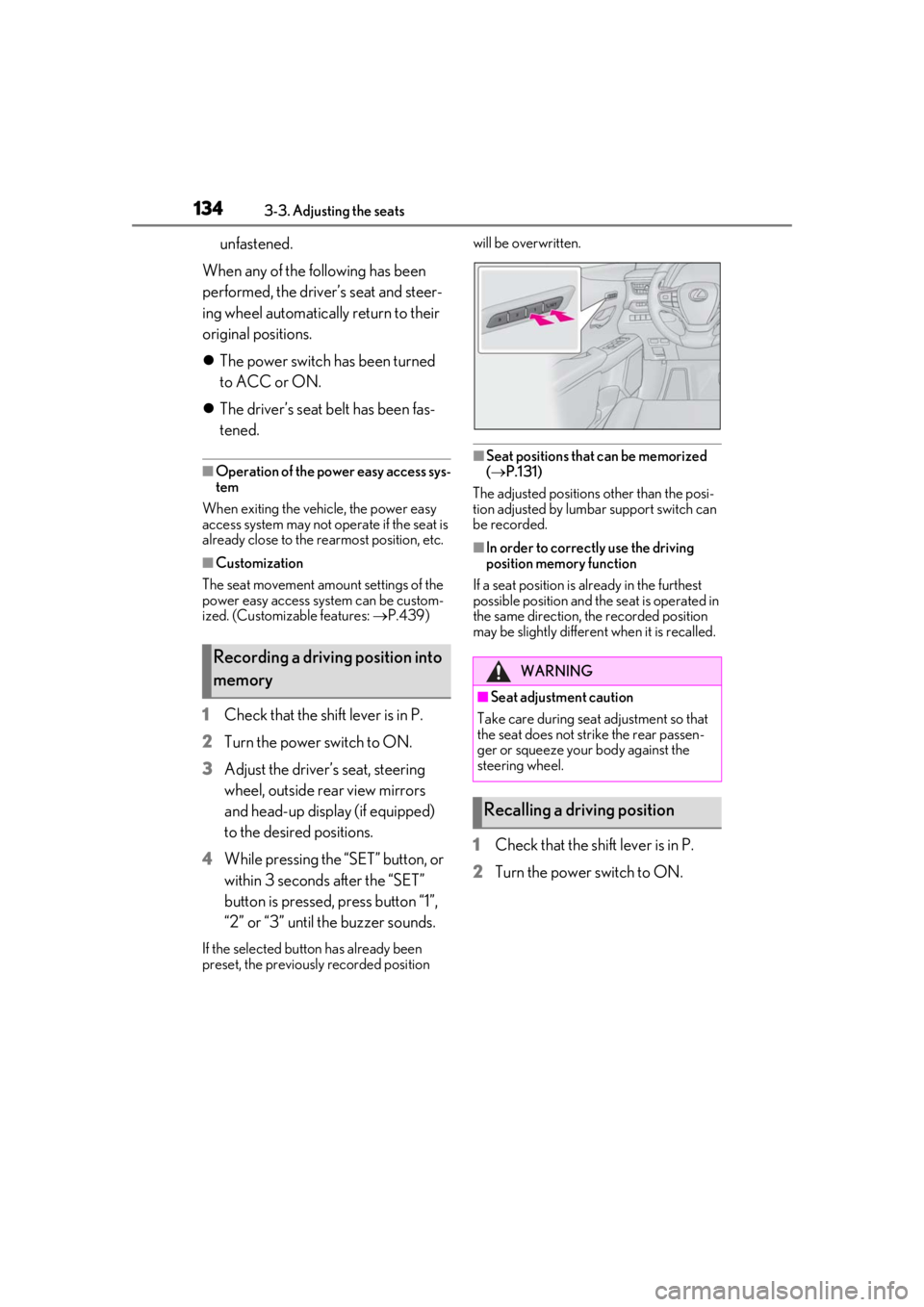
While pressing the “SET” button, or
within 3 seconds after the “SET”
button is pressed, press button “1”,
“2” or “3” until the buzzer sounds.
If the selected button has already been
preset, the previously recorded position will be overwritten.
■Seat positions that can be memorized
(
P.131)
The adjusted positions other than the posi-
tion adjusted by lumbar support switch can
be recorded.
■In order to correctly use the driving
position memory function
If a seat position is already in the furthest
possible position and the seat is operated in
the same direction, the recorded position
may be slightly differen t when it is recalled.
1Check that the shift lever is in P.
2
Turn the power switch to ON.
Recording a driving position into
memoryWARNING
■Seat adjustme nt caution
Take care during seat adjustment so that
the seat does not strike the rear passen-
ger or squeeze your body against the
steering wheel.
Recalling a driving position
Page 135 of 476
1353-3. Adjusting the seats
3
Before driving
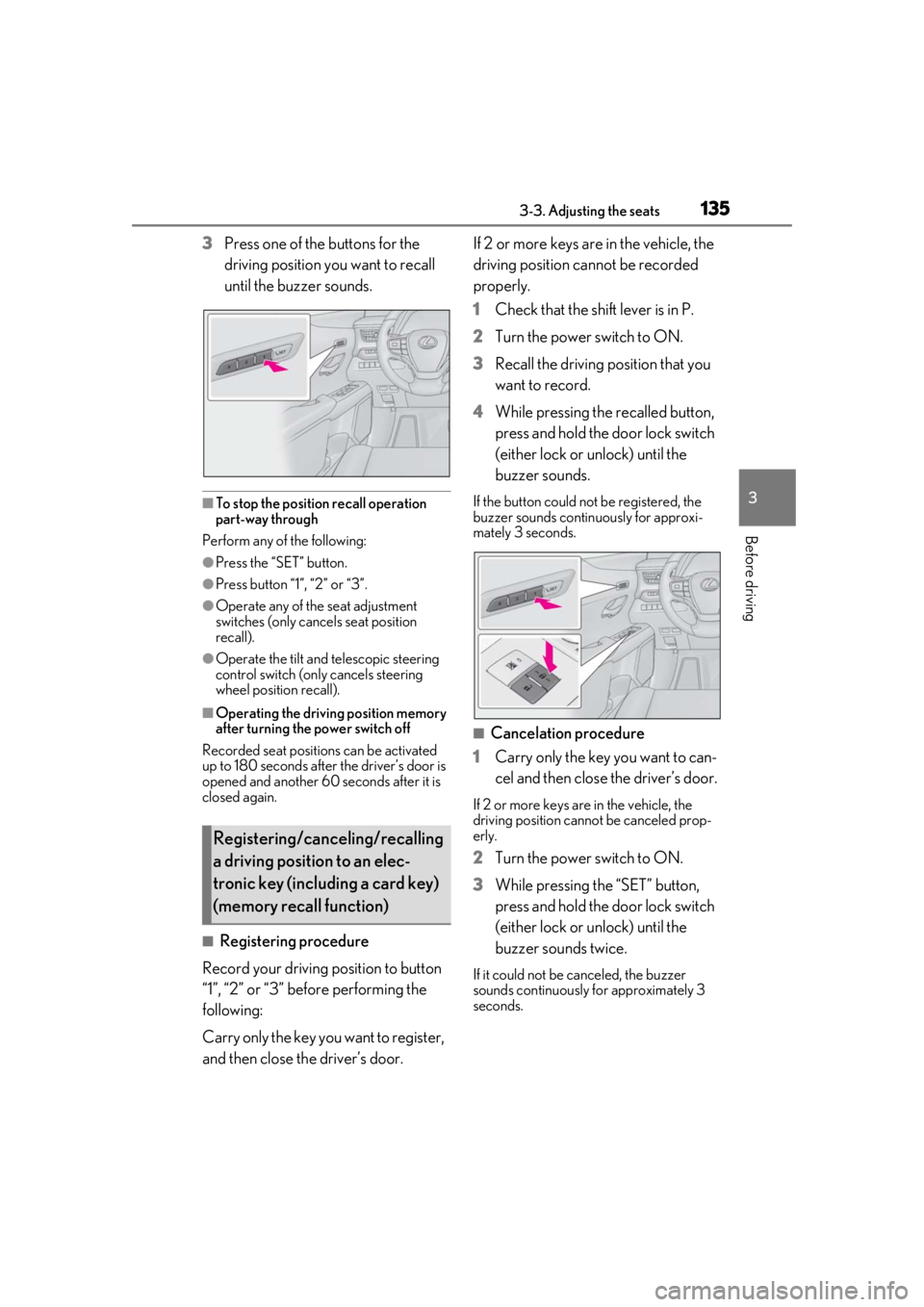
3Press one of the buttons for the
driving position you want to recall
until the buzzer sounds.
■To stop the position recall operation
part-way through
Perform any of the following:
●Press the “SET” button.
●Press button “1”, “2” or “3”.
●Operate any of the seat adjustment
switches (only cancels seat position
recall).
●Operate the tilt and telescopic steering
control switch (only cancels steering
wheel position recall).
■Operating the driving position memory
after turning the power switch off
Recorded seat positions can be activated
up to 180 seconds after the driver’s door is
opened and another 60 seconds after it is
closed again.
■Registering procedure
Record your driving position to button
“1”, “2” or “3” before performing the
following:
Carry only the key you want to register,
and then close the driver’s door. If 2 or more keys are in the vehicle, the
driving position cannot be recorded
properly.
1
Check that the shift lever is in P.
2 Turn the power switch to ON.
3 Recall the driving position that you
want to record.
4 While pressing the recalled button,
press and hold the door lock switch
(either lock or unlock) until the
buzzer sounds.
If the button could not be registered, the
buzzer sounds continuously for approxi-
mately 3 seconds.
■Cancelation procedure
1 Carry only the key you want to can-
cel and then close the driver’s door.
If 2 or more keys are in the vehicle, the
driving position cannot be canceled prop-
erly.
2Turn the power switch to ON.
3 While pressing the “SET” button,
press and hold the door lock switch
(either lock or unlock) until the
buzzer sounds twice.
If it could not be canceled, the buzzer
sounds continuously for approximately 3
seconds.
Registering/canceling/recalling
a driving position to an elec-
tronic key (including a card key)
(memory recall function)
Page 136 of 476
1363-3. Adjusting the seats
■Recall procedure
1
Make sure that the doors are
locked before recalling the driving
position. Carry the electronic key
that has been registered to the driv-
ing position, and then unlock and
open the driver’s door using the
smart access system with push-but-
ton start or wireless remote control.
The driving position will move to the
recorded position (not including the steer-
ing wheel and head-up display [if
equipped]). However, the seat will move to
a position slightly behind the recorded
position in order to make entering the vehi-
cle easier.
If the driving position is in a position that
has already been recorded, the seat and
outside rear view mirrors will not move.
2Turn the power switch to ACC or
ON, or fasten a seat belt.
The seat, steering wheel and head-up dis-
play (if equipped) will move to the
recorded position.
■Recalling the driving position using the
memory recall function
●Different driving positions can be regis-
tered for each electronic key. Therefore,
the driving position that is recalled may
be different depending on the key being
carried.
●If a door other than the driver’s door is
unlocked with the smart access system
with push-button start, the driving posi-
tion cannot be recalled. In this case, press
the driving position button which has
been set.
■Customization
The unlock door settings of the memory
recall function can be customized. (Cus-
tomizable features: P.439)
■Front seats
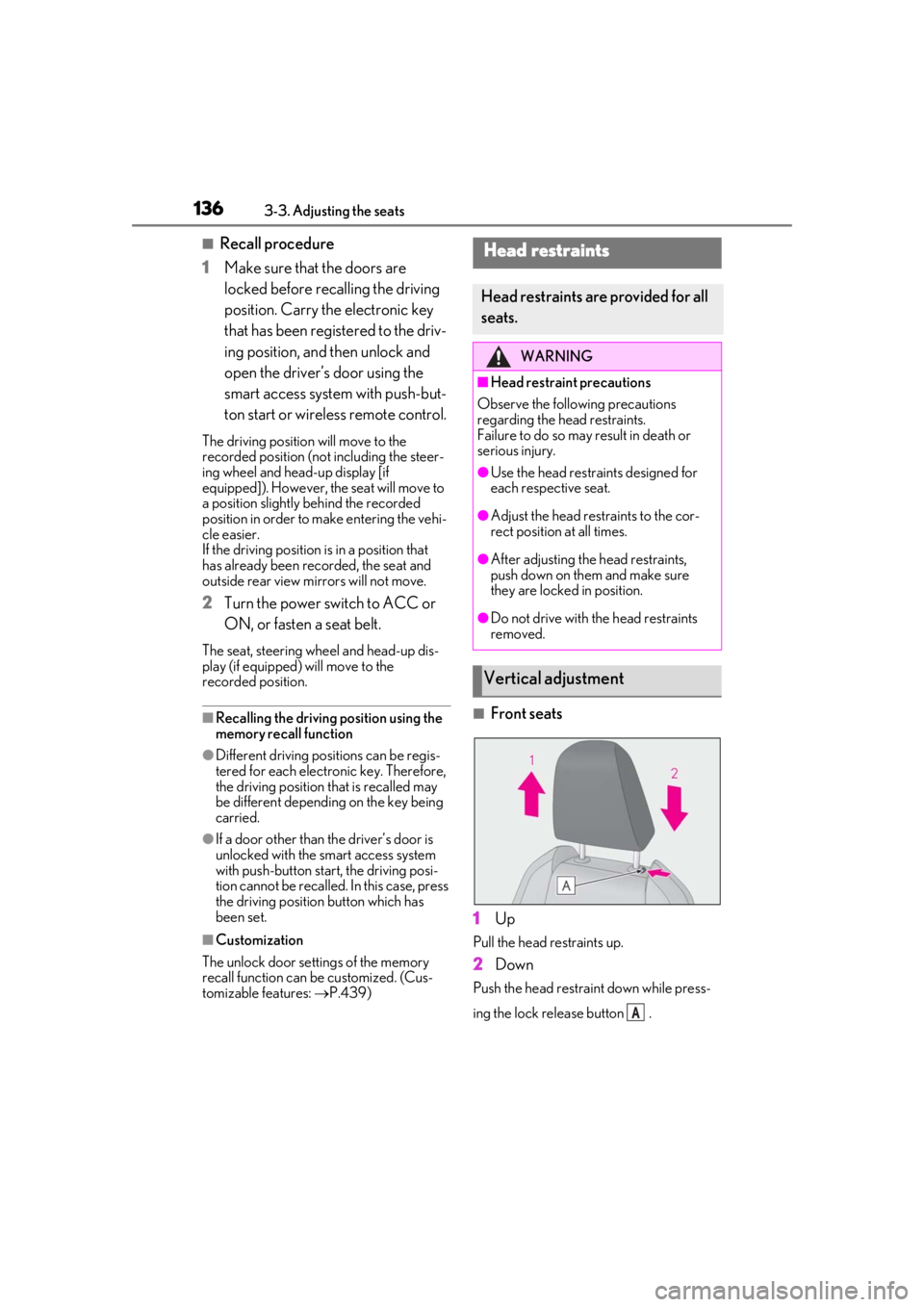
1
Up
Pull the head restraints up.
2Down
Push the head restraint down while press-
ing the lock release button .
Head restraints
Head restraints are provided for all
seats.
WARNING
■Head restraint precautions
Observe the following precautions
regarding the he ad restraints.
Failure to do so may result in death or
serious injury.
●Use the head restraints designed for
each respective seat.
●Adjust the head restraints to the cor-
rect position at all times.
●After adjusting the head restraints,
push down on them and make sure
they are locked in position.
●Do not drive with the head restraints
removed.
Vertical adjustment
A
Page 139 of 476
1393-4. Adjusting the steering wheel and mirrors
3
Before driving
3-4.Adjusting the steering wheel and mirrors
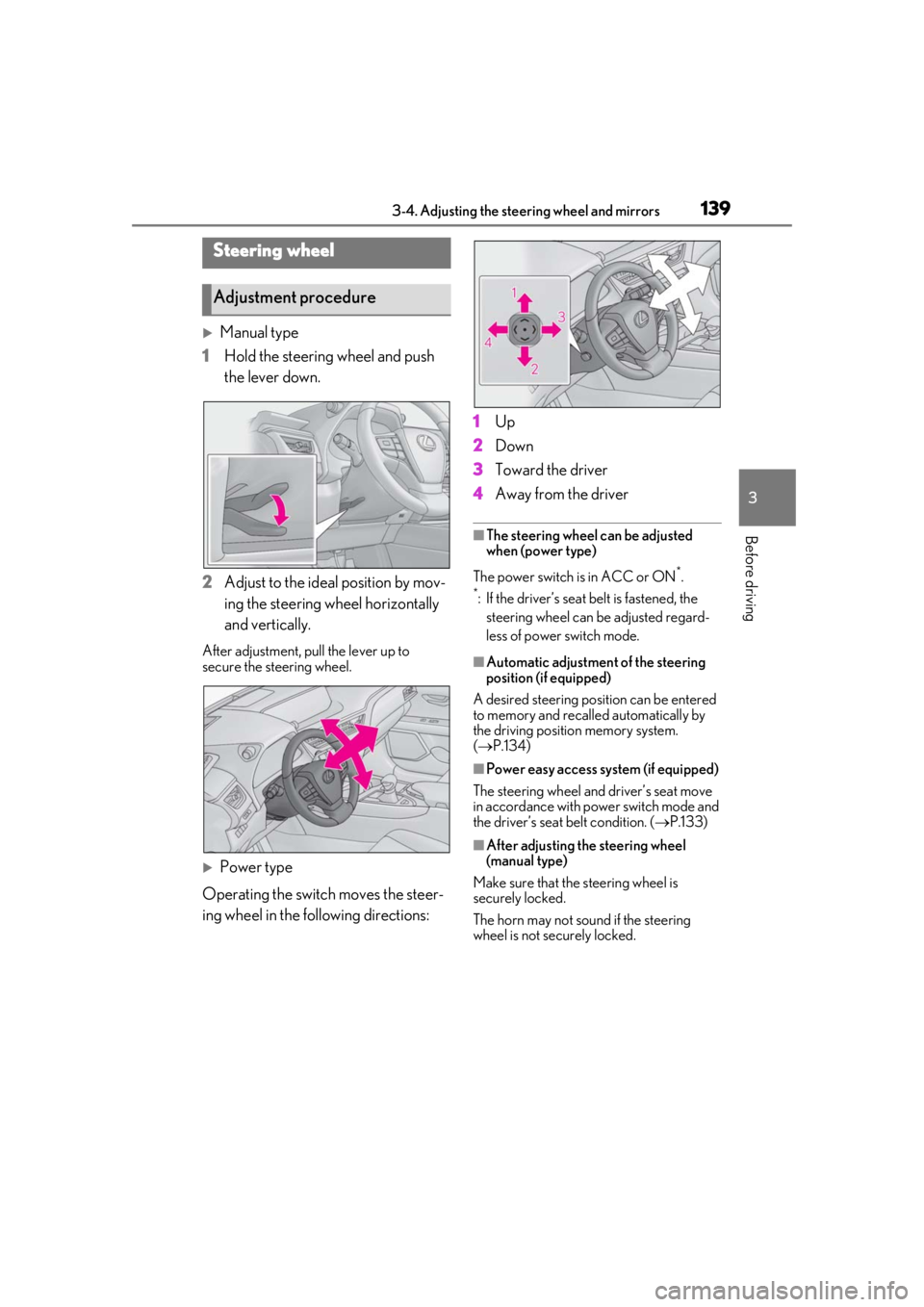
Manual type
1 Hold the steering wheel and push
the lever down.
2 Adjust to the ideal position by mov-
ing the steering wheel horizontally
and vertically.
After adjustment, pull the lever up to
secure the steering wheel.
Power type
Operating the switch moves the steer-
ing wheel in the following directions: 1
Up
2 Down
3 Toward the driver
4 Away from the driver
■The steering wheel can be adjusted
when (power type)
The power switch is in ACC or ON
*.
*: If the driver’s seat belt is fastened, the
steering wheel can be adjusted regard-
less of power switch mode.
■Automatic adjustment of the steering
position (if equipped)
A desired steering posi tion can be entered
to memory and recalled automatically by
the driving position memory system.
( P.134)
■Power easy access system (if equipped)
The steering wheel and driver’s seat move
in accordance with power switch mode and
the driver’s seat belt condition. ( P.133)
■After adjusting the steering wheel
(manual type)
Make sure that the steering wheel is
securely locked.
The horn may not sound if the steering
wheel is not securely locked.
Steering wheel
Adjustment procedure