warning LEXUS UX250H 2019 Owners Manual
[x] Cancel search | Manufacturer: LEXUS, Model Year: 2019, Model line: UX250H, Model: LEXUS UX250H 2019Pages: 476, PDF Size: 10.51 MB
Page 412 of 476
4127-2. Steps to take in an emergency
If “Hybrid system overheated Out-
put power reduced” is shown on the
multi-information display
1
Stop the vehicle in a safe place.
2
Stop the hybrid system and care-
fully lift the hood.
3
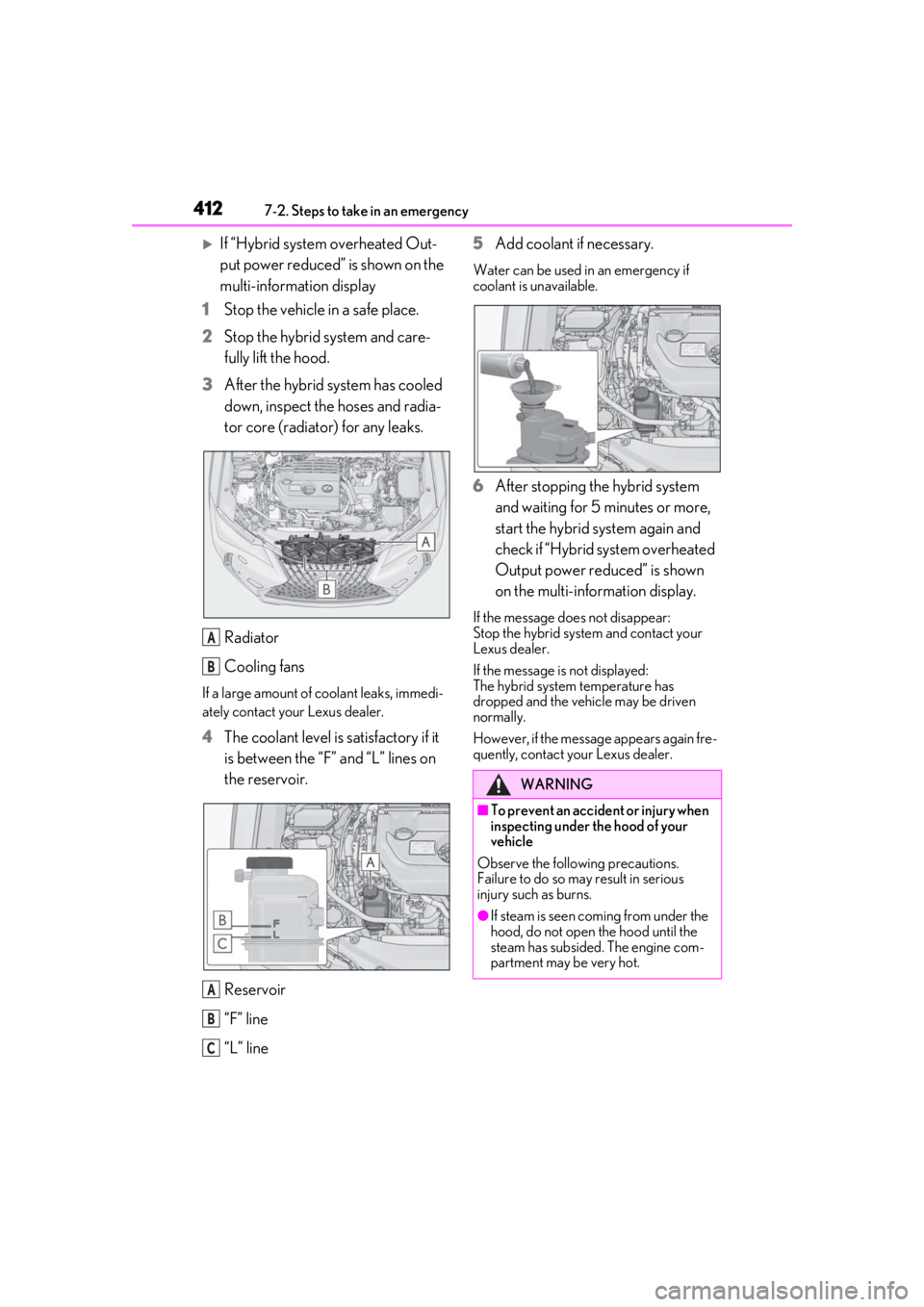
After the hybrid system has cooled
down, inspect the hoses and radia-
tor core (radiator) for any leaks.
Radiator
Cooling fans
If a large amount of coolant leaks, immedi-
ately contact your Lexus dealer.
4The coolant level is satisfactory if it
is between the “F” and “L” lines on
the reservoir.
Reservoir
“F” line
“L” line 5
Add coolant if necessary.
Water can be used in an emergency if
coolant is unavailable.
6After stopping the hybrid system
and waiting for 5 minutes or more,
start the hybrid system again and
check if “Hybrid system overheated
Output power reduced” is shown
on the multi-information display.
If the message does not disappear:
Stop the hybrid system and contact your
Lexus dealer.
If the message is not displayed:
The hybrid system temperature has
dropped and the vehicle may be driven
normally.
However, if the message appears again fre-
quently, contact your Lexus dealer.
A
B
A
B
C
WARNING
■To prevent an accident or injury when
inspecting under the hood of your
vehicle
Observe the following precautions.
Failure to do so may result in serious
injury such as burns.
●If steam is seen coming from under the
hood, do not open the hood until the
steam has subsided. The engine com-
partment may be very hot.
Page 413 of 476
4137-2. Steps to take in an emergency
7
When trouble arises
1Stop the hybrid system. Shift the
shift lever to P and set the parking
brake.
2
Remove the mud, snow or sand
from around the front wheels.
3
Place wood, stones or some other
material under the front wheels to
help provide traction.
4
Restart the hybrid system.
5
Shift the shift lever to D or R and
release the parking brake. Then,
while exercising caution, depress
the accelerator pedal.
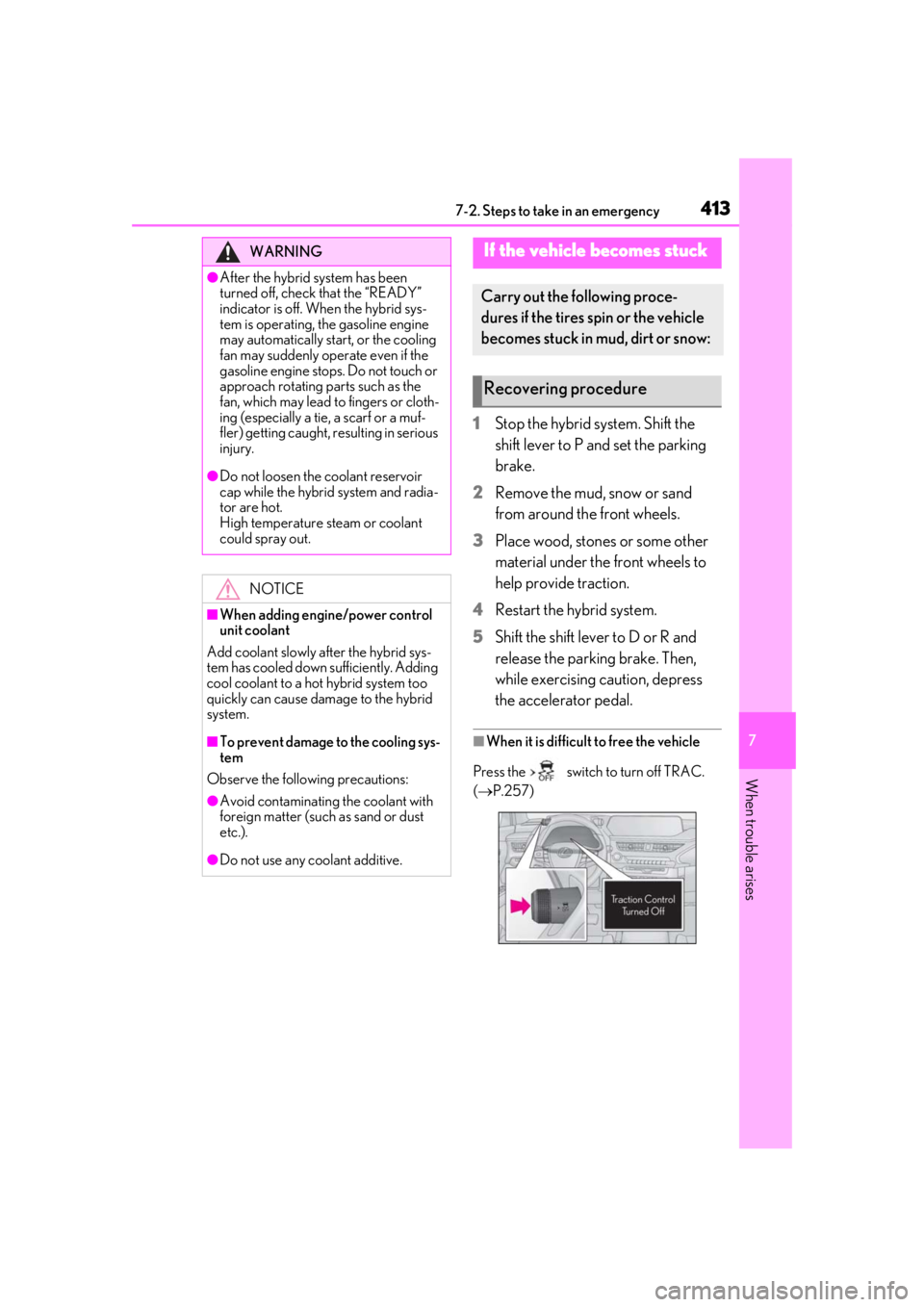
■When it is difficult to free the vehicle
Press the switch to turn off TRAC.
( P.257)
WARNING
●After the hybrid system has been
turned off, check that the “READY”
indicator is off. When the hybrid sys-
tem is operating, the gasoline engine
may automatically start, or the cooling
fan may suddenly operate even if the
gasoline engine stops. Do not touch or
approach rotating parts such as the
fan, which may lead to fingers or cloth-
ing (especially a tie, a scarf or a muf-
fler) getting caught, resulting in serious
injury.
●Do not loosen the coolant reservoir
cap while the hybrid system and radia-
tor are hot.
High temperature steam or coolant
could spray out.
NOTICE
■When adding engine/power control
unit coolant
Add coolant slowly after the hybrid sys-
tem has cooled down sufficiently. Adding
cool coolant to a hot hybrid system too
quickly can cause damage to the hybrid
system.
■To prevent damage to the cooling sys-
tem
Observe the following precautions:
●Avoid contaminating the coolant with
foreign matter (such as sand or dust
etc.).
●Do not use any coolant additive.
If the vehicle becomes stuck
Carry out the following proce-
dures if the tires spin or the vehicle
becomes stuck in mud, dirt or snow:
Recovering procedure
Page 414 of 476

4147-2. Steps to take in an emergency
WARNING
■When attempting to free a stuck vehi-
cle
If you choose to push the vehicle back
and forth to free it, make sure the sur-
rounding area is clear to avoid striking
other vehicles, objects or people. The
vehicle may also lunge forward or lunge
back suddenly as it becomes free. Use
extreme caution.
■When shifting the shift lever
Be careful not to shif t the shift lever with
the accelerator pedal depressed.
This may lead to unexpected rapid accel-
eration of the vehicle that may cause an
accident resulting in death or serious
injury.
NOTICE
■To avoid damage to the hybrid trans-
mission and other components
●Avoid spinning the tires and depress-
ing the accelerator pedal more than
necessary.
●If the vehicle remains stuck even after
these procedures are performed, the
vehicle may require towing to be freed.
Page 421 of 476
4218-1. Specifications
8
Vehicle specifications
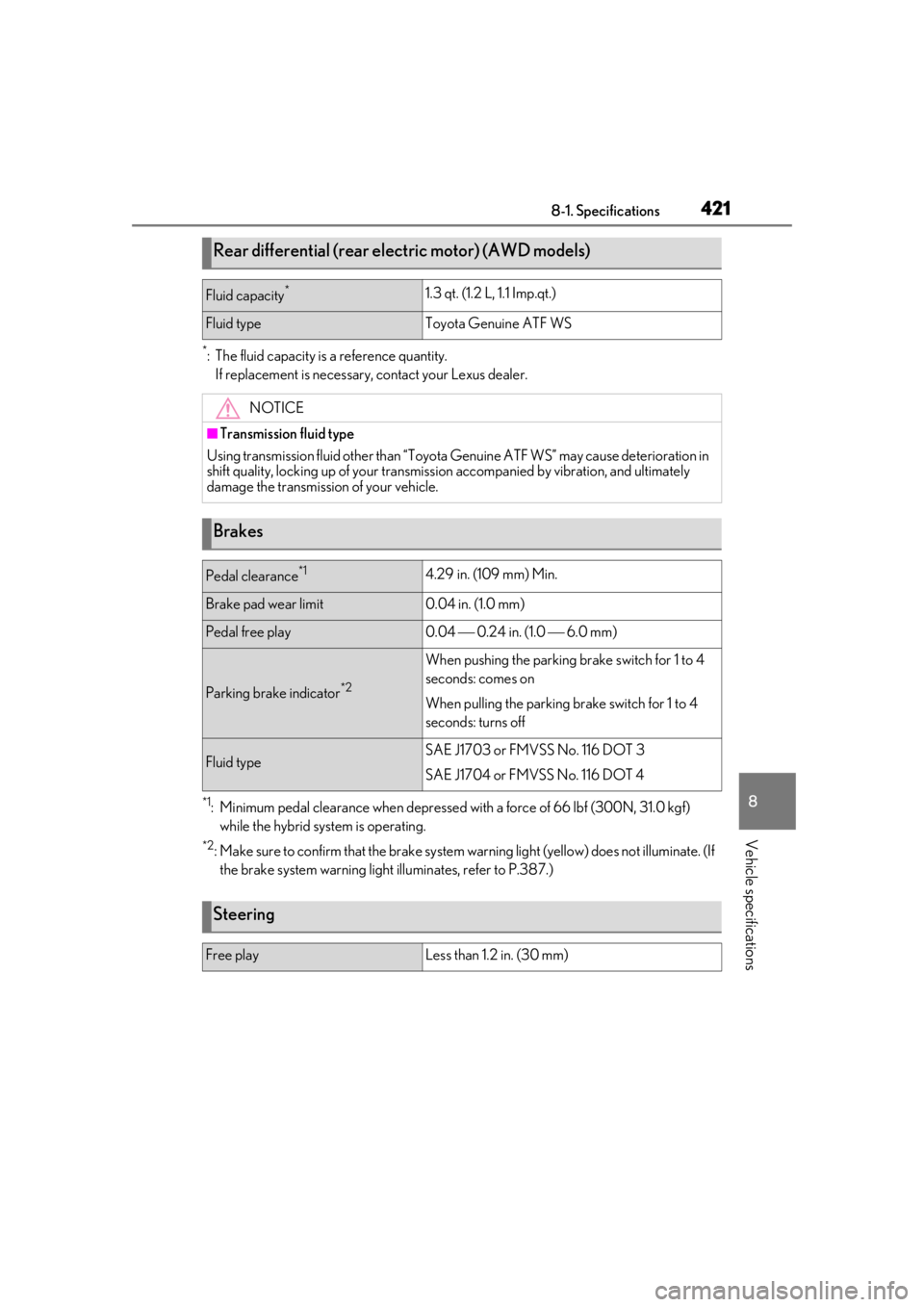
*: The fluid capacity is a reference quantity.If replacement is necessary, contact your Lexus dealer.
*1: Minimum pedal clearance when depressed with a force of 66 lbf (300N, 31.0 kgf) while the hybrid system is operating.
*2: Make sure to confirm that the brake system wa rning light (yellow) does not illuminate. (If
the brake system warning light illuminates, refer to P.387.)
Rear differential (rear electric motor) (AWD models)
Fluid capacity*1.3 qt. (1.2 L, 1.1 Imp.qt.)
Fluid typeToyota Genuine ATF WS
NOTICE
■Transmission fluid type
Using transmission fluid other than “Toyota Genuine ATF WS” may ca use deterioration in
shift quality, locking up of your transmission accompanied by vibration, and ultimately
damage the transmission of your vehicle.
Brakes
Pedal clearance*14.29 in. (109 mm) Min.
Brake pad wear limit0.04 in. (1.0 mm)
Pedal free play0.04 0.24 in. (1.0 6.0 mm)
Parking brake indicator*2
When pushing the parking brake switch for 1 to 4
seconds: comes on
When pulling the parking brake switch for 1 to 4
seconds: turns off
Fluid typeSAE J1703 or FMVSS No. 116 DOT 3
SAE J1704 or FMVSS No. 116 DOT 4
Steering
Free playLess than 1.2 in. (30 mm)
Page 428 of 476

4288-1. Specifications
information.
■DOT quality grades
All passenger vehicle tires must con-
form to Federal Safety Requirements in
addition to these grades. Quality
grades can be found where applicable
on the tire sidewall between tread
shoulder and maximum section width.
For example: Treadwear 200 Traction AA
Temperature A
■Treadwear
The treadwear grade is a comparative
rating based on the wear rate of the tire
when tested under controlled condi-
tions on a specified government test
course.
For example, a tire graded 150 would wear
one and a half (1 - 1/2) times as well on the
government course as a tire graded 100.
The relative performa nce of tires depends
upon the actual conditions of their use,
however, and may depart significantly from
the norm due to variatio ns in driving habits,
service practices and differences in road
characteristics and climate.
■Traction AA, A, B, C
The traction grades, from highest to
lowest, are AA, A, B and C, and they
represent the tire’s ability to stop on
wet pavement as measured under con-
trolled conditions on specified govern-
ment test surfaces of asphalt and
concrete.
A tire marked C may have poor traction
performance.
Warning: The traction grade assigned to
this tire is based on braking (straight
ahead) traction tests and does not include
cornering (turning) traction.
■Temperature A, B, C
The temperature grades are A (the
highest), B, and C, representing the
tire’s resistance to the generation of
heat and its ability to dissipate heat
when tested under controlled condi-
tions on a specified indoor laboratory
test wheel.
Sustained high temperature can cause the
material of the tire to degenerate and
reduce tire life, and excessive temperature
can lead to sudd en tire failure.
Grade C corresponds to a level of perfor-
mance which all passenger car tires must
meet under the Fede ral Motor Vehicle
Safety Standard No. 109.
Grades B and A represent higher levels of
performance on the laboratory test wheel
than the minimum required by law.
Warning: The temperature grades for this
tire are established for a tire that is prop-
erly inflated and not overloaded.
Excessive speed, unde rinflation, or exces-
sive loading, either separately or in combi-
nation, can cause heat buildup and
possible tire failure.
Page 434 of 476
4348-2. Customization
8-2.Customization
■Changing using the meter control
switches
1
Press or of the meter con-
trol switches, and select .
2
Press or of the meter con-
trol switches, select the item, and
press “OK”.
3
Press or of the meter con-
trol switches, select the desired set-
ting, and press “OK”.
To go back to the previous screen or
exit the customize mode, press .
■Changing using the Remote Touch
1
Press the “MENU” button on the
Remote Touch.
2
Select “Setup” on the menu screen
and select “Vehicle”. 3
Select “Vehicle Customization”.
Various setting can be changed. Refer to
the list of settings th
at can be changed for
details.
For details on the Remote Touch, refer
to the “NAVIGATION AND MULTI-
MEDIA SYSTEM OWNER’S MAN-
UAL”.
■When customizing using the Remote
Touch
Stop the vehicle in a safe place, apply the
parking brake, and shift the shift lever to P.
Also, to prevent 12-volt battery discharge,
leave the hybrid system operating while
customizing the features.
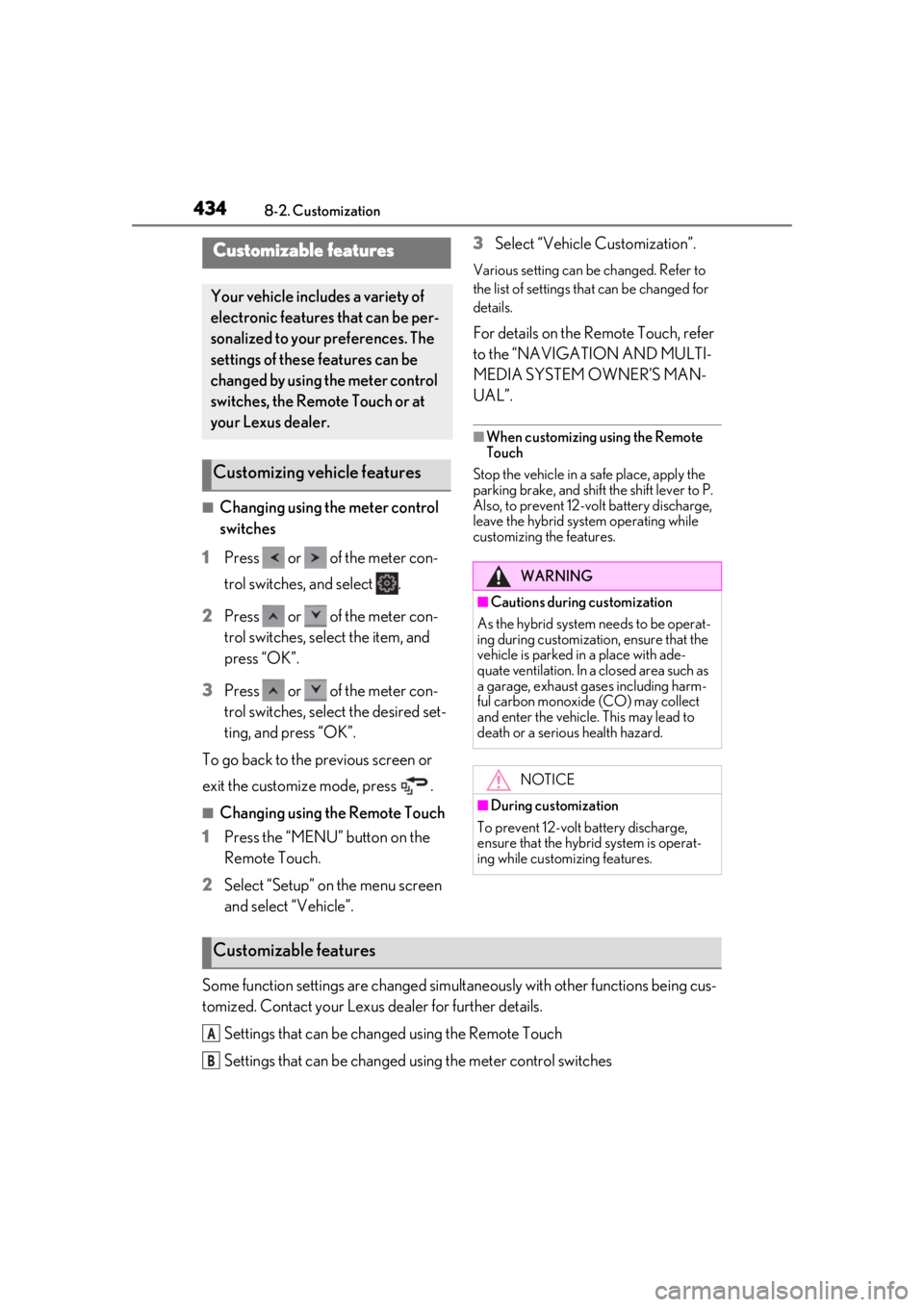
Some function settings are changed simultaneously with other functions being cus-
tomized. Contact your Lexus dealer for further details.
Settings that can be changed using the Remote Touch
Settings that can be changed using the meter control switches
Customizable features
Your vehicle includes a variety of
electronic features that can be per-
sonalized to your preferences. The
settings of these features can be
changed by using the meter control
switches, the Remote Touch or at
your Lexus dealer.
Customizing vehicle features
WARNING
■Cautions during customization
As the hybrid system needs to be operat-
ing during customizatio n, ensure that the
vehicle is parked in a place with ade-
quate ventilation. In a closed area such as
a garage, exhaust gases including harm-
ful carbon monoxide (CO) may collect
and enter the vehicle. This may lead to
death or a serious health hazard.
NOTICE
■During customization
To prevent 12-volt battery discharge,
ensure that the hybrid system is operat-
ing while customizing features.
Customizable features
A
B
Page 437 of 476
4378-2. Customization
8
Vehicle specifications
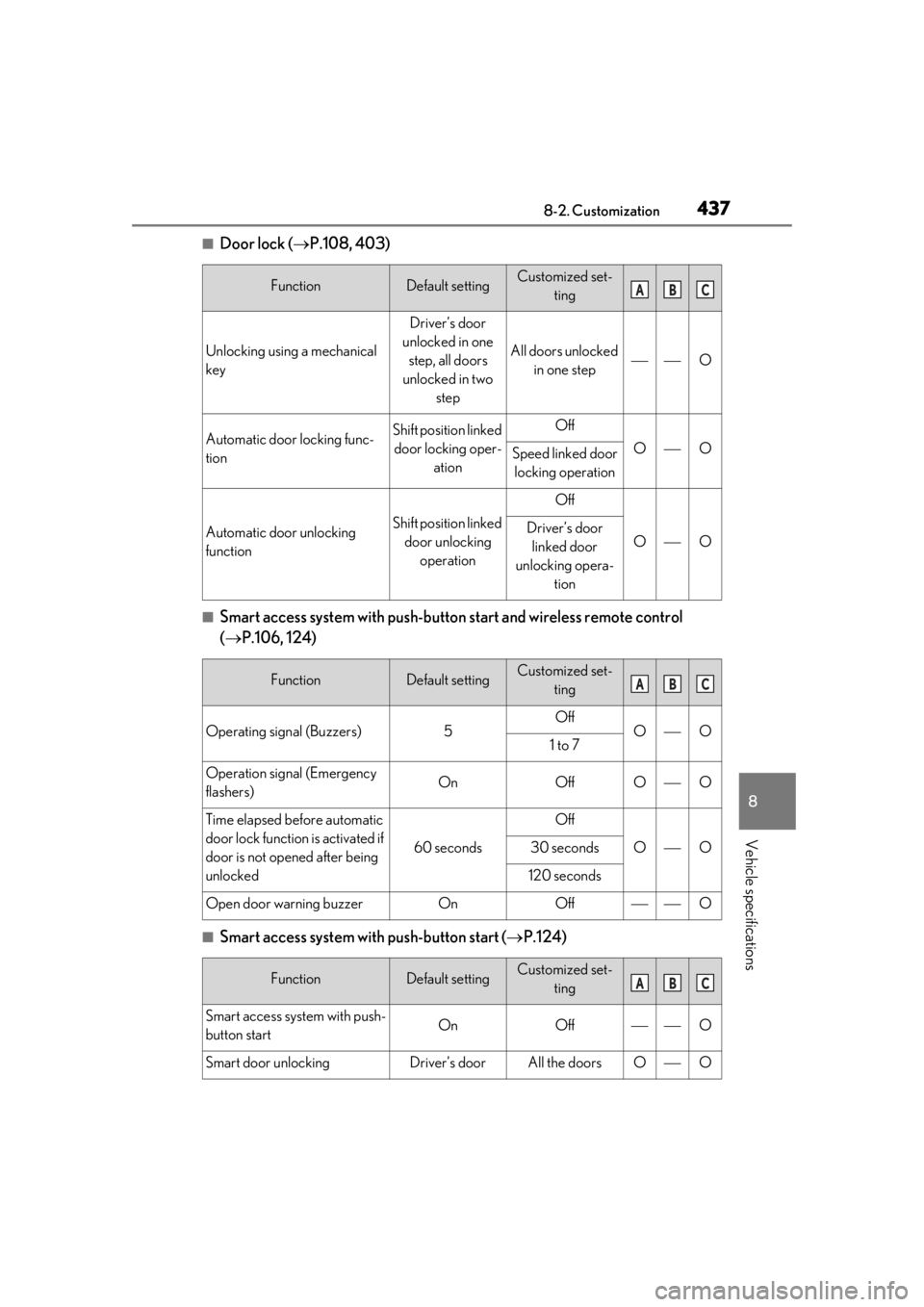
■Door lock (P.108, 403)
■Smart access system with push-butto n start and wireless remote control
( P.106, 124)
■Smart access system with push-button start ( P.124)
FunctionDefault settingCustomized set-
ting
Unlocking using a mechanical
key
Driver’s door
unlocked in one step, all doors
unlocked in two step
All doors unlocked in one stepO
Automatic door locking func-
tionShift position linked door locking oper- ationOff
OOSpeed linked door locking operation
Automatic door unlocking
functionShift position linked door unlocking operation
Off
OODriver’s door linked door
unlocking opera- tion
FunctionDefault settingCustomized set-ting
Operating signal (Buzzers)5OffOO1 to 7
Operation signal (Emergency
flashers)OnOffOO
Time elapsed before automatic
door lock function is activated if
door is not opened after being
unlocked
60 seconds
Off
OO30 seconds
120 seconds
Open door warning buzzerOnOffO
FunctionDefault settingCustomized set-ting
Smart access system with push-
button startOnOffO
Smart door unlockingDriver’s doorAll the doorsOO
ABC
ABC
ABC
Page 441 of 476
4418-2. Customization
8
Vehicle specifications
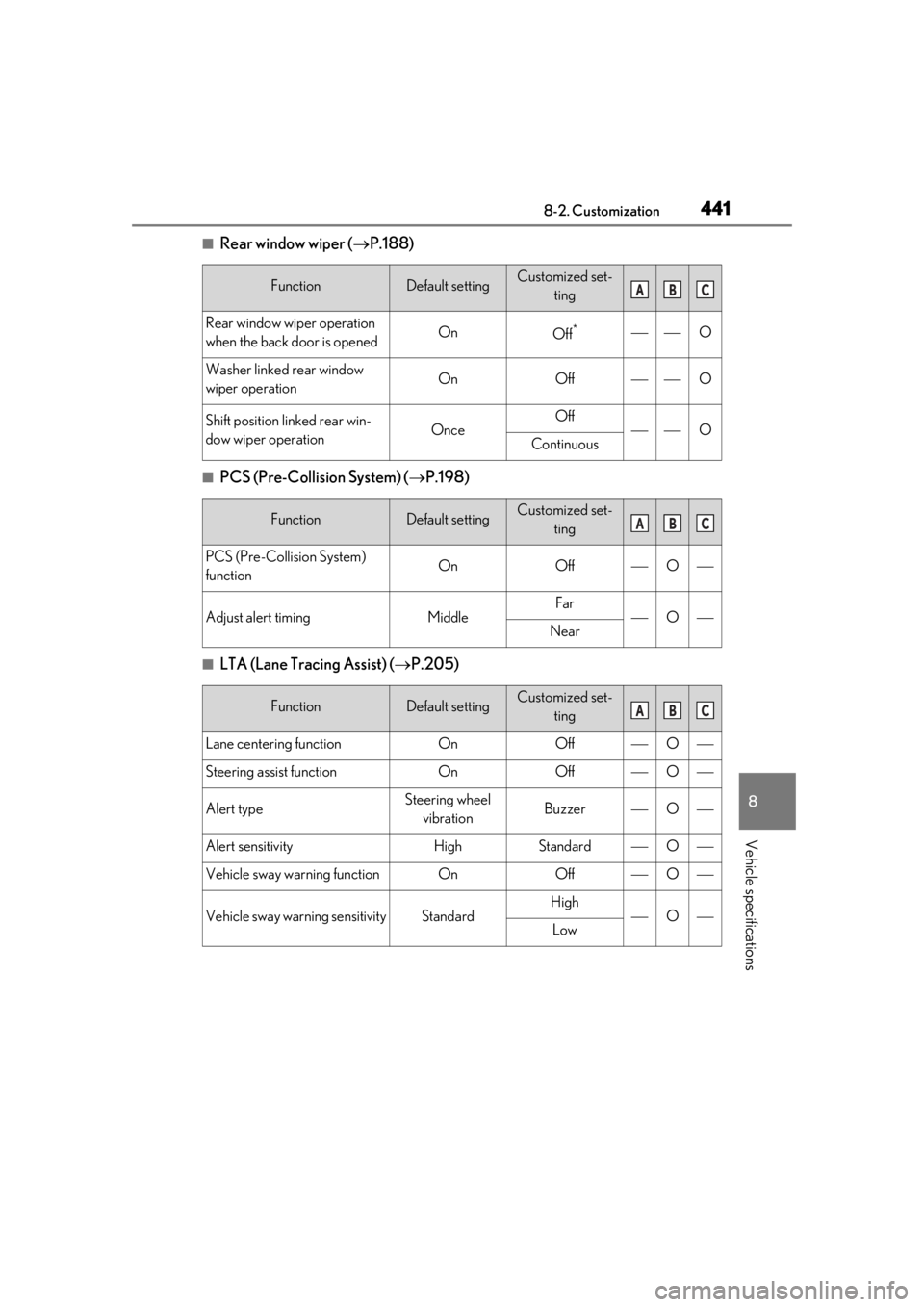
■Rear window wiper (P.188)
■PCS (Pre-Collision System) ( P.198)
■LTA (Lane Tracing Assist) ( P.205)
FunctionDefault settingCustomized set-
ting
Rear window wiper operation
when the back door is openedOnOff*O
Washer linked rear window
wiper operationOnOffO
Shift position linked rear win-
dow wiper operationOnceOffOContinuous
FunctionDefault settingCustomized set-ting
PCS (Pre-Collision System)
functionOnOffO
Adjust alert timingMiddleFarONear
FunctionDefault settingCustomized set-ting
Lane centering functionOnOffO
Steering assist functionOnOffO
Alert typeSteering wheel vibrationBuzzerO
Alert sensitivityHighStandardO
Vehicle sway warning functionOnOffO
Vehicle sway warning sensitivityStandardHighOLow
ABC
ABC
ABC
Page 446 of 476
4468-3. Initialization
8-3.Initialization
*:If equipped
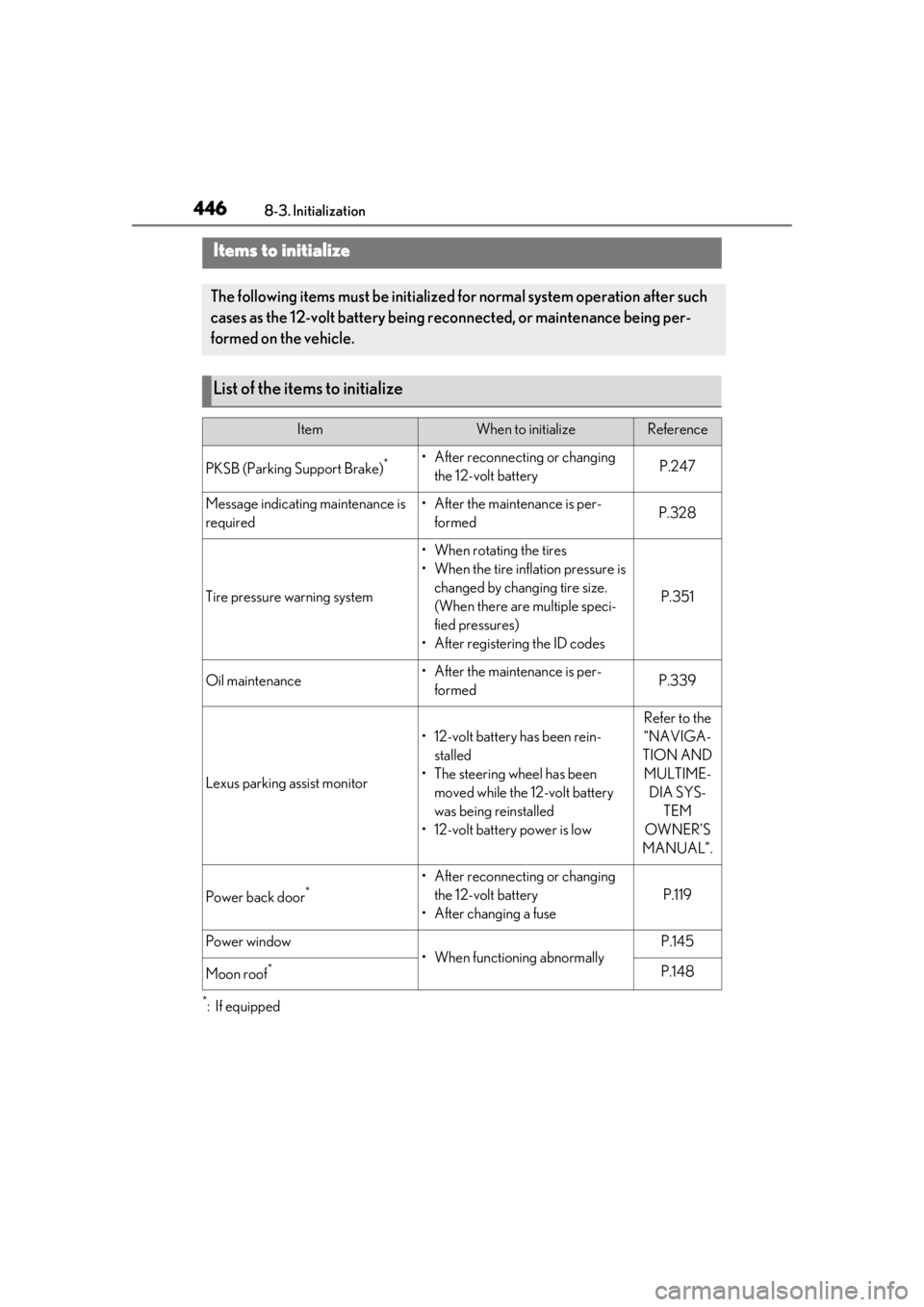
Items to initialize
The following items must be initialized for normal system operation after such
cases as the 12-volt battery being re connected, or maintenance being per-
formed on the vehicle.
List of the items to initialize
ItemWhen to initializeReference
PKSB (Parking Support Brake)*• After reconnecting or changing the 12-volt batteryP.247
Message indicating maintenance is
required• After the maintenance is per-formedP.328
Tire pressure warning system
• When rotating the tires
• When the tire inflation pressure is changed by changing tire size.
(When there are multiple speci-
fied pressures)
• After registering the ID codes
P.351
Oil maintenance• After the maintenance is per- formedP.339
Lexus parking assist monitor
• 12-volt battery has been rein-stalled
• The steering wheel has been moved while the 12-volt battery
was being reinstalled
• 12-volt battery power is low
Refer to the
“NAVIGA-
TION AND MULTIME- DIA SYS- TEM
OWNER’S
MANUAL”.
Power back door*• After reconnecting or changing the 12-volt battery
• After changing a fuse
P.119
Power window
• When functioning abnormally
P.145
Moon roof*P.148
Page 461 of 476
461What to do if... (Troubleshooting)
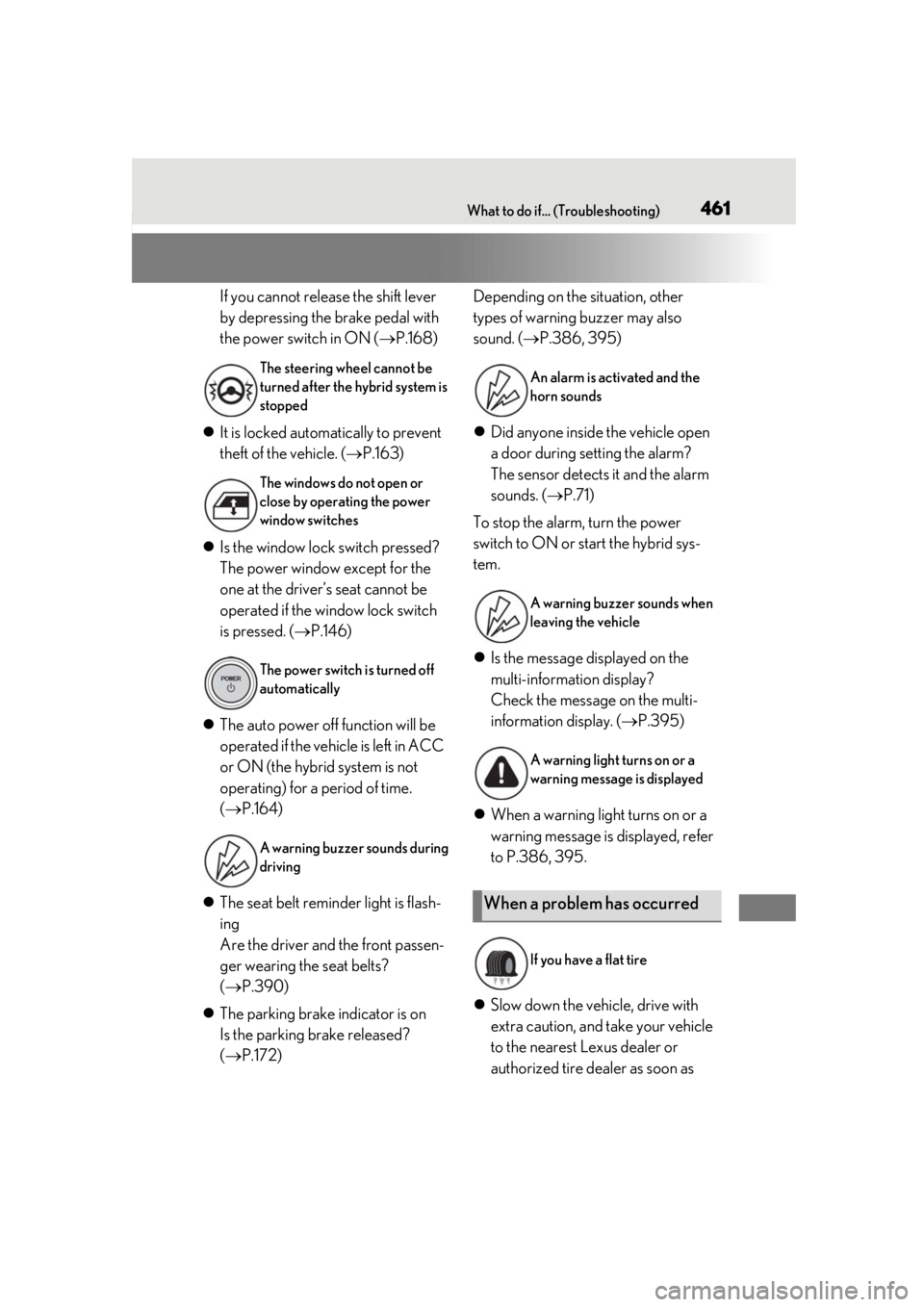
If you cannot release the shift lever
by depressing the brake pedal with
the power switch in ON (P.168)
It is locked automatically to prevent
theft of the vehicle. ( P.163)
Is the window lock switch pressed?
The power window except for the
one at the driver’s seat cannot be
operated if the window lock switch
is pressed. ( P.146)
The auto power off function will be
operated if the vehicle is left in ACC
or ON (the hybrid system is not
operating) for a period of time.
( P.164)
The seat belt reminder light is flash-
ing
Are the driver and the front passen-
ger wearing the seat belts?
( P.390)
The parking brake indicator is on
Is the parking brake released?
( P.172) Depending on the situation, other
types of warning buzzer may also
sound. (
P.386, 395)
Did anyone inside the vehicle open
a door during setting the alarm?
The sensor detects it and the alarm
sounds. ( P.71)
To stop the alarm, turn the power
switch to ON or start the hybrid sys-
tem.
Is the message displayed on the
multi-information display?
Check the message on the multi-
information display. ( P.395)
When a warning light turns on or a
warning message is displayed, refer
to P.386, 395.
Slow down the vehicle, drive with
extra caution, and take your vehicle
to the nearest Lexus dealer or
authorized tire dealer as soon as
The steering wheel cannot be
turned after the hybrid system is
stopped
The windows do not open or
close by operating the power
window switches
The power switch is turned off
automatically
A warning buzzer sounds during
drivingAn alarm is activated and the
horn sounds
A warning buzzer sounds when
leaving the vehicle
A warning light turns on or a
warning message is displayed
When a problem has occurred
If you have a flat tire