fuel LEXUS UX250H 2019 Owner's Manual
[x] Cancel search | Manufacturer: LEXUS, Model Year: 2019, Model line: UX250H, Model: LEXUS UX250H 2019Pages: 476, PDF Size: 10.51 MB
Page 97 of 476
972-1. Instrument cluster
2
Vehicle status information and indicators
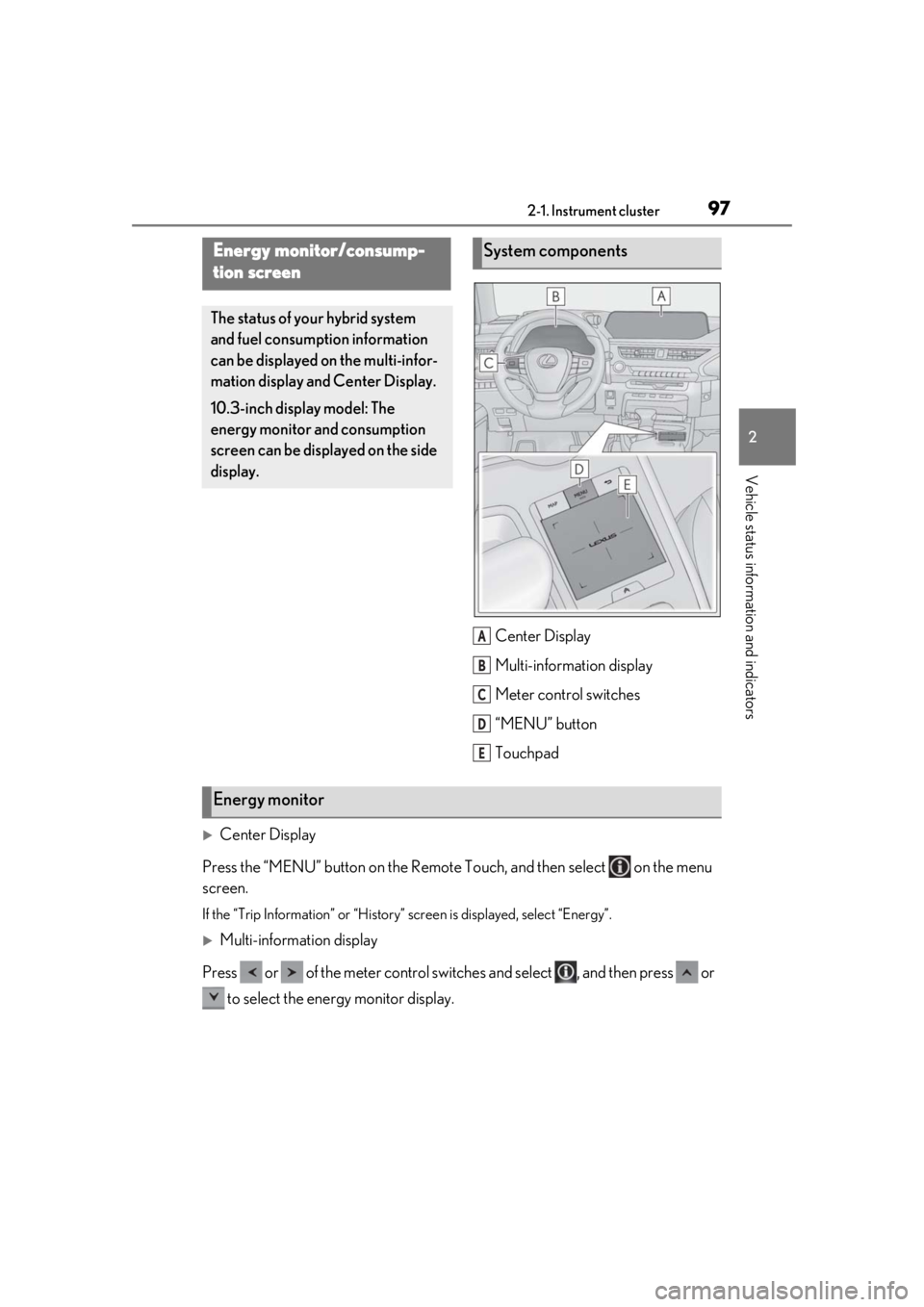
Center Display
Multi-information display
Meter control switches
“MENU” button
Touchpad
Center Display
Press the “MENU” button on the Remote Touch, and then select on the menu
screen.
If the “Trip Information” or “History” screen is displayed, select “Energy”.
Multi-information display
Press or of the meter control switch es and select , and then press or
to select the energy monitor display.
Energy monitor/consump-
tion screen
The status of your hybrid system
and fuel consumption information
can be displayed on the multi-infor-
mation display and Center Display.
10.3-inch display model: The
energy monitor and consumption
screen can be displayed on the side
display.
System components
A
B
C
D
E
Energy monitor
Page 100 of 476
1002-1. Instrument cluster
High
Multi-information displayLow
High
These images are examples only, and may
vary slightly from actual conditions.
Press the “MENU” button on the
Remote Touch, and then select on
the screen.
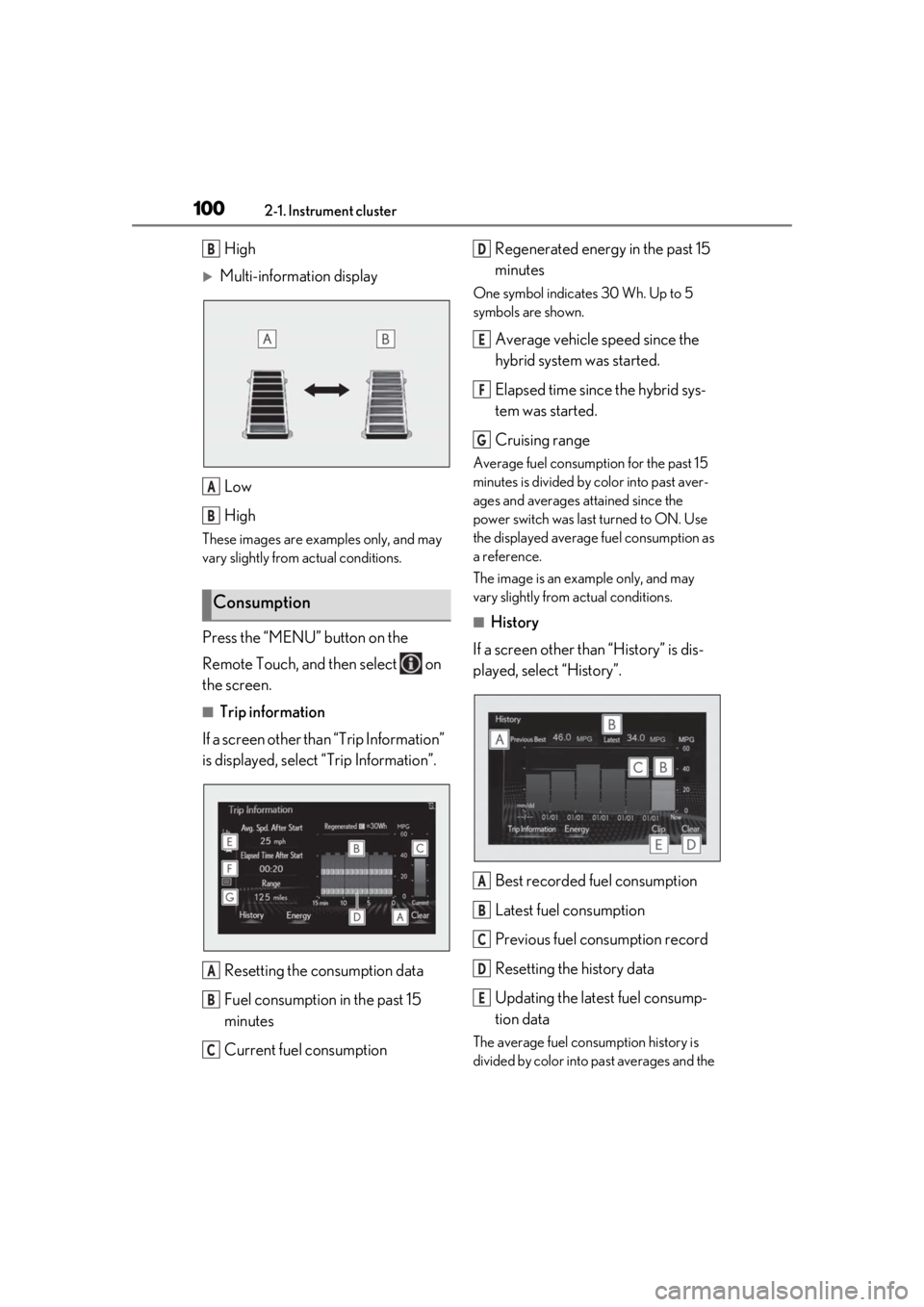
■Trip information
If a screen other than “Trip Information”
is displayed, select “Trip Information”.
Resetting the consumption data
Fuel consumption in the past 15
minutes
Current fuel consumption Regenerated energy in the past 15
minutes
One symbol indicates 30 Wh. Up to 5
symbols are shown.
Average vehicle speed since the
hybrid system was started.
Elapsed time since the hybrid sys-
tem was started.
Cruising range
Average fuel consumption for the past 15
minutes is divided by color into past aver-
ages and averages attained since the
power switch was last turned to ON. Use
the displayed average fuel consumption as
a reference.
The image is an example only, and may
vary slightly from actual conditions.
■History
If a screen other than “History” is dis-
played, select “History”.
Best recorded fuel consumption
Latest fuel consumption
Previous fuel consumption record
Resetting the history data
Updating the latest fuel consump-
tion data
The average fuel consumption history is
divided by color into past averages and the
Consumption
B
A
B
A
B
C
D
E
F
G
A
B
C
D
E
Page 101 of 476
1012-1. Instrument cluster
2
Vehicle status information and indicators
average fuel consumption since the last
updated. Use the displayed average fuel
consumption as a reference.
The image is an example only, and may
vary slightly from actual conditions.
■Updating the history data
Update the latest fuel consumption by
selecting “Clip” to measure the current fuel
consumption again.
■Resetting the data
The fuel consumption data can be deleted
by selecting “Clear”.
■Cruising range
Displays the estimated maximum distance
that can be driven with the quantity of fuel
remaining.
This distance is comp uted based on your
average fuel consumption.
As a result, the actual distance that can be
driven may differ from that displayed.
Display the vehicle information on the
side display ( P.273), and then select
or to display the desired
screen.
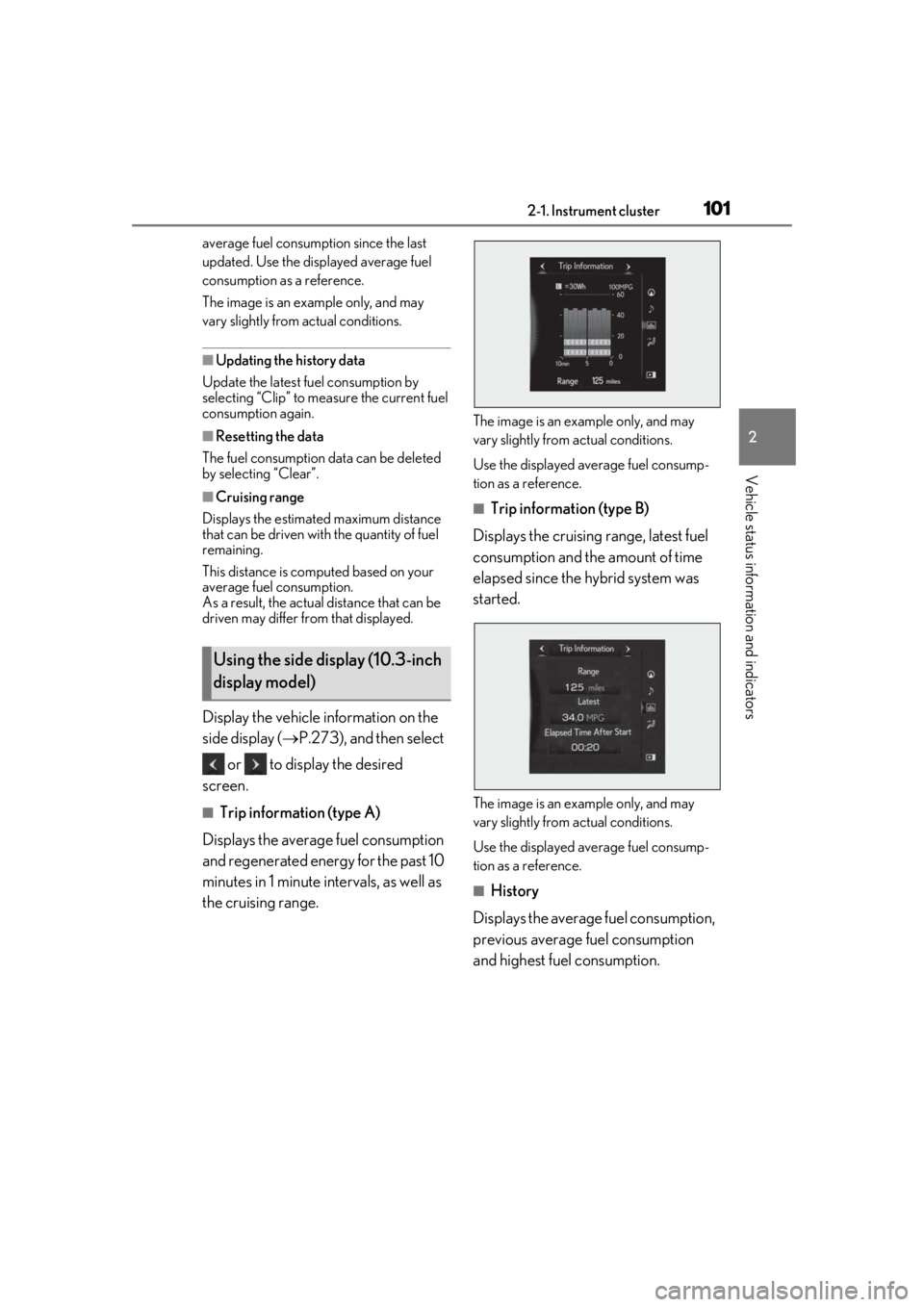
■Trip information (type A)
Displays the average fuel consumption
and regenerated energy for the past 10
minutes in 1 minute intervals, as well as
the cruising range.
The image is an example only, and may
vary slightly from actual conditions.
Use the displayed average fuel consump-
tion as a reference.
■Trip information (type B)
Displays the cruising range, latest fuel
consumption and the amount of time
elapsed since the hybrid system was
started.
The image is an example only, and may
vary slightly from actual conditions.
Use the displayed average fuel consump-
tion as a reference.
■History
Displays the average fuel consumption,
previous average fuel consumption
and highest fuel consumption.
Using the side display (10.3-inch
display model)
Page 102 of 476
1022-1. Instrument cluster
The image is an example only, and may
vary slightly from actual conditions.
Use the displayed average fuel consump-
tion as a reference.
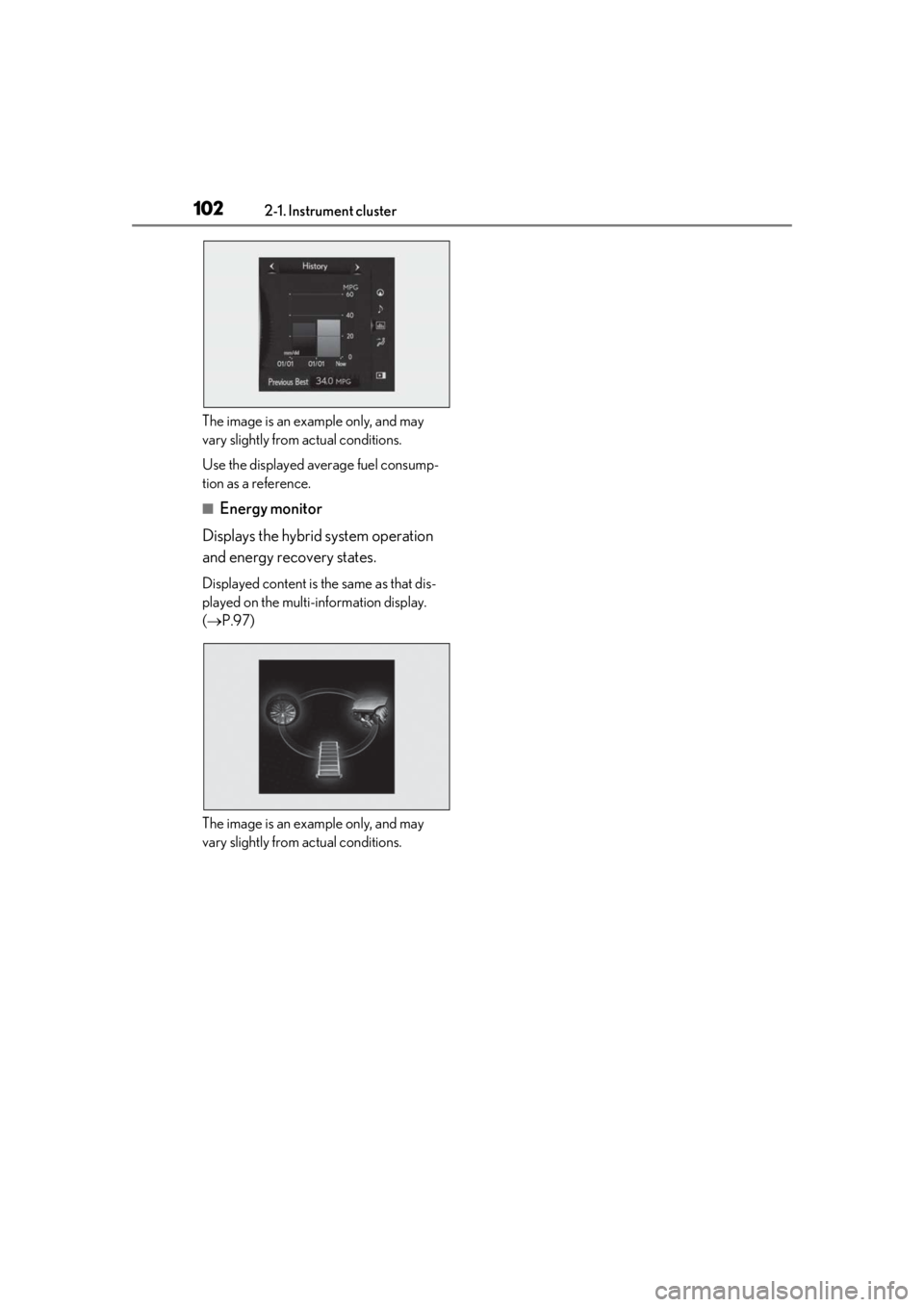
■Energy monitor
Displays the hybrid system operation
and energy recovery states.
Displayed content is the same as that dis-
played on the multi-information display.
( P.97)
The image is an example only, and may
vary slightly from actual conditions.
Page 151 of 476
151
4
4
Driving
Driving
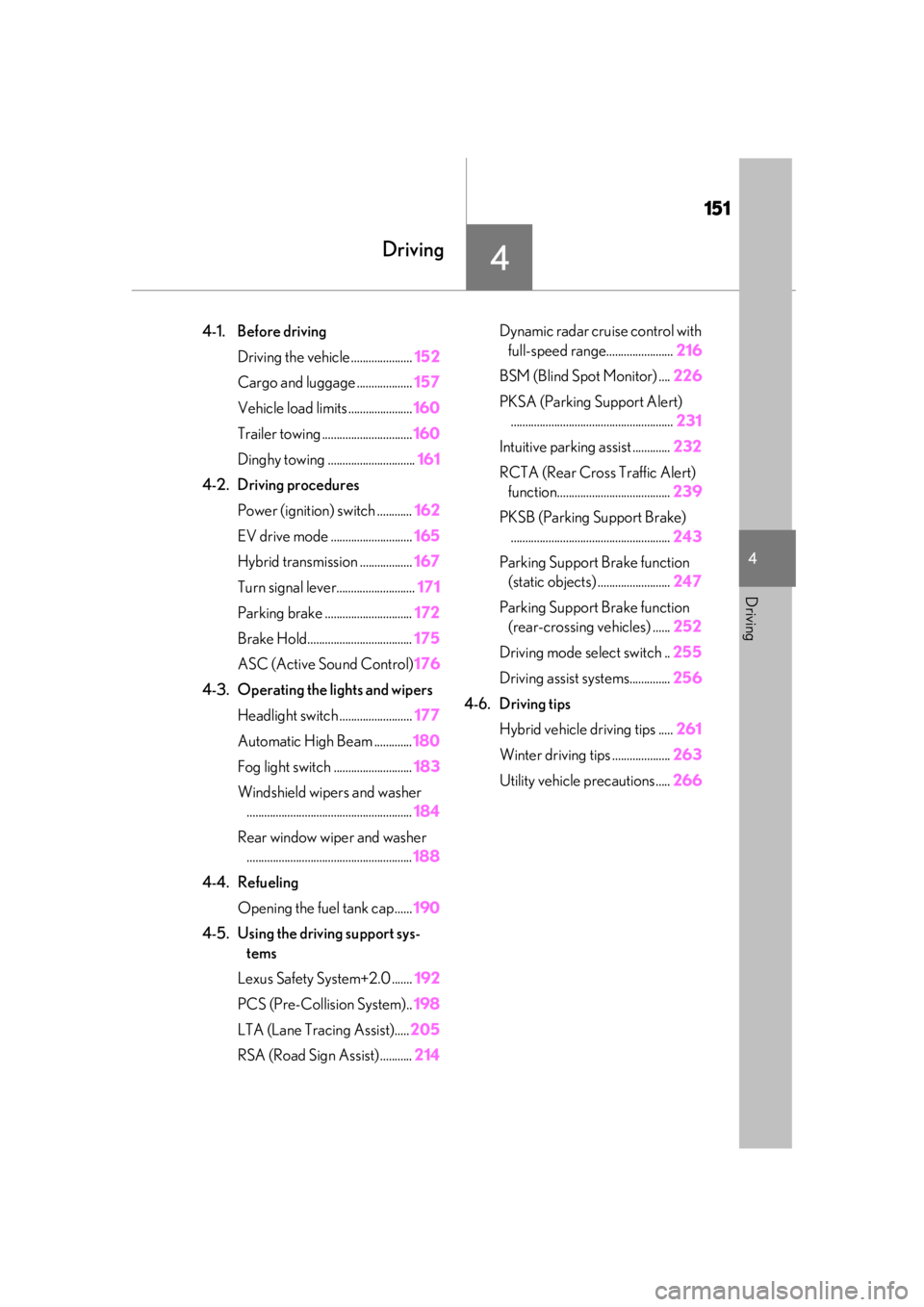
4-1. Before drivingDriving the vehicle ..................... 152
Cargo and luggage ................... 157
Vehicle load limits ...................... 160
Trailer towing ............................... 160
Dinghy towing .............................. 161
4-2. Driving procedures Power (ignition) switch ............ 162
EV drive mode ............................ 165
Hybrid transmission .................. 167
Turn signal lever........................... 171
Parking brake .............................. 172
Brake Hold.................................... 175
ASC (Active Sound Control) 176
4-3. Operating the lights and wipers Headlight switch ......................... 177
Automatic High Beam ............. 180
Fog light switch ........................... 183
Windshield wipers and washer ......................................................... 184
Rear window wiper and washer ......................................................... 188
4-4. Refueling Opening the fuel tank cap...... 190
4-5. Using the driving support sys- tems
Lexus Safety System+2.0 ....... 192
PCS (Pre-Collision System).. 198
LTA (Lane Tracing Assist)..... 205
RSA (Road Sign Assist) ........... 214Dynamic radar cruise control with
full-speed range....................... 216
BSM (Blind Spot Monitor) .... 226
PKSA (Parking Support Alert) ........................................................ 231
Intuitive parking assist ............. 232
RCTA (Rear Cross Traffic Alert) function....................................... 239
PKSB (Parking Support Brake) ....................................................... 243
Parking Support Brake function (static objects) ......................... 247
Parking Support Brake function (rear-crossing vehicles) ...... 252
Driving mode select switch .. 255
Driving assist systems.............. 256
4-6. Driving tips Hybrid vehicle driving tips ..... 261
Winter driving tips .................... 263
Utility vehicle precautions..... 266
Page 152 of 476

1524-1. Before driving
4-1.Before driving
■Starting the hybrid system
P.162
■Driving
1 With the brake pedal depressed,
shift the shift lever to D. ( P.167)
2 If the parking brake is in manual
mode, release the parking brake.
(P.172)
3 Gradually release the brake pedal
and gently depress the accelerator
pedal to accelerate the vehicle.
■Stopping
1 With the shift lever in D, depress the
brake pedal.
2 If necessary, set the parking brake.
(P.172)
If the vehicle is to be stopped for an
extended period of time, shift the shift lever
to P. ( P.167)
■Parking the vehicle
1 With the shift lever in D, depress the
brake pedal.
2 If the parking brake is in manual
mode, set the parking brake
(P.172), and shift the shift lever to
P ( P.167).
3 Press the power switch to stop the
hybrid system. 4
Lock the door, making sure that you
have the electronic key on your
person.
If parking on a hill, block the wheels as
needed.
■Starting off on a steep uphill
1 Make sure that the parking brake is
set with the brake pedal depressed,
and then shift the shift lever to D.
2 Release the brake pedal and gently
depress the accelerator pedal.
3 Release the parking brake.
■When starting off on a uphill
The hill-start assist control will be activated.
( P.257)
■For fuel-efficient driving
Keep in mind that hybr id vehicles are similar
to conventional vehicles, and it is necessary
to refrain from activi ties such as sudden
acceleration. ( P.261)
■Driving in the rain
●Drive carefully when it is raining, because
visibility will be reduced, the windows
may become fogged-up, and the road
will be slippery.
●Drive carefully when it starts to rain,
because the road surface will be espe-
cially slippery.
●Refrain from high speeds when driving on
an expressway in the rain, because there
may be a layer of wa ter between the tires
and the road surface, preventing the
steering and brakes from operating prop-
erly.
■Restraining the hybrid system output
(Brake Override System)
●When the accelerato r and brake pedals
are depressed at the same time, the
hybrid system output may be restrained.
●A warning message is displayed on the
multi-information display and head-up
display (if equipped) while the system is
operating. ( P.391)
Driving the vehicle
The specified procedures should be
observed to ensure safe driving:
Driving procedure
Page 153 of 476
1534-1. Before driving
4
Driving
■Restraining sudden start (Drive-Start
Control)
●When the following unusual operation is
performed, the hybrid system output may
be restrained.
• When the shift lever is shifted from R to D, D to R, N to R, P to D, or P to R (D
includes S) with the accelerator pedal
depressed, a warning message appears
on the multi-information display and
head-up display (if equipped). If a warn-
ing message is shown on the multi-infor-
mation display and head-up display, read
the message and follow the instructions.
• When the accelerator pedal is depressed
too much while the vehicle is in reverse.
●While Drive-Start Control is being acti-
vated, your vehicle may have trouble
escaping from the mud or fresh snow. In
such case, deactivate TRAC ( P.257)
to cancel Drive- Start Control so that the
vehicle may become able to escape from
the mud or fresh snow.
■Breaking in your new Lexus
To extend the life of the vehicle, observing
the following precautions is recommended:
●For the first 200 miles (300 km):
Avoid sudden stops.
●For the first 1000 miles (1600 km):
• Do not drive at extremely high speeds.
• Avoid sudden acceleration.
• Do not drive continuously in low gears.
• Do not drive at a constant speed for extended periods.
■Operating your vehicle in a foreign
country
Comply with the relevant vehicle registra-
tion laws and confirm the availability of the
correct fuel. ( P.417)
WARNING
Observe the following precautions.
Failure to do so may result in death or
serious injury.
■When starting the vehicle
Always keep your foot on the brake
pedal while stopped with the “READY”
indicator is illuminated. This prevents the
vehicle from creeping.
■When driving the vehicle
●Do not drive if you are unfamiliar with
the location of the brake and accelera-
tor pedals to avoid depressing the
wrong pedal.
• Accidentally depressing the accelera- tor pedal instead of the brake pedal
will result in sudden acceleration that
may lead to an accident.
• When backing up, you may twist your body around, leading to difficulty in
operating the pedals. Make sure to
operate the pedals properly.
• Make sure to keep a correct driving posture even when moving the vehicle
only slightly. This allows you to depress
the brake and accelerator pedals
properly.
• Depress the brake pedal using your right foot. Depressing the brake pedal
using your left foot may delay
response in an emergency, resulting in
an accident.
●The driver should pay extra attention
to pedestrians when the vehicle is
powered only by the electric motor
(traction motor). As there is no engine
noise, the pedestrians may misjudge
the vehicle’s movement. Even though
the vehicle is equipped with the vehicle
proximity notification system, drive
with care as pedestrians in the vicinity
may still not notice the vehicle if the
surrounding area is noisy.
●Do not drive the vehicle over or stop
the vehicle near flammable materials.
The exhaust system and exhaust gases
can be extremely hot. These hot parts
may cause a fire if there is any flamma-
ble material nearby.
Page 166 of 476

1664-2. Driving procedures
mation display.
●The temperature of the hybrid system is
high.
The vehicle has been left in the sun,
driven on a hill, driven at high speeds, etc.
●The temperature of the hybrid system is
low.
The vehicle has been left in temperatures
lower than about 32 °F (0 °C) for a long
period of time, etc.
●The gasoline engine is warming up.
●The hybrid battery (traction battery) is
low.
The remaining battery level indicated in
the “Energy Monitor” display is low.
( P.97)
●Vehicle speed is high.
●The accelerator pedal is depressed firmly
or the vehicle is on a hill, etc.
●The windshield defogger is in use.
■Switching to EV drive mode when the
gasoline engine is cold
If the hybrid system is started while the gas-
oline engine is cold, the gasoline engine will
start automatically after a short period of
time in order to warm up. In this case, you
will become unable to switch to EV drive
mode.
After the hybrid system has started and the
“READY” indicator has illuminated, press
the EV drive mode switch before the gaso-
line engine starts to switch to EV drive
mode.
■Automatic cancelation of EV drive
mode
When driving in EV drive mode, the gaso-
line engine may automatically restart in the
following situations. When EV drive mode
is canceled, a buzzer will sound, the EV
drive mode indicator w ill go off after flash-
ing, and a message is displayed on the
multi-information display.
●The hybrid battery (traction battery)
becomes low.
The remaining battery level indicated in
the “Energy Monitor” display is low.
( P.97)
●Vehicle speed is high.
●The accelerator pedal is depressed firmly
or the vehicle is on a hill, etc.
■Possible driving distan ce when driving in
EV drive mode
EV drive mode’s possible driving distance
ranges from a few hundred meters to
approximately 0.6 mile (1 km). However,
depending on vehicle conditions, there are
situations when EV drive mode cannot be
used. (The distance that is possible depends
on the hybrid battery [traction battery] level
and driving conditions.)
■Fuel economy
The hybrid system is designed to achieve
the best possible fuel economy during nor-
mal driving (using the gasoline engine and
electric motor [tractio n motor]). Driving in
EV drive mode more than necessary may
lower fuel economy.
■If “EV Mode Unavailable” is shown on
the multi-information display
The EV drive mode is not available. The rea-
son the EV drive mode is not available (the
vehicle is idling, batter y charge is low, vehi-
cle speed is higher than the EV drive mode
operating speed range or accelerator pedal
is depressed too much) may be displayed.
Use the EV drive mode when it becomes
available.
■If “EV Mode Deactivated” is shown on
the multi-information display
The EV drive mode has been automatically
canceled. The reason the EV drive mode is
not available (the batt ery charge is low,
vehicle speed is higher than the EV drive
mode operating speed range or accelera-
tor pedal is depressed too much) may be
displayed. Drive the vehicle for a while
before attempting to turn on the EV drive
mode again.
Page 167 of 476
1674-2. Driving procedures
4
Driving
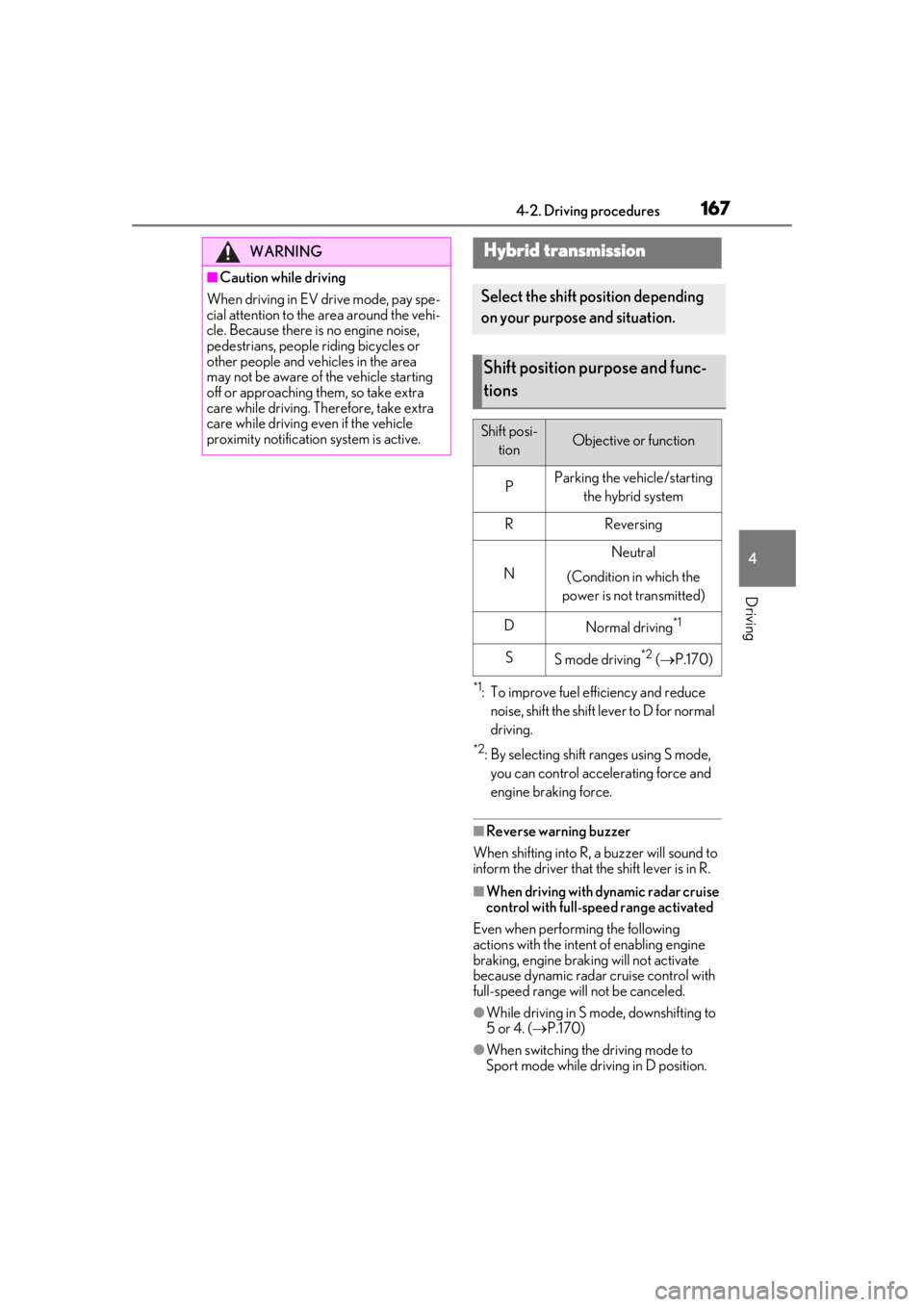
*1: To improve fuel efficiency and reduce noise, shift the shift lever to D for normal
driving.
*2: By selecting shift ranges using S mode, you can control accelerating force and
engine braking force.
■Reverse warning buzzer
When shifting into R, a buzzer will sound to
inform the driver that the shift lever is in R.
■When driving with dynamic radar cruise
control with full-speed range activated
Even when performing the following
actions with the intent of enabling engine
braking, engine braking will not activate
because dynamic radar cruise control with
full-speed range will not be canceled.
●While driving in S mode, downshifting to
5 or 4. ( P.170)
●When switching the driving mode to
Sport mode while driving in D position.
WARNING
■Caution while driving
When driving in EV drive mode, pay spe-
cial attention to the area around the vehi-
cle. Because there is no engine noise,
pedestrians, people riding bicycles or
other people and vehicles in the area
may not be aware of the vehicle starting
off or approaching th em, so take extra
care while driving. Th erefore, take extra
care while driving even if the vehicle
proximity notification system is active.
Hybrid transmission
Select the shift position depending
on your purpose and situation.
Shift position purpose and func-
tions
Shift posi-
tionObjective or function
PParking the vehicle/starting the hybrid system
RReversing
N
Neutral
(Condition in which the
power is not transmitted)
DNormal driving*1
SS mode driving*2 ( P.170)
Page 177 of 476
1774-3. Operating the lights and wipers
4
Driving
4-3.Operating the lights and wipers
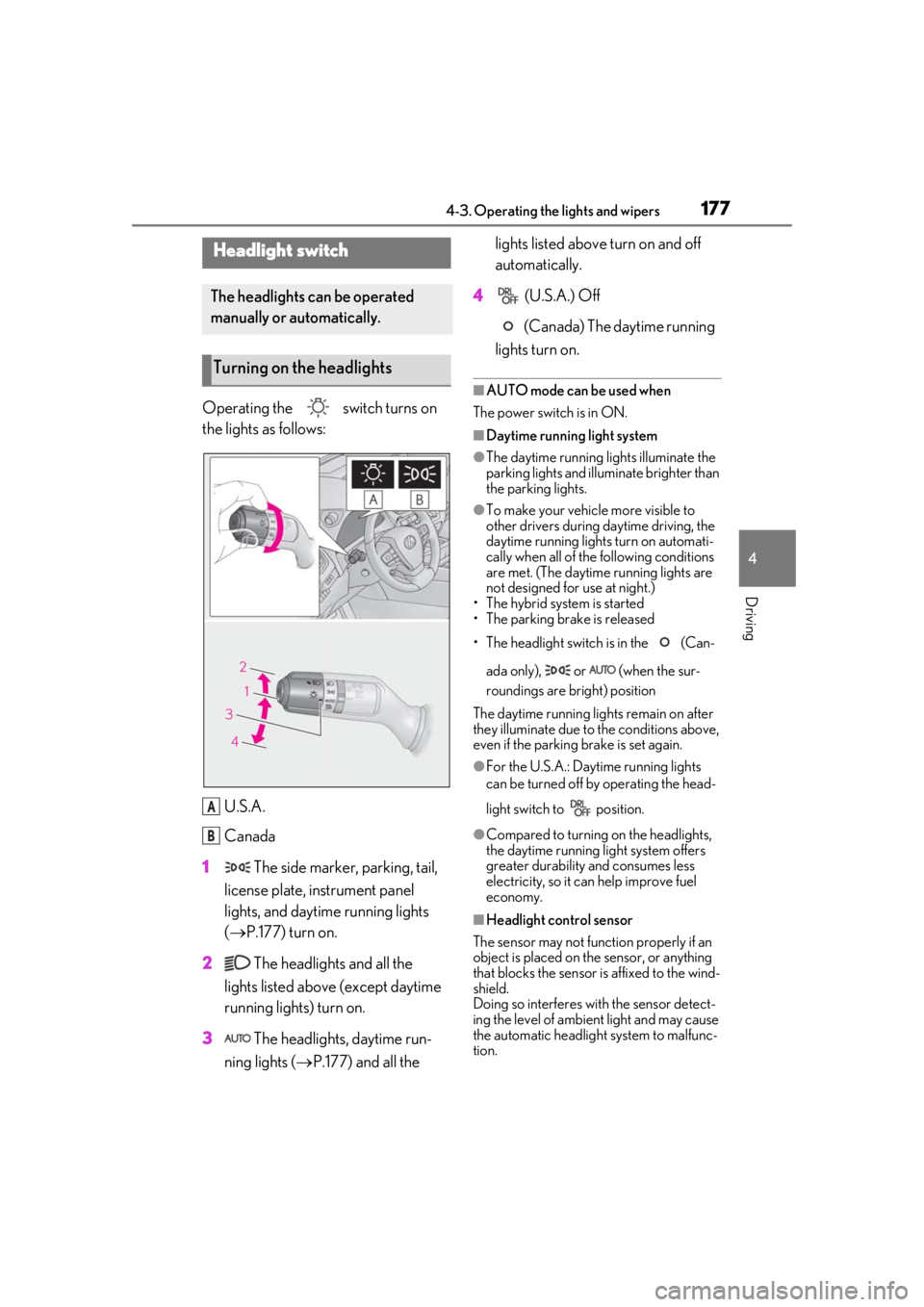
Operating the switch turns on
the lights as follows:U.S.A.
Canada
1 The side marker, parking, tail,
license plate, instrument panel
lights, and daytime running lights
( P.177) turn on.
2 The headlights and all the
lights listed above (except daytime
running lights) turn on.
3 The headlights, daytime run-
ning lights ( P.177) and all the lights listed above turn on and off
automatically.
4 (U.S.A.) Off
(Canada) The daytime running
lights turn on.
■AUTO mode can be used when
The power switch is in ON.
■Daytime running light system
●The daytime running lights illuminate the
parking lights and illuminate brighter than
the parking lights.
●To make your vehicle more visible to
other drivers during daytime driving, the
daytime running lights turn on automati-
cally when all of the following conditions
are met. (The daytime running lights are
not designed for use at night.)
• The hybrid system is started
• The parking brake is released
• The headlight switch is in the (Can-
ada only), or (when the sur-
roundings are bright) position
The daytime running lights remain on after
they illuminate due to the conditions above,
even if the parking brake is set again.
●For the U.S.A.: Daytime running lights
can be turned off by operating the head-
light switch to position.
●Compared to turning on the headlights,
the daytime running light system offers
greater durability and consumes less
electricity, so it can help improve fuel
economy.
■Headlight control sensor
The sensor may not function properly if an
object is placed on the sensor, or anything
that blocks the sensor is affixed to the wind-
shield.
Doing so interferes with the sensor detect-
ing the level of ambien t light and may cause
the automatic headlight system to malfunc-
tion.
Headlight switch
The headlights can be operated
manually or automatically.
Turning on the headlights
A
B