lock LEXUS UX250H 2019 Repair Manual
[x] Cancel search | Manufacturer: LEXUS, Model Year: 2019, Model line: UX250H, Model: LEXUS UX250H 2019Pages: 476, PDF Size: 10.51 MB
Page 147 of 476
1473-5. Opening, closing the windows and moon roof
3
Before driving
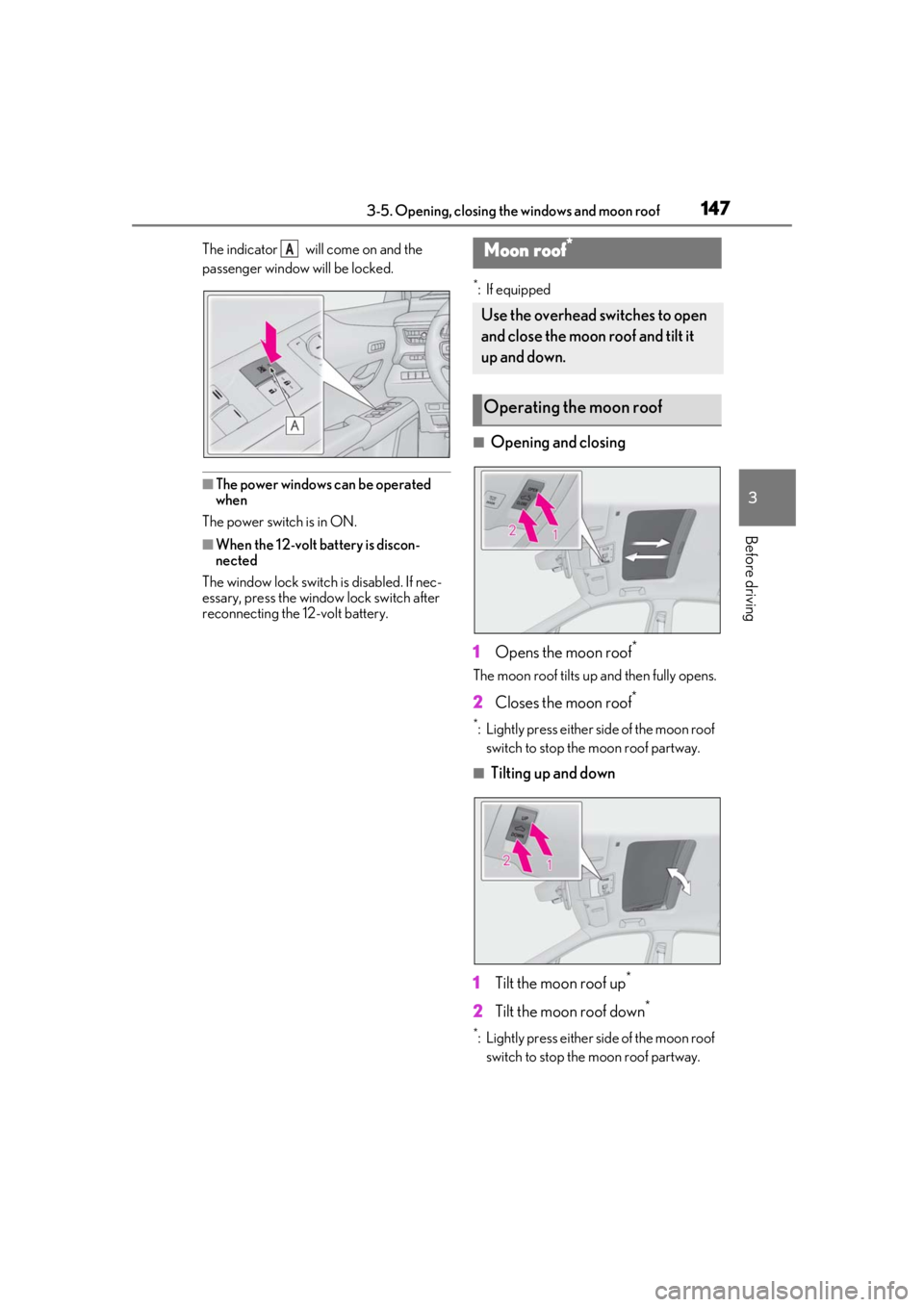
The indicator will come on and the
passenger window will be locked.
■The power windows can be operated
when
The power switch is in ON.
■When the 12-volt battery is discon-
nected
The window lock switch is disabled. If nec-
essary, press the window lock switch after
reconnecting the 12-volt battery.
*: If equipped
■Opening and closing
1 Opens the moon roof
*
The moon roof tilts up and then fully opens.
2Closes the moon roof*
*: Lightly press either side of the moon roof
switch to stop the moon roof partway.
■Tilting up and down
1 Tilt the moon roof up
*
2Tilt the moon roof down*
*: Lightly press either side of the moon roof
switch to stop the moon roof partway.
AMoon roof*
Use the overhead switches to open
and close the moon roof and tilt it
up and down.
Operating the moon roof
Page 148 of 476

1483-5. Opening, closing the windows and moon roof
■The moon roof can be operated when
The power switch is in ON.
■Operating the moon roof after turning
the hybrid system off
The moon roof can be operated for approx-
imately 45 seconds after the power switch
is turned to ACC or OFF. It cannot, how-
ever, be operated once either front door is
opened.
■Jam protection function
If an object is detected between the moon
roof and the frame while the moon roof is
closing or tilting down, travel is stopped and
the moon roof opens slightly.
■Sunshade
The sunshade can be opened and closed
manually. However, the sunshade will open
automatically when the moon roof is
opened.
■Door lock linked moon roof operation
●The moon roof can be opened and
closed using the mechanical key.*
( P.404)
●The moon roof can be opened using the
wireless remote control.* ( P.108)
*: These settings must be customized at
your Lexus dealer.
■When the moon roof does not close nor-
mally
Perform the following procedure:
1
Stop the vehicle.
2
Press and hold the “CLOSE” switch.*
The moon roof will close, reopen and pause
for approximately 10 seconds. Then it will
close again and stop at the completely
closed position.
3
Check to make sure that the moon roof
is completely closed and then release
the switch.
*: If the switch is released at the incorrect time, the procedure will have to be per-
formed again from the beginning.
If the moon roof does not fully close even
after performing the above procedure cor- rectly, have the vehicle inspected by your
Lexus dealer.
■If the moon roof does not move normally
If the moon roof does not open or close
normally or the automatic opening function
does not operate, perform the following ini-
tialization procedure.
1
Stop the vehicle.
2
Press and hold the “DOWN” switch.*
The moon roof will stop at the tilt-up posi-
tion. After that, it will open, close, tilt up, tilt
down, and stop at the fully closed position.
3
Confirm that the moon roof has com-
pletely stopped and release the switch.
*: If you release the sw itch while the moon
roof is moving, perform the procedure
again from the beginning.
If, after performing the above procedures
correctly, the moon roof still does not open
or close normally or the automatic opening
function does not operate, have the vehicle
inspected by your Lexus dealer.
■Moon roof open warning buzzer
The buzzer sounds and “Moon Roof Open”
is shown on the multi-information display in
the instrument cluster when the power
switch is turned off and the driver’s door is
opened with the moon roof open.
■Customization
Some functions can be customized.
( P.440)
WARNING
Observe the following precautions.
Failure to do so may cause death or seri-
ous injury.
■Opening the moon roof
●Do not allow any passengers to put
their hands or heads outside the vehi-
cle while it is moving.
●Do not sit on top of the moon roof.
Page 152 of 476

1524-1. Before driving
4-1.Before driving
■Starting the hybrid system
P.162
■Driving
1 With the brake pedal depressed,
shift the shift lever to D. ( P.167)
2 If the parking brake is in manual
mode, release the parking brake.
(P.172)
3 Gradually release the brake pedal
and gently depress the accelerator
pedal to accelerate the vehicle.
■Stopping
1 With the shift lever in D, depress the
brake pedal.
2 If necessary, set the parking brake.
(P.172)
If the vehicle is to be stopped for an
extended period of time, shift the shift lever
to P. ( P.167)
■Parking the vehicle
1 With the shift lever in D, depress the
brake pedal.
2 If the parking brake is in manual
mode, set the parking brake
(P.172), and shift the shift lever to
P ( P.167).
3 Press the power switch to stop the
hybrid system. 4
Lock the door, making sure that you
have the electronic key on your
person.
If parking on a hill, block the wheels as
needed.
■Starting off on a steep uphill
1 Make sure that the parking brake is
set with the brake pedal depressed,
and then shift the shift lever to D.
2 Release the brake pedal and gently
depress the accelerator pedal.
3 Release the parking brake.
■When starting off on a uphill
The hill-start assist control will be activated.
( P.257)
■For fuel-efficient driving
Keep in mind that hybr id vehicles are similar
to conventional vehicles, and it is necessary
to refrain from activi ties such as sudden
acceleration. ( P.261)
■Driving in the rain
●Drive carefully when it is raining, because
visibility will be reduced, the windows
may become fogged-up, and the road
will be slippery.
●Drive carefully when it starts to rain,
because the road surface will be espe-
cially slippery.
●Refrain from high speeds when driving on
an expressway in the rain, because there
may be a layer of wa ter between the tires
and the road surface, preventing the
steering and brakes from operating prop-
erly.
■Restraining the hybrid system output
(Brake Override System)
●When the accelerato r and brake pedals
are depressed at the same time, the
hybrid system output may be restrained.
●A warning message is displayed on the
multi-information display and head-up
display (if equipped) while the system is
operating. ( P.391)
Driving the vehicle
The specified procedures should be
observed to ensure safe driving:
Driving procedure
Page 156 of 476
1564-1. Before driving
WARNING
●Always apply the parking brake, shift
the shift lever to P, stop the hybrid sys-
tem and lock the vehicle.
Do not leave the vehicle unattended
while the “READY” indicator is illumi-
nated.
If the vehicle is parked with the shift
lever in P but the parking brake is not
set, the vehicle may start to move, pos-
sibly leading to an accident.
●Do not touch the exhaust pipes while
the “READY” indicator is illuminated
or immediately after turning the hybrid
system off.
Doing so may cause burns.
■When taking a nap in the vehicle
Always turn the hybrid system off. Other-
wise, if you accidentally move the shift
lever or depress the accelerator pedal,
this could cause an accident or fire due
to hybrid system overheating. Addition-
ally, if the vehicle is parked in a poorly
ventilated area, exhaust gases may col-
lect and enter the ve hicle, leading to
death or a serious health hazard.
■When braking
●When the brakes are wet, drive more
cautiously.
Braking distance increases when the
brakes are wet, and this may cause one
side of the vehicle to brake differently
than the other side. Also, the parking
brake may not securely hold the vehi-
cle.
●If the electronically controlled brake
system does not operate, do not follow
other vehicles closely and avoid hills or
sharp turns that require braking.
In this case, braking is still possible, but
the brake pedal should be depressed
more firmly than usual. Also, the brak-
ing distance will increase. Have your
brakes fixed immediately.
●The brake system consists of 2 or more
individual hydraulic systems; if one of
the systems fails, the other(s) will still
operate. In this case, the brake pedal
should be depressed more firmly than
usual and the braking distance will
increase. Have your brakes fixed
immediately.
■If the vehicle becomes stuck (AWD
models)
Do not spin the wheels excessively when
any of the tires is up in the air, or the vehi-
cle is stuck in sand, mud, etc. This may
damage the driveline components or
propel the vehicle forward or backward,
causing an accident.
NOTICE
■When driving the vehicle
●Do not depress the accelerator and
brake pedals at the same time during
driving, as this may restrain the hybrid
system output.
●Do not use the accelerator pedal or
depress the accelerator and brake
pedals at the same time to hold the
vehicle on a hill.
■Avoiding damage to vehicle parts
●Do not turn the steering wheel fully in
either direction and hold it there for an
extended period of time.
Doing so may damage the power
steering motor.
●When driving over bumps in the road,
drive as slowly as possible to avoid
damaging the wheels, underside of the
vehicle, etc.
■If you get a flat tire while driving
A flat or damaged tire may cause the fol-
lowing situations. Hold the steering
wheel firmly and gradually depress the
brake pedal to slow down the vehicle.
●It may be difficult to control your vehi-
cle.
Page 157 of 476
1574-1. Before driving
4
Driving
NOTICE
●The vehicle will make abnormal
sounds or vibrations.
●The vehicle will lean abnormally.
Information on what to do in case of a flat
tire ( P.399)
■When encountering flooded roads
Do not drive on a road that has flooded
after heavy rain, etc. Doing so may cause
the following serious damage to the vehi-
cle:
●Engine stalling
●Short in electrical components
●Engine damage caused by water
immersion
In the event that you drive on a flooded
road and the vehicle is flooded, be sure
to have your Lexus dealer check the fol-
lowing:
●Brake function
●Changes in quantity and quality of oil
and fluid used for the engine, hybrid
transmission, etc.
●Lubricant condition for the bearings
and suspension joints (where possi-
ble), and the function of all joints, bear-
ings, etc.
■When parking the vehicle
Always set the parking brake, and shift
the shift lever to P. Failure to do so may
cause the vehicle to move or the vehicle
may accelerate sudden ly if the accelera-
tor pedal is accidentally depressed.
Cargo and luggage
Take notice of the following infor-
mation about storage precautions,
cargo capacity and load:
WARNING
■Things that must not be carried in the
luggage compartment
The following things may cause a fire if
loaded in the luggage compartment:
●Receptacles containing gasoline
●Aerosol cans
■Storage precautions
Observe the following precautions.
Failure to do so may prevent the pedals
from being depressed properly, may
block the driver’s vision, or may result in
items hitting the driver or passengers,
possibly causing an accident.
●Stow cargo and luggage in the lug-
gage compartment whenever possi-
ble.
●Do not stack cargo and luggage in the
luggage compartment higher than the
seatbacks.
●When you fold down the rear seats,
long items should not be placed
directly behind the front seats.
●Never allow anyone to ride in the lug-
gage compartment. It is not designed
for passengers. They should ride in
their seats with thei r seat belts prop-
erly fastened.
Page 163 of 476
1634-2. Driving procedures
4
Driving
■Steering lock function
●After turning the power switch off and
opening and closing the doors, the steer-
ing wheel will be locked due to the steer-
ing lock function. Operating the power
switch again automatically cancels the
steering lock.
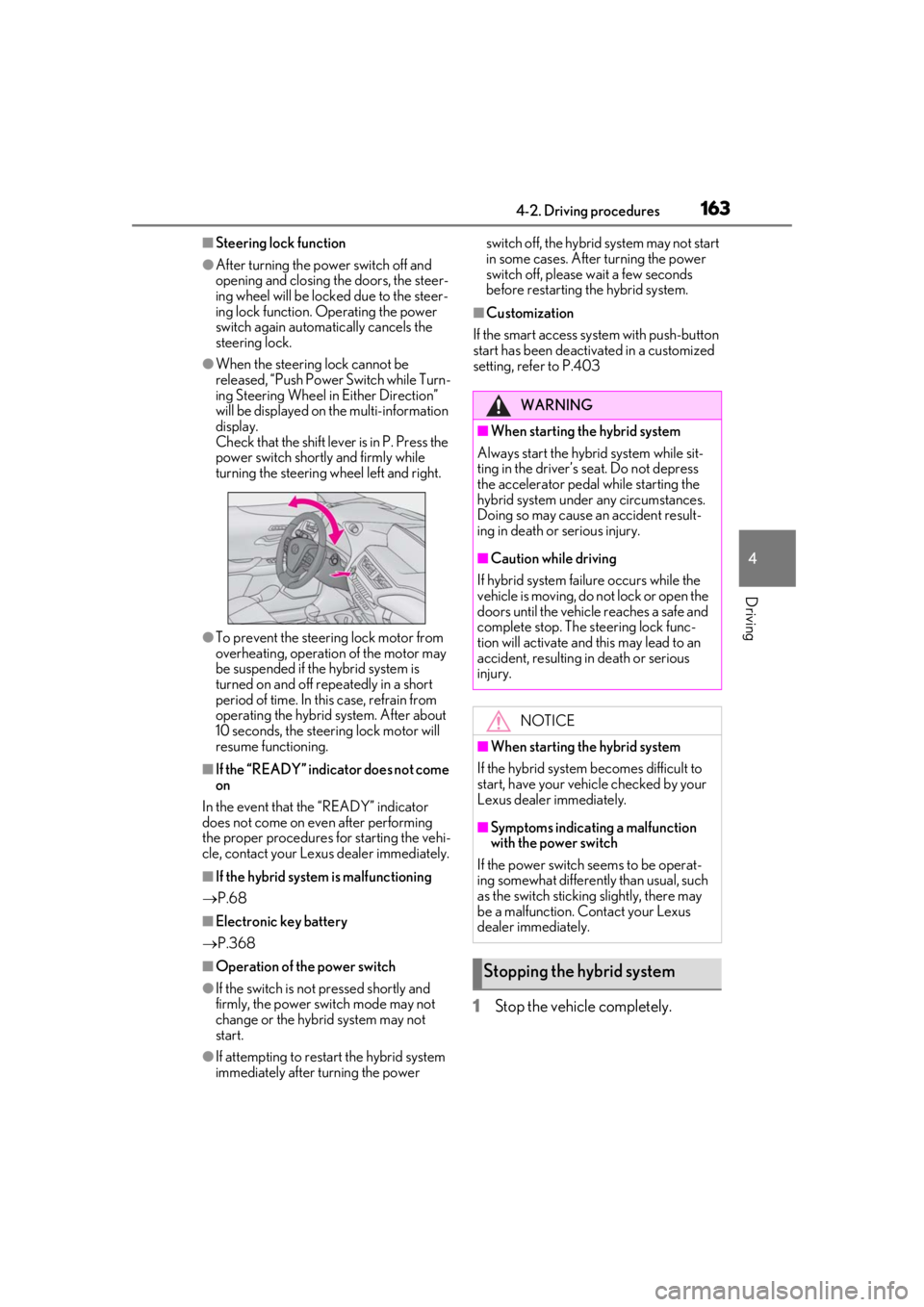
●When the steering lock cannot be
released, “Push Power Switch while Turn-
ing Steering Wheel in Either Direction”
will be displayed on the multi-information
display.
Check that the shift lever is in P. Press the
power switch shortly and firmly while
turning the steering wheel left and right.
●To prevent the steering lock motor from
overheating, operation of the motor may
be suspended if the hybrid system is
turned on and off repeatedly in a short
period of time. In this case, refrain from
operating the hybrid system. After about
10 seconds, the steering lock motor will
resume functioning.
■If the “READY” indicator does not come
on
In the event that the “READY” indicator
does not come on even after performing
the proper procedures for starting the vehi-
cle, contact your Lexus dealer immediately.
■If the hybrid system is malfunctioning
P.68
■Electronic key battery
P.368
■Operation of the power switch
●If the switch is not pressed shortly and
firmly, the power switch mode may not
change or the hybrid system may not
start.
●If attempting to restart the hybrid system
immediately after turning the power switch off, the hybrid system may not start
in some cases. After turning the power
switch off, please wait a few seconds
before restarting the hybrid system.
■Customization
If the smart access system with push-button
start has been deactivated in a customized
setting, refe r to P.403
1Stop the vehicle completely.
WARNING
■When starting the hybrid system
Always start the hybrid system while sit-
ting in the driver’s seat. Do not depress
the accelerator pedal while starting the
hybrid system under any circumstances.
Doing so may cause an accident result-
ing in death or serious injury.
■Caution while driving
If hybrid system failure occurs while the
vehicle is moving, do not lock or open the
doors until the vehicle reaches a safe and
complete stop. The steering lock func-
tion will activate and this may lead to an
accident, resulting in death or serious
injury.
NOTICE
■When starting the hybrid system
If the hybrid system becomes difficult to
start, have your vehicle checked by your
Lexus dealer immediately.
■Symptoms indicating a malfunction
with the power switch
If the power switch seems to be operat-
ing somewhat differently than usual, such
as the switch sticking slightly, there may
be a malfunction. Contact your Lexus
dealer immediately.
Stopping the hybrid system
Page 168 of 476
1684-2. Driving procedures
( P.255)
■Restraining sudden start (Drive-Start
Control)
P.153
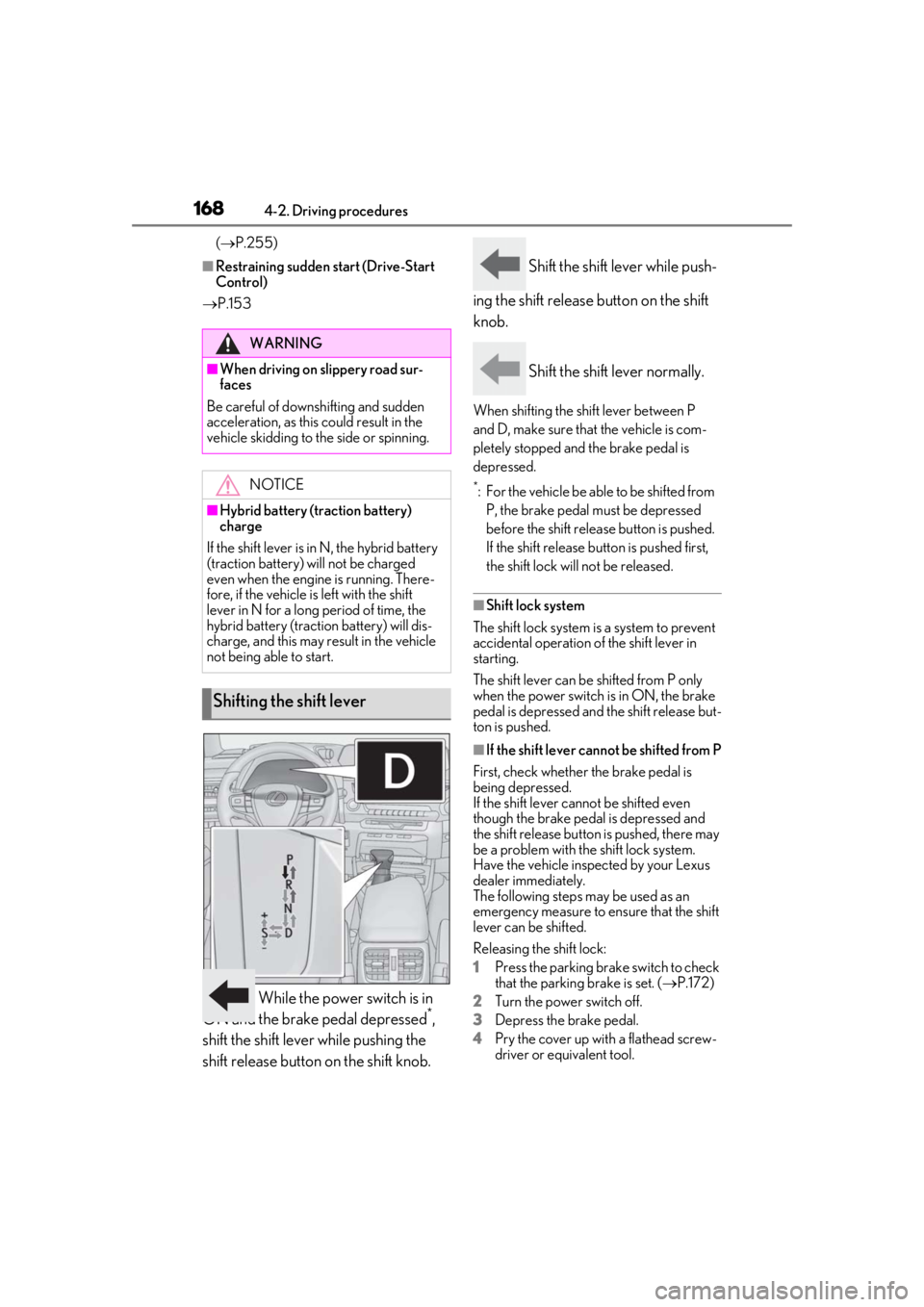
While the power switch is in
ON and the brake pedal depressed*,
shift the shift lever while pushing the
shift release button on the shift knob. Shift the shift lever while push-
ing the shift release button on the shift
knob.
Shift the shift lever normally.
When shifting the shift lever between P
and D, make sure that the vehicle is com-
pletely stopped and the brake pedal is
depressed.
*: For the vehicle be able to be shifted from P, the brake pedal must be depressed
before the shift releas e button is pushed.
If the shift release button is pushed first,
the shift lock will not be released.
■Shift lock system
The shift lock system is a system to prevent
accidental operation of the shift lever in
starting.
The shift lever can be shifted from P only
when the power switch is in ON, the brake
pedal is depressed and the shift release but-
ton is pushed.
■If the shift lever cannot be shifted from P
First, check whether the brake pedal is
being depressed.
If the shift lever cannot be shifted even
though the brake pedal is depressed and
the shift release button is pushed, there may
be a problem with th e shift lock system.
Have the vehicle inspected by your Lexus
dealer immediately.
The following steps may be used as an
emergency measure to ensure that the shift
lever can be shifted.
Releasing the shift lock:
1
Press the parking brake switch to check
that the parking brake is set. ( P.172)
2
Turn the power switch off.
3
Depress the brake pedal.
4
Pry the cover up with a flathead screw-
driver or equivalent tool.
WARNING
■When driving on slippery road sur-
faces
Be careful of downshifting and sudden
acceleration, as this could result in the
vehicle skidding to the side or spinning.
NOTICE
■Hybrid battery (traction battery)
charge
If the shift lever is in N, the hybrid battery
(traction battery) will not be charged
even when the engine is running. There-
fore, if the vehicle is left with the shift
lever in N for a long period of time, the
hybrid battery (traction battery) will dis-
charge, and this may re sult in the vehicle
not being able to start.
Shifting the shift lever
Page 169 of 476
1694-2. Driving procedures
4
Driving
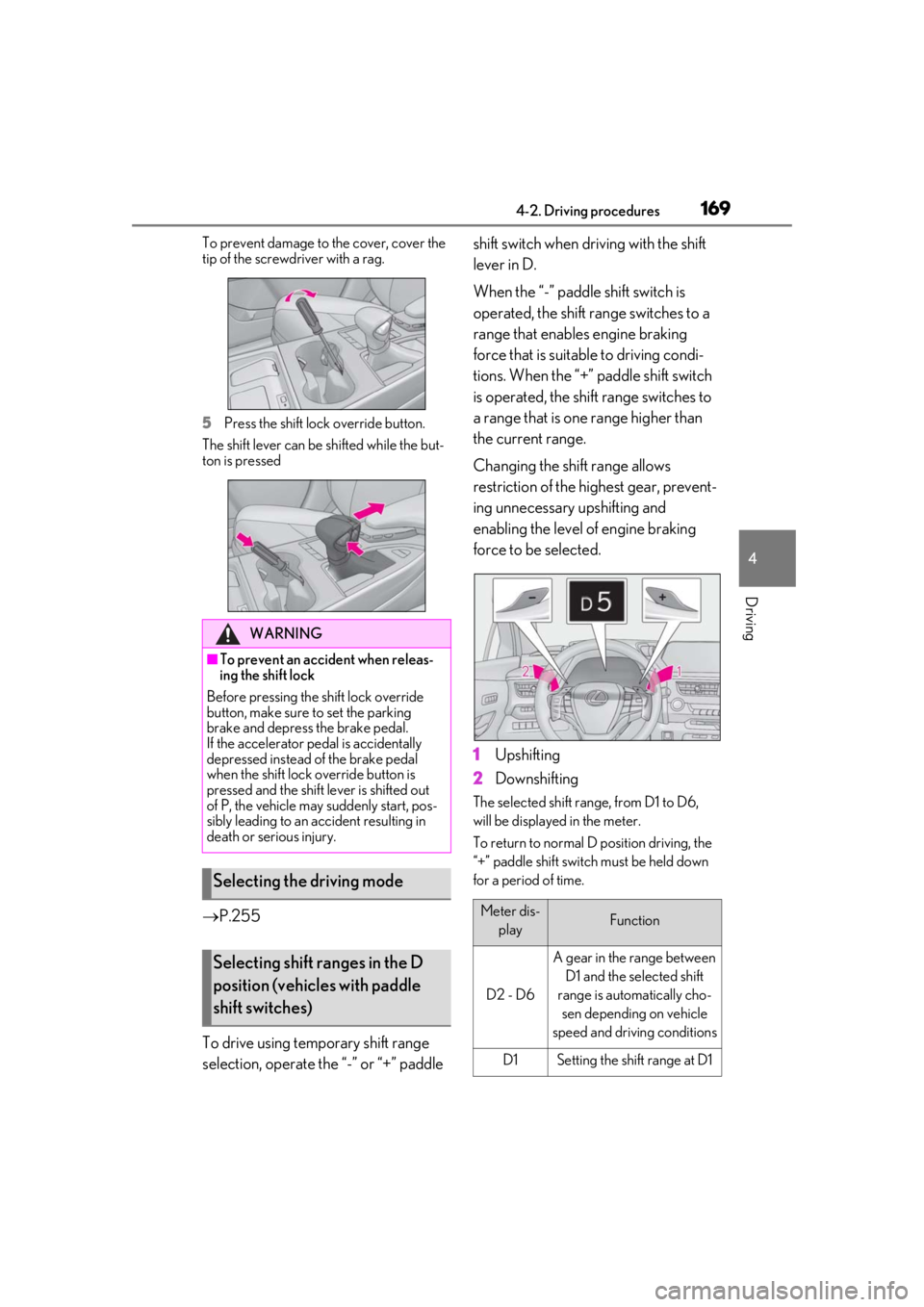
To prevent damage to the cover, cover the
tip of the screwdriver with a rag.
5
Press the shift lock override button.
The shift lever can be shifted while the but-
ton is pressed
P.255
To drive using temporary shift range
selection, operate the “-” or “+” paddle shift switch when driving with the shift
lever in D.
When the “-” paddle shift switch is
operated, the shift range switches to a
range that enables engine braking
force that is suitable to driving condi-
tions. When the “+” paddle shift switch
is operated, the shift range switches to
a range that is one range higher than
the current range.
Changing the shift range allows
restriction of the highest gear, prevent-
ing unnecessary upshifting and
enabling the level of engine braking
force to be selected.
1
Upshifting
2
Downshifting
The selected shift range, from D1 to D6,
will be displayed in the meter.
To return to normal D position driving, the
“+” paddle shift switch must be held down
for a period of time.
WARNING
■To prevent an accident when releas-
ing the shift lock
Before pressing the shift lock override
button, make sure to set the parking
brake and depress the brake pedal.
If the accelerator pe dal is accidentally
depressed instead of the brake pedal
when the shift lock override button is
pressed and the shift lever is shifted out
of P, the vehicle may suddenly start, pos-
sibly leading to an accident resulting in
death or serious injury.
Selecting the driving mode
Selecting shift ranges in the D
position (vehicles with paddle
shift switches)
Meter dis-
playFunction
D2 - D6
A gear in the range between D1 and the selected shift
range is automatically cho- sen depending on vehicle
speed and driving conditions
D1Setting the shift range at D1
Page 177 of 476
1774-3. Operating the lights and wipers
4
Driving
4-3.Operating the lights and wipers
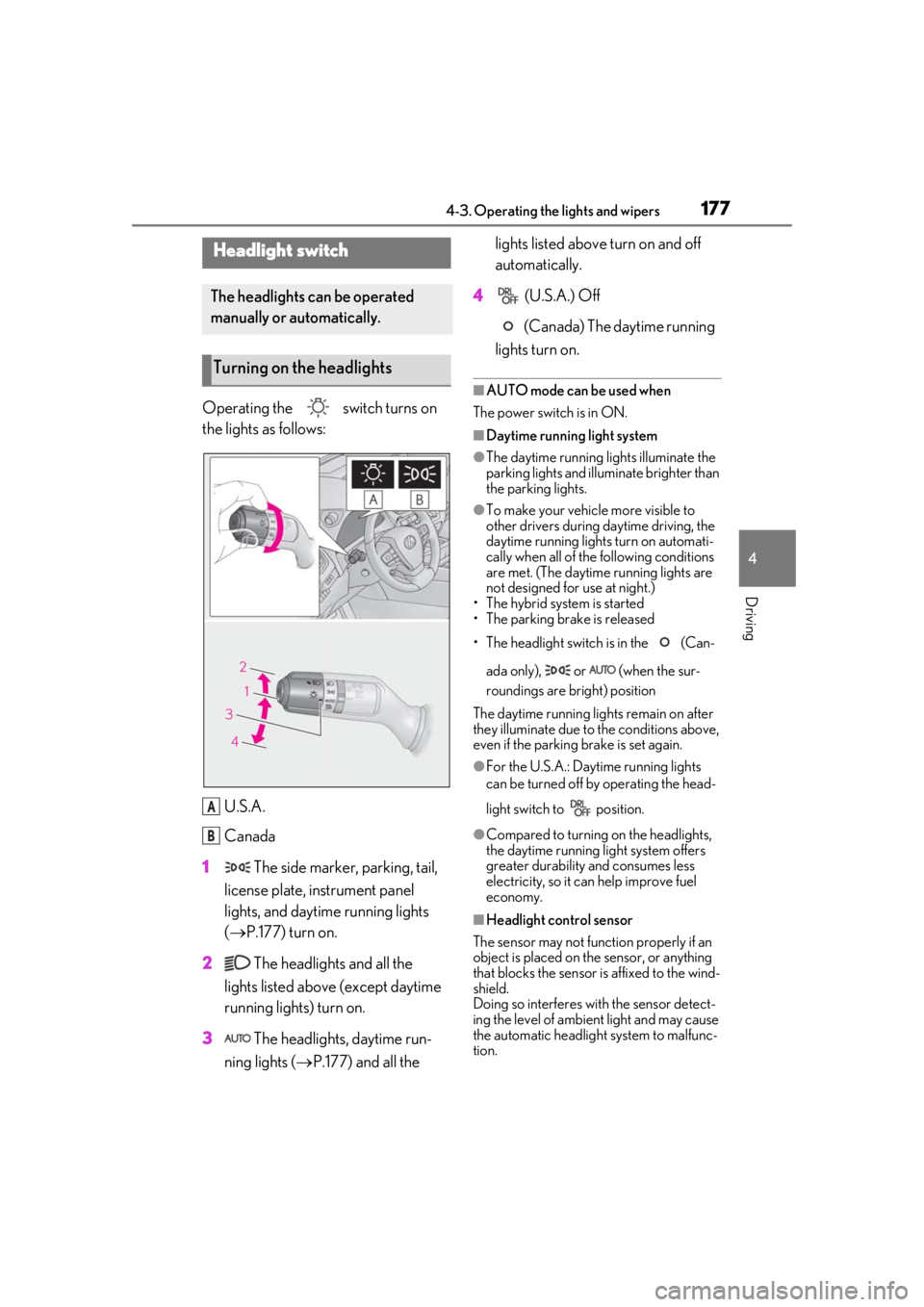
Operating the switch turns on
the lights as follows:U.S.A.
Canada
1 The side marker, parking, tail,
license plate, instrument panel
lights, and daytime running lights
( P.177) turn on.
2 The headlights and all the
lights listed above (except daytime
running lights) turn on.
3 The headlights, daytime run-
ning lights ( P.177) and all the lights listed above turn on and off
automatically.
4 (U.S.A.) Off
(Canada) The daytime running
lights turn on.
■AUTO mode can be used when
The power switch is in ON.
■Daytime running light system
●The daytime running lights illuminate the
parking lights and illuminate brighter than
the parking lights.
●To make your vehicle more visible to
other drivers during daytime driving, the
daytime running lights turn on automati-
cally when all of the following conditions
are met. (The daytime running lights are
not designed for use at night.)
• The hybrid system is started
• The parking brake is released
• The headlight switch is in the (Can-
ada only), or (when the sur-
roundings are bright) position
The daytime running lights remain on after
they illuminate due to the conditions above,
even if the parking brake is set again.
●For the U.S.A.: Daytime running lights
can be turned off by operating the head-
light switch to position.
●Compared to turning on the headlights,
the daytime running light system offers
greater durability and consumes less
electricity, so it can help improve fuel
economy.
■Headlight control sensor
The sensor may not function properly if an
object is placed on the sensor, or anything
that blocks the sensor is affixed to the wind-
shield.
Doing so interferes with the sensor detect-
ing the level of ambien t light and may cause
the automatic headlight system to malfunc-
tion.
Headlight switch
The headlights can be operated
manually or automatically.
Turning on the headlights
A
B
Page 178 of 476
1784-3. Operating the lights and wipers
■Automatic light off system
●When the headlights come on: The head-
lights and tail lights turn off 30 seconds
after a driver’s door is opened and closed
if the power switch is turned to ACC or
OFF. (The lights turn off immediately if on the key is pressed after all the
doors are locked.)
●When only the tail lights come on: The tail
lights turn off automatically if the power
switch is turned to ACC or OFF. and the
driver’s door is opened.
To turn the lights on again, turn the power
switch to ON, or turn the light switch off
once and then back to or .
■Automatic headlight leveling system (if
equipped)
The level of the headlights is automatically
adjusted according to the number of pas-
sengers and the loading condition of the
vehicle to ensure that the headlights do not
interfere with other road users.
■Windshield wiper linked headlight illu-
mination
When driving during daytime with the
headlight switch turned to position, if
the windshield wipers are used, the head-
lights will turn on auto matically after several
seconds to help enha nce the visibility of
your vehicle.
■12-volt battery-saving function
In order to prevent the 12-volt battery of the
vehicle from discharging, if the headlights
and/or tail lights are on when the power
switch is turned off the 12-volt battery sav-
ing function will operate and automatically
turn off all the lights after approximately 20 minutes. When the power switch is turned
to ON, the 12-volt battery-saving function
will be disabled.
When any of the following are performed,
the 12-volt battery-saving function is can-
celed once and then reactivated. All the
lights will turn off automatically 20 minutes
after the 12-volt battery-saving function has
been reactivated:
●When the headlight switch is operated
●When a door is opened or closed
■Welcome light illumination control
The parking and tail lights automatically
turn on at night when the doors are
unlocked using the entry function or wire-
less remote control if the light switch is in
the position.
■Customization
Settings (e.g. light sensor sensitivity) can be
changed. (Customizable features:
P.440)
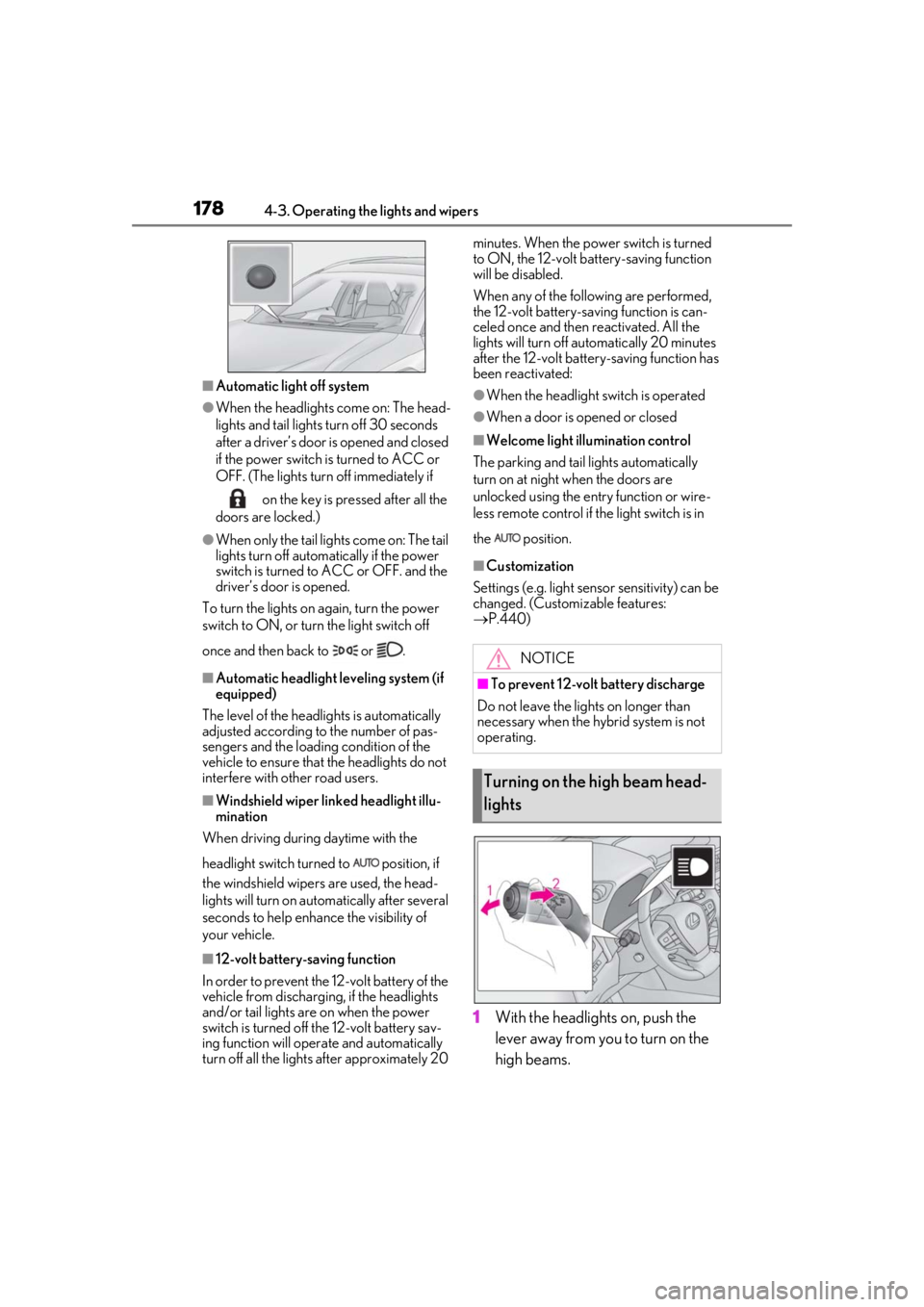
1With the headlights on, push the
lever away from you to turn on the
high beams.
NOTICE
■To prevent 12-volt battery discharge
Do not leave the lights on longer than
necessary when the hybrid system is not
operating.
Turning on the high beam head-
lights