battery charge LEXUS UX250H 2019 Owners Manual
[x] Cancel search | Manufacturer: LEXUS, Model Year: 2019, Model line: UX250H, Model: LEXUS UX250H 2019Pages: 476, PDF Size: 10.51 MB
Page 1 of 476

UX250h_OM_OM76266U_(U)
1
2
3
4
5
6
7
8
9
Pictorial indexSearch by illustration
For safety
and securityMake sure to read through them
(Main topics: Child seat, theft deterrent system)
Vehicle status
information and
indicatorsReading driving-related information
(Main topics: Meters, multi-information display)
Before drivingOpening and closing the doors and windows,
adjustment before driving
(Main topics: Keys, doors, seats)
DrivingOperations and advice which are necessary for driving
(Main topics: Starting hybrid system, refueling)
Interior featuresUsage of the interior features
(Main topics: Air conditioner, storage features)
Maintenance
and careCaring for your vehicle and maintenance procedures
(Main topics: Interior and exterior, light bulbs)
When trouble
arisesWhat to do in case of malfunction and emergency
(Main topics: 12-volt battery discharge, flat tire)
Vehicle
specificationsVehicle specifications, customizable features
(Main topics: Fuel, oil, tire inflation pressure)
For ownersReporting safety defects for U.S. owners, and seat belt,
SRS airbag and headlight aim instructions for Canadian
owners
IndexSearch by symptom
Search alphabetically
Page 4 of 476
4TABLE OF CONTENTS
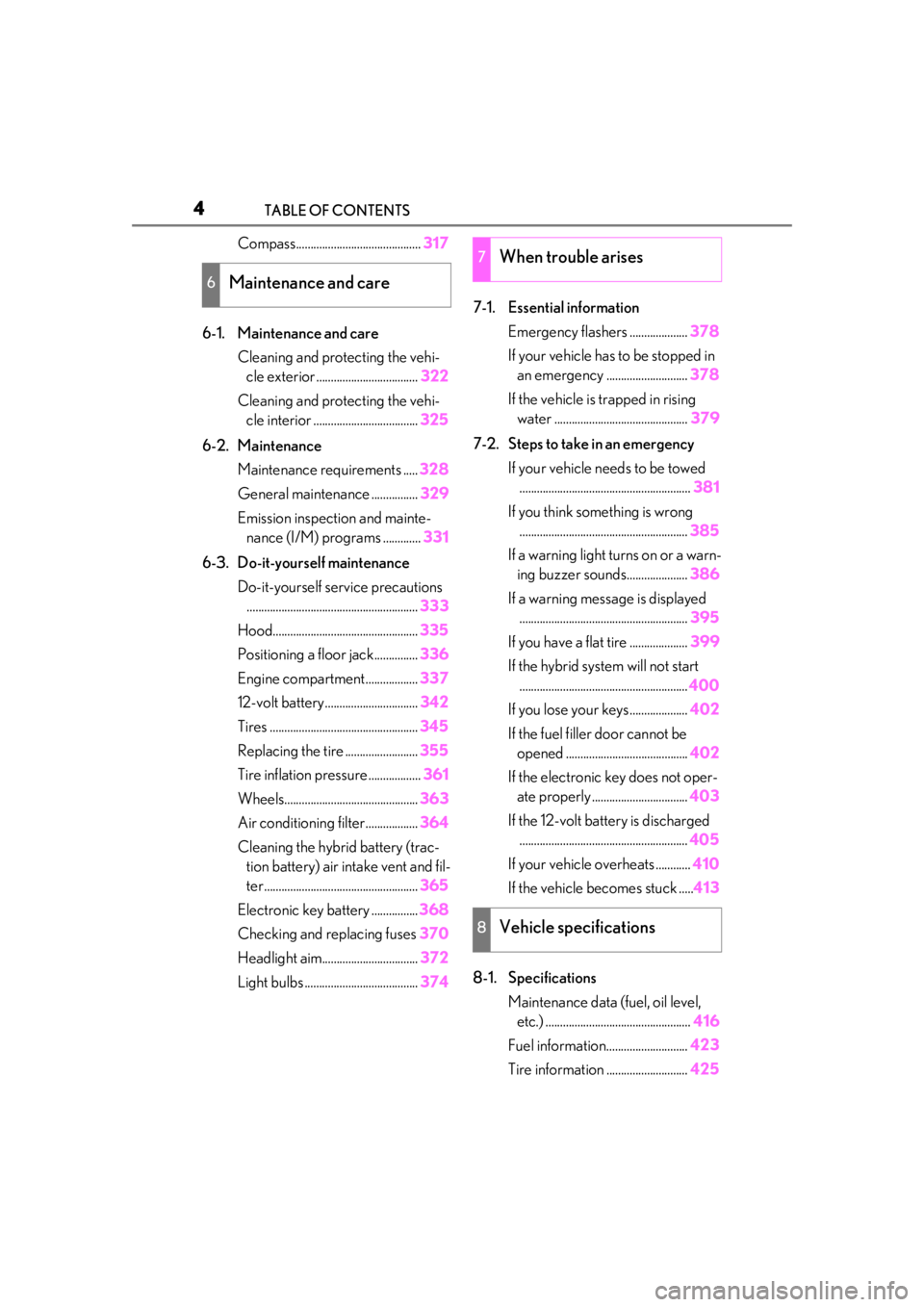
Compass...........................................317
6-1. Maintenance and care Cleaning and protecting the vehi-cle exterior ................................... 322
Cleaning and protecting the vehi- cle interior .................................... 325
6-2. Maintenance Maintenance requirements ..... 328
General maintenance ................ 329
Emission inspection and mainte- nance (I/M) programs ............. 331
6-3. Do-it-yourself maintenance Do-it-yourself service precautions........................................................... 333
Hood.................................................. 335
Positioning a floor jack............... 336
Engine compartment.................. 337
12-volt battery................................ 342
Tires ................................................... 345
Replacing the tire ......................... 355
Tire inflation pressure .................. 361
Wheels.............................................. 363
Air conditioning filter..................364
Cleaning the hybrid battery (trac- tion battery) air intake vent and fil-
ter..................................................... 365
Electronic key battery ................ 368
Checking and replacing fuses 370
Headlight aim................................. 372
Light bulbs ....................................... 3747-1. Essential information
Emergency flashers .................... 378
If your vehicle has to be stopped in an emergency ............................ 378
If the vehicle is trapped in rising water .............................................. 379
7-2. Steps to take in an emergency If your vehicle needs to be towed........................................................... 381
If you think something is wrong .......................................................... 385
If a warning light turns on or a warn- ing buzzer sounds..................... 386
If a warning messa ge is displayed
.......................................................... 395
If you have a flat tire .................... 399
If the hybrid syst em will not start
.......................................................... 400
If you lose your keys.................... 402
If the fuel filler door cannot be opened .......................................... 402
If the electronic key does not oper- ate properly ................................. 403
If the 12-volt battery is discharged .......................................................... 405
If your vehicle overheats ............ 410
If the vehicle becomes stuck ..... 413
8-1. Specifications Maintenance data (fuel, oil level, etc.) .................................................. 416
Fuel information............................ 423
Tire inform
ation ............................ 425
6Maintenance and care
7When trouble arises
8Vehicle specifications
Page 63 of 476
631-4. Hybrid system
1
For safety and security
charged.
*: When the hybrid battery (traction bat-tery) requires charging or the engine is
warming up, etc., the gasoline engine will
not automatically stop. ( P.63)
■During normal driving
The gasoline engine is predominantly
used. The electric motor (traction
motor) charges the hybrid battery
(traction battery) as necessary.
■When accelerating sharply
When the accelerator pedal is
depressed heavily, the power of the
hybrid battery (traction battery) is
added to that of the gasoline engine via
the electric motor (traction motor).
■When braking (regenerative brak-
ing)
The wheels operate the electric motor
(traction motor) as a power generator,
and the hybrid battery (traction bat-
tery) is charged.
■Regenerative braking
In the following situations, kinetic energy is
converted to electric energy and decelera-
tion force can be obta ined in conjunction
with the recharging of the hybrid battery
(traction battery).
●The accelerator pedal is released while
driving with the shift lever in D or S.
●The brake pedal is depressed while driv-
ing with the shift lever in D or S.
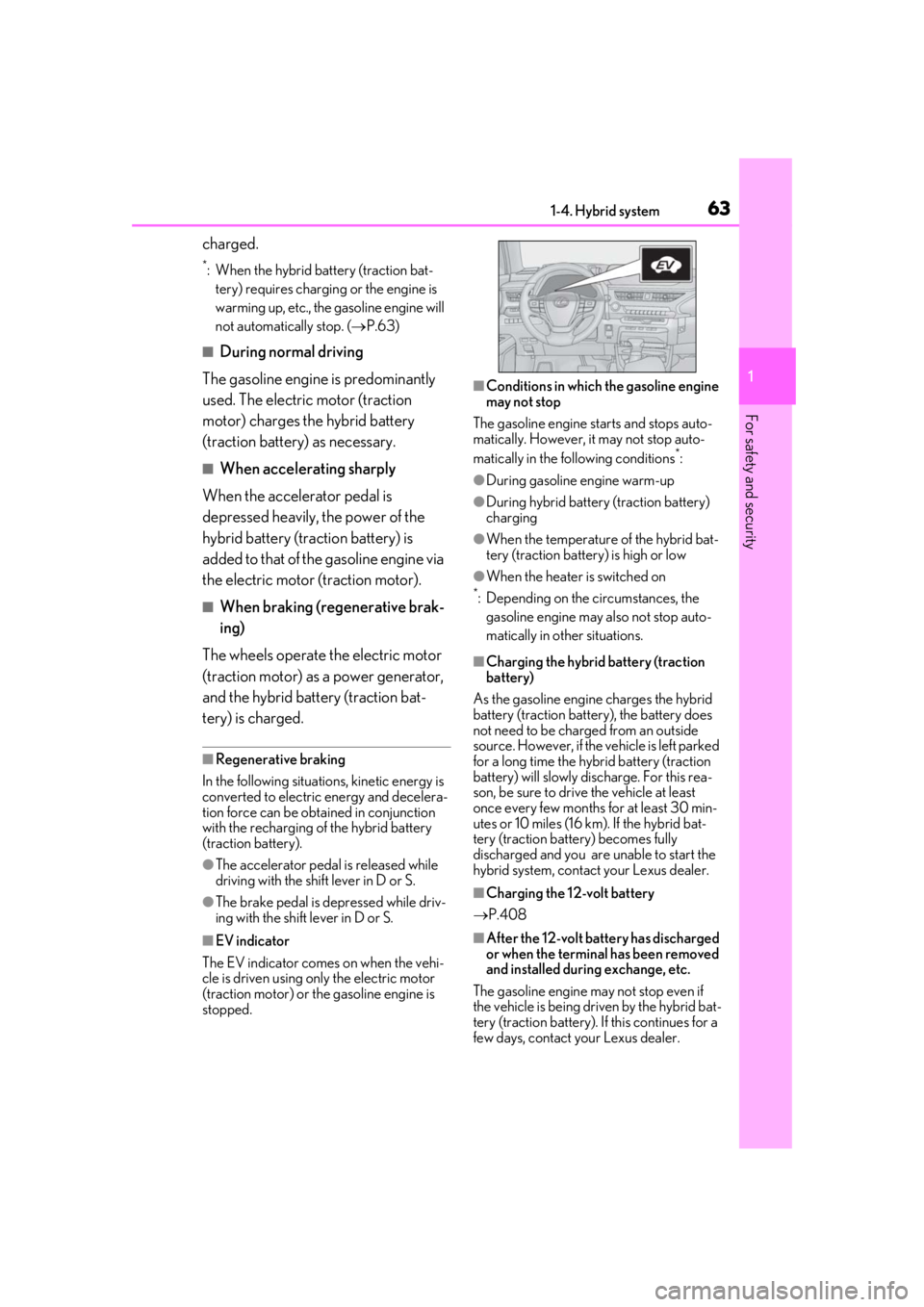
■EV indicator
The EV indicator comes on when the vehi-
cle is driven using only the electric motor
(traction motor) or th e gasoline engine is
stopped.
■Conditions in which the gasoline engine
may not stop
The gasoline engine starts and stops auto-
matically. However, it may not stop auto-
matically in the following conditions
*:
●During gasoline engine warm-up
●During hybrid battery (traction battery)
charging
●When the temperature of the hybrid bat-
tery (traction battery) is high or low
●When the heater is switched on
*: Depending on the circumstances, the gasoline engine may also not stop auto-
matically in other situations.
■Charging the hybrid battery (traction
battery)
As the gasoline engine charges the hybrid
battery (traction battery), the battery does
not need to be charged from an outside
source. However, if the vehicle is left parked
for a long time the hybrid battery (traction
battery) will slowly discharge. For this rea-
son, be sure to drive the vehicle at least
once every few months for at least 30 min-
utes or 10 miles (16 km ). If the hybrid bat-
tery (traction battery) becomes fully
discharged and you are unable to start the
hybrid system, contact your Lexus dealer.
■Charging the 12-volt battery
P.408
■After the 12-volt battery has discharged
or when the terminal has been removed
and installed during exchange, etc.
The gasoline engine may not stop even if
the vehicle is being driven by the hybrid bat-
tery (traction battery). If this continues for a
few days, contact your Lexus dealer.
Page 71 of 476
711-5. Theft deterrent system
1
For safety and security
■Items to check before locking the
vehicle
To prevent unexpected triggering of
the alarm and vehicle theft, make sure
of the following:
Nobody is in the vehicle.
The windows and moon roof (if
equipped) are closed before the
alarm is set.
No valuables or other personal
items are left in the vehicle.
■Setting
Close the doors and hood, and lock all
the doors. The system will be set auto-
matically after 30 seconds.
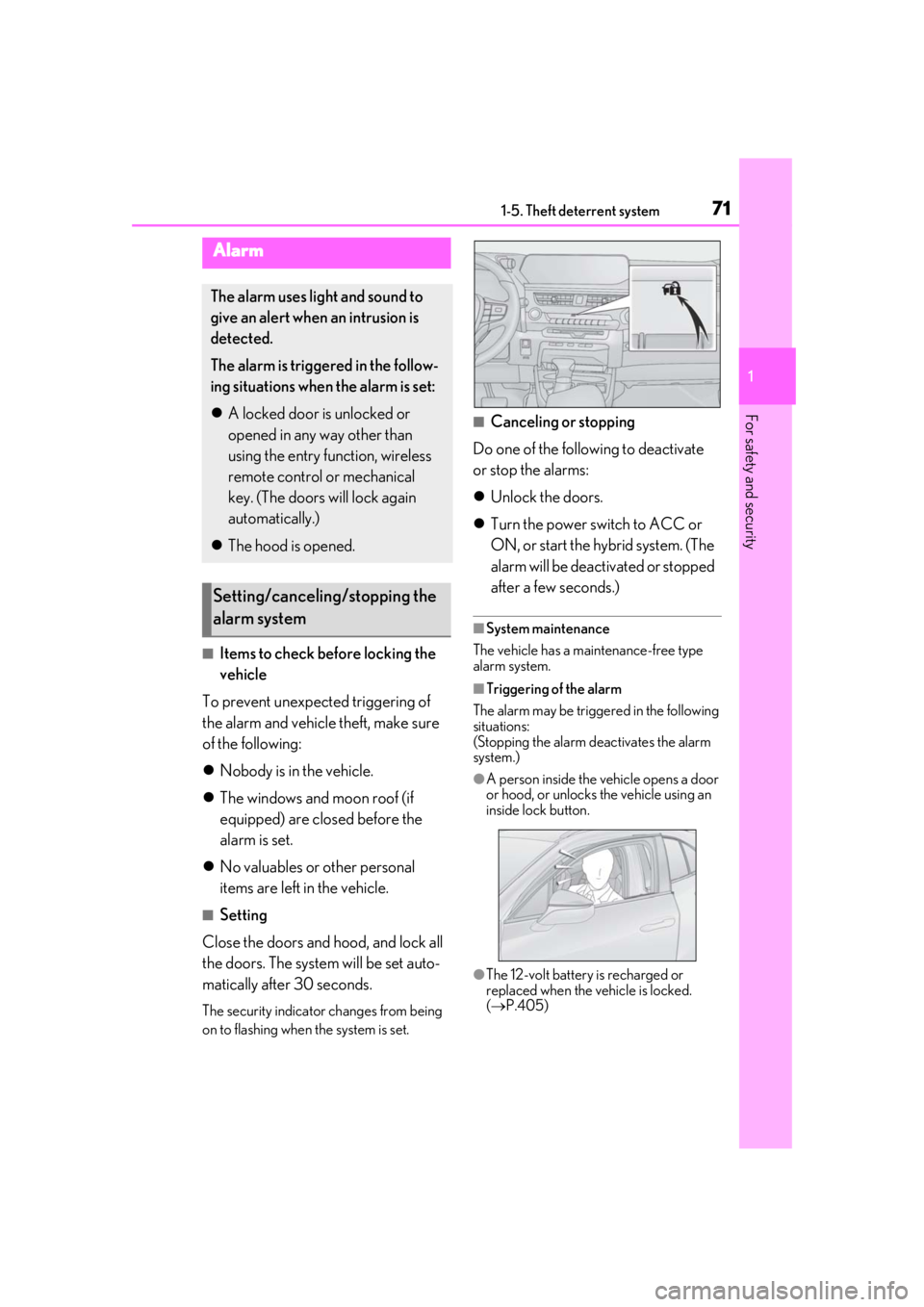
The security indicator changes from being
on to flashing when the system is set.
■Canceling or stopping
Do one of the following to deactivate
or stop the alarms:
Unlock the doors.
Turn the power switch to ACC or
ON, or start the hybrid system. (The
alarm will be deactivated or stopped
after a few seconds.)
■System maintenance
The vehicle has a maintenance-free type
alarm system.
■Triggering of the alarm
The alarm may be triggered in the following
situations:
(Stopping the alarm deactivates the alarm
system.)
●A person inside the vehicle opens a door
or hood, or unlocks the vehicle using an
inside lock button.
●The 12-volt battery is recharged or
replaced when the vehicle is locked.
( P.405)
Alarm
The alarm uses light and sound to
give an alert when an intrusion is
detected.
The alarm is triggered in the follow-
ing situations when the alarm is set:
A locked door is unlocked or
opened in any way other than
using the entry function, wireless
remote control or mechanical
key. (The doors will lock again
automatically.)
The hood is opened.
Setting/canceling/stopping the
alarm system
Page 76 of 476
762-1. Instrument cluster
*1: These lights come on when the power switch is turned to ON to indicate that a
system check is being performed. They
will go off after the hybrid system is on,
or after a few seconds. There may be a
malfunction in a system if the lights do
not come on, or go off. Have the vehicle
inspected by your Lexus dealer.
*2: This light illuminates on the multi-infor-
mation display.
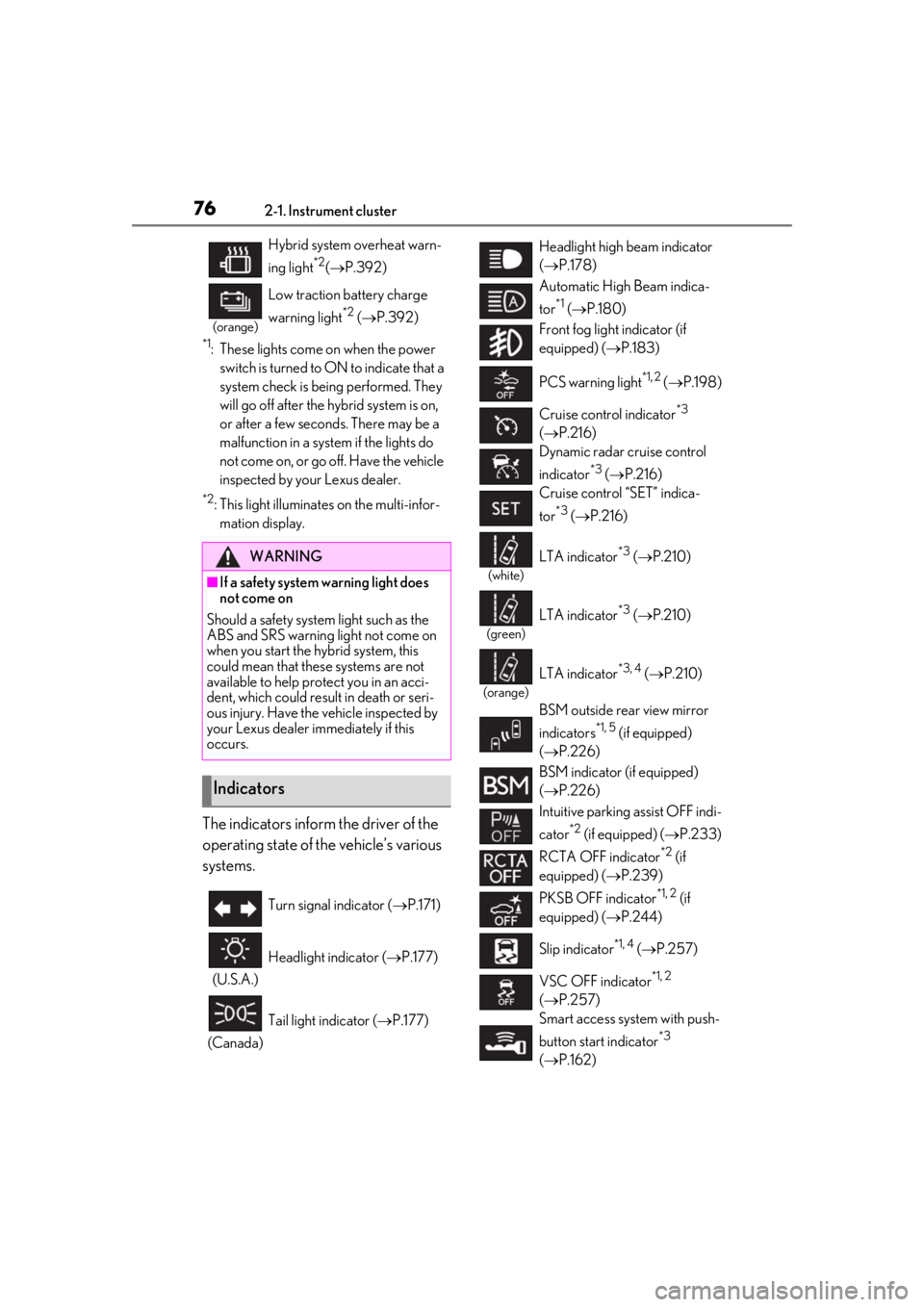
The indicators inform the driver of the
operating state of the vehicle’s various
systems.
Hybrid system overheat warn-
ing light
*2( P.392)
(orange)
Low traction battery charge
warning light
*2 ( P.392)
WARNING
■If a safety system warning light does
not come on
Should a safety system light such as the
ABS and SRS warning light not come on
when you start the hybrid system, this
could mean that these systems are not
available to help pr otect you in an acci-
dent, which could result in death or seri-
ous injury. Have the vehicle inspected by
your Lexus dealer immediately if this
occurs.
Indicators
Turn signal indicator ( P.171)
(U.S.A.) Headlight indicator (
P.177)
(Canada) Tail light indicator (
P.177)
Headlight high beam indicator
( P.178)
Automatic High Beam indica-
tor
*1 ( P.180)
Front fog light indicator (if
equipped) ( P.183)
PCS warning light
*1, 2 ( P.198)
Cruise control indicator
*3
( P.216)
Dynamic radar cruise control
indicator
*3 ( P.216)
Cruise control “SET” indica-
tor
*3 ( P.216)
(white)
LTA indicator*3 ( P.210)
(green)
LTA indicator*3 ( P.210)
(orange)
LTA indicator*3, 4 ( P.210)
BSM outside rear view mirror
indicators
*1, 5 (if equipped)
( P.226)
BSM indicator (if equipped)
( P.226)
Intuitive parking assist OFF indi-
cator
*2 (if equipped) ( P.233)
RCTA OFF indicator
*2 (if
equipped) ( P.239)
PKSB OFF indicator
*1, 2 (if
equipped) ( P.244)
Slip indicator
*1, 4 ( P.257)
VSC OFF indicator
*1, 2
( P.257)
Smart access system with push-
button start indicator
*3
( P.162)
Page 79 of 476
792-1. Instrument cluster
2
Vehicle status information and indicators
Shift position/shift range (P.167)
Odometer and trip meter display ( P.80)
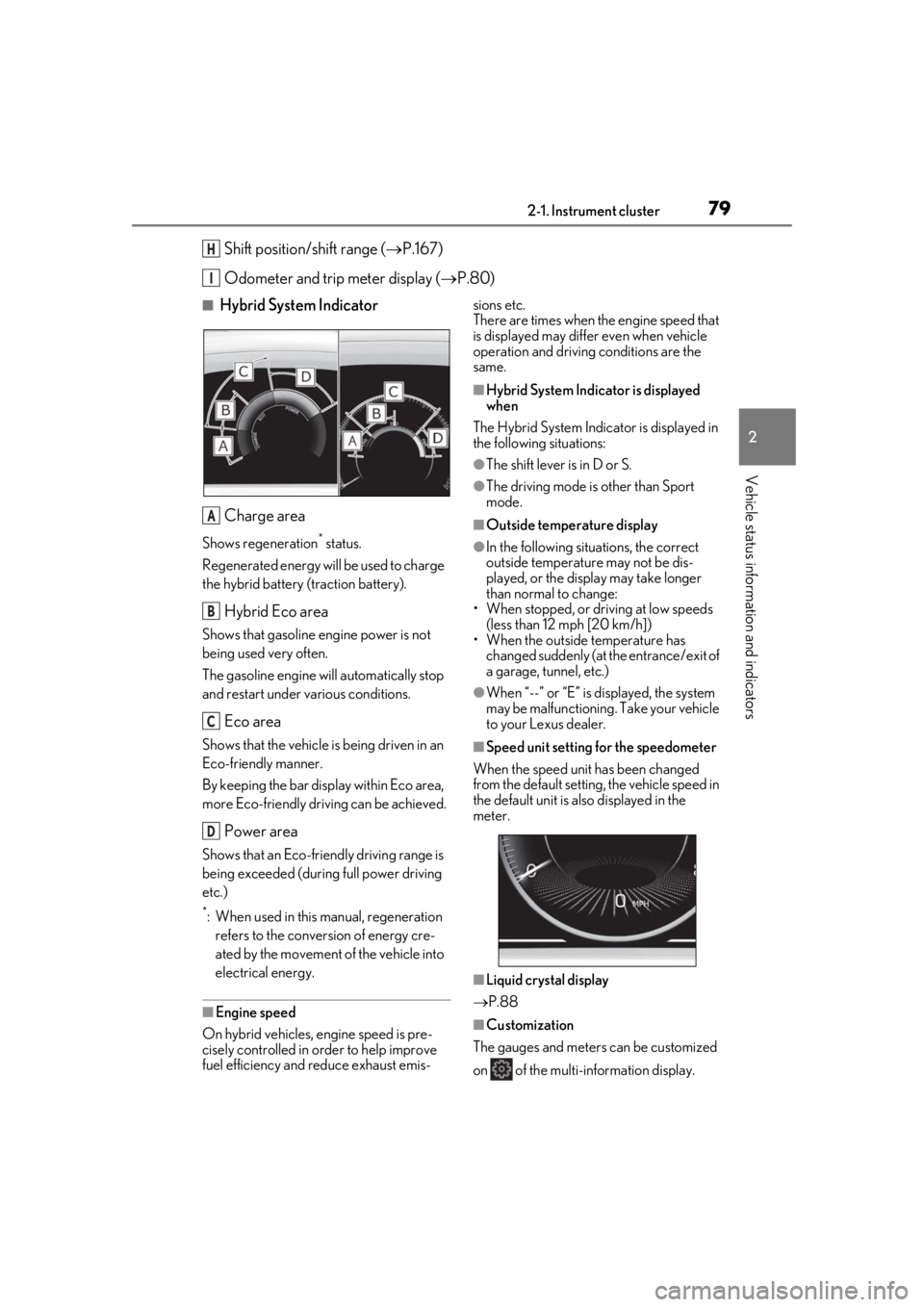
■Hybrid System Indicator
Charge area
Shows regeneration* status.
Regenerated energy will be used to charge
the hybrid battery (traction battery).
Hybrid Eco area
Shows that gasoline engine power is not
being used very often.
The gasoline engine will automatically stop
and restart under various conditions.
Eco area
Shows that the vehicle is being driven in an
Eco-friendly manner.
By keeping the bar display within Eco area,
more Eco-friendly driv ing can be achieved.
Power area
Shows that an Eco-friendly driving range is
being exceeded (durin g full power driving
etc.)
*: When used in this manual, regeneration refers to the conversion of energy cre-
ated by the movement of the vehicle into
electrical energy.
■Engine speed
On hybrid vehicles, engine speed is pre-
cisely controlled in order to help improve
fuel efficiency and reduce exhaust emis- sions etc.
There are times when the engine speed that
is displayed may differ even when vehicle
operation and driving
conditions are the
same.
■Hybrid System Indicator is displayed
when
The Hybrid System Indicator is displayed in
the following situations:
●The shift lever is in D or S.
●The driving mode is other than Sport
mode.
■Outside temperature display
●In the following situations, the correct
outside temperature may not be dis-
played, or the display may take longer
than normal to change:
• When stopped, or driving at low speeds (less than 12 mph [20 km/h])
• When the outside temperature has
changed suddenly (at the entrance/exit of
a garage, tunnel, etc.)
●When “--” or “E” is displayed, the system
may be malfunctioning. Take your vehicle
to your Lexus dealer.
■Speed unit setting for the speedometer
When the speed unit has been changed
from the default setting, the vehicle speed in
the default unit is also displayed in the
meter.
■Liquid crystal display
P.88
■Customization
The gauges and meters can be customized
on of the multi-information display.
H
I
A
B
C
D
Page 84 of 476
842-1. Instrument cluster
•Rev peak
Shift position/shift range (P.167)
Odometer and trip meter display ( P.86)
Fuel gauge
Displays the quantity of fuel remaining in the tank
Engine coolant temperature gauge
Displays the engine coolant temperature
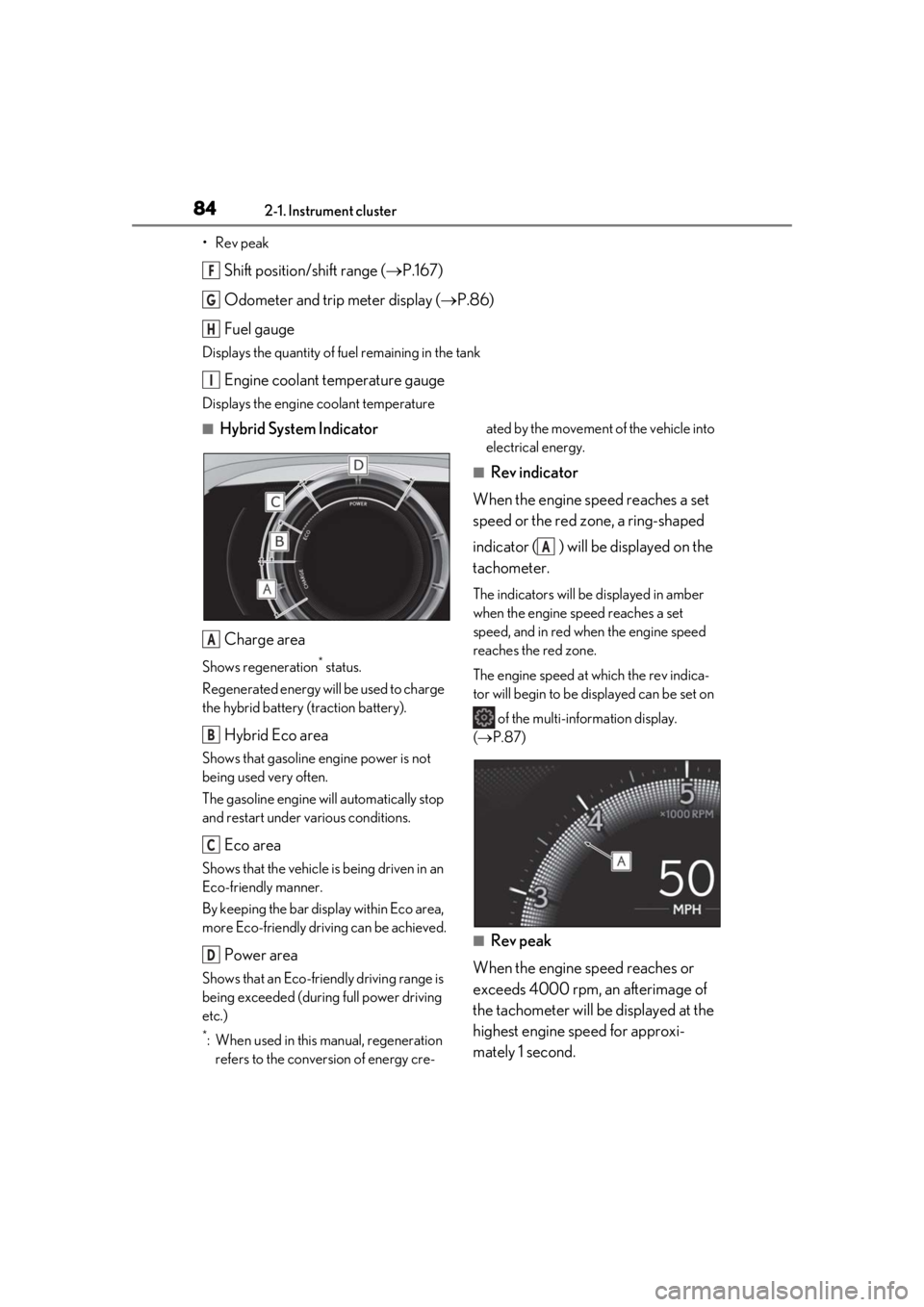
■Hybrid System Indicator
Charge area
Shows regeneration* status.
Regenerated energy will be used to charge
the hybrid battery (traction battery).
Hybrid Eco area
Shows that gasoline engine power is not
being used very often.
The gasoline engine will automatically stop
and restart under various conditions.
Eco area
Shows that the vehicle is being driven in an
Eco-friendly manner.
By keeping the bar display within Eco area,
more Eco-friendly driv ing can be achieved.
Power area
Shows that an Eco-friendly driving range is
being exceeded (durin g full power driving
etc.)
*: When used in this manual, regeneration refers to the conversion of energy cre- ated by the movement of the vehicle into
electrical energy.
■Rev indicator
When the engine speed reaches a set
speed or the red zone, a ring-shaped
indicator ( ) will be displayed on the
tachometer.
The indicators will be displayed in amber
when the engine speed reaches a set
speed, and in red when the engine speed
reaches the red zone.
The engine speed at which the rev indica-
tor will begin to be displayed can be set on
of the multi-information display.
( P.87)
■Rev peak
When the engine speed reaches or
exceeds 4000 rpm, an afterimage of
the tachometer will be displayed at the
highest engine speed for approxi-
mately 1 second.
F
G
H
I
A
B
C
D
A
Page 91 of 476
912-1. Instrument cluster
2
Vehicle status information and indicators
Select to display warning messages
and measures to be taken if a malfunc-
tion is detected. (P.395)
■Meter display settings that can be
changed
Language
Select to change th e language displayed.
Units
Select to change the units of measure dis-
played.
Speedometer display (except F
SPORT models)
Select to set the display of the speedome-
ter to digital/analog.
Drive information 1/Drive informa-
tion 2
Select to select up to 2 items ( P.89) that
will be displayed on ea ch Drive information
screen (Drive information 1 screen and
Drive information 2 screen) respectively.
Clock
Select to switch be tween 12-hour display
and 24-hour display.
Pop-up display
Select to enable/disable some pop-up dis-
plays for each relevant system.
Accent color
Select to change the accent color on the
screen, such as the cursor color.
Tachometer setting
Select to set the display of the Hybrid Sys-
tem Indicator or tachometer for each driv- ing mode.
Rev indicator (F SPORT models)
• Select to enable/disable the rev indica-
tor.
• Select to set the engine speed at which the rev indicator (amber) will begin to be
displayed.
Rev peak (F SPORT models)
Select to enable/disable the rev peak.
EV indicator
Select to enable/disable the EV indicator.
Default setting
Select to reset the meter display settings to
the default setting.
■Suspension of the settings display
●Some settings cannot be changed while
driving. When changing settings, park
the vehicle in a safe place.
●If a warning message is displayed, opera-
tion of the settings display will be sus-
pended.
Warning message display
Settings display
WARNING
■Cautions during setting up the dis-
play
As the hybrid system needs to be operat-
ing during setting up the display, ensure
that the vehicle is parked in a place with
adequate ventilation. In a closed area
such as a garage, ex haust gases includ-
ing harmful carbon monoxide (CO) may
collect and enter the vehicle. This may
lead to death or a serious health hazard.
NOTICE
■During setting up the display
To prevent 12-volt battery discharge,
ensure that the hybrid system is operat-
ing while setting up the display features.
Page 95 of 476
952-1. Instrument cluster
2
Vehicle status information and indicators
Display angle
Select to adjust the angle of the head-up
display.
■Enabling/disabling of the head-up dis-
play
If the head-up display is disabled, it will
remain disabled when the power switch is
turned off then back to ON.
■Display brightness
The brightness of the head-up display can
be adjusted on of the multi-information
display. Also, it is automatically adjusted
according to the ambient brightness.
■Head-up display automatic position
adjustment (vehicles with driving posi-
tion memory)
If the display position is recorded into mem-
ory, the head-up display will be automati-
cally adjusted to the desired position.
( P.133)
■When the 12-volt battery is discon-
nected
The customize settings of the head-up dis-
play will be reset.
Displays the operational status of the
following systems:
LTA (Lane Tracing Assist)
( P.205)
Dynamic radar cruise control with
full-speed range ( P.216)
Details of content displayed on the head-
up display may differ from that displayed
on the multi-inform ation display. For
details, refer to the explanation of each sys-
tem.
Pop-up displays for the following sys-
tems will be displayed when necessary.
■Driving support systems
Displays a warning/suggestion/advice
message or the operating state of a rel-
evant system.
PCS (Pre-Collision System)
( P.198)
Intuitive parking assist (if equipped)
( P.232)
Parking Support Brake function (for
static objects) (if equipped)
( P.247)
Brake Override System ( P.152)
WARNING
■Caution for changing settings of the
head-up display
As the hybrid system needs to be operat-
ing while changing th e settings of the
head-up display, ensure that the vehicle
is parked in a place with adequate venti-
lation. In a closed area such as a garage,
exhaust gases including harmful carbon
monoxide (CO) may collect and enter
the vehicle. This may lead to death or a
serious health hazard.
NOTICE
■When changing the settings of the
head-up display
To prevent 12-volt battery discharge,
ensure that the hybrid system is operat-
ing while changing th e settings of the
head-up display.
Driving support system display
area
Pop-up display
Page 105 of 476
1053-1. Key information
3
Before driving
You can replace the battery by yourself
( P.368). However, as there is a danger
that the electronic key may be damaged, it
is recommended that replacement be car-
ried out by your Lexus dealer.
●To avoid serious deterioration, do not
leave the electronic key within 3 ft. (1 m)
of the following electr ical appliances that
produce a magnetic field:
• TVs
• Personal computers
• Cellular phones, cordless phones and battery chargers
• Recharging cellular phones or cordless phones
• Table lamps
• Induction cookers
■Replacing the battery
P.368
■Confirmation of the registered key
number
The number of keys already registered to
the vehicle can be confirmed. Ask your
Lexus dealer for details.
■If “A New Key has been Registered
Contact Your Dealer for Details” is
shown on the multi-information display
This message will be displayed each time
the driver’s door is opened when the doors
are unlocked from the outside for approxi-
mately 10 days after a new electronic key
has been registered. If this message is dis-
played but you have not had a new elec-
tronic key registered, ask your Lexus dealer
to check if an unknown electronic key
(other than those in your possession) has
been registered.
NOTICE
■To prevent key damage
●Do not drop the keys, subject them to
strong shocks or bend them.
●Do not expose the keys to high tem-
peratures for long periods of time.
●Do not get the keys wet or wash them
in an ultrasonic washer, etc.
●Do not attach metallic or magnetic
materials to the keys or place the keys
close to such materials.
●Do not disassemble the keys.
●Do not attach a sticker or anything else
to the surface of the electronic key.
●Do not place the keys near objects that
produce magnetic fields, such as TVs,
audio systems and induction cookers,
or medical electrical equipment, such
as low-frequency therapy equipment.
■Carrying the electronic key on your
person
Carry the electronic key 3.9 in. (10 cm)
or more away from electric appliances
that are turned on. Radio waves emitted
from electric applianc es within 3.9 in. (10
cm) of the electronic key may interfere
with the key, causing the key to not func-
tion properly.
■In case of a smart access system with
push-button start malfunction or
other key-related problems
P.403
■When an electronic key is lost
P.402
■Handling the card key
●If the battery or card key terminals get
wet, the battery may corrode and the
card key may stop working.
If the key is dropped into water, or if
drinking water, etc., is spilled on the
key, immediately remove the battery
cover and wipe the battery and termi-
nals. (To remove the battery cover,
lightly grasp and pull it.) If the battery is
corroded, have your Lexus dealer
replace the battery.
●Do not crush the battery cover or use
a screwdriver to remove the battery
cover.
Forcibly removing the battery cover
may bend or damage the key.