steering wheel adjustment LEXUS UX250H 2019 Owners Manual
[x] Cancel search | Manufacturer: LEXUS, Model Year: 2019, Model line: UX250H, Model: LEXUS UX250H 2019Pages: 476, PDF Size: 10.51 MB
Page 25 of 476
251-1. For safe use
1
For safety and security
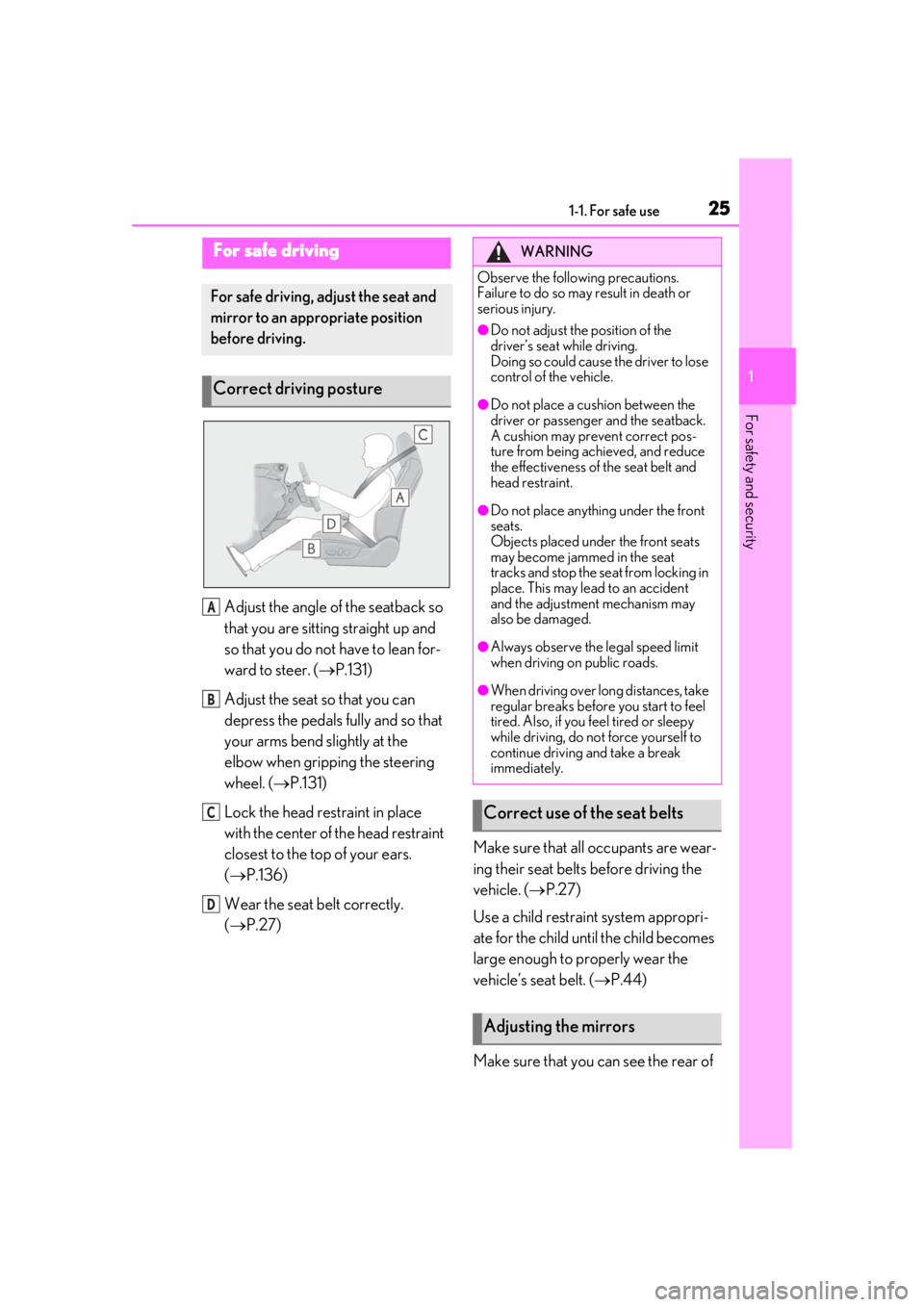
Adjust the angle of the seatback so
that you are sitting straight up and
so that you do not have to lean for-
ward to steer. (P.131)
Adjust the seat so that you can
depress the pedals fully and so that
your arms bend slightly at the
elbow when gripping the steering
wheel. ( P.131)
Lock the head restraint in place
with the center of the head restraint
closest to the top of your ears.
( P.136)
Wear the seat belt correctly.
( P.27) Make sure that all occupants are wear-
ing their seat belts before driving the
vehicle. (
P.27)
Use a child restraint system appropri-
ate for the child until the child becomes
large enough to properly wear the
vehicle’s seat belt. ( P.44)
Make sure that you can see the rear of
For safe driving
For safe driving, adjust the seat and
mirror to an appropriate position
before driving.
Correct driving posture
A
B
C
D
WARNING
Observe the following precautions.
Failure to do so may result in death or
serious injury.
●Do not adjust the position of the
driver’s seat while driving.
Doing so could cause the driver to lose
control of the vehicle.
●Do not place a cushion between the
driver or passenger and the seatback.
A cushion may prevent correct pos-
ture from being achieved, and reduce
the effectiveness of the seat belt and
head restraint.
●Do not place anything under the front
seats.
Objects placed under the front seats
may become jammed in the seat
tracks and stop the seat from locking in
place. This may lead to an accident
and the adjustment mechanism may
also be damaged.
●Always observe the legal speed limit
when driving on public roads.
●When driving over long distances, take
regular breaks before you start to feel
tired. Also, if you feel tired or sleepy
while driving, do not force yourself to
continue driving and take a break
immediately.
Correct use of the seat belts
Adjusting the mirrors
Page 131 of 476
1313-3. Adjusting the seats
3
Before driving
3-3.Adjusting the seats
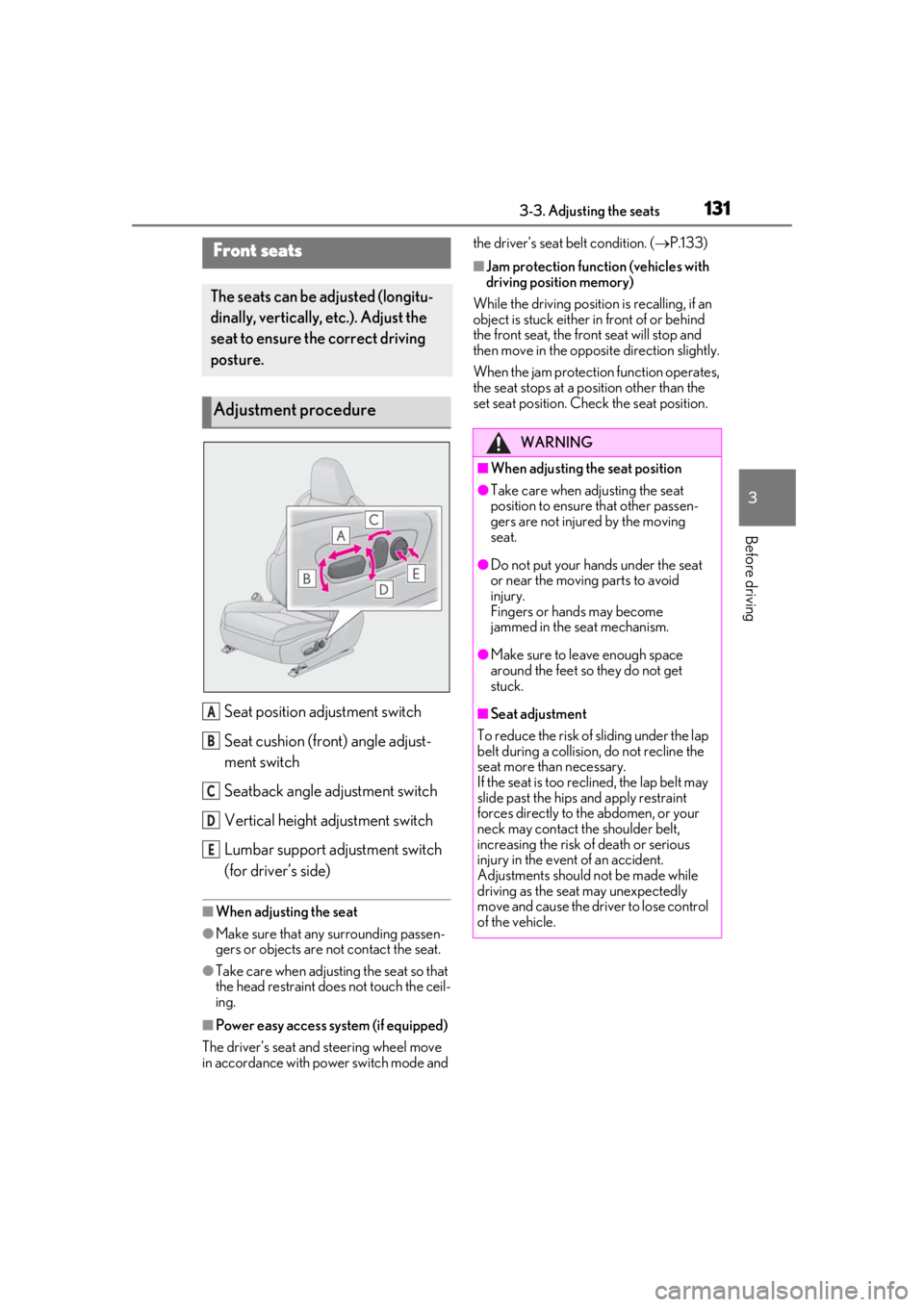
Seat position adjustment switch
Seat cushion (front) angle adjust-
ment switch
Seatback angle adjustment switch
Vertical height adjustment switch
Lumbar support adjustment switch
(for driver’s side)
■When adjusting the seat
●Make sure that any surrounding passen-
gers or objects are not contact the seat.
●Take care when adjusting the seat so that
the head restraint does not touch the ceil-
ing.
■Power easy access system (if equipped)
The driver’s seat and steering wheel move
in accordance with power switch mode and the driver’s seat belt condition. (
P.133)
■Jam protection function (vehicles with
driving position memory)
While the driving position is recalling, if an
object is stuck either in front of or behind
the front seat, the front seat will stop and
then move in the opposite direction slightly.
When the jam protection function operates,
the seat stops at a po sition other than the
set seat position. Chec k the seat position.Front seats
The seats can be adjusted (longitu-
dinally, vertically, etc.). Adjust the
seat to ensure the correct driving
posture.
Adjustment procedure
A
B
C
D
E
WARNING
■When adjusting the seat position
●Take care when adjusting the seat
position to ensure that other passen-
gers are not injured by the moving
seat.
●Do not put your hands under the seat
or near the moving parts to avoid
injury.
Fingers or hands may become
jammed in the seat mechanism.
●Make sure to leave enough space
around the feet so they do not get
stuck.
■Seat adjustment
To reduce the risk of sliding under the lap
belt during a collision, do not recline the
seat more than necessary.
If the seat is too rec lined, the lap belt may
slide past the hips and apply restraint
forces directly to the abdomen, or your
neck may contact the shoulder belt,
increasing the risk of death or serious
injury in the event of an accident.
Adjustments should not be made while
driving as the seat may unexpectedly
move and cause the driver to lose control
of the vehicle.
Page 134 of 476
1343-3. Adjusting the seats
unfastened.
When any of the following has been
performed, the driver’s seat and steer-
ing wheel automatically return to their
original positions.
The power switch has been turned
to ACC or ON.
The driver’s seat belt has been fas-
tened.
■Operation of the power easy access sys-
tem
When exiting the vehicle, the power easy
access system may not operate if the seat is
already close to the rearmost position, etc.
■Customization
The seat movement amou nt settings of the
power easy access sy stem can be custom-
ized. (Customizable features: P.439)
1Check that the shift lever is in P.
2
Turn the power switch to ON.
3
Adjust the driver’s seat, steering
wheel, outside rear view mirrors
and head-up display (if equipped)
to the desired positions.
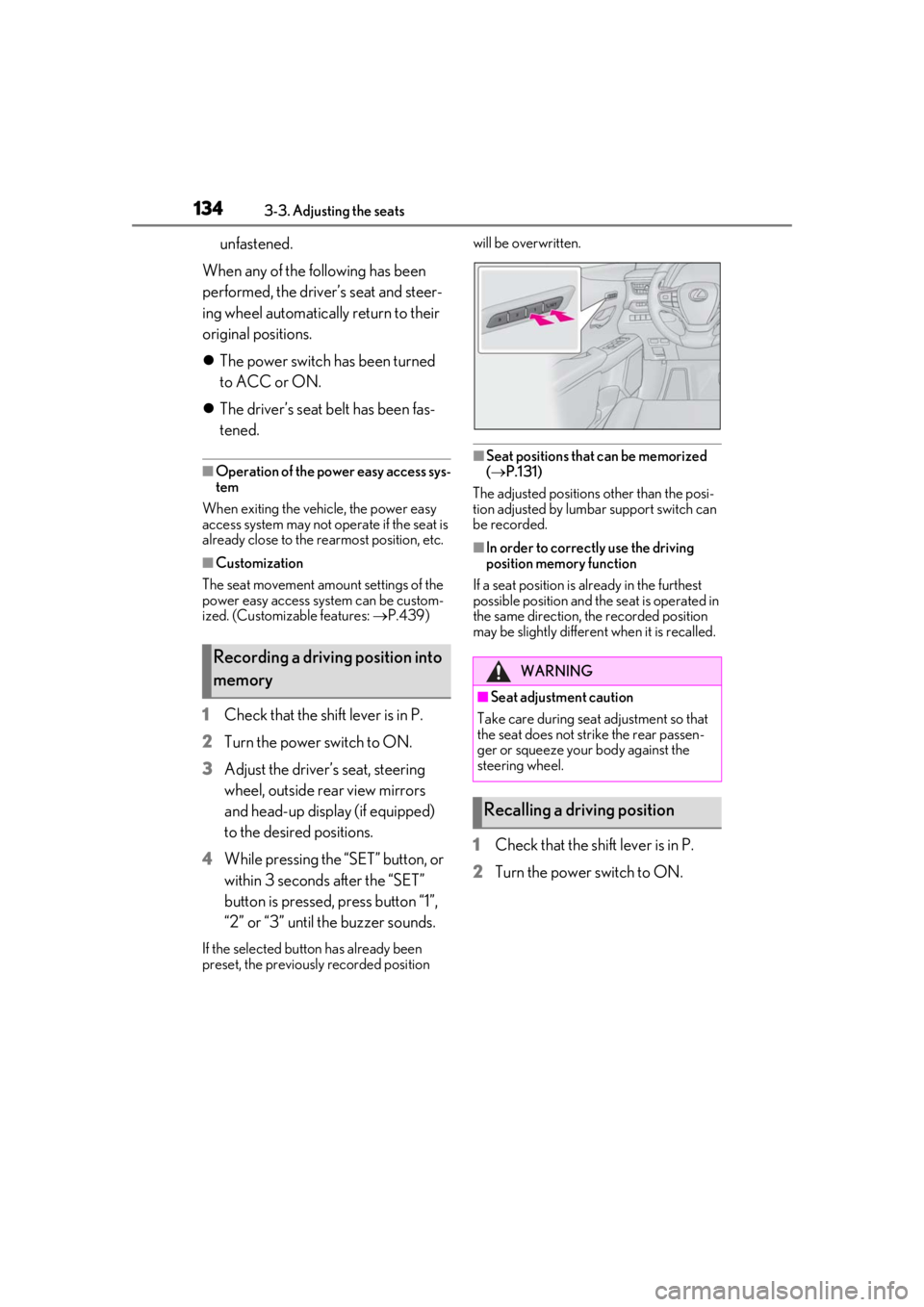
4
While pressing the “SET” button, or
within 3 seconds after the “SET”
button is pressed, press button “1”,
“2” or “3” until the buzzer sounds.
If the selected button has already been
preset, the previously recorded position will be overwritten.
■Seat positions that can be memorized
(
P.131)
The adjusted positions other than the posi-
tion adjusted by lumbar support switch can
be recorded.
■In order to correctly use the driving
position memory function
If a seat position is already in the furthest
possible position and the seat is operated in
the same direction, the recorded position
may be slightly differen t when it is recalled.
1Check that the shift lever is in P.
2
Turn the power switch to ON.
Recording a driving position into
memoryWARNING
■Seat adjustme nt caution
Take care during seat adjustment so that
the seat does not strike the rear passen-
ger or squeeze your body against the
steering wheel.
Recalling a driving position
Page 135 of 476
1353-3. Adjusting the seats
3
Before driving
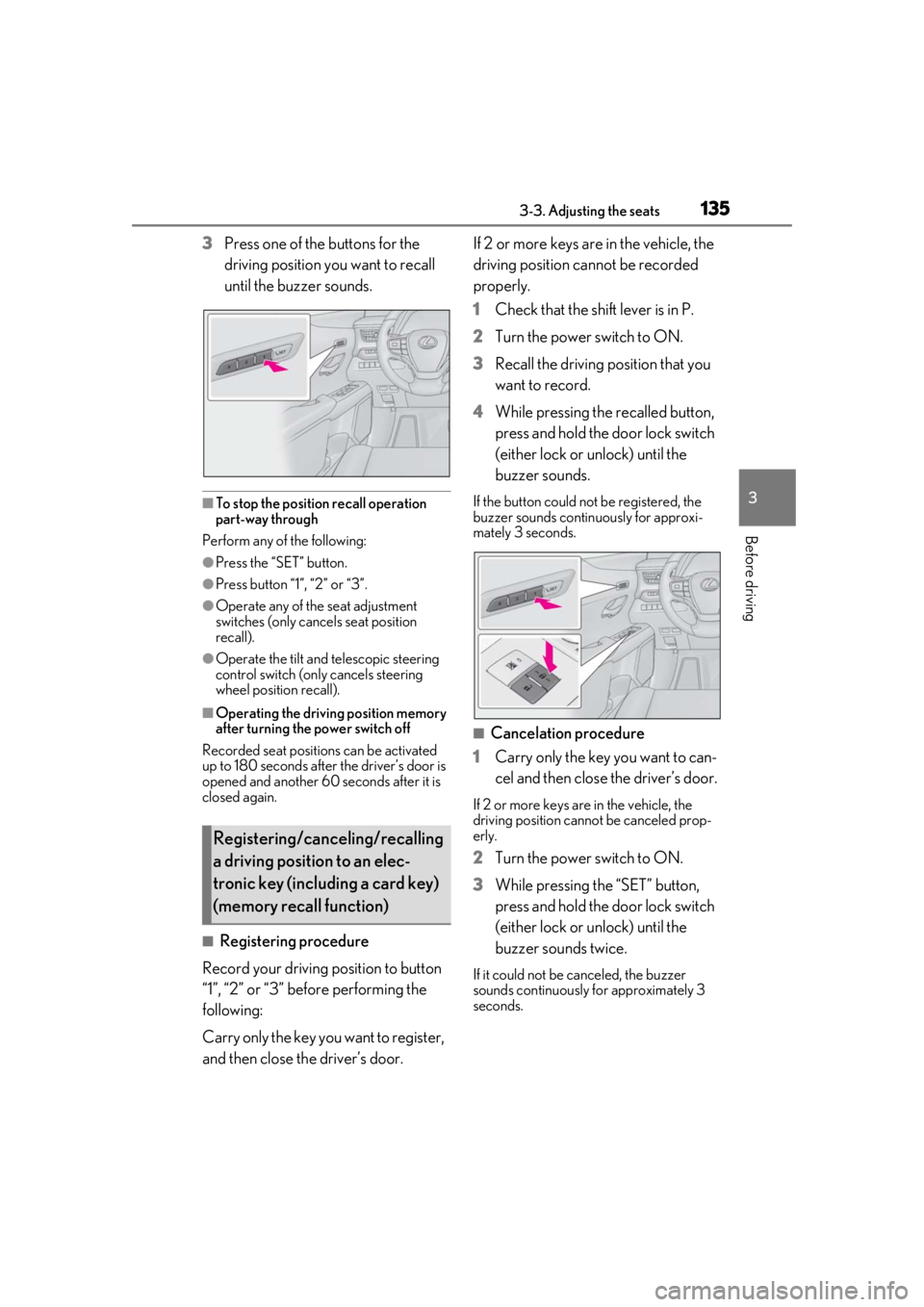
3Press one of the buttons for the
driving position you want to recall
until the buzzer sounds.
■To stop the position recall operation
part-way through
Perform any of the following:
●Press the “SET” button.
●Press button “1”, “2” or “3”.
●Operate any of the seat adjustment
switches (only cancels seat position
recall).
●Operate the tilt and telescopic steering
control switch (only cancels steering
wheel position recall).
■Operating the driving position memory
after turning the power switch off
Recorded seat positions can be activated
up to 180 seconds after the driver’s door is
opened and another 60 seconds after it is
closed again.
■Registering procedure
Record your driving position to button
“1”, “2” or “3” before performing the
following:
Carry only the key you want to register,
and then close the driver’s door. If 2 or more keys are in the vehicle, the
driving position cannot be recorded
properly.
1
Check that the shift lever is in P.
2 Turn the power switch to ON.
3 Recall the driving position that you
want to record.
4 While pressing the recalled button,
press and hold the door lock switch
(either lock or unlock) until the
buzzer sounds.
If the button could not be registered, the
buzzer sounds continuously for approxi-
mately 3 seconds.
■Cancelation procedure
1 Carry only the key you want to can-
cel and then close the driver’s door.
If 2 or more keys are in the vehicle, the
driving position cannot be canceled prop-
erly.
2Turn the power switch to ON.
3 While pressing the “SET” button,
press and hold the door lock switch
(either lock or unlock) until the
buzzer sounds twice.
If it could not be canceled, the buzzer
sounds continuously for approximately 3
seconds.
Registering/canceling/recalling
a driving position to an elec-
tronic key (including a card key)
(memory recall function)
Page 136 of 476
1363-3. Adjusting the seats
■Recall procedure
1
Make sure that the doors are
locked before recalling the driving
position. Carry the electronic key
that has been registered to the driv-
ing position, and then unlock and
open the driver’s door using the
smart access system with push-but-
ton start or wireless remote control.
The driving position will move to the
recorded position (not including the steer-
ing wheel and head-up display [if
equipped]). However, the seat will move to
a position slightly behind the recorded
position in order to make entering the vehi-
cle easier.
If the driving position is in a position that
has already been recorded, the seat and
outside rear view mirrors will not move.
2Turn the power switch to ACC or
ON, or fasten a seat belt.
The seat, steering wheel and head-up dis-
play (if equipped) will move to the
recorded position.
■Recalling the driving position using the
memory recall function
●Different driving positions can be regis-
tered for each electronic key. Therefore,
the driving position that is recalled may
be different depending on the key being
carried.
●If a door other than the driver’s door is
unlocked with the smart access system
with push-button start, the driving posi-
tion cannot be recalled. In this case, press
the driving position button which has
been set.
■Customization
The unlock door settings of the memory
recall function can be customized. (Cus-
tomizable features: P.439)
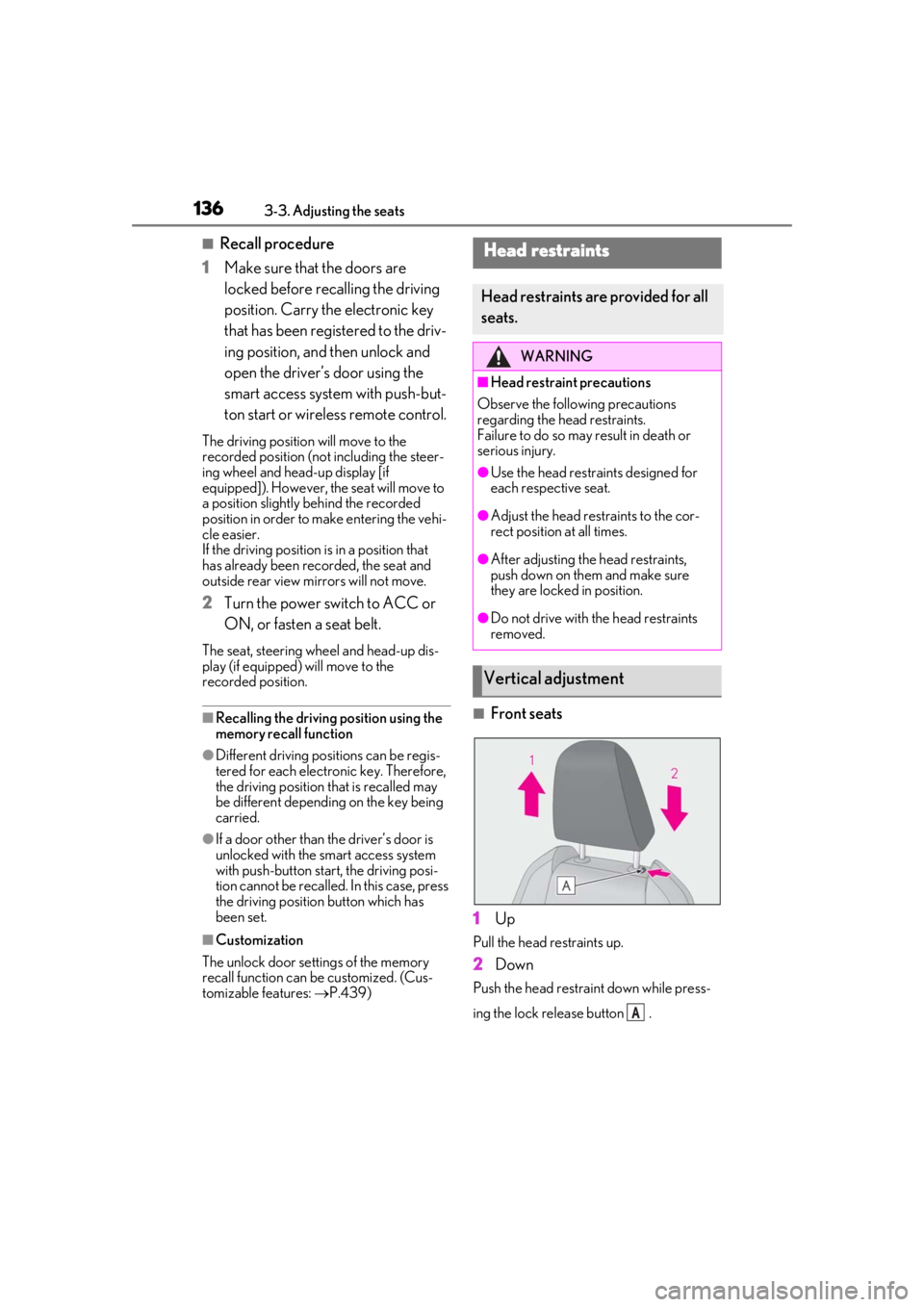
■Front seats
1
Up
Pull the head restraints up.
2Down
Push the head restraint down while press-
ing the lock release button .
Head restraints
Head restraints are provided for all
seats.
WARNING
■Head restraint precautions
Observe the following precautions
regarding the he ad restraints.
Failure to do so may result in death or
serious injury.
●Use the head restraints designed for
each respective seat.
●Adjust the head restraints to the cor-
rect position at all times.
●After adjusting the head restraints,
push down on them and make sure
they are locked in position.
●Do not drive with the head restraints
removed.
Vertical adjustment
A
Page 139 of 476
1393-4. Adjusting the steering wheel and mirrors
3
Before driving
3-4.Adjusting the steering wheel and mirrors
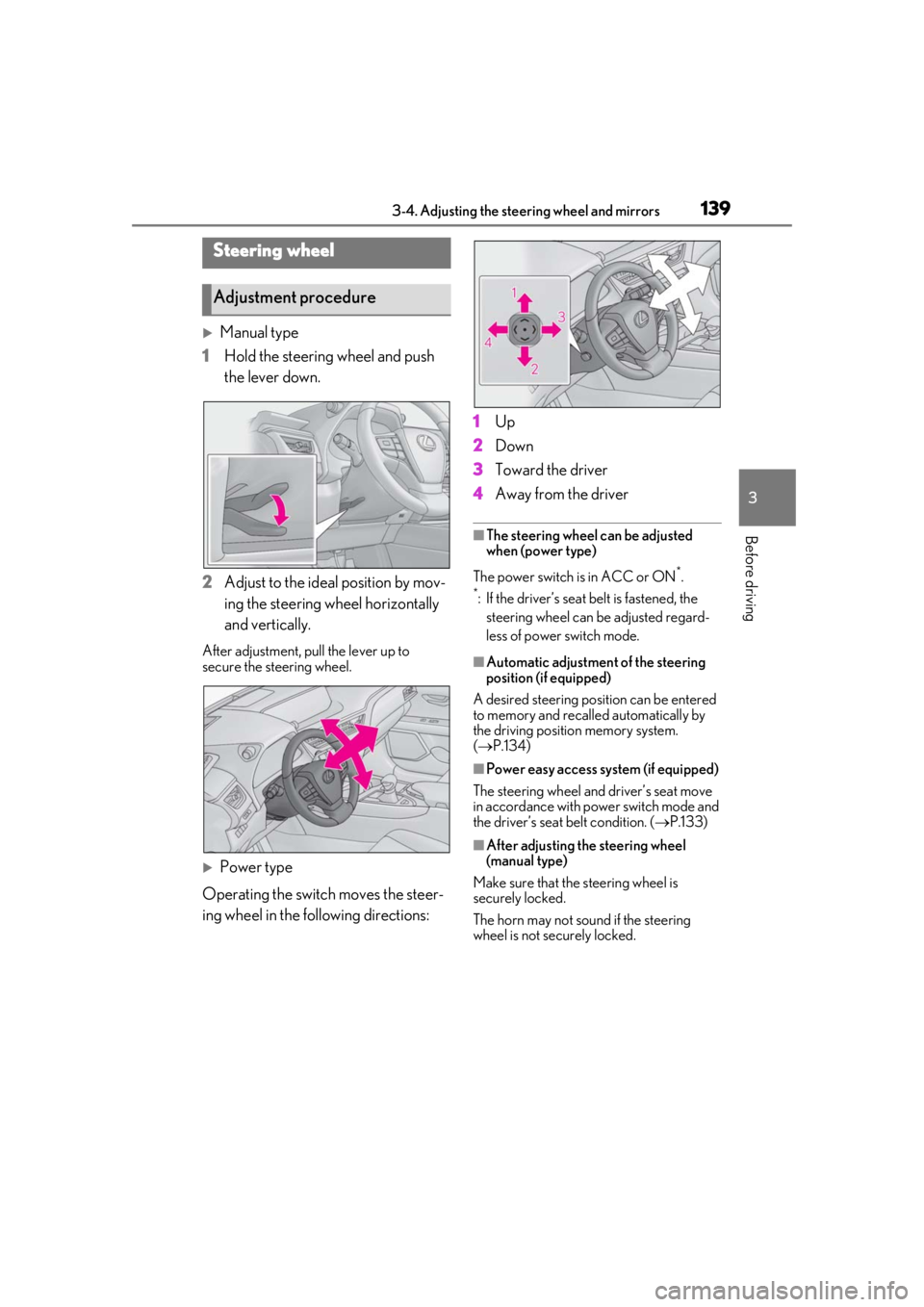
Manual type
1 Hold the steering wheel and push
the lever down.
2 Adjust to the ideal position by mov-
ing the steering wheel horizontally
and vertically.
After adjustment, pull the lever up to
secure the steering wheel.
Power type
Operating the switch moves the steer-
ing wheel in the following directions: 1
Up
2 Down
3 Toward the driver
4 Away from the driver
■The steering wheel can be adjusted
when (power type)
The power switch is in ACC or ON
*.
*: If the driver’s seat belt is fastened, the
steering wheel can be adjusted regard-
less of power switch mode.
■Automatic adjustment of the steering
position (if equipped)
A desired steering posi tion can be entered
to memory and recalled automatically by
the driving position memory system.
( P.134)
■Power easy access system (if equipped)
The steering wheel and driver’s seat move
in accordance with power switch mode and
the driver’s seat belt condition. ( P.133)
■After adjusting the steering wheel
(manual type)
Make sure that the steering wheel is
securely locked.
The horn may not sound if the steering
wheel is not securely locked.
Steering wheel
Adjustment procedure
Page 142 of 476
1423-4. Adjusting the steering wheel and mirrors
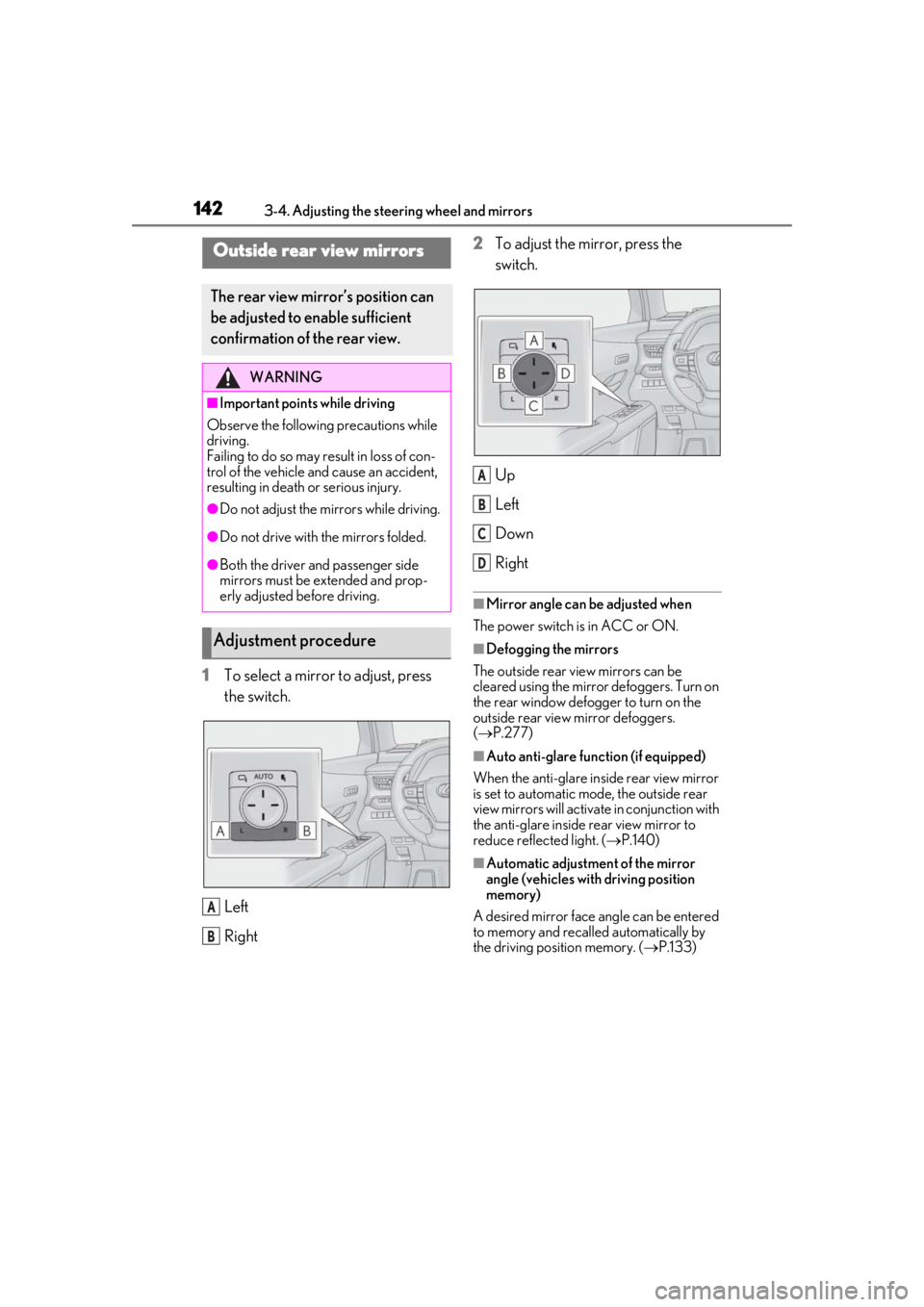
1To select a mirror to adjust, press
the switch.
Left
Right2
To adjust the mirror, press the
switch.
Up
Left
Down
Right
■Mirror angle can be adjusted when
The power switch is in ACC or ON.
■Defogging the mirrors
The outside rear view mirrors can be
cleared using the mirror defoggers. Turn on
the rear window defogger to turn on the
outside rear view mirror defoggers.
( P.277)
■Auto anti-glare function (if equipped)
When the anti-glare inside rear view mirror
is set to automatic mode, the outside rear
view mirrors will activate in conjunction with
the anti-glare inside rear view mirror to
reduce reflec ted light. (P.140)
■Automatic adjustment of the mirror
angle (vehicles with driving position
memory)
A desired mirror face angle can be entered
to memory and recalled automatically by
the driving position memory. ( P.133)
Outside rear view mirrors
The rear view mirror’s position can
be adjusted to enable sufficient
confirmation of the rear view.
WARNING
■Important points while driving
Observe the following precautions while
driving.
Failing to do so may result in loss of con-
trol of the vehicle and cause an accident,
resulting in death or serious injury.
●Do not adjust the mirrors while driving.
●Do not drive with the mirrors folded.
●Both the driver and passenger side
mirrors must be extended and prop-
erly adjusted before driving.
Adjustment procedure
A
B
A
B
C
D
Page 144 of 476

1443-4. Adjusting the steering wheel and mirrors
The memorized downward tilt position of
the mirror is linked to the normal position
(angle adjusted with the shift lever in other
than R). Therefore, if the normal position is
changed after adjustment, the tilt position
will also change.
When the normal position is changed,
readjust the angle in reversing.
Page 394 of 476
3947-2. Steps to take in an emergency
WARNING
●If the tire pressure warning light comes
on even after tire inflation pressure
adjustment, it is probable that you have
a flat tire. Have the flat tire replaced by
the nearest Lexus dealer.
●Avoid abrupt maneuvering and brak-
ing.
If the vehicle tires deteriorate, you
could lose control of the steering
wheel or the brakes.
■If a blowout or sudden air leakage
should occur
The tire pressure warning system may
not activate immediately.
■Maintenance of the tires
Each tire, including the spare (if pro-
vided), should be checked monthly when
cold and inflated to the inflation pressure
recommended by the vehicle manufac-
turer on the vehicle placard or tire infla-
tion pressure label (tire and load
information label). (If your vehicle has
tires of a different size than the size indi-
cated on the vehicle placard or tire infla-
tion pressure label [tire and load
information label], yo u should determine
the proper tire infl ation pressure for
those tires.)
As an added safety feature, your vehicle
has been equipped with a tire pressure
monitoring system (TPMS-tire pressure
warning system) that illuminates a low
tire pressure telltale (tire pressure warn-
ing light) when one or more of your tires
is significantly under-inflated. Accord-
ingly, when the low tire pressure telltale
(tire pressure warnin g light) illuminates,
you should stop and check your tires as
soon as possible, and inflate them to the
proper pressure. Driving on a signifi-
cantly under-inflated tire causes the tire
to overheat and can lead to tire failure.
Under-inflation also reduces fuel effi-
ciency and tire tread life, and may affect
the vehicle’s handling and stopping abil-
ity.
Please note that the TPMS (tire pressure
warning system) is not a substitute for
proper tire maintenance, and it is the
driver’s responsibility to maintain correct
tire pressure, even if under-inflation has
not reached the level to trigger illumina-
tion of the TPMS low tire pressure telltale
(tire pressure warning light).
Your vehicle has also been equipped with
a TPMS (tire pressure warning system)
malfunction indicator to indicate when
the system is not operating properly. The
TPMS (tire pressure warning system)
malfunction indicator is combined with
the low tire pressure telltale (tire pres-
sure warning light) . When the system
detects a malfunction, the telltale will
flash for approximately one minute and
then remain continuously illuminated.
This sequence will continue upon subse-
quent vehicle start-ups as long as the
malfunction exists. When the malfunction
indicator is illuminated, the system may
not be able to detect or signal low tire
pressure as intended.
TPMS (tire pressure warning system)
malfunctions may occur for a variety of
reasons, including the installation of
replacement or alternate tires or wheels
on the vehicle that prevent the TPMS
(tire pressure warning system) from func-
tioning properly. Always check the
TPMS (tire pressure warning system)
malfunction telltale after replacing one
or more tires or wheels on your vehicle to
ensure that the replacement or alternate
tires and wheels allow the TPMS (tire
pressure warning system) to continue to
function properly.
NOTICE
■To ensure the tire pressure warning
system operates properly
Do not install tires with different specifi-
cations or makers, as the tire pressure
warning system may not operate prop-
erly.
Page 472 of 476

472Alphabetical Index
Speedometer ........................................... 78, 82
Sport mode .................................................... 255
Steering lockColumn lock release..................................163
Steering lock system warning message...........................................................................163
Steering wheel Adjustment......................................................139
Heated steering wheel............................286
Meter control switches ..............................88
Power easy access system .....................133
Steering wheel position memory ........133
Stop lights Replacing light bulbs................................ 374
Storage feature ............................................ 293
Stuck If the vehicle becomes stuck..................413
Suggestion function....................................... 92
Sunshade.......................................................... 148
Sun visors ......................................................... 301
Switches “ODO TRIP” switch .......................... 80, 86
“SOS” button .................................................. 56
ASC (Active Sound Control) switch 176
Automatic High Beam system............. 180
Brake hold switch........................................ 175
BSM (Blind Spot Monitor) switch .... 228
Door lock switches ...................................... 110
Driving mode select switch .................. 255
Driving position memory switches .....133
Dynamic radar cruise control with full-speed range switch ................................. 217
Emergency flashers switch ................... 378
EV drive mode switch ............................. 165
Fog light switch ............................................ 183
Garage door opener switches ............. 311
Head-up display switch............................. 94
Heated steering wheel............................286
Ignition switch................................................ 162
Instrument panel light control switches .................................................................. 80, 86
Intuitive parking assist switch............... 233 Light switch ..................................................... 177
LTA (Lane-Tracing Assist) switch ..... 210
Meter control switches ............................. 88
Moon roof switches....................................147
Outside rear view mi
rror switches .....142
Paddle shift switches .......................169, 170
Parking brake switch.................................. 172
PCS OFF switch ....................................... 200
PKSB (Parking Support Brake) switch .......................................................................... 244
Power back door opener and closer switch ............................................................... 115
Power door lock switch ............................ 110
Power switch..................................................162
Power window switch .............................. 145
RCTA switch ................................................239
Rear window and outside rear view mir- ror defoggers switch ............................ 277
Rear window wiper and washer switch ........................................................................... 188
Seat heater switches.................................287
Seat ventilator switches .......................... 287
Tire pressure warning reset switch.... 351
Vehicle-to-vehicle di stance switch..... 217
VSC off switch ............................................ 257
Window lock switch.................................. 146
Windshield wiper de-icer switch....... 279
Windshield wipers and washer switch ........................................................................... 184
T
Tachometer............................................... 78, 82 Rev indicator ...................................................84
Rev peak............................................................84
Tail lights Light switch ..................................................... 177
Replacing light bulbs ................................ 374
Theft deterrent system Alarm..................................................................... 71
Immobilizer system ......................................69
Tire inflation pressure Maintenance data ...................................... 422