lock LINCOLN AVIATOR 2005 User Guide
[x] Cancel search | Manufacturer: LINCOLN, Model Year: 2005, Model line: AVIATOR, Model: LINCOLN AVIATOR 2005Pages: 368, PDF Size: 5 MB
Page 32 of 368
FIND Program type:Allows you to search RDS-equipped stations for a
certain category of music format: Classic, Country, Info, Jazz, Oldies,
R&B, Religious, Rock, Soft, Top 40.
Press and hold MENU until RDS XX is shown in the display. Press MENU
until FIND appears in the display. Use SEL to scroll through music types.
Press SEEK or SCAN to search for a station playing the requested music
category.
Show TYPE:Displays the station’s call letters or music format.
Press and hold MENU until RDS XX is shown in the display. Press MENU
until SHOW appears in the display. Use SEL to select NAME or TYPE.
Compression:Brings soft and loud CD passages together for a more
consistent listening level when in CD mode. Press MENU until
compression status is displayed. Press the SEL control to enable the
compression feature when COMPRESS OFF is displayed. Press the SEL
control again to disable the feature when COMPRESS ON is displayed.
Occupancy mode:Press MENU until occupancy mode appears in the
display. Press SEL to select ALL, DRIVER or REAR SEAT occupancy
mode.
Autoset:Allows you to set the strongest local radio stations without
losing your original manually set preset stations for AM/FM1/FM2 . Press
MENU until AUTOSET appears in the display. Press SEL to toggle
ON/OFF. When the six strongest stations are filled, the station stored in
preset 1 will begin playing. If there are less than six strong stations, the
system will store the last one in the remaining presets.
Speed sensitive volume:Radio volume changes automatically and
slightly with vehicle speed to compensate for road and wind noise.
Recommended level is 1–3. Level 0 turns the feature off and level 7 is
the maximum setting.
Press MENU until SPEED VOL X appears in the display. Then press SEL
to increase (
) or decrease () the volume setting. The level will
appear in the display.
Setting the clock:Your vehicle is equipped with a separate in-dash
clock. Refer toSetting the clockin the Driver Controls chapter.
Folder/Track Mode:In MP3 mode, press MENU until MODE appears in
the display. Use SEL to toggle between FOLDER (only tracks within
selected folder are accessible) or TRACK (all tracks on disc are
accessible) MODE.
REVIEW COPY
2005 Aviator f/k/a Navigator LS(231), Owners Guide (post-2002-fmt)(own2002),
Market:USA_English(fus)
Entertainment Systems
32
Page 37 of 368
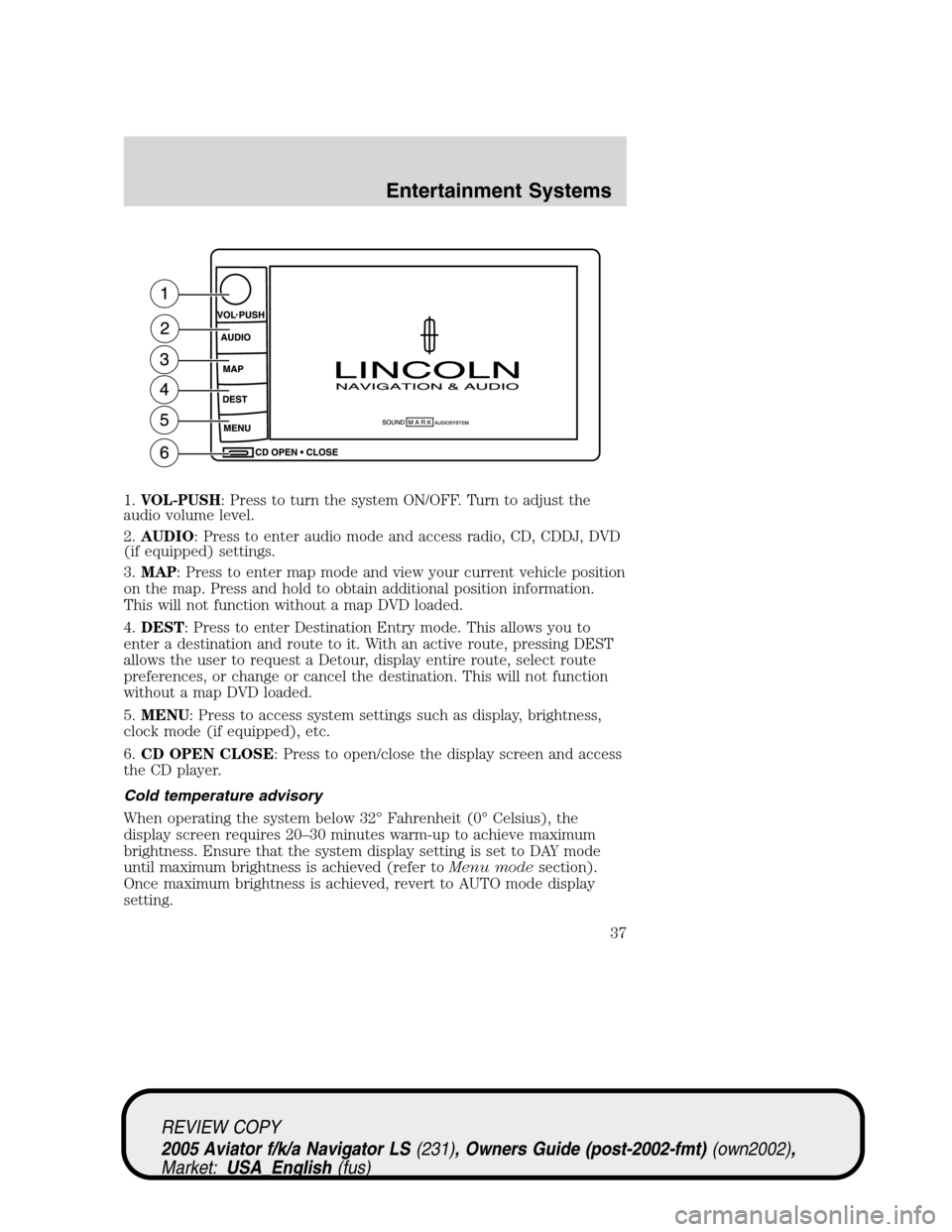
1.VOL-PUSH: Press to turn the system ON/OFF. Turn to adjust the
audio volume level.
2.AUDIO: Press to enter audio mode and access radio, CD, CDDJ, DVD
(if equipped) settings.
3.MAP: Press to enter map mode and view your current vehicle position
on the map. Press and hold to obtain additional position information.
This will not function without a map DVD loaded.
4.DEST: Press to enter Destination Entry mode. This allows you to
enter a destination and route to it. With an active route, pressing DEST
allows the user to request a Detour, display entire route, select route
preferences, or change or cancel the destination. This will not function
without a map DVD loaded.
5.MENU: Press to access system settings such as display, brightness,
clock mode (if equipped), etc.
6.CD OPEN CLOSE: Press to open/close the display screen and access
the CD player.
Cold temperature advisory
When operating the system below 32°Fahrenheit (0°Celsius), the
display screen requires 20–30 minutes warm-up to achieve maximum
brightness. Ensure that the system display setting is set to DAY mode
until maximum brightness is achieved (refer toMenu modesection).
Once maximum brightness is achieved, revert to AUTO mode display
setting.
REVIEW COPY
2005 Aviator f/k/a Navigator LS(231), Owners Guide (post-2002-fmt)(own2002),
Market:USA_English(fus)
Entertainment Systems
37
Page 38 of 368
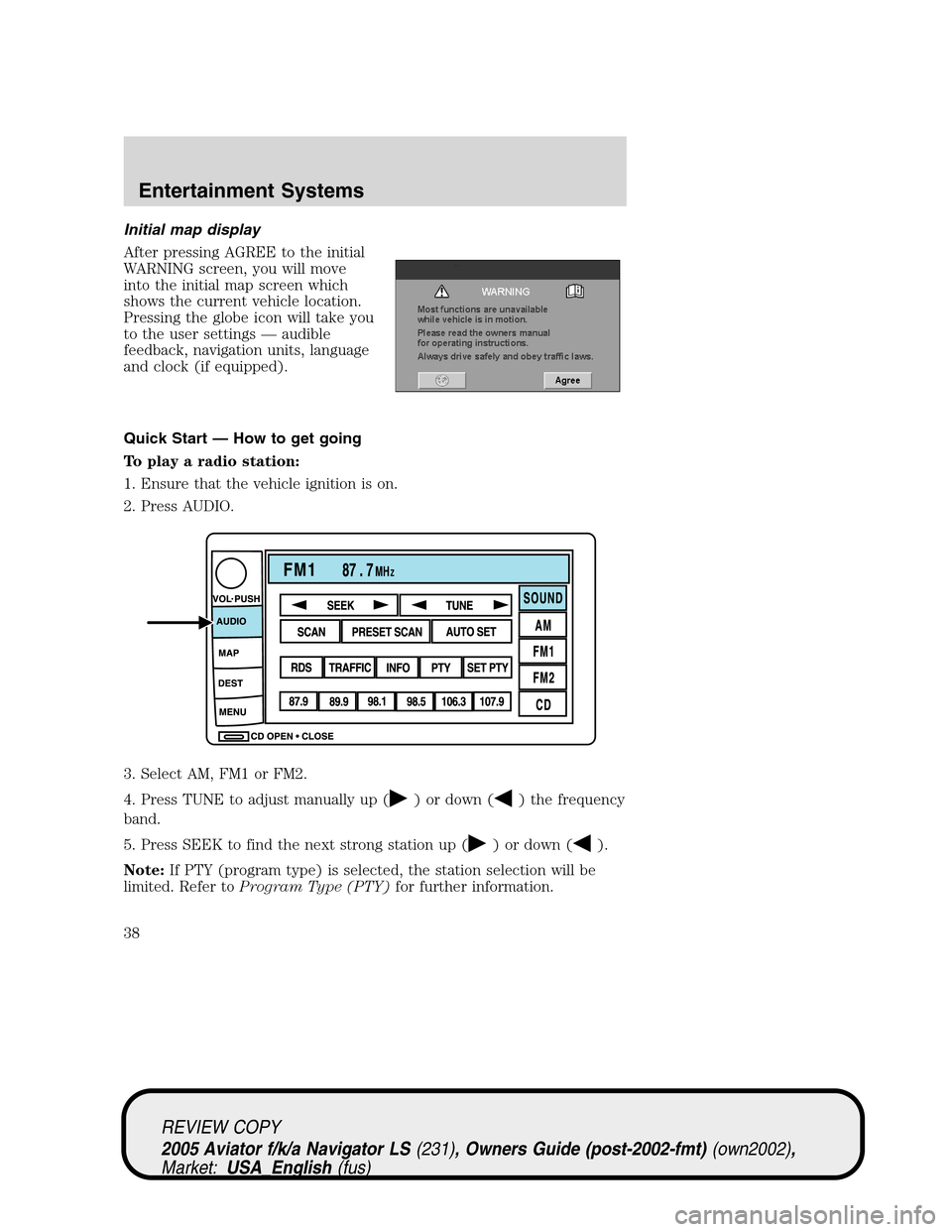
Initial map display
After pressing AGREE to the initial
WARNING screen, you will move
into the initial map screen which
shows the current vehicle location.
Pressing the globe icon will take you
to the user settings—audible
feedback, navigation units, language
and clock (if equipped).
Quick Start—How to get going
To play a radio station:
1. Ensure that the vehicle ignition is on.
2. Press AUDIO.
3. Select AM, FM1 or FM2.
4. Press TUNE to adjust manually up (
) or down () the frequency
band.
5. Press SEEK to find the next strong station up (
) or down ().
Note:If PTY (program type) is selected, the station selection will be
limited. Refer toProgram Type (PTY)for further information.
REVIEW COPY
2005 Aviator f/k/a Navigator LS(231), Owners Guide (post-2002-fmt)(own2002),
Market:USA_English(fus)
Entertainment Systems
38
Page 78 of 368
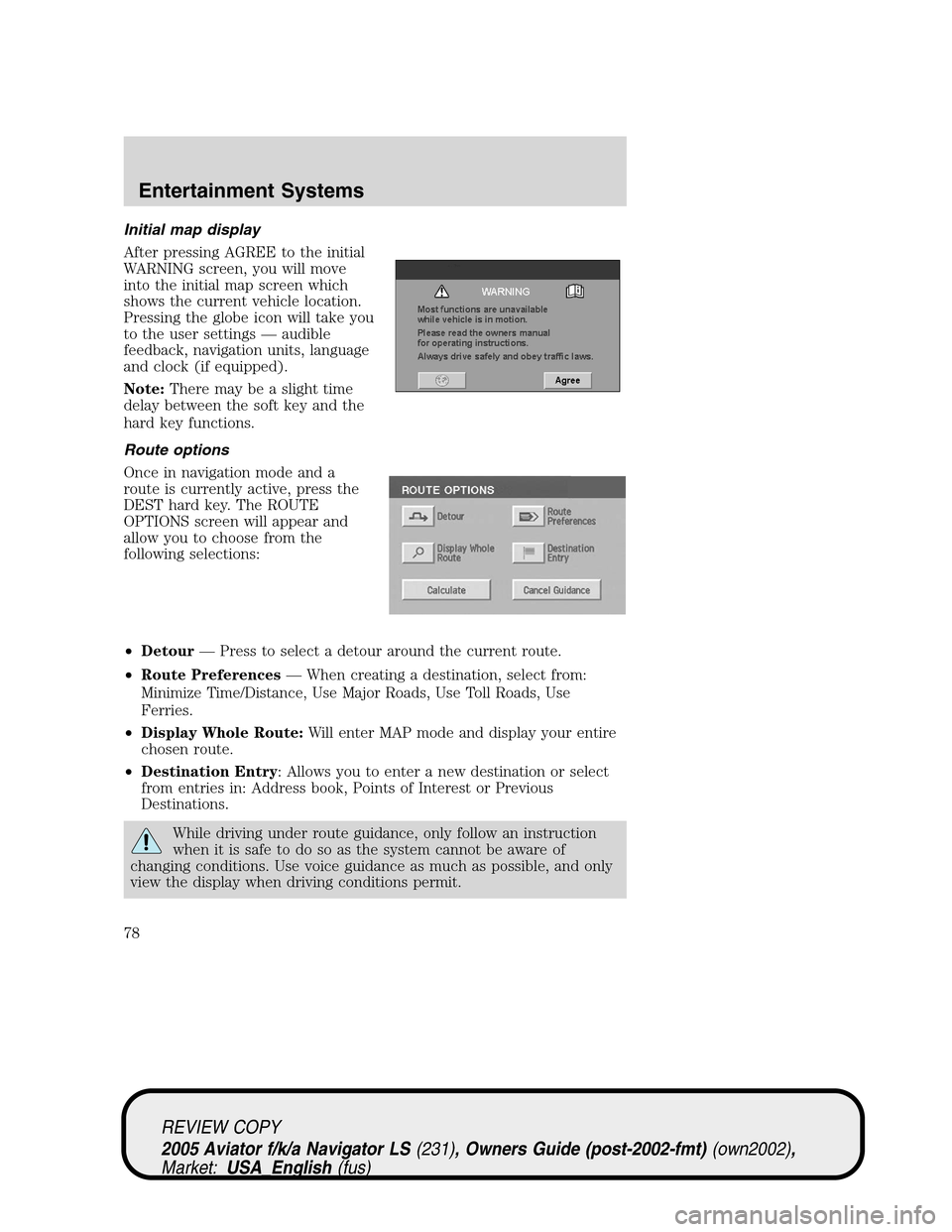
Initial map display
After pressing AGREE to the initial
WARNING screen, you will move
into the initial map screen which
shows the current vehicle location.
Pressing the globe icon will take you
to the user settings—audible
feedback, navigation units, language
and clock (if equipped).
Note:There may be a slight time
delay between the soft key and the
hard key functions.
Route options
Once in navigation mode and a
route is currently active, press the
DEST hard key. The ROUTE
OPTIONS screen will appear and
allow you to choose from the
following selections:
•Detour—Press to select a detour around the current route.
•Route Preferences—When creating a destination, select from:
Minimize Time/Distance, Use Major Roads, Use Toll Roads, Use
Ferries.
•Display Whole Route:Will enter MAP mode and display your entire
chosen route.
•Destination Entry: Allows you to enter a new destination or select
from entries in: Address book, Points of Interest or Previous
Destinations.
While driving under route guidance, only follow an instruction
when it is safe to do so as the system cannot be aware of
changing conditions. Use voice guidance as much as possible, and only
view the display when driving conditions permit.
REVIEW COPY
2005 Aviator f/k/a Navigator LS(231), Owners Guide (post-2002-fmt)(own2002),
Market:USA_English(fus)
Entertainment Systems
78
Page 104 of 368
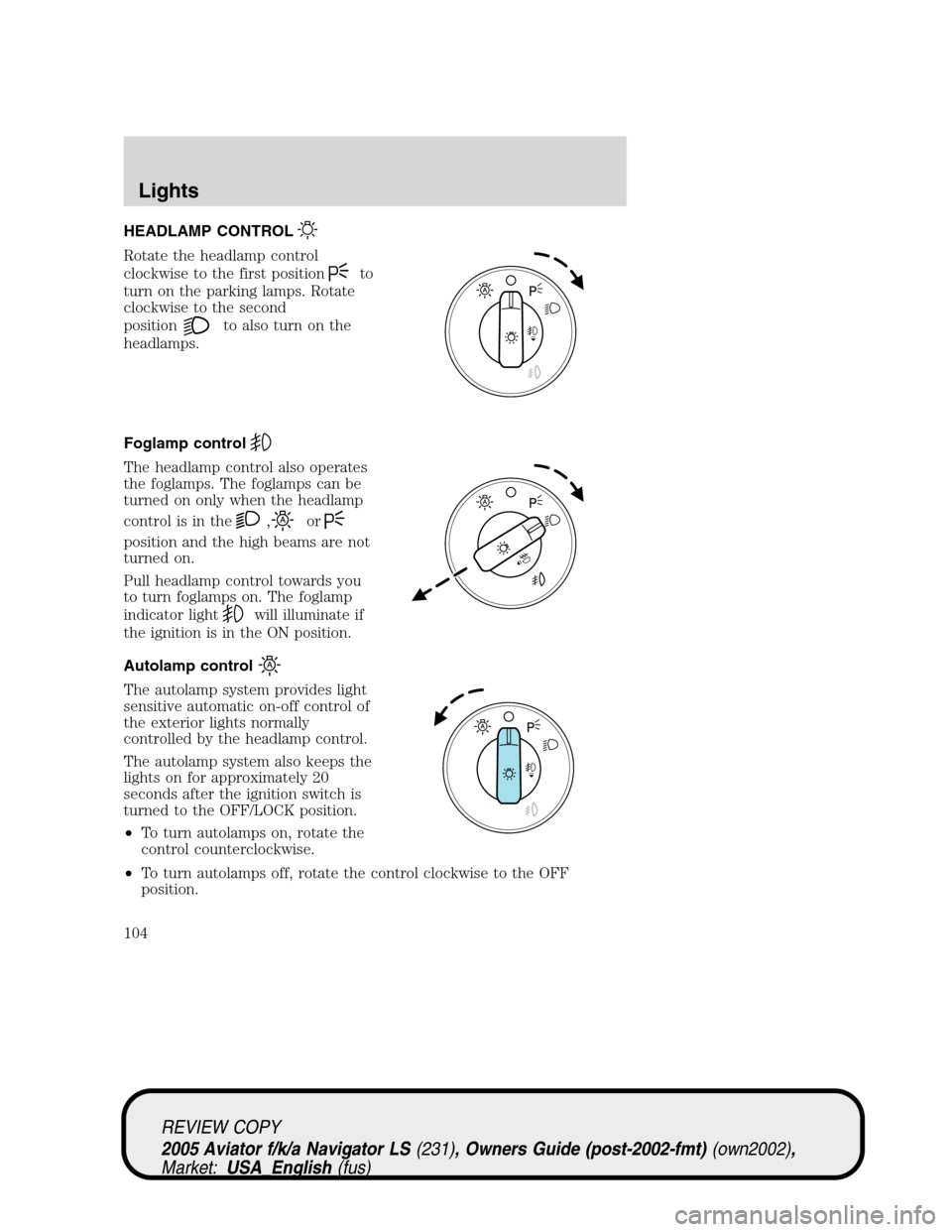
HEADLAMP CONTROL
Rotate the headlamp control
clockwise to the first position
to
turn on the parking lamps. Rotate
clockwise to the second
position
to also turn on the
headlamps.
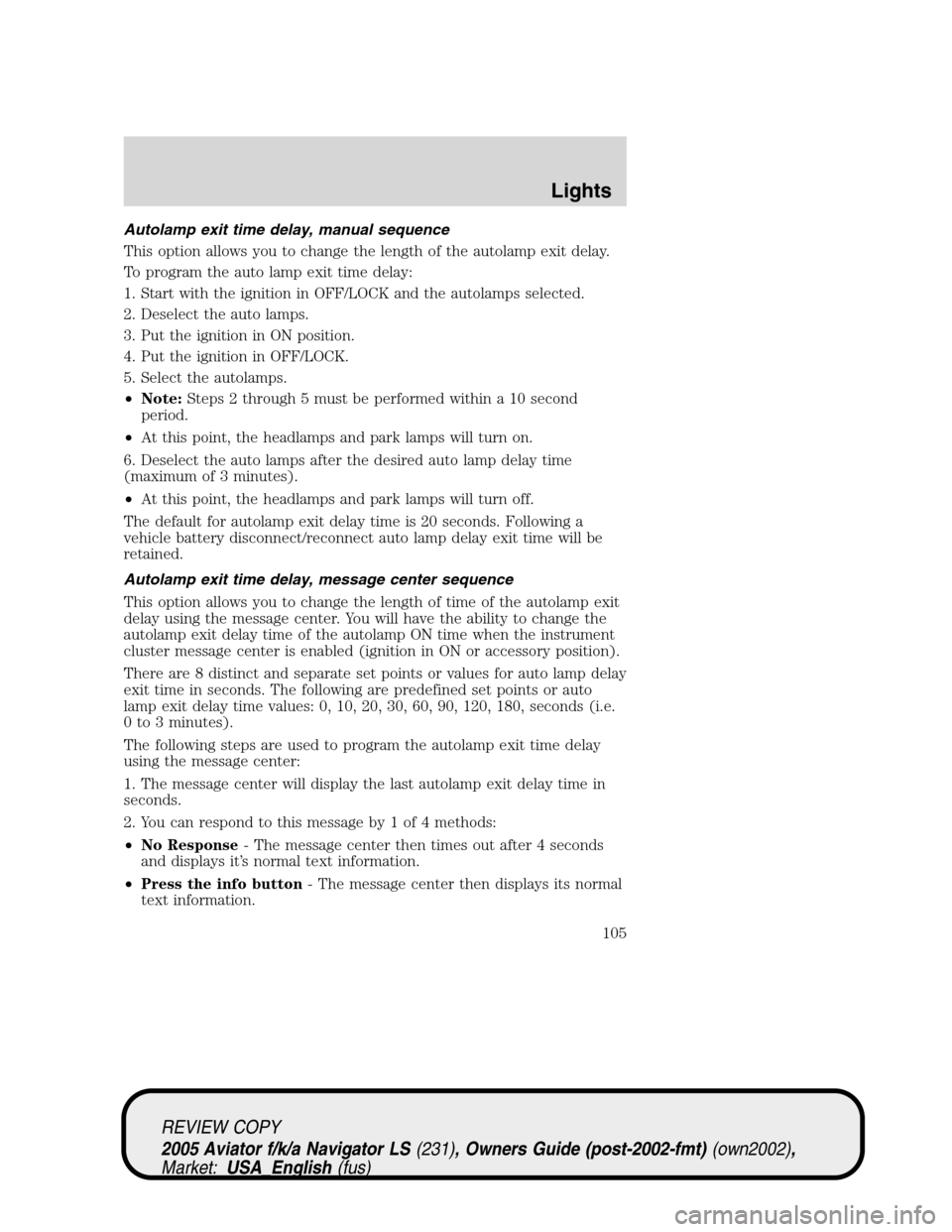
Foglamp control
The headlamp control also operates
the foglamps. The foglamps can be
turned on only when the headlamp
control is in the
,or
position and the high beams are not
turned on.
Pull headlamp control towards you
to turn foglamps on. The foglamp
indicator light
will illuminate if
the ignition is in the ON position.
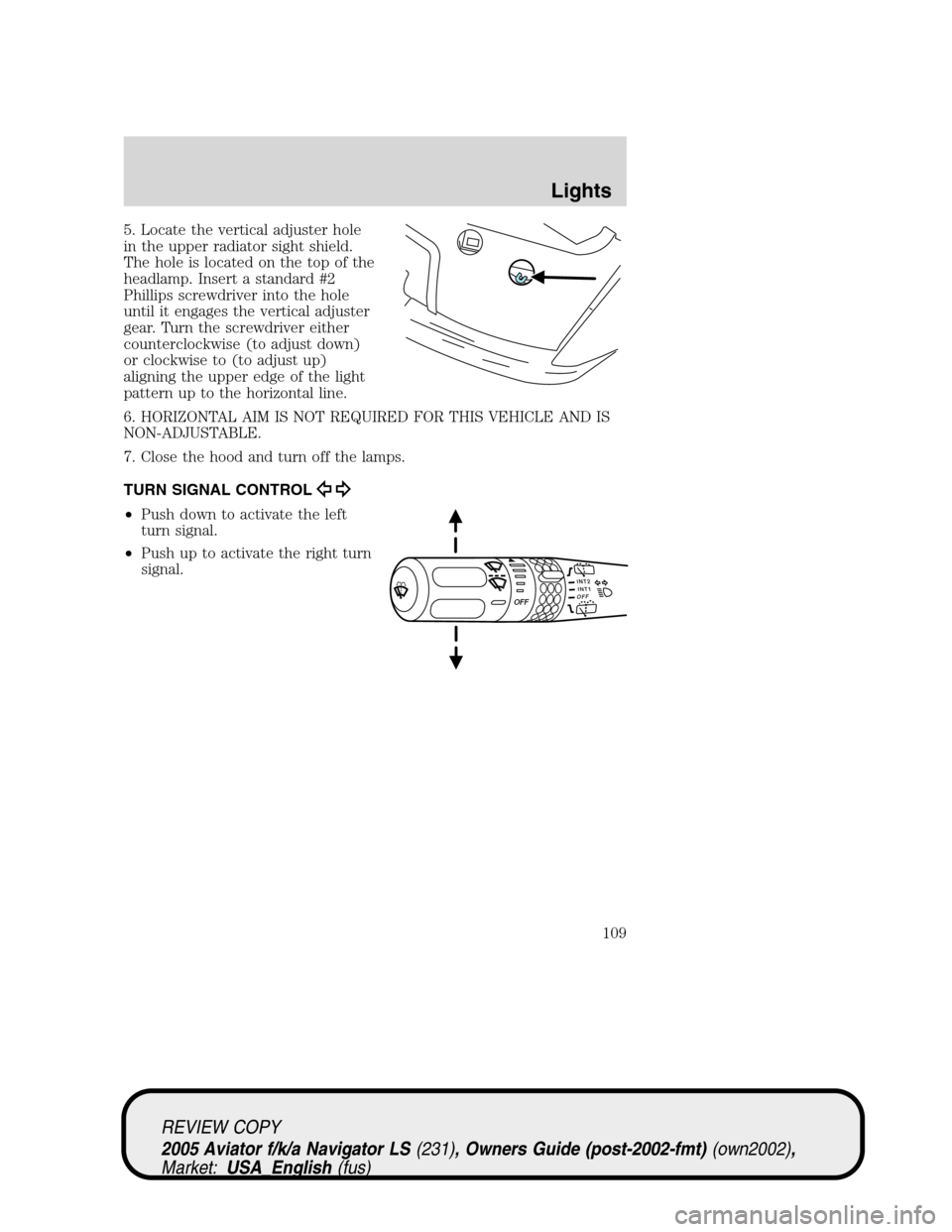
Autolamp control
The autolamp system provides light
sensitive automatic on-off control of
the exterior lights normally
controlled by the headlamp control.
The autolamp system also keeps the
lights on for approximately 20
seconds after the ignition switch is
turned to the OFF/LOCK position.
•To turn autolamps on, rotate the
control counterclockwise.
•To turn autolamps off, rotate the control clockwise to the OFF
position.
REVIEW COPY
2005 Aviator f/k/a Navigator LS(231), Owners Guide (post-2002-fmt)(own2002),
Market:USA_English(fus)
Lights
Lights
104
Page 105 of 368
Autolamp exit time delay, manual sequence
This option allows you to change the length of the autolamp exit delay.
To program the auto lamp exit time delay:
1. Start with the ignition in OFF/LOCK and the autolamps selected.
2. Deselect the auto lamps.
3. Put the ignition in ON position.
4. Put the ignition in OFF/LOCK.
5. Select the autolamps.
•Note:Steps 2 through 5 must be performed within a 10 second
period.
•At this point, the headlamps and park lamps will turn on.
6. Deselect the auto lamps after the desired auto lamp delay time
(maximum of 3 minutes).
•At this point, the headlamps and park lamps will turn off.
The default for autolamp exit delay time is 20 seconds. Following a
vehicle battery disconnect/reconnect auto lamp delay exit time will be
retained.
Autolamp exit time delay, message center sequence
This option allows you to change the length of time of the autolamp exit
delay using the message center. You will have the ability to change the
autolamp exit delay time of the autolamp ON time when the instrument
cluster message center is enabled (ignition in ON or accessory position).
There are 8 distinct and separate set points or values for auto lamp delay
exit time in seconds. The following are predefined set points or auto
lamp exit delay time values: 0, 10, 20, 30, 60, 90, 120, 180, seconds (i.e.
0 to 3 minutes).
The following steps are used to program the autolamp exit time delay
using the message center:
1. The message center will display the last autolamp exit delay time in
seconds.
2. You can respond to this message by 1 of 4 methods:
•No Response- The message center then times out after 4 seconds
and displays it’s normal text information.
•Press the info button- The message center then displays its normal
text information.
REVIEW COPY
2005 Aviator f/k/a Navigator LS(231), Owners Guide (post-2002-fmt)(own2002),
Market:USA_English(fus)
Lights
105
Page 109 of 368
5. Locate the vertical adjuster hole
in the upper radiator sight shield.
The hole is located on the top of the
headlamp. Insert a standard #2
Phillips screwdriver into the hole
until it engages the vertical adjuster
gear. Turn the screwdriver either
counterclockwise (to adjust down)
or clockwise to (to adjust up)
aligning the upper edge of the light
pattern up to the horizontal line.
6. HORIZONTAL AIM IS NOT REQUIRED FOR THIS VEHICLE AND IS
NON-ADJUSTABLE.
7. Close the hood and turn off the lamps.
TURN SIGNAL CONTROL
•Push down to activate the left
turn signal.
•Push up to activate the right turn
signal.
INT2OFFOFFINT1
REVIEW COPY
2005 Aviator f/k/a Navigator LS(231), Owners Guide (post-2002-fmt)(own2002),
Market:USA_English(fus)
Lights
109
Page 114 of 368
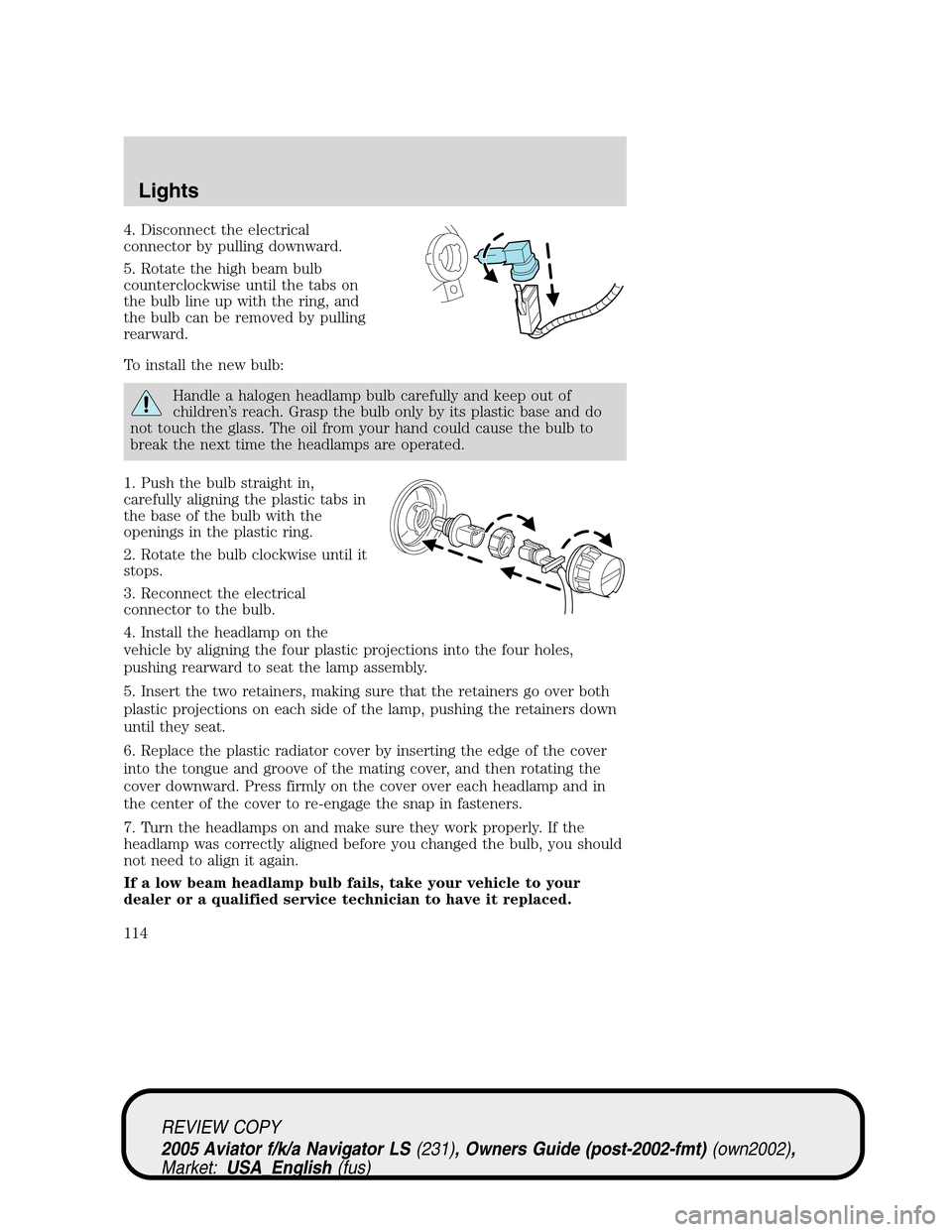
4. Disconnect the electrical
connector by pulling downward.
5. Rotate the high beam bulb
counterclockwise until the tabs on
the bulb line up with the ring, and
the bulb can be removed by pulling
rearward.
To install the new bulb:
Handle a halogen headlamp bulb carefully and keep out of
children’s reach. Grasp the bulb only by its plastic base and do
not touch the glass. The oil from your hand could cause the bulb to
break the next time the headlamps are operated.
1. Push the bulb straight in,
carefully aligning the plastic tabs in
the base of the bulb with the
openings in the plastic ring.
2. Rotate the bulb clockwise until it
stops.
3. Reconnect the electrical
connector to the bulb.
4. Install the headlamp on the
vehicle by aligning the four plastic projections into the four holes,
pushing rearward to seat the lamp assembly.
5. Insert the two retainers, making sure that the retainers go over both
plastic projections on each side of the lamp, pushing the retainers down
until they seat.
6. Replace the plastic radiator cover by inserting the edge of the cover
into the tongue and groove of the mating cover, and then rotating the
cover downward. Press firmly on the cover over each headlamp and in
the center of the cover to re-engage the snap in fasteners.
7. Turn the headlamps on and make sure they work properly. If the
headlamp was correctly aligned before you changed the bulb, you should
not need to align it again.
If a low beam headlamp bulb fails, take your vehicle to your
dealer or a qualified service technician to have it replaced.
REVIEW COPY
2005 Aviator f/k/a Navigator LS(231), Owners Guide (post-2002-fmt)(own2002),
Market:USA_English(fus)
Lights
114
Page 115 of 368
Replacing HID headlamp bulbs (if equipped)
The low beam headlamps on your vehicle use a“high intensity discharge”
source. These lamps operate at a high voltage. The bulb is NOT
replaceable. When the bulb is burned out, the bulb assembly must be
replaced by your dealer or a qualified technician.
Replacing front parking lamp/turn signal/sidemarker bulbs
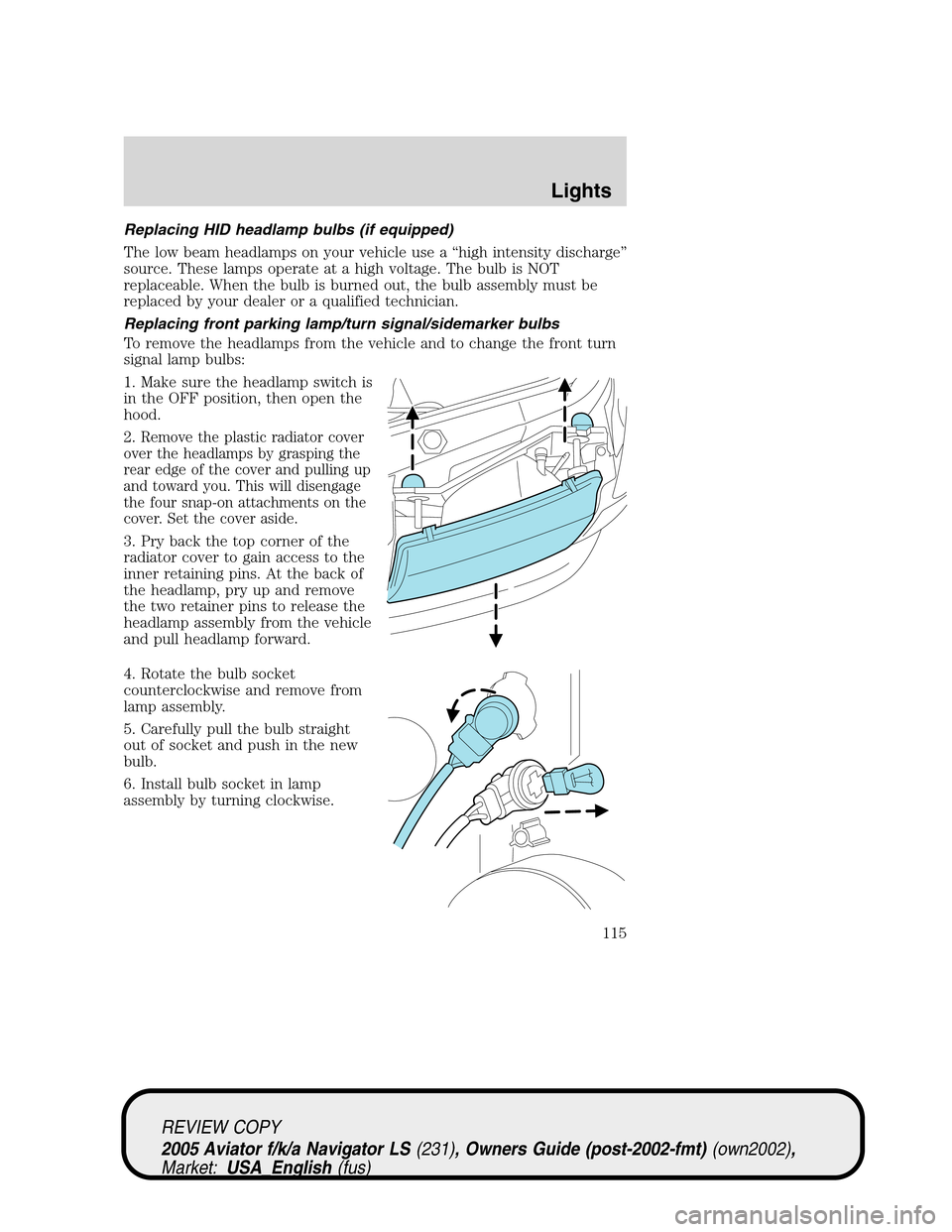
To remove the headlamps from the vehicle and to change the front turn
signal lamp bulbs:
1. Make sure the headlamp switch is
in the OFF position, then open the
hood.
2.
Remove the plastic radiator cover
over the headlamps by grasping the
rear edge of the cover and pulling up
and toward you. This will disengage
the four snap-on attachments on the
cover. Set the cover aside.
3. Pry back the top corner of the
radiator cover to gain access to the
inner retaining pins. At the back of
the headlamp, pry up and remove
the two retainer pins to release the
headlamp assembly from the vehicle
and pull headlamp forward.
4. Rotate the bulb socket
counterclockwise and remove from
lamp assembly.
5. Carefully pull the bulb straight
out of socket and push in the new
bulb.
6. Install bulb socket in lamp
assembly by turning clockwise.
REVIEW COPY
2005 Aviator f/k/a Navigator LS(231), Owners Guide (post-2002-fmt)(own2002),
Market:USA_English(fus)
Lights
115
Page 116 of 368
To replace the park/sidemarker bulb:
1. Rotate the bulb socket counterclockwise and remove from the lamp
assembly.
2. Carefully pull the bulb straight out of the socket and push in the new
bulb.
3. Install the bulb socket in the lamp assembly by turning it
counterclockwise.
To re-install the headlamp on the vehicle:
1. Install the headlamp on the vehicle by aligning the four plastic
projections into the four holes, pushing rearward to seat the lamp
assembly.
2. Insert the two retainers, making sure that the retainers go over both
plastic projections on each side of the lamp, pushing the retainers down
until they seat.
3. Replace the plastic radiator cover by inserting the edge of the cover
into the tongue and groove of the mating cover, and then rotating the
cover downward. Press firmly on the cover over each headlamp and in
the center of the cover to re-engage the snap-in fasteners.
4. Turn the headlamps on and make sure they work properly.
Replacing tail/brake/turn/sidemarker/backup lamp bulbs
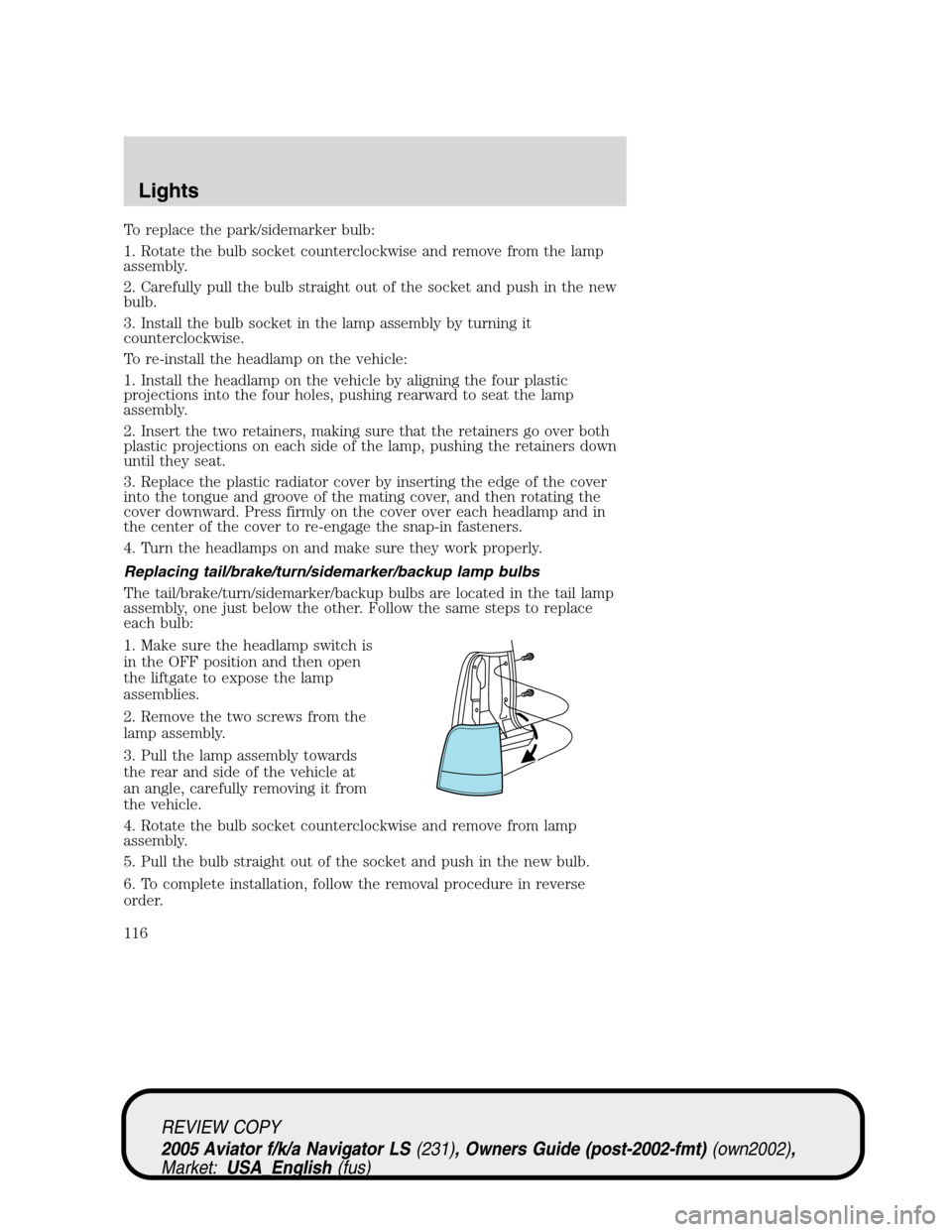
The tail/brake/turn/sidemarker/backup bulbs are located in the tail lamp
assembly, one just below the other. Follow the same steps to replace
each bulb:
1. Make sure the headlamp switch is
in the OFF position and then open
the liftgate to expose the lamp
assemblies.
2. Remove the two screws from the
lamp assembly.
3. Pull the lamp assembly towards
the rear and side of the vehicle at
an angle, carefully removing it from
the vehicle.
4. Rotate the bulb socket counterclockwise and remove from lamp
assembly.
5. Pull the bulb straight out of the socket and push in the new bulb.
6. To complete installation, follow the removal procedure in reverse
order.
REVIEW COPY
2005 Aviator f/k/a Navigator LS(231), Owners Guide (post-2002-fmt)(own2002),
Market:USA_English(fus)
Lights
116