USB port LINCOLN AVIATOR 2020 User Guide
[x] Cancel search | Manufacturer: LINCOLN, Model Year: 2020, Model line: AVIATOR, Model: LINCOLN AVIATOR 2020Pages: 609, PDF Size: 5.4 MB
Page 499 of 609
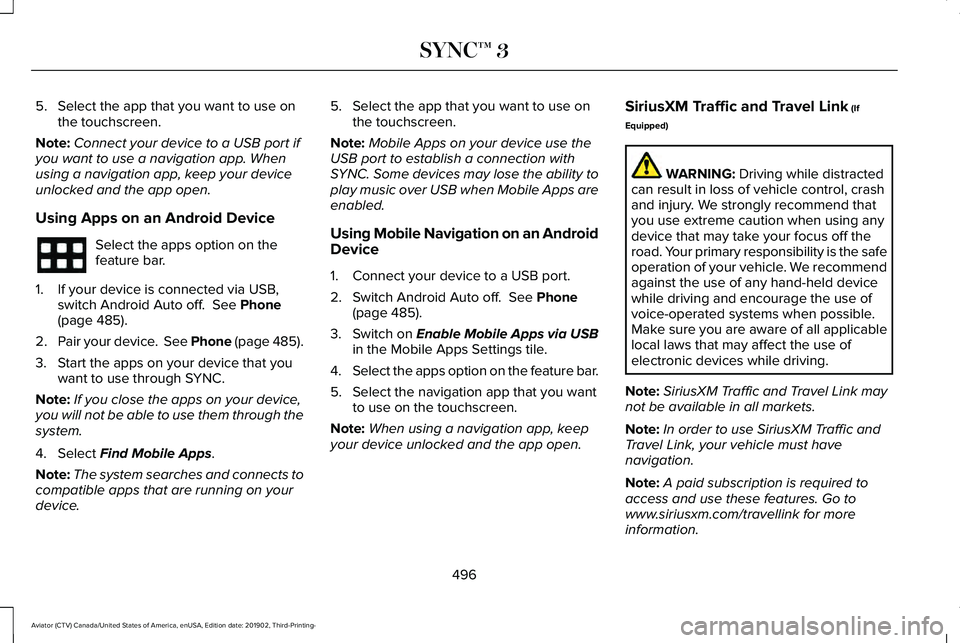
5. Select the app that you want to use on
the touchscreen.
Note: Connect your device to a USB port if
you want to use a navigation app. When
using a navigation app, keep your device
unlocked and the app open.
Using Apps on an Android Device Select the apps option on the
feature bar.
1. If your device is connected via USB, switch Android Auto off. See Phone
(page 485).
2. Pair your device. See Phone (page 485).
3. Start the apps on your device that you want to use through SYNC.
Note: If you close the apps on your device,
you will not be able to use them through the
system.
4. Select
Find Mobile Apps.
Note: The system searches and connects to
compatible apps that are running on your
device. 5. Select the app that you want to use on
the touchscreen.
Note: Mobile Apps on your device use the
USB port to establish a connection with
SYNC. Some devices may lose the ability to
play music over USB when Mobile Apps are
enabled.
Using Mobile Navigation on an Android
Device
1. Connect your device to a USB port.
2. Switch Android Auto off.
See Phone
(page 485).
3. Switch on
Enable Mobile Apps via USB
in the Mobile Apps Settings tile.
4. Select the apps option on the feature bar.
5. Select the navigation app that you want to use on the touchscreen.
Note: When using a navigation app, keep
your device unlocked and the app open. SiriusXM Traffic and Travel Link
(If
Equipped) WARNING:
Driving while distracted
can result in loss of vehicle control, crash
and injury. We strongly recommend that
you use extreme caution when using any
device that may take your focus off the
road. Your primary responsibility is the safe
operation of your vehicle. We recommend
against the use of any hand-held device
while driving and encourage the use of
voice-operated systems when possible.
Make sure you are aware of all applicable
local laws that may affect the use of
electronic devices while driving.
Note: SiriusXM Traffic and Travel Link may
not be available in all markets.
Note: In order to use SiriusXM Traffic and
Travel Link, your vehicle must have
navigation.
Note: A paid subscription is required to
access and use these features. Go to
www.siriusxm.com/travellink for more
information.
496
Aviator (CTV) Canada/United States of America, enUSA, Edition date: 201902, Third-Printing- SYNC™ 3
Page 504 of 609
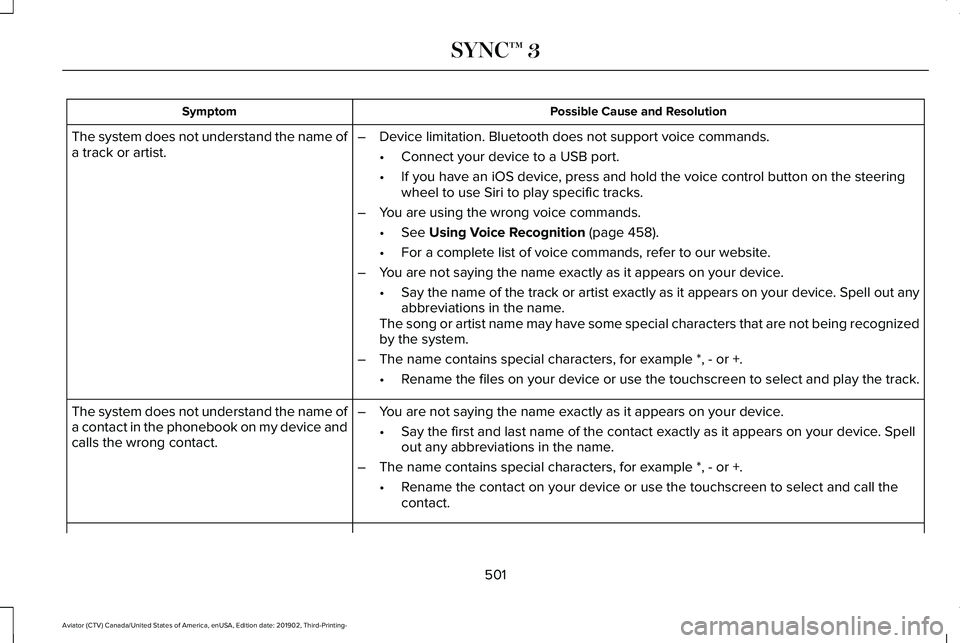
Possible Cause and Resolution
Symptom
–Device limitation. Bluetooth does not support voice commands.
•Connect your device to a USB port.
• If you have an iOS device, press and hold the voice control button on the steering
wheel to use Siri to play specific tracks.
– You are using the wrong voice commands.
•See Using Voice Recognition (page 458).
• For a complete list of voice commands, refer to our website.
– You are not saying the name exactly as it appears on your device.
•Say the name of the track or artist exactly as it appears on your device\
. Spell out any
abbreviations in the name.
The song or artist name may have some special characters that are not be\
ing recognized
by the system.
– The name contains special characters, for example *, - or +.
•Rename the files on your device or use the touchscreen to select and play\
the track.
The system does not understand the name of
a track or artist.
–You are not saying the name exactly as it appears on your device.
•Say the first and last name of the contact exactly as it appears on your\
device. Spell
out any abbreviations in the name.
– The name contains special characters, for example *, - or +.
•Rename the contact on your device or use the touchscreen to select and ca\
ll the
contact.
The system does not understand the name of
a contact in the phonebook on my device and
calls the wrong contact.
501
Aviator (CTV) Canada/United States of America, enUSA, Edition date: 201902, Third-Printing- SYNC™ 3
Page 505 of 609
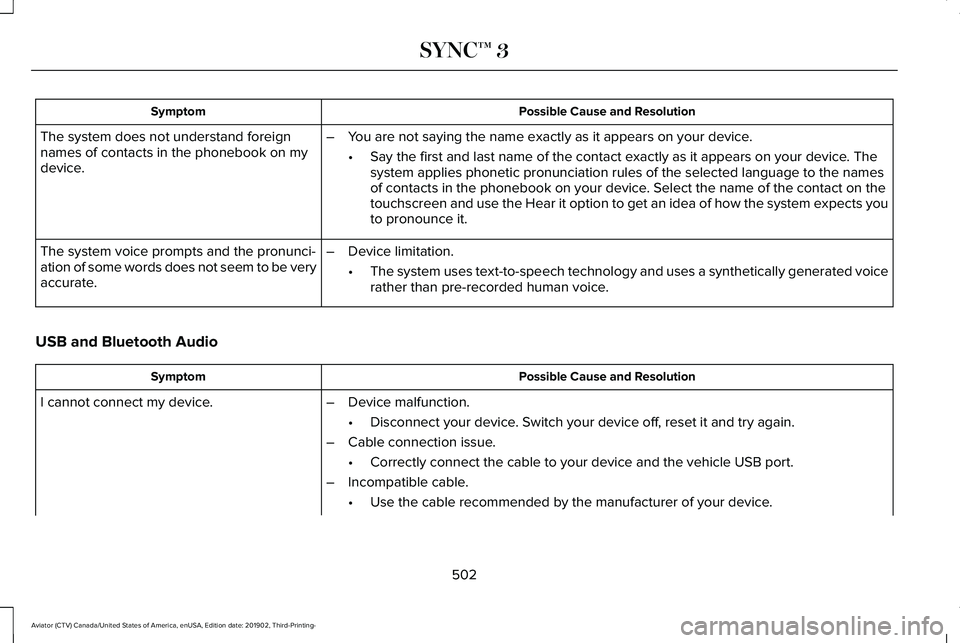
Possible Cause and Resolution
Symptom
The system does not understand foreign
names of contacts in the phonebook on my
device. –
You are not saying the name exactly as it appears on your device.
•Say the first and last name of the contact exactly as it appears on your\
device. The
system applies phonetic pronunciation rules of the selected language to \
the names
of contacts in the phonebook on your device. Select the name of the contact on the
touchscreen and use the Hear it option to get an idea of how the system \
expects you
to pronounce it.
– Device limitation.
•The system uses text-to-speech technology and uses a synthetically gener\
ated voice
rather than pre-recorded human voice.
The system voice prompts and the pronunci-
ation of some words does not seem to be very
accurate.
USB and Bluetooth Audio Possible Cause and Resolution
Symptom
I cannot connect my device. –Device malfunction.
•Disconnect your device. Switch your device off, reset it and try again.
– Cable connection issue.
•Correctly connect the cable to your device and the vehicle USB port.
– Incompatible cable.
•Use the cable recommended by the manufacturer of your device.
502
Aviator (CTV) Canada/United States of America, enUSA, Edition date: 201902, Third-Printing- SYNC™ 3
Page 506 of 609

Possible Cause and Resolution
Symptom
–Incorrect device settings.
•Make sure that your device does not have an auto-install program or active \
security
settings.
• Check that your device is not set only to charge.
– Device lock screen enabled.
•Unlock your device before connecting it.
The system does not recognize my device. –Device limitation.
•Do not leave your device in your vehicle during very hot or very cold we\
ather condi-
tions.
– Cable connection issue.
•Correctly connect the cable to your device and the vehicle USB port.
– Incompatible cable.
•Use the cable recommended by the manufacturer of your device.
The system does not understand the name of
a track or artist. –
Device limitation. Bluetooth does not support voice commands.
•Connect your device to a USB port.
• If you have an iOS device, press and hold the voice control button on the steering
wheel to use Siri to play specific tracks.
503
Aviator (CTV) Canada/United States of America, enUSA, Edition date: 201902, Third-Printing- SYNC™ 3
Page 509 of 609
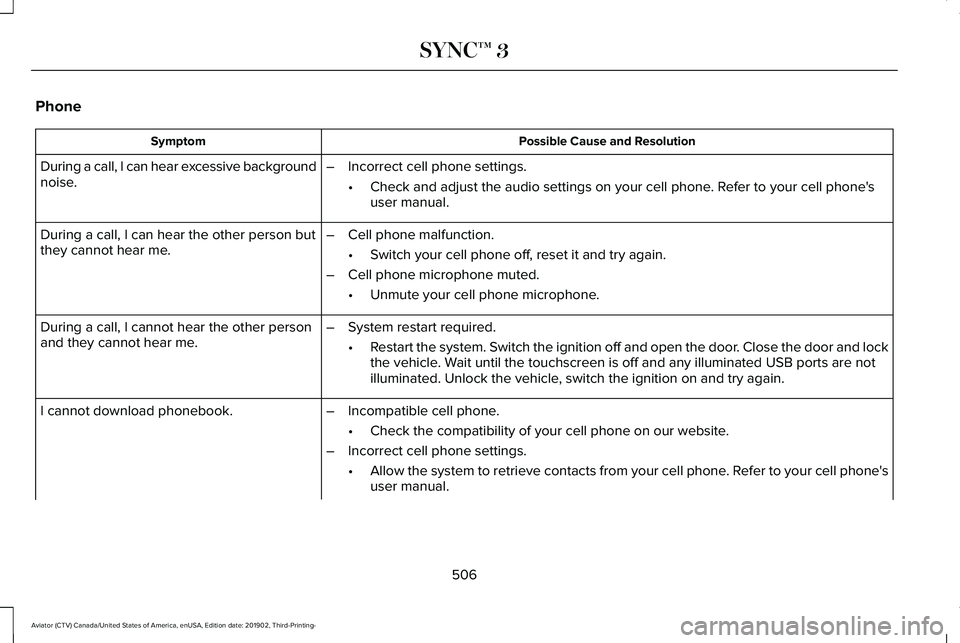
Phone
Possible Cause and Resolution
Symptom
During a call, I can hear excessive background
noise. –
Incorrect cell phone settings.
•Check and adjust the audio settings on your cell phone. Refer to your cell phone's
user manual.
– Cell phone malfunction.
•Switch your cell phone off, reset it and try again.
– Cell phone microphone muted.
•Unmute your cell phone microphone.
During a call, I can hear the other person but
they cannot hear me.
During a call, I cannot hear the other person
and they cannot hear me.
–
System restart required.
•Restart the system. Switch the ignition off and open the door. Close the door and lock
the vehicle. Wait until the touchscreen is off and any illuminated USB ports are not
illuminated. Unlock the vehicle, switch the ignition on and try again.
I cannot download phonebook. –Incompatible cell phone.
•Check the compatibility of your cell phone on our website.
– Incorrect cell phone settings.
•Allow the system to retrieve contacts from your cell phone. Refer to your cell phone's
user manual.
506
Aviator (CTV) Canada/United States of America, enUSA, Edition date: 201902, Third-Printing- SYNC™ 3
Page 513 of 609

Apps
Possible Cause and Resolution
Symptom
The system cannot find any apps. –Incompatible device.
•You will need an Android device with OS 4.3 or higher or an iOS device wi\
th iOS 8.0
or higher. Pair and connect your Android device to find AppLink compatible apps.
Connect your iOS device to a USB port or pair and connect using Bluetoot\
h.
I have a compatible device and it is correctly
connected but the system still cannot find any
apps. –
AppLink compatible apps not installed on your device.
•Download and install the latest version of the app.
– AppLink compatible apps not running on your device.
•Start the apps to allow the system to find them and make sure you sign in to any apps
if required.
– Incorrect app settings.
•Check and adjust the app settings on your device and allow SYNC to access the app
if required.
I have a compatible device, it is correctly
connected and my apps are running but the
system still cannot find any apps. –
Apps failed to fully close.
•Restart the apps and try again.
• If you have an Android device with apps that have an exit or quit option\
, use this and
then restart the apps. Alternatively, use the force stop option in the settings menu on
your device.
• If you have an iOS device with iOS 7.0 or higher, tap the home button on your device
twice and then swipe the app upward to close it.
510
Aviator (CTV) Canada/United States of America, enUSA, Edition date: 201902, Third-Printing- SYNC™ 3
Page 596 of 609
Stay in Neutral Mode.........................................224
Understanding Your Transmission Selector
Positions...........................................................223
Automatic Transmission Fluid Check...........................................................369
Auto-Start-Stop.............................................208 Disabling Auto-Start-Stop................................209
Enabling Auto-Start-Stop..................................208
Autowipers......................................................103 Autowipers Settings...........................................104
Low Temperature Wipe Inhibit.........................104
Auxiliary Power Points..................................197
110 Volt AC Power Point.....................................197
12 Volt DC Power Point......................................197
USB Port and Power Point Locations.............197
AWD See: All-Wheel Drive..........................................228
B
Battery See: Changing the 12V Battery........................
371
Blind Spot Information System.................289 Blind Spot Information System with Trailer
Tow.....................................................................291
Switching the System On and Off..................293
System Errors......................................................293 Using the Blind Spot Information
System..............................................................289
BLIS See: Blind Spot Information System..............289
Bonnet Lock See: Opening and Closing the Hood............358
Booster Seats...................................................37 Types of Booster Seats.......................................37
Brake Fluid Check........................................369 Brake Fluid Service Interval.............................370
Brakes.............................................................235 General Information...........................................235
Breaking-In.....................................................324
Bulb Specification Chart.............................437
C
Canceling the Set Speed...........................268
Capacities and Specifications...................426 Air Conditioning System...................................426
Alternative Engine Oil for Extremely Cold
Climates............................................................430
Automatic Transmission....................................427
Engine Coolant...................................................428
Engine Oil.............................................................429
Front Axle.............................................................434
Fuel Tank..............................................................432
Grease...................................................................432 Hydraulic Brake System...................................432
Locks......................................................................433
Rear Axle..............................................................435
Transfer Case.......................................................434
Washer Reservoir...............................................436
Car Wash See: Cleaning the Exterior...............................
379
Catalytic Converter......................................220 On-Board Diagnostics (OBD-II)........................221
Readiness for Inspection and Maintenance
(I/M) Testing.....................................................222
Center Console
.............................................201
Changing a Bulb...........................................377 LED Lamps............................................................377
Changing a Fuse..........................................355 Fuses.....................................................................355
Changing a Road Wheel...............................411 Dissimilar Spare Wheel and Tire Assembly
Information.......................................................412
Tire Change Procedure.....................................
413
Changing the 12V Battery...........................371 Battery Management System..........................372
Remove and Reinstall the Battery..................373
Changing the Engine Air Filter..................363
Changing the Front Wiper Blades - Vehicles With: Heated Wiper
Blades...........................................................376
Replacing the Rubber Insert............................376
593
Aviator (CTV) Canada/United States of America, enUSA, Edition date: 201902, Third-Printing- Index
Page 599 of 609
Driver and Passenger Knee Airbags.........58
Driving Aids...................................................282
Driving Hints..................................................323
Driving Through Water................................324
DRL See: Daytime Running Lamps - Vehicles With:
Configurable Daytime Running Lamps......108
See: Daytime Running Lamps - Vehicles With: Daytime Running Lamps (DRL)....................108
E
Economical Driving
......................................323
Electric Parking Brake.................................236 Applying the Electric Parking Brake..............236
Automatically Releasing the Electric Parking
Brake.................................................................237
Manually Releasing the Electric Parking Brake.................................................................237
Releasing the Electric Parking Brake if the Vehicle Battery is Running Out of
Charge..............................................................238
Electromagnetic Compatibility
..................554
Emergency Call Limitations..........................63
Emergency Call Requirements....................62
Emergency Door Release............................86 Emission Law
..................................................219
Noise Emissions Warranty, Prohibited
Tampering Acts and Maintenance............220
Tampering With a Noise Control System...............................................................219
End User License Agreement...................559 VEHICLE SOFTWARE END USER LICENSE
AGREEMENT (EULA) ....................................559
Engine Block Heater
...................................206
Using the Engine Block Heater......................207
Engine Coolant Check................................364 Adding Coolant...................................................365
Coolant Change..................................................367
Engine Coolant Temperature
Management...................................................368
Fail-Safe Cooling................................................367
Recycled Coolant...............................................366
Severe Climates..................................................367
Engine Emission Control
.............................219
Engine Immobilizer See: Passive Anti-Theft System........................94
Engine Oil Check...........................................361 Adding Engine Oil..............................................362
Engine Oil Dipstick........................................361
Engine Specifications...................................421 Drivebelt Routing................................................422
Entertainment................................................470 AM/FM Radio........................................................471 Apps.......................................................................482
Bluetooth Stereo or USB..................................480
CD (If equipped)..................................................479
HD Radio
™ Information (If Available)..............
475
SiriusXM® Satellite Radio (If Activated)..........471
Sources.................................................................470
Supported Media Players, Formats and Metadata Information...................................482
USB Ports.............................................................482
Environment.....................................................20
EPB See: Electric Parking Brake.............................236
Essential Towing Checks.............................319 Before Towing a Trailer.....................................320
Hitches...................................................................319
Launching or Retrieving a Boat or Personal
Watercraft (PWC)............................................320
Safety Chains.......................................................319
Trailer Brakes........................................................319
Trailer Lamps.......................................................320
When Towing a Trailer......................................320
Event Data Recording See: Data Recording.............................................12
Export Unique Options
...................................19
Exterior Mirrors................................................117 360-Degree Camera...........................................119
Auto-dimming Feature........................................119
Auto-Folding Exterior Mirrors............................118
596
Aviator (CTV) Canada/United States of America, enUSA, Edition date: 201902, Third-Printing- Index
Page 608 of 609
Recreational Towing - All-Wheel and
Four-Wheel Drive Vehicles..........................322
Recreational Towing - Front-Wheel Drive Vehicles.............................................................321
Recreational Towing - Rear-Wheel Drive Vehicles.............................................................321
Towing..............................................................316
Traction Control............................................245 Principle of Operation.......................................245
Trailer Sway Control
......................................317
Transmission Code Designation..............425
Transmission..................................................223
Transporting the Vehicle............................332
U
Under Hood Overview................................360
Unique Driving Characteristics
.................208
Universal Garage Door Opener.................191 HomeLink Wireless Control System................191
USB Port
.........................................................454
Locating the USB Ports.....................................455
Using All-Wheel Drive
.................................228
Driving in Special Conditions With All-Wheel
Drive (AWD).....................................................230
How Your Vehicle Differs from Other Vehicles............................................................229 Operating ALL-Wheel drive (AWD) Vehicles
with Mismatched Tires.................................229
Operating All-Wheel Drive (AWD) Vehicles With Spare Tires.............................................228
Using MyKey With Remote Start Systems..........................................................76
Using Snow Chains.....................................402
Using Stability Control.................................247
Using Summer Tires.....................................401
Using the Backup Start Passcode...............71
Using the Valet Mode....................................70
Using Traction Control
................................245
Switching the System Off.................................245
System Indicator Lights and Messages........245
Using the Information Display Controls.......245
Using Voice Recognition............................458 Apps.......................................................................467
Automatic Blower Motor Speed
Reduction.........................................................469
Climate..................................................................462
Entertainment......................................................460
General.................................................................459
Navigation............................................................465
Phone....................................................................463
SiriusXM Traffic and Travel Link.....................468
Voice Settings.....................................................468
Utilizing the Mediation/Arbitration Program (Canada Only)
.............................................336 V
Vehicle Care..................................................378
General Information...........................................378
Vehicle Certification Label
.........................424
Vehicle Identification Number..................424
Vehicle Identification
...................................438
Vehicle Storage.............................................384 Body.......................................................................385
Brakes...................................................................385
Cooling system...................................................385
Disconnecting Your 12 Volt Battery...............385
Engine...................................................................385
Fuel system..........................................................385
General..................................................................384
Miscellaneous.....................................................386
Removing Vehicle From Storage
...................386
Tires.......................................................................385
Vehicle Wi-Fi Hotspot
..................................443
Ventilation See: Climate Control..........................................160
VIN See: Vehicle Identification Number...............
424
Voice Control
...................................................99
605
Aviator (CTV) Canada/United States of America, enUSA, Edition date: 201902, Third-Printing- Index