service reset LINCOLN AVIATOR 2020 User Guide
[x] Cancel search | Manufacturer: LINCOLN, Model Year: 2020, Model line: AVIATOR, Model: LINCOLN AVIATOR 2020Pages: 609, PDF Size: 5.4 MB
Page 477 of 609
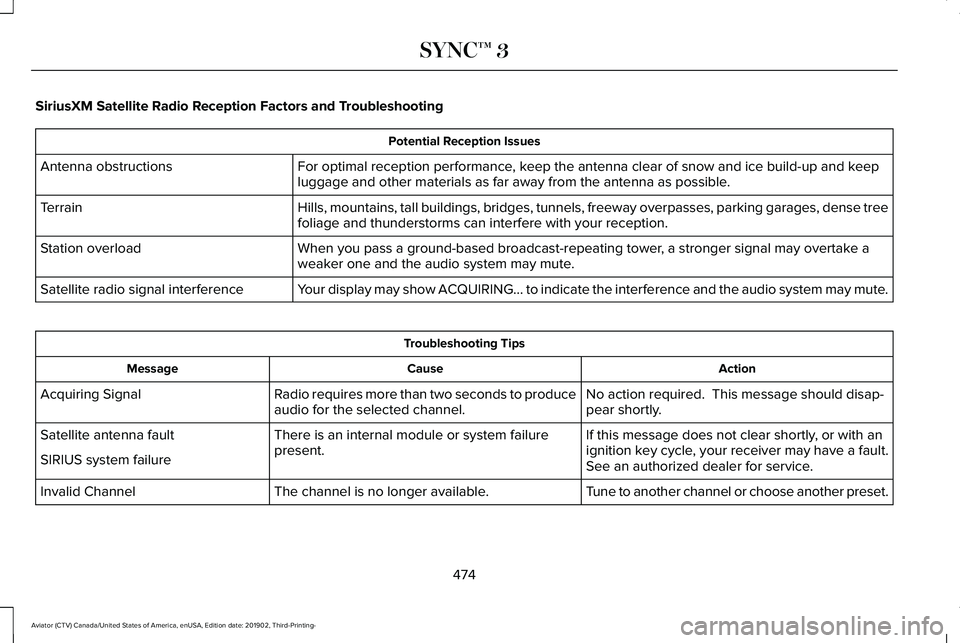
SiriusXM Satellite Radio Reception Factors and Troubleshooting
Potential Reception Issues
For optimal reception performance, keep the antenna clear of snow and ice build-up and keep
luggage and other materials as far away from the antenna as possible.
Antenna obstructions
Hills, mountains, tall buildings, bridges, tunnels, freeway overpasses, \
parking garages, dense tree
foliage and thunderstorms can interfere with your reception.
Terrain
When you pass a ground-based broadcast-repeating tower, a stronger signal may overtake a
weaker one and the audio system may mute.
Station overload
Your display may show ACQUIRING... to indicate the interference and the a\
udio system may mute.
Satellite radio signal interference Troubleshooting Tips
Action
Cause
Message
No action required. This message should disap-
pear shortly.
Radio requires more than two seconds to produce
audio for the selected channel.
Acquiring Signal
If this message does not clear shortly, or with an
ignition key cycle, your receiver may have a fault.
See an authorized dealer for service.
There is an internal module or system failure
present.
Satellite antenna fault
SIRIUS system failure
Tune to another channel or choose another preset.
The channel is no longer available.
Invalid Channel
474
Aviator (CTV) Canada/United States of America, enUSA, Edition date: 201902, Third-Printing- SYNC™ 3
Page 481 of 609
In order to provide the best possible
experience, use the contact form to report
any station issues found while listening to a
station broadcasting with HD Radio
technology. Independent entities own and
operate each station. These stations are
responsible for ensuring all audio streams
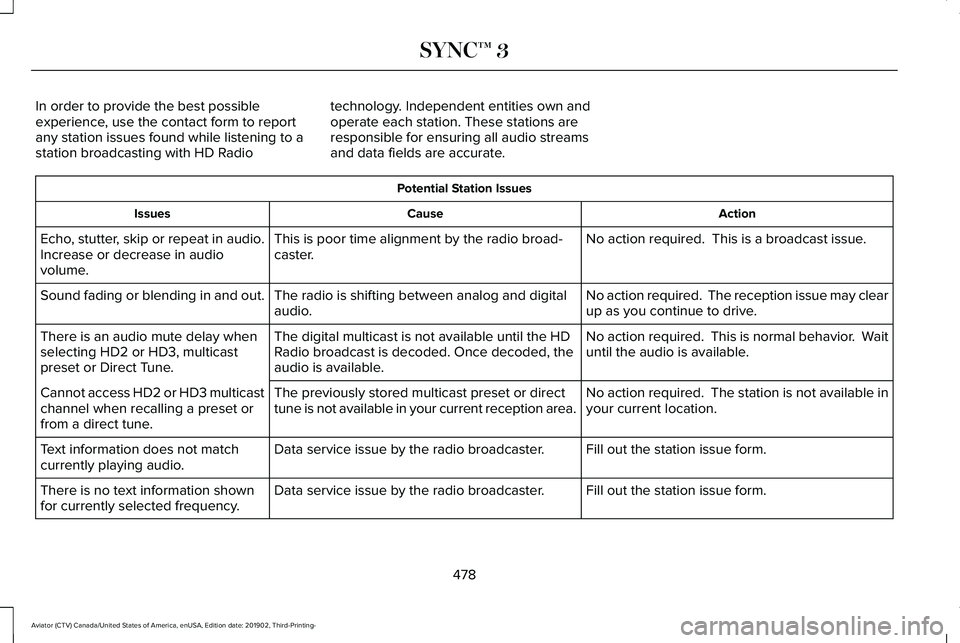
and data fields are accurate. Potential Station Issues
Action
Cause
Issues
No action required. This is a broadcast issue.
This is poor time alignment by the radio broad-
caster.
Echo, stutter, skip or repeat in audio.
Increase or decrease in audio
volume.
No action required. The reception issue may clear
up as you continue to drive.
The radio is shifting between analog and digital
audio.
Sound fading or blending in and out.
No action required. This is normal behavior. Wait
until the audio is available.
The digital multicast is not available until the HD
Radio broadcast is decoded. Once decoded, the
audio is available.
There is an audio mute delay when
selecting HD2 or HD3, multicast
preset or Direct Tune.
No action required. The station is not available in
your current location.
The previously stored multicast preset or direct
tune is not available in your current reception area.
Cannot access HD2 or HD3 multicast
channel when recalling a preset or
from a direct tune.
Fill out the station issue form.
Data service issue by the radio broadcaster.
Text information does not match
currently playing audio.
Fill out the station issue form.
Data service issue by the radio broadcaster.
There is no text information shown
for currently selected frequency.
478
Aviator (CTV) Canada/United States of America, enUSA, Edition date: 201902, Third-Printing- SYNC™ 3
Page 526 of 609
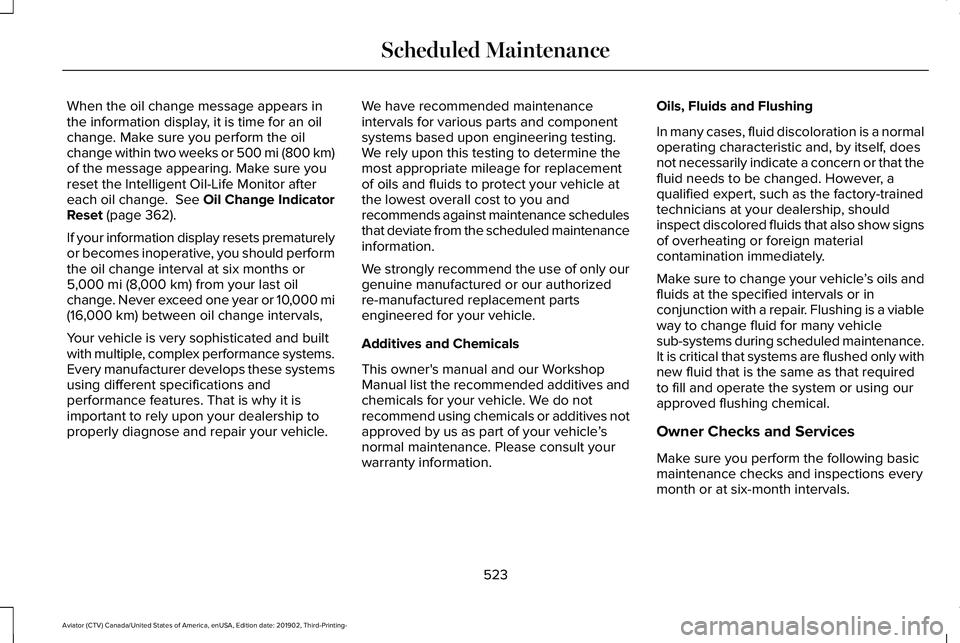
When the oil change message appears in
the information display, it is time for an oil
change. Make sure you perform the oil
change within two weeks or 500 mi (800 km)
of the message appearing. Make sure you
reset the Intelligent Oil-Life Monitor after
each oil change. See Oil Change Indicator
Reset (page 362).
If your information display resets prematurely
or becomes inoperative, you should perform
the oil change interval at six months or
5,000 mi (8,000 km)
from your last oil
change. Never exceed one year or 10,000 mi
(16,000 km)
between oil change intervals,
Your vehicle is very sophisticated and built
with multiple, complex performance systems.
Every manufacturer develops these systems
using different specifications and
performance features. That is why it is
important to rely upon your dealership to
properly diagnose and repair your vehicle. We have recommended maintenance
intervals for various parts and component
systems based upon engineering testing.
We rely upon this testing to determine the
most appropriate mileage for replacement
of oils and fluids to protect your vehicle at
the lowest overall cost to you and
recommends against maintenance schedules
that deviate from the scheduled maintenance
information.
We strongly recommend the use of only our
genuine manufactured or our authorized
re-manufactured replacement parts
engineered for your vehicle.
Additives and Chemicals
This owner's manual and our Workshop
Manual list the recommended additives and
chemicals for your vehicle. We do not
recommend using chemicals or additives not
approved by us as part of your vehicle
’s
normal maintenance. Please consult your
warranty information. Oils, Fluids and Flushing
In many cases, fluid discoloration is a normal
operating characteristic and, by itself, does
not necessarily indicate a concern or that the
fluid needs to be changed. However, a
qualified expert, such as the factory-trained
technicians at your dealership, should
inspect discolored fluids that also show signs
of overheating or foreign material
contamination immediately.
Make sure to change your vehicle
’s oils and
fluids at the specified intervals or in
conjunction with a repair. Flushing is a viable
way to change fluid for many vehicle
sub-systems during scheduled maintenance.
It is critical that systems are flushed only with
new fluid that is the same as that required
to fill and operate the system or using our
approved flushing chemical.
Owner Checks and Services
Make sure you perform the following basic
maintenance checks and inspections every
month or at six-month intervals.
523
Aviator (CTV) Canada/United States of America, enUSA, Edition date: 201902, Third-Printing- Scheduled Maintenance
Page 531 of 609
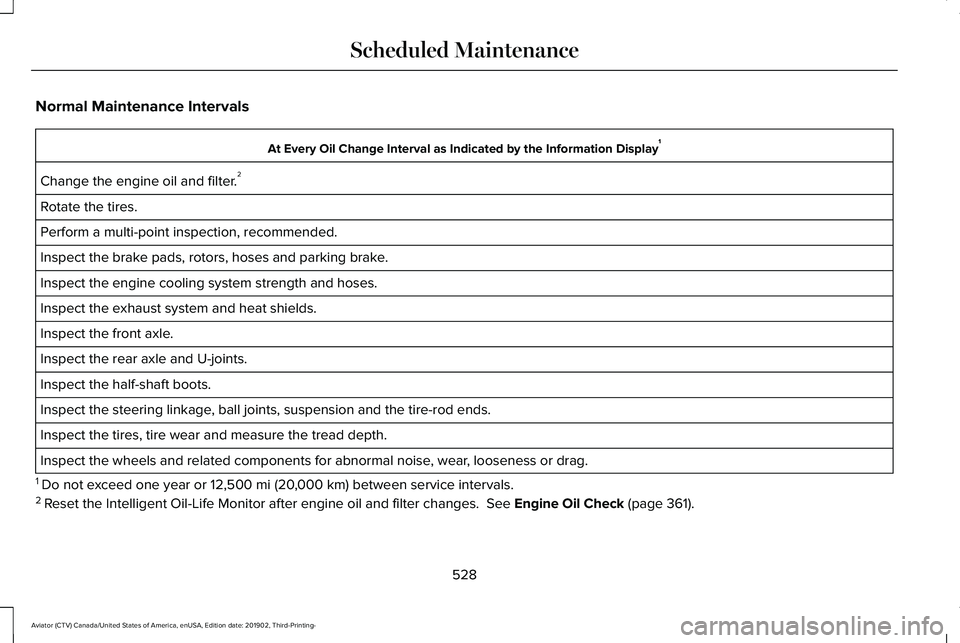
Normal Maintenance Intervals
At Every Oil Change Interval as Indicated by the Information Display
1
Change the engine oil and filter. 2
Rotate the tires.
Perform a multi-point inspection, recommended.
Inspect the brake pads, rotors, hoses and parking brake.
Inspect the engine cooling system strength and hoses.
Inspect the exhaust system and heat shields.
Inspect the front axle.
Inspect the rear axle and U-joints.
Inspect the half-shaft boots.
Inspect the steering linkage, ball joints, suspension and the tire-rod ends.
Inspect the tires, tire wear and measure the tread depth.
Inspect the wheels and related components for abnormal noise, wear, looseness or drag.
1 Do not exceed one year or 12,500 mi (20,000 km) between service intervals.
2 Reset the Intelligent Oil-Life Monitor after engine oil and filter change\
s.
See Engine Oil Check (page 361).
528
Aviator (CTV) Canada/United States of America, enUSA, Edition date: 201902, Third-Printing- Scheduled Maintenance
Page 533 of 609
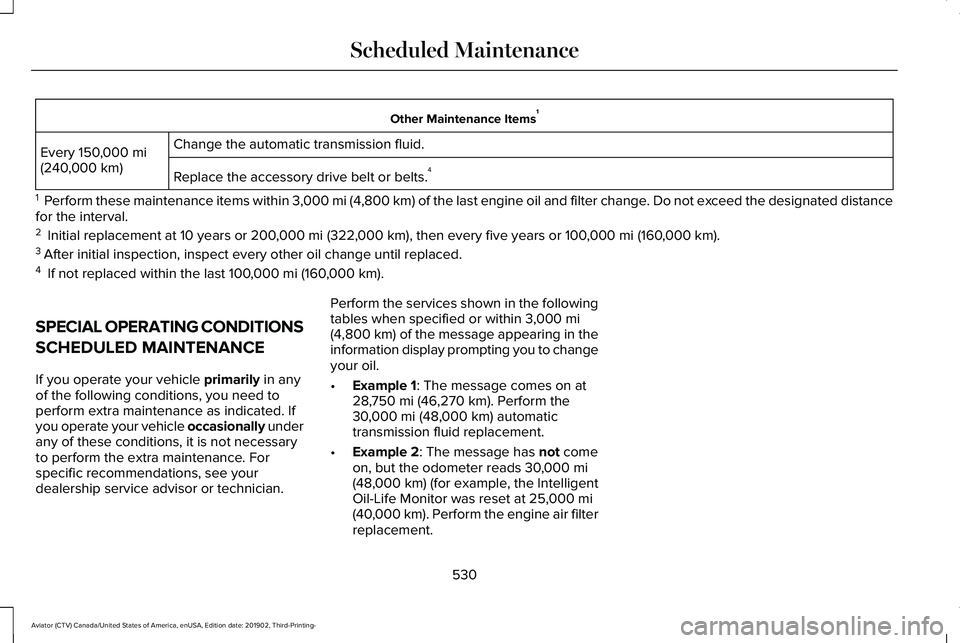
Other Maintenance Items
1
Change the automatic transmission fluid.
Every 150,000 mi
(240,000 km) Replace the accessory drive belt or belts. 4
1 Perform these maintenance items within 3,000 mi (4,800 km) of the last engine oil and filter change. Do not exceed the designated distance
for the interval.
2 Initial replacement at 10 years or
200,000 mi (322,000 km), then every five years or 100,000 mi (160,000 km).
3 After initial inspection, inspect every other oil change until replaced.\
4 If not replaced within the last
100,000 mi (160,000 km).
SPECIAL OPERATING CONDITIONS
SCHEDULED MAINTENANCE
If you operate your vehicle
primarily in any
of the following conditions, you need to
perform extra maintenance as indicated. If
you operate your vehicle occasionally under
any of these conditions, it is not necessary
to perform the extra maintenance. For
specific recommendations, see your
dealership service advisor or technician. Perform the services shown in the following
tables when specified or within
3,000 mi
(4,800 km) of the message appearing in the
information display prompting you to change
your oil.
• Example 1
: The message comes on at
28,750 mi (46,270 km). Perform the
30,000 mi (48,000 km) automatic
transmission fluid replacement.
• Example 2
: The message has not come
on, but the odometer reads 30,000 mi
(48,000 km) (for example, the Intelligent
Oil-Life Monitor was reset at 25,000 mi
(40,000 km). Perform the engine air filter
replacement.
530
Aviator (CTV) Canada/United States of America, enUSA, Edition date: 201902, Third-Printing- Scheduled Maintenance
Page 535 of 609
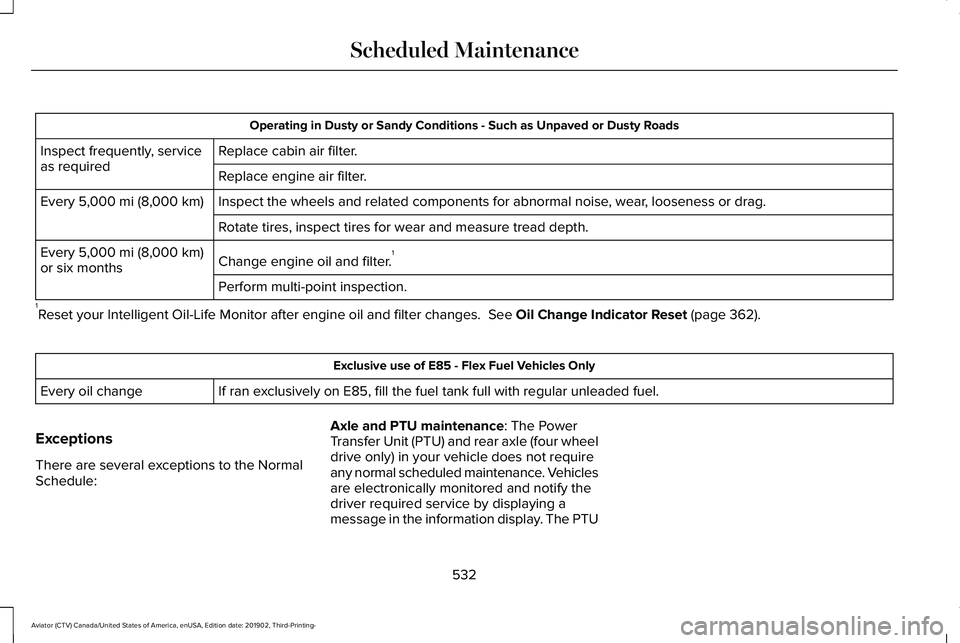
Operating in Dusty or Sandy Conditions - Such as Unpaved or Dusty Roads
Replace cabin air filter.
Inspect frequently, service
as required
Replace engine air filter.
Inspect the wheels and related components for abnormal noise, wear, looseness or drag.
Every 5,000 mi (8,000 km)
Rotate tires, inspect tires for wear and measure tread depth.
Change engine oil and filter. 1
Every
5,000 mi (8,000 km)
or six months
Perform multi-point inspection.
1 Reset your Intelligent Oil-Life Monitor after engine oil and filter chang\
es.
See Oil Change Indicator Reset (page 362). Exclusive use of E85 - Flex Fuel Vehicles Only
If ran exclusively on E85, fill the fuel tank full with regular unleaded fuel.
Every oil change
Exceptions
There are several exceptions to the Normal
Schedule: Axle and PTU maintenance
: The Power
Transfer Unit (PTU) and rear axle (four wheel
drive only) in your vehicle does not require
any normal scheduled maintenance. Vehicles
are electronically monitored and notify the
driver required service by displaying a
message in the information display. The PTU
532
Aviator (CTV) Canada/United States of America, enUSA, Edition date: 201902, Third-Printing- Scheduled Maintenance
Page 595 of 609
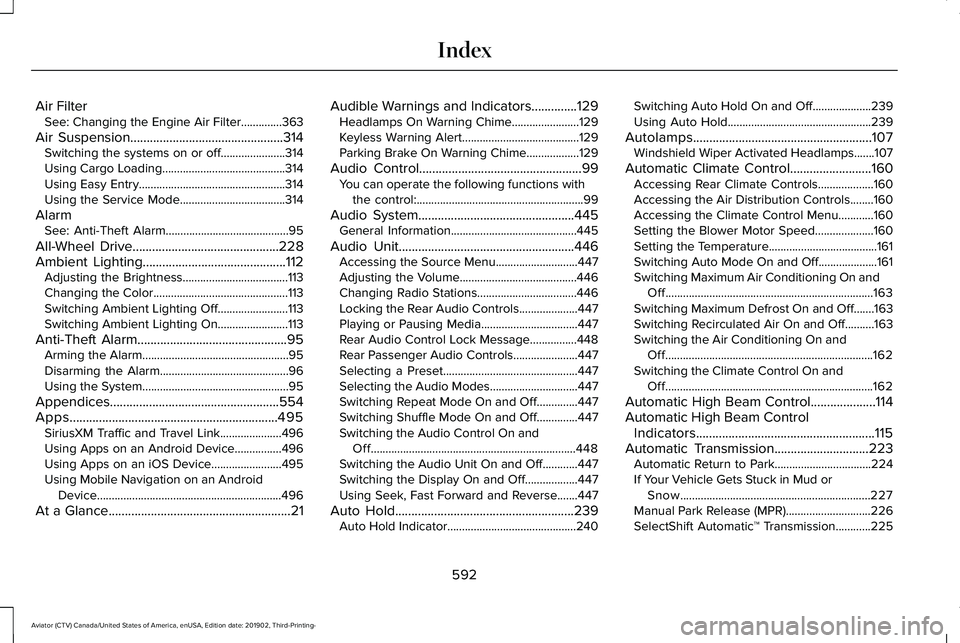
Air Filter
See: Changing the Engine Air Filter..............363
Air Suspension...............................................314 Switching the systems on or off......................314
Using Cargo Loading..........................................314
Using Easy Entry..................................................314
Using the Service Mode....................................314
Alarm See: Anti-Theft Alarm..........................................95
All-Wheel Drive.............................................228
Ambient Lighting............................................112 Adjusting the Brightness....................................113
Changing the Color..............................................113
Switching Ambient Lighting Off........................113
Switching Ambient Lighting On........................113
Anti-Theft Alarm..............................................95 Arming the Alarm..................................................95
Disarming the Alarm............................................96
Using the System..................................................95
Appendices....................................................554
Apps................................................................495 SiriusXM Traffic and Travel Link.....................496
Using Apps on an Android Device................496
Using Apps on an iOS Device........................495
Using Mobile Navigation on an Android
Device...............................................................496
At a Glance........................................................21 Audible Warnings and Indicators..............129
Headlamps On Warning Chime.......................
129
Keyless Warning Alert........................................129
Parking Brake On Warning Chime..................129
Audio Control
..................................................99
You can operate the following functions with
the control:.........................................................99
Audio System
................................................445
General Information...........................................445
Audio Unit
......................................................446
Accessing the Source Menu............................447
Adjusting the Volume........................................446
Changing Radio Stations..................................446
Locking the Rear Audio Controls....................447
Playing or Pausing Media.................................447
Rear Audio Control Lock Message................448
Rear Passenger Audio Controls......................447
Selecting a Preset..............................................447
Selecting the Audio Modes..............................447
Switching Repeat Mode On and Off..............447
Switching Shuffle Mode On and Off..............447
Switching the Audio Control On and
Off......................................................................448
Switching the Audio Unit On and Off............447
Switching the Display On and Off..................447
Using Seek, Fast Forward and Reverse.......447
Auto Hold
.......................................................239
Auto Hold Indicator............................................240 Switching Auto Hold On and Off....................239
Using Auto Hold.................................................239
Autolamps
.......................................................107
Windshield Wiper Activated Headlamps.......107
Automatic Climate Control
.........................160
Accessing Rear Climate Controls...................160
Accessing the Air Distribution Controls........160
Accessing the Climate Control Menu............160
Setting the Blower Motor Speed....................160
Setting the Temperature.....................................161
Switching Auto Mode On and Off....................161
Switching Maximum Air Conditioning On and Off.......................................................................163
Switching Maximum Defrost On and Off.......163
Switching Recirculated Air On and Off..........163
Switching the Air Conditioning On and Off.......................................................................162
Switching the Climate Control On and Off.......................................................................162
Automatic High Beam Control
....................114
Automatic High Beam Control Indicators.......................................................115
Automatic Transmission
.............................223
Automatic Return to Park.................................224
If Your Vehicle Gets Stuck in Mud or
Snow.................................................................227
Manual Park Release (MPR).............................226
SelectShift Automatic ™ Transmission............225
592
Aviator (CTV) Canada/United States of America, enUSA, Edition date: 201902, Third-Printing- Index