cruise control LINCOLN AVIATOR 2020 Owner's Manual
[x] Cancel search | Manufacturer: LINCOLN, Model Year: 2020, Model line: AVIATOR, Model: LINCOLN AVIATOR 2020Pages: 609, PDF Size: 5.4 MB
Page 277 of 609
The system may cancel and set the parking
brake if:
•
You unbuckle the seatbelt and open the
driver door after you stop your vehicle.
• Your vehicle is held at a stop
continuously for more than three minutes.
The system may deactivate or prevent
activating when requested if:
• A sensor is blocked.
• The brake temperature is too high.
• There is a failure in the system or a
related system.
SETTING THE ADAPTIVE CRUISE
CONTROL SPEED
Drive to the speed you prefer. Press either button to set the
current speed.
Take your foot off the accelerator pedal. The indicator, current gap setting and set
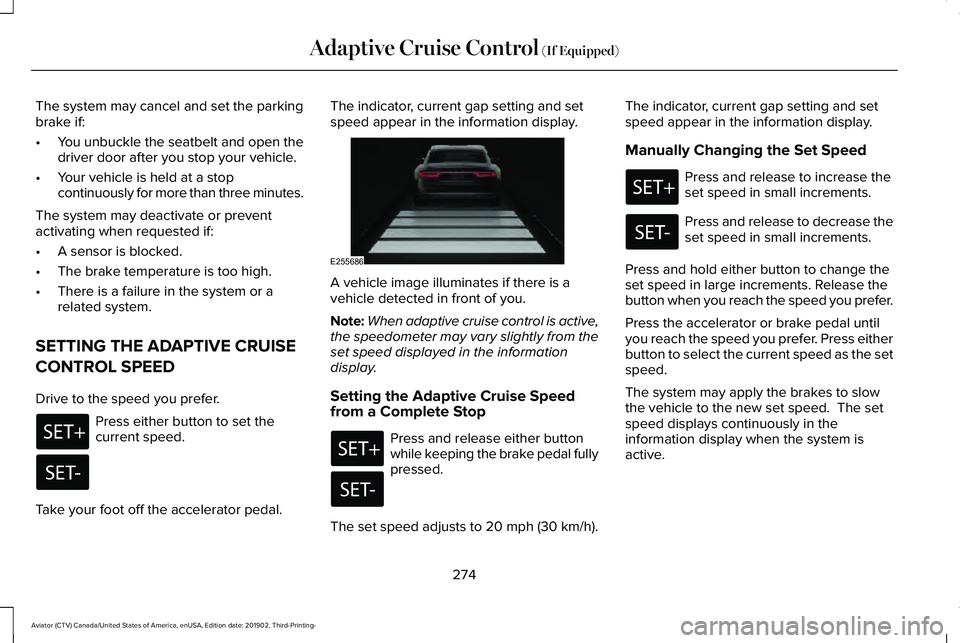
speed appear in the information display.
A vehicle image illuminates if there is a
vehicle detected in front of you.
Note:
When adaptive cruise control is active,
the speedometer may vary slightly from the
set speed displayed in the information
display.
Setting the Adaptive Cruise Speed
from a Complete Stop Press and release either button
while keeping the brake pedal fully
pressed.
The set speed adjusts to 20 mph (30 km/h). The indicator, current gap setting and set
speed appear in the information display.
Manually Changing the Set Speed Press and release to increase the
set speed in small increments.
Press and release to decrease the
set speed in small increments.
Press and hold either button to change the
set speed in large increments. Release the
button when you reach the speed you prefer.
Press the accelerator or brake pedal until
you reach the speed you prefer. Press either
button to select the current speed as the set
speed.
The system may apply the brakes to slow
the vehicle to the new set speed. The set
speed displays continuously in the
information display when the system is
active.
274
Aviator (CTV) Canada/United States of America, enUSA, Edition date: 201902, Third-Printing- Adaptive Cruise Control (If Equipped) E255686
Page 278 of 609
SETTING THE ADAPTIVE CRUISE
CONTROL GAP
Press the button to cycle through
the four gap settings.
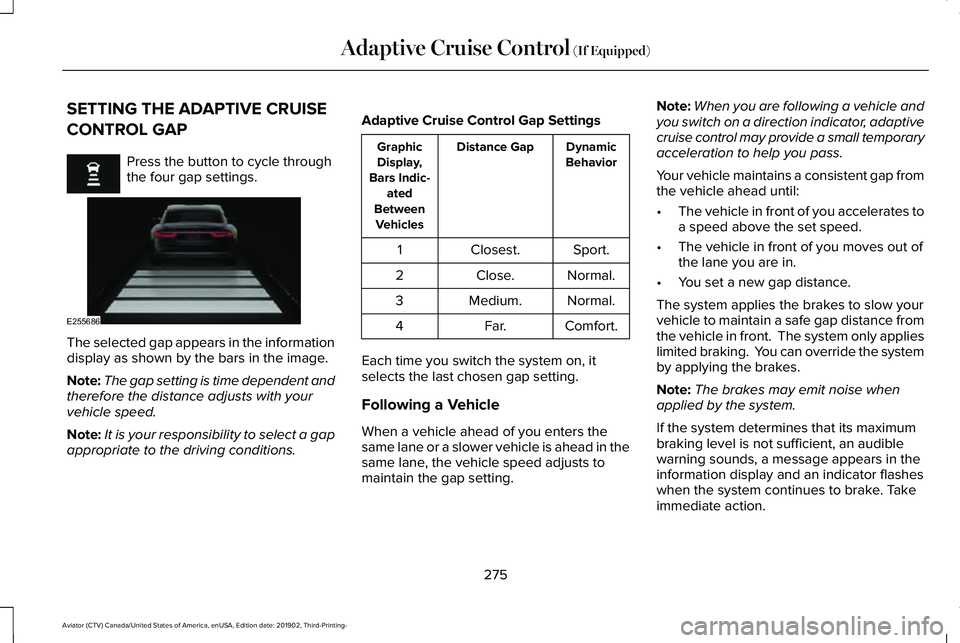
The selected gap appears in the information
display as shown by the bars in the image.
Note:
The gap setting is time dependent and
therefore the distance adjusts with your
vehicle speed.
Note: It is your responsibility to select a gap
appropriate to the driving conditions. Adaptive Cruise Control Gap Settings Dynamic
Behavior
Distance Gap
Graphic
Display,
Bars Indic- ated
Between Vehicles
Sport.
Closest.
1
Normal.
Close.
2
Normal.
Medium.
3
Comfort.
Far.
4
Each time you switch the system on, it
selects the last chosen gap setting.
Following a Vehicle
When a vehicle ahead of you enters the
same lane or a slower vehicle is ahead in the
same lane, the vehicle speed adjusts to
maintain the gap setting. Note:
When you are following a vehicle and
you switch on a direction indicator, adaptive
cruise control may provide a small temporary
acceleration to help you pass.
Your vehicle maintains a consistent gap from
the vehicle ahead until:
• The vehicle in front of you accelerates to
a speed above the set speed.
• The vehicle in front of you moves out of
the lane you are in.
• You set a new gap distance.
The system applies the brakes to slow your
vehicle to maintain a safe gap distance from
the vehicle in front. The system only applies
limited braking. You can override the system
by applying the brakes.
Note: The brakes may emit noise when
applied by the system.
If the system determines that its maximum
braking level is not sufficient, an audible
warning sounds, a message appears in the
information display and an indicator flashes
when the system continues to brake. Take
immediate action.
275
Aviator (CTV) Canada/United States of America, enUSA, Edition date: 201902, Third-Printing- Adaptive Cruise Control (If Equipped) E255686
Page 279 of 609
CANCELING THE SET SPEED
Press the button or tap the brake
pedal.
The set speed does not erase.
RESUMING THE SET SPEED Press the button.
Your vehicle speed returns to the previously
set speed and gap setting. The set speed
displays continuously in the information
display when the system is active.
Note: Only use resume if you are aware of
the set speed and intend to return to it.
Resuming the Set Speed from a
Complete Stop
If your vehicle follows a vehicle to a complete
stop and remains stationary for less than
three seconds, your vehicle accelerates from
a stationary position to follow the vehicle
ahead. If your vehicle follows a vehicle to
a complete stop and remains
stationary for more than three
seconds, press and release the button or
press the accelerator pedal to follow the
vehicle ahead.
OVERRIDING THE SET SPEED WARNING: If you override the system
by pressing the accelerator pedal, it does
not automatically apply the brakes to
maintain a gap from any vehicle ahead.
When you press the accelerator pedal, you
override the set speed and gap distance.
Use the accelerator pedal to intentionally
exceed the set speed limit.
When you override the system, the green
indicator illuminates and the vehicle icon
does not appear in the information display. The system resumes operation when you
release the accelerator pedal. The vehicle
speed decreases to the set speed, or a lower
speed if following a slower vehicle.
ADAPTIVE CRUISE CONTROL
INDICATORS - VEHICLES WITH:
ADAPTIVE CRUISE CONTROL
WITH LANE CENTERING
Illuminates when you switch lane
centering on. The color of the
indicator changes to indicate the
system status.
Gray indicates the system is on but inactive.
Green indicates the system is active and
applying assistance steering torque input to
keep your vehicle in the center of the lane.
Amber with an audible tone and then gray
indicates a system auto-cancellation.
276
Aviator (CTV) Canada/United States of America, enUSA, Edition date: 201902, Third-Printing- Adaptive Cruise Control (If Equipped)E281471 E281472 E281472 E262175
Page 280 of 609
ADAPTIVE CRUISE CONTROL
INDICATORS - VEHICLES WITH:
ADAPTIVE CRUISE CONTROL
WITH STOP AND GO
Illuminates when you switch
adaptive cruise control on. The
color of the indicator changes to
indicate the system status.
White indicates the system is on but inactive.
Green indicates that you set the speed and
the system is active. ADAPTIVE CRUISE CONTROL
INDICATORS - VEHICLES WITH:
INTELLIGENT ADAPTIVE CRUISE
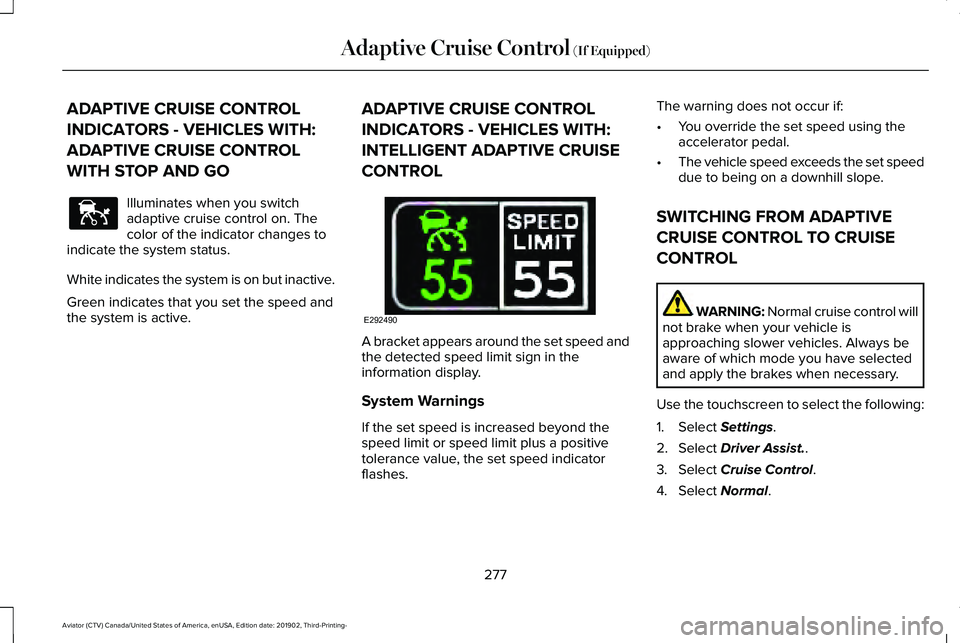
CONTROL A bracket appears around the set speed and
the detected speed limit sign in the
information display.
System Warnings
If the set speed is increased beyond the
speed limit or speed limit plus a positive
tolerance value, the set speed indicator
flashes.The warning does not occur if:
•
You override the set speed using the
accelerator pedal.
• The vehicle speed exceeds the set speed
due to being on a downhill slope.
SWITCHING FROM ADAPTIVE
CRUISE CONTROL TO CRUISE
CONTROL WARNING: Normal cruise control will
not brake when your vehicle is
approaching slower vehicles. Always be
aware of which mode you have selected
and apply the brakes when necessary.
Use the touchscreen to select the following:
1. Select
Settings.
2. Select
Driver Assist..
3. Select
Cruise Control.
4. Select
Normal.
277
Aviator (CTV) Canada/United States of America, enUSA, Edition date: 201902, Third-Printing- Adaptive Cruise Control
(If Equipped)E144529 E292490
Page 281 of 609
The cruise control indicator
replaces the adaptive cruise
control indicator if you select
normal cruise control. The gap setting does
not display, and the system does not respond
to lead vehicles. Automatic braking remains
active to maintain set speed. The system
remembers the last setting when you start
your vehicle.
SWITCHING INTELLIGENT MODE
ON AND OFF WARNING: You are responsible for
controlling your vehicle at all times. The
system is designed to be an aid and does
not relieve you of your responsibility to
drive with due care and attention. Failure
to follow this instruction could result in the
loss of control of your vehicle, personal
injury or death.
Use the touchscreen to select the following:
1. Select Settings. See Settings (page 498). 2. Select
Driver Assist..
3. Select
Cruise Control.
Changing the Set Speed with
Intelligent Adaptive Cruise Control
When intelligent mode is on, the system
adjusts the set speed to the speed limit
detected by the camera and the speed limit
information provided by the navigation
system.
Note: The set speed adjusts when the
system detects a different maximum speed
limit.
Note: The speed limit information provided
by the navigation map data may be
inaccurate or out of date.
See Navigation
(page 487).
Note: The system alerts you if the set speed
increases beyond the speed limit.
See
Adaptive Cruise Control Indicators (page
276).
If the system does not detect a speed limit,
the vehicle speed remains at the current set
speed. You can override the set speed at any time.
You may need to override or cancel the
system in certain situations such as inclement
weather or if an incorrect speed is set.
Note:
The system may not detect and read
speed limit signs with conditional
information, for example, when a sign is
flashing, during specific time ranges, or when
children are present.
Note: Under certain conditions, the system
may not adjust the vehicle speed until after
your vehicle passes the speed limit sign.
ADJUSTING THE SET SPEED
TOLERANCE
You can set a permanent speed tolerance
that is above or below the detected speed
limit.
Use the touchscreen to select the following:
1. Select Settings. See Settings (page 498).
2. Select
Driver Assist.
3. Select
Cruise Control.
4. Select
Tolerance.
278
Aviator (CTV) Canada/United States of America, enUSA, Edition date: 201902, Third-Printing- Adaptive Cruise Control
(If Equipped)E71340
Page 282 of 609
5. Use + and - to set the tolerance.
Note: You cannot set the tolerance more
than
20 mph (30 km/h) above or below the
recognized speed. ADAPTIVE CRUISE CONTROL –
TROUBLESHOOTING
Adaptive Cruise Control – Information
Messages - Vehicles With: Adaptive
Cruise Control With Lane Centering
Note:
Depending on your vehicle options
and instrument cluster type, not all messages
display or are available. Note:
Certain messages may be abbreviated
or shortened depending upon which cluster
type you have. Action
Message
Make sure you return your hands to the steering wheel and provide steering \
input.
Keep Hands on Steering Wheel
Conditions exist preventing the system from being available.
Lane Centering Assist Not Available
Adaptive cruise control must be on before lane centering can be switched\
on.
For Lane Centering Assist to work Turn On
Adaptive Cruise
279
Aviator (CTV) Canada/United States of America, enUSA, Edition date: 201902, Third-Printing- Adaptive Cruise Control
(If Equipped)
Page 283 of 609
Adaptive Cruise Control – Information
Messages - Vehicles With: Adaptive
Cruise Control With Stop and Go
Note:
Depending on your vehicle options
and instrument cluster type, not all messages
display or are available. Note:
Certain messages may be abbreviated
or shortened depending upon which cluster
type you have. Action
Message
A malfunction is preventing the adaptive cruise from engaging.
Adaptive Cruise Malfunction
Front Sensor Not Aligned Contact an authorized dealer to have the radar checked for proper coverage and operation. Conditions exist preventing the system from being available.
Adaptive Cruise Not Available
The radar is blocked because of poor radar visibility due to inclement weather or ice, mud, orwater in front of the radar. You can typically clean the sensor to resolve this.
Adaptive Cruise Not Available Sensor
Blocked See Manual Due to the nature of radar technology, it is possible to get a blockage warning with no actual
block. This happens, for example, when driving in sparse rural or desert environments. A false blocked condition either self clears, or clears after you restart your vehicl\
e.
You have selected normal cruise control. The system does not brake or react to traffic.
Normal Cruise Active Adaptive Braking Off
Displays when the adaptive cruise is going to cancel and you must take control.
Adaptive Cruise - Driver Resume Control
Displays when the vehicle speed is too slow to activate the adaptive cru\
ise and there is no leadvehicle in range.
Adaptive Cruise Speed Too Low to
Activate
280
Aviator (CTV) Canada/United States of America, enUSA, Edition date: 201902, Third-Printing- Adaptive Cruise Control (If Equipped)
Page 284 of 609
Adaptive Cruise Control – Information
Messages - Vehicles With: Intelligent
Adaptive Cruise Control
Note:
Depending on your vehicle options
and instrument cluster type, not all messages
display or are available. Note:
Certain messages may be abbreviated
or shortened depending upon which cluster
type you have. Action
Message
Conditions exist preventing the system from being available.
Intelligent Cruise Control Speed Sign
Recognition Not Available
281
Aviator (CTV) Canada/United States of America, enUSA, Edition date: 201902, Third-Printing- Adaptive Cruise Control (If Equipped)
Page 305 of 609
Active Braking: Active braking may activate
if the system determines that a collision is
imminent. The system may help the driver
reduce impact damage or avoid the crash
completely.
Note: Brake Support and Active Braking are
active at speeds up to 75 mph (120 km/h). If
your vehicle has a radar sensor included
with Adaptive Cruise Control, then Brake
Support and Active Braking are active up to
the maximum speed of the vehicle.
Note: If you perceive Pre-Collision Assist
alerts as being too frequent or disturbing,
then you can reduce the alert sensitivity,
though the manufacturer recommends using
the highest sensitivity setting where possible.
Setting lower sensitivity would lead to fewer
and later system warnings.
Note: Pre-Collision Assist turns off when you
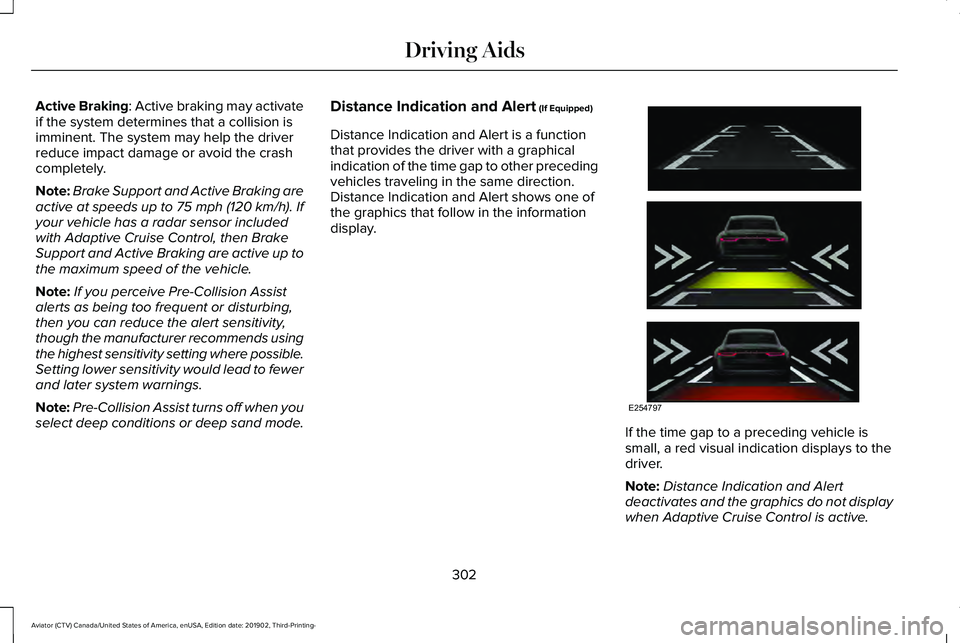
select deep conditions or deep sand mode. Distance Indication and Alert (If Equipped)
Distance Indication and Alert is a function
that provides the driver with a graphical
indication of the time gap to other preceding
vehicles traveling in the same direction.
Distance Indication and Alert shows one of
the graphics that follow in the information
display. If the time gap to a preceding vehicle is
small, a red visual indication displays to the
driver.
Note:
Distance Indication and Alert
deactivates and the graphics do not display
when Adaptive Cruise Control is active.
302
Aviator (CTV) Canada/United States of America, enUSA, Edition date: 201902, Third-Printing- Driving AidsE254797
Page 327 of 609
![LINCOLN AVIATOR 2020 Owners Manual •
Drive a heavily loaded vehicle or tow a
trailer.
• Carry unnecessary weight (approximately
1 mpg [0.4 km/L] is lost for every 400 lb
[180 kilogram] of weight carried).
• Driving with the wheel](/img/15/58978/w960_58978-326.png "LINCOLN AVIATOR 2020 Owners Manual •
Drive a heavily loaded vehicle or tow a
trailer.
• Carry unnecessary weight (approximately
1 mpg [0.4 km/L] is lost for every 400 lb
[180 kilogram] of weight carried).
• Driving with the wheel")
•
Drive a heavily loaded vehicle or tow a
trailer.
• Carry unnecessary weight (approximately
1 mpg [0.4 km/L] is lost for every 400 lb
[180 kilogram] of weight carried).
• Driving with the wheels out of alignment.
Conditions
• Heavily loading a vehicle or towing a
trailer may reduce fuel economy at any
speed.
• Adding certain accessories to your
vehicle (for example bug deflectors,
rollbars, light bars, running boards, ski
racks or luggage racks) may reduce fuel
economy.
• To maximize the fuel economy, drive with
the tonneau cover installed (if equipped).
• Using fuel blended with alcohol may
lower fuel economy.
• Fuel economy may decrease with lower
temperatures during the first 5–10 mi
(12–16 km) of driving.
• Driving on flat terrain offers improved fuel
economy as compared to driving on hilly
terrain. •
Transmissions give their best fuel
economy when operated in the top cruise
gear and with steady pressure on the gas
pedal.
• Four-wheel-drive operation (if equipped)
is less fuel efficient than two-wheel-drive
operation.
COLD WEATHER PRECAUTIONS
The functional operation of some
components and systems can be affected at
temperatures below
-13°F (-25°C).
BREAKING-IN
You need to break in new tires for
approximately
300 mi (480 km). During this
time, your vehicle may exhibit some unusual
driving characteristics.
Avoid driving too fast during the first 1,000 mi
(1,600 km)
. Vary your speed frequently and
change up through the gears early. Do not
labor the engine. Do not tow during the first
1,000 mi
(1,600 km).
DRIVING THROUGH WATER WARNING:
Do not drive through
flowing or deep water as you may lose
control of your vehicle.
Note: Driving through standing water can
cause vehicle damage.
Note: Engine damage can occur if water
enters the air filter.
Before driving through standing water, check
the depth. Never drive through water that is
higher than the bottom of the front rocker
area of your vehicle.
324
Aviator (CTV) Canada/United States of America, enUSA, Edition date: 201902, Third-Printing- Driving Hints