mirror LINCOLN AVIATOR 2020 Owner's Manual
[x] Cancel search | Manufacturer: LINCOLN, Model Year: 2020, Model line: AVIATOR, Model: LINCOLN AVIATOR 2020Pages: 609, PDF Size: 5.4 MB
Page 293 of 609
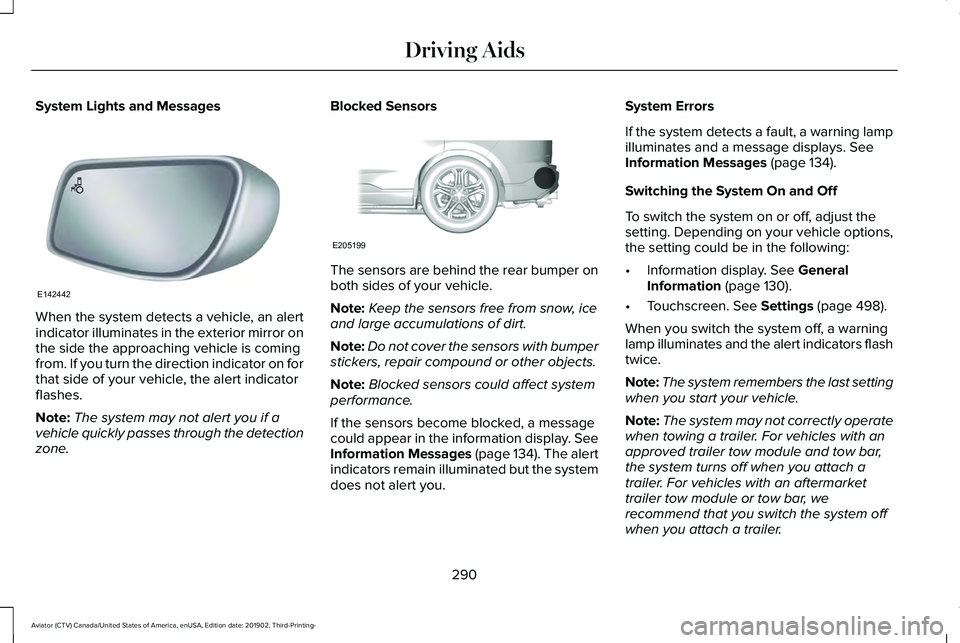
System Lights and Messages
When the system detects a vehicle, an alert
indicator illuminates in the exterior mirror on
the side the approaching vehicle is coming
from. If you turn the direction indicator on for
that side of your vehicle, the alert indicator
flashes.
Note:
The system may not alert you if a
vehicle quickly passes through the detection
zone. Blocked Sensors
The sensors are behind the rear bumper on
both sides of your vehicle.
Note:
Keep the sensors free from snow, ice
and large accumulations of dirt.
Note: Do not cover the sensors with bumper
stickers, repair compound or other objects.
Note: Blocked sensors could affect system
performance.
If the sensors become blocked, a message
could appear in the information display. See
Information Messages (page 134). The alert
indicators remain illuminated but the system
does not alert you. System Errors
If the system detects a fault, a warning lamp
illuminates and a message displays. See
Information Messages (page 134).
Switching the System On and Off
To switch the system on or off, adjust the
setting. Depending on your vehicle options,
the setting could be in the following:
• Information display.
See General
Information (page 130).
• Touchscreen.
See Settings (page 498).
When you switch the system off, a warning
lamp illuminates and the alert indicators flash
twice.
Note: The system remembers the last setting
when you start your vehicle.
Note: The system may not correctly operate
when towing a trailer. For vehicles with an
approved trailer tow module and tow bar,
the system turns off when you attach a
trailer. For vehicles with an aftermarket
trailer tow module or tow bar, we
recommend that you switch the system off
when you attach a trailer.
290
Aviator (CTV) Canada/United States of America, enUSA, Edition date: 201902, Third-Printing- Driving AidsE142442 E205199
Page 294 of 609
To permanently switch the system off,
contact an authorized dealer.
Blind Spot Information System with
Trailer Tow (If Equipped)
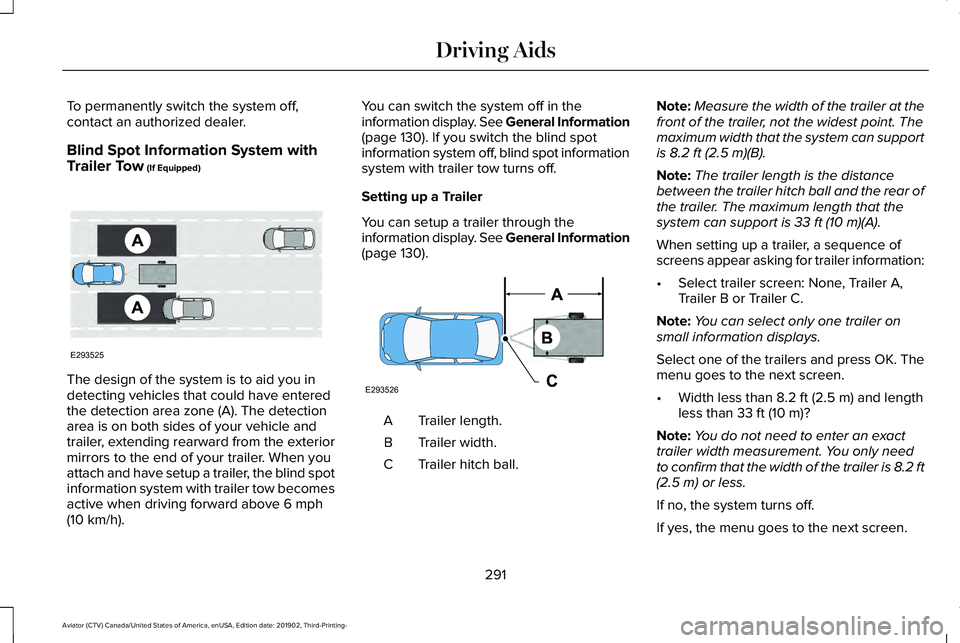
The design of the system is to aid you in
detecting vehicles that could have entered
the detection area zone (A). The detection
area is on both sides of your vehicle and
trailer, extending rearward from the exterior
mirrors to the end of your trailer. When you
attach and have setup a trailer, the blind spot
information system with trailer tow becomes
active when driving forward above
6 mph
(10 km/h). You can switch the system off in the
information display. See General Information
(page
130). If you switch the blind spot
information system off, blind spot information
system with trailer tow turns off.
Setting up a Trailer
You can setup a trailer through the
information display. See General Information
(page
130). Trailer length.
A
Trailer width.
B
Trailer hitch ball.
C Note:
Measure the width of the trailer at the
front of the trailer, not the widest point. The
maximum width that the system can support
is
8.2 ft (2.5 m)(B).
Note: The trailer length is the distance
between the trailer hitch ball and the rear of
the trailer. The maximum length that the
system can support is
33 ft (10 m)(A).
When setting up a trailer, a sequence of
screens appear asking for trailer information:
• Select trailer screen: None, Trailer A,
Trailer B or Trailer C.
Note: You can select only one trailer on
small information displays.
Select one of the trailers and press OK. The
menu goes to the next screen.
• Width less than
8.2 ft (2.5 m) and length
less than 33 ft (10 m)?
Note: You do not need to enter an exact
trailer width measurement. You only need
to confirm that the width of the trailer is 8.2 ft
(2.5 m)
or less.
If no, the system turns off.
If yes, the menu goes to the next screen.
291
Aviator (CTV) Canada/United States of America, enUSA, Edition date: 201902, Third-Printing- Driving AidsE293525 E293526
Page 296 of 609
•
Box trailers that have a width greater than
8.2 ft (2.5 m) could cause early alerts
when you pass a vehicle.
• Clam shell or V-Nose box trailers with a
width greater than
8.2 ft (2.5 m) could
cause delayed alerts when a vehicle
traveling the same speed as your vehicle
merges lanes.
System Errors
If the system detects a fault, a warning lamp
illuminates and a message displays.
See
Information Messages (page 134).
Switching the System On and Off
You can switch the blind spot information
system with trailer tow off by not selecting a
trailer the information display.
See General
Information (page 130). In this case, the
system turns off as long as a trailer is
attached to your vehicle. As soon as you
disconnect the trailer, the blind spot
information system becomes active. When you switch the system off, a warning
lamp illuminates and the alert indicators flash
twice.
Note:
The system remembers the last trailer
setting when you start your vehicle.
You cannot switch off the blind spot
information system with trailer tow when
using MyKey, but you can still change the
trailer settings.
See MyKey™ (page 73).
To permanently switch the system off,
contact an authorized dealer.
CROSS TRAFFIC ALERT WARNING:
Do not use the cross
traffic alert system as a replacement for
using the interior and exterior mirrors or
looking over your shoulder before
reversing out of a parking space. The cross
traffic alert system is not a replacement for
careful driving. WARNING:
The system may not
operate properly during severe weather
conditions, for example snow, ice, heavy
rain and spray. Always drive with due care
and attention. Failure to take care may
result in a crash.
The system alerts you of vehicles
approaching from the sides behind your
vehicle when you shift into reverse (R).
Using Cross Traffic Alert
The system detects vehicles that approach
at a speed between
4 mph (6 km/h) and
37 mph (60 km/h). Coverage decreases when
the sensors are partially, mostly or fully
obstructed. Slowly reversing helps increase
the coverage area and effectiveness.
The system turns on when you start the
engine and you shift into reverse (R). The
system turns off when you shift out of reverse
(R).
293
Aviator (CTV) Canada/United States of America, enUSA, Edition date: 201902, Third-Printing- Driving Aids
Page 300 of 609
Cross Traffic Alert Indicator
When the system detects an
approaching vehicle, a tone
sounds, a warning lamp illuminates
in the relevant exterior mirror and arrows
appear in the information display to show
which side the approaching vehicle is coming
from. Note:
If arrows do not display, a message
appears in the information display.
If the system malfunctions, a warning lamp
illuminates in the instrument cluster and a
message appears in the information display.
Have your vehicle checked as soon as
possible. Note:
In exceptional conditions, the system
could alert you, even when there is nothing
in the detection zone, for example a vehicle
passing further away from your vehicle.
Cross Traffic Alert Information Messages Action
Message
Displays instead of indication arrows when the system detects a vehicle. Check for approaching
traffic.
Cross Traffic Alert
Indicates blocked cross traffic alert system sensors. Clean the sensors. If the message\
continues
to appear, have your vehicle checked as soon as possible.
Cross Traffic Not Available Sensor
Blocked See Manual
The system has malfunctioned. Have your vehicle checked as soon as possible.
Cross Traffic System Fault
Displays if you attach a trailer to your vehicle.
Cross Traffic Alert Deactivated Trailer
Attached
297
Aviator (CTV) Canada/United States of America, enUSA, Edition date: 201902, Third-Printing- Driving AidsE268294
Page 301 of 609
SPEED SIGN RECOGNITION (IF
EQUIPPED)
Principle of Operation WARNING:
You are responsible for
controlling your vehicle at all times. The
system is designed to be an aid and does
not relieve you of your responsibility to
drive with due care and attention. Failure
to follow this instruction could result in the
loss of control of your vehicle, personal
injury or death. WARNING: You must remain in your
vehicle when the system turns on. At all
times, you are responsible for controlling
your vehicle, supervising the system and
intervening, if required. Failure to take care
may result in the loss of control of your
vehicle, serious personal injury or death. WARNING:
The system may not
function if the sensor is blocked. The system detects recognizable traffic
signs, for example:
•
Speed limit signs.
• No overtaking signs.
• Speed limit cancellation signs.
• No overtaking cancellation signs.
It continuously monitors road signs to inform
you of the current maximum speed limit and
overtaking regulations. The sensor is behind
the interior rear view mirror.
Note: In cold and severe weather conditions
the system may not function. Rain, snow,
spray and large contrasts in lighting can all
prevent the sensor from functioning correctly.
Note: Do not carry out windshield repairs in
the immediate area surrounding the sensor.
Note: If your vehicle has a suspension kit
not approved by us, the system may not
correctly function.
Note: Always use original parts when
replacing headlamp bulbs. Other bulbs may
reduce system performance.
Note: The system may not detect all traffic
signs and may incorrectly read signs. Note:
Keep the windshield free from
obstructions, for example, bird droppings,
insects and snow or ice.
Note: If the system has navigation, traffic
sign data provided by the navigation system
contains information integrated to the data
carrier release.
Using Traffic Sign Recognition
Setting the System Speed Warning
The system has a number of speed warning
levels that you can set using the information
display. See General Information (page
130).
System Display
The system can display two traffic signs in
parallel.
You can view the status at any time using
the information display.
298
Aviator (CTV) Canada/United States of America, enUSA, Edition date: 201902, Third-Printing- Driving Aids
Page 357 of 609
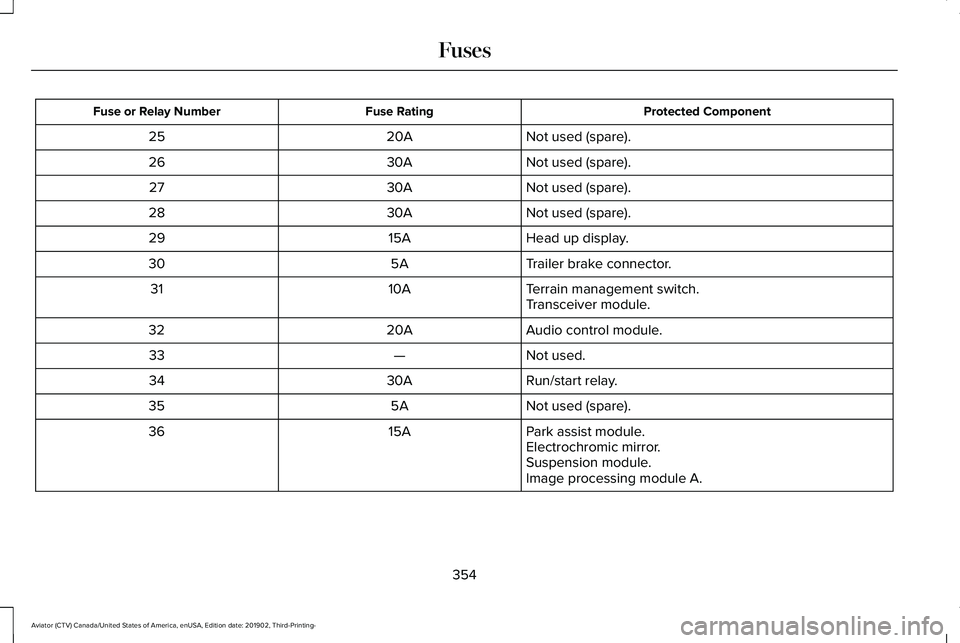
Protected Component
Fuse Rating
Fuse or Relay Number
Not used (spare).
20A
25
Not used (spare).
30A
26
Not used (spare).
30A
27
Not used (spare).
30A
28
Head up display.
15A
29
Trailer brake connector.
5A
30
Terrain management switch.
10A
31
Transceiver module.
Audio control module.
20A
32
Not used.
—
33
Run/start relay.
30A
34
Not used (spare).
5A
35
Park assist module.
15A
36
Electrochromic mirror.
Suspension module.
Image processing module A.
354
Aviator (CTV) Canada/United States of America, enUSA, Edition date: 201902, Third-Printing- Fuses
Page 384 of 609
•
Do not allow wax to come in contact with
any non-body (low-gloss black) colored
trim. The wax will discolor or stain the
parts over time.
•Roof racks.
• Bumpers.
• Grained door handles.
• Side moldings.
• Mirror housings.
• Windshield cowl area.
• Do not apply wax to glass areas.
• After waxing, your car's paint should feel
smooth, and be free of streaks and
smudges.
CLEANING THE ENGINE
Engines are more efficient when they are
clean because grease and dirt buildup keep
the engine warmer than normal. When washing:
•
Take care when using a power washer
to clean the engine. The high-pressure
fluid could penetrate the sealed parts
and cause damage.
• Do not spray a hot engine with cold water
to avoid cracking the engine block or
other engine components.
• Spray Motorcraft Engine Shampoo and
Degreaser on all parts that require
cleaning and pressure rinse clean. In
Canada, use Motorcraft Engine Shampoo.
Note: If your vehicle has an engine cover
remove the cover before application of
Motorcraft Engine Shampoo and Degreaser.
Immediately rinse away any over spray.
• Never wash or rinse the engine while it
is hot or running; water in the running
engine may cause internal damage.
• Never wash or rinse any ignition coil,
spark plug wire or spark plug well, or the
area in and around these locations.
• Cover the battery, power distribution box,
and air filter assembly to prevent water
damage when cleaning the engine. CLEANING THE WINDOWS AND
WIPER BLADES
Car wash chemicals and environmental
fallout can result in windshield and wiper
blade contamination. Dirty windshield and
wipers will result in poor windshield wiper
operation. Keep the windshield and wiper
blades clean to maintain windshield wiper
performance.
To clean the windshield and wiper blades:
•
Clean the windshield with a non-abrasive
glass cleaner. When cleaning the interior
of the windshield, avoid getting any glass
cleaner on the instrument panel or door
panels. Wipe any glass cleaner off these
surfaces immediately.
• For windshields contaminated with tree
sap, chemicals, wax or bugs, clean the
entire windshield using steel wool (no
greater than 0000 grade) in a circular
motion and rinse with water.
• Clean the wiper blades with isopropyl
rubbing alcohol or windshield washer
concentrate.
381
Aviator (CTV) Canada/United States of America, enUSA, Edition date: 201902, Third-Printing- Vehicle Care
Page 385 of 609
Note:
Do not use razor blades or other
sharp objects to clean or remove decals from
the inside of the heated rear window. The
vehicle warranty does not cover damage
caused to the heated rear window grid lines.
CLEANING THE INTERIOR WARNING: Do not use cleaning
solvents, bleach or dye on the vehicle's
seatbelts, as these actions may weaken
the belt webbing. WARNING:
On vehicles equipped
with seat-mounted airbags, do not use
chemical solvents or strong detergents.
Such products could contaminate the side
airbag system and affect performance of
the side airbag in a crash. For fabric, carpets, cloth seats and seats
equipped with side airbags:
•
Remove dust and loose dirt with a
vacuum cleaner.
• Remove light stains and soil with
Motorcraft Professional Strength Carpet
& Upholstery Cleaner.
• If grease or tar is present on the material,
spot-clean the area first with Motorcraft
Spot and Stain Remover. In Canada, use
Motorcraft Multi-Purpose Cleaner.
• If a ring forms on the fabric after spot
cleaning, clean the entire area
immediately (but do not oversaturate) or
the ring will set.
• Do not use household cleaning products
or glass cleaners, which can stain and
discolor the fabric and affect the flame
retardant abilities of the seat materials.
Mirrors
Do not clean the housing or glass of any
mirror with harsh abrasives, fuel or other
petroleum or ammonia-based cleaning
products. CLEANING THE INSTRUMENT
PANEL AND INSTRUMENT
CLUSTER LENS
WARNING:
Do not use chemical
solvents or strong detergents when
cleaning the steering wheel or instrument
panel to avoid contamination of the airbag
system.
Note: Follow the same procedure as
cleaning leather seats for cleaning leather
instrument panels and leather interior trim
surfaces. See Cleaning Leather Seats
(page
383).
Clean the instrument panel and cluster lens
with a clean, damp and soft cloth, then use
a clean, dry and soft cloth to dry these areas.
382
Aviator (CTV) Canada/United States of America, enUSA, Edition date: 201902, Third-Printing- Vehicle Care
Page 487 of 609
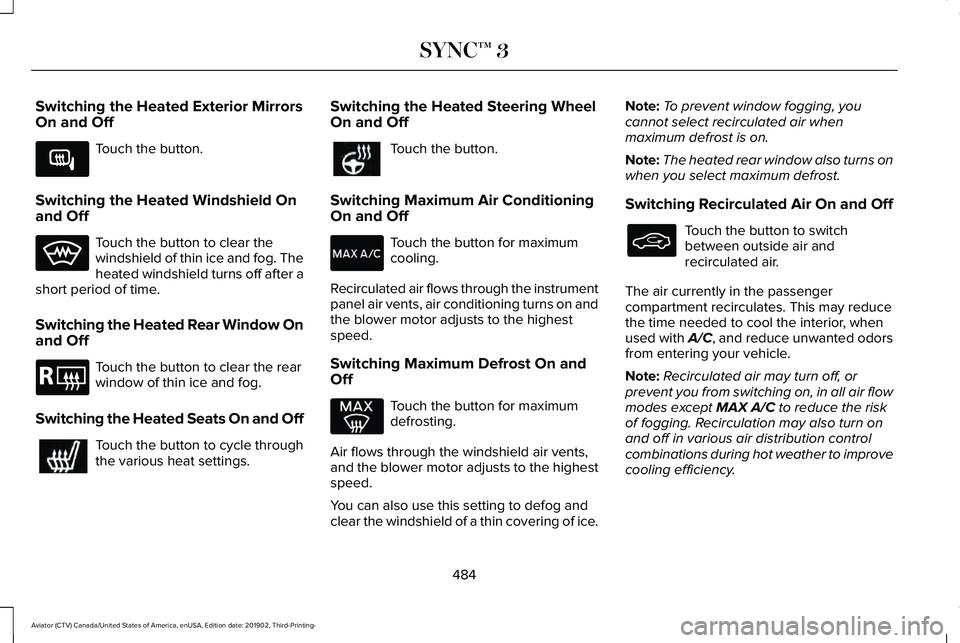
Switching the Heated Exterior Mirrors
On and Off
Touch the button.
Switching the Heated Windshield On
and Off Touch the button to clear the
windshield of thin ice and fog. The
heated windshield turns off after a
short period of time.
Switching the Heated Rear Window On
and Off Touch the button to clear the rear
window of thin ice and fog.
Switching the Heated Seats On and Off Touch the button to cycle through
the various heat settings. Switching the Heated Steering Wheel
On and Off Touch the button.
Switching Maximum Air Conditioning
On and Off Touch the button for maximum
cooling.
Recirculated air flows through the instrument
panel air vents, air conditioning turns on and
the blower motor adjusts to the highest
speed.
Switching Maximum Defrost On and
Off Touch the button for maximum
defrosting.
Air flows through the windshield air vents,
and the blower motor adjusts to the highest
speed.
You can also use this setting to defog and
clear the windshield of a thin covering of ice. Note:
To prevent window fogging, you
cannot select recirculated air when
maximum defrost is on.
Note: The heated rear window also turns on
when you select maximum defrost.
Switching Recirculated Air On and Off Touch the button to switch
between outside air and
recirculated air.
The air currently in the passenger
compartment recirculates. This may reduce
the time needed to cool the interior, when
used with A/C, and reduce unwanted odors
from entering your vehicle.
Note: Recirculated air may turn off, or
prevent you from switching on, in all air flow
modes except MAX A/C to reduce the risk
of fogging. Recirculation may also turn on
and off in various air distribution control
combinations during hot weather to improve
cooling efficiency.
484
Aviator (CTV) Canada/United States of America, enUSA, Edition date: 201902, Third-Printing- SYNC™ 3E266189 E184884
Page 597 of 609
Changing the Front Wiper Blades -
Vehicles Without: Heated Wiper
Blades...........................................................375
Installing the Front Wiper Blades ..................376
Removing the Front Wiper Blades.................376
Changing the Rear Wiper Blades.............377
Changing the Vehicle Wi-Fi Hotspot Name or Password................................................443
Checking MyKey System Status.................75 MyKey Distance.....................................................75
Number of Admin Keys.......................................76
Number of MyKeys...............................................76
Checking the Wiper Blades.......................375
Child Restraint and Seatbelt Maintenance..................................................49
Child Restraint Positioning
...........................39
Child Safety......................................................24
General Information.............................................24
Child Safety Locks...........................................41
Cleaning Leather Seats..............................383
Cleaning Products
........................................378
Materials................................................................378
Cleaning the Engine
.....................................381
Cleaning the Exterior...................................379 Cleaning the Headlamps..................................379
Exterior Chrome Parts.......................................380
Exterior Plastic Parts..........................................380
Stripes or Graphics............................................380 Underbody...........................................................380
Under Hood.........................................................380
Cleaning the Instrument Panel and Instrument Cluster Lens...........................382
Cleaning the Interior
....................................382
Mirrors...................................................................382
Cleaning the Wheels
...................................384
Cleaning the Windows and Wiper Blades............................................................381
Clearing All MyKeys.......................................75
Climate............................................................482 Accessing Rear Climate Controls..................485
Accessing the Climate Control Menu...........
482
Directing the Airflow..........................................482
Rear Climate Control Lock Indicator.............485
Setting the Blower Motor Speed....................483
Setting the Temperature...................................483
Switching Auto Mode On and Off..................483
Switching Dual Zone Mode On and Off.......483
Switching Maximum Air Conditioning On and Off......................................................................484
Switching Maximum Defrost On and Off......................................................................484
Switching Rear Auto Mode On and Off........485
Switching Recirculated Air On and Off.........484
Switching the Air Conditioning On and Off......................................................................483 Switching the Climate Controlled Seats On
and Off..............................................................483
Switching the Climate Control On and Off......................................................................483
Switching the Heated Exterior Mirrors On and Off......................................................................484
Switching the Heated Rear Window On and Off......................................................................484
Switching the Heated Seats On and Off......484
Switching the Heated Steering Wheel On and Off......................................................................484
Switching the Heated Windshield On and Off......................................................................484
Switching the Rear Climate Controlled Seats On and Off.......................................................485
Switching the Rear Heated Seats On and Off......................................................................485
Switching the Rear Ventilated Seats On and Off......................................................................485
Switching the Ventilated Seats On and Off......................................................................485
Climate Control
..............................................160
Climate Controlled Seats............................186
Ventilated Seats...................................................187
Cold Weather Precautions.........................324
Connected Vehicle
......................................439
Connecting the Vehicle to a Mobile
Network............................................................439
594
Aviator (CTV) Canada/United States of America, enUSA, Edition date: 201902, Third-Printing- Index