suspension LINCOLN AVIATOR 2020 Owner's Manual
[x] Cancel search | Manufacturer: LINCOLN, Model Year: 2020, Model line: AVIATOR, Model: LINCOLN AVIATOR 2020Pages: 609, PDF Size: 5.4 MB
Page 420 of 609
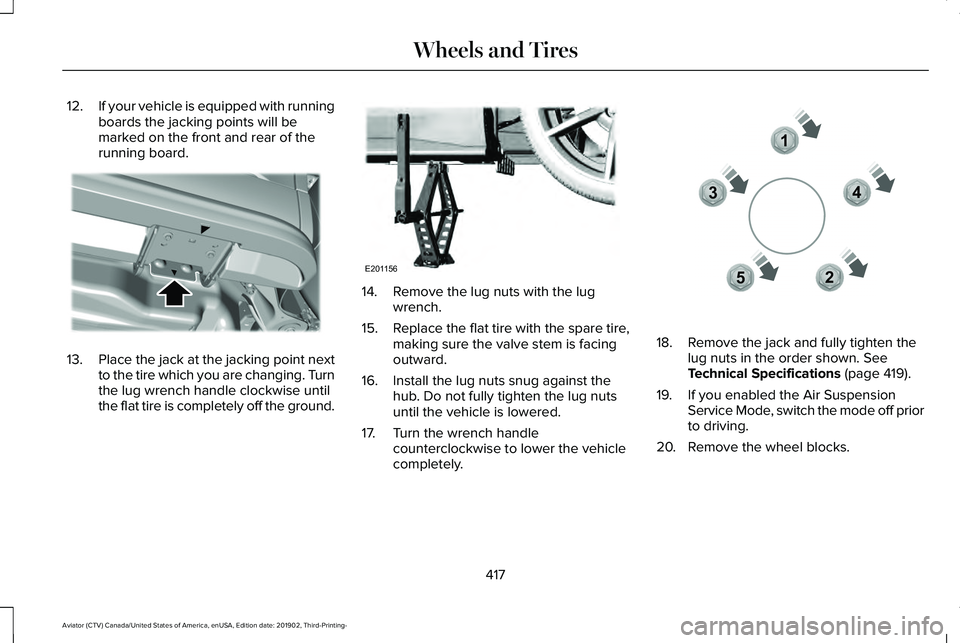
12.
If your vehicle is equipped with running
boards the jacking points will be
marked on the front and rear of the
running board. 13.
Place the jack at the jacking point next
to the tire which you are changing. Turn
the lug wrench handle clockwise until
the flat tire is completely off the ground. 14. Remove the lug nuts with the lug
wrench.
15. Replace the flat tire with the spare tire,
making sure the valve stem is facing
outward.
16. Install the lug nuts snug against the hub. Do not fully tighten the lug nuts
until the vehicle is lowered.
17. Turn the wrench handle counterclockwise to lower the vehicle
completely. 18. Remove the jack and fully tighten the
lug nuts in the order shown. See
Technical Specifications (page 419).
19. If you enabled the Air Suspension Service Mode, switch the mode off prior
to driving.
20. Remove the wheel blocks.
417
Aviator (CTV) Canada/United States of America, enUSA, Edition date: 201902, Third-Printing- Wheels and TiresE310613 E201156 12
3
4
5E306781
Page 528 of 609
Check Every Six Months
Seatbelts and seat latches for wear and function.
Safety warning lamps (brake, ABS, airbag and seatbelt) for operation.
Washer spray and wiper operation. Clean or replace blades as necessary.
Multi-Point Inspection
In order to keep your vehicle running right,
it is important to have the systems on your
vehicle checked regularly. This can help
identify potential issues and prevent major
problems. We recommend having the
following multi-point inspection performed
at every scheduled maintenance interval to
help make sure your vehicle keeps running
great. Multi-Point Inspection
Hazard warning system operation
Accessory drive belt(s)
Horn operation
Battery performance
Radiator, cooler, heater and air conditioning hoses
Engine air filter
Suspension components for leaks or damage
Exhaust system
525
Aviator (CTV) Canada/United States of America, enUSA, Edition date: 201902, Third-Printing- Scheduled Maintenance
Page 531 of 609
Normal Maintenance Intervals
At Every Oil Change Interval as Indicated by the Information Display
1
Change the engine oil and filter. 2
Rotate the tires.
Perform a multi-point inspection, recommended.
Inspect the brake pads, rotors, hoses and parking brake.
Inspect the engine cooling system strength and hoses.
Inspect the exhaust system and heat shields.
Inspect the front axle.
Inspect the rear axle and U-joints.
Inspect the half-shaft boots.
Inspect the steering linkage, ball joints, suspension and the tire-rod ends.
Inspect the tires, tire wear and measure the tread depth.
Inspect the wheels and related components for abnormal noise, wear, looseness or drag.
1 Do not exceed one year or 12,500 mi (20,000 km) between service intervals.
2 Reset the Intelligent Oil-Life Monitor after engine oil and filter change\
s.
See Engine Oil Check (page 361).
528
Aviator (CTV) Canada/United States of America, enUSA, Edition date: 201902, Third-Printing- Scheduled Maintenance
Page 586 of 609
(ii) END USER AGREES TO INDEMNIFY AND
HOLD HARMLESS THE UNDERLYING
WIRELESS SERVICE CARRIER AND ITS
OFFICERS, EMPLOYEES, AND AGENTS
AGAINST ANY AND ALL CLAIMS,
INCLUDING WITHOUT LIMITATION CLAIMS
FOR LIBEL, SLANDER, OR ANY PROPERTY
DAMAGE, PERSONAL INJURY OR DEATH,
ARISING IN ANY WAY, DIRECTLY OR
INDIRECTLY, IN CONNECTION WITH THIS
AGREEMENT OR THE USE, FAILURE TO USE,
OR INABILITY TO USE THE DEVICE EXCEPT
WHERE THE CLAIMS RESULT FROM THE
UNDERLYING CARRIER
’S GROSS
NEGLIGENCE OR WILLFUL MISCONDUCT.
THIS INDEMNITY WILL SURVIVE THE
TERMINATION OF THE AGREEMENT.
(iii) END USER HAS NO PROPERTY RIGHT
IN ANY NUMBER ASSIGNED TO THE
DEVICE.
(iv) END USER UNDERSTANDS THAT FORD
AND THE UNDERLYING CARRIER CANNOT
GUARANTY THE SECURITY OF WIRELESS
TRANSMISSIONS, AND WILL NOT BE LIABLE
FOR ANY LACK OF SECURITY RELATING
TO THE USE OF THE SERVICES THE SERVICE IS FOR [END USER
’S] USE
ONLY AND END USER MAY NOT RESELL
THE SERVICE TO ANY OTHER PARTY END
USER UNDERSTANDS THAT THE
UNDERLYING CARRIER DOES NOT
GUARANTEE ANY END USER
UNINTERRUPTED SERVICE OR COVERAGE.
THE UNDERLYING CARRIER DOES NOT
WARRANT THAT END USERS CAN OR WILL
BE LOCATED USING THE SERVICE. THE
UNDERLYING CARRIER MAKES NO
WARRANTY, EXPRESS OR IMPLIED, OF
MERCHANTABILITY OR FITNESS FOR A
PARTICULAR PURPOSE, SUITABILITY, OR
PERFORMANCE REGARDING ANY SERVICES
OR GOODS, AND IN NO EVENT SHALL
AT&T BE LIABLE, WHETHER OR NOT DUE
TO ITS OWN NEGLIGENCE, FOR ANY: (A)
ACT OR OMISSION OF A THIRD PARTY; (B)
MISTAKES, OMISSIONS, INTERRUPTIONS,
ERRORS, FAILURES TO TRANSMIT, DELAYS,
OR DEFECTS IN THE SERVICE PROVIDED
BY OR THROUGH THE UNDERLYING
CARRIER; (C) DAMAGE OR INJURY CAUSED
BY SUSPENSION OR TERMINATION BY THE
UNDERLYING CARRIER; OR (D) DAMAGE OR
INJURY CAUSED BY A FAILURE OR DELAY
IN CONNECTING A CALL TO ANY ENTITY, INCLUDING 911 OR ANY OTHER
EMERGENCY SERVICE. TO THE FULL
EXTENT ALLOWED BY LAW, THE END USER
RELEASES, INDEMNIFIES AND HOLDS THE
UNDERLYING CARRIER HARMLESS FROM
AND AGAINST ANY AND ALL CLAIMS OF
ANY PERSON OR ENTITY FOR DAMAGES
OF ANY NATURE ARISING IN ANY WAY
FROM OR RELATING TO, DIRECTLY OR
INDIRECTLY, SERVICES PROVIDED BY THE
UNDERLYING CARRIER OR ANY PERSON’S
USE THEREOF, INCLUDING CLAIMS ARISING
IN WHOLE OR IN PART FROM THE ALLEGED
NEGLIGENCE OF THE UNDERLYING
CARRIER.
VII. China Territory
Personal Use Only
You agree to use this Data together with
[insert name of Client Application] for the
solely personal, non-commercial purposes
for which you were licensed, and not for
service bureau, time-sharing or other similar
purposes. Accordingly, but subject to the
restrictions set forth in the following
paragraphs, you may copy this Data only as
necessary for your personal use to (i) view
583
Aviator (CTV) Canada/United States of America, enUSA, Edition date: 201902, Third-Printing- Appendices
Page 595 of 609
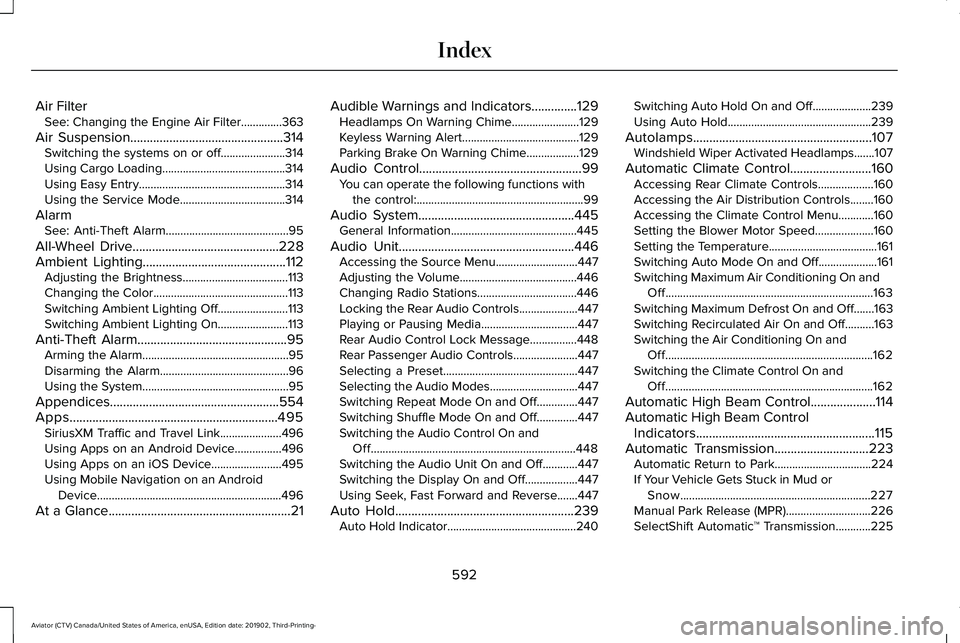
Air Filter
See: Changing the Engine Air Filter..............363
Air Suspension...............................................314 Switching the systems on or off......................314
Using Cargo Loading..........................................314
Using Easy Entry..................................................314
Using the Service Mode....................................314
Alarm See: Anti-Theft Alarm..........................................95
All-Wheel Drive.............................................228
Ambient Lighting............................................112 Adjusting the Brightness....................................113
Changing the Color..............................................113
Switching Ambient Lighting Off........................113
Switching Ambient Lighting On........................113
Anti-Theft Alarm..............................................95 Arming the Alarm..................................................95
Disarming the Alarm............................................96
Using the System..................................................95
Appendices....................................................554
Apps................................................................495 SiriusXM Traffic and Travel Link.....................496
Using Apps on an Android Device................496
Using Apps on an iOS Device........................495
Using Mobile Navigation on an Android
Device...............................................................496
At a Glance........................................................21 Audible Warnings and Indicators..............129
Headlamps On Warning Chime.......................
129
Keyless Warning Alert........................................129
Parking Brake On Warning Chime..................129
Audio Control
..................................................99
You can operate the following functions with
the control:.........................................................99
Audio System
................................................445
General Information...........................................445
Audio Unit
......................................................446
Accessing the Source Menu............................447
Adjusting the Volume........................................446
Changing Radio Stations..................................446
Locking the Rear Audio Controls....................447
Playing or Pausing Media.................................447
Rear Audio Control Lock Message................448
Rear Passenger Audio Controls......................447
Selecting a Preset..............................................447
Selecting the Audio Modes..............................447
Switching Repeat Mode On and Off..............447
Switching Shuffle Mode On and Off..............447
Switching the Audio Control On and
Off......................................................................448
Switching the Audio Unit On and Off............447
Switching the Display On and Off..................447
Using Seek, Fast Forward and Reverse.......447
Auto Hold
.......................................................239
Auto Hold Indicator............................................240 Switching Auto Hold On and Off....................239
Using Auto Hold.................................................239
Autolamps
.......................................................107
Windshield Wiper Activated Headlamps.......107
Automatic Climate Control
.........................160
Accessing Rear Climate Controls...................160
Accessing the Air Distribution Controls........160
Accessing the Climate Control Menu............160
Setting the Blower Motor Speed....................160
Setting the Temperature.....................................161
Switching Auto Mode On and Off....................161
Switching Maximum Air Conditioning On and Off.......................................................................163
Switching Maximum Defrost On and Off.......163
Switching Recirculated Air On and Off..........163
Switching the Air Conditioning On and Off.......................................................................162
Switching the Climate Control On and Off.......................................................................162
Automatic High Beam Control
....................114
Automatic High Beam Control Indicators.......................................................115
Automatic Transmission
.............................223
Automatic Return to Park.................................224
If Your Vehicle Gets Stuck in Mud or
Snow.................................................................227
Manual Park Release (MPR).............................226
SelectShift Automatic ™ Transmission............225
592
Aviator (CTV) Canada/United States of America, enUSA, Edition date: 201902, Third-Printing- Index