lock LINCOLN AVIATOR 2020 Service Manual
[x] Cancel search | Manufacturer: LINCOLN, Model Year: 2020, Model line: AVIATOR, Model: LINCOLN AVIATOR 2020Pages: 609, PDF Size: 5.4 MB
Page 138 of 609
.
Adaptive Cruise Mal")
Adaptive Cruise Control
Action
Message
A radar malfunction is preventing the adaptive cruise from engaging. Se\
e How Does AdaptiveCruise Control With Stop and Go Work (page 269).
Adaptive Cruise Malfunction
Front Sensor Not Aligned Conditions exist such that the adaptive cruise cannot function properly. See How Does AdaptiveCruise Control With Stop and Go Work
(page 269).
Adaptive Cruise Not Available
The radar is blocked because of poor radar visibility due to bad weather, ice, mud or water infront of radar. You can typically clean the sensor to resolve.
See How Does Adaptive Cruise
Control With Stop and Go Work (page 269).
Adaptive Cruise Not Available Sensor
Blocked See Manual
Displayed when the automatic braking has been disabled.
Normal Cruise Active Adaptive Braking Off
Displayed when the adaptive cruise has reinstated controls to the driver\
.
Adaptive Cruise - Driver Resume Control
Displays when the vehicle speed is too slow to activate the adaptive cru\
ise.
Adaptive Cruise Speed Too Low to
Activate
Adaptive Headlamps Action
Message
Displays when a system error has occurred. Contact an authorized dealer \
as soon as possible.
Check Headlamp System See Manual
135
Aviator (CTV) Canada/United States of America, enUSA, Edition date: 201902, Third-Printing- Information Displays
Page 141 of 609

AWD
Action
Message
The all-wheel drive system temporarily turns off to protect itself from \
overheating.
AWD Temporarily Disabled
The all-wheel drive system is locking up the torque transfer clutch to h\
elp reduce clutchtemperature.
AWD Temporarily Locked
The all-wheel drive system temporarily turns off to protect itself from \
overheating or if you areusing the temporary spare tire.
AWD OFF
The all-wheel drive system will resume normal function and clear this me\
ssage after driving ashort distance with the road tire re-installed or after the system cools\
.
AWD Restored
The all-wheel drive system is not operating properly. If the warning stays on or continues tocome on, contact an authorized dealer.
AWD Fault Service Required
Displayed when the transfer case fluid requires service.
Change AWD Power Transfer Unit Lube
Displayed when the transfer case fluid has been changed and reset to new\
.
AWD Power Transfer Unit Lube Set to New
138
Aviator (CTV) Canada/United States of America, enUSA, Edition date: 201902, Third-Printing- Information Displays
Page 143 of 609

Blind Spot Information and Cross Traffic Alert System
Action
Message
A system error has occurred. Contact an authorized dealer as soon as pos\
sible.
Blind Spot System Fault
The system sensors are blocked. See Blind Spot Information System (page 289).
Blind Spot Not Available Sensor Blocked
See Manual
The system detects a vehicle and automatically applied the brakes.
Cross Traffic Alert Applying Brakes
The blind spot information system and cross traffic alert system sensors\
are blocked. See CrossTraffic Alert
(page 293).
Cross Traffic Not Available Sensor Blocked
See Manual
A system error has occurred. Contact an authorized dealer as soon as pos\
sible.
Cross Traffic System Fault
The system automatically turns off and displays this message when you co\
nnect a trailer to thevehicle that does not have a trailer blind spot system or when you switc\
h the trailer blind spot system off through the information display.
See Cross Traffic Alert (page 293).
Cross Traffic Alert Deactivated Trailer
Attached
The system automatically turns off and displays this message when you co\
nnect a trailer to thevehicle that does not have a trailer blind spot system or when you switc\
h the trailer blind spot system off through the information display.
See Blind Spot Information System (page 289).
Blind Spot Alert Deactivated Trailer
Attached
140
Aviator (CTV) Canada/United States of America, enUSA, Edition date: 201902, Third-Printing- Information Displays
Page 144 of 609
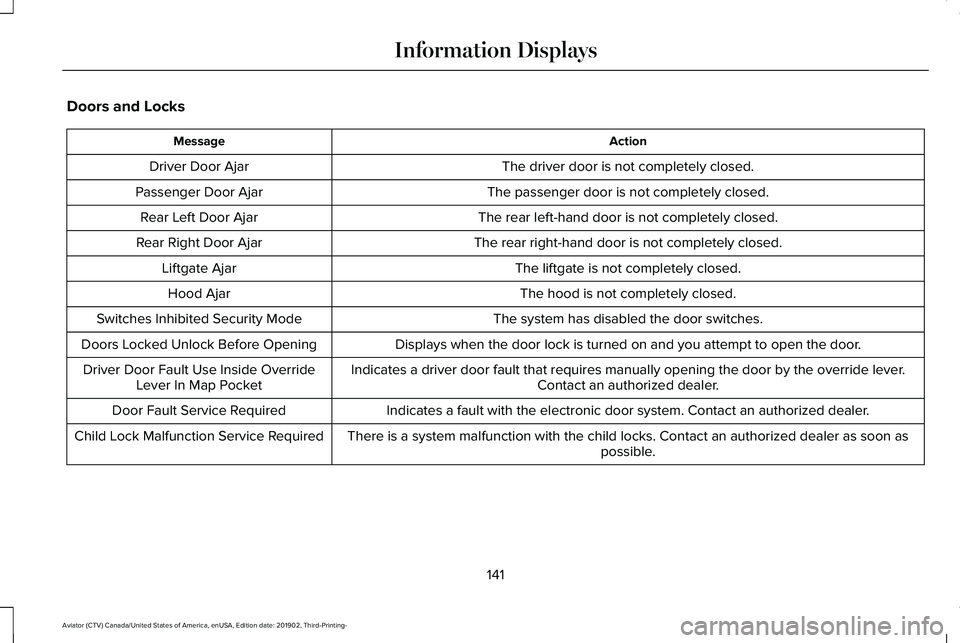
Doors and Locks
Action
Message
The driver door is not completely closed.
Driver Door Ajar
The passenger door is not completely closed.
Passenger Door Ajar
The rear left-hand door is not completely closed.
Rear Left Door Ajar
The rear right-hand door is not completely closed.
Rear Right Door Ajar
The liftgate is not completely closed.
Liftgate Ajar
The hood is not completely closed.
Hood Ajar
The system has disabled the door switches.
Switches Inhibited Security Mode
Displays when the door lock is turned on and you attempt to open the doo\
r.
Doors Locked Unlock Before Opening
Indicates a driver door fault that requires manually opening the door by\
the override lever.Contact an authorized dealer.
Driver Door Fault Use Inside Override
Lever In Map Pocket
Indicates a fault with the electronic door system. Contact an authorized\
dealer.
Door Fault Service Required
There is a system malfunction with the child locks. Contact an authorize\
d dealer as soon as possible.
Child Lock Malfunction Service Required
141
Aviator (CTV) Canada/United States of America, enUSA, Edition date: 201902, Third-Printing- Information Displays
Page 145 of 609

Action
Message
Indicates that the rear seat interior door release switches and power wi\
ndows are switched off,preventing rear seat occupants from opening the doors or windows.
Child Lock ON
Indicates that the rear seat interior door release switches and power wi\
ndows are switched on.
Child Lock OFF
The factory keypad code displays in the information display after the system resets t\
he keypad.See Passive Anti-Theft System (page 94).
Factory Keypad Code {X X X X X}
Driver Alert Action
Message
Stop and rest as soon as it is safe to do so.
Driver Alert Warning Rest Now
Take a rest soon.
Driver Alert Warning Rest Suggested
Fuel Action
Message
An early reminder of a low fuel condition.
Fuel Level Low
The fuel fill inlet valve may not be properly closed.
Check Fuel Fill Inlet
142
Aviator (CTV) Canada/United States of America, enUSA, Edition date: 201902, Third-Printing- Information Displays
Page 151 of 609
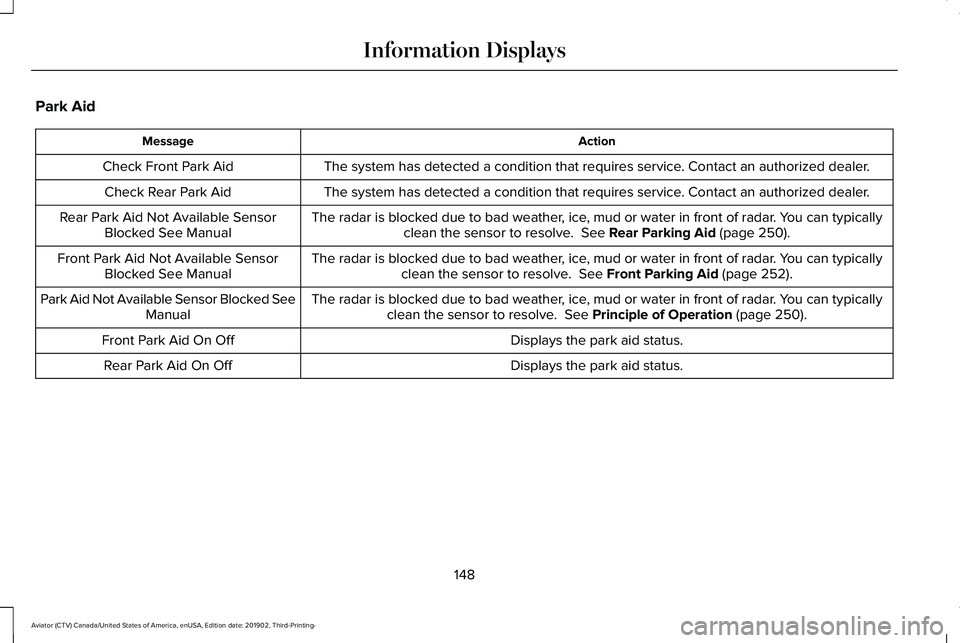
Park Aid
Action
Message
The system has detected a condition that requires service. Contact an authorized dealer.
Check Front Park Aid
The system has detected a condition that requires service. Contact an authorized dealer.
Check Rear Park Aid
The radar is blocked due to bad weather, ice, mud or water in front of radar. You can typicallyclean the sensor to resolve. See Rear Parking Aid (page 250).
Rear Park Aid Not Available Sensor
Blocked See Manual
The radar is blocked due to bad weather, ice, mud or water in front of radar. You can typicallyclean the sensor to resolve.
See Front Parking Aid (page 252).
Front Park Aid Not Available Sensor
Blocked See Manual
The radar is blocked due to bad weather, ice, mud or water in front of radar. You can typicallyclean the sensor to resolve.
See Principle of Operation (page 250).
Park Aid Not Available Sensor Blocked See
Manual
Displays the park aid status.
Front Park Aid On Off
Displays the park aid status.
Rear Park Aid On Off
148
Aviator (CTV) Canada/United States of America, enUSA, Edition date: 201902, Third-Printing- Information Displays
Page 153 of 609
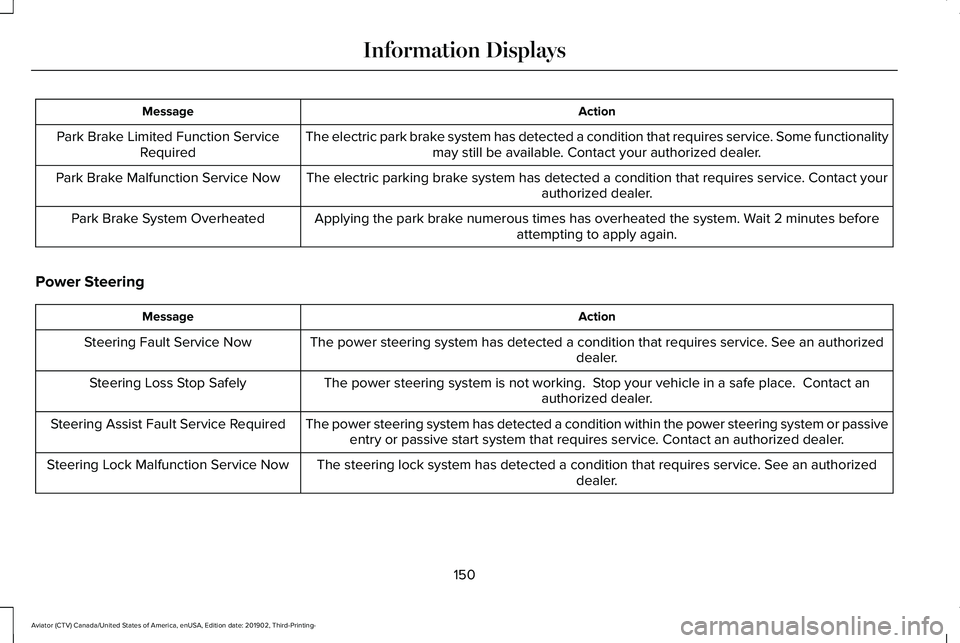
Action
Message
The electric park brake system has detected a condition that requires service. Some functionalitymay still be available. Contact your authorized dealer.
Park Brake Limited Function Service
Required
The electric parking brake system has detected a condition that requires service. Contact your authorized dealer.
Park Brake Malfunction Service Now
Applying the park brake numerous times has overheated the system. Wait 2 minutes beforeattempting to apply again.
Park Brake System Overheated
Power Steering Action
Message
The power steering system has detected a condition that requires service\
. See an authorized dealer.
Steering Fault Service Now
The power steering system is not working. Stop your vehicle in a safe place. Contact anauthorized dealer.
Steering Loss Stop Safely
The power steering system has detected a condition within the power stee\
ring system or passiveentry or passive start system that requires service. Contact an authorized dealer.
Steering Assist Fault Service Required
The steering lock system has detected a condition that requires service. See an authorizeddealer.
Steering Lock Malfunction Service Now
150
Aviator (CTV) Canada/United States of America, enUSA, Edition date: 201902, Third-Printing- Information Displays
Page 154 of 609
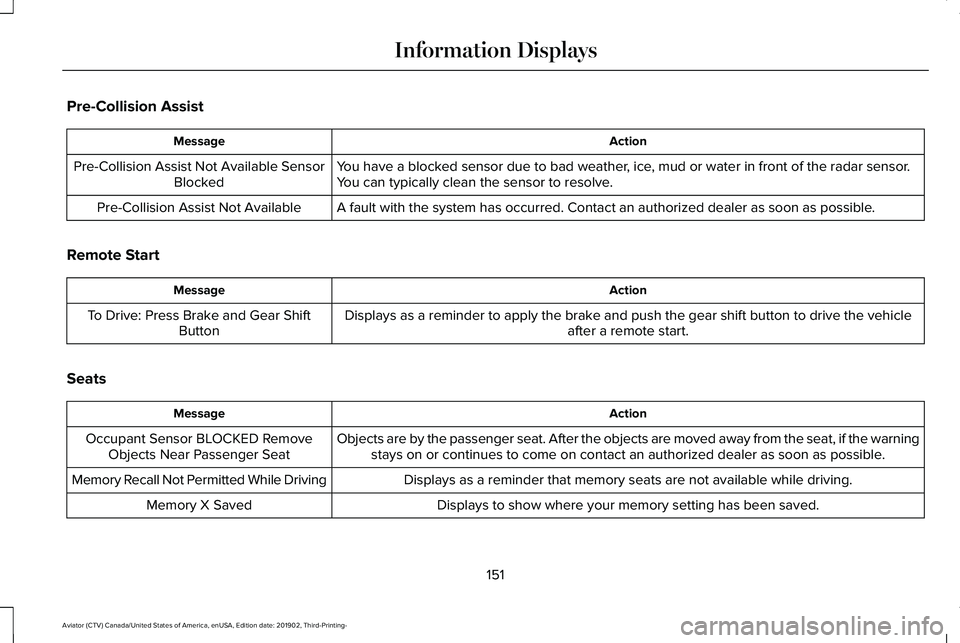
Pre-Collision Assist
Action
Message
You have a blocked sensor due to bad weather, ice, mud or water in front of the radar sensor.
You can typically clean the sensor to resolve.
Pre-Collision Assist Not Available Sensor
Blocked
A fault with the system has occurred. Contact an authorized dealer as so\
on as possible.
Pre-Collision Assist Not Available
Remote Start Action
Message
Displays as a reminder to apply the brake and push the gear shift button to drive the vehicle after a remote start.
To Drive: Press Brake and Gear Shift
Button
Seats Action
Message
Objects are by the passenger seat. After the objects are moved away from\
the seat, if the warningstays on or continues to come on contact an authorized dealer as soon as\
possible.
Occupant Sensor BLOCKED Remove
Objects Near Passenger Seat
Displays as a reminder that memory seats are not available while driving\
.
Memory Recall Not Permitted While Driving
Displays to show where your memory setting has been saved.
Memory X Saved
151
Aviator (CTV) Canada/United States of America, enUSA, Edition date: 201902, Third-Printing- Information Displays
Page 162 of 609
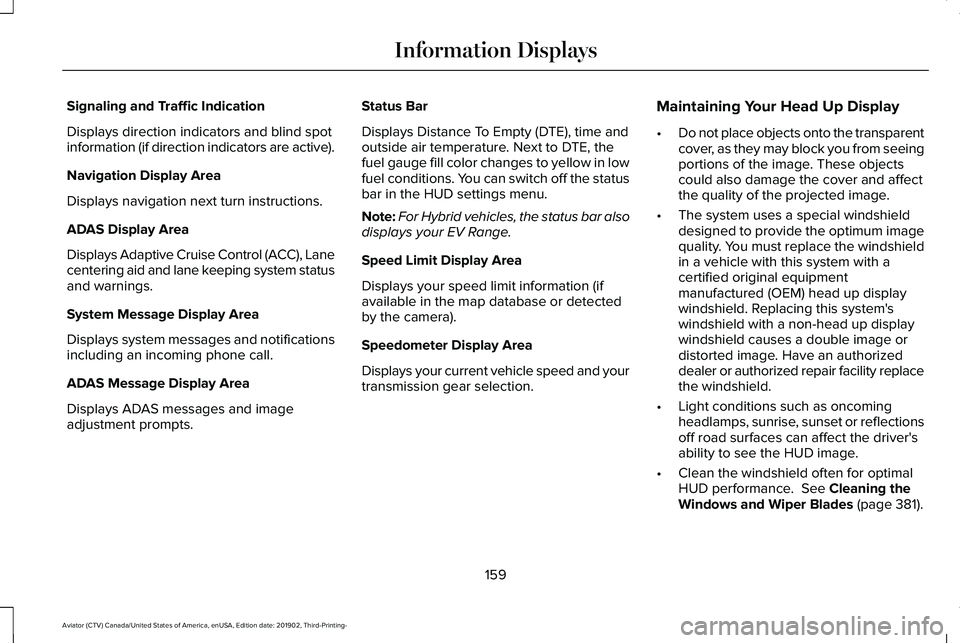
Signaling and Traffic Indication
Displays direction indicators and blind spot
information (if direction indicators are active).
Navigation Display Area
Displays navigation next turn instructions.
ADAS Display Area
Displays Adaptive Cruise Control (ACC), Lane
centering aid and lane keeping system status
and warnings.
System Message Display Area
Displays system messages and notifications
including an incoming phone call.
ADAS Message Display Area
Displays ADAS messages and image
adjustment prompts.
Status Bar
Displays Distance To Empty (DTE), time and
outside air temperature. Next to DTE, the
fuel gauge fill color changes to yellow in low
fuel conditions. You can switch off the status
bar in the HUD settings menu.
Note:
For Hybrid vehicles, the status bar also
displays your EV Range.
Speed Limit Display Area
Displays your speed limit information (if
available in the map database or detected
by the camera).
Speedometer Display Area
Displays your current vehicle speed and your
transmission gear selection. Maintaining Your Head Up Display
•
Do not place objects onto the transparent
cover, as they may block you from seeing
portions of the image. These objects
could also damage the cover and affect
the quality of the projected image.
• The system uses a special windshield
designed to provide the optimum image
quality. You must replace the windshield
in a vehicle with this system with a
certified original equipment
manufactured (OEM) head up display
windshield. Replacing this system's
windshield with a non-head up display
windshield causes a double image or
distorted image. Have an authorized
dealer or authorized repair facility replace
the windshield.
• Light conditions such as oncoming
headlamps, sunrise, sunset or reflections
off road surfaces can affect the driver's
ability to see the HUD image.
• Clean the windshield often for optimal
HUD performance. See Cleaning the
Windows and Wiper Blades (page 381).
159
Aviator (CTV) Canada/United States of America, enUSA, Edition date: 201902, Third-Printing- Information Displays
Page 168 of 609
Selecting a Row
Touch 2nd Row to control the second row
climate.
Touch
3rd Row to control the third row
climate.
Linking the Rows Touch the button to simultaneously
control the climate of the second
and third row.
Setting the Rear Blower Motor Speed Touch the arrow buttons to adjust
the volume of air circulated in the
rear passenger compartment.
Setting the Rear Temperature
Touch the arrow buttons to set the
temperature in the rear passenger
compartment. Switching the Rear Climate Control On
and Off Touch the button to switch the
selected row controls on or off.
Note: When linked, touch the button to
switch both rows on or off.
Directing Air to the Overhead and Rear
Footwell Air Vents Touch the button to activate the
selection screen.
Touch the button to direct airflow
to the overhead air vents.
Touch the button to direct airflow
to the rear footwell air vents.
Switching Rear Auto Mode On and Off
Touch
AUTO switch on rear automatic
operation, then set the temperature. Rear Climate Control Lock Message
A message displays when the controls are
locked through the front and you try to
operate them.
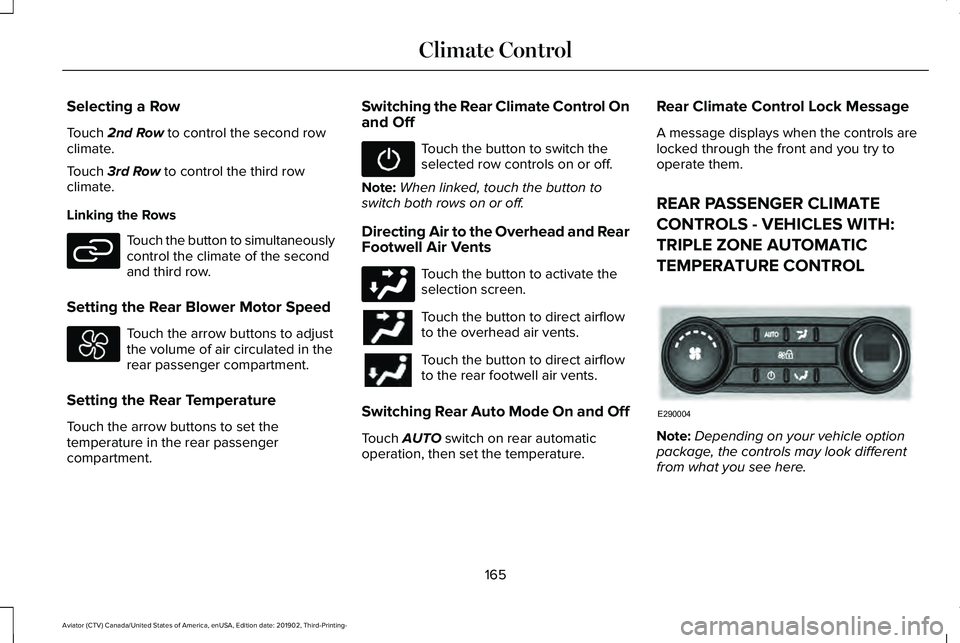
REAR PASSENGER CLIMATE
CONTROLS - VEHICLES WITH:
TRIPLE ZONE AUTOMATIC
TEMPERATURE CONTROL
Note:
Depending on your vehicle option
package, the controls may look different
from what you see here.
165
Aviator (CTV) Canada/United States of America, enUSA, Edition date: 201902, Third-Printing- Climate ControlE282078 E290004