tow LINCOLN AVIATOR 2020 Manual Online
[x] Cancel search | Manufacturer: LINCOLN, Model Year: 2020, Model line: AVIATOR, Model: LINCOLN AVIATOR 2020Pages: 609, PDF Size: 5.4 MB
Page 469 of 609
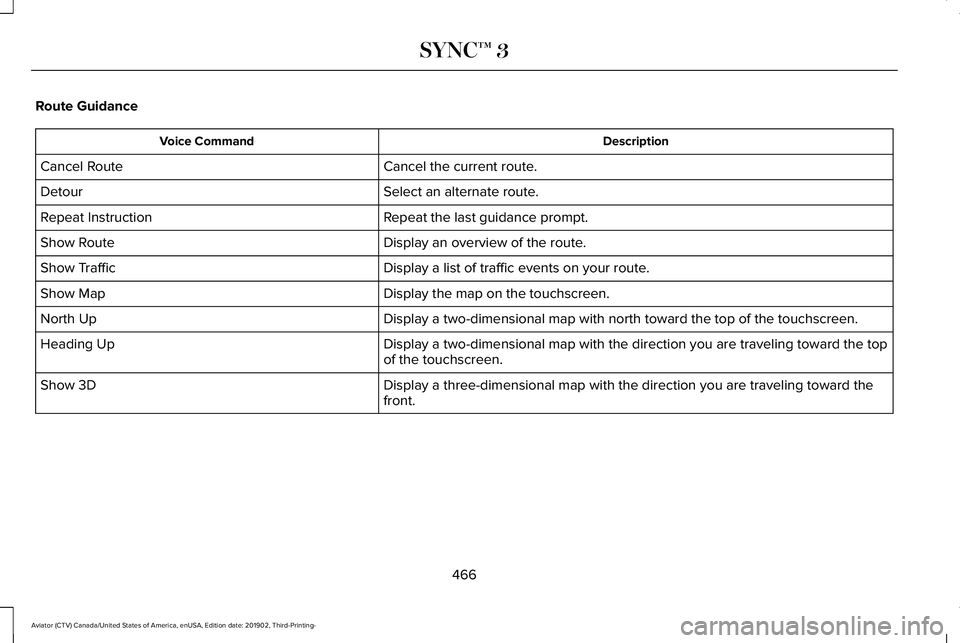
Route Guidance
Description
Voice Command
Cancel the current route.
Cancel Route
Select an alternate route.
Detour
Repeat the last guidance prompt.
Repeat Instruction
Display an overview of the route.
Show Route
Display a list of traffic events on your route.
Show Traffic
Display the map on the touchscreen.
Show Map
Display a two-dimensional map with north toward the top of the touchscre\
en.
North Up
Display a two-dimensional map with the direction you are traveling towar\
d the top
of the touchscreen.
Heading Up
Display a three-dimensional map with the direction you are traveling tow\
ard the
front.
Show 3D
466
Aviator (CTV) Canada/United States of America, enUSA, Edition date: 201902, Third-Printing- SYNC™ 3
Page 477 of 609
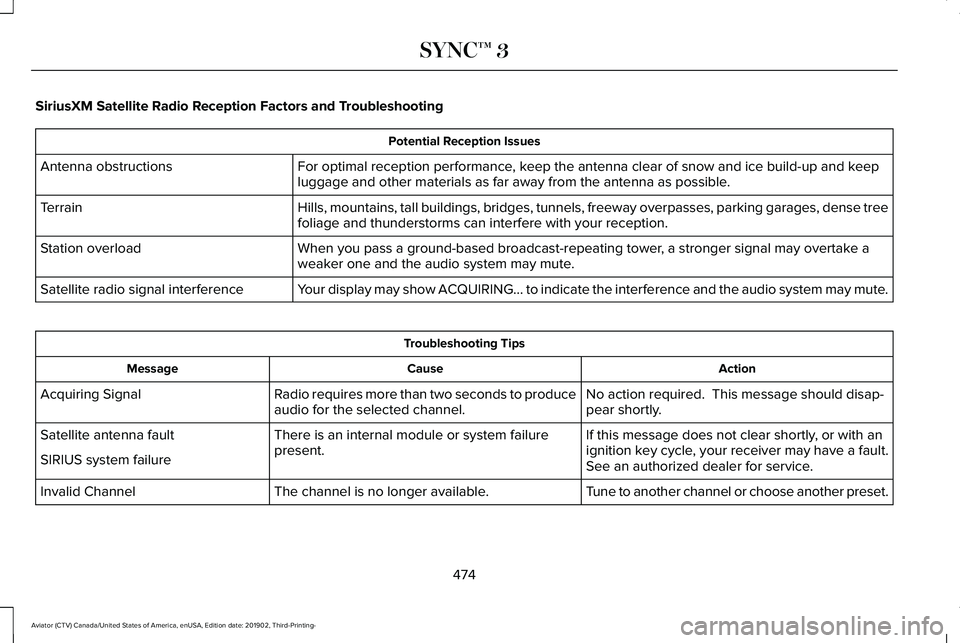
SiriusXM Satellite Radio Reception Factors and Troubleshooting
Potential Reception Issues
For optimal reception performance, keep the antenna clear of snow and ice build-up and keep
luggage and other materials as far away from the antenna as possible.
Antenna obstructions
Hills, mountains, tall buildings, bridges, tunnels, freeway overpasses, \
parking garages, dense tree
foliage and thunderstorms can interfere with your reception.
Terrain
When you pass a ground-based broadcast-repeating tower, a stronger signal may overtake a
weaker one and the audio system may mute.
Station overload
Your display may show ACQUIRING... to indicate the interference and the a\
udio system may mute.
Satellite radio signal interference Troubleshooting Tips
Action
Cause
Message
No action required. This message should disap-
pear shortly.
Radio requires more than two seconds to produce
audio for the selected channel.
Acquiring Signal
If this message does not clear shortly, or with an
ignition key cycle, your receiver may have a fault.
See an authorized dealer for service.
There is an internal module or system failure
present.
Satellite antenna fault
SIRIUS system failure
Tune to another channel or choose another preset.
The channel is no longer available.
Invalid Channel
474
Aviator (CTV) Canada/United States of America, enUSA, Edition date: 201902, Third-Printing- SYNC™ 3
Page 478 of 609
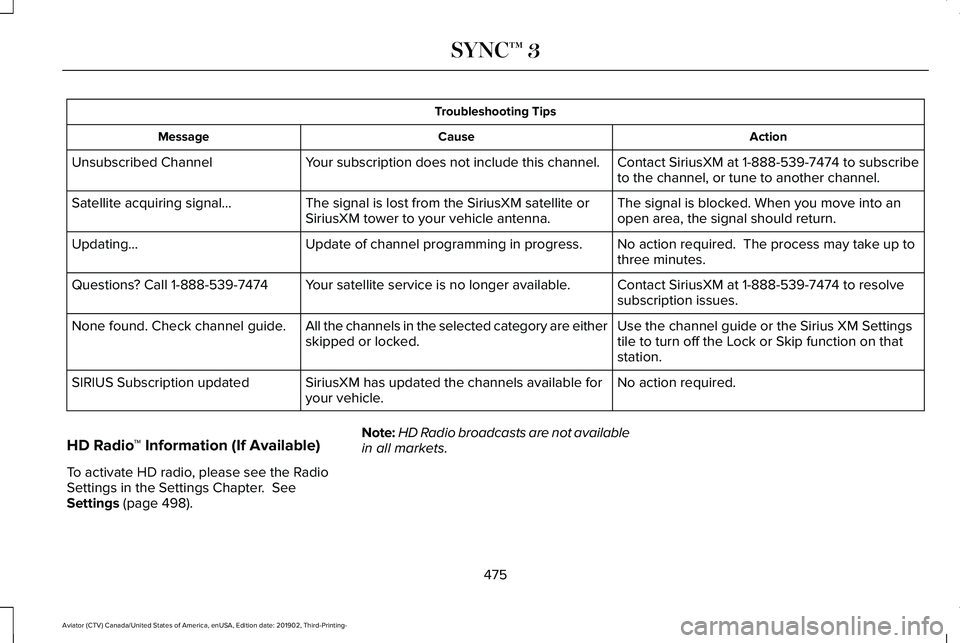
Troubleshooting Tips
Action
Cause
Message
Contact SiriusXM at 1-888-539-7474 to subscribe
to the channel, or tune to another channel.
Your subscription does not include this channel.
Unsubscribed Channel
The signal is blocked. When you move into an
open area, the signal should return.
The signal is lost from the SiriusXM satellite or
SiriusXM tower to your vehicle antenna.
Satellite acquiring signal…
No action required. The process may take up to
three minutes.
Update of channel programming in progress.
Updating…
Contact SiriusXM at 1-888-539-7474 to resolve
subscription issues.
Your satellite service is no longer available.
Questions? Call 1-888-539-7474
Use the channel guide or the Sirius XM Settings
tile to turn off the Lock or Skip function on that
station.
All the channels in the selected category are either
skipped or locked.
None found. Check channel guide.
No action required.
SiriusXM has updated the channels available for
your vehicle.
SIRIUS Subscription updated
HD Radio ™ Information (If Available)
To activate HD radio, please see the Radio
Settings in the Settings Chapter. See
Settings (page 498). Note:
HD Radio broadcasts are not available
in all markets.
475
Aviator (CTV) Canada/United States of America, enUSA, Edition date: 201902, Third-Printing- SYNC™ 3
Page 494 of 609
Changing the Format of the Map
Display the map in one of the following
formats:
•
A two-dimensional map with the direction
you are traveling toward the top of the
screen.
• A two-dimensional map with north toward
the top of the screen.
• A three-dimensional map with the
direction you are traveling toward the
front.
Zoom
Display more or less detail on the map.
Note: You can use pinch gestures to zoom
in and out. Place two fingers on the screen
and move them apart to zoom in. Place two
fingers on the screen and bring them
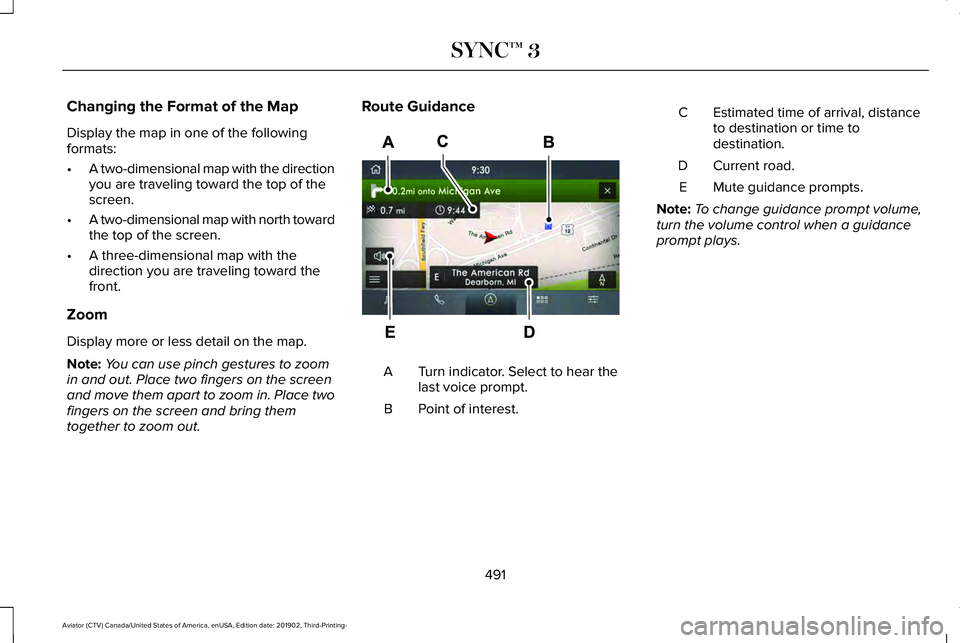
together to zoom out. Route Guidance
Turn indicator. Select to hear the
last voice prompt.
A
Point of interest.
B Estimated time of arrival, distance
to destination or time to
destination.
C
Current road.
D
Mute guidance prompts.
E
Note: To change guidance prompt volume,
turn the volume control when a guidance
prompt plays.
491
Aviator (CTV) Canada/United States of America, enUSA, Edition date: 201902, Third-Printing- SYNC™ 3E297859
Page 522 of 609
PROTECT YOURSELF FROM THE RISING
COST OF VEHICLE REPAIRS WITH
LINCOLN PROTECT EXTENDED SERVICE
PLAN.
Lincoln Protect Extended Service Plans
(U.S. Only)
Lincoln Protect means peace of mind. It’
s the
extended service plan backed by the Lincoln
Motor Company, and provides more
protection beyond the New Vehicle Limited
Warranty coverage. When you visit your
Lincoln Dealer, insist on genuine Lincoln
Protect extended service plans!
Lincoln Protect Extended Service Plan Can
Quickly Pay for Itself
One trip to the Service Center could easily
exceed the price of your Lincoln Protect
extended service plan. With Lincoln Protect
you minimize your risk for unexpected repair
bills and rising repair costs. Up to 1000+ Covered Vehicle Components
There are four mechanical Lincoln Protect
extended service plans with different levels
of coverage. Ask your authorized dealer for
details.
1.
PremiumCARE - Our most comprehensive
coverage. With over 1,000 covered
components, this plan is so complete it’ s
probably easier to list what’ s not covered.
2. ExtraCARE - Covers 113 components, and
includes many high-tech items.
3. BaseCARE - Covers 84 components.
4. PowertrainCARE - Covers 29 critical components.
Lincoln Protect extended service plans are
honored by all authorized Lincoln dealers in
the U.S., Canada and Mexico.
That means you get:
• Reliable, quality service at any Lincoln or
Ford dealership.
• Repairs performed by factory trained
technicians, using genuine parts. Rental Car Reimbursement
1st day Rental Benefit
If you bring your car into your dealer for
service, we
’ll give you a loaner to use for the
day.
Extended Rental Benefits
If your vehicle is kept overnight for covered
repairs, you are eligible for rental car
coverage, including bumper to bumper
warranty repairs, and Field Service Actions.
Roadside Assistance
Exclusive 24/7 roadside assistance, including:
• Towing, flat-tire change and battery jump
starts.
• Out of fuel and lock-out assistance.
• Travel expense reimbursement for
lodging, meals and rental car.
• Assistance for taxi, shuttle, rental car
coverage and other transportation.
519
Aviator (CTV) Canada/United States of America, enUSA, Edition date: 201902, Third-Printing- Lincoln Protect
Page 524 of 609
There are several Lincoln Protect extended
service plans available in various time,
distance and deductible combinations. Each
plan is tailored to fit your own driving needs,
including reimbursement for towing and
rental. When you purchase Lincoln Protect
extended service plan, you receive added
peace-of-mind protection throughout
Canada, the United States and Mexico,
provided by a network of participating
authorized Lincoln Motor Company dealers.
Note:
Repairs performed outside of Canada,
the United States and Mexico are not eligible
for Lincoln Protect extended service plan
coverage.
This information is subject to change. For
more information, visit your local Lincoln of
Canada dealer or www.LincolnCanada.com
to find the Lincoln Protect extended service
plan that is right for you.
521
Aviator (CTV) Canada/United States of America, enUSA, Edition date: 201902, Third-Printing- Lincoln Protect
Page 530 of 609
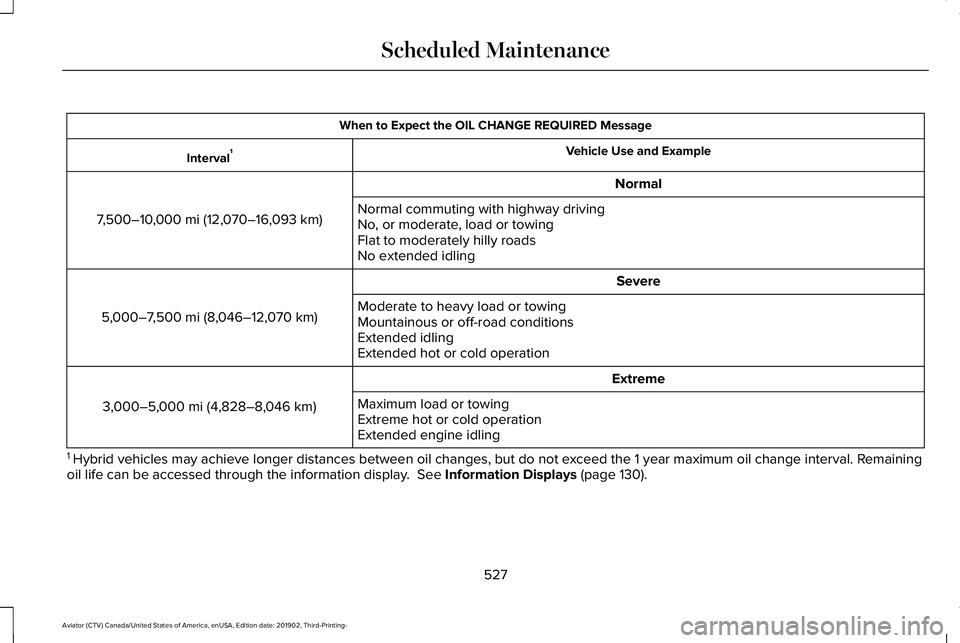
When to Expect the OIL CHANGE REQUIRED Message
Vehicle Use and Example
Interval 1
Normal
7,500–10,000 mi (12,070–16,093 km) Normal commuting with highway driving
No, or moderate, load or towing
Flat to moderately hilly roads
No extended idling
Severe
5,000–7,500 mi (8,046–12,070 km) Moderate to heavy load or towing
Mountainous or off-road conditions
Extended idling
Extended hot or cold operation
Extreme
3,000–5,000 mi (4,828–8,046 km) Maximum load or towing
Extreme hot or cold operation
Extended engine idling
1 Hybrid vehicles may achieve longer distances between oil changes, but do\
not exceed the 1 year maximum oil change interval. Remaining
oil life can be accessed through the information display. See Information Displays (page 130).
527
Aviator (CTV) Canada/United States of America, enUSA, Edition date: 201902, Third-Printing- Scheduled Maintenance
Page 534 of 609

Towing a Trailer or Using a Car-top Carrier
Change engine oil and filter as indicated by the information display and\
perform services listed in the Normal
Scheduled Maintenance chart.
As required
Inspect front axle.
Inspect frequently, service
as required
Inspect rear axle and U-joints.
Inspect half-shaft boots.
See axle maintenance items under Exceptions.
Replace spark plugs.
Every
60,000 mi
(96,000 km) Extensive Idling or Low-speed Driving for Long Distances, as in Heavy Commercial Use
Change engine oil and filter as indicated by the information display and\
perform services listed in the Normal
Scheduled Maintenance chart.
As required
Replace cabin air filter.
Inspect frequently, service
as required
Replace engine air filter.
Replace spark plugs.
Every
60,000 mi
(96,000 km)
531
Aviator (CTV) Canada/United States of America, enUSA, Edition date: 201902, Third-Printing- Scheduled Maintenance
Page 596 of 609
Stay in Neutral Mode.........................................224
Understanding Your Transmission Selector
Positions...........................................................223
Automatic Transmission Fluid Check...........................................................369
Auto-Start-Stop.............................................208 Disabling Auto-Start-Stop................................209
Enabling Auto-Start-Stop..................................208
Autowipers......................................................103 Autowipers Settings...........................................104
Low Temperature Wipe Inhibit.........................104
Auxiliary Power Points..................................197
110 Volt AC Power Point.....................................197
12 Volt DC Power Point......................................197
USB Port and Power Point Locations.............197
AWD See: All-Wheel Drive..........................................228
B
Battery See: Changing the 12V Battery........................
371
Blind Spot Information System.................289 Blind Spot Information System with Trailer
Tow.....................................................................291
Switching the System On and Off..................293
System Errors......................................................293 Using the Blind Spot Information
System..............................................................289
BLIS See: Blind Spot Information System..............289
Bonnet Lock See: Opening and Closing the Hood............358
Booster Seats...................................................37 Types of Booster Seats.......................................37
Brake Fluid Check........................................369 Brake Fluid Service Interval.............................370
Brakes.............................................................235 General Information...........................................235
Breaking-In.....................................................324
Bulb Specification Chart.............................437
C
Canceling the Set Speed...........................268
Capacities and Specifications...................426 Air Conditioning System...................................426
Alternative Engine Oil for Extremely Cold
Climates............................................................430
Automatic Transmission....................................427
Engine Coolant...................................................428
Engine Oil.............................................................429
Front Axle.............................................................434
Fuel Tank..............................................................432
Grease...................................................................432 Hydraulic Brake System...................................432
Locks......................................................................433
Rear Axle..............................................................435
Transfer Case.......................................................434
Washer Reservoir...............................................436
Car Wash See: Cleaning the Exterior...............................
379
Catalytic Converter......................................220 On-Board Diagnostics (OBD-II)........................221
Readiness for Inspection and Maintenance
(I/M) Testing.....................................................222
Center Console
.............................................201
Changing a Bulb...........................................377 LED Lamps............................................................377
Changing a Fuse..........................................355 Fuses.....................................................................355
Changing a Road Wheel...............................411 Dissimilar Spare Wheel and Tire Assembly
Information.......................................................412
Tire Change Procedure.....................................
413
Changing the 12V Battery...........................371 Battery Management System..........................372
Remove and Reinstall the Battery..................373
Changing the Engine Air Filter..................363
Changing the Front Wiper Blades - Vehicles With: Heated Wiper
Blades...........................................................376
Replacing the Rubber Insert............................376
593
Aviator (CTV) Canada/United States of America, enUSA, Edition date: 201902, Third-Printing- Index
Page 599 of 609
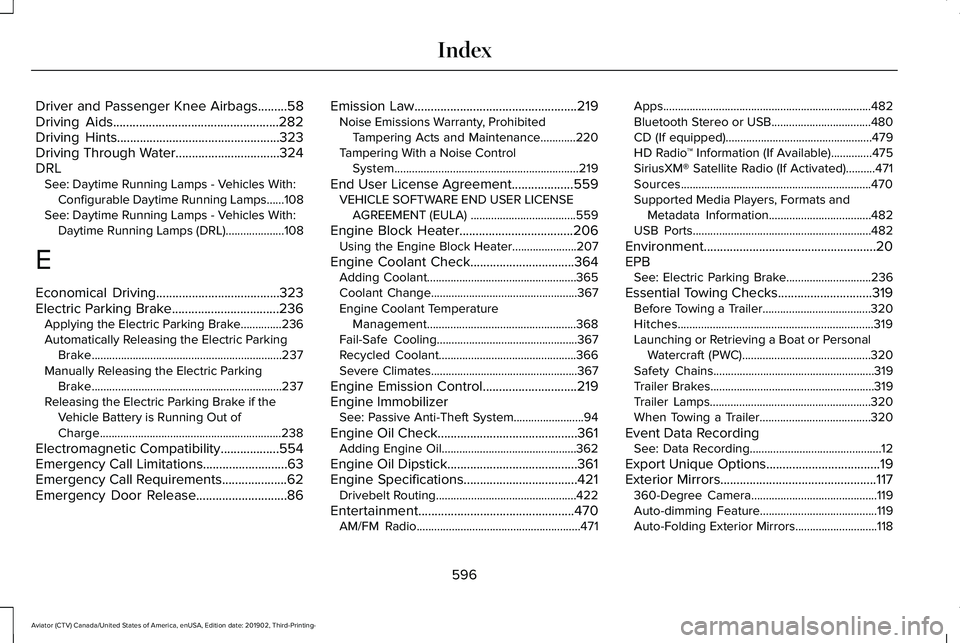
Driver and Passenger Knee Airbags.........58
Driving Aids...................................................282
Driving Hints..................................................323
Driving Through Water................................324
DRL See: Daytime Running Lamps - Vehicles With:
Configurable Daytime Running Lamps......108
See: Daytime Running Lamps - Vehicles With: Daytime Running Lamps (DRL)....................108
E
Economical Driving
......................................323
Electric Parking Brake.................................236 Applying the Electric Parking Brake..............236
Automatically Releasing the Electric Parking
Brake.................................................................237
Manually Releasing the Electric Parking Brake.................................................................237
Releasing the Electric Parking Brake if the Vehicle Battery is Running Out of
Charge..............................................................238
Electromagnetic Compatibility
..................554
Emergency Call Limitations..........................63
Emergency Call Requirements....................62
Emergency Door Release............................86 Emission Law
..................................................219
Noise Emissions Warranty, Prohibited
Tampering Acts and Maintenance............220
Tampering With a Noise Control System...............................................................219
End User License Agreement...................559 VEHICLE SOFTWARE END USER LICENSE
AGREEMENT (EULA) ....................................559
Engine Block Heater
...................................206
Using the Engine Block Heater......................207
Engine Coolant Check................................364 Adding Coolant...................................................365
Coolant Change..................................................367
Engine Coolant Temperature
Management...................................................368
Fail-Safe Cooling................................................367
Recycled Coolant...............................................366
Severe Climates..................................................367
Engine Emission Control
.............................219
Engine Immobilizer See: Passive Anti-Theft System........................94
Engine Oil Check...........................................361 Adding Engine Oil..............................................362
Engine Oil Dipstick........................................361
Engine Specifications...................................421 Drivebelt Routing................................................422
Entertainment................................................470 AM/FM Radio........................................................471 Apps.......................................................................482
Bluetooth Stereo or USB..................................480
CD (If equipped)..................................................479
HD Radio
™ Information (If Available)..............
475
SiriusXM® Satellite Radio (If Activated)..........471
Sources.................................................................470
Supported Media Players, Formats and Metadata Information...................................482
USB Ports.............................................................482
Environment.....................................................20
EPB See: Electric Parking Brake.............................236
Essential Towing Checks.............................319 Before Towing a Trailer.....................................320
Hitches...................................................................319
Launching or Retrieving a Boat or Personal
Watercraft (PWC)............................................320
Safety Chains.......................................................319
Trailer Brakes........................................................319
Trailer Lamps.......................................................320
When Towing a Trailer......................................320
Event Data Recording See: Data Recording.............................................12
Export Unique Options
...................................19
Exterior Mirrors................................................117 360-Degree Camera...........................................119
Auto-dimming Feature........................................119
Auto-Folding Exterior Mirrors............................118
596
Aviator (CTV) Canada/United States of America, enUSA, Edition date: 201902, Third-Printing- Index