Ball LINCOLN AVIATOR 2020 Owners Manual
[x] Cancel search | Manufacturer: LINCOLN, Model Year: 2020, Model line: AVIATOR, Model: LINCOLN AVIATOR 2020Pages: 609, PDF Size: 5.4 MB
Page 19 of 609
System data cannot be accessed without
special equipment and access to your
vehicle's module.
For additional information about our privacy
policy, refer to your local Lincoln website.
Note:
To find out if your vehicle has a
connectivity technology, visit
www .ConnectedLincoln. com .
Vehicles With an Emergency Call
System
When the emergency call system is active,
it may disclose to emergency services that
your vehicle has been in a crash involving
the deployment of an airbag or activation of
the fuel pump shut-off. Certain versions or
updates to the emergency call system may
also be capable of electronically or verbally
disclosing to emergency services operators
your vehicle location or other details about
your vehicle or crash to assist emergency
services operators to provide the most
appropriate emergency services. If you do
not want to disclose this information, do not
activate the emergency call system. Note:
You cannot deactivate emergency call
systems that are required by law.
PERCHLORATE
Certain components in your vehicle such as
airbag modules, seatbelt pretensioners and
remote control batteries may contain
perchlorate material. Special handling may
apply for service or vehicle end of life
disposal.
For more information visit: Web Address
www.dtsc.ca.gov/hazard- ouswaste/perchlorate
LINCOLN AUTOMOTIVE
FINANCIAL SERVICES
Lincoln Automotive Financial Services offers
a full range of financing and lease plans to
help you acquire your vehicle. We are
dedicated to providing answers, information
and a truly extraordinary experience. Use the options below to contact us with
questions about your account or financing
and we will respond promptly: Web Address
www.credit.lincoln.com
Phone: 1-888-498-8801
Mail: Lincoln Automotive Financial Services
P.O. Box 542000
Omaha, NE 68154-8000
16
Aviator (CTV) Canada/United States of America, enUSA, Edition date: 201902, Third-Printing- Introduction
Page 294 of 609
To permanently switch the system off,
contact an authorized dealer.
Blind Spot Information System with
Trailer Tow (If Equipped)
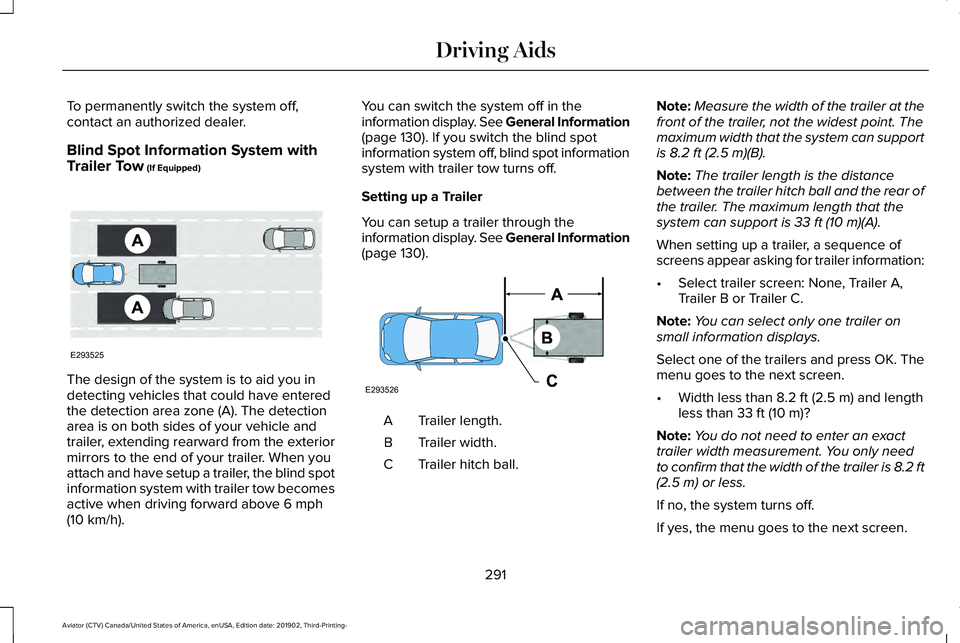
The design of the system is to aid you in
detecting vehicles that could have entered
the detection area zone (A). The detection
area is on both sides of your vehicle and
trailer, extending rearward from the exterior
mirrors to the end of your trailer. When you
attach and have setup a trailer, the blind spot
information system with trailer tow becomes
active when driving forward above
6 mph
(10 km/h). You can switch the system off in the
information display. See General Information
(page
130). If you switch the blind spot
information system off, blind spot information
system with trailer tow turns off.
Setting up a Trailer
You can setup a trailer through the
information display. See General Information
(page
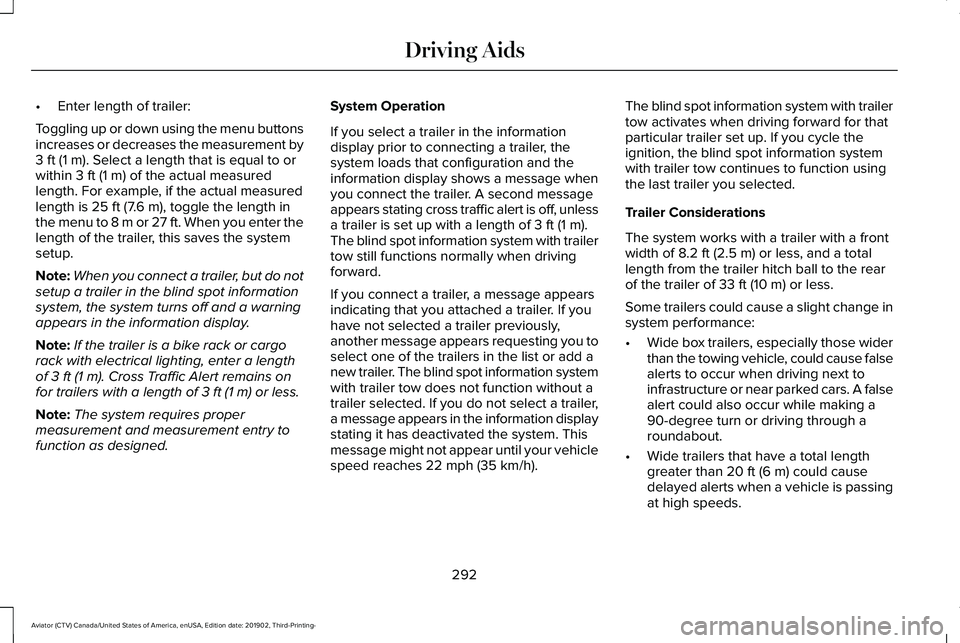
130). Trailer length.
A
Trailer width.
B
Trailer hitch ball.
C Note:
Measure the width of the trailer at the
front of the trailer, not the widest point. The
maximum width that the system can support
is
8.2 ft (2.5 m)(B).
Note: The trailer length is the distance
between the trailer hitch ball and the rear of
the trailer. The maximum length that the
system can support is
33 ft (10 m)(A).
When setting up a trailer, a sequence of
screens appear asking for trailer information:
• Select trailer screen: None, Trailer A,
Trailer B or Trailer C.
Note: You can select only one trailer on
small information displays.
Select one of the trailers and press OK. The
menu goes to the next screen.
• Width less than
8.2 ft (2.5 m) and length
less than 33 ft (10 m)?
Note: You do not need to enter an exact
trailer width measurement. You only need
to confirm that the width of the trailer is 8.2 ft
(2.5 m)
or less.
If no, the system turns off.
If yes, the menu goes to the next screen.
291
Aviator (CTV) Canada/United States of America, enUSA, Edition date: 201902, Third-Printing- Driving AidsE293525 E293526
Page 295 of 609
•
Enter length of trailer:
Toggling up or down using the menu buttons
increases or decreases the measurement by
3 ft (1 m). Select a length that is equal to or
within 3 ft (1 m) of the actual measured
length. For example, if the actual measured
length is
25 ft (7.6 m), toggle the length in
the menu to 8 m or 27 ft. When you enter the
length of the trailer, this saves the system
setup.
Note: When you connect a trailer, but do not
setup a trailer in the blind spot information
system, the system turns off and a warning
appears in the information display.
Note: If the trailer is a bike rack or cargo
rack with electrical lighting, enter a length
of
3 ft (1 m). Cross Traffic Alert remains on
for trailers with a length of 3 ft (1 m) or less.
Note: The system requires proper
measurement and measurement entry to
function as designed. System Operation
If you select a trailer in the information
display prior to connecting a trailer, the
system loads that configuration and the
information display shows a message when
you connect the trailer. A second message
appears stating cross traffic alert is off, unless
a trailer is set up with a length of
3 ft (1 m).
The blind spot information system with trailer
tow still functions normally when driving
forward.
If you connect a trailer, a message appears
indicating that you attached a trailer. If you
have not selected a trailer previously,
another message appears requesting you to
select one of the trailers in the list or add a
new trailer. The blind spot information system
with trailer tow does not function without a
trailer selected. If you do not select a trailer,
a message appears in the information display
stating it has deactivated the system. This
message might not appear until your vehicle
speed reaches
22 mph (35 km/h). The blind spot information system with trailer
tow activates when driving forward for that
particular trailer set up. If you cycle the
ignition, the blind spot information system
with trailer tow continues to function using
the last trailer you selected.
Trailer Considerations
The system works with a trailer with a front
width of
8.2 ft (2.5 m) or less, and a total
length from the trailer hitch ball to the rear
of the trailer of
33 ft (10 m) or less.
Some trailers could cause a slight change in
system performance:
• Wide box trailers, especially those wider
than the towing vehicle, could cause false
alerts to occur when driving next to
infrastructure or near parked cars. A false
alert could also occur while making a
90-degree turn or driving through a
roundabout.
• Wide trailers that have a total length
greater than
20 ft (6 m) could cause
delayed alerts when a vehicle is passing
at high speeds.
292
Aviator (CTV) Canada/United States of America, enUSA, Edition date: 201902, Third-Printing- Driving Aids
Page 319 of 609
TOWING A TRAILER
WARNING: Towing trailers
beyond the maximum recommended
gross trailer weight exceeds the limit
of your vehicle and could result in
engine damage, transmission damage,
structural damage, loss of vehicle
control, vehicle rollover and personal
injury. WARNING:
Do not exceed the
GVWR or the GAWR specified on the
certification label.
Note: See
Recommended Towing
Weights (page 317).
Your vehicle may have electrical items,
such as fuses or relays, related to
towing.
See Fuses (page 342). Your vehicle's load capacity designation
is by weight, not by volume, so you
cannot necessarily use all available
space when loading a vehicle or trailer.
Towing a trailer places an extra load on
your vehicle's engine, transmission, axle,
brakes, tires and suspension. Inspect
these components periodically during,
and after, any towing operation.
Load Placement
To help minimize how trailer movement
affects your vehicle when driving:
•
Load the heaviest items closest to
the trailer floor.
• Load the heaviest items centered
between the left and right side trailer
tires. •
Load the heaviest items above the
trailer axles or just slightly forward
toward the trailer tongue. Do not
allow the final trailer tongue weight
to go above or below 10-15% of the
loaded trailer weight.
• Select a ball mount with the correct
rise or drop and load capacity. When
both the loaded vehicle and trailer
are connected, the trailer frame
should be level, or slightly angled
down toward your vehicle, when
viewed from the side.
When driving with a trailer or payload, a
slight takeoff vibration or shudder may
be present due to the increased payload
weight. Additional information regarding
proper trailer loading and setting your
vehicle up for towing is located in
another chapter of this manual.
See
Load Limit (page 310).
You can also find information in the
RV
& Trailer Towing Guide available at your
authorized dealer, or online.
316
Aviator (CTV) Canada/United States of America, enUSA, Edition date: 201902, Third-Printing- Towing
Page 531 of 609
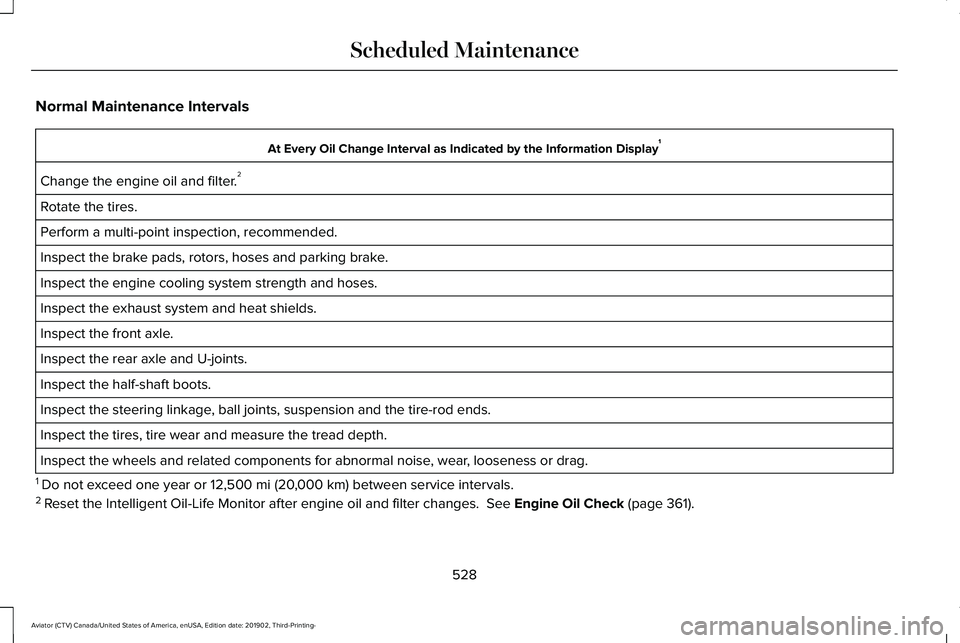
Normal Maintenance Intervals
At Every Oil Change Interval as Indicated by the Information Display
1
Change the engine oil and filter. 2
Rotate the tires.
Perform a multi-point inspection, recommended.
Inspect the brake pads, rotors, hoses and parking brake.
Inspect the engine cooling system strength and hoses.
Inspect the exhaust system and heat shields.
Inspect the front axle.
Inspect the rear axle and U-joints.
Inspect the half-shaft boots.
Inspect the steering linkage, ball joints, suspension and the tire-rod ends.
Inspect the tires, tire wear and measure the tread depth.
Inspect the wheels and related components for abnormal noise, wear, looseness or drag.
1 Do not exceed one year or 12,500 mi (20,000 km) between service intervals.
2 Reset the Intelligent Oil-Life Monitor after engine oil and filter change\
s.
See Engine Oil Check (page 361).
528
Aviator (CTV) Canada/United States of America, enUSA, Edition date: 201902, Third-Printing- Scheduled Maintenance