alarm LINCOLN AVIATOR 2020 Owners Manual
[x] Cancel search | Manufacturer: LINCOLN, Model Year: 2020, Model line: AVIATOR, Model: LINCOLN AVIATOR 2020Pages: 609, PDF Size: 5.4 MB
Page 5 of 609
Phone as a Key – Troubleshooting
............71
MyKey™
Principle of Operation ...................................
73
Creating a MyKey ...........................................
74
Clearing All MyKeys ......................................
75
Checking MyKey System Status ................
75
Using MyKey With Remote Start Systems ........................................................................\
.
76
MyKey – Troubleshooting ............................
76
Doors and Locks
Locking and Unlocking .................................
78
Opening the Doors .......................................
85
Emergency Door Release ...........................
86
Soft Closing Door ..........................................
86
Keyless Entry ..................................................
86
Liftgate
Power Liftgate ................................................
89
Security
Passive Anti-Theft System ...........................
94Anti-Theft Alarm
.............................................
95
Steering Wheel
Adjusting the Steering Wheel - Vehicles With: Manual Adjustable Steering
Column .........................................................
97
Adjusting the Steering Wheel - Vehicles With: Power Adjustable Steering Column
........................................................................\
.
97
Audio Control .................................................
99
Voice Control ..................................................
99
Cruise Control - Vehicles With: Adaptive Cruise Control With Lane Centering
........................................................................\
99
Cruise Control - Vehicles With: Cruise Control ........................................................
100
Information Display Control .......................
101
Heated Steering Wheel ...............................
101
Horn ..................................................................
101
Wipers and Washers
Windshield Wipers - Vehicles Without: Heated Wiper Blades .............................
102
Windshield Wipers - Vehicles With: Heated Wiper Blades .............................................
103Autowipers
.....................................................
103
Windshield Washers ....................................
104
Rear Window Wiper and Washers ...........
104
Lighting
General Information ....................................
106
Lighting Control ............................................
106
Autolamps ......................................................
107
Instrument Lighting Dimmer ......................
107
Headlamp Exit Delay ...................................
108
Daytime Running Lamps - Vehicles With: Configurable Daytime Running Lamps
.......................................................................
108
Daytime Running Lamps - Vehicles With: Daytime Running Lamps (DRL) .............
108
Front Fog Lamps ..........................................
108
Adaptive Headlamps ..................................
109
Direction Indicators .......................................
111
Welcome Lighting ..........................................
111
Interior Lamps ................................................
112
Ambient Lighting ...........................................
112
2
Aviator (CTV) Canada/United States of America, enUSA, Edition date: 201902, Third-Printing- Table of Contents
Page 14 of 609
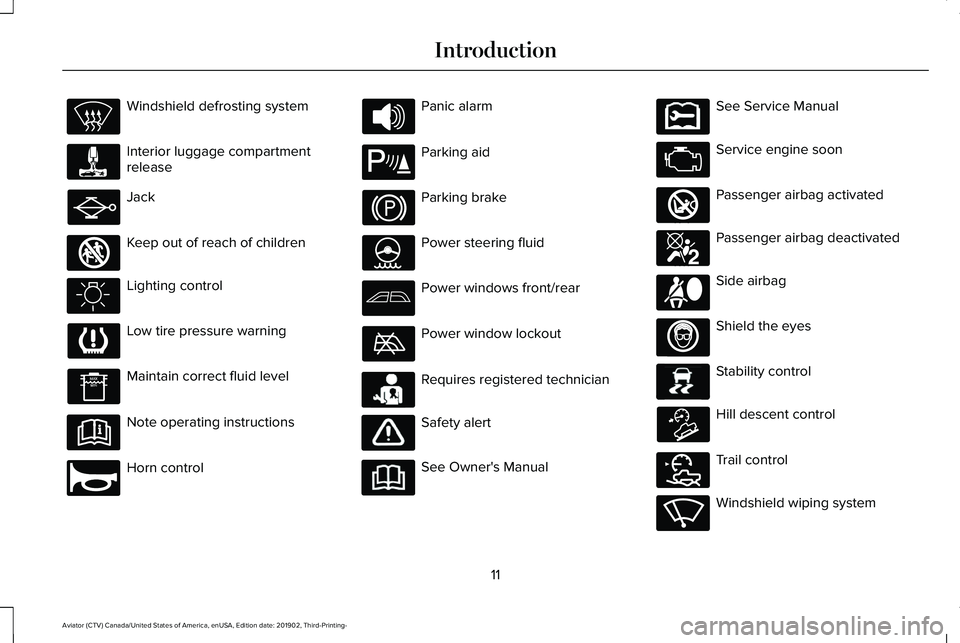
Windshield defrosting system
Interior luggage compartment
release
Jack
Keep out of reach of children
Lighting control
Low tire pressure warning
Maintain correct fluid level
Note operating instructions
Horn control Panic alarm
Parking aid
Parking brake
Power steering fluid
Power windows front/rear
Power window lockout
Requires registered technician
Safety alert
See Owner's Manual See Service Manual
Service engine soon
Passenger airbag activated
Passenger airbag deactivated
Side airbag
Shield the eyes
Stability control
Hill descent control
Trail control
Windshield wiping system
11
Aviator (CTV) Canada/United States of America, enUSA, Edition date: 201902, Third-Printing- Introduction E161353 E270945 E139213 E231159 E231158 E270849 E270850 E167012 E138639 E163957 E272858 E270969
Page 67 of 609
GENERAL INFORMATION ON
RADIO FREQUENCIES
This device complies with Part 15 of the FCC
Rules and with Industry Canada
license-exempt RSS standard(s). Operation
is subject to the following two conditions: (1)
This device may not cause harmful
interference, and (2) This device must accept
any interference received, including
interference that may cause undesired
operation.
WARNING: Changes or modifications
not expressively approved by the party
responsible for compliance could void the
user's authority to operate the equipment.
The term "IC:" before the radio certification
number only signifies that Industry Canada
technical specifications were met.
The typical operating range for your
transmitter is approximately 33 ft (10 m).
Vehicles with the remote start feature will
have a greater range. One of the following could cause a decrease
in operating range:
•
Weather conditions.
• Nearby radio towers.
• Structures around the vehicle.
• Other vehicles parked next to your
vehicle.
The radio frequency used by your remote
control can also be used by other radio
transmitters, for example amateur radios,
medical equipment, wireless headphones,
wireless remote controls, cell phones, battery
chargers and alarm systems. If the
frequencies are jammed, you will not be able
to use your remote control. You can lock and
unlock the doors with the key.
Note: Make sure to lock your vehicle before
leaving it unattended.
Note: If you are in range, the remote control
will operate if you press any button
unintentionally.
Note: The remote control contains sensitive
electrical components. Exposure to moisture
or impact may cause permanent damage. Intelligent Access
(If Equipped)
The system uses a radio frequency signal to
communicate with your vehicle and authorize
your vehicle to unlock when one of the
following conditions are met:
• You activate the front exterior door
handle switch.
• You press the luggage compartment
button.
• You press a button on the transmitter.
If excessive radio frequency interference is
present in the area or if the transmitter
battery is low, you may need to mechanically
unlock your door. You can use the
mechanical key blade in your intelligent
access key to open the driver door in this
situation.
See Remote Control (page 64).
REMOTE CONTROL
Intelligent Access Key
Note: You may not be able to shift out of
park (P) unless the intelligent access key is
inside your vehicle.
64
Aviator (CTV) Canada/United States of America, enUSA, Edition date: 201902, Third-Printing- Keys and Remote Controls
Page 70 of 609
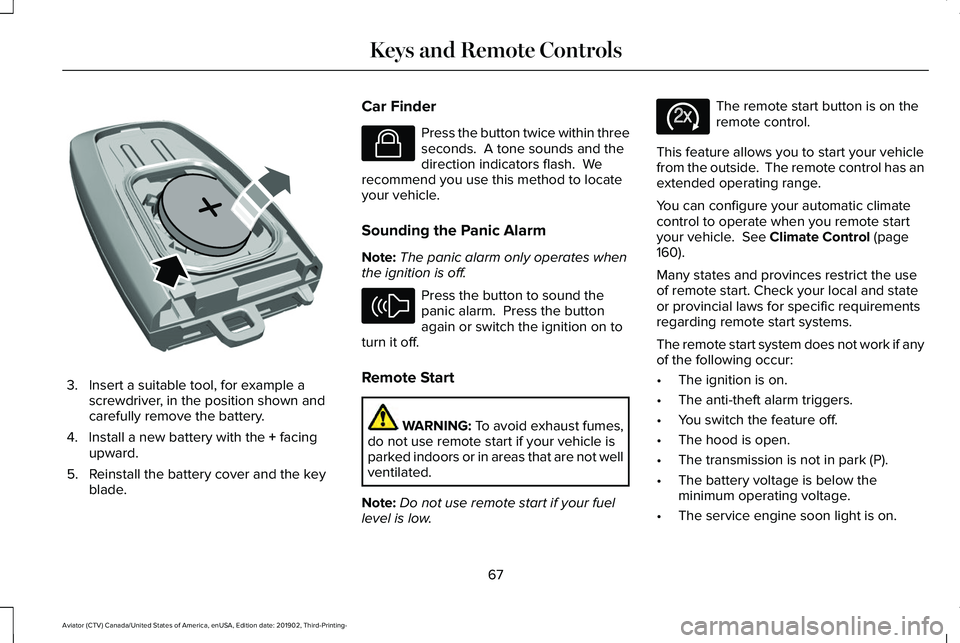
3. Insert a suitable tool, for example a
screwdriver, in the position shown and
carefully remove the battery.
4. Install a new battery with the + facing
upward.
5. Reinstall the battery cover and the key blade. Car Finder Press the button twice within three
seconds. A tone sounds and the
direction indicators flash. We
recommend you use this method to locate
your vehicle.
Sounding the Panic Alarm
Note: The panic alarm only operates when
the ignition is off. Press the button to sound the
panic alarm. Press the button
again or switch the ignition on to
turn it off.
Remote Start WARNING: To avoid exhaust fumes,
do not use remote start if your vehicle is
parked indoors or in areas that are not well
ventilated.
Note: Do not use remote start if your fuel
level is low. The remote start button is on the
remote control.
This feature allows you to start your vehicle
from the outside. The remote control has an
extended operating range.
You can configure your automatic climate
control to operate when you remote start
your vehicle.
See Climate Control (page
160).
Many states and provinces restrict the use
of remote start. Check your local and state
or provincial laws for specific requirements
regarding remote start systems.
The remote start system does not work if any
of the following occur:
• The ignition is on.
• The anti-theft alarm triggers.
• You switch the feature off.
• The hood is open.
• The transmission is not in park (P).
• The battery voltage is below the
minimum operating voltage.
• The service engine soon light is on.
67
Aviator (CTV) Canada/United States of America, enUSA, Edition date: 201902, Third-Printing- Keys and Remote ControlsE218402 E138623 E138624 E138625
Page 89 of 609
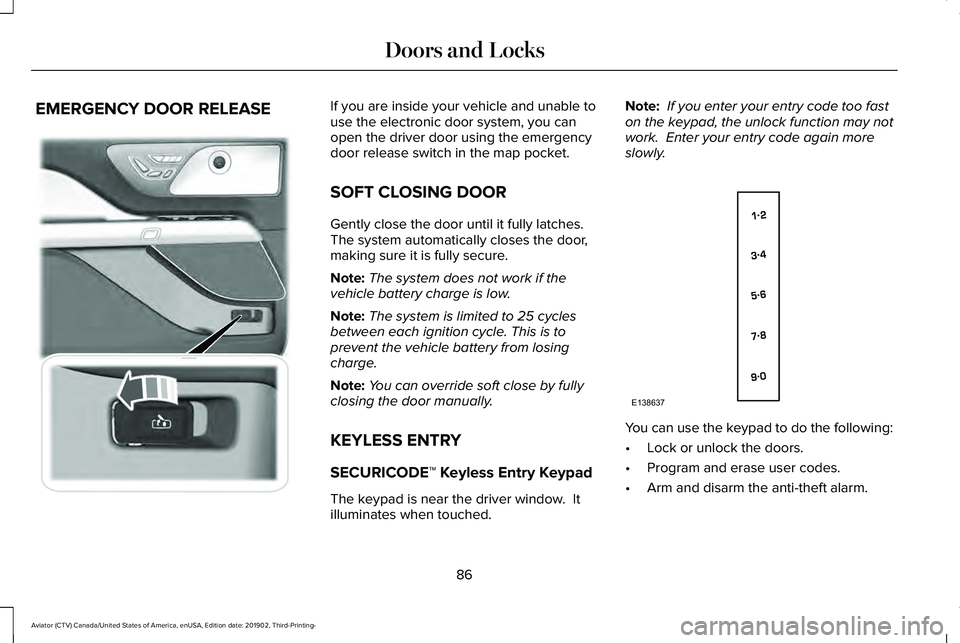
EMERGENCY DOOR RELEASE If you are inside your vehicle and unable to
use the electronic door system, you can
open the driver door using the emergency
door release switch in the map pocket.
SOFT CLOSING DOOR
Gently close the door until it fully latches.
The system automatically closes the door,
making sure it is fully secure.
Note:
The system does not work if the
vehicle battery charge is low.
Note: The system is limited to 25 cycles
between each ignition cycle. This is to
prevent the vehicle battery from losing
charge.
Note: You can override soft close by fully
closing the door manually.
KEYLESS ENTRY
SECURICODE™ Keyless Entry Keypad
The keypad is near the driver window. It
illuminates when touched. Note:
If you enter your entry code too fast
on the keypad, the unlock function may not
work. Enter your entry code again more
slowly. You can use the keypad to do the following:
•
Lock or unlock the doors.
• Program and erase user codes.
• Arm and disarm the anti-theft alarm.
86
Aviator (CTV) Canada/United States of America, enUSA, Edition date: 201902, Third-Printing- Doors and Locks E295773 E138637
Page 98 of 609
ANTI-THEFT ALARM
The active anti-theft system is designed to
warn you in the event of unauthorized
vehicle entry and is also designed to help
prevent unwanted towing of your vehicle.
You can choose what is monitored by arming
the system in different ways. See
Information Displays (page 130).
The direction indicators flash and the horn
sounds if the system triggers while the alarm
is armed.
Take all remote controls to an authorized
dealer if there is any potential alarm problem
with your vehicle.
Using the System
You can select two levels of alarm security.
You can change the level of security when
the ignition is switched off through the
information display with the two options
below: Perimeter Sensing (If Equipped)
Perimeter sensing monitors the following:
•
Doors.
• Hood.
• Liftgate.
All Sensors (If Equipped)
All sensors monitors the following:
• Doors.
• Hood.
• Liftgate.
• Movement inside your vehicle.
• Change in vehicle inclination, for
example, unwanted towing.
Note: Do not choose all sensors monitor
mode when the vehicle is in transport or if
movement within the vehicle is likely to
occur. Note:
For correct operation of the interior
motion detection system, make sure you
close all the windows prior to arming the
system. This helps prevent accidental alarm
activation due to external influences.
Additionally, the interior motion sensing
system does not arm if any door is ajar.
Arming the Alarm
The alarm is ready to arm when there is not
a key in the ignition. Lock your vehicle using
the remote control or keyless entry keypad.
You can also lock your vehicle using the lock
sensor on the exterior door handle if your
vehicle is equipped with intelligent access.
See
Locking and Unlocking (page 78).
The direction indicators flash once after you
lock your vehicle. This indicates the alarm is
in the pre-armed mode. It fully arms after 20
seconds.
95
Aviator (CTV) Canada/United States of America, enUSA, Edition date: 201902, Third-Printing- Security
Page 99 of 609
Disarming the Alarm
Disarm the alarm by any of the following
actions:
•
Press the power door unlock button
within the 20-second pre-armed mode.
• Unlock the doors with the remote control
or keyless entry keypad. If equipped with
intelligent access, you can use the unlock
sensor on the exterior door handle. See
Locking and Unlocking (page 78).
• Switch the ignition on or start your
vehicle.
• Use a key in the driver door lock cylinder
to unlock your vehicle, then switch the
ignition on within 12 seconds.
Note: Pressing the panic button on the
remote control stops the horn and direction
indicators, but does not disarm the system.
96
Aviator (CTV) Canada/United States of America, enUSA, Edition date: 201902, Third-Printing- Security
Page 140 of 609
Action
Message
The status of the system after you switched it on.
AdvanceTrac SPORT MODE
The status of the system after you switched it off.
Traction Control Off
The status of the system after you switched it off.
Traction Control On
Alarm Action
Message
Alarm triggered due to unauthorized entry. See Anti-Theft Alarm (page 95).
Vehicle Alarm To Stop Alarm, Start Vehicle.
Automatic Engine Shutdown Action
Message
The engine is getting ready to shut off.
Vehicle Shuts Off In {seconds:#0} Seconds
The engine has shut off to help increase fuel economy.
Vehicle Shut Off to Save Energy
The engine is getting ready to shut off. You can press OK on the left-hand steering wheel buttonto override the shut down.
Vehicle Shuts Off in {seconds:#0} Seconds
Press Ok to Override
137
Aviator (CTV) Canada/United States of America, enUSA, Edition date: 201902, Third-Printing- Information Displays
Page 273 of 609
WARNING: Pay close attention to
changing road conditions such as entering
or leaving a highway, on roads with
intersections or roundabouts, roads
without visible lanes of travel, roads that
are winding, slippery, unpaved, or steep
slopes. WARNING:
The system does not
control speed in low traction conditions or
extremely steep slopes. The system is
designed to be an aid and does not relieve
you of your responsibility to drive with due
care and attention. Failure to follow this
instruction could result in personal injury. WARNING:
The system is not a crash
warning or avoidance system. WARNING:
Do not use the system
when towing a trailer that has aftermarket
electronic trailer brake controls. Failure to
follow this instruction could result in the
loss of control of your vehicle, personal
injury or death. WARNING:
Do not use tire sizes
other than those recommended because
this can affect the normal operation of the
system. Failure to do so may result in a loss
of vehicle control, which could result in
serious injury. WARNING:
Do not use the system
with a snow plow blade installed. WARNING:
Do not use the system in
poor visibility, for example fog, heavy rain,
spray or snow.
When Following a Vehicle WARNING: When following a vehicle
that is braking, your vehicle does not
always decelerate quickly enough to avoid
a crash without driver intervention. Apply
the brakes when necessary. Failure to
follow this instruction could result in
personal injury or death. Hilly Condition Usage
You should select a lower gear when the
system is active in situations such as
prolonged downhill driving on steep grades,
for example in mountainous areas. The
system needs additional engine braking in
these situations to reduce the load on the
vehicle
’s regular brake system to prevent it
from overheating.
Note: An audible alarm sounds and the
system shuts down if it applies brakes for an
extended period of time. This allows the
brakes to cool. The system functions
normally again after the brakes cool.
ADAPTIVE CRUISE CONTROL
LIMITATIONS - VEHICLES WITH:
ADAPTIVE CRUISE CONTROL
WITH LANE CENTERING
Adaptive cruise control limitations apply to
lane centering unless stated otherwise or
contradicted by a lane centering limitation.
See
Adaptive Cruise Control Limitations
(page 271).
270
Aviator (CTV) Canada/United States of America, enUSA, Edition date: 201902, Third-Printing- Adaptive Cruise Control
(If Equipped)
Page 501 of 609
SETTINGS
Press the button to enter the
settings menu.
Once you select a tile, press the
button next to a menu item to view
an explanation of the feature or
setting.
Sound
Select this tile to adjust the sound settings.
Clock
Select this tile to adjust the clock settings.
Bluetooth
Select this tile to switch Bluetooth on and off
and adjust settings.
Phone
Select this tile to connect, disconnect, and
manage the connected device settings. Audio
Select this tile to adjust the audio settings.
Driver Assist (If Equipped)
Select this tile to adjust Driver Assist features
like Parking Aids, Lane Keeping system,
Pedestrian Detection, and Auto-Start-Stop.
Vehicle
Select this tile to adjust vehicle settings like
windows, alarm, lighting, backup starting
passcode, and MyKey settings.
Lincoln Way
Select this tile to adjust the Lincoln Way
settings.
General
Select this tile to adjust settings like
language, measurement units, or to reset the
system.
911 Assist
(If Equipped)
Select this tile to switch 911 Assist on and off. Automatic Updates
Select this tile to adjust automatic update
settings.
Mobile Apps
Select this tile to adjust permissions, enable,
disable, and update mobile apps.
Display
Select this tile to adjust display settings like
brightness and auto dim.
Charge Settings
(If Equipped)
Select this tile to adjust the electric vehicle
charge setting.
Voice Control
Select this tile to adjust voice control settings
like command confirmations and displayed
lists.
Navigation
(If Equipped)
Select this tile to adjust navigation settings
like map preferences and route guidance.
498
Aviator (CTV) Canada/United States of America, enUSA, Edition date: 201902, Third-Printing- SYNC™ 3E280315 E268570