ECU LINCOLN AVIATOR 2021 User Guide
[x] Cancel search | Manufacturer: LINCOLN, Model Year: 2021, Model line: AVIATOR, Model: LINCOLN AVIATOR 2021Pages: 667, PDF Size: 7.01 MB
Page 48 of 667
•
Seatbelt pretensioners at the front
outermost and second row outermost
seating positions.
• Belt tension sensor at the front outermost
passenger seating position. •
Seatbelt warning light and chime. •
Crash sensors and monitoring system
with readiness indicator.
The seatbelt pretensioners are designed to
tighten the seatbelts when activated. In
frontal and near-frontal crashes, the seatbelt
pretensioners may be activated alone or, if
the crash is of sufficient severity, together
with the front airbags. The pretensioners may
also activate when a Safety Canopy airbag
deploys. FASTENING THE SEATBELTS
The front outboard and rear safety restraints
in the vehicle are combination lap and
shoulder belts.
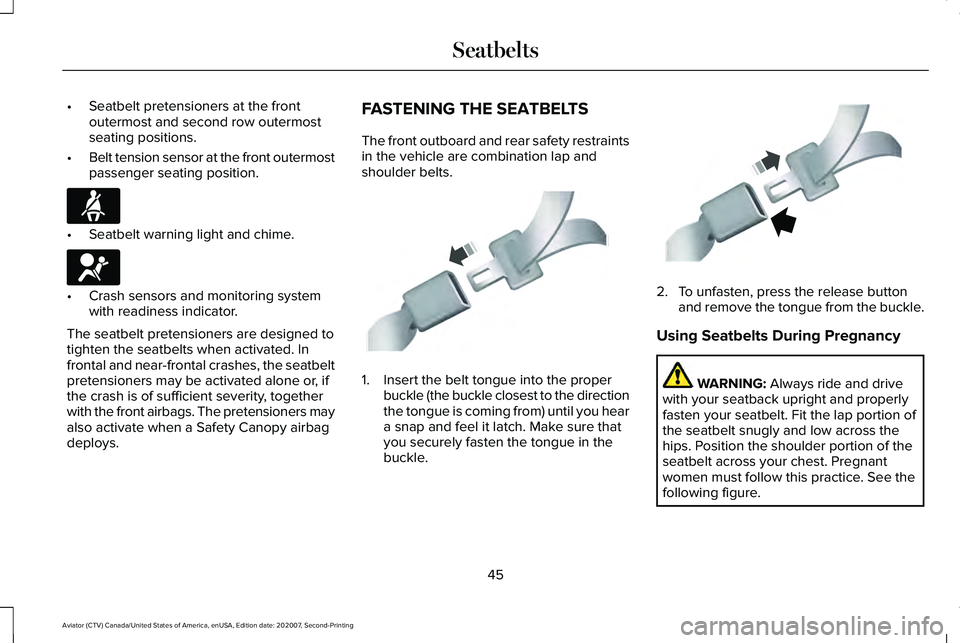
1. Insert the belt tongue into the proper
buckle (the buckle closest to the direction
the tongue is coming from) until you hear
a snap and feel it latch. Make sure that
you securely fasten the tongue in the
buckle. 2. To unfasten, press the release button
and remove the tongue from the buckle.
Using Seatbelts During Pregnancy WARNING: Always ride and drive
with your seatback upright and properly
fasten your seatbelt. Fit the lap portion of
the seatbelt snugly and low across the
hips. Position the shoulder portion of the
seatbelt across your chest. Pregnant
women must follow this practice. See the
following figure.
45
Aviator (CTV) Canada/United States of America, enUSA, Edition date: 202007, Second-Printing SeatbeltsE71880 E67017 E142587 E142588
Page 67 of 667
WHAT IS 911 ASSIST
911 Assist is a SYNC system feature that can
call for help if you are in an accident. If a
crash deploys an airbag, excluding knee
airbags and rear inflatable seatbelts [if
equipped], or activates the fuel pump
shut-off, your SYNC-equipped vehicle may
be able to contact emergency services by
dialing 911 through a paired and connected
Bluetooth enabled phone. You can learn
more about the 911 Assist feature, by visiting:
Website
www.owner.lincoln.com
www.syncmyride.ca
www.syncmaroute.ca
Not all crashes will deploy an airbag or
activate the fuel pump shut-off, the triggers
for 911 Assist. If a connected cell phone
sustains damage or loses its connection to
SYNC during a crash, SYNC will search for
and try to connect to a previously paired cell
phone. SYNC will then attempt to call the
emergency services. Before making the call:
•
SYNC provides a short window of time,
about 10 seconds, to cancel the call. If
you fail to cancel the call, SYNC attempts
to dial 911.
• SYNC says the following, or a similar
message: SYNC will attempt to call 911,
to cancel the call, press Cancel on your
screen or press and hold the phone
button on your steering wheel.
If you do not cancel the call, and SYNC
makes a successful call, a pre-recorded
message plays for the 911 operator, and then
the occupant(s) in your vehicle is able to talk
with the operator. Be prepared to
immediately provide your name, phone
number and location, because not all 911
systems are capable of receiving this
information electronically.
During an emergency call, the system
transmits vehicle data to the emergency
service. See Data Privacy (page 16). EMERGENCY CALL
REQUIREMENTS WARNING: Do not wait for 911 Assist
to make an emergency call if you can do
it yourself. Dial emergency services
immediately to avoid delayed response
time which could increase the risk of
serious injury or death after a crash. If you
do not hear 911 Assist within five seconds
of the crash, the system or phone may be
damaged or non-functional. WARNING: Always place your phone
in a secure location in your vehicle so it
does not become a projectile or get
damaged in a crash. Failure to do so may
cause serious injury to someone or
damage the phone which could prevent
911 Assist from working properly. WARNING: Unless the 911 Assist
setting is set on before a crash, the system
will not dial for help which could delay
response time, potentially increasing the
risk of serious injury or death after a crash.
64
Aviator (CTV) Canada/United States of America, enUSA, Edition date: 202007, Second-Printing 911 Assist
Page 70 of 667
REMOTE CONTROL
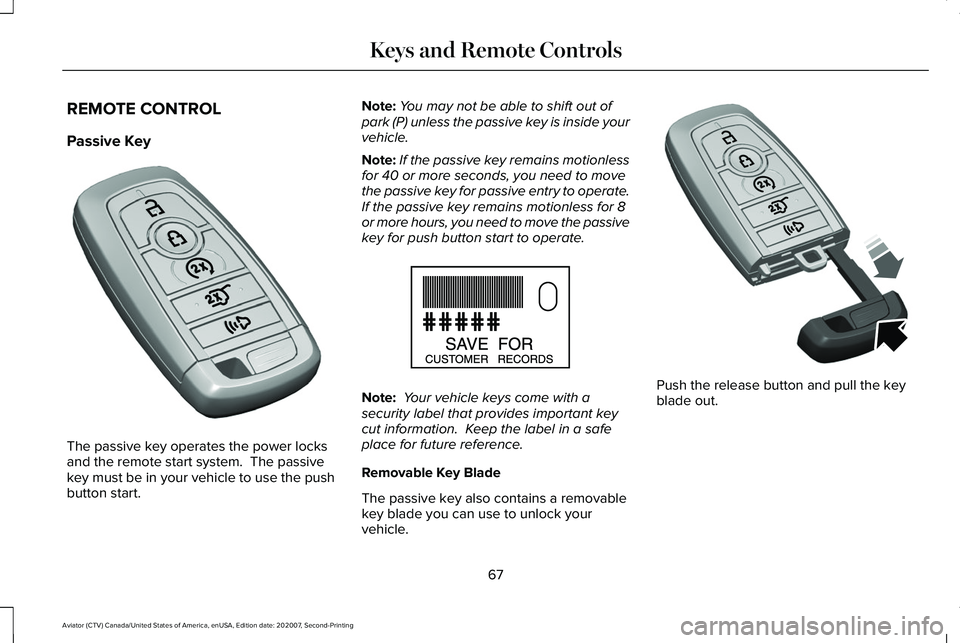
Passive Key
The passive key operates the power locks
and the remote start system. The passive
key must be in your vehicle to use the push
button start. Note:
You may not be able to shift out of
park (P) unless the passive key is inside your
vehicle.
Note: If the passive key remains motionless
for 40 or more seconds, you need to move
the passive key for passive entry to operate.
If the passive key remains motionless for 8
or more hours, you need to move the passive
key for push button start to operate. Note:
Your vehicle keys come with a
security label that provides important key
cut information. Keep the label in a safe
place for future reference.
Removable Key Blade
The passive key also contains a removable
key blade you can use to unlock your
vehicle. Push the release button and pull the key
blade out.
67
Aviator (CTV) Canada/United States of America, enUSA, Edition date: 202007, Second-Printing Keys and Remote ControlsE305198 E151795 E305199
Page 71 of 667
Replacing the Battery
WARNING: Keep batteries away from
children to prevent ingestion. Failure to
follow this instruction could result in
personal injury or death. If ingested,
immediately seek medical attention. WARNING: If the battery
compartment does not securely close, stop
using the remote control and replace it as
soon as possible. In the meantime, keep
the remote control away from children.
Failure to follow this instruction could result
in personal injury or death.
A message appears in the information
display when the remote control battery is
low.
See Information Messages (page 140).
The remote control uses one coin-type
three-volt lithium battery, CR2450, or
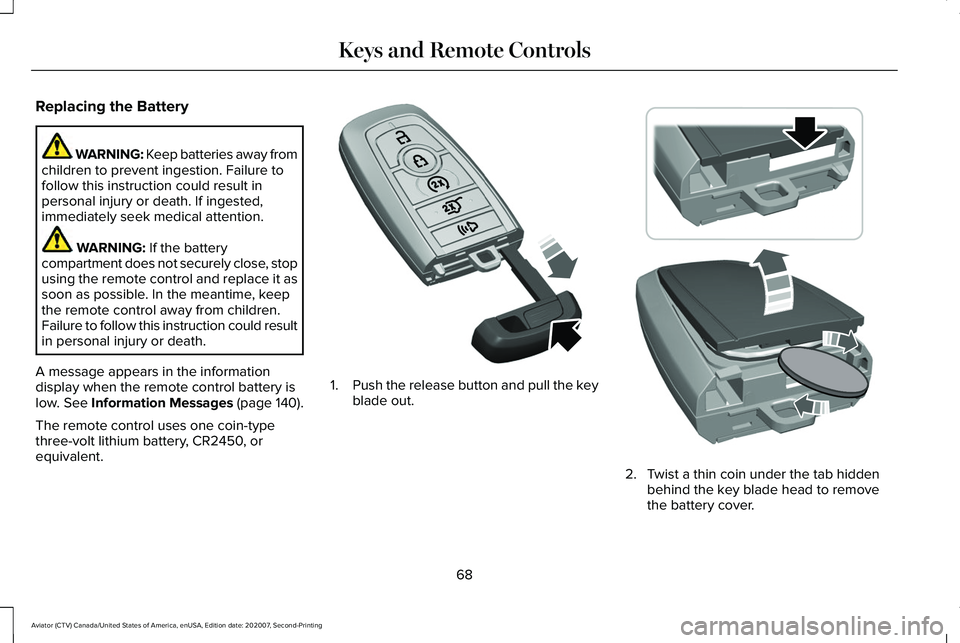
equivalent. 1.
Push the release button and pull the key
blade out. 2. Twist a thin coin under the tab hidden
behind the key blade head to remove
the battery cover.
68
Aviator (CTV) Canada/United States of America, enUSA, Edition date: 202007, Second-Printing Keys and Remote ControlsE305199 E303824
Page 82 of 667
Number of MyKeys
Indicates the number of MyKeys you have
programmed to your vehicle. Use this feature
to detect how many MyKeys you have for
your vehicle and determine when you have
deleted all MyKeys.
Number of Admin Keys
Indicates how many admin keys you have
programmed to your vehicle. Use this feature
to determine how many admin keys you have
for your vehicle, and detect if an additional
MyKey has been programmed.
USING MYKEY WITH REMOTE
START SYSTEMS
MyKey is not compatible with non
Ford-approved, aftermarket remote start
systems. If you choose to install a remote
start system, see an authorized dealer for a
Ford-approved remote start system.
MYKEY – TROUBLESHOOTING Potential causes
Condition
· The key or transmitter used to start the vehicle does not have admin
privileges.
I cannot create a MyKey.
· Vehicles with keyless start: Make sure you place the transmitter into
the backup slot. See Starting a Gasoline Engine (page 209).
· The key or transmitter used to start the vehicle is the only admin key.
There always has to be at least one admin key.
· SecuriLock passive anti-theft system is disabled or in unlimited mode.
· The key or transmitter used to start the vehicle does not have admin
privileges.
I cannot program the configurable settings.
79
Aviator (CTV) Canada/United States of America, enUSA, Edition date: 202007, Second-Printing MyKey™
Page 84 of 667
LOCKING AND UNLOCKING
Your vehicle has an intelligent electronically
controlled door system that is in constant
communication with overall vehicle systems.
When you lock your vehicle using the lock
switch on each door interior trim panel, or
by using the keyless entry keypad or the lock
sensor on each door exterior trim panel, the
exterior door handle switches do not release
the doors. This helps to secure your vehicle
and prevent unauthorized entry. Also, when
your vehicle reaches a speed greater than
12 mph (20 km/h) the exterior door handle
switches do not release the doors.
If the airbags deploy or the fuel pump shutoff
switch activates, all interior and exterior
unlock switches do not unlock your door for
six seconds. This helps to secure the doors
in the event of a crash. After six seconds, all
switches reset and you can open the doors
using the interior and exterior unlatch
switches. Door Lock Indicator
An LED on each door lock switch illuminates
when you lock the doors. It remains on for
2 to 5 seconds after you switch the ignition
off.
Door Lock Switch Inhibitor
When you electronically lock your vehicle,
the door lock switches and the interior
luggage compartment release switch do not
operate after 20 seconds. You must unlock
your vehicle with the remote control or
keyless entry keypad, or switch the ignition
on, to restore function to these switches.
You can switch this feature on or off in the
information display.
See General
Information (page 134).
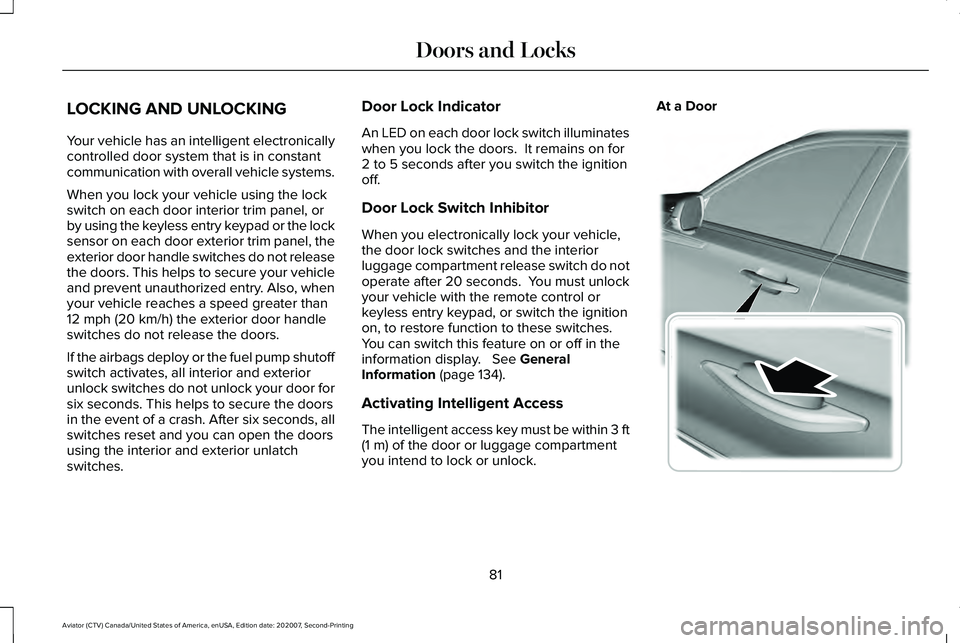
Activating Intelligent Access
The intelligent access key must be within 3 ft
(1 m)
of the door or luggage compartment
you intend to lock or unlock. At a Door
81
Aviator (CTV) Canada/United States of America, enUSA, Edition date: 202007, Second-Printing Doors and LocksE295769
Page 87 of 667
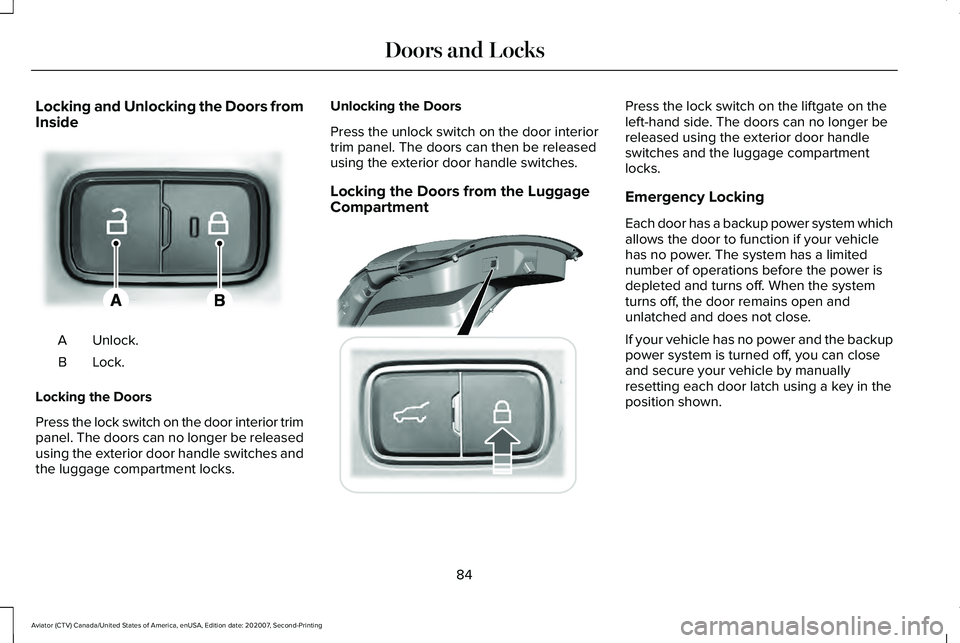
Locking and Unlocking the Doors from
Inside
Unlock.
A
Lock.B
Locking the Doors
Press the lock switch on the door interior trim
panel. The doors can no longer be released
using the exterior door handle switches and
the luggage compartment locks. Unlocking the Doors
Press the unlock switch on the door interior
trim panel. The doors can then be released
using the exterior door handle switches.
Locking the Doors from the Luggage
Compartment Press the lock switch on the liftgate on the
left-hand side. The doors can no longer be
released using the exterior door handle
switches and the luggage compartment
locks.
Emergency Locking
Each door has a backup power system which
allows the door to function if your vehicle
has no power. The system has a limited
number of operations before the power is
depleted and turns off. When the system
turns off, the door remains open and
unlatched and does not close.
If your vehicle has no power and the backup
power system is turned off, you can close
and secure your vehicle by manually
resetting each door latch using a key in the
position shown.
84
Aviator (CTV) Canada/United States of America, enUSA, Edition date: 202007, Second-Printing Doors and LocksE295772 E295920
Page 92 of 667
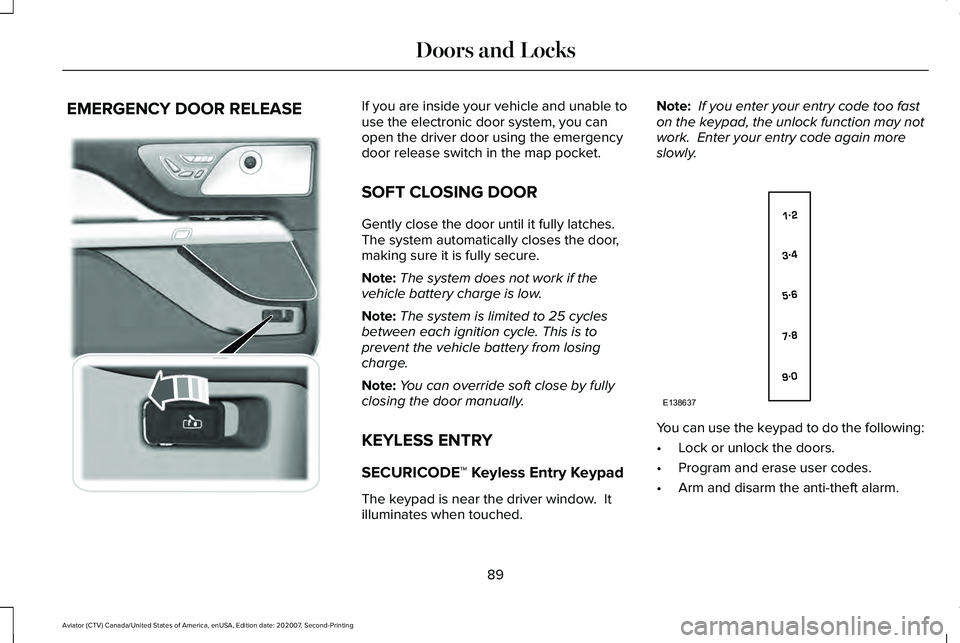
EMERGENCY DOOR RELEASE If you are inside your vehicle and unable to
use the electronic door system, you can
open the driver door using the emergency
door release switch in the map pocket.
SOFT CLOSING DOOR
Gently close the door until it fully latches.
The system automatically closes the door,
making sure it is fully secure.
Note:
The system does not work if the
vehicle battery charge is low.
Note: The system is limited to 25 cycles
between each ignition cycle. This is to
prevent the vehicle battery from losing
charge.
Note: You can override soft close by fully
closing the door manually.
KEYLESS ENTRY
SECURICODE™ Keyless Entry Keypad
The keypad is near the driver window. It
illuminates when touched. Note:
If you enter your entry code too fast
on the keypad, the unlock function may not
work. Enter your entry code again more
slowly. You can use the keypad to do the following:
•
Lock or unlock the doors.
• Program and erase user codes.
• Arm and disarm the anti-theft alarm.
89
Aviator (CTV) Canada/United States of America, enUSA, Edition date: 202007, Second-Printing Doors and Locks E295773 E138637
Page 100 of 667
PASSIVE ANTI-THEFT SYSTEM
Note:
The system is not compatible with
non-Ford aftermarket remote start systems.
Use of these systems may result in vehicle
starting problems and a loss of security
protection.
Note: Metallic objects, electronic devices or
a second coded key on the same key chain
may cause vehicle starting problems if they
are too close to the key when starting the
engine. Prevent these objects from touching
the coded key while starting the engine.
Switch the ignition off, move all objects on
the key chain away from the coded key and
restart the engine if a problem occurs.
Note: Do not leave a duplicate coded key
in the vehicle. Always take your keys and
lock all doors when leaving the vehicle. SecuriLock®
The system is an engine immobilization
system. It is designed to help prevent the
engine from being started unless a coded
key programmed to your vehicle is used.
Using the wrong key may prevent the engine
from starting. A message may appear in the
information display.
If you are unable to start the engine with a
correctly coded key, a malfunction has
happened and a message may appear in the
information display.
Automatic Arming
The vehicle arms immediately after you
switch the ignition off.
Automatic Disarming
Switching the ignition on with a coded key
disarms the vehicle.
Replacement Keys
Note:
Your vehicle comes equipped with two
intelligent access keys. The intelligent access key functions as a
programmed key that operates the driver
door lock and activates the intelligent access
with push button start system, as well as a
remote control.
If your programmed transmitters are lost or
stolen and you do not have an extra coded
key, you will need to have your vehicle
towed to an authorized dealer. You need to
erase the key codes from your vehicle and
program new coded keys.
Store an extra programmed key away from
the vehicle in a safe place to help prevent
any inconveniences. See your authorized
dealer to purchase additional spare or
replacement keys.
Programming a Spare Intelligent Access
Key
See your authorized dealer to have
additional keys programmed to your vehicle.
97
Aviator (CTV) Canada/United States of America, enUSA, Edition date: 202007, Second-Printing Security
Page 101 of 667
ANTI-THEFT ALARM
The active anti-theft system is designed to
warn you in the event of unauthorized
vehicle entry and is also designed to help
prevent unwanted towing of your vehicle.
You can choose what is monitored by arming
the system in different ways. See
Information Displays (page 134).
The direction indicators flash and the horn
sounds if the system triggers while the alarm
is armed.
Take all remote controls to an authorized
dealer if there is any potential alarm problem
with your vehicle.
Using the System
You can select two levels of alarm security.
You can change the level of security when
the ignition is switched off through the
information display with the two options
below: Perimeter Sensing (If Equipped)
Perimeter sensing monitors the following:
•
Doors.
• Hood.
• Liftgate.
All Sensors (If Equipped)
All sensors monitors the following:
• Doors.
• Hood.
• Liftgate.
• Movement inside your vehicle.
• Change in vehicle inclination, for
example, unwanted towing.
Note: Do not choose all sensors monitor
mode when the vehicle is in transport or if
movement within the vehicle is likely to
occur. Note:
For correct operation of the interior
motion detection system, make sure you
close all the windows prior to arming the
system. This helps prevent accidental alarm
activation due to external influences.
Additionally, the interior motion sensing
system does not arm if any door is ajar.
Arming the Alarm
The alarm is ready to arm when there is not
a key in the ignition. Lock your vehicle using
the remote control or keyless entry keypad.
You can also lock your vehicle using the lock
sensor on the exterior door handle if your
vehicle is equipped with intelligent access.
See
Locking and Unlocking (page 81).
The direction indicators flash once after you
lock your vehicle. This indicates the alarm is
in the pre-armed mode. It fully arms after 20
seconds.
98
Aviator (CTV) Canada/United States of America, enUSA, Edition date: 202007, Second-Printing Security