air condition LINCOLN AVIATOR 2021 User Guide
[x] Cancel search | Manufacturer: LINCOLN, Model Year: 2021, Model line: AVIATOR, Model: LINCOLN AVIATOR 2021Pages: 667, PDF Size: 7.01 MB
Page 112 of 667
GENERAL INFORMATION
Condensation in the Exterior Front
Lamps and Rear Lamps
Exterior front lamps and rear lamps have
vents to accommodate normal changes in
air pressure.
Condensation can be a natural by-product
of this design. When moist air enters the
lamp assembly through the vents, there is a
possibility that condensation can occur when
the temperature is cold. When normal
condensation occurs, a fine mist can form on
the interior of the lens. The fine mist
eventually clears and exits through the vents
during normal operation.
Clearing time may take as long as 48 hours
under dry weather conditions.
Examples of acceptable condensation are:
•
The presence of a fine mist (no streaks,
drip marks or large droplets).
• A fine mist covers less than 50% of the
lens. Examples of unacceptable condensation are:
•
A water puddle inside the lamp.
• Streaks, drip marks or large droplets
present on the interior of the lens.
If you see any unacceptable condensation,
have your vehicle checked by an authorized
dealer.
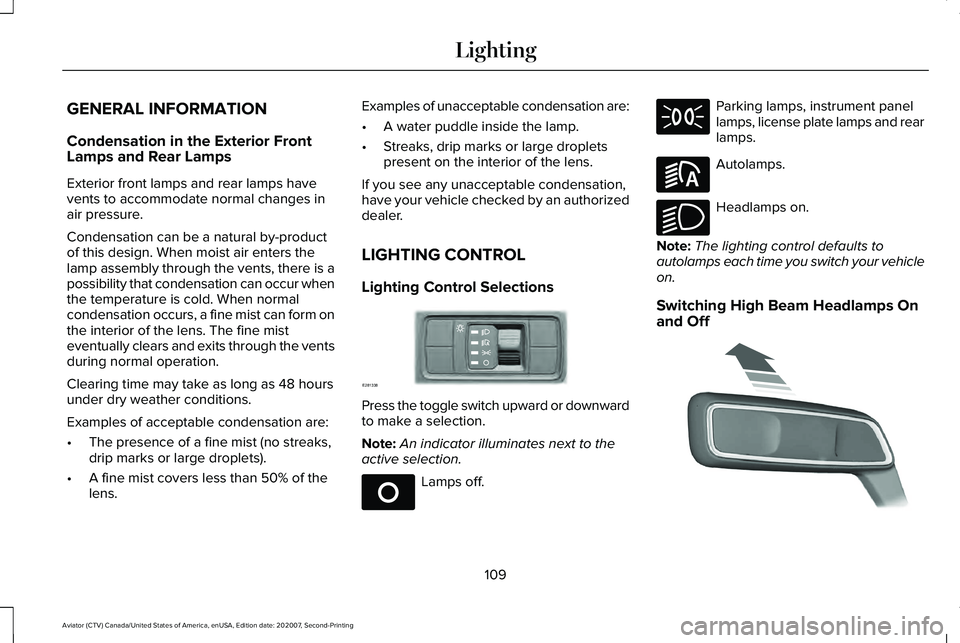
LIGHTING CONTROL
Lighting Control Selections Press the toggle switch upward or downward
to make a selection.
Note:
An indicator illuminates next to the
active selection. Lamps off. Parking lamps, instrument panel
lamps, license plate lamps and rear
lamps.
Autolamps.
Headlamps on.
Note: The lighting control defaults to
autolamps each time you switch your vehicle
on.
Switching High Beam Headlamps On
and Off 109
Aviator (CTV) Canada/United States of America, enUSA, Edition date: 202007, Second-Printing LightingE281338 E265031 E281240 E270968 E273182
Page 130 of 667
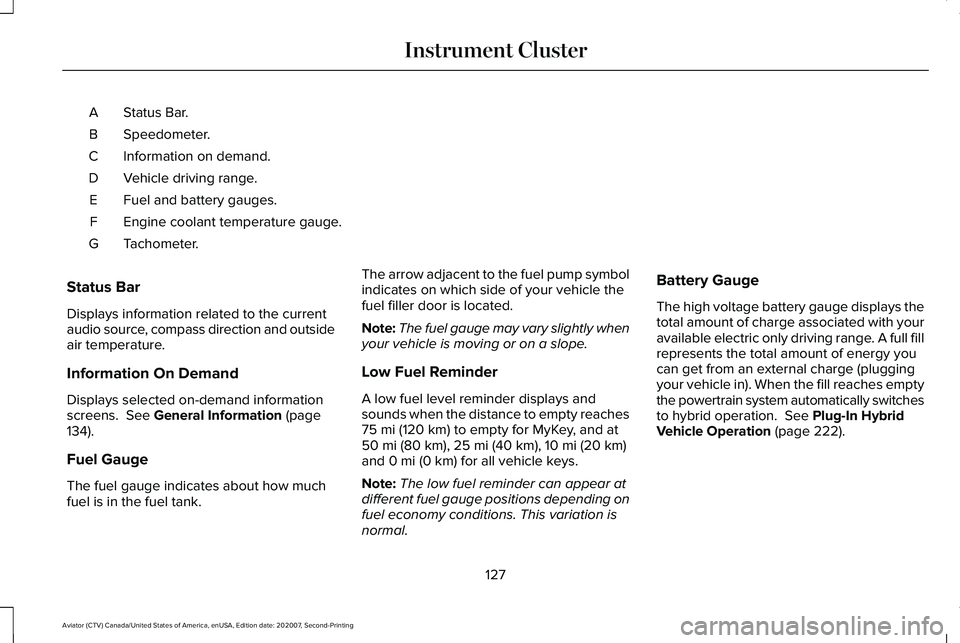
Status Bar.
A
Speedometer.
B
Information on demand.
C
Vehicle driving range.
D
Fuel and battery gauges.
E
Engine coolant temperature gauge.
F
Tachometer.
G
Status Bar
Displays information related to the current
audio source, compass direction and outside
air temperature.
Information On Demand
Displays selected on-demand information
screens. See General Information (page
134).
Fuel Gauge
The fuel gauge indicates about how much
fuel is in the fuel tank. The arrow adjacent to the fuel pump symbol
indicates on which side of your vehicle the
fuel filler door is located.
Note:
The fuel gauge may vary slightly when
your vehicle is moving or on a slope.
Low Fuel Reminder
A low fuel level reminder displays and
sounds when the distance to empty reaches
75 mi (120 km) to empty for MyKey, and at
50 mi (80 km), 25 mi (40 km), 10 mi (20 km)
and 0 mi (0 km) for all vehicle keys.
Note: The low fuel reminder can appear at
different fuel gauge positions depending on
fuel economy conditions. This variation is
normal. Battery Gauge
The high voltage battery gauge displays the
total amount of charge associated with your
available electric only driving range. A full fill
represents the total amount of energy you
can get from an external charge (plugging
your vehicle in). When the fill reaches empty
the powertrain system automatically switches
to hybrid operation.
See Plug-In Hybrid
Vehicle Operation (page 222).
127
Aviator (CTV) Canada/United States of America, enUSA, Edition date: 202007, Second-Printing Instrument Cluster
Page 169 of 667
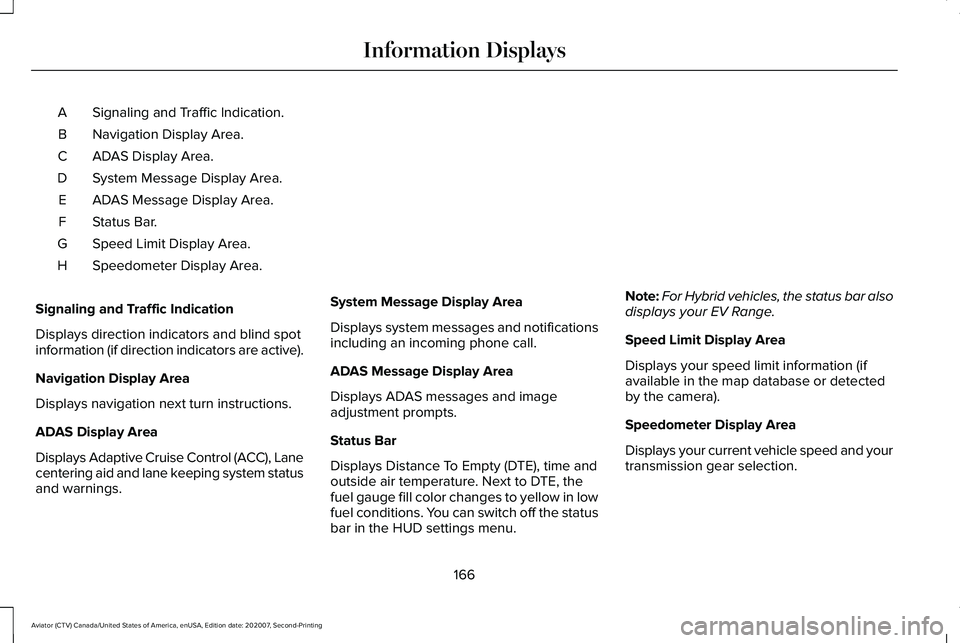
Signaling and Traffic Indication.
A
Navigation Display Area.
B
ADAS Display Area.
C
System Message Display Area.
D
ADAS Message Display Area.
E
Status Bar.
F
Speed Limit Display Area.
G
Speedometer Display Area.
H
Signaling and Traffic Indication
Displays direction indicators and blind spot
information (if direction indicators are active).
Navigation Display Area
Displays navigation next turn instructions.
ADAS Display Area
Displays Adaptive Cruise Control (ACC), Lane
centering aid and lane keeping system status
and warnings. System Message Display Area
Displays system messages and notifications
including an incoming phone call.
ADAS Message Display Area
Displays ADAS messages and image
adjustment prompts.
Status Bar
Displays Distance To Empty (DTE), time and
outside air temperature. Next to DTE, the
fuel gauge fill color changes to yellow in low
fuel conditions. You can switch off the status
bar in the HUD settings menu.Note:
For Hybrid vehicles, the status bar also
displays your EV Range.
Speed Limit Display Area
Displays your speed limit information (if
available in the map database or detected
by the camera).
Speedometer Display Area
Displays your current vehicle speed and your
transmission gear selection.
166
Aviator (CTV) Canada/United States of America, enUSA, Edition date: 202007, Second-Printing Information Displays
Page 170 of 667
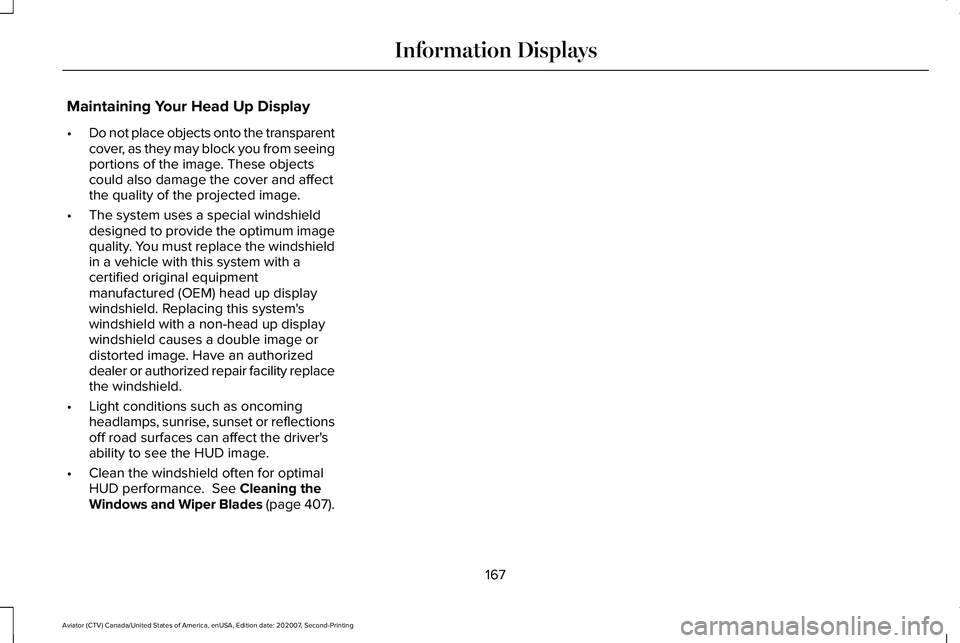
Maintaining Your Head Up Display
•
Do not place objects onto the transparent
cover, as they may block you from seeing
portions of the image. These objects
could also damage the cover and affect
the quality of the projected image.
• The system uses a special windshield
designed to provide the optimum image
quality. You must replace the windshield
in a vehicle with this system with a
certified original equipment
manufactured (OEM) head up display
windshield. Replacing this system's
windshield with a non-head up display
windshield causes a double image or
distorted image. Have an authorized
dealer or authorized repair facility replace
the windshield.
• Light conditions such as oncoming
headlamps, sunrise, sunset or reflections
off road surfaces can affect the driver's
ability to see the HUD image.
• Clean the windshield often for optimal
HUD performance. See Cleaning the
Windows and Wiper Blades (page 407).
167
Aviator (CTV) Canada/United States of America, enUSA, Edition date: 202007, Second-Printing Information Displays
Page 171 of 667
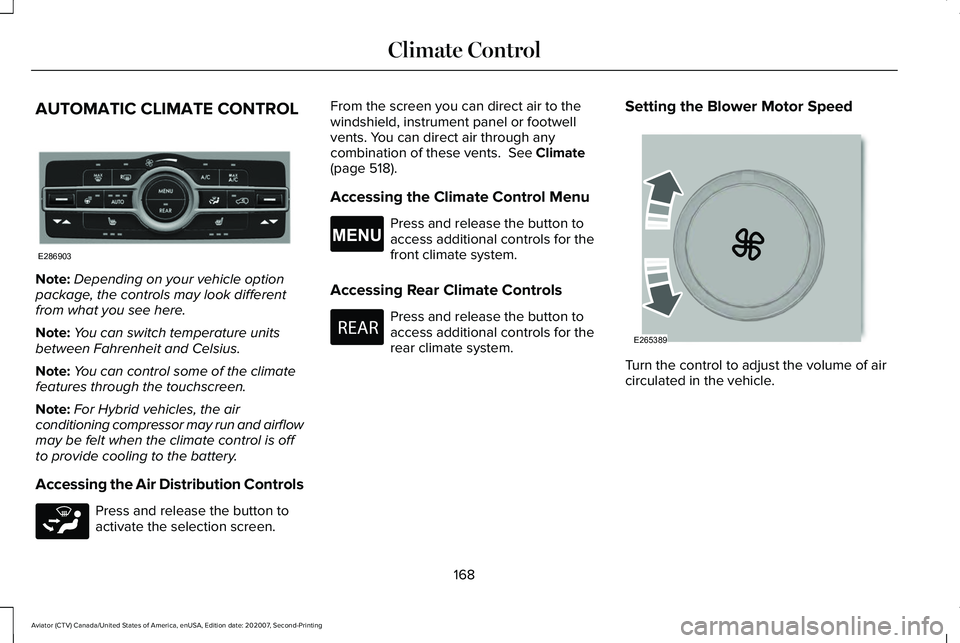
AUTOMATIC CLIMATE CONTROL
Note:
Depending on your vehicle option
package, the controls may look different
from what you see here.
Note: You can switch temperature units
between Fahrenheit and Celsius.
Note: You can control some of the climate
features through the touchscreen.
Note: For Hybrid vehicles, the air
conditioning compressor may run and airflow
may be felt when the climate control is off
to provide cooling to the battery.
Accessing the Air Distribution Controls Press and release the button to
activate the selection screen. From the screen you can direct air to the
windshield, instrument panel or footwell
vents. You can direct air through any
combination of these vents. See Climate
(page 518).
Accessing the Climate Control Menu Press and release the button to
access additional controls for the
front climate system.
Accessing Rear Climate Controls Press and release the button to
access additional controls for the
rear climate system.
Setting the Blower Motor Speed
Turn the control to adjust the volume of air
circulated in the vehicle.
168
Aviator (CTV) Canada/United States of America, enUSA, Edition date: 202007, Second-Printing Climate ControlE286903 E265283 E265038 E270447 E265389
Page 172 of 667
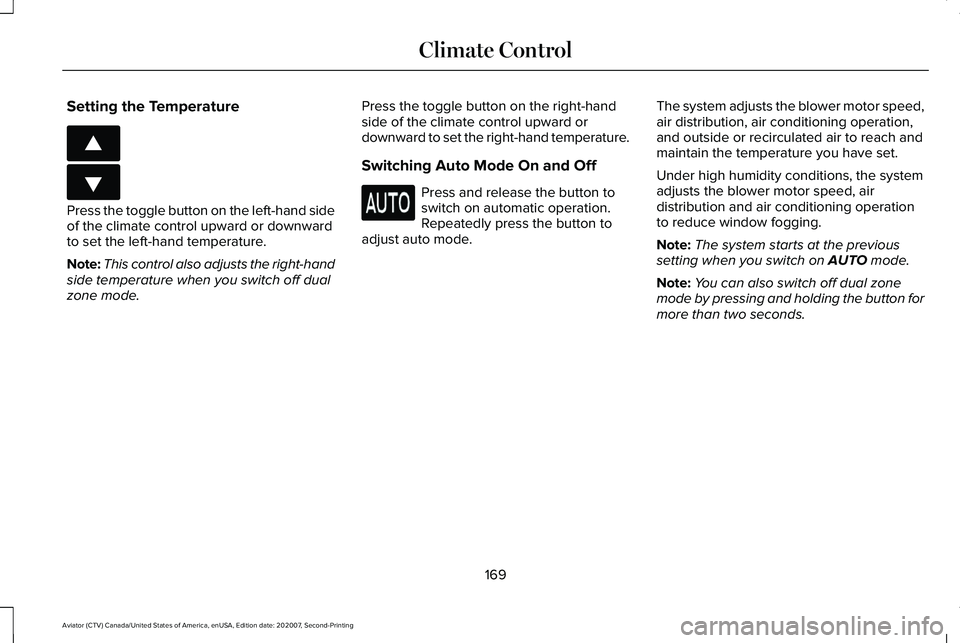
Setting the Temperature
Press the toggle button on the left-hand side
of the climate control upward or downward
to set the left-hand temperature.
Note:
This control also adjusts the right-hand
side temperature when you switch off dual
zone mode. Press the toggle button on the right-hand
side of the climate control upward or
downward to set the right-hand temperature.
Switching Auto Mode On and Off Press and release the button to
switch on automatic operation.
Repeatedly press the button to
adjust auto mode. The system adjusts the blower motor speed,
air distribution, air conditioning operation,
and outside or recirculated air to reach and
maintain the temperature you have set.
Under high humidity conditions, the system
adjusts the blower motor speed, air
distribution and air conditioning operation
to reduce window fogging.
Note:
The system starts at the previous
setting when you switch on AUTO mode.
Note: You can also switch off dual zone
mode by pressing and holding the button for
more than two seconds.
169
Aviator (CTV) Canada/United States of America, enUSA, Edition date: 202007, Second-Printing Climate ControlE266187 E266186
Page 173 of 667
Auto Mode Indicator Status
Description
Auto Mode Indicator Status
One indicator illuminated. •The blower motor speed is reduced.
•Use this setting to minimize the amount of noise from the blower motor.
• This setting increases the time taken to cool the interior.
Two indicators illuminated. •The blower motor speed is moderate.
Three indicators illuminated. •The blower motor speed is increased.
•Use this setting to reduce the time taken to cool the interior.
• This setting increases the amount of noise from the blower motor.
Switching the Air Conditioning On and
Off Press and release the button.
Use air conditioning with recirculated air to
improve cooling performance and efficiency. Note:
In certain conditions, such as
maximum defrost, the air conditioning
compressor may continue to operate even
though you switch off the air conditioning.
Note: The A/C LED light may turn on and off
based on the temperature setting or the
current conditions. Switching the Climate Control On and
Off Press and release the button.
Note: Your vehicle may not have a physical
button. You can use the touchscreen to turn
the climate control on and off.
170
Aviator (CTV) Canada/United States of America, enUSA, Edition date: 202007, Second-Printing Climate Control
Page 174 of 667
Switching Maximum Air Conditioning
On and Off
Press and release the button for
maximum cooling.
The driver and passenger temperatures are
set to LO, recirculated air flows through the
instrument panel air vents, air conditioning
turns on and the blower motor adjusts to the
highest speed.
Switching Maximum Defrost On and
Off Press and release the button for
maximum defrosting.
The driver and passenger temperatures are
set to HI, air flows through the windshield air
vents, and the blower motor adjusts to the
highest speed.
Note: Depending on your region, air
conditioning turns on.
You can also use this setting to defog and
clear the windshield of a thin covering of ice. Note:
To prevent window fogging, you
cannot select recirculated air when
maximum defrost is on.
Note: The heated rear window also turns on
when you select maximum defrost.
Switching Recirculated Air On and Off Press and release the button to
switch between outside air and
recirculated air.
The air currently in the passenger
compartment recirculates. This may reduce
the time needed to cool the interior, when
used with A/C, and reduce unwanted odors
from entering your vehicle.
Note: Recirculated air may turn off, or
prevent you from switching on, in all air flow
modes except MAX A/C to reduce the risk
of fogging. Recirculation may also turn on
and off in various air distribution control
combinations during hot weather to improve
cooling efficiency. HINTS ON CONTROLLING THE
INTERIOR CLIMATE
General Hints
Note:
Prolonged use of recirculated air may
cause the windows to fog up.
Note: You may feel a small amount of air
from the footwell air vents regardless of the
air distribution setting.
Note: To reduce humidity build-up inside
your vehicle, do not drive with the system
switched off or with recirculated air always
switched on.
Note: Do not place objects under the front
seats as this may interfere with the airflow
to the rear seats.
Note: Remove any snow, ice or leaves from
the air intake area at the base of the
windshield.
Note: To improve the time to reach a
comfortable temperature in hot weather,
drive with the windows open until you feel
cold air through the air vents.
171
Aviator (CTV) Canada/United States of America, enUSA, Edition date: 202007, Second-Printing Climate Control
Page 197 of 667
VENTILATED SEATS
Do not do the following:
•
Spill liquid on the front seats. This may
cause the air vent holes to become
blocked and not work properly.
• Place cargo or objects under the seats.
They may block the air intake causing
the air vents to not work properly.
The engine must be running to use this
feature. Press this symbol to cycle through the
various ventilation settings and off. More
indicator lights indicate higher fan speeds.
Note:
The ventilated seats switch on during
a remote start if they are enabled. Note:
The ventilated seats may switch on
when you start your vehicle if they were on
when you previously switched your vehicle
off.
If the engine falls below 350 RPM when the
ventilated seats are on, the system turns off.
You need to switch it back on.
Note: To improve comfort, use the ventilated
seats along with the vehicle ’s air
conditioning system.
Automatic Climate Controlled Seats (If
Equipped)
When you switch on the auto setting, the
seats switch between the heated seats and
ventilated seats to match your climate control
setting.
194
Aviator (CTV) Canada/United States of America, enUSA, Edition date: 202007, Second-Printing SeatsE224689
Page 221 of 667
AUTO-START-STOP - EXCLUDING:
PLUG-IN HYBRID ELECTRIC
VEHICLE (PHEV)
The system helps reduce fuel consumption
by automatically stopping and restarting the
engine when your vehicle has stopped. The
engine restarts automatically when you
release the brake pedal.
In some situations, your vehicle may restart
automatically, for example:
•
To maintain interior comfort.
• To recharge the battery.
Note: Power assist steering turns off when
the engine is off.
Note: If your vehicle is flex fuel capable,
Auto-Start-Stop will be inhibited for a short
time after a refuel event while the system is
verifying the fuel type being used. WARNING: Apply the parking brake,
shift into park (P), switch the ignition off
and remove the key before you leave your
vehicle. Failure to follow this instruction
could result in personal injury or death. WARNING: Apply the parking brake,
shift into park (P), switch the ignition off
and remove the key before you open the
hood or have any service or repair work
completed. If you do not switch the ignition
off, the engine could restart at any time.
Failure to follow this instruction could result
in personal injury or death. WARNING: The system may require
the engine to automatically restart when
the auto-start-stop indicator illuminates
green or flashes amber. Failure to follow
this instruction could result in personal
injury.
The Auto-Start-Stop system status is
available at a glance within the information
display.
See Information Displays (page
134). Enabling Auto-Start-Stop
The system automatically enables every time
you start your vehicle if:
•
Your vehicle exceeds an initial speed of
3 mph (5 km/h)
after you have initially
started your vehicle.
• You have stopped your vehicle.
• Your foot is on the brake pedal.
• The driver door is closed.
• The interior compartment has cooled or
warmed to an acceptable level.
• The front windshield defroster is off.
• You have not turned the steering wheel
rapidly or you do not have it at a sharp
angle.
• The vehicle is not on a steep road grade.
• The battery is within optimal operating
conditions (battery state of charge and
temperature in range).
• The engine coolant is near operating
temperature.
• Elevation is below about
12,000 ft
(3,650 m).
• Ambient temperature is moderate.
218
Aviator (CTV) Canada/United States of America, enUSA, Edition date: 202007, Second-Printing Unique Driving Characteristics