service LINCOLN AVIATOR 2021 User Guide
[x] Cancel search | Manufacturer: LINCOLN, Model Year: 2021, Model line: AVIATOR, Model: LINCOLN AVIATOR 2021Pages: 667, PDF Size: 7.01 MB
Page 22 of 667
CONNECTED VEHICLE DATA
The modem has a SIM. The
modem was enabled when your
vehicle was built and periodically
sends messages to stay connected to the
cell phone network, receive automatic
software updates and send vehicle-related
information to us, for example diagnostic
information. These messages could include
information that identifies your vehicle, the
SIM and the electronic serial number of the
modem. Cell phone network service
providers could have access to additional
information, for example cell phone network
tower identification. For additional
information about our privacy policy, visit
www.ConnectedLincoln.com or refer to your
local Lincoln website.
Note: The modem continues to send this
information unless you disable the modem
or stop the modem from sharing vehicle data
by changing the modem settings.
Note: The service can be unavailable or
interrupted for a number of reasons, for
example environmental or topographical
conditions and data plan coverage. Note:
To find out if your vehicle has a
modem, visit www.ConnectedLincoln.com.
MOBILE DEVICE DATA
If you connect a mobile device to your
vehicle, you can display data from your
device on the touchscreen for example,
music and album art. You can share your
vehicle data with mobile apps on your device
through the system. See Apps.
The mobile apps function operates by your
connected device sending data to us in the
United States. The data is encrypted and
includes, for example, the vehicle
identification number of your vehicle, the
SYNC module serial number, odometer,
enabled apps, usage statistics and
debugging information. We retain it only as
long as necessary to provide the service, to
troubleshoot, for continuous improvement
and to offer you products and services that
may be of interest to you according to your
preferences and where allowed by law. If you connect a cell phone to the system,
the system creates a profile that links to that
cell phone. The cell phone profile enables
more mobile features and efficient operation.
The profile contains, for example data from
your phonebook, read and unread text
messages and call history, including history
of calls when your cell phone was not
connected to the system.
If you connect a media device, the system
creates and retains a media device index of
supported media content. The system also
records a short diagnostic log of
approximately 10 minutes of all recent system
activity.
The cell phone profile, media device index
and diagnostic log remain in your vehicle
unless you delete them and are generally
accessible only in your vehicle when you
connect your cell phone or media device. If
you no longer plan to use the system or your
vehicle, we recommend you use the master
reset function to erase the stored
information. See Settings.
19
Aviator (CTV) Canada/United States of America, enUSA, Edition date: 202007, Second-Printing Data Privacy
Page 23 of 667
System data cannot be accessed without
special equipment and access to your
vehicle's module.
For additional information about our privacy
policy, refer to the local Lincoln website.
Note:
To find out if your vehicle has
connectivity technology, visit
www.ConnectedLincoln.com.
EMERGENCY CALL SYSTEM DATA
When the emergency call system is active,
it may disclose to emergency services that
your vehicle has been in a crash involving
the deployment of an airbag or activation of
the fuel pump shut-off. Certain versions or
updates to the emergency call system may
also be capable of electronically or verbally
disclosing to emergency services operators
your vehicle location or other details about
your vehicle or crash to assist emergency
services operators to provide the most
appropriate emergency services. If you do
not want to disclose this information, do not
activate the emergency call system. Note:
You cannot deactivate emergency call
systems that are required by law.
20
Aviator (CTV) Canada/United States of America, enUSA, Edition date: 202007, Second-Printing Data Privacy
Page 56 of 667
PRINCIPLE OF OPERATION
WARNING: Airbags do not inflate
slowly or gently, and the risk of injury from
a deploying airbag is the greatest close to
the trim covering the airbag module. WARNING:
All occupants of your
vehicle, including the driver, should always
properly wear their seatbelts, even when
an airbag supplemental restraint system is
provided. Failure to properly wear your
seatbelt could seriously increase the risk
of injury or death. WARNING:
Even with advanced
restraints systems, properly restrain
children 12 and under in a rear seating
position. Failure to follow this could
seriously increase the risk of injury or
death. WARNING:
Do not place your arms
on the airbag cover or through the steering
wheel. Failure to follow this instruction
could result in personal injury. WARNING:
Keep the areas in front
of the airbags free from obstruction. Do
not affix anything to or over the airbag
covers. Objects could become projectiles
during airbag deployment or in a sudden
stop. Failure to follow this instruction could
result in personal injury or death. WARNING: Airbags can kill or injure
a child in a child restraint. Never place a
rear-facing child restraint in front of an
active airbag. If you must use a
forward-facing child restraint in the front
seat, move the seat upon which the child
restraint is installed all the way back. WARNING: Do not attempt to service,
repair, or modify the supplementary
restraint system or associated components.
Failure to follow this instruction could result
in personal injury or death. WARNING:
Several airbag system
components get hot after inflation. To
reduce the risk of injury, do not touch them
after inflation. WARNING:
If a supplementary
restraint system component has deployed,
it will not function again. Have the system
and associated components inspected as
soon as possible. Failure to follow this
instruction could result in personal injury
or death.
The airbags are a supplemental restraint
system and are designed to work with the
seatbelts to help protect the driver and right
front passenger from certain upper body
injuries. Airbags do not inflate slowly; there
is a risk of injury from a deploying airbag.
Note: You will hear a loud bang and see a
cloud of harmless powdery residue if an
airbag deploys. This is normal.
53
Aviator (CTV) Canada/United States of America, enUSA, Edition date: 202007, Second-Printing Supplementary Restraints System
Page 61 of 667
After all occupants have adjusted their seats
and put on seatbelts, it is very important that
they continue to sit properly. A properly
seated occupant sits upright, leaning against
the seat backrest, and centered on the seat
cushion, with their feet comfortably extended
on the floor. Sitting improperly can increase
the chance of injury in a crash event. For
example, if an occupant slouches, lies down,
turns sideways, sits forward, leans forward
or sideways, or puts one or both feet up, the
chance of injury during a crash greatly
increases.
Make sure the front passenger
sensing system is operating
properly. See Crash Sensors and
Airbag Indicator (page 61).
Do not attempt to repair or service the
system. Take your vehicle immediately to an
authorized dealer.
If it is necessary to modify an advanced front
airbag system to accommodate a person
with disabilities, contact our Customer
Relationship Center.
See Getting the
Services You Need (page 359). SIDE AIRBAGS WARNING:
Do not place objects or
mount equipment on or near the airbag
cover, on the side of the front or rear
seatbacks, or in areas that may come into
contact with a deploying airbag. Failure to
follow these instructions may increase the
risk of personal injury in the event of a
crash. WARNING:
Accessory seat covers
not released by Ford Motor Company
could prevent the deployment of the
airbags and increase the risk of injuries in
a crash. WARNING:
Do not lean your head
on the door. The side airbag could injure
you as it deploys from the side of the
seatback. WARNING: Do not attempt to service,
repair, or modify the supplementary
restraint system or associated components.
Failure to follow this instruction could result
in personal injury or death. WARNING:
If a supplementary
restraint system component has deployed,
it will not function again. Have the system
and associated components inspected as
soon as possible. Failure to follow this
instruction could result in personal injury
or death.
The side airbags are on the outermost side
of the front seat backrests. In certain
sideways crashes or rollover events, the side
airbags will be inflated. The airbag was
designed to inflate between the door panel
and occupant to further enhance the
protection provided to occupants in side
impact crashes.
58
Aviator (CTV) Canada/United States of America, enUSA, Edition date: 202007, Second-Printing Supplementary Restraints SystemE67017
Page 62 of 667
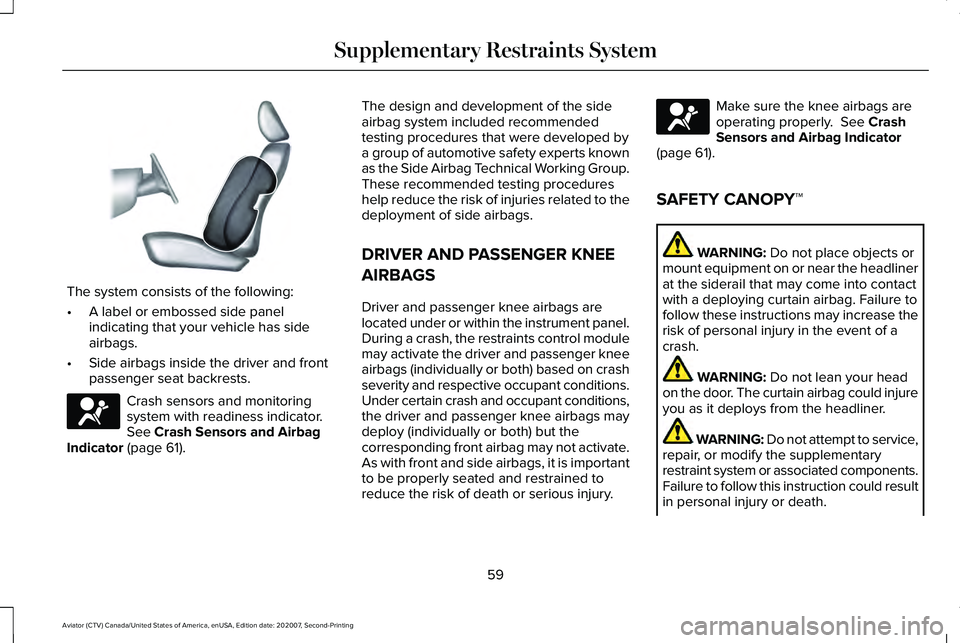
The system consists of the following:
•
A label or embossed side panel
indicating that your vehicle has side
airbags.
• Side airbags inside the driver and front
passenger seat backrests. Crash sensors and monitoring
system with readiness indicator.
See Crash Sensors and Airbag
Indicator (page 61). The design and development of the side
airbag system included recommended
testing procedures that were developed by
a group of automotive safety experts known
as the Side Airbag Technical Working Group.
These recommended testing procedures
help reduce the risk of injuries related to the
deployment of side airbags.
DRIVER AND PASSENGER KNEE
AIRBAGS
Driver and passenger knee airbags are
located under or within the instrument panel.
During a crash, the restraints control module
may activate the driver and passenger knee
airbags (individually or both) based on crash
severity and respective occupant conditions.
Under certain crash and occupant conditions,
the driver and passenger knee airbags may
deploy (individually or both) but the
corresponding front airbag may not activate.
As with front and side airbags, it is important
to be properly seated and restrained to
reduce the risk of death or serious injury. Make sure the knee airbags are
operating properly.
See Crash
Sensors and Airbag Indicator
(page
61).
SAFETY CANOPY™ WARNING:
Do not place objects or
mount equipment on or near the headliner
at the siderail that may come into contact
with a deploying curtain airbag. Failure to
follow these instructions may increase the
risk of personal injury in the event of a
crash. WARNING:
Do not lean your head
on the door. The curtain airbag could injure
you as it deploys from the headliner. WARNING: Do not attempt to service,
repair, or modify the supplementary
restraint system or associated components.
Failure to follow this instruction could result
in personal injury or death.
59
Aviator (CTV) Canada/United States of America, enUSA, Edition date: 202007, Second-Printing Supplementary Restraints SystemE152533 E67017 E67017
Page 64 of 667
CRASH SENSORS AND AIRBAG
INDICATOR
WARNING: Modifying or adding
equipment to the front end of your vehicle
(including hood, bumper system, frame,
front end body structure, tow hooks and
hood pins) may affect the performance of
the airbag system, increasing the risk of
injury. Do not modify or add equipment to
the front end of your vehicle.
Your vehicle has a collection of crash and
occupant sensors which provide information
to the restraints control module. The
restraints control module deploys (activates)
the seatbelt pretensioners, driver airbag,
passenger airbag, knee airbag(s), seat
mounted side airbags and the Safety
Canopy. Based on the type of crash, the
restraints control module deploys the
appropriate safety devices. The restraints control module also monitors
the readiness of the above safety devices
plus the crash and occupant sensors. The
readiness of the safety system is indicated
by a warning indicator light in the instrument
cluster or by a backup tone if the warning
light is not working. Routine maintenance of
the airbag is not required.
A difficulty with the system is indicated by
one or more of the following:
•
The readiness light will not illuminate
immediately after you switch the ignition
on.
• The readiness light either flashes or stays
lit.
• A series of five beeps is heard. The tone
pattern repeats periodically until the
problem, the light or both are repaired. If any of these things happen, even
intermittently, have the supplemental
restraint system serviced at an authorized
dealer immediately. Unless serviced, the
system may not function properly in the
event of a crash.
The restraint system is designed to activate
when the vehicle sustains conditions
sufficient to cause the restraint control
module to deploy a safety device.
The fact that not all the safety devices
activate for all occupants in a crash does not
mean something is wrong with the system.
Rather, it means the restraints control module
determined the accident conditions (crash
severity, type of crash, belt usage) were not
appropriate to activate these safety devices.
•
The front airbags are designed to
activate only in frontal and near-frontal
crashes (not rollovers, side impacts or
rear impacts) unless the crash causes
sufficient frontal deceleration.
• The seatbelt pretensioners are designed
to activate in frontal, near-frontal and side
crashes, and in rollovers.
61
Aviator (CTV) Canada/United States of America, enUSA, Edition date: 202007, Second-Printing Supplementary Restraints SystemE67017
Page 67 of 667
WHAT IS 911 ASSIST
911 Assist is a SYNC system feature that can
call for help if you are in an accident. If a
crash deploys an airbag, excluding knee
airbags and rear inflatable seatbelts [if
equipped], or activates the fuel pump
shut-off, your SYNC-equipped vehicle may
be able to contact emergency services by
dialing 911 through a paired and connected
Bluetooth enabled phone. You can learn
more about the 911 Assist feature, by visiting:
Website
www.owner.lincoln.com
www.syncmyride.ca
www.syncmaroute.ca
Not all crashes will deploy an airbag or
activate the fuel pump shut-off, the triggers
for 911 Assist. If a connected cell phone
sustains damage or loses its connection to
SYNC during a crash, SYNC will search for
and try to connect to a previously paired cell
phone. SYNC will then attempt to call the
emergency services. Before making the call:
•
SYNC provides a short window of time,
about 10 seconds, to cancel the call. If
you fail to cancel the call, SYNC attempts
to dial 911.
• SYNC says the following, or a similar
message: SYNC will attempt to call 911,
to cancel the call, press Cancel on your
screen or press and hold the phone
button on your steering wheel.
If you do not cancel the call, and SYNC
makes a successful call, a pre-recorded
message plays for the 911 operator, and then
the occupant(s) in your vehicle is able to talk
with the operator. Be prepared to
immediately provide your name, phone
number and location, because not all 911
systems are capable of receiving this
information electronically.
During an emergency call, the system
transmits vehicle data to the emergency
service. See Data Privacy (page 16). EMERGENCY CALL
REQUIREMENTS WARNING: Do not wait for 911 Assist
to make an emergency call if you can do
it yourself. Dial emergency services
immediately to avoid delayed response
time which could increase the risk of
serious injury or death after a crash. If you
do not hear 911 Assist within five seconds
of the crash, the system or phone may be
damaged or non-functional. WARNING: Always place your phone
in a secure location in your vehicle so it
does not become a projectile or get
damaged in a crash. Failure to do so may
cause serious injury to someone or
damage the phone which could prevent
911 Assist from working properly. WARNING: Unless the 911 Assist
setting is set on before a crash, the system
will not dial for help which could delay
response time, potentially increasing the
risk of serious injury or death after a crash.
64
Aviator (CTV) Canada/United States of America, enUSA, Edition date: 202007, Second-Printing 911 Assist
Page 135 of 667
Low Tire Pressure Warning
Illuminates when your tire pressure
is low. If the lamp remains on with
the engine running or when
driving, check your tire pressure as soon as
possible.
It also illuminates momentarily when you
switch the ignition on to confirm the lamp is
functional. If it does not illuminate when you
switch the ignition on, or begins to flash at
any time, have the system checked by an
authorized dealer.
Low Washer Fluid Illuminates when the windshield
washer fluid is low.
Powertrain Fault Illuminates when the system
detects a powertrain or an 4WD
fault. Contact an authorized dealer
as soon as possible. Ready to Drive (If Equipped) Illuminates when you have
switched on your vehicle and it is
ready to drive. A corresponding
message may appear stating ready to drive.
Service Engine Soon It illuminates when you switch the
ignition on prior to engine start to
check the bulb and to indicate
whether your vehicle is ready for Inspection
and Maintenance (I/M) testing.
Normally, it illuminates until the engine is
cranked and automatically turns off if no
system errors are present. However, if after
15 seconds it flashes eight times, this
indicates that your vehicle is not ready for
Inspection and Maintenance (I/M) testing.
See
Catalytic Converter (page 235).
If it illuminates when the engine is running
this indicates a system error. The On Board
Diagnostics system has detected an error in
the vehicle emission control system. If it flashes, engine misfire may be occurring.
Continuing to drive your vehicle may cause
reduced power or the engine to stop. Failure
to respond to the warning lamp may cause
component damage not covered by the
vehicle Warranty. Have your vehicle
checked as soon as possible.
Stability Control
It flashes when the system is
active. If it remains illuminated or
does not illuminate when you
switch the ignition on, this indicates a system
error. During a system error the system
switches off. Have the system checked by
an authorized dealer immediately.
See
Using Stability Control (page 269).
Stability Control Off Illuminates when you switch the
system off. It goes out when you
switch the system back on or when
you switch the ignition off.
See Using
Stability Control (page 269).
132
Aviator (CTV) Canada/United States of America, enUSA, Edition date: 202007, Second-Printing Instrument Cluster E132353 E224090 E138639 E130458
Page 143 of 667
When you are decelerating with either your
foot off the accelerator pedal or on the brake
pedal you will see a green or white solid bar
indicating the power being used to slow
down the vehicle. You may also see a green
rectangular box which shows the amount of
power that can be recaptured by the
regenerative braking system and returned
to the high voltage battery.
•
When your power level is completely
within the box the color of the bar will be
all green. This means that the
regenerative braking system is being
used to efficiently slow the vehicle down
and return the maximum percentage of
energy to the high voltage battery.
• When your power level is outside of the
green box then the bar will be white. This
means that both the regenerative braking
system and conventional braking system
are being used. Electric Efficiency
This screen shows your average driving
distance per kWh of electricity used on your
hybrid vehicle. The value is calculated only
when your available electric range is being
used and the gasoline engine is off.
Distance per full charge is also shown. This
is an estimate of the electric range you would
have if you plugged in and fully charged your
vehicle right now. The higher your electric
efficiency, the higher your distance per full
charge.
Your electric efficiency is affected by your
driving style and route, climate control use,
outside temperature and other factors. Best
efficiency is achieved in mild ambient
temperatures with mild to moderate
acceleration and braking, moderate speeds
and low climate control usage.
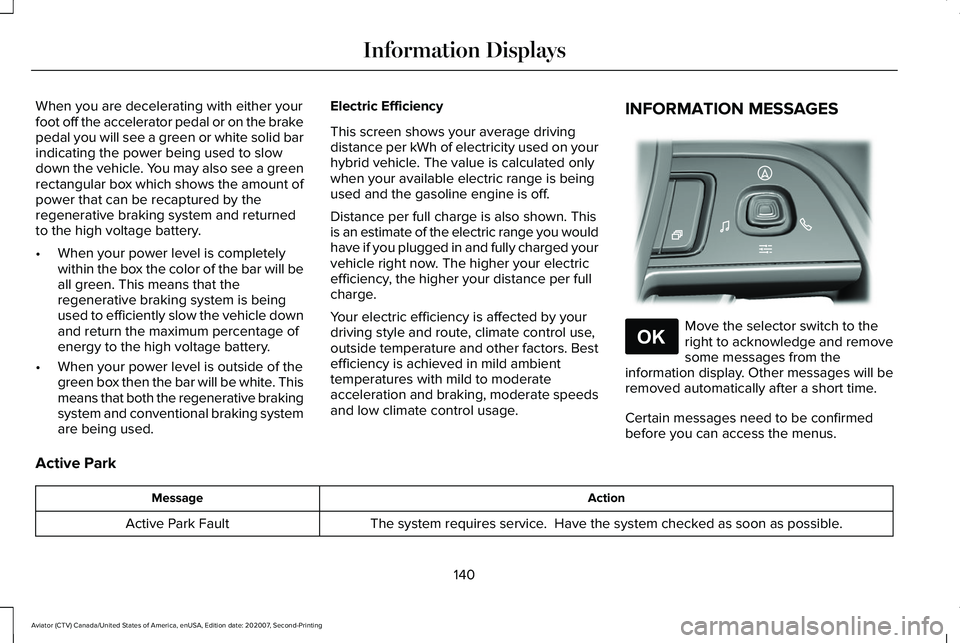
INFORMATION MESSAGES
Move the selector switch to the
right to acknowledge and remove
some messages from the
information display. Other messages will be
removed automatically after a short time.
Certain messages need to be confirmed
before you can access the menus.
Active Park Action
Message
The system requires service. Have the system checked as soon as possible.
Active Park Fault
140
Aviator (CTV) Canada/United States of America, enUSA, Edition date: 202007, Second-Printing Information DisplaysE281220 E265041
Page 145 of 667
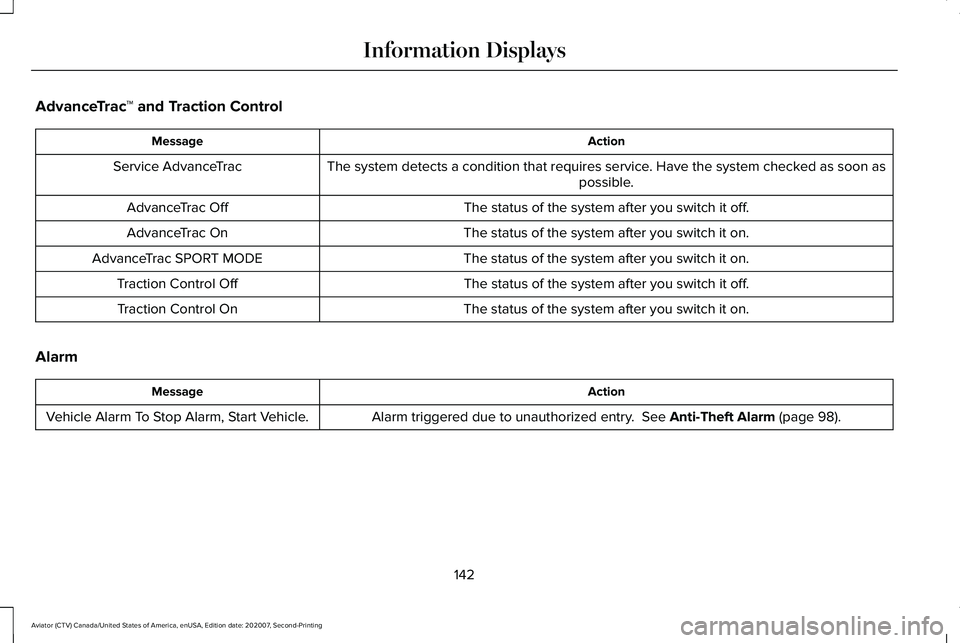
AdvanceTrac
™ and Traction Control Action
Message
The system detects a condition that requires service. Have the system checked as soon as possible.
Service AdvanceTrac
The status of the system after you switch it off.
AdvanceTrac Off
The status of the system after you switch it on.
AdvanceTrac On
The status of the system after you switch it on.
AdvanceTrac SPORT MODE
The status of the system after you switch it off.
Traction Control Off
The status of the system after you switch it on.
Traction Control On
Alarm Action
Message
Alarm triggered due to unauthorized entry. See Anti-Theft Alarm (page 98).
Vehicle Alarm To Stop Alarm, Start Vehicle.
142
Aviator (CTV) Canada/United States of America, enUSA, Edition date: 202007, Second-Printing Information Displays