service reset LINCOLN AVIATOR 2021 User Guide
[x] Cancel search | Manufacturer: LINCOLN, Model Year: 2021, Model line: AVIATOR, Model: LINCOLN AVIATOR 2021Pages: 667, PDF Size: 7.01 MB
Page 573 of 667
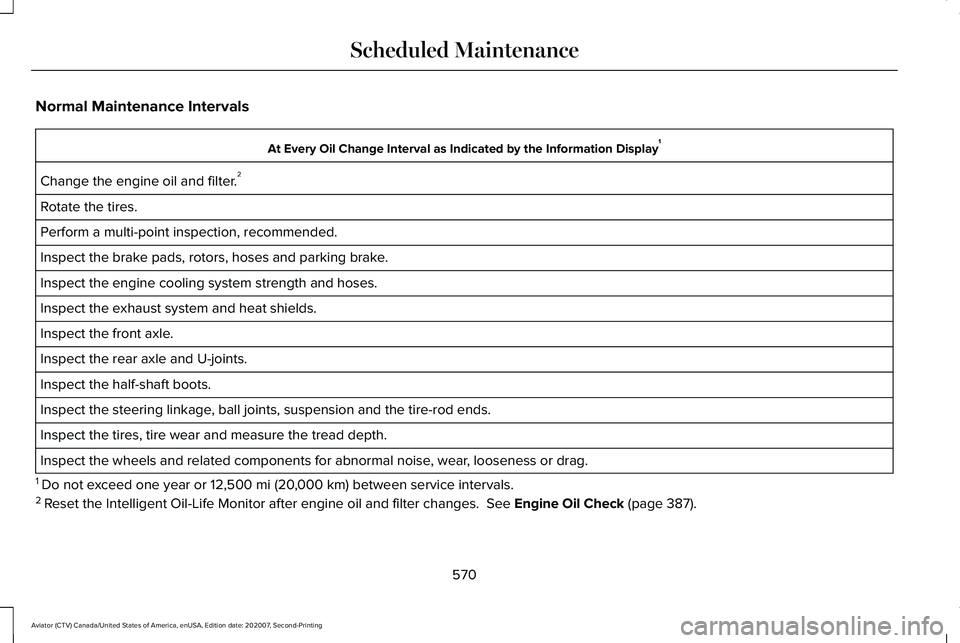
Normal Maintenance Intervals
At Every Oil Change Interval as Indicated by the Information Display
1
Change the engine oil and filter. 2
Rotate the tires.
Perform a multi-point inspection, recommended.
Inspect the brake pads, rotors, hoses and parking brake.
Inspect the engine cooling system strength and hoses.
Inspect the exhaust system and heat shields.
Inspect the front axle.
Inspect the rear axle and U-joints.
Inspect the half-shaft boots.
Inspect the steering linkage, ball joints, suspension and the tire-rod ends.
Inspect the tires, tire wear and measure the tread depth.
Inspect the wheels and related components for abnormal noise, wear, looseness or drag.
1 Do not exceed one year or 12,500 mi (20,000 km) between service intervals.
2 Reset the Intelligent Oil-Life Monitor after engine oil and filter change\
s.
See Engine Oil Check (page 387).
570
Aviator (CTV) Canada/United States of America, enUSA, Edition date: 202007, Second-Printing Scheduled Maintenance
Page 575 of 667
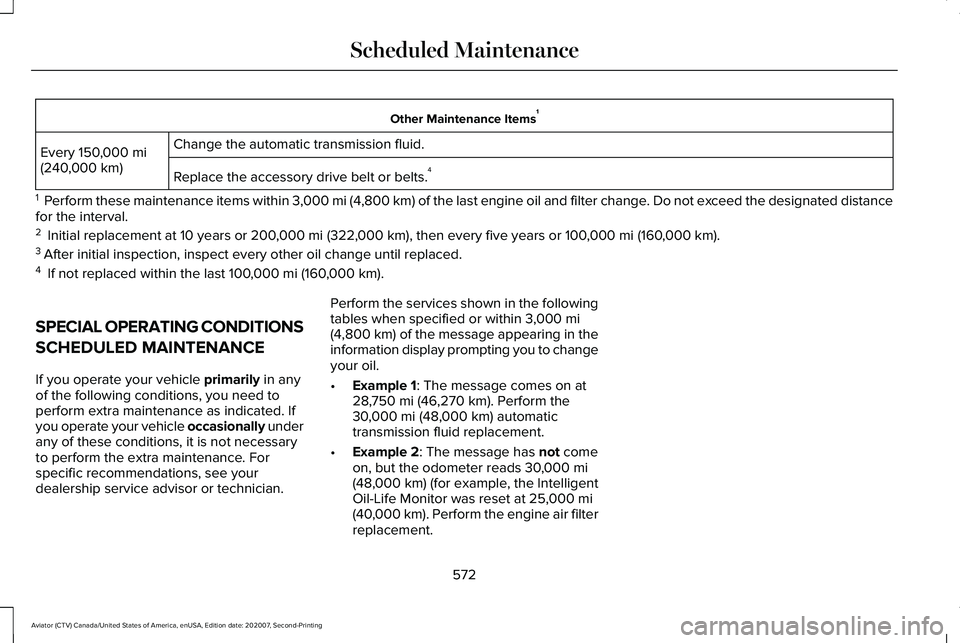
Other Maintenance Items
1
Change the automatic transmission fluid.
Every 150,000 mi
(240,000 km) Replace the accessory drive belt or belts. 4
1 Perform these maintenance items within 3,000 mi (4,800 km) of the last engine oil and filter change. Do not exceed the designated distance
for the interval.
2 Initial replacement at 10 years or
200,000 mi (322,000 km), then every five years or 100,000 mi (160,000 km).
3 After initial inspection, inspect every other oil change until replaced.\
4 If not replaced within the last
100,000 mi (160,000 km).
SPECIAL OPERATING CONDITIONS
SCHEDULED MAINTENANCE
If you operate your vehicle
primarily in any
of the following conditions, you need to
perform extra maintenance as indicated. If
you operate your vehicle occasionally under
any of these conditions, it is not necessary
to perform the extra maintenance. For
specific recommendations, see your
dealership service advisor or technician. Perform the services shown in the following
tables when specified or within
3,000 mi
(4,800 km) of the message appearing in the
information display prompting you to change
your oil.
• Example 1
: The message comes on at
28,750 mi (46,270 km). Perform the
30,000 mi (48,000 km) automatic
transmission fluid replacement.
• Example 2
: The message has not come
on, but the odometer reads 30,000 mi
(48,000 km) (for example, the Intelligent
Oil-Life Monitor was reset at 25,000 mi
(40,000 km). Perform the engine air filter
replacement.
572
Aviator (CTV) Canada/United States of America, enUSA, Edition date: 202007, Second-Printing Scheduled Maintenance
Page 577 of 667
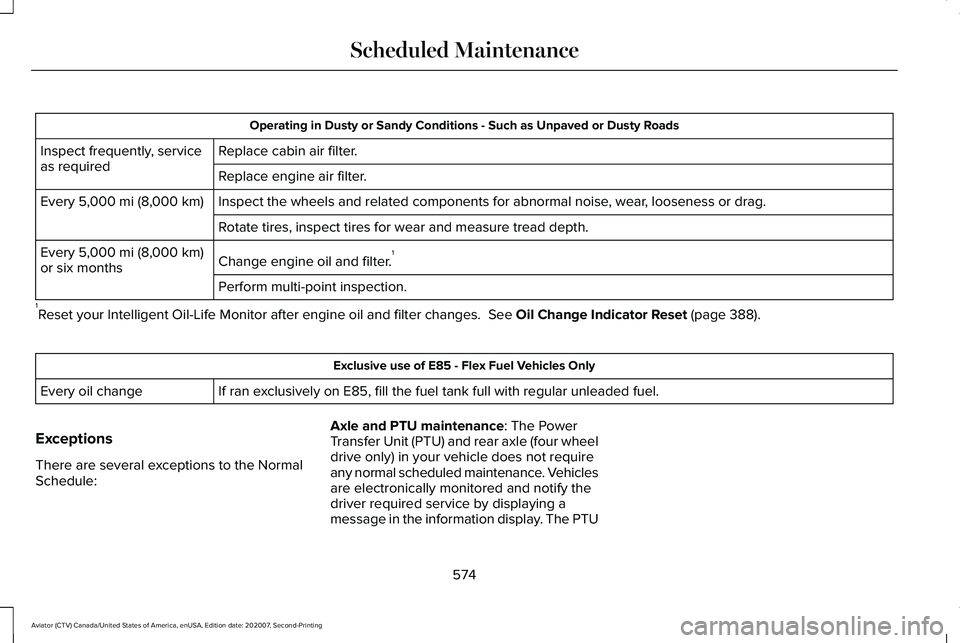
Operating in Dusty or Sandy Conditions - Such as Unpaved or Dusty Roads
Replace cabin air filter.
Inspect frequently, service
as required
Replace engine air filter.
Inspect the wheels and related components for abnormal noise, wear, looseness or drag.
Every 5,000 mi (8,000 km)
Rotate tires, inspect tires for wear and measure tread depth.
Change engine oil and filter. 1
Every
5,000 mi (8,000 km)
or six months
Perform multi-point inspection.
1 Reset your Intelligent Oil-Life Monitor after engine oil and filter chang\
es.
See Oil Change Indicator Reset (page 388). Exclusive use of E85 - Flex Fuel Vehicles Only
If ran exclusively on E85, fill the fuel tank full with regular unleaded fuel.
Every oil change
Exceptions
There are several exceptions to the Normal
Schedule: Axle and PTU maintenance
: The Power
Transfer Unit (PTU) and rear axle (four wheel
drive only) in your vehicle does not require
any normal scheduled maintenance. Vehicles
are electronically monitored and notify the
driver required service by displaying a
message in the information display. The PTU
574
Aviator (CTV) Canada/United States of America, enUSA, Edition date: 202007, Second-Printing Scheduled Maintenance
Page 651 of 667
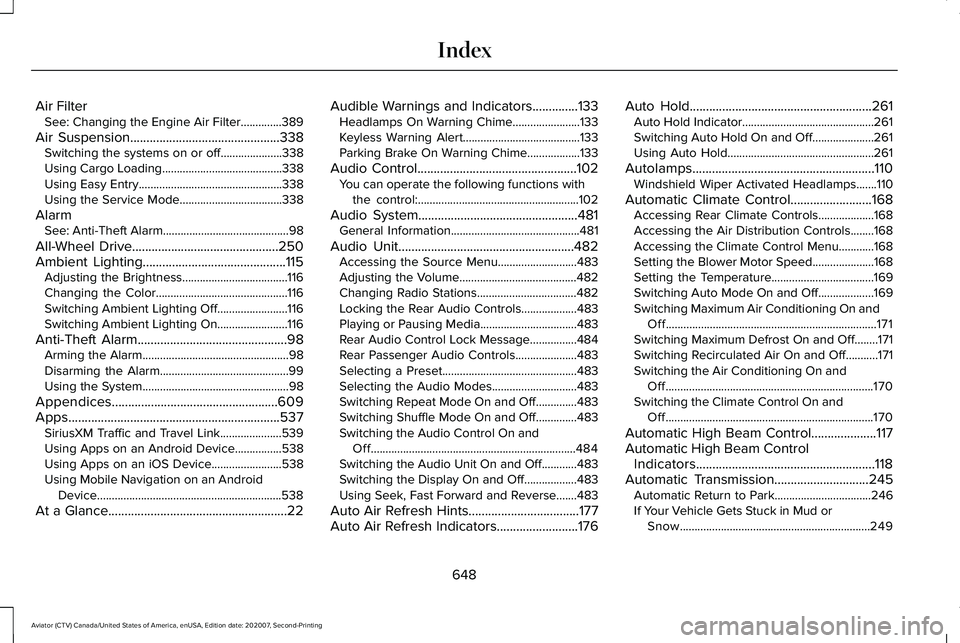
Air Filter
See: Changing the Engine Air Filter..............389
Air Suspension..............................................338 Switching the systems on or off.....................338
Using Cargo Loading.........................................338
Using Easy Entry.................................................338
Using the Service Mode...................................338
Alarm See: Anti-Theft Alarm...........................................98
All-Wheel Drive
.............................................250
Ambient Lighting............................................115
Adjusting the Brightness....................................116
Changing the Color.............................................116
Switching Ambient Lighting Off........................116
Switching Ambient Lighting On........................116
Anti-Theft Alarm
..............................................98
Arming the Alarm..................................................98
Disarming the Alarm............................................99
Using the System..................................................98
Appendices...................................................609
Apps.................................................................537 SiriusXM Traffic and Travel Link.....................539
Using Apps on an Android Device................
538
Using Apps on an iOS Device........................538
Using Mobile Navigation on an Android Device...............................................................538
At a Glance.......................................................22 Audible Warnings and Indicators
..............133
Headlamps On Warning Chime.......................133
Keyless Warning Alert........................................133
Parking Brake On Warning Chime..................133
Audio Control
.................................................102
You can operate the following functions with
the control:.......................................................102
Audio System
.................................................481
General Information............................................481
Audio Unit......................................................482 Accessing the Source Menu...........................483
Adjusting the Volume........................................
482
Changing Radio Stations..................................482
Locking the Rear Audio Controls...................483
Playing or Pausing Media.................................483
Rear Audio Control Lock Message................484
Rear Passenger Audio Controls.....................
483
Selecting a Preset..............................................483
Selecting the Audio Modes.............................483
Switching Repeat Mode On and Off ..............483
Switching Shuffle Mode On and Off..............483
Switching the Audio Control On and Off......................................................................484
Switching the Audio Unit On and Off............
483
Switching the Display On and Off..................483
Using Seek, Fast Forward and Reverse.......483
Auto Air Refresh Hints..................................177
Auto Air Refresh Indicators.........................176 Auto Hold
........................................................261
Auto Hold Indicator.............................................261
Switching Auto Hold On and Off.....................261
Using Auto Hold..................................................261
Autolamps........................................................110 Windshield Wiper Activated Headlamps.......110
Automatic Climate Control.........................168 Accessing Rear Climate Controls...................
168
Accessing the Air Distribution Controls........168
Accessing the Climate Control Menu............168
Setting the Blower Motor Speed.....................168
Setting the Temperature...................................169
Switching Auto Mode On and Off...................169
Switching Maximum Air Conditioning On and Off........................................................................\
171
Switching Maximum Defrost On and Off........171
Switching Recirculated Air On and Off...........171
Switching the Air Conditioning On and Off.......................................................................170
Switching the Climate Control On and Off.......................................................................170
Automatic High Beam Control....................117
Automatic High Beam Control Indicators.......................................................118
Automatic Transmission
.............................245
Automatic Return to Park.................................246
If Your Vehicle Gets Stuck in Mud or
Snow.................................................................249
648
Aviator (CTV) Canada/United States of America, enUSA, Edition date: 202007, Second-Printing Index
Page 659 of 667
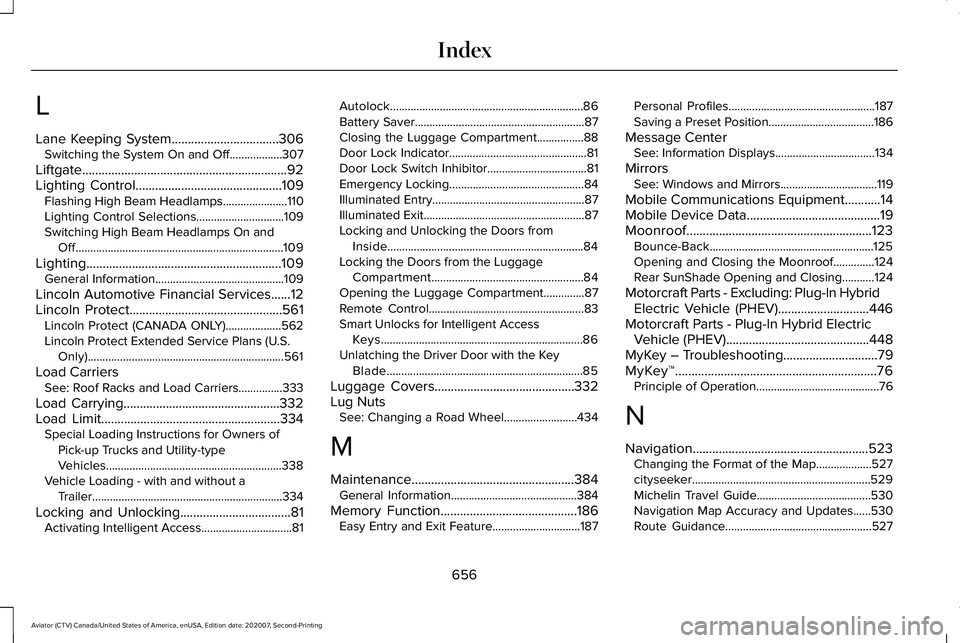
L
Lane Keeping System.................................306
Switching the System On and Off..................307
Liftgate...............................................................92
Lighting Control.............................................109 Flashing High Beam Headlamps......................
110
Lighting Control Selections..............................109
Switching High Beam Headlamps On and Off.......................................................................109
Lighting............................................................109 General Information............................................109
Lincoln Automotive Financial Services......12
Lincoln Protect...............................................561 Lincoln Protect (CANADA ONLY)...................
562
Lincoln Protect Extended Service Plans (U.S. Only)...................................................................561
Load Carriers See: Roof Racks and Load Carriers...............333
Load Carrying
................................................332
Load Limit.......................................................334
Special Loading Instructions for Owners of
Pick-up Trucks and Utility-type
Vehicles............................................................338
Vehicle Loading - with and without a Trailer.................................................................334
Locking and Unlocking
..................................81
Activating Intelligent Access...............................81 Autolock..................................................................86
Battery Saver..........................................................87
Closing the Luggage Compartment................
88
Door Lock Indicator...............................................81
Door Lock Switch Inhibitor..................................81
Emergency Locking..............................................84
Illuminated Entry....................................................87
Illuminated Exit.......................................................87
Locking and Unlocking the Doors from Inside...................................................................84
Locking the Doors from the Luggage Compartment....................................................84
Opening the Luggage Compartment..............87
Remote Control.....................................................83
Smart Unlocks for Intelligent Access Keys.....................................................................86
Unlatching the Driver Door with the Key Blade...................................................................85
Luggage Covers
...........................................332
Lug Nuts See: Changing a Road Wheel.........................434
M
Maintenance..................................................384 General Information...........................................384
Memory Function..........................................186 Easy Entry and Exit Feature..............................187 Personal Profiles..................................................187
Saving a Preset Position....................................186
Message Center See: Information Displays..................................134
Mirrors See: Windows and Mirrors.................................119
Mobile Communications Equipment
...........14
Mobile Device Data.........................................19
Moonroof.........................................................123 Bounce-Back........................................................125
Opening and Closing the Moonroof..............124
Rear SunShade Opening and Closing...........124
Motorcraft Parts - Excluding: Plug-In Hybrid Electric Vehicle (PHEV)............................446
Motorcraft Parts - Plug-In Hybrid Electric Vehicle (PHEV)
............................................448
MyKey – Troubleshooting.............................79
MyKey™..............................................................76 Principle of Operation..........................................76
N
Navigation......................................................523 Changing the Format of the Map...................527
cityseeker.............................................................529
Michelin Travel Guide.......................................530
Navigation Map Accuracy and Updates......530
Route Guidance..................................................527
656
Aviator (CTV) Canada/United States of America, enUSA, Edition date: 202007, Second-Printing Index