charging LINCOLN AVIATOR 2021 Owner's Manual
[x] Cancel search | Manufacturer: LINCOLN, Model Year: 2021, Model line: AVIATOR, Model: LINCOLN AVIATOR 2021Pages: 667, PDF Size: 7.01 MB
Page 534 of 667
The navigation system map data may contain
inaccurate or incomplete information due to
the passage of time, changing
circumstances, sources used and the nature
of collecting comprehensive geographic
data, any of which may lead to incorrect
results. Inaccurate speed limit information,
turn restrictions and other road attributes
may affect the determined route and
associated guidance
Annual navigation map updates are available
for purchase through your dealership.
Depending on your purchase agreement,
you might be eligible for free Map update.
You can choose to download the Map data
update onto a USB, order a USB, or use Wi-Fi
to deliver automatic updates. To update your
Map data over Wi-Fi, your vehicle must be
connected to a Wi-Fi access point. Map Data
files are large, so it is highly recommended
to perform the update when free Wi-Fi is
available otherwise high data rates may
apply. For USB updates, free map update
eligibility, and other details, contact dealers
at 1-866-462-8837 in the United States and
Canada or 01-800-557-5539 in Mexico or
visit our local website for more information.
ELECTRIC VEHICLE INFORMATION
(IF EQUIPPED)
Power Flow The Power Flow information for
your plug-in hybrid vehicle is
available through the Home screen
or under Apps.
Vehicle Operational States
Power will flow to or from the front and rear
wheels depending on operational state and
drive conditions.
• Idling: The vehicle is running and in park
(P). The engine and, or the high voltage
battery are on.
• Electric Driving: The vehicle is running
and in drive (D) or neutral (N). The high
voltage battery provides power to the
wheels.
• Hybrid Driving: The vehicle is running
and in drive (D) or neutral (N). The engine
and the high voltage battery provide
power to the wheels. •
Engine Driving: The vehicle is running
and in drive (D) or neutral (N). The engine
provides power to the wheels.
• Regenerative Braking: The vehicle is
running in drive gear (D) and is slowing
down. The regenerative braking system
captures power and sends it back to the
high voltage battery.
• Charging: The vehicle is plugged in and
the high voltage battery is being charged.
Engine On Due To
The following conditions help to explain why
the engine is on, and what you can do to
allow all electric operation.
• Drive Power: The engine is on due to
accelerator pedal pressure or speed
control activation. Reduce pressure on
the accelerator pedal or switch off the
speed control to return to full electric
mode.
• High Speed: The engine is on because
the vehicle speed exceeds the level for
full electric operation. Reduce the speed
to return to electric operation.
531
Aviator (CTV) Canada/United States of America, enUSA, Edition date: 202007, Second-Printing SYNC™ 3E304437
Page 535 of 667
•
Heater Setting: The engine is on because
of the heater setting. Reduce or switch
off the heater setting to return to electric
operation.
• Neutral Gear: The engine is on because
the vehicle is in neutral (N). Shift out of
neutral gear to return to electric
operation.
• Engine Cold: The engine is on because
it is cold. The vehicle returns to electric
operation once the engine is sufficiently
warm.
• Battery Charging: The engine is on to
charge the high-voltage battery. The
vehicle returns to electric operation once
the battery is sufficiently charged.
• Low Gear: The engine is on because the
vehicle is in low gear. Shift out of low
gear to return to electric operation.
• Normal Operation: The engine is on to
optimize vehicle operation. The vehicle
returns to electric operation when
possible. •
Low Use: The engine is on to maintain
engine oil quality. The vehicle returns to
electric operation when low engine use
mode is complete. See Plug-In Hybrid
Vehicle Operation (page 222).
• Fuel Maintenance: The engine is on to
maintain fuel freshness. The vehicle
returns to electric operation when fuel
freshness mode is complete.
See Fuel
Quality (page 227).
• Engine Braking Active: The engine is on
to provide increased powertrain braking.
This can occur when you turn on the
grade assist feature, when speed control
is on or when driving with your foot off
the accelerator pedal. Turning off grade
assist or speed control may allow the
vehicle to return to electric operation.
• Battery Temperature: The engine is on
due to high or low high-voltage battery
temperature. This is a normal operating
condition. The vehicle returns to electric
operation when possible.
• Drive Mode: The engine is on due to the
drive mode selection. Select an
appropriate drive mode for electric only
operation. Charge Settings The Charge Settings information
for your plug-in hybrid vehicle is
available through the Home screen
or under Vehicle Settings. To Improve your
charging experience, your vehicle has the
following convenience features.
Charge Times
Once you set up Charge Times for a specific
charging location, your vehicle prioritizes
charging based on your preferred time
settings. You can set two preferred charging
time windows for weekdays and two for
weekends. This feature allows you to take
advantage of electric utility rate plans that
offer lower pricing during certain times of
day. Contact your utility company to see what
plans are available.
Note: You can also set up and use these
features using the Lincoln Way app.
532
Aviator (CTV) Canada/United States of America, enUSA, Edition date: 202007, Second-Printing SYNC™ 3E304452
Page 536 of 667
Departure Times
Setting Departure Times allows you to
control charging schedules and have the
vehicle cabin heated or cooled while
plugged in, so your vehicle is ready to drive
when you are. By setting a departure time
your vehicle can use your charge time
settings to minimize your electricity costs but
still prioritize finishing charging before your
scheduled departure. A calendar view allows
you to program two departure times per day
for each day of the week.
Note:
You can also set up and use these
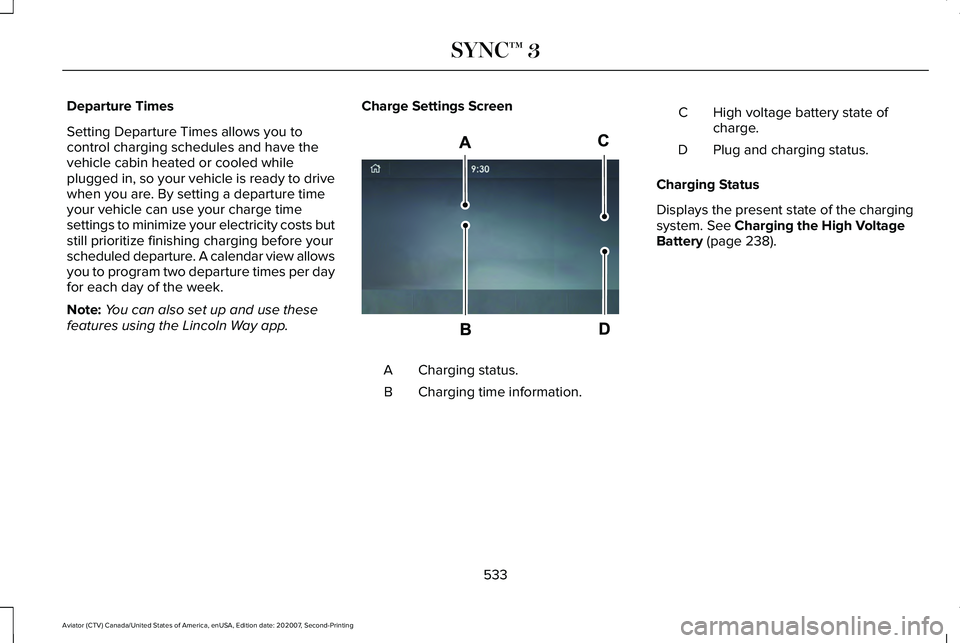
features using the Lincoln Way app. Charge Settings Screen Charging status.
A
Charging time information.
B High voltage battery state of
charge.
C
Plug and charging status.
D
Charging Status
Displays the present state of the charging
system. See Charging the High Voltage
Battery (page 238).
533
Aviator (CTV) Canada/United States of America, enUSA, Edition date: 202007, Second-Printing SYNC™ 3E304455
Page 537 of 667
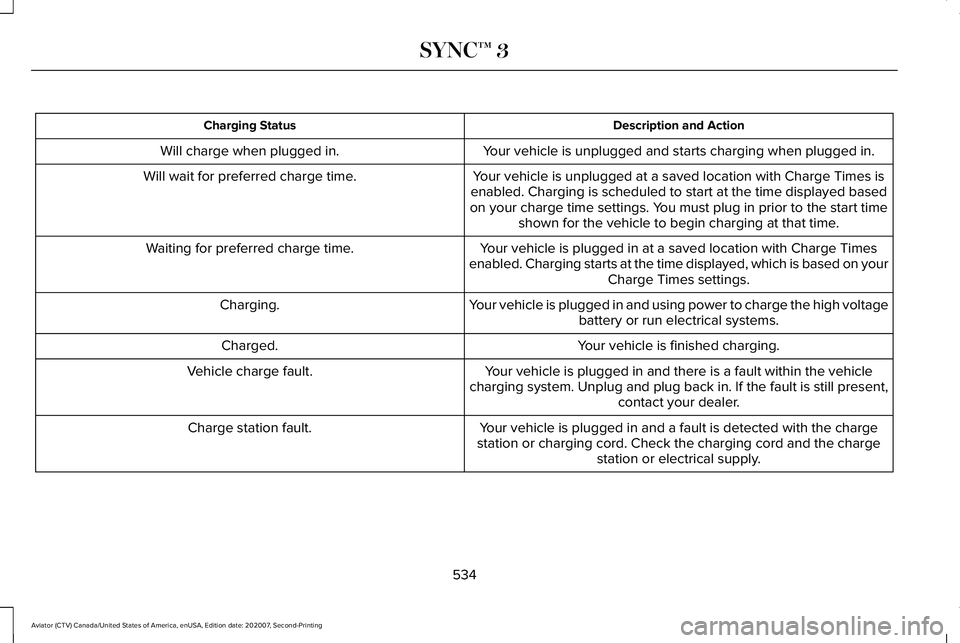
Description and Action
Charging Status
Your vehicle is unplugged and starts charging when plugged in.
Will charge when plugged in.
Your vehicle is unplugged at a saved location with Charge Times is
enabled. Charging is scheduled to start at the time displayed based
on your charge time settings. You must plug in prior to the start time shown for the vehicle to begin charging at that time.
Will wait for preferred charge time.
Your vehicle is plugged in at a saved location with Charge Times
enabled. Charging starts at the time displayed, which is based on your Charge Times settings.
Waiting for preferred charge time.
Your vehicle is plugged in and using power to charge the high voltagebattery or run electrical systems.
Charging.
Your vehicle is finished charging.
Charged.
Your vehicle is plugged in and there is a fault within the vehicle
charging system. Unplug and plug back in. If the fault is still present,\
contact your dealer.
Vehicle charge fault.
Your vehicle is plugged in and a fault is detected with the charge
station or charging cord. Check the charging cord and the charge station or electrical supply.
Charge station fault.
534
Aviator (CTV) Canada/United States of America, enUSA, Edition date: 202007, Second-Printing SYNC™ 3
Page 538 of 667
Description and Action
Charging Status
A charging coupler is plugged into the vehicle but there is noconnection with a charging power source.
Charge station not detected.
Your vehicle is plugged in but cannot communicate with the chargingstation. Contact the station provider.
Incompatible charge station.
Your vehicle is plugged in and charging is paused at the chargestation.
Charge station paused.
Charging Time Information
Displays estimates of how long your vehicle
takes to fully charge when plugged into a
high or low power charger.
• High power estimate: The minimum time
to a 100% charge using a high power
charger.
• Low power estimate: The longest time to
a 100% charge using a low power
charger.
When charging, the start and estimated end
time displays. When your vehicle is not
plugged in and at a location with Charge
Times enabled, the start and end times
display based on known charging power. Note:
Charging durations and end times are
only estimates. Certain conditions may result
in longer charging times. See Charging the
High Voltage Battery (page 238).
High Voltage Battery State of Charge
Displays the remaining charge percentage
with 100% representing the total amount of
energy you can get from an external charge.
Plug and Charging Status
Displays the plug and charging status icons. Not plugged in. Plugged in and not currently
charging.
Plugged in and charging.
Plugged in and waiting to charge
based on charge time settings.
Charge Preferences
Touch the button to access Charge Time and
Departure Time settings. Additional
information and settings are displayed on
the charge settings screen once Charge
Time or Departure Times are set up.
535
Aviator (CTV) Canada/United States of America, enUSA, Edition date: 202007, Second-Printing SYNC™ 3E304458 E304459 E304460 E304461
Page 539 of 667
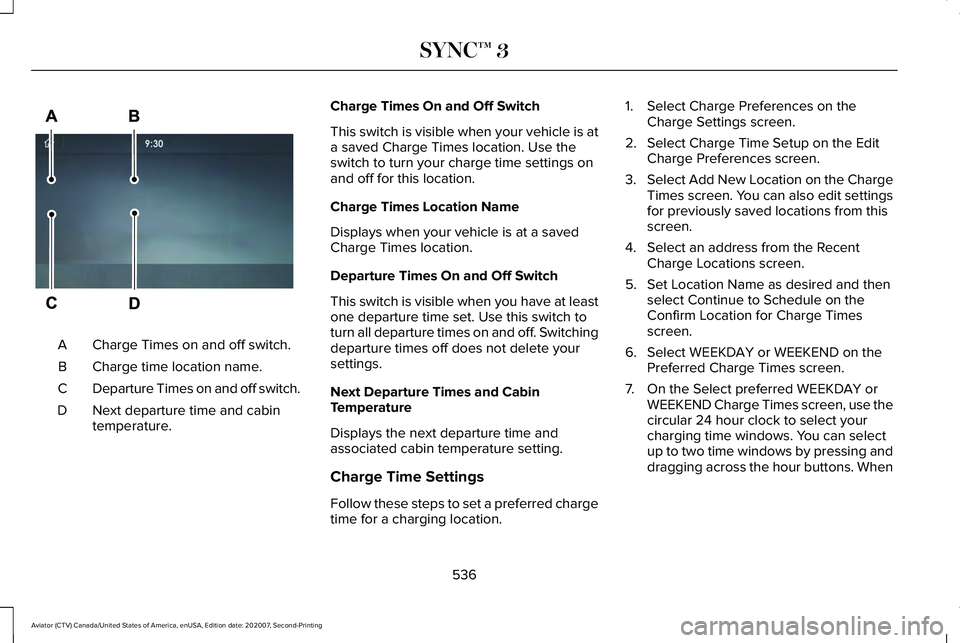
Charge Times on and off switch.
A
Charge time location name.
B
Departure Times on and off switch.
C
Next departure time and cabin
temperature.
D Charge Times On and Off Switch
This switch is visible when your vehicle is at
a saved Charge Times location. Use the
switch to turn your charge time settings on
and off for this location.
Charge Times Location Name
Displays when your vehicle is at a saved
Charge Times location.
Departure Times On and Off Switch
This switch is visible when you have at least
one departure time set. Use this switch to
turn all departure times on and off. Switching
departure times off does not delete your
settings.
Next Departure Times and Cabin
Temperature
Displays the next departure time and
associated cabin temperature setting.
Charge Time Settings
Follow these steps to set a preferred charge
time for a charging location. 1. Select Charge Preferences on the
Charge Settings screen.
2. Select Charge Time Setup on the Edit Charge Preferences screen.
3. Select Add New Location on the Charge
Times screen. You can also edit settings
for previously saved locations from this
screen.
4. Select an address from the Recent Charge Locations screen.
5. Set Location Name as desired and then select Continue to Schedule on the
Confirm Location for Charge Times
screen.
6. Select WEEKDAY or WEEKEND on the Preferred Charge Times screen.
7. On the Select preferred WEEKDAY or WEEKEND Charge Times screen, use the
circular 24 hour clock to select your
charging time windows. You can select
up to two time windows by pressing and
dragging across the hour buttons. When
536
Aviator (CTV) Canada/United States of America, enUSA, Edition date: 202007, Second-Printing SYNC™ 3E304454
Page 540 of 667
you have selected your preferred times
then press Next to return to the Preferred
Charge Times screen. Repeat for
WEEKEND or WEEKDAY as desired.
Once you are done setting preferred
charge times, press Save.
Note: Selecting all or none of the 24 hours
results in any time of day given equal priority
for charging.
8. Your saved location now shows on the Charge Times screen. Select Done to
return to the main charge settings screen.
Whenever your vehicle is at a saved
charging location, the charge settings
screen displays the location name, and
the charging times are based on your
Charge Time settings for that location
plus the next Departure Time.
Note: A 100% charge by your next Departure
Time is always the priority. When Charge
Times are set, charging outside your
preferred charging time windows could be
necessary in order to finish by your next
Departure Time. A notification appears when
this condition occurs. Note:
When a 100% charge cannot be done
by your next departure time, a notification
appears which includes an estimate of the
charge level you will have at your departure
time.
Departure Time Settings
1. Select Charge Preferences on the Charge Settings screen.
2. Select Departure Time Setup on the Edit
Charge Preferences screen.
3. Two time settings show for each day of the week on the Departure Times
schedule screen. Select any one.
4. On the Departure Time settings screen, set your desired departure time, cabin
temperature and days of the week to
repeat. Press Save.
5. Your settings are now shown on the Departure Times schedule screen. Press
Back two times to return to the main
charge settings screen. The next
departure time and cabin temperature
setting display. Note:
Cabin conditioning can perform
differently depending on if you plug in with
the included convenience cord or a higher
power charging station. The power available
for conditioning is limited to the charging
station power available.
Note: Your vehicle may not always reach
the set cabin temperature due to charging
and ambient temperature conditions. This is
normal operation
APPS
The system allows you interact with select
mobile apps while keeping your eyes on the
road. Voice commands, your steering wheel
buttons, or a quick tap on your touchscreen
give you advanced control of compatible
mobile apps. You can also stream your
favorite music or podcasts, share your time
of arrival with friends, and keep connected
safely.
537
Aviator (CTV) Canada/United States of America, enUSA, Edition date: 202007, Second-Printing SYNC™ 3
Page 611 of 667
Wireless Accessory Charging Module
South Korea
R-R-1Ap-WACM2
United States and Canada
WARNING: Changes or modifications
not expressively approved by the party
responsible for compliance could void the
user's authority to operate the equipment.
The term "IC:" before the radio certification
number only signifies that Industry Canada
technical specifications were met. FCC ID: L2C0094TR
IC: 3432A-0074TR
This device complies with Part 15 of the FCC
Rules and with Innovation, Science and
Economic Development Canada
’s
licence-exempt RSS(s). Operation is subject
to the following two conditions:
1. This device may not cause harmful interference, and
2. This device must accept any interference
received, including interference that may
cause undesired operation.
608
Aviator (CTV) Canada/United States of America, enUSA, Edition date: 202007, Second-Printing Customer InformationE339675
Page 653 of 667
Car Wash
See: Cleaning the Exterior...............................405
Catalytic Converter......................................235
On-Board Diagnostics (OBD-II).......................236
Readiness for Inspection and Maintenance (I/M) Testing......................................................237
Changing a Bulb...........................................403 LED Lamps...........................................................403
Changing a Fuse...........................................381 Fuses......................................................................381
Changing a Road Wheel.............................434 Dissimilar Spare Wheel and Tire Assembly
Information.......................................................435
Tire Change Procedure....................................436
Changing the 12V Battery..........................397 Battery Management System..........................398
Remove and Reinstall the Battery..................399
Changing the Engine Air Filter.................389
Changing the Front Wiper Blades - Vehicles With: Heated Wiper
Blades
...........................................................402
Replacing the Rubber Insert............................402
Changing the Front Wiper Blades - Vehicles Without: Heated Wiper
Blades............................................................401
Installing the Front Wiper Blades ..................402
Removing the Front Wiper Blades.................402
Changing the Rear Wiper Blades.............403 Changing the Vehicle Wi-Fi Hotspot Name
or Password................................................479
Charging the High Voltage Battery - Plug-In Hybrid Electric Vehicle (PHEV)...............238
IMPORTANT SAFETY INSTRUCTIONS.........238
Checking MyKey System Status.................78 MyKey Distance.....................................................78
Number of Admin Keys.......................................79
Number of MyKeys...............................................79
Checking the Interior Air Quality...............175 Particulate Matter Pollution Information........176
Checking the Wiper Blades........................401
Child Restraint and Seatbelt Maintenance.................................................50
Child Restraint Positioning
...........................40
Child Safety......................................................25 General Information.............................................25
Child Safety Locks..........................................42
Cleaning Leather Seats..............................409
Cleaning Products
........................................404
Materials...............................................................404
Cleaning the Engine....................................407
Cleaning the Exterior..................................405 Cleaning the Exterior Lamps...........................405
Cleaning the Exterior Precautions.................405
Exterior Chrome Parts.......................................406
Exterior Plastic Parts..........................................406
Stripes or Graphics............................................406 Underbody...........................................................406
Under Hood.........................................................406
Cleaning the Instrument Panel and Instrument Cluster Lens...........................408
Cleaning the Interior
....................................408
Mirrors...................................................................408
Cleaning the Wheels
....................................410
Cleaning the Windows and Wiper Blades...........................................................407
Clearing All MyKeys
.......................................78
Climate.............................................................518 Accessing Rear Climate Controls...................
521
Accessing the Climate Control Menu............518
Directing the Airflow...........................................518
Rear Climate Control Lock Indicator..............521
Setting the Blower Motor Speed....................519
Setting the Temperature...................................519
Switching Auto Mode On and Off...................
519
Switching Dual Zone Mode On and Off........519
Switching Maximum Air Conditioning On and Off......................................................................520
Switching Maximum Defrost On and Off......................................................................520
Switching Rear Auto Mode On and Off.........521
Switching Recirculated Air On and Off.........520
Switching the Air Conditioning On and Off.......................................................................519
650
Aviator (CTV) Canada/United States of America, enUSA, Edition date: 202007, Second-Printing Index
Page 658 of 667
Driving to Optimize Fuel Economy.................221
Starting..................................................................220
Stopping................................................................221
Transmission Operation.....................................221
I
In California (U.S. Only)...............................360
Information Display Control........................104
Information Displays.....................................134
General Information............................................134
Information Messages
.................................140
Active Park............................................................140
Adaptive Cruise Control.....................................141
Adaptive Headlamps...........................................141
AdvanceTrac ™ and Traction Control................142
Alarm......................................................................142
AWD........................................................................\
143
Battery and Charging System (12 volt)...........144
Battery and Charging System (High Voltage).............................................................145
Blind Spot Information and Cross Traffic Alert System...............................................................146
Doors and Locks..................................................147
Driver Alert............................................................148
Fuel........................................................................\
.148
Hill Descent Control...........................................149
Hill Start Assist.....................................................150 Keys and Intelligent Access.............................150
Lane Keeping System........................................152
Maintenance.........................................................153
MyKey.....................................................................154
Park Aid..................................................................155
Park Brake.............................................................156
Power Steering....................................................158
Pre-Collision Assist.............................................158
Remote Start.........................................................159
Seats.......................................................................159
Starting System ...................................................160
Tire Pressure Monitoring System....................160
Trailer.......................................................................161
Transmission.........................................................162
Installing Child Restraints
..............................27
Child Seats..............................................................27
Using Lap and Shoulder Belts...........................27
Using Lower Anchors and Tethers for
CHildren (LATCH)..............................................31
Using Tether Straps..............................................33
Installing the Vehicle Identification Card...............................................................474
Instrument Cluster
........................................126
Instrument Lighting Dimmer........................110
Instrument Panel.............................................22
Interior Air Quality.........................................175 Interior Air Quality – Troubleshooting............
177
Refreshing the Interior Air.................................176 Interior Air Quality –
Troubleshooting..........................................177
Interior Air Quality – Information Messages..........................................................177
Interior Lamps
.................................................115
Front Interior Lamp..............................................115
Rear Interior Lamps..............................................115
Interior Mirror
.................................................122
Auto-Dimming Mirror..........................................122
Introduction.........................................................9
J
Jump Starting the Vehicle..........................353 Connecting the Jumper Cables......................354
Jump Starting......................................................355
Locating the Jump Starting Connection
Points................................................................354
Preparing Your Vehicle.....................................353
Removing the Jumper Cables.........................355
K
Keyless Entry...................................................89 SECURICODE™ Keyless Entry Keypad.............89
Keyless Starting
............................................208
Ignition Modes....................................................209
Keys and Remote Controls
..........................66
655
Aviator (CTV) Canada/United States of America, enUSA, Edition date: 202007, Second-Printing Index