towing LINCOLN AVIATOR 2021 Owner's Guide
[x] Cancel search | Manufacturer: LINCOLN, Model Year: 2021, Model line: AVIATOR, Model: LINCOLN AVIATOR 2021Pages: 667, PDF Size: 7.01 MB
Page 361 of 667
If you need to tow your vehicle, contact a
professional towing service or, if you are a
member of a roadside assistance program,
your roadside assistance service provider.
We recommend the use of a wheel lift and
dollies or flatbed equipment to tow your
vehicle. Do not tow with a slingbelt. We do
not approve a slingbelt towing procedure. If
you tow your vehicle incorrectly, or by any
other means, vehicle damage may occur.
We produce a towing manual for all
authorized tow truck operators. Have your
tow truck operator refer to this manual for
proper hook-up and towing procedures for
your vehicle.
We recommend towing a four-wheel drive
vehicle with all wheels off the ground, such
as using a wheel lift and dollies or flatbed
equipment.
We recommend towing a rear-wheel drive
vehicle with the rear wheels on a tow dolly
when towing your vehicle from the front
using wheel lift equipment. This prevents
damage to the transmission.
We recommend towing a rear-wheel drive
vehicle with the front wheels on a tow dolly
when towing your vehicle from the rear using
wheel lift equipment. This prevents damage
to the front fascia.
358
Aviator (CTV) Canada/United States of America, enUSA, Edition date: 202007, Second-Printing Roadside Emergencies
Page 439 of 667
•
Wet weather driving capability.
• All-wheel driving capability.
When driving with the full-size dissimilar
spare wheel and tire assembly additional
caution should be given to:
• Towing a trailer.
• Driving vehicles equipped with a camper
body.
• Driving vehicles with a load on the cargo
rack.
Drive cautiously when using a full-size
dissimilar spare wheel and tire assembly and
seek service as soon as possible.
Tire Change Procedure WARNING: The jack supplied with
this vehicle is only intended for changing
wheels. Do not use the vehicle jack other
than when you are changing a wheel in an
emergency. WARNING:
Check that the vehicle
jack is not damaged or deformed and the
thread is lubricated and clean. WARNING:
When one of the front
wheels is off the ground, the transmission
alone will not prevent the vehicle from
moving or slipping off the jack, even if the
transmission is in park (P). WARNING:
To help prevent your
vehicle from moving when changing a
wheel, shift the transmission into park (P),
set the parking brake and use an
appropriate block or wheel chock to
secure the wheel diagonally opposite to
the wheel being changed. For example,
when changing the front left wheel, place
an appropriate block or wheel chock on
the right rear wheel. WARNING:
Always use the jack
provided as original equipment with your
vehicle. If using a jack other than the one
provided, make sure the jack capacity is
adequate for the vehicle weight, including
any vehicle cargo or modifications. If you
are unsure if the jack capacity is adequate,
contact the authorized dealer. WARNING:
Failure to follow these
guidelines could result in an increased risk
of loss of vehicle control, injury or death. WARNING:
Use only the specified
jacking points. If you use other positions,
you may damage the body, steering,
suspension, engine, braking system or the
fuel lines. WARNING:
Do not work on your
vehicle when the jack is the only support.
If the vehicle slips off the jack, you or
someone else could be seriously injured. WARNING:
Never place anything
between the vehicle jack and your vehicle.
436
Aviator (CTV) Canada/United States of America, enUSA, Edition date: 202007, Second-Printing Wheels and Tires
Page 443 of 667
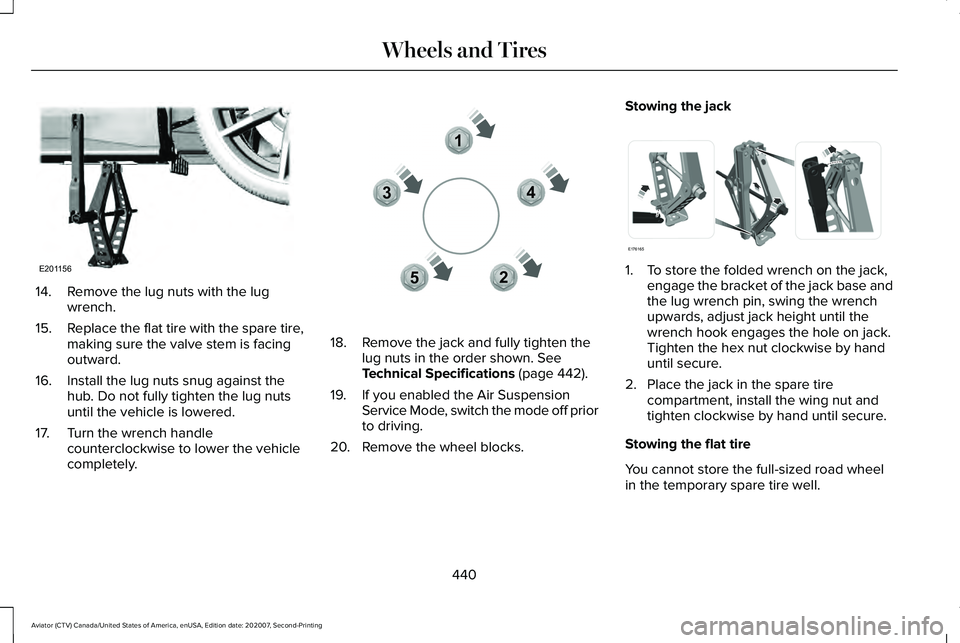
14. Remove the lug nuts with the lug
wrench.
15. Replace the flat tire with the spare tire,
making sure the valve stem is facing
outward.
16. Install the lug nuts snug against the hub. Do not fully tighten the lug nuts
until the vehicle is lowered.
17. Turn the wrench handle counterclockwise to lower the vehicle
completely. 18. Remove the jack and fully tighten the
lug nuts in the order shown. See
Technical Specifications (page 442).
19. If you enabled the Air Suspension Service Mode, switch the mode off prior
to driving.
20. Remove the wheel blocks. Stowing the jack
1. To store the folded wrench on the jack,
engage the bracket of the jack base and
the lug wrench pin, swing the wrench
upwards, adjust jack height until the
wrench hook engages the hole on jack.
Tighten the hex nut clockwise by hand
until secure.
2. Place the jack in the spare tire compartment, install the wing nut and
tighten clockwise by hand until secure.
Stowing the flat tire
You cannot store the full-sized road wheel
in the temporary spare tire well.
440
Aviator (CTV) Canada/United States of America, enUSA, Edition date: 202007, Second-Printing Wheels and TiresE201156 12
3
4
5E306781 E176165
Page 564 of 667
PROTECT YOURSELF FROM THE RISING
COST OF VEHICLE REPAIRS WITH
LINCOLN PROTECT EXTENDED SERVICE
PLAN.
Lincoln Protect Extended Service Plans
(U.S. Only)
Lincoln Protect means peace of mind. It’
s the
extended service plan backed by the Lincoln
Motor Company, and provides more
protection beyond the New Vehicle Limited
Warranty coverage. When you visit your
Lincoln Dealer, insist on genuine Lincoln
Protect extended service plans!
Lincoln Protect Extended Service Plan Can
Quickly Pay for Itself
One trip to the Service Center could easily
exceed the price of your Lincoln Protect
extended service plan. With Lincoln Protect
you minimize your risk for unexpected repair
bills and rising repair costs. Up to 1000+ Covered Vehicle Components
There are four mechanical Lincoln Protect
extended service plans with different levels
of coverage. Ask your authorized dealer for
details.
1.
PremiumCARE - Our most comprehensive
coverage. With over 1,000 covered
components, this plan is so complete it’ s
probably easier to list what’ s not covered.
2. ExtraCARE - Covers 113 components, and
includes many high-tech items.
3. BaseCARE - Covers 84 components.
4. PowertrainCARE - Covers 29 critical components.
Lincoln Protect extended service plans are
honored by all authorized Lincoln dealers in
the U.S., Canada and Mexico.
That means you get:
• Reliable, quality service at any Lincoln or
Ford dealership.
• Repairs performed by factory trained
technicians, using genuine parts. Rental Car Reimbursement
1st day Rental Benefit
If you bring your car into your dealer for
service, we
’ll give you a loaner to use for the
day.
Extended Rental Benefits
If your vehicle is kept overnight for covered
repairs, you are eligible for rental car
coverage, including bumper to bumper
warranty repairs, and Field Service Actions.
Roadside Assistance
Exclusive 24/7 roadside assistance, including:
• Towing, flat-tire change and battery jump
starts.
• Out of fuel and lock-out assistance.
• Travel expense reimbursement for
lodging, meals and rental car.
• Assistance for taxi, shuttle, rental car
coverage and other transportation.
561
Aviator (CTV) Canada/United States of America, enUSA, Edition date: 202007, Second-Printing Lincoln Protect
Page 566 of 667
There are several Lincoln Protect extended
service plans available in various time,
distance and deductible combinations. Each
plan is tailored to fit your own driving needs,
including reimbursement for towing and
rental. When you purchase Lincoln Protect
extended service plan, you receive added
peace-of-mind protection throughout
Canada, the United States and Mexico,
provided by a network of participating
authorized Lincoln Motor Company dealers.
Note:
Repairs performed outside of Canada,
the United States and Mexico are not eligible
for Lincoln Protect extended service plan
coverage.
This information is subject to change. For
more information, visit your local Lincoln of
Canada dealer or www.LincolnCanada.com
to find the Lincoln Protect extended service
plan that is right for you.
563
Aviator (CTV) Canada/United States of America, enUSA, Edition date: 202007, Second-Printing Lincoln Protect
Page 572 of 667
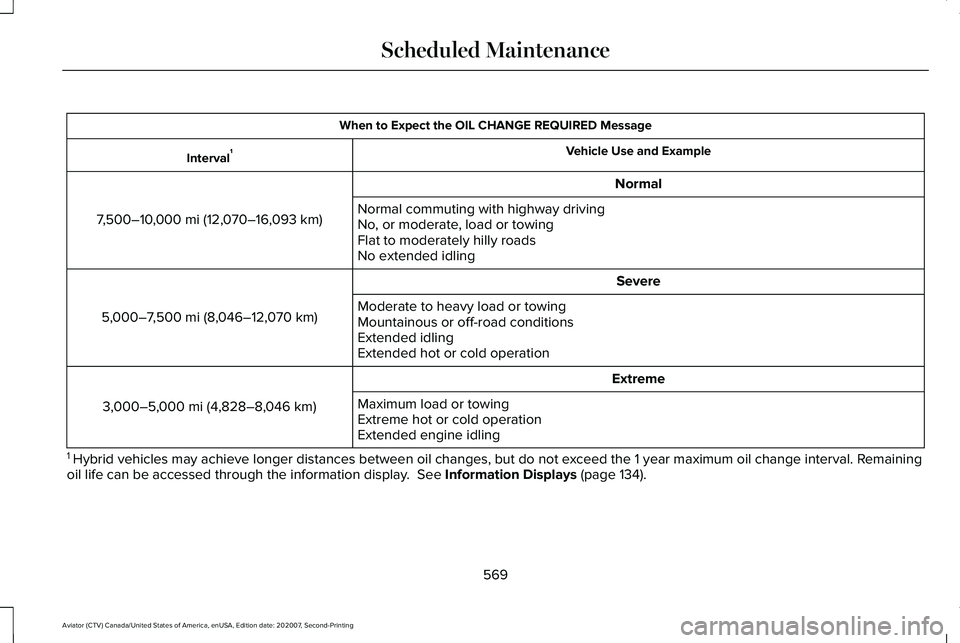
When to Expect the OIL CHANGE REQUIRED Message
Vehicle Use and Example
Interval 1
Normal
7,500–10,000 mi (12,070–16,093 km) Normal commuting with highway driving
No, or moderate, load or towing
Flat to moderately hilly roads
No extended idling
Severe
5,000–7,500 mi (8,046–12,070 km) Moderate to heavy load or towing
Mountainous or off-road conditions
Extended idling
Extended hot or cold operation
Extreme
3,000–5,000 mi (4,828–8,046 km) Maximum load or towing
Extreme hot or cold operation
Extended engine idling
1 Hybrid vehicles may achieve longer distances between oil changes, but do\
not exceed the 1 year maximum oil change interval. Remaining
oil life can be accessed through the information display. See Information Displays (page 134).
569
Aviator (CTV) Canada/United States of America, enUSA, Edition date: 202007, Second-Printing Scheduled Maintenance
Page 576 of 667

Towing a Trailer or Using a Car-top Carrier
Change engine oil and filter as indicated by the information display and\
perform services listed in the Normal
Scheduled Maintenance chart.
As required
Inspect front axle.
Inspect frequently, service
as required
Inspect rear axle and U-joints.
Inspect half-shaft boots.
See axle maintenance items under Exceptions.
Replace spark plugs.
Every
60,000 mi
(96,000 km) Extensive Idling or Low-speed Driving for Long Distances, as in Heavy Commercial Use
Change engine oil and filter as indicated by the information display and\
perform services listed in the Normal
Scheduled Maintenance chart.
As required
Replace cabin air filter.
Inspect frequently, service
as required
Replace engine air filter.
Replace spark plugs.
Every
60,000 mi
(96,000 km)
573
Aviator (CTV) Canada/United States of America, enUSA, Edition date: 202007, Second-Printing Scheduled Maintenance
Page 656 of 667
Engine Specifications - Excluding: Plug-In
Hybrid Electric Vehicle (PHEV)...............444
Drivebelt Routing................................................445
Engine Specifications - Plug-In Hybrid Electric Vehicle (PHEV)............................445
Drivebelt Routing................................................446
Entertainment................................................506 AM/FM Radio.......................................................507
Apps........................................................................\
518
Bluetooth Stereo or USB...................................516
CD........................................................................\
...515
HD Radio ™ Information (If Available)................511
SiriusXM® Satellite Radio (If Activated).........507
Sources.................................................................506
Supported Media Players, Formats and Metadata Information....................................518
USB Ports..............................................................518
Environment......................................................21
EPB See: Electric Parking Brake.............................
258
Essential Towing Checks............................343 Before Towing a Trailer.....................................
344
Hitches..................................................................343
Launching or Retrieving a Boat or Personal Watercraft (PWC)............................................344
Safety Chains.......................................................343
Trailer Brakes.......................................................343
Trailer Lamps.......................................................344 When Towing a Trailer.......................................344
Event Data
.........................................................18
Export Unique Options...................................15
Exterior Mirrors..............................................120 360-Degree Camera..........................................122
Auto-dimming Feature.......................................122
Auto-Folding Exterior Mirrors............................121
Blind Spot Information System........................122
Direction Indicator Mirrors ...............................122
Fold-Away Exterior Mirrors................................121
Heated Exterior Mirrors ....................................122
Lincoln Welcome Mat Projection Lamp.........122
Memory Mirrors ..................................................122
Power Exterior Mirrors.......................................120
F
Fastening the Seatbelts
................................45
Seatbelt Locking Modes.....................................46
Using Seatbelts During Pregnancy..................45
Flat Tire See: Changing a Road Wheel.........................434
Floor Mats......................................................349
Fog Lamps - Front See: Front Fog Lamps..........................................111
Front Fog Lamps.............................................111 Front Fog Lamp Indicator...................................112
Switching the Front Fog Lamps On or Off......111 Front Parking Aid..........................................274
Object Distance Indicator.................................276
Front Passenger Sensing System..............56
Front Wiper Blades See: Changing the Front Wiper Blades - Vehicles
With: Heated Wiper Blades.........................402
See: Changing the Front Wiper Blades - Vehicles Without: Heated Wiper Blades....................401
Fuel and Refueling.......................................226
Fuel Consumption
........................................232
Advertised Capacity..........................................232
Calculating Fuel Economy...............................
232
Fuel Filler Funnel Location.........................227
Fuel Filter
.........................................................401
Fuel Quality....................................................227 Choosing the Right Fuel...................................227
Fuel Shutoff...................................................352
Fuses...............................................................368
Fuse Specification Chart............................368 Engine Compartment Fuse Box.....................368
Passenger Compartment Fuse Panel............
376
G
Garage Door Opener...................................197
Garage Door Opener See: Universal Garage Door Opener.............197
653
Aviator (CTV) Canada/United States of America, enUSA, Edition date: 202007, Second-Printing Index
Page 661 of 667
One-Touch Down.................................................119
One-Touch Up.......................................................119
Window Lock........................................................120
Pre-Collision Assist......................................323
Adjusting the Pre-Collision Assist
Settings............................................................326
Blocked Sensors................................................326
Distance Indication and Alert..........................
325
Evasive Steering Assist.....................................326
Using the Pre-Collision Assist System..........324
Programming Your Phone
.............................72
Resetting Phone as a Key...................................72
Protecting the Environment..........................21
Puncture See: Changing a Road Wheel.........................434
R
Radio Frequency Certification Labels...........................................................576
Blind Spot Information System Sensors.......576
Body Control Module.........................................581
Cruise Control Module......................................
584
Garage Door Opener........................................588
Keys and Remote Controls..............................588
Radio Transceiver Module...............................
592
Remote Function Actuator................................581
SYNC.....................................................................596 Telematics Control Unit.....................................601
Tire Pressure Monitoring System
Sensors.............................................................601
Wireless Accessory Charging Module.........608
Rear Occupant Alert System Audible Warnings.......................................................196
Rear Occupant Alert System Indicators......................................................196
Rear Occupant Alert System Limitations....................................................195
Rear Occupant Alert System Precautions..................................................195
Rear Occupant Alert System
......................195
Rear Parking Aid...........................................272 Object Distance Indicator.................................274
Rear Passenger Climate Controls.............172 Directing Air to the Overhead and Rear
Footwell Air Vents...........................................173
Rear Climate Control Lock Message..............
173
Rear Passenger Climate Control Screen.......172
Selecting a Row...................................................173
Setting the Rear Blower Motor Speed...........173
Setting the Rear Temperature..........................173
Switching Rear Auto Mode On and Off.........173
Switching the Rear Climate Control On and Off........................................................................\
173 Rear Seats.......................................................189
Adjusting the Second Row Outermost Seats
Backrest............................................................189
Adjusting the Second Row Seats for Easy Entry...................................................................190
Adjusting the Third Row Power Seats...........192
Folding the Second Row Outermost Seats Flat......................................................................190
Rear Under Floor Storage..........................332 Cargo Management System............................
332
Rear View Camera.......................................283 Camera Guidelines............................................284
Manual Zoom......................................................285
Object Distance Indicator................................285
Rear Camera Delay............................................286
Rear Camera On Demand...............................285
Using the Rear View Camera System...........283
Rear View Camera See: Rear View Camera....................................283
Rear Window Wiper and Washers............107 Rear Window Washer.........................................108
Rear Window Wiper............................................107
Rear Wiper Blades See: Changing the Rear Wiper Blades.........403
Recommended Towing Weights
................341
Reduced Engine Performance..................347
Refreshing the Interior Air
...........................176
Automatically Refreshing the Interior Air......176
658
Aviator (CTV) Canada/United States of America, enUSA, Edition date: 202007, Second-Printing Index
Page 665 of 667
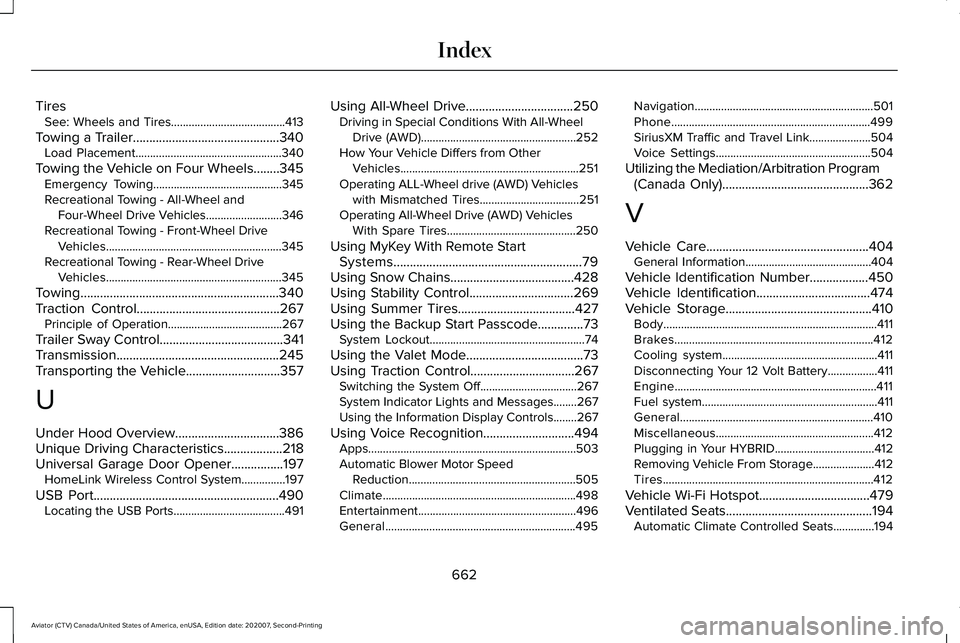
Tires
See: Wheels and Tires.......................................413
Towing a Trailer.............................................340
Load Placement..................................................340
Towing the Vehicle on Four Wheels........345 Emergency Towing............................................345
Recreational Towing - All-Wheel and
Four-Wheel Drive Vehicles..........................
346
Recreational Towing - Front-Wheel Drive Vehicles............................................................345
Recreational Towing - Rear-Wheel Drive Vehicles............................................................345
Towing.............................................................340
Traction Control
............................................267
Principle of Operation.......................................267
Trailer Sway Control
......................................341
Transmission..................................................245
Transporting the Vehicle.............................357
U
Under Hood Overview
................................386
Unique Driving Characteristics..................218
Universal Garage Door Opener................197 HomeLink Wireless Control System...............197
USB Port
.........................................................490
Locating the USB Ports......................................491 Using All-Wheel Drive.................................250
Driving in Special Conditions With All-Wheel
Drive (AWD).....................................................252
How Your Vehicle Differs from Other Vehicles.............................................................251
Operating ALL-Wheel drive (AWD) Vehicles with Mismatched Tires..................................251
Operating All-Wheel Drive (AWD) Vehicles With Spare Tires............................................250
Using MyKey With Remote Start Systems..........................................................79
Using Snow Chains
......................................428
Using Stability Control................................269
Using Summer Tires....................................427
Using the Backup Start Passcode..............73 System Lockout.....................................................74
Using the Valet Mode....................................73
Using Traction Control................................267 Switching the System Off.................................267
System Indicator Lights and Messages........267
Using the Information Display Controls........267
Using Voice Recognition............................494 Apps.......................................................................503
Automatic Blower Motor Speed
Reduction.........................................................505
Climate..................................................................498
Entertainment......................................................496
General.................................................................495 Navigation.............................................................501
Phone....................................................................499
SiriusXM Traffic and Travel Link.....................504
Voice Settings.....................................................504
Utilizing the Mediation/Arbitration Program (Canada Only).............................................362
V
Vehicle Care
..................................................404
General Information...........................................404
Vehicle Identification Number
..................450
Vehicle Identification...................................474
Vehicle Storage.............................................410 Body........................................................................\
.411
Brakes....................................................................412
Cooling system.....................................................411
Disconnecting Your 12 Volt Battery.................411
Engine.....................................................................411
Fuel system............................................................411
General..................................................................410
Miscellaneous......................................................412
Plugging in Your HYBRID..................................412
Removing Vehicle From Storage
.....................412
Tires........................................................................\
412
Vehicle Wi-Fi Hotspot..................................479
Ventilated Seats
.............................................194
Automatic Climate Controlled Seats..............194
662
Aviator (CTV) Canada/United States of America, enUSA, Edition date: 202007, Second-Printing Index